Introduction to Spatial9
What Spatial9 does, who it is for, and how the platform, the engine and the integrations fit together.
Spatial9 is an AI platform that turns stereo audio, stems and existing immersive masters into immersive spatial audio, and delivers the result in open and industry formats such as Eclipsa Audio (IAMF), ADM BWF, binaural and Ambisonics. This page explains what the platform does, who it is designed for, and how the web app, the engine and the developer integrations fit together.
Read this page first if you are new to Spatial9. It gives you the mental model used by every other page in these docs: what you provide, what the system automates, what you still decide, and which entry point (the app, an AI assistant, an agent or the API) matches the way you work.
What Spatial9 does
Spatial9 places each sound in a mix at its own position around the listener, in front, behind, to the sides and above, instead of on the single left-to-right line that stereo allows. The platform recreates the cues the brain uses to locate sound, so the result can be heard on a room of speakers, a soundbar or ordinary headphones through binaural rendering.
The platform performs four kinds of work for you:
- Source separation. When you supply only a finished stereo master, Spatial9 estimates individual stems such as vocals, drums, bass and other instruments.
- Spatial arrangement. GravityLLM, the Spatial9 AI model, decides where every source sits, how far away it is, how high it is and how it moves over time.
- Processing and rendering. AI agents coordinate the processing and rendering steps that turn sources plus positions into immersive audio.
- Delivery. The system exports the deliverables your workflow needs, from binaural headphone files to ADM BWF masters and Eclipsa Audio for YouTube.
Who Spatial9 is for
Spatial9 is designed for anyone who has finished audio and wants an immersive version without building a dedicated immersive studio. Typical users fall into the following groups.
| Audience | Typical goal | Usual entry point |
|---|---|---|
| Musicians and producers | Release an immersive version of a song | Web app, Spatializer for Music |
| Labels and publishers | Convert a back catalog at scale | REST API, A2A, automation tools |
| Video creators | Give a video soundtrack depth and movement | Spatializer for Video |
| Atmos mix engineers | Publish an existing Dolby Atmos mix on YouTube | ADM to Eclipsa Audio converter |
| Developers | Add spatial audio to an application or agent | MCP, A2A, REST API, Agent Skills |
| Device and broadcast teams | Real-time stereo-to-immersive playback | Acoustic Digital Twin |
| Students and educators | Learn immersive production | Spatial9 Academy and Education plans |
Design principles
The platform is built on a small set of principles that explain much of its behavior.
- Accessibility for creators. Immersive production is available to independent musicians, video creators, labels and students, not only to large studios. A stereo track or a set of stems is enough to start.
- AI does the heavy lifting. Separation, spatial arrangement, processing, rendering and multi-format export are labor-intensive tasks that the system performs quickly and consistently.
- Humans direct taste and intent. The system proposes; you decide what the mix should feel like and when it is finished. Every move the engine makes can be heard, compared with stereo, edited or rejected.
- Open formats and no lock-in. Spatial9 delivers to open and widely supported formats, including ADM, Eclipsa Audio (IAMF), binaural and Ambisonics, depending on the workflow and plan.
- Accessibility for listeners. The music experience includes a hearing accessibility profile so playback can adapt to the person listening.
Spatial9 is a member of the Alliance for Open Media, the organization behind IAMF, and debuted music rendered in Eclipsa Audio with Google at CES 2025.
The two lanes of work
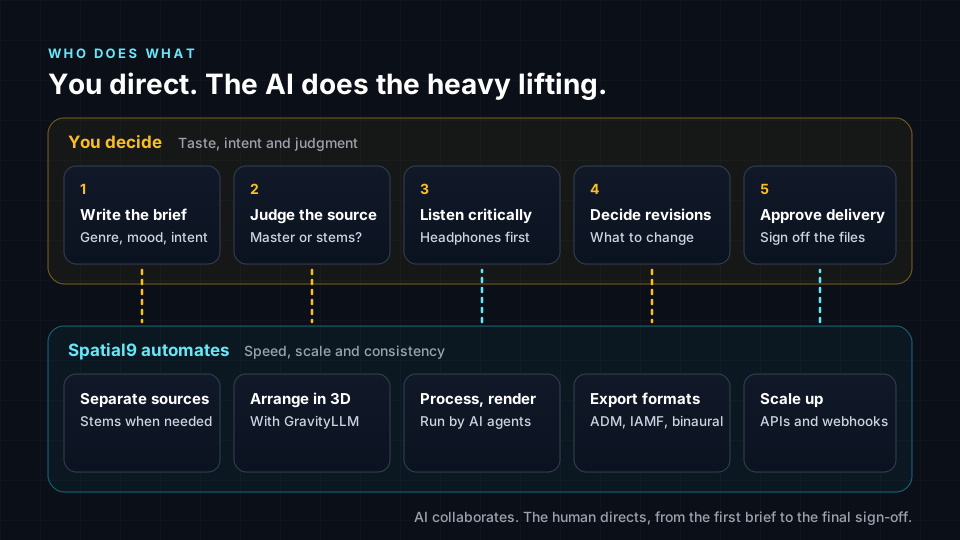
Every Spatial9 project divides work between two lanes. Understanding this split helps you know where to spend your attention.
The human lane
You act as the creative director. The human lane is a repeatable loop of five decisions:
- Write the creative brief. Describe the genre, mood, destination and intent. A specific brief such as "intimate acoustic ballad for headphones, vocal close and centered, room ambience gently above" gives the system more to work with than a generic request.
- Judge the source. Decide whether the stereo master is clean enough, whether stems are available, and whether problems such as heavy distortion or a very narrow mix will limit the result.
- Listen critically. Review on headphones and, where possible, on speakers. Check balance, clarity, translation and whether the space serves the song.
- Decide what to revise. Write actionable notes, for example "the vocal feels too far away" or "the hi-hats move too much".
- Approve delivery. Check formats, file names and destination specifications before anything is published.
The automation lane
Spatial9 handles source separation when needed, generates the spatial arrangement with GravityLLM, coordinates processing and rendering with AI agents, and produces exports. For catalogs, jobs can be submitted in batches through APIs, with webhooks reporting back when a job finishes.
The production pipeline
A track moves through seven stages from upload to publication. These stages are the same whether you work in the app, through an AI assistant or through the API.
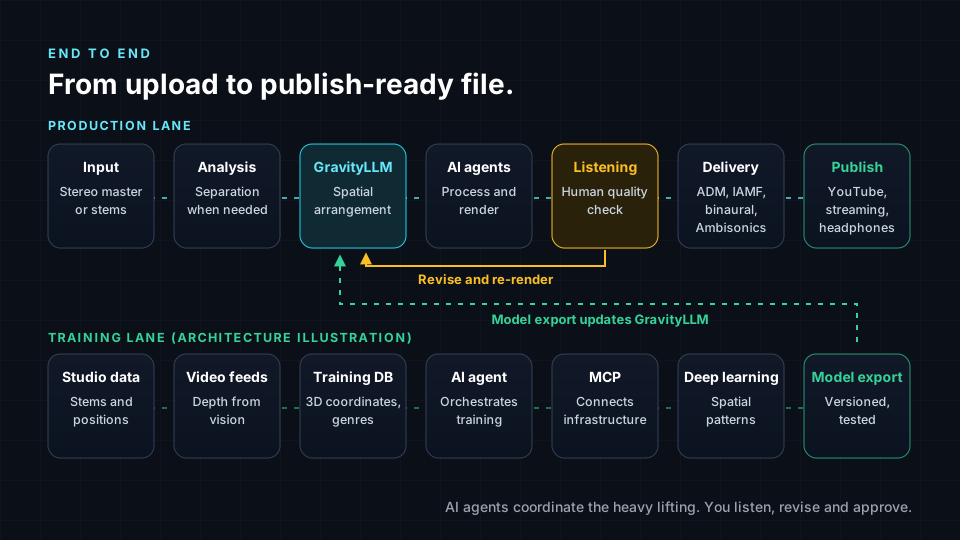
| Stage | What happens | Your role |
|---|---|---|
| 1. Input | You provide a stereo master or a set of stems | Choose the input type |
| 2. Analysis and separation | The material is analyzed; stems are estimated if needed | Supply clean, lossless sources |
| 3. GravityLLM arrangement | Azimuth, elevation, distance and movement are generated per source | Provide a clear brief |
| 4. Rendering | AI agents coordinate processing and rendering | None |
| 5. Quality listening | You review the result | Listen and write revision notes |
| 6. Delivery | Files are exported in the formats you select | Choose formats per destination |
| 7. Publish | Files are sent to YouTube, a distributor or another destination | Approve and check destination rules |
A separate training lane teaches GravityLLM how to make spatial decisions. Studio sessions contribute stems, spatial positioning data and genre metadata; a training database stores 3D coordinates, instrument types, genre classifications and movement patterns; and the trained model is versioned, tested and deployed to inference engines. Because spatial decisions are learned from real examples, the model places an electronic synth differently from a folk guitar. See Spatial inference and GravityLLM for details.
What the engine provides
The music engine combines several systems that respond to the structure and content of a song. The following table summarizes the capabilities documented for the engine.
| Capability | Description |
|---|---|
| Movement library | More than 1,500 movements built on more than 110 core shapes in 20 families, beat-synced with a per-stem phase |
| Section-aware staging | Nine section profiles, from intro to outro, each with its own field size and height |
| Harmonic motion | Key, mode and chord estimation mapped to subtle spatial behaviors such as field breathing and key-change warps |
| Lyric choreography | Word-level transcription, 154 built-in words and phrases and 22 spatial actions, each open to your approval |
| Immersive effects | 61 effects in nine families, six of them spatially aware versions of traditional tools |
| Movement from text | A plain-language description becomes a parametric 3D path, refined in conversation |
| Gesture input | Hand tracking and full-body pose tracking from a camera turn gestures into movements |
| Frequency-aware placement | Per-stem filtering keeps low-frequency weight stable while upper ranges carry direction |
| Mixing assistant | A conversational assistant that acts on the mix across 27 kinds of actions |
| Export presets | Up to 33 presets, from stereo and 7.1.4 to ADM BWF, Ambisonics, binaural and Eclipsa Audio |
The lead vocal, kick and bass stay anchored by default, so the song keeps its center while the space around it moves. See Spatializer for Music for the full description of these controls.
Products
Spatial9 is organized into the following products. Each has its own page in the Products section of these docs.
| Product | Input | Output | Page |
|---|---|---|---|
| Spatializer for Music | Stereo master or stems | Immersive mix in binaural, ADM BWF, Eclipsa Audio, Ambisonics and more | Spatializer for Music |
| Spatializer for Video | Video with its soundtrack | Immersive soundtrack, including Eclipsa Audio for YouTube | Spatializer for Video |
| ADM to Eclipsa Audio converter | Dolby Atmos ADM BWF master | Eclipsa Audio (IAMF) and a YouTube-ready MP4, free | ADM to Eclipsa Audio converter |
| Acoustic Digital Twin (ADT) | Live stereo audio | Real-time immersive rendering for cars, devices, streaming and broadcast | Acoustic Digital Twin |
| Education and Academy | None | Free course, classroom studio, accessible guides and certificates | Education and Academy |
Integrations for developers and agents
The same engine is reachable outside the web app through several interfaces. All of them submit the same kind of render work and are subject to the same account limits.
| Interface | Address | Use it when |
|---|---|---|
| MCP server | https://spatial9.ai/mcp | You want ChatGPT, Claude, Gemini, Cursor or another MCP client to call Spatial9 as a tool |
| A2A agent | https://spatial9.ai/a2a (A2A 0.3.0) | Another agent or an agent platform delegates spatial audio tasks to Spatial9 |
| REST API | https://api.spatializer.spatial9.ai/api/v0.0.1 | You need direct HTTP control, with tus resumable uploads |
| Agent Skills | SKILL.md library | You want coding agents to learn how to use Spatial9 correctly |
The documented limits are 3 concurrent renders, 20 renders per day and 120 A2A tasks per hour. In the A2A interface, messageId acts as the idempotency key, and push notifications carry the X-A2A-Notification-Token header. See Limits, quotas and errors before you build automated pipelines.
Output formats
Depending on the workflow and plan, Spatial9 delivers the following families of output.
- Eclipsa Audio (IAMF). The open, royalty-free format based on the Alliance for Open Media IAMF specification. YouTube has accepted Eclipsa Audio uploads since January 2025.
- ADM BWF and ADM XML. Object-based masters in the Audio Definition Model, used for professional delivery workflows including Dolby Atmos.
- Binaural. A headphone rendering as WAV or MP4 that plays on any pair of headphones.
- Ambisonics. Scene-based audio (higher-order Ambisonics), used for VR and 360 video.
- Channel layouts. Stereo, 5.1, 7.1, 7.1.4 and larger layouts on plans that include them.
For input, the platform accepts WAV, MP3, FLAC and AIFF. For best results, use 24-bit WAV at 48 kHz or higher; files up to 96 kHz sample rate are accepted.
Plans at a glance
Music and video features are offered in separate plan families. Format availability depends on the plan.
| Plan | Price per month | Projects | Formats |
|---|---|---|---|
| Music Free | $0 | 1 per month | Preview only, share only |
| Music Pro | $29 | 5 per month | ADM BWF, ADM XML, Eclipsa Audio, binaural WAV and MP4, Ambisonics HOA |
| Music Studio | $149 | 30 per month | Music Pro formats plus IAMF and MPEG-H |
| Music Enterprise | Custom | Unlimited | All formats plus custom |
Video plans start with Video YouTuber at $14 per month, and a Creator Bundle combines Music Pro and Video Creator. Current prices and yearly rates are listed on the pricing page.
How these docs are organized
| Section | What it covers |
|---|---|
| Getting started | This introduction, the quickstart, core concepts and choosing a workflow |
| Products | How each product works, what it accepts and what it delivers |
| Developers and agents | MCP, A2A and REST references, limits, Agent Skills, automation and enterprise pipelines |
| Formats and delivery | Eclipsa Audio, IAMF, Dolby Atmos, ADM BWF, Ambisonics, binaural and publishing |
| Mixing standards | Rules for immersive mixes, stems, upmixing and genre approaches |
| Science and research | Psychoacoustics, the spatial audio ontology and the research behind the engine |
| Reference | The FAQ and troubleshooting page |
Terms such as object, bed, scene, renderer and binaural are defined in Core concepts and in the glossary.
Next steps
- Quickstart: create, review and export your first immersive mix.
- Core concepts: learn the vocabulary used throughout these docs.
- Choose the right workflow: decide between the app, MCP, A2A, the REST API and the Acoustic Digital Twin.
- ADM to Eclipsa Audio converter: publish an existing Dolby Atmos master on YouTube.