Core concepts
Objects, beds, channels, scenes, rendering, binaural and loudness: the vocabulary used throughout these docs.
This page defines the vocabulary used throughout the Spatial9 documentation: how immersive audio describes space, what objects, beds, channels and scenes are, how a renderer turns a mix into speaker or headphone signals, and how level and loudness are measured. Each definition is followed by what it means in practice when you work with Spatial9.
Read this page if you are new to immersive audio or need a shared reference for terms used across the docs.
Stereo, surround and immersive audio
Stereo uses two channels, left and right. Every sound lives somewhere on the line between the two speakers, and on headphones a stereo mix tends to sound as if it is inside your head. Surround formats such as 5.1 and 7.1 add speakers around the listener, but each sound is still tied to fixed channels and usually nothing comes from above.
Immersive audio, also called spatial audio or 3D audio, adds height and flexible positioning, so a sound can come from anywhere around and above the listener and can move through that space over time. Spatial audio is the common everyday term, immersive audio is the term the music and film industries tend to use, and 3D audio is common in games and virtual reality.
| Property | Stereo | Immersive |
|---|---|---|
| Channels | 2 | Many, or a full sound field |
| Where sound can be | On a line between left and right | Anywhere around and above the listener |
| On headphones | Sound feels inside the head | Sound feels outside and around the head |
| On speakers | Best in one seat | Wider listening area with more speakers |
| Room for instruments | Limited, especially in the center | Separation by direction |
| Adapts to the device | No | Yes, each device renders it its own way |
How the ear locates sound
Spatial audio works by recreating the cues the brain uses to locate sound. Three cues matter most.
| Cue | Description |
|---|---|
| Interaural time difference | A sound on the left reaches the left ear a fraction of a millisecond before the right ear |
| Interaural level difference | The head shadows the far ear, so the sound is slightly quieter there, especially at high frequencies |
| Spectral (outer-ear) filtering | The folds of the outer ear color a sound differently depending on whether it arrives from the front, behind, above or below |
The outer-ear cue is how you distinguish front from back and perceive height. Different cues dominate in different frequency ranges: timing differences matter most in the lows and low mids, level differences and outer-ear filtering matter more in the highs, and height cues live mostly in the upper range. See How we hear in 3D for detail.
Spatial coordinates
Positions are described with three coordinates relative to the listener:
- Azimuth: the horizontal angle around the listener.
- Elevation: the angle above or below ear level.
- Distance: how far the source is from the listener.
GravityLLM, the Spatial9 AI model, generates these coordinates for every source, together with movement over time. This set of positions and movements is called the spatial arrangement.
The four ways to describe space
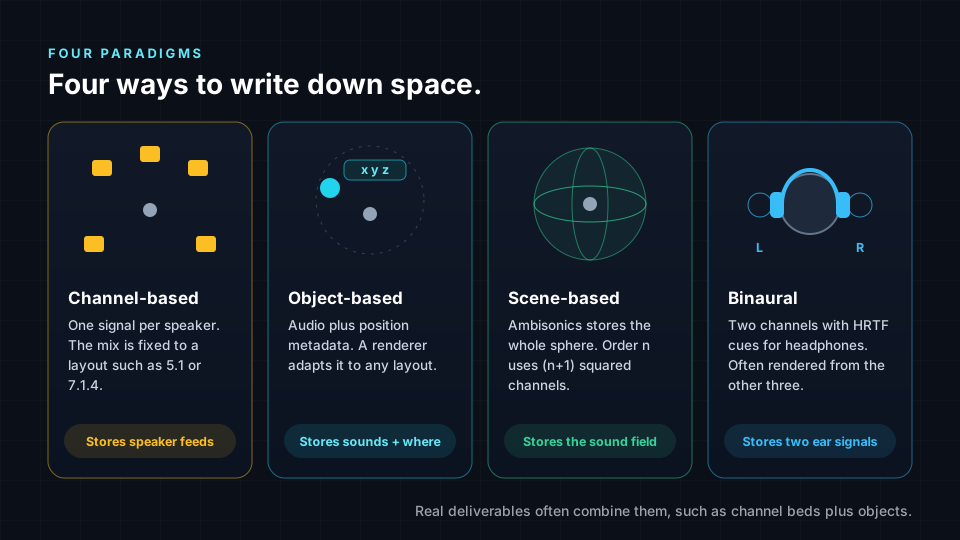
Every immersive format answers one question: how is space written down so that a playback system can recreate it? There are four main answers, and real productions often combine them.
| Paradigm | What it stores | Strength | Limitation | Examples |
|---|---|---|---|---|
| Channel-based | Finished feeds for speakers in known positions | Simple and predictable | Tied to one layout | Stereo, 5.1, 7.1.4 |
| Object-based | Sounds plus position metadata | Adapts to different speaker layouts | Requires a renderer at playback | Dolby Atmos objects, ADM |
| Scene-based | The whole sound field around a point | Device-independent, rotatable | Precision depends on order | Ambisonics, used in Eclipsa Audio |
| Binaural | Two ear signals with 3D cues built in | Plays on any headphones | Cues collapse on speakers | Headphone renders |
Channels
A channel is an audio signal intended for one speaker in a known position. Channel-based layouts use the notation main.LFE.height:
- The first number counts main speakers around the listener at roughly ear level.
- The second number counts low-frequency effects (LFE) channels, usually a subwoofer.
- The third number, when present, counts height speakers above the listener.
5.1 means five main channels and one LFE channel. 7.1.4 means seven main channels, one LFE channel and four height channels, for twelve channels in total.
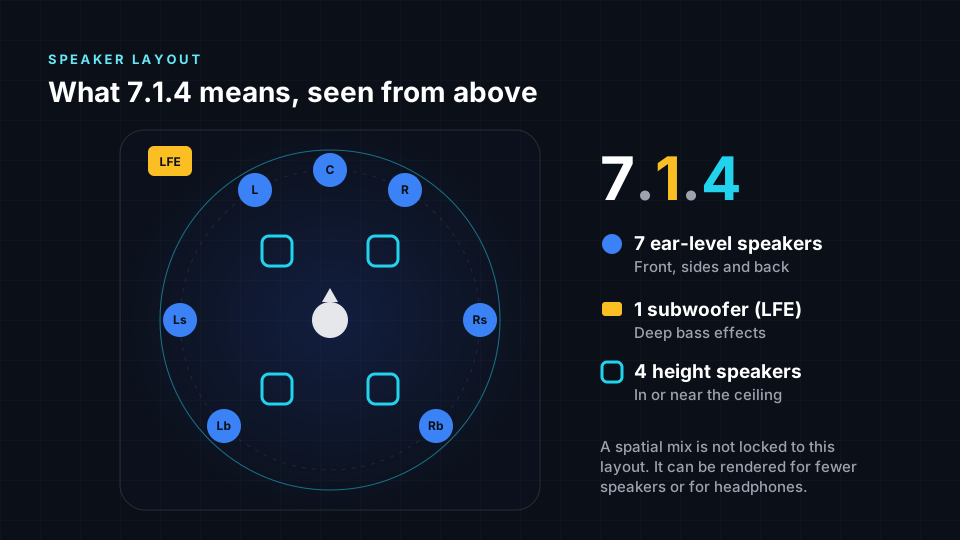
A channel-based mix is designed for its layout. Playing it on a different layout requires downmixing or upmixing, and the result differs from what was intended.
Objects and metadata
An audio object is an audio signal plus metadata: position, size, gain and how these change over time. Instead of saying "play this in the left surround speaker", an object says "this sound is here". Because the mix stores positions rather than speaker feeds, one mix can adapt to a cinema, a 7.1.4 studio, a soundbar or headphones.
Beds
A bed is a channel-based layer used for sounds that do not need to move individually, such as ambience or a wide pad. Beds plus objects is a common structure in immersive music and film. Dolby Atmos, for example, is a licensed object-based format supporting up to 128 channels of beds and objects. ADM BWF exports can be bed-only or bed-plus-objects.
Scenes and Ambisonics
Scene-based audio stores the whole sound field around a listening point as a set of spherical harmonic components, rather than speaker feeds or individual sounds. The standard scene-based technique is Ambisonics. Order n uses (n+1) squared channels.
| Ambisonic order | Channels | Typical use |
|---|---|---|
| First | 4 | 360 video, Ambisonic microphone recordings |
| Second | 9 | More precise scenes |
| Third | 16 | Detailed immersive scenes and production work |
| Fourth | 25 | Highest detail offered in the Immersive Classroom |
Because the whole sphere is stored, a player can rotate the scene to match a viewer's head or a VR camera. This makes Ambisonics the usual choice for VR and 360 video. Spatial9 export presets include Ambisonics up to 9th order (100 channels). See Ambisonics.
Rendering
A renderer reads a mix, whether channels, objects or a scene, and produces the signals for the playback system that is actually present. For objects, the renderer reads position metadata and works out how to feed the available speakers. For headphones, it produces a binaural signal.
Rendering is what makes "mix once, play everywhere" possible. A scene-based or object-based mix does not need a separate version for headphones, phones, TVs and home theaters. The same mix sounds slightly different on each device: a home theater with ceiling speakers gives the most precise height, while headphones depend on how well the binaural rendering suits the listener's ears.
In the Spatial9 pipeline, AI agents coordinate processing and rendering after GravityLLM has produced the spatial arrangement, and the export step renders the same project to each format you select.
Binaural and HRTFs
Binaural means two ears. A binaural file has two channels, like stereo, but each sound carries the timing, level and tonal differences it would have if it had traveled around a real head. The brain reads those cues and places the sound outside the head: in front, behind or above. Binaural audio is a recording or rendering method, not a format.
There are two ways to create binaural audio:
- Recorded binaural uses a dummy-head microphone, a model of a head with microphones inside realistic ears.
- Rendered binaural applies a head-related transfer function to every sound in a spatial mix.
A head-related transfer function (HRTF) describes how the head, shoulders and outer ears change a sound depending on its direction. Because ear shapes differ, HRTFs differ between people, which is why the same binaural render can sound very real to one listener and vague to another. Some devices offer personalized HRTFs built from a scan or photo of the ears.
Head tracking
With a fixed binaural file, the whole scene turns when you turn your head. With a spatial mix, a player with motion sensors can re-render the binaural signal in real time so sounds stay fixed in the room. Head tracking is only possible when the spatial information is kept, which is why the recommended workflow is to make a spatial master first and derive binaural from it.
What 8D audio is not
"8D audio" is an informal name for a stereo effect that pans the whole song in a circle around the head, usually with extra reverb. The vocal, drums and bass move together as one block. It is not a format and contains no 3D information. Similarly, stereo widening only stretches sound across the front; nothing is placed above or behind the listener.
| 8D audio | Binaural | Spatial audio | |
|---|---|---|---|
| What it is | Stereo panning effect | Two-channel render with hearing cues | 3D mix that can be played many ways |
| Channels | 2 | Always 2 | Channels, objects or a sound field |
| Sounds placed individually | No | Yes, when rendered from a spatial mix | Yes |
| Head tracking | Not possible | Not possible from a fixed file | Possible |
Stems, sources and separation
A stem is an audio file holding one instrument or group, exported from the same start point and with the same length as the others. A source is any individual sound the engine places. When you supply only a stereo master, source separation estimates individual stems. Extracted stems are estimates and may contain bleed or artifacts; original stems are clean sources and allow the most precise placement. See Upmixing stereo vs mixing from stems.
Upmixing spreads stereo or surround material into a larger layout. Downmixing or fold-down reduces a larger mix to fewer channels, for example a stereo or binaural version. Always check the fold-down, because many listeners will hear that version.
Level, peaks and loudness
Level and placement are linked in an immersive mix: a sound placed close and loud dominates, while a sound placed far and quiet becomes atmosphere.
| Term | Meaning |
|---|---|
| dBFS | Decibels relative to full scale. 0 dBFS is the digital ceiling |
| Peak | The highest instantaneous level of a signal |
| RMS | The average energy of a signal, closer to perceived loudness than peak |
| Headroom | The space between the loudest peak and full scale |
| Clipping | Distortion when a signal exceeds the maximum level a file can store |
| LUFS | Loudness units relative to full scale, used for loudness normalization on platforms |
| Masking | One sound hiding another because they share frequencies at the same time |
| Spatial unmasking | Hearing sounds more clearly because they come from different directions |
The Immersive Classroom meters show RMS and peak in dBFS, from -60 to 0 dBFS, and the clip light turns on at -0.1 dBFS. The classroom has no LUFS meter, so judge overall loudness by ear and leave loudness targets to your delivery tools. For video, YouTube is widely reported to normalize playback to around -14 LUFS, and peaks should stay below about -1 dB to avoid distortion when streamed.
Deliverables
Paradigms are ideas; deliverables are files. The files you will encounter most often are listed below.
| Deliverable | Paradigm | Typical destination |
|---|---|---|
| Eclipsa Audio (IAMF) | Channel-based layers or Ambisonic scenes | YouTube, Samsung 2025 TVs and soundbars, Android apps |
| ADM BWF | Channels, objects and scenes described by ADM metadata | Streaming services with immersive music, via distributors |
| Dolby Atmos | Beds and objects, licensed | Cinema and immersive music streaming |
| Binaural WAV or MP4 | Binaural | Headphones and social media |
| Ambisonics | Scene-based | VR and 360 video |
IAMF is an open, royalty-free format from the Alliance for Open Media, with version 1.0 published in 2023. It supports the codecs Opus, AAC-LC, FLAC and LPCM. The Audio Definition Model (ADM) is an ITU standard for describing immersive audio metadata; an ADM BWF file stores that metadata inside a Broadcast Wave Format file alongside the audio. See Eclipsa Audio and IAMF reference and ADM BWF files.
How these concepts map to Spatial9
| Concept | Where it appears in Spatial9 |
|---|---|
| Sources and stems | Your upload: a stereo master, which is separated, or original stems |
| Spatial arrangement | Generated by GravityLLM as azimuth, elevation, distance and movement per source |
| Objects and beds | ADM BWF exports, including bed-only and bed-plus-objects modes |
| Channels | Speaker layout exports such as 5.1, 7.1.4 and 9.1.6, and the 7.1.4 Channels console view |
| Scenes | Ambisonics exports and the Spatial Sphere (higher-order Ambisonics) playback mode |
| Rendering | Coordinated by AI agents and repeated for each export format |
| Binaural | The primary headphone export and the default way to review on headphones |
| Level and masking | Mix Console meters, Frequency Masking and Auto Ducking |
Next steps
- Quickstart: apply these concepts to your first immersive mix.
- Immersive audio formats compared: see how Eclipsa Audio, Dolby Atmos and other formats differ.
- Binaural rendering, headphones and speakers: learn how to check a mix on both playback types.
- How we hear in 3D: go deeper into the cues behind every spatial decision.