Spatializer for Video
How Spatial9 places sound to follow the picture, and how to deliver immersive video soundtracks.
Spatializer for Video creates an immersive soundtrack that follows the picture. AI detects and tracks objects on screen and proposes where score, dialogue and effects should sit around the viewer, so that a car crossing the frame travels with its sound while every line of dialogue stays clear at the screen.
This page explains the principles the video workflow applies, the stages from upload to delivery, the creative techniques it uses, how to prepare your soundtrack, and which deliverables and plans are available. The video transformation is in invite-only early access.
What the video workflow does
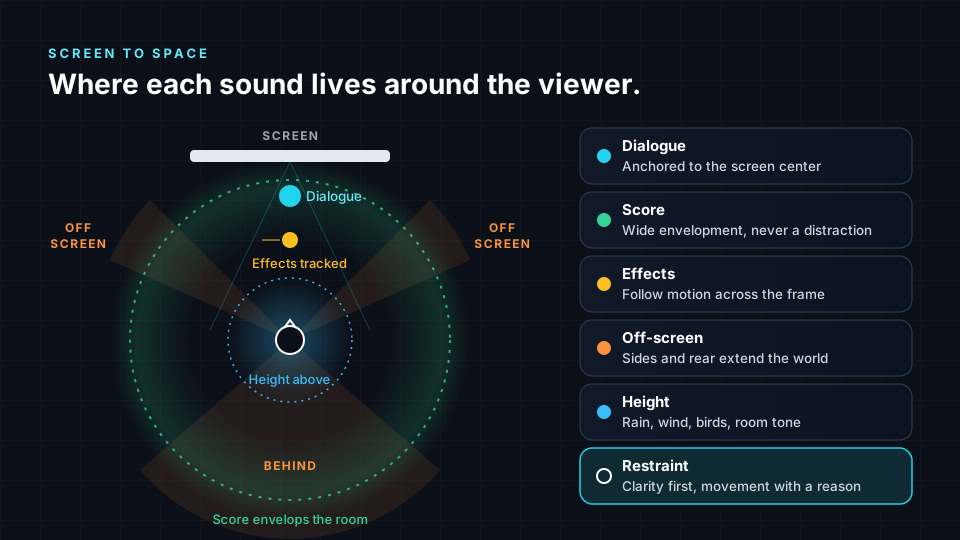
In a stereo mix for video, every sound sits on a line between two speakers. In an immersive mix, the screen becomes the front wall of a sphere and the viewer sits inside it. The spatializer decides what stays locked to the picture and what is free to surround the audience.
The workflow provides the following capabilities:
- Object detection and tracking. AI finds objects in the frame and follows their position over time, then suggests where each sound should sit.
- Soundtrack transformation. A whole video soundtrack becomes an immersive mix, including Eclipsa Audio for YouTube, without audio engineering knowledge.
- Music video packaging. For a stereo song, Spatial9 creates an immersive version and wraps it in a YouTube-ready MP4 with a branded frame, your cover art or your own video, and can publish it to YouTube.
The AI produces a first draft for you to react to. You still decide whether a sound should move, how far it should travel and whether a scene calls for intimacy or scale.
Principles of sound for picture
The video workflow is built on seven principles. Use them to judge any draft, whether it comes from the AI or from your own mix.
- Dialogue is anchored to the screen. Keep speech at or near the center of the screen. Moving dialogue around the room is one of the fastest ways to confuse a viewer.
- Score is envelopment. Music can open up and surround the audience, but it supports the picture and does not compete with dialogue.
- Effects follow motion. When a car crosses the frame, its sound travels with it. When a door slams on the left of the image, the sound comes from the left.
- Off-screen sound extends the world. Sounds the camera does not show, such as a crowd to the side or traffic in the distance, tell the audience that the world continues beyond the frame.
- Perspective follows the camera. A close-up and a wide shot of the same scene may call for different placement and distance. Handle cuts with care, because sudden jumps in the sound field feel jarring.
- Height carries atmosphere. Overhead space suits rain, wind, birdsong, ceiling reflections and room tone. Used gently, height adds depth without pulling focus from the picture.
- Restraint keeps it clear. Not every sound needs to move and not every scene needs full envelopment. Clarity comes first, and movement always needs a reason.
Processing stages
A video project moves through the same overall loop as a music project: you supply the material and the brief, the system analyzes and spatializes it, and you review and approve the result.
| Stage | What happens | Your role |
|---|---|---|
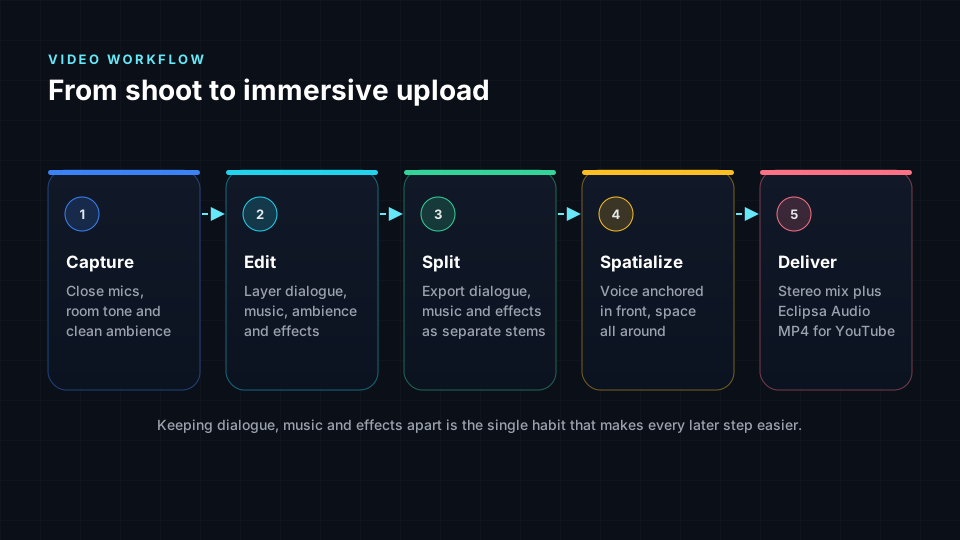
| 1. Input | You provide the video and its soundtrack, ideally as separate dialogue, music and effects stems | Prepare clean, aligned stems |
| 2. Scene analysis | Live object detection and tracking follow on-screen objects over time | None |
| 3. Spatial placement | Score, dialogue and effects are placed around the viewer to follow the picture | Write a brief that states the intent |
| 4. Review | You watch and listen, comparing the plain and spatial versions | Apply the listening checklist |
| 5. Delivery | The mix is exported as ADM, Eclipsa Audio (IAMF), binaural or Ambisonics | Choose deliverables per destination |
Creative techniques
The video room describes its artistic approach through ten creative techniques. Learn them as a vocabulary so that you can name what works and what does not when you review a mix.
Space and source
- Ambient Soundscapes. Backgrounds such as forests, cities and rooms are spread around the viewer so that the environment feels continuous.
- Musical Elements. Score and musical layers are placed using psychoacoustic positioning, so music feels wide without masking speech.
- Scene Analysis. Abstract sounds without a visible source, such as drones, risers and textures, receive a position that suits the moment.
- Frequency-Based Placement. Low frequencies anchor the center and high frequencies create width, which keeps the foundation stable while the top end opens the space.
- Height Channels. Weather, flyovers and room tone gain vertical space and a sense of air.
Story and motion
- Narrative Focus. Sound gently guides attention to what matters, for example by bringing an important sound forward as a character turns toward it.
- Movement Correlation. Audio motion mirrors visual dynamics. Fast cuts and fast motion carry more movement, while calm shots stay still.
- Emotional Mapping. Tension and mood influence spatial spread. A tense moment can narrow and press in, and a moment of release can open wide.
- Object Relationships. Connected elements, such as a band on stage or a car and its engine, are grouped spatially.
- Off-Screen Elements. Unseen sources receive a believable direction that stays consistent across cuts.
Preparing your soundtrack
The quality of the immersive mix depends on the quality of the stereo soundtrack you start from. Clean recordings, clear dialogue, layered sound and controlled levels all carry through to the spatial version.
Deliver dialogue, music and effects separately
Film soundtracks are commonly delivered as three groups, called DME: dialogue, music and effects. Export your final edit the same way, as three full-length files that start at the same point. Separate groups let the spatial mix keep the voice anchored in front while music and ambience surround the viewer.
Where each layer usually sits
| Layer | Typical position | Reason |
|---|---|---|
| Dialogue and voiceover | Front and center, not moving | Viewers follow the voice and expect it to match the speaker on screen |
| Music | Front and wide, opening up around the viewer | Supports the emotion without fighting the voice |
| Ambience | All around, including slightly above | Makes the location feel real |
| Sound effects | Where the action is, moving with it | Connects sound to what the viewer sees |
| Low end | Centered | Keeps weight and impact solid on every device |
Stereo preparation checklist
Before you spatialize, confirm the following in your stereo edit:
- Dialogue is recorded close to the speaker, in a quiet room, with room tone captured for every location.
- Noise reduction, EQ and compression on dialogue are applied gently.
- Music, ambience and sound effects are layered under the voice, and music is ducked whenever someone speaks.
- The mix has been checked on phone speakers and earbuds as well as good headphones.
- Overall loudness is around -14 LUFS with peaks below about -1 dB. YouTube does not publish an official target; this figure comes from widely reported measurements.
Handling cuts and perspective
Camera cuts are where immersive mixes most often go wrong. If voices move around the room every time the camera flips in a two-angle dialogue scene, the audience hears the sound jumping. Keep dialogue steady at the screen and let backgrounds and effects carry the change of perspective.
Apply these habits whether you start from an AI draft or mix by hand:
- Decide what is locked and what is free. Before you mix a scene, list the elements that stay with the screen and the elements that can surround the viewer.
- Smooth the transitions. When perspective changes, shift ambience and reverb gradually instead of snapping them.
- Give movement a motive. If nothing on screen justifies a moving sound, keep it still. Sweeping music around the room for effect distracts from the story and resembles the 8D effect described in Binaural and headphones.
- Protect intelligibility. Check dialogue clarity on headphones and on a simple speaker setup, and pull surround elements back if words become harder to follow.
- Use height sparingly. A little overhead atmosphere goes a long way, and too much can make a scene feel detached from the picture.
Reviewing an immersive video mix
Watch each scene once for story, then again for each line of the following checklist.
| Check | What to listen for |
|---|---|
| Dialogue anchor | Every line is clear and attached to the screen |
| Score balance | The music surrounds you without masking speech |
| Motion match | Moving sounds follow what you see, in direction and timing |
| Off-screen logic | Unseen sources stay in a consistent place across cuts |
| Height use | Overhead sound adds air without pulling focus |
| Restraint | No movement happens without a reason |
| Translation | The mix still works on binaural headphones |
In the demo, use the Spatial toggle to switch between the plain and the spatial version while you watch, and observe the live object detection and tracking in the Live spatialization view.
Deliverables
The video workflow produces the same open deliverables used across Spatial9.
| Deliverable | Use |
|---|---|
| ADM | Object-based master for professional delivery workflows |
| Eclipsa Audio (IAMF) | Immersive playback on YouTube and supported devices |
| Binaural | Headphone playback on any device |
| Ambisonics | Scene-based audio for VR and 360 video |
Publishing to YouTube
YouTube has accepted Eclipsa Audio uploads since January 2025. On supported devices, such as Samsung's 2025 TVs and soundbars, the video plays in 3D; on other devices, viewers still hear a normal version.
- Keep your stereo mix as the version most viewers will hear.
- Add an Eclipsa Audio MP4 for viewers on supported devices.
- Upload privately first.
- Confirm that "Eclipsa Audio" appears in the player's Settings on a supported TV.
- Check the normal version on a phone before you publish.
If you already have a Dolby Atmos mix, you can convert its ADM BWF master to Eclipsa Audio for free with the ADM to Eclipsa Audio converter.
Video plans
Video features are offered in a separate plan family. The following table summarizes the published limits.
| Plan | Price per month | Projects | Length | Resolution | Spatial motion |
|---|---|---|---|---|---|
| Video YouTuber | $14 | 5 | 10 min | 1080p | Basic |
| Video Creator | $79 | 20 | 10 min | 1080p | Presets |
| Video Pro | $149 | Unlimited | 20+ min | 4K | Advanced |
| Video Enterprise | Custom | Unlimited | 30-90+ min | 4K-8K | Custom |
Every video plan includes full Eclipsa Audio export. Video Pro adds full ADM BWF, full dialogue tools, batch processing of 10 and 1,000 API calls, and Video Enterprise raises batch processing to 50 or more. The Creator Bundle combines Music Pro and Video Creator for $99 per month. Yearly rates and current details are listed on the pricing page.
Next steps
- Eclipsa Audio and IAMF: understand the format your YouTube deliverable uses.
- Publishing and delivery: check destination rules before you upload.
- Spatializer for Music: learn the placement, movement and effects controls shared with the music workflow.
- Psychoacoustics: learn why height, distance and frequency change how viewers perceive space.