Limits, quotas and errors
Concurrency, daily render and task limits, file size rules, retries, idempotency and error handling.
Spatial9 applies a small set of account limits so that every user gets predictable render capacity. This page lists those limits, the file rules for uploads, how refunds work, how to use idempotency keys so that retries never start a second render, and how to read and handle errors from the MCP server, the A2A agent and the Spatializer REST API.
Read this page before you build a pipeline, a scheduled job or an agent that starts renders without a person watching. The patterns here, counting free slots, polling slowly, using stable keys and relaying plain-language errors, apply to every integration route.
Account limits
The render limits apply per account and are shared by the MCP server and the A2A agent. A render started over MCP and a render started over A2A count against the same totals.
| Limit | Value | Applies to |
|---|---|---|
| Concurrent renders | 3 at a time | MCP and A2A combined |
| Daily renders | 20 per rolling 24 hours | MCP and A2A combined |
| A2A tasks | 120 per hour | A2A agent |
| YouTube publishes | 5 per 24 hours | publish_to_youtube |
| Webhooks | 5 per A2A task | tasks/pushNotificationConfig/set |
Call get_capabilities and get_usage over MCP to read the current limits and the remaining allowance for your account instead of hard-coding them.
Guest allowance
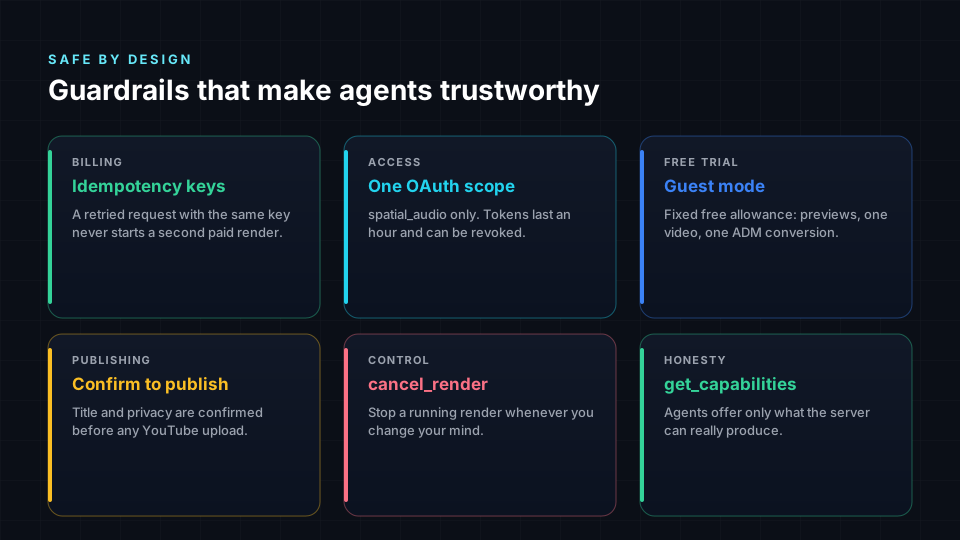
The free guest server at https://spatial9.ai/mcp/free needs no sign-in and allows 3 chorus previews, 1 video in spatial audio, 1 ADM to Eclipsa Audio conversion and 1 instrument split. The guest allowance is available over MCP only.
What uses a project
| Action | Cost |
|---|---|
create_spatial_audio, create_from_stems, video_in_spatial_audio | One project |
split_stems | One project |
convert_dolby_to_eclipsa, adm_to_eclipsa | One project |
remix_render with preview: true | Free |
remix_render real render | One project |
preview_chorus | Free, uses no project |
| Publishing to YouTube and social clips | Free |
Chorus previews are free and do not count toward render slots, so you can offer a 30-second taste while a full render waits for a free slot.
Refunds
- A failed render is refunded automatically.
- A canceled render is refunded only if paid processing had not started.
- A chorus preview cannot be canceled; over A2A,
tasks/cancelanswers withTaskNotCancelableError.
File rules
| Rule | Value |
|---|---|
| Maximum upload size through an upload link | 2 GB |
| Upload link validity | 2 hours |
| Accepted sources | A public https link or an uploaded file |
| Not accepted | Streaming pages such as YouTube or Spotify links |
Stems for create_from_stems | 2 to 16 |
Effects per apply_effects call | Up to 6 |
Upload links come from create_upload_link over MCP or the upload_link skill over A2A. The Spatializer REST API uses tus resumable uploads instead; a chunk larger than the server Tus-Max-Size returns 413. See REST API reference.
Typical durations
| Job | Typical time |
|---|---|
| Song in spatial audio | 10-20 minutes |
| Short video in spatial audio | A few minutes |
| Stem split | 4-8 minutes |
| Remix render | 3-6 minutes |
| Chorus preview | Under 2 minutes |
| Dolby or ADM BWF conversion | Depends on length |
At 20 renders per day, a 200-track backlog takes about 10 days. Plan backfills accordingly and let a queue release work as slots free up.
Counting free slots
Before you start a render, count how many you may start now. The free slot count is the smaller of the concurrency headroom and the daily headroom.
free_slots = max(0, min(3 - running, 20 - started_last_24h))A worker that keeps its state in a database can compute both numbers with two queries.
def free_slots() -> int:
    running = db.execute("SELECT count(*) FROM tracks WHERE status IN ('submitted', 'working')").fetchone()[0]
    today = db.execute(
        "SELECT count(*) FROM track_events WHERE event = 'started' AND at > now() - interval '24 hours'"
    ).fetchone()[0]
    return max(0, min(3 - running, 20 - today))
In Apache Airflow, a pool of 3 enforces the concurrency limit.
airflow pools set spatial9 3 "Spatial9 render limit"Idempotency
An idempotency key tells Spatial9 that a request is a retry of an earlier one. A retry with the same key returns the same job or task instead of starting and charging a second render.
| Route | Field | Example |
|---|---|---|
| MCP | idempotency_key argument | <platform>-<track_id>-v<version> or catalog-<ISRC> |
| A2A | messageId on the message | oss-spatial_audio-<track_id>-v<version> |
Build the key from stable data that identifies one version of one track. Change the version part only when you deliberately want a new render.
Polling and timing
| Pattern | Interval |
|---|---|
MCP get_job_status | Every 30-60 seconds |
A2A tasks/get | Every 30-60 seconds |
| A2A stream | Reconnect with tasks/resubscribe; streams close after about 20 seconds |
| A2A webhook delivery | Checked once a minute, so up to a minute of lag |
| Scheduled queue jobs | Every 10-15 minutes |
The examples in the Agent Skills repository poll every 45 seconds. Polling in a tight loop wastes requests and can reach the 120 tasks per hour limit for A2A. Prefer webhooks with a slow fallback poll for tasks that have been quiet for several minutes.
A webhook stops after 5 failed deliveries in a row or 2 days after registration. Webhook URLs must use https on a public host and port 443.
Error handling
MCP server
| Outcome | Shape | Action |
|---|---|---|
| Success | result.structuredContent | Read job_id, status, stage and progress |
| Tool failure | result.isError: true with the reason in result.content[0].text | Relay the message in plain words and stop |
| Protocol error | Top-level error with a message | Fix the request, for example a bad parameter |
| Unauthorized | HTTP 401 | The key is wrong or revoked |
Job statuses end in completed, failed or cancelled.
A2A agent
| Outcome | Shape | Action |
|---|---|---|
| Task failed | State failed, reason in status.message.parts[0].text | Relay the reason; the render is refunded |
| Missing input | State input-required | Reply on the same taskId with the file or filename |
| Cannot cancel | TaskNotCancelableError | Let the preview finish |
| Protocol error | JSON-RPC error object | Fix the request |
| Unauthorized | HTTP 401 | The key is wrong or revoked |
Treat completed, canceled, failed and rejected as final states.
REST API
| Status | Meaning |
|---|---|
| 400 | Upload filename missing from Upload-Metadata or not part of the music |
| 403 | No access to the upload |
| 404 | Preset, music or upload not found |
| 409 | Upload-Offset does not match the server offset; resume with HEAD |
| 413 | Chunk exceeds Tus-Max-Size |
| 415 | Content-Type must be application/offset+octet-stream |
When a limit is reached
When you reach the concurrent or daily limit, the tool returns a plain-language explanation as an error result. The server does not upsell; it tells the agent to say so plainly. Handle it this way:
- Stop starting new work in the current run.
- Leave the remaining items in your queue with their existing idempotency keys.
- Retry on the next scheduled run, after a slot frees up.
Retry policy
| Situation | Retry |
|---|---|
| Network error or timeout before a reply | Yes, with the same idempotency key |
| HTTP 5xx | Yes, with backoff and the same key |
Tool failure with isError | Relay the reason; retry only after fixing the cause |
| Render failed | At most 2 retries per track |
| Daily limit reached | No; wait for the next run |
| HTTP 401 | No; replace the key |
| HTTP 4xx from the REST API | No; fix the request first |
Security and logging
- Store
s9_keys and REST API keys in a secret manager or an environment file, never in code or images. - Do not log keys or full download URLs; download links are temporary and signed.
- Never build download links by hand; use
get_downloadsor the task artifacts. - Allow outbound traffic only to
spatial9.aiand the download file host. - Verify webhook tokens with a constant-time comparison and re-read the task with
tasks/get.
Common mistakes
- One long-running process that waits on every render instead of a queue that polls.
- Starting 50 renders at once instead of counting free slots.
- A new idempotency key on every retry.
- Building download links by hand.
- Logging secrets or signed URLs.
- Skipping the listening check on the first renders of a catalog.
Next steps
- MCP server reference for tool arguments and result shapes.
- A2A agent reference for task states, streaming and webhooks.
- Workflow automation for queue patterns in n8n, Airflow and Power Automate.
- Enterprise platforms for governed catalog pipelines.