The Spatial9 Approach: AI as a Creative Partner in Immersive Production
Spatial9 Team ·
Lesson 4 of 14 in Spatial9 Academy, module 2: The Spatial9 approach. Practice in the demo: Architecture.
Not long ago, an immersive mix meant a specialist studio full of speakers, a full set of stems, and many hours of skilled work for every song. That model produced beautiful results. It also meant most musicians, video creators and students never got near it.
We started Spatial9 because we believe that should change. Immersive sound is too wonderful to stay locked behind expensive rooms and long queues. So we built AI that does the heavy lifting, and we designed it so that people stay in charge of what matters most: taste, intent and judgment.
This lesson opens Module 2 of Spatial9 Academy. In Module 1 you learned how people hear in 3D, where immersive audio came from and how formats describe space. Now you will see how a modern AI-assisted workflow puts all of that to work, and where you fit into it.
What you will learn
- The four principles behind the Spatial9 approach.
- Which parts of immersive production AI automates, and which stay with you.
- The human decision loop: brief, judge the source, listen, revise, approve.
- How to read the Spatial9 demo map: three groups, seven demos and four status badges.
- Why honesty about what is Live, Illustration or Coming soon matters in technology.
Four principles
Every tool carries a point of view. Ours rests on four ideas.
1. Accessibility for creators. Immersive production should be available to independent musicians, video creators, labels and students, not only to large studios. If you have a stereo track or a set of stems, you should be able to hear it in 3D.
2. AI does the heavy lifting. Separating sources, generating a spatial arrangement, processing, rendering and exporting many formats are labor-intensive tasks. AI can do them quickly and consistently, which frees human time for creative decisions.
3. Humans direct taste and intent. A machine can propose where a synth lead sits. It cannot know what the song means to the artist. People decide what a mix should feel like, and people decide when it is right.
4. Open formats and no lock-in. We deliver to open and widely supported formats, including ADM, Eclipsa Audio (IAMF), binaural and Ambisonics, depending on the workflow and plan. Your music should not be trapped inside one ecosystem. Spatial9 was part of the Eclipsa Audio debut with Google at CES 2025, and you can read why open formats matter to us in why open source matters for immersive audio.
There is one more principle that is easy to overlook: accessibility for listeners. Not everyone hears the same way. The music demo includes a hearing accessibility profile, so the experience can adapt to the person listening.
What you decide and what Spatial9 automates
The clearest way to understand the approach is to split the work into two lanes.
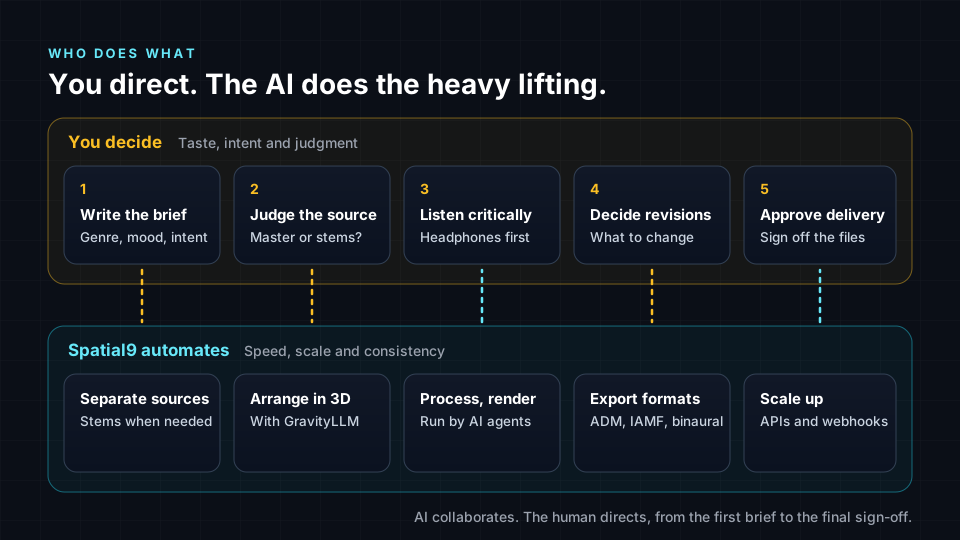
In the automation lane, Spatial9 can separate a stereo mix into estimated stems when needed. Extracted stems are estimates, so original stems give better results whenever you have them. Our AI model, GravityLLM, then generates the spatial arrangement: where each source sits, its distance, its elevation and its movement. AI agents coordinate processing and rendering, and the system produces the deliverables your workflow needs. For catalogs, batches can be submitted through APIs and webhooks.
In the human lane, you are the creative director. You decide what the mix is for, whether the source is good enough, whether the result works, and when it ships. That lane is where your training as an engineer, a sound designer or a musician matters most.
The human decision loop
Professional immersive work is not one click. It is a loop. Learn these five steps and you will be valuable on any AI-assisted team.
- Write the creative brief. Describe the genre, the mood, the destination and the intent. "Intimate acoustic ballad for headphones, vocal close and centered, room ambience gently above" gives the AI far more to work with than "make it 3D".
- Judge the source. Is the stereo master clean? Are stems available? Are there problems, such as heavy distortion or a very narrow mix, that will limit the result? This decision shapes everything that follows.
- Listen critically. Use headphones and, if you can, a speaker system. Listen for balance, clarity, translation and whether the space serves the song.
- Decide what to revise. Be specific. "The vocal feels too far away" or "the hi-hats move too much and distract" are actionable notes.
- Approve delivery. Only you sign off. Check the formats, file names and specifications for each destination before anything is published.
Then repeat as needed. The loop is fast with AI in it, which means you can try ideas you would never have time to test manually.
For a wider view of how these roles are changing across music and video, read Spatial9 and the future of spatial and immersive audio engineering.
Reading the demo map
The Spatial9 demo is your lab for this course. Before you use it, learn to read it like an engineer reads a spec sheet.
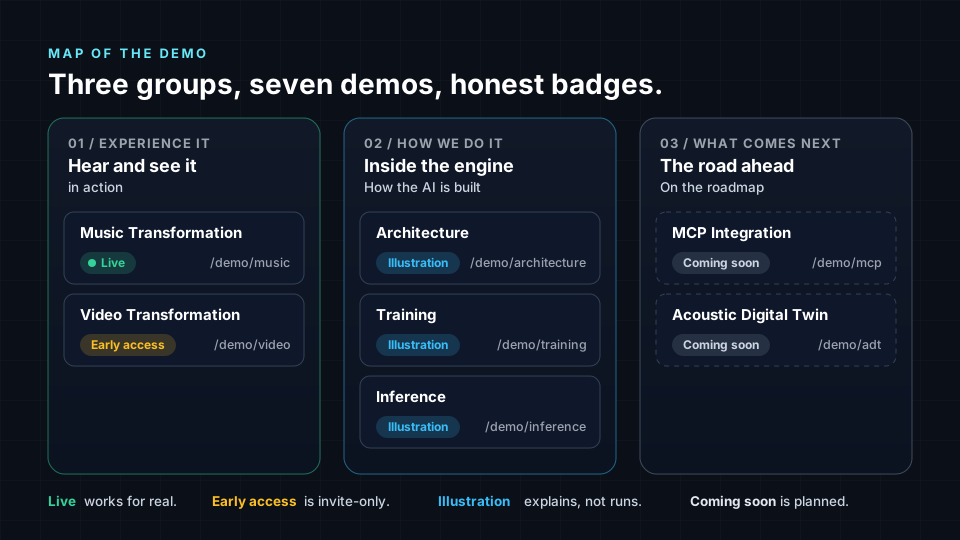
The overview at /demo is organized into three groups, listed below.
- 01 / Experience it (Hear and see it in action): Music Transformation and Video Transformation.
- 02 / How we do it (Inside the engine): Architecture, Training and Inference.
- 03 / What comes next (The road ahead): MCP Integration and Acoustic Digital Twin.
Every demo carries a status badge, and each badge means something specific.
| Badge | What it means | Demos |
|---|---|---|
| Live | A working product you can use now. | Music Transformation |
| Early access | Available by invitation only. | Video Transformation |
| Illustration | An interactive explanation of how the system works, not the system itself. | Architecture, Training, Inference |
| Coming soon | Planned and not yet available. | MCP Integration, Acoustic Digital Twin |
Why honest labels matter
Technology marketing often blurs the line between what works today and what might work someday. That blur hurts everyone. Creators make plans around features that do not exist. Students learn the wrong lessons. Trust erodes.
We label every demo clearly because we want you to make decisions based on facts. When you explore the Training demo, you know it is a simulated illustration of a pipeline, not a live model training run. When you see MCP Integration, you know it is on the roadmap.
This is a habit worth adopting in your own career. When you present work to a client, a lecturer or a label, say clearly what is finished, what is a prototype and what is a plan. Honest labels make you more credible, not less.
Try it in the demo
Wear headphones for the music section. This tour has two parts: the overview, then the Architecture illustration.
- Open /demo. Find the three group headings "01 / Experience it", "02 / How we do it" and "03 / What comes next". Write down the status badge on each of the seven demos.
- Open Music Transformation (badge Live). In "Choose a mode", read the three tiles: "3D Spatial Audio", "Interactive Mode" and "Your Stems + AI". Note which parts of the work the AI does in each mode and which parts you control.
- Find the "Hearing Accessibility" banner and press "Configure". This is listener accessibility in practice. Create a profile, then use the Active/Inactive toggle to compare.
- Return to the overview and open Architecture at /demo/architecture. Remember its badge: Illustration. It explains how the system is built rather than running it.
- Find "End-to-End Architecture" and the "Interactive System Architecture". Step through the stages from "Studio Data Collection" to "Model Export". For each stage, decide whether a human or the AI system plays the leading role.
- Look at the summary stats. The demo lists 3000+ instruments, 50+ genres, 500+ music styles and 150+ video moods. Think about why a model that places sounds in space needs that variety.
- Scroll to the API Documentation section and its "RESTful API". This is how catalogs submit work at scale. Note one question you would ask before using an API for a label's back catalog.
Key terms
| Term | Meaning |
|---|---|
| Creative brief | A short written description of the intent, mood, genre and destination of a mix. |
| GravityLLM | Spatial9's AI model that generates the spatial arrangement of sources. |
| AI agents | Software components that coordinate processing and rendering steps. |
| Source separation | Splitting a mixed recording into estimated stems. |
| Human decision loop | Brief, judge the source, listen, revise, approve. |
| Status badge | A demo label: Live, Early access, Illustration or Coming soon. |
| Lock-in | Being forced to stay in one ecosystem because your work only exists in its format. |
Check your understanding
- Name the four principles of the Spatial9 approach.
- List the five steps of the human decision loop in order.
- What is the difference between a Live demo and an Illustration demo?
- Why are original stems better than extracted stems?
- Why does an open format help avoid lock-in?
Answers
- Accessibility for creators, AI does the heavy lifting, humans direct taste and intent, and open formats with no lock-in.
- Write the brief, judge the source, listen critically, decide revisions, approve delivery.
- A Live demo is a working product you can use; an Illustration explains how the system works without running it.
- Extracted stems are estimates from a mix and may contain artifacts or bleed, while original stems are the clean, separate sources.
- Anyone can implement an open format, so your work can be played and edited across many tools and devices instead of one vendor's ecosystem.
Assignment
Write a creative brief and a review sheet for one track you know well. The brief (150 to 250 words) should describe the genre, the mood, the destination and three specific spatial intentions. The review sheet should be a table with columns for timecode, observation and requested revision, ready to use while listening. Then add a half-page reflection on which decisions in your brief an AI could make well and which only you can make. Deliver it as a PDF.
Frequently asked questions
Does AI replace the audio engineer in immersive production?
No, in the Spatial9 approach AI handles labor-intensive tasks such as separation, spatial arrangement, rendering and exports, while the engineer writes the brief, judges the source, listens critically, decides revisions and approves delivery.
What is GravityLLM?
GravityLLM is Spatial9's AI model that generates the spatial arrangement of a mix, deciding where each source sits, how far away it is, how high it is and how it moves.
Can students use Spatial9?
Yes, the Spatial9 student plan costs $9 and includes access to the demo environment and binaural exports, and you can sign up at app.spatial9.ai.
What formats can Spatial9 deliver?
Depending on the workflow and plan, Spatial9 delivers ADM, Eclipsa Audio (IAMF), binaural and Ambisonics, so the same project can reach YouTube, streaming, headphones and VR.
Next step
You now understand the philosophy and your role in it. In the next lesson, Inside the Spatial9 Pipeline: From Upload to Publish-Ready File, you will follow a track through every stage of the system, from upload to delivery. Return to the Spatial9 Academy course home to see the full course.