Spatial inference and GravityLLM
How the engine decides where each sound goes, and how the model learns from mixes.
This page describes how Spatial9 decides where each sound goes in an immersive mix, and how GravityLLM, the Spatial9 AI model, learns to make those decisions from real studio sessions. It covers the inference pipeline from prompt to rendered formats, the fields of a scene description, the training process, and the practical limits that affect results.
It is written for producers, engineers, students and developers who want to understand what the model does with their material and how to influence its output. For the perceptual basis of spatial hearing, see Psychoacoustics.
Training and inference compared
GravityLLM operates in two distinct modes. During training, the model sees examples and adjusts its weights repeatedly. During inference, the weights stay fixed and the model applies what it has learned to material it has not seen before.
| Aspect | Training | Inference |
|---|---|---|
| Purpose | Learn spatial patterns from examples | Generate a scene for new material |
| Weights | Adjusted on every step | Fixed |
| Input | Stems, genre metadata, prompt, engineer's arrangement | Prompt, genre, audio analysis |
| Output | An updated model checkpoint | A scene description |
The inference pipeline
Inference follows a fixed path. Two inputs go in, a scene description comes out, and a renderer turns that description into the formats you deliver.
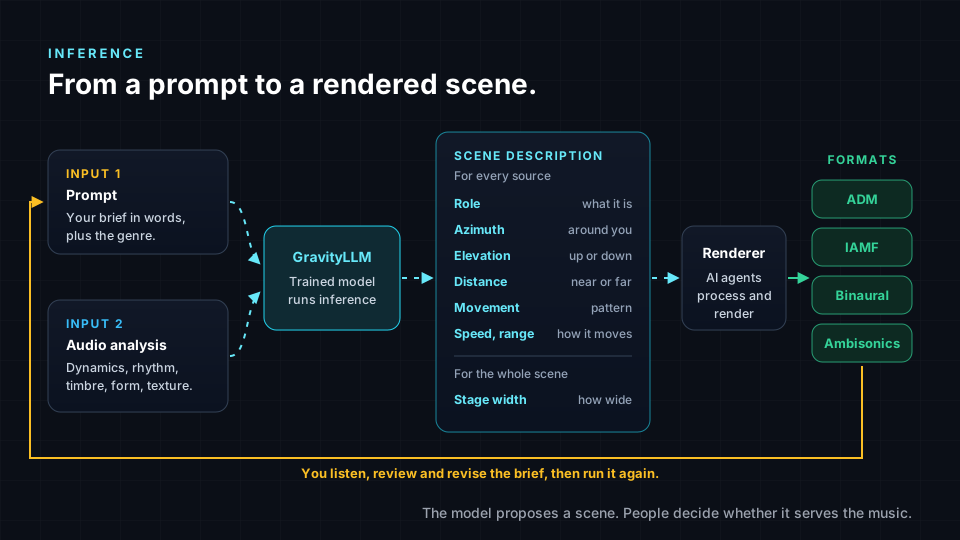
- Prompt. You supply a written brief and a genre. A prompt such as "position a jazz ensemble in an intimate venue layout" communicates the mood and the scale of the space.
- Audio analysis. In the production environment, the system analyzes the full audio spectrum of the material, covering musical elements and contextual factors.
- Model. GravityLLM combines the prompt and the analysis and generates a spatial arrangement.
- Scene description. The output is a structured description of the whole scene, with a set of fields for every source and shared fields for the scene.
- Rendering. AI agents coordinate the processing and rendering that turn the sources and their positions into immersive audio.
- Formats. Depending on the workflow and plan, the result is delivered as ADM, Eclipsa Audio (IAMF), binaural or Ambisonics.
- Human review. You listen to the result. If something does not serve the song, you revise the brief and run inference again.
Pipeline inputs and outputs
| Stage | Input | Output |
|---|---|---|
| Prompt | Your brief and genre selection | Stated spatial intent |
| Audio analysis | Your audio material | Musical and contextual features |
| GravityLLM | Prompt and analysis | Spatial arrangement |
| Scene description | Spatial arrangement | Per-source and scene-level fields |
| Renderer | Sources and scene description | Rendered immersive audio |
| Delivery | Rendered audio | ADM, Eclipsa Audio (IAMF), binaural, Ambisonics |
Source material
The model places parts of a song, so the material you provide affects how cleanly those parts can be placed. Separate stems are placed directly in 3D. A single stereo master is first separated into parts with AI, then each part is placed.
| What you provide | How Spatial9 handles it | Result |
|---|---|---|
| Separate stems | Places each stem directly in 3D | Cleanest separation, most control |
| WAV master | Separates the mix with AI, then places each part | Very good on most songs |
| MP3 master | Same as WAV, with less detail to work with | Fine for testing, not ideal for release |
| MIDI only | Cannot be used directly | Render it to audio first |
For export guidance, see Stereo vs stems and Exporting stems.
Signals the model uses
The audio analysis and the prompt together give the model its view of the material. The analysis covers two groups of signals.
| Group | Signal | Role in placement |
|---|---|---|
| Musical elements | Dynamics | Energy of the material |
| Musical elements | Form | Song structure |
| Musical elements | Rhythm | Rhythmic content |
| Musical elements | Timbre | Character of each source |
| Musical elements | Texture | Density and layering |
| Contextual factors | Genre | Genre conventions |
| Contextual factors | Style | Stylistic context |
| Contextual factors | Mix aesthetics | Overall mix character |
| Prompt | Written brief | Stated spatial goal and scale of the space |
The model does not apply fixed rules such as "vocals go front center". It applies patterns that recur across the sessions it was trained on. The patterns a spatial model can learn include the following.
- Anchors. In many genres the lead vocal sits in front of the listener and stays stable, because it carries the song.
- Genre conventions. An orchestral session may spread sections across a wide stage, while a hip-hop mix may keep the core tight and use space for separation and clarity.
- Instrument roles. Bass and kick often stay grounded and central, while ambience, pads and effects are more likely to surround or rise above the listener.
- Movement habits. Some sources move gently and some stay fixed, and the speed and range of movement tend to follow the energy of the music.
Scene description fields
A scene description is a list of placement decisions. Each source receives its own set of fields, and the scene as a whole receives shared fields.
| Field | Scope | Meaning |
|---|---|---|
| Role | Source | What the source is and does in the song, such as lead vocal or ambience |
| Azimuth | Source | Horizontal angle around the listener, measured from straight ahead |
| Elevation | Source | Vertical angle, from below the listener to directly overhead |
| Distance | Source | How near or far the source sits from the listener |
| Movement pattern | Source | The kind of motion, if any, such as a gentle sway or a slow orbit |
| Speed | Source | How fast the movement happens |
| Range | Source | How far the source travels while it moves |
| Stage width | Scene | How wide the whole arrangement spreads |
The Inference room in the Immersive Classroom is an illustration with generated values, not a live model. It shows the output as JSON, giving each instrument's position as x, y and z values.
How GravityLLM learns
GravityLLM learns through supervised learning. Each training example pairs an input with a known good answer. The input is the material: the stems, the genre and a short description of the goal. The answer is what a skilled engineer actually did with that material, such as where the lead vocal was placed or how a synth pad moved.
Training data
Professional studios upload stems, spatial positioning data and genre metadata from real sessions. A vector database stores the resulting 3D coordinates, instrument types, genre classifications and movement patterns. Each dataset also carries a human prompt, a short sentence describing the spatial goal, which teaches the model to connect words such as "intimate", "front center" or "concert hall" with spatial decisions.
| Data stage | Content | Purpose |
|---|---|---|
| Session upload | Stems, spatial positioning data, genre metadata | Source material from real sessions |
| Storage | 3D coordinates, instrument types, genre classes, movement patterns | Structured examples in a vector database |
| Human prompt | Short sentence describing the spatial goal | Links language to spatial decisions |
| Training set | Examples the model learns from | Produces train loss |
| Validation set | Held-out sessions the model never trains on | Produces validation loss |
The training loop
Training is a loop that repeats until the model's predictions come close to the engineers' choices.
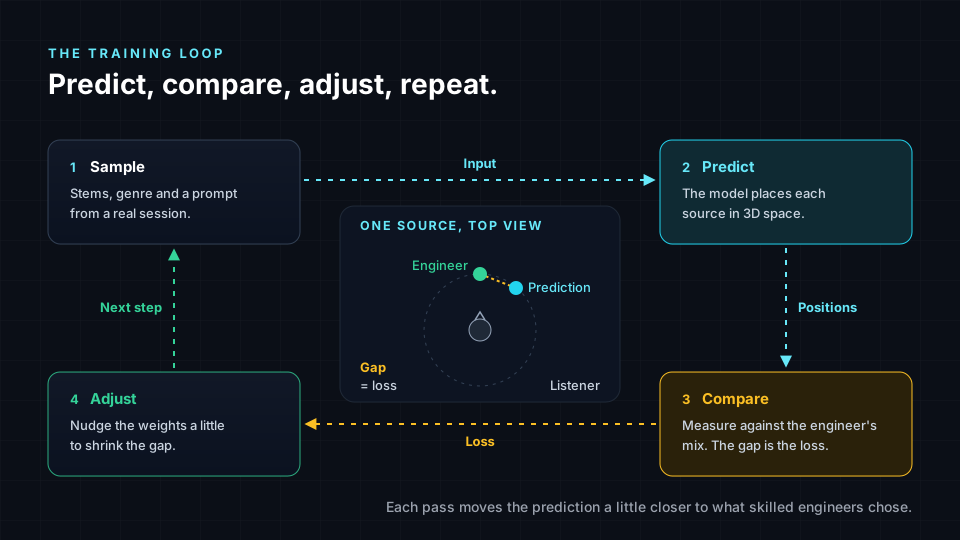
- Sample. The system picks an example from the training data, such as a rock session with stems, a genre label and a prompt asking for vocals front center.
- Predict. The model proposes a position for every source, plus elevation, distance and movement.
- Compare. The prediction is measured against what the engineer did. The size of the difference is the loss.
- Adjust. The weights are nudged slightly in the direction that would have made the loss smaller.
One pass through this loop is a training step, and a step usually processes a small batch of examples. A full pass through all the training data is an epoch. A lead vocal predicted far left when the engineer placed it front center produces a large loss.
Train loss, validation loss and overfitting
Two numbers are tracked during training. Train loss measures error on the sessions the model learns from. Validation loss measures error on held-out sessions, and is the reliable measure of how the model handles new music.
| Pattern | Train loss | Validation loss |
|---|---|---|
| Good fit | Falls, then settles | Falls, then settles with a small steady gap |
| Overfitting | Keeps falling | Reaches a low point, then rises |
The usual remedy for overfitting is to keep the version of the model from the lowest point of the validation curve, called the best checkpoint. More varied training data also helps, because a large and diverse set of sessions is harder to memorize.
Training settings
| Setting | Too low | Too high |
|---|---|---|
| Learning rate | Training is very slow | Loss jumps around and may never settle |
| Training steps | The model underfits and misses patterns | The model may overfit and memorize |
The learning rate controls how large each adjustment is. A common approach is to start with larger adjustments and reduce them as training progresses so the model settles gradually. The validation curve indicates when the number of steps is sufficient.
Variation and consistency
The same brief can produce slightly different scenes on separate runs. Many generative systems include some variation by design. Variation is useful when you are exploring options, and consistency matters when you are delivering a body of work.
| Situation | What you want | What helps |
|---|---|---|
| Exploring ideas for one song | Variation | Run the brief more than once and compare versions |
| Delivering a full album | Consistency | Use a clear brief, reuse its language across tracks, and A/B tracks |
| Fixing one problem | Targeted change | Revise only the part of the brief related to the problem |
Limits
Keep the following limits in mind when you evaluate generated scenes.
- Valid is not the same as right. A scene description can be technically valid and still wrong for the song. A backing vocal may pull attention from the lead, a moving synth may distract under a quiet lyric, or a wide stage may feel empty in a sparse intro.
- The model reflects its data. A model can only learn the patterns present in its training set. The genres, instruments and engineering styles in that set shape its suggestions.
- Genre bias. If a genre or culture is underrepresented in the data, the model may treat it as a variation of the genres it knows best, and its suggestions may be weaker or less authentic. If a regional tradition is placed the same way as a rock band, that indicates missing examples, not a property of the music.
- Source quality. MP3 masters provide less detail for separation than WAV masters or stems, and heavily distorted or over-limited exports give separation less to work with.
Influencing results
You influence GravityLLM mainly through the brief and the material you provide. Your role in the Spatial9 workflow is to write the brief, judge the source material, listen to the result, revise and approve. The model proposes a scene and you decide whether to keep it.
- Write a specific brief. The model learned from prompts paired with spatial decisions, so clear spatial language matches what it was trained on. For example: "keep the vocal anchored front, open the chorus wide, and keep the low end centered".
- Select the right genre. Genre is a contextual signal and drives genre conventions such as stage width and movement.
- Provide clean, consistent material. Prefer stems, then WAV, then MP3. Keep all stems the same length and from the same version of the song, because stems from different versions cause timing problems.
- Keep the lead anchored. Listeners follow the voice, so ask for the space to open around the vocal rather than moving it.
- Request movement with a purpose. A synth rising overhead in a chorus serves the music. Constant spinning resembles the 8D effect.
- Review with three questions. Is the lead clear? Does the space support the emotion? Is anything moving without a reason?
- Revise narrowly. When one element is wrong, change only the part of the brief that relates to it and run inference again.
Spatial9 also checks that the immersive version stays true to the original with its patent-pending Intent Fidelity Score.
Next steps
- Spatializer for Music to run inference on your own stems or master.
- Mixing best practices for placement guidance to use in your briefs.
- Genre guides for genre conventions that shape stage width and movement.
- Formats overview to choose between ADM, Eclipsa Audio (IAMF), binaural and Ambisonics.