ADM to Eclipsa Audio converter
Convert a Dolby Atmos ADM BWF master into Eclipsa Audio (IAMF) and a YouTube-ready MP4, free.
The ADM to Eclipsa Audio converter turns a finished Dolby Atmos master, exported as ADM BWF, into an Eclipsa Audio (IAMF) file and, optionally, a YouTube-ready MP4. The conversion runs in your browser at /adm-to-eclipsa, requires only a free Spatial9 account and adds no watermark. You do not need a DAW plugin, a command line or a remix session.
This page describes the accepted input, how the conversion translates beds and moving objects, each step of the converter, the packaging options for YouTube, how to verify the upload, and the limits of the translation. It also covers the alternative routes through an AI assistant and through open-source tools.
What the converter does
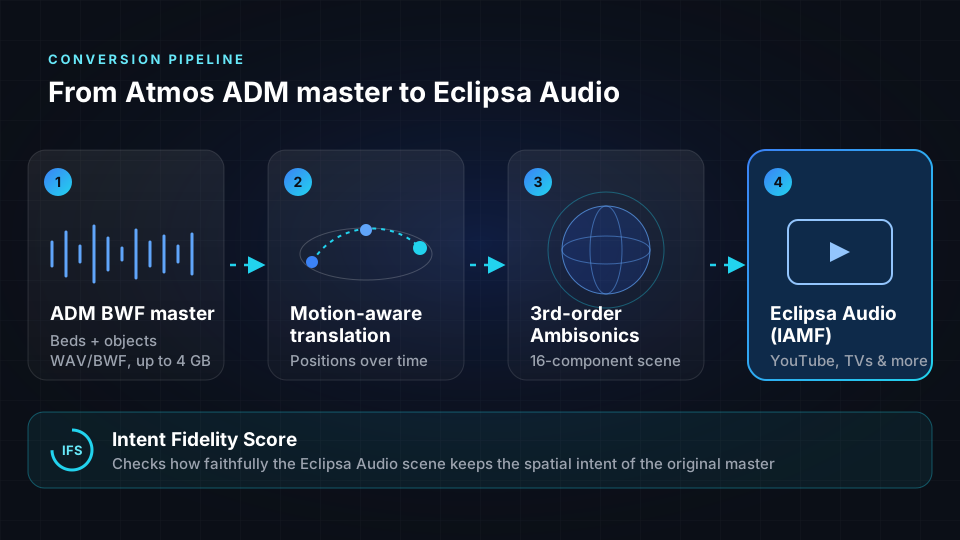
Spatial9 reads the beds, the objects and the object movement metadata in your ADM master, then rebuilds the mix as a third-order Ambisonics scene inside an Eclipsa Audio file. This process is called motion-aware translation: a synth that sweeps from the rear left to the front right in your Atmos mix still sweeps the same way in the Eclipsa Audio version.
| Property | Value |
|---|---|
| Input | Dolby Atmos ADM BWF master, as a WAV or BWF file |
| Output | Eclipsa Audio (IAMF) with a third-order Ambisonics scene of 16 components |
| Optional output | YouTube-ready MP4 with the Eclipsa Audio track |
| Quality measure | Intent Fidelity Score comparing the converted scene with the original master |
| Account | Free Spatial9 account; sign-in required |
| Cost | Free, with no watermark |
| Browser file size limit | 4 GB |
Why convert to Eclipsa Audio
Converting an Atmos master you have already finished adds a second immersive release with almost no extra work.
- YouTube. YouTube accepts Eclipsa Audio uploads, so a song or live session mixed in Atmos can play in 3D for viewers on supported devices.
- TVs and soundbars. Eclipsa Audio is backed by Samsung and built into a growing range of televisions and soundbars.
- Royalty-free. Eclipsa Audio is built on IAMF, an open standard from the Alliance for Open Media. Nobody pays licensing fees to create, distribute or play it.
- Value from existing masters. For studios and catalog owners, an Eclipsa Audio version is a new deliverable created from masters that are already finished.
The two formats are built differently, which is why renaming a file is not enough.
| Dolby Atmos music master | Eclipsa Audio | |
|---|---|---|
| Built on | Dolby's proprietary object-based system | IAMF, an open standard from the Alliance for Open Media |
| Licensing | Licensed technology | Royalty-free |
| How sound is described | Beds plus objects with position data | Audio elements such as a scene-based Ambisonics sound field, with mixing metadata |
| Typical file | ADM BWF, a large multichannel WAV | IAMF bitstream, often inside an MP4 |
| Where it plays | Music streaming services, cinemas, Atmos-enabled devices | YouTube, supported TVs and soundbars, apps with an IAMF decoder |
Before you start
Every conversion starts from an ADM BWF file: a single Broadcast Wave file that carries Audio Definition Model metadata, as defined in ITU-R BS.2076. Dolby Atmos Renderer, Pro Tools, Logic Pro, Nuendo and DaVinci Resolve can export this format, and it is the same master many distributors already request.
An ADM BWF file contains the following chunks:
| Chunk | Contents |
|---|---|
| fmt | Sample rate, bit depth and number of tracks |
| bext | Broadcast information such as title, originator and timecode |
| chna | A map linking every audio track to its ADM description |
| axml | The ADM metadata in XML, describing beds, objects and their positions over time |
| data | The audio, as many mono tracks side by side |
A Dolby Atmos music master can contain up to 128 tracks, typically at 48 kHz and 24-bit. Object movement is stored as a series of time blocks, each with an azimuth and elevation, and some objects also store distance and size. The converter follows these blocks over time.
Check what you have before you upload:
- ADM BWF WAV. Use the converter.
- Dolby Digital (AC-3), Dolby Digital Plus (E-AC-3) or TrueHD. These are not interchangeable with an ADM master. Spatial9 can convert them through the Spatial9 connector in an AI assistant, which decodes the speaker channels, up to 7.1, and places each at its real speaker position.
- Stereo WAV. You need spatialization rather than conversion. Use Spatializer for Music.
If you plan to publish on YouTube, also prepare a cover image or a video, because YouTube requires a video track.
Converting a master
- Open /adm-to-eclipsa and sign in with a free Spatial9 account.
- Drop your ADM BWF master onto the upload area, or click to browse. The converter accepts one WAV or BWF file at a time.
- Confirm or edit the Track Name. It defaults to the file name.
- Open the Quality Control Report to see how the file is validated before conversion.
- Start the conversion. The status moves through Preparing, Uploading, Queued and Processing, and upload progress is shown in megabytes.
- When the status reads IAMF Conversion Complete, review the compliance result and the Intent Fidelity Score.
- Select Download IAMF to save the Eclipsa Audio file, or select Make YouTube-Ready MP4 to package it with video.
The Intent Fidelity Score
The Intent Fidelity Score (IFS) is a patent-pending measure that compares the converted Eclipsa Audio scene with your original ADM master and shows how faithfully the spatial intent of the mix was preserved. It gives you a clear, shareable number to send with the file, so a client or label can see that the immersive picture they approved carried over. Your ears give the final answer.
Creating a YouTube-ready MP4
After conversion, choose how to package the Eclipsa Audio for YouTube.
| Option | Description |
|---|---|
| IAMF Only | An audio-only Eclipsa Audio file |
| Branded MP4 | A video with an auto-generated branded frame |
| Blank Video | A plain black video frame with no logos or artwork |
| Cover Art | Your album art, uploaded as a JPG or PNG, used as the video frame |
| Custom Video | Your own video file, such as an MP4 or MOV |
The MP4 is encoded and muxed in the cloud. When it is ready, the converter shows YouTube-Ready MP4 Created. You can download the MP4 or send it directly to your YouTube channel.
Uploading to YouTube
YouTube's recommended upload settings list Eclipsa Audio alongside AAC-LC and Opus, with a channel layout of "Stereo + Eclipsa Audio" at 48 kHz. Follow these rules:
- Upload a video MP4, not an audio-only MP4.
- Keep the sample rate at 48 kHz.
- Avoid edit lists and keep the file header at the front. Spatial9 does this by default.
- Upload as private or unlisted first.
- Allow time for processing. YouTube processes the immersive track after the standard versions, so it can appear some time after the video goes live.
Verifying the immersive track
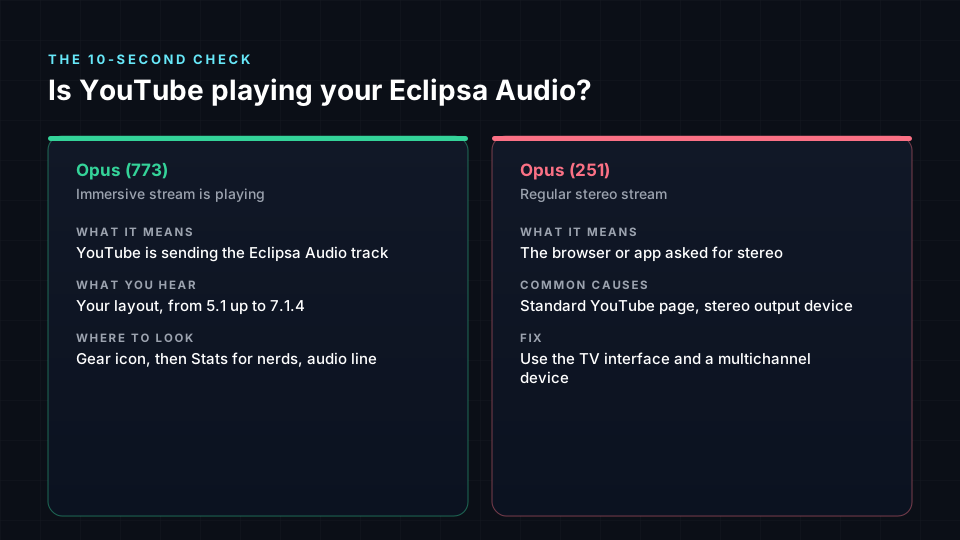
Right-click the YouTube player, choose Stats for nerds and read the audio codec line.
| Stats for nerds shows | Meaning | Action |
|---|---|---|
| opus (773) | The Eclipsa Audio stream is playing | None |
| opus (251) | The stereo version is playing | Check your browser and playback setup, or wait for processing |
| No 773 after a day on a correct setup | The immersive track may not have been accepted | Confirm the file is a video MP4 at 48 kHz with an IAMF track |
YouTube sends the immersive stream only to players that request it, and desktop browsers normally request stereo. To listen on a computer, use Chrome 153 or later, set your audio device to its full speaker layout and open the video through the YouTube TV interface at youtube.com/tv. On headphones, use the binaural WAV that every Spatial9 render includes, the IAMF web demo or the open-source libiamf decoder.
Other conversion routes
The browser converter is the shortest path, but two other free routes produce a file YouTube accepts.
Through an AI assistant
Spatial9 works as a remote MCP connector in ChatGPT, Claude, Gemini, Grok and other assistants that support MCP. After you add the connector once, you can ask in plain language, for example to convert an Atmos master for YouTube using your cover image as the video. The assistant provides an upload link for files up to 2 GB, runs the convert_dolby_to_eclipsa tool on Spatial9, waits for the job and returns the downloads. Because the conversion runs on Spatial9, the result is the same in every assistant.
The guest address https://spatial9.ai/mcp/free includes one ADM to Eclipsa Audio conversion with no account. See /connect for setup in each assistant and MCP server for the tool reference.
With open-source tools
If you work in a terminal, you can use the open-source iamf-tools encoder, which has an ADM input built in.
git clone https://github.com/AOMediaCodec/iamf-tools.git
cd iamf-tools
bazel build -c opt //iamf/cli:encoder_main
./bazel-bin/iamf/cli/encoder_main \
  --adm_filename=/path/to/my_mix_adm.wav \
  --output_iamf_directory=/path/to/out
Then turn a cover image into a video of the same length as your mix and combine the two. Replace 245 with your mix length in seconds.
ffmpeg -loop 1 -i cover.jpg -t 245 -r 30 \
  -c:v libx264 -pix_fmt yuv420p cover_video.mp4
MP4Box -add /path/to/out/my_mix.iamf -add cover_video.mp4 -new upload.mp4
The ADM workflow in iamf-tools is marked experimental by its authors, and the encoder writes uncompressed LPCM audio, so files are large. Objects cannot be stored as objects in IAMF; the encoder folds them into third-order Ambisonics, so movement is kept but the objects are no longer editable.
Limits of the translation
- It is a translation, not a lossless copy. Positions are rebuilt in a third-order Ambisonics scene, so a very small, precise object can sound slightly broader than it does in the Dolby Atmos Renderer. Individual objects and metadata fields are not independently recoverable.
- Dolby-specific settings do not carry over. Settings such as the binaural render modes chosen in the Dolby Atmos Renderer have no direct equivalent in Eclipsa Audio.
- Playback depends on the device. No spatial format sounds identical on every system. Viewers on unsupported devices hear a stereo or binaural version.
- Keep your Atmos master. Apple Music, Amazon Music and TIDAL take Dolby Atmos. Eclipsa Audio is for YouTube and compatible TVs, soundbars and devices.
- You need the rights. Convert only masters you own or have permission to release.
Before you publish, listen for elements that move, such as fly-overs and anything that should travel overhead; confirm that dialogue and lead vocals stay anchored in front; check that bass and kick feel as solid as in the original; and confirm that ceiling elements still sound above you rather than only wider.
Bulk and catalog conversion
Studios and labels with many files or a full catalog can request batch ADM to Eclipsa Audio conversion on the Spatial9 managed pipeline, with priority processing and delivery. Use the bulk and enterprise link on the converter page, or see Enterprise platforms for automated pipelines.
Next steps
- ADM BWF: learn how the source master stores beds, objects and movement.
- Eclipsa Audio and IAMF: understand the output format and how devices render it.
- Ambisonics: learn what a third-order, 16-component scene represents.
- Publishing and delivery: prepare the MP4 and metadata for YouTube and other destinations.