Spatial9 Education and Academy
The free Academy, the classroom studio, Learn Your Way accessible guides, certificates and academic plans.
Spatial9 Education brings together a free immersive audio course, a browser-based classroom studio, accessible learning guides and certificates. Spatial9 Academy teaches you how people hear in three dimensions, how immersive formats describe space, how Spatial9 generates a spatial mix with GravityLLM, and how to deliver your own immersive work. Every lesson sends you into the Spatial9 demo so that you hear each idea instead of only reading about it.
The core course is free with a Spatial9 account and ends with a verifiable certificate. A low-cost Student Pro plan adds your own uploads and real file exports. This page describes the course structure, the Immersive Classroom, the Niner AI tutor, the Learn Your Way accessible guides, certificates, the academic plans and how educators can use the material. Start at /education.
Who the Academy is for
Spatial9 Academy is written for university students and recent graduates in music technology, film sound and audio engineering. No prior immersive experience is required. You need a pair of headphones, a quiet room and a free Spatial9 account. Each lesson explains its terms the first time they appear, and a key terms table closes every lesson.
By the end of the course you can:
- Explain how the brain locates sound in three dimensions and why headphones can recreate it.
- Describe channels, objects, scenes and binaural, and choose a delivery format for each destination.
- Describe how Spatial9 analyzes music, generates a spatial arrangement with GravityLLM and renders it to open formats.
- Use every tool in the Immersive Classroom, including the Sphere and 7.1.4 Studio, the mix console, movement design, motion capture, the effects library and Niner.
- Listen critically in a 3D audio engine and write precise, professional feedback.
- Create an immersive mix from your own stems and export it in binaural.
Course structure
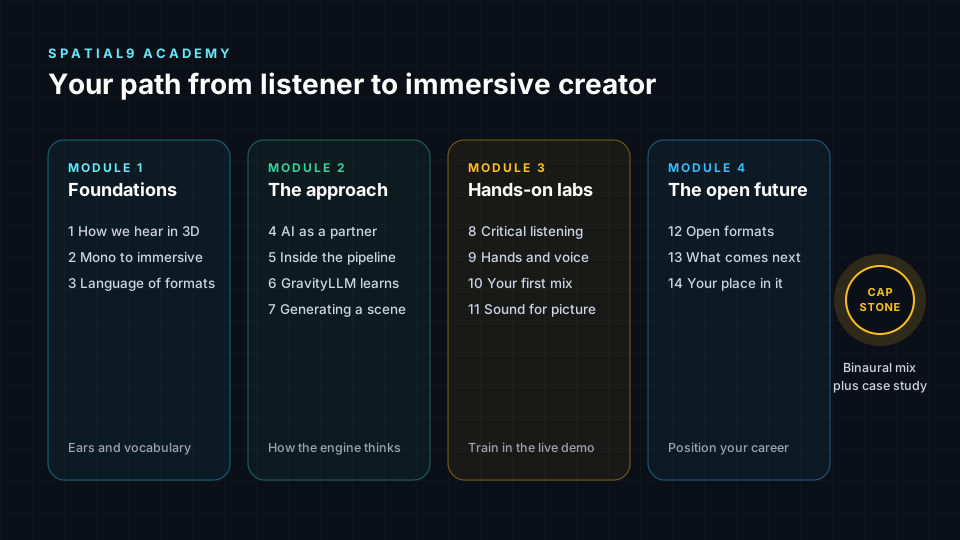
The course has 24 lessons and labs in five modules. You can follow it in order like a semester, or go directly to the lesson your current project needs.
| Module | Lessons | Focus |
|---|---|---|
| 1. Foundations | 1 to 3 | How we hear in 3D, the history of spatial audio, and channels, objects, scenes and binaural |
| 2. The Spatial9 approach | 4 to 7 | AI as a creative partner, the production pipeline, how GravityLLM learns and how a spatial scene is generated |
| 3. Inside the Immersive Classroom | 8 to 17 | A feature-by-feature course on the classroom: placement, console and meters, movement, motion capture, effects, Niner and export |
| 4. Hands-on labs | 18 to 21 | Critical listening, interactive mixing, your first mix from your own stems and sound for picture |
| 5. The open future | 22 to 24 | Open formats, AI assistants and MCP, research directions, and careers |
How every lesson works
Every lesson follows the same four-step rhythm. The second step always happens with headphones on in the Spatial9 demo.
| Step | What you do | What you keep |
|---|---|---|
| Learn | Read the concepts and study the diagrams | A clear mental model and the key terms |
| Hear | Follow numbered steps in the demo with exact button names | Listening experience you can describe |
| Prove | Answer the self-check questions, then read the answers | Confidence that the idea has landed |
| Create | Complete the portfolio assignment | Evidence of skill that employers can see |
Every assignment is designed to become a portfolio piece.
Demo rooms and their status
The demo labels each room by status, and learning to read those labels is part of the course.
| Demo room | Status | Used in |
|---|---|---|
| Immersive Classroom | Live, free | Lessons 8 to 17 and every lab |
| Music Transformation | Live | Lessons 1 to 3 and Labs 1 to 3 |
| Video Transformation | Early access | Lesson 21 |
| Architecture | Illustration | Lessons 4 and 5 |
| Training | Illustration | Lesson 6 |
| Inference | Illustration | Lesson 7 |
| MCP and AI Assistants | Live | Lesson 23 |
| Acoustic Digital Twin | Coming soon | Lesson 23 |
Live means the feature is working now. Early access means it is real but invite-only. Illustration means an interactive explanation of how the engine works, not a live model. Coming soon means a research direction Spatial9 is building toward. All rooms are reachable from /demo.
The Immersive Classroom
The Immersive Classroom is the studio you practice in for most of the course. It has three tabs: Classroom, Studio and Certificate. Every free student starts with Echoes, a 23-stem reference mix at 125 BPM created by Spatial9 co-founder and CEO Luiz Zanardo.
The classroom workspace contains the following areas:
- Transport with time, bar, tempo, key and render readouts.
- A/B switch that compares A · Spatial, the immersive mix, with B · Stereo, the original stereo mix.
- Ask Niner bar for the AI tutor.
- Sphere and 7.1.4 Studio for placing sound in 3D.
- Mix console with faders, mute, solo and meters for stems and speaker channels.
- Stem rack with one tile per stem, each with a note titled "Why Niner placed it here".
- Waveform and spectrum for the song overview and a live frequency analyzer.
- Controls menu with Spatial FX, Clarity, Tools, Connectivity and Settings groups, plus the Effects Rack.
Echoes has a written mix intent: a stable front stage of bass, lead, snares and impacts, wide side pads and an overhead canopy, with movement reserved for the arp, risers and transitions. Studying why each stem sits where it does is the first exercise of Module 3.
For a description of each classroom tool as it applies to production work, see Spatializer for Music.
Learning with Niner
Niner is the AI mixing tutor in the Immersive Classroom. It can change your mix, but its main purpose is to strengthen your ears and your reasoning. Start a session from the Ask Niner bar with Start session, or use one of the chips: Explain this mix, Make it wider or Quiz me. You can type or talk, and Voice on reads typed replies aloud.
Answer cards
Niner organizes each answer into four cards.
| Card | Content |
|---|---|
| What I heard | A description of the current state of the mix |
| Analysis | Why it sounds that way, with a named concept |
| Watch out for | A risk or side effect to listen for |
| Try next | A small action or listening exercise |
Proposals and control
Proposed changes wait in a Ready to apply card until you accept them. You stay in control with Undo and Redo, an A/B compare between A (Before Niner) and B (With changes), Save as preset and Close Niner.
Niner can move stems and set movement types, add effects from the 1,459-effect library, change levels, mute and solo, control playback, switch the spatial mode between Ambisonics and 7.1.4, toggle head tracking, set ducking, check masking, apply harmonic movement presets, set up hearing compensation and open export.
Session modes
- Standard is a balanced tutor and the default.
- Evolving learns your preferences over time and requires you to be signed in. When you correct Niner, for example "never move the bass", it saves the rule.
- Experimental offers bolder suggestions. Compare every change with A/B in this mode.
A study routine
- Predict. Before you ask, write down what you think the answer is.
- Ask why. Request an explanation with a concept.
- Listen. Do the Try next exercise exactly.
- Decide. Apply or decline the proposal, then compare with A/B.
- Teach back. Explain the concept to Niner in your own words and ask it to correct you.
- Quiz. End with "Quiz me on what I hear".
Learn Your Way accessible guides
Learn Your Way is a set of free, accessible spatial audio guides at /education/accessible. It requires no sign-in. The guides are built for keyboard use, screen readers and zoom up to 400 percent, and every step has a clear heading.
- Learning preferences. Theme, text size, spacing, motion and other settings are saved on your device, or to your account if you sign in.
- No autoplay. Nothing plays by itself. Sound starts only when you press play or "Read this step aloud", and the Stop sound button at the top of every page stops it immediately.
- Ask Niner. The tutor is available from the bar at the top of Learn Your Way pages.
- Report a barrier. Select "Report a barrier" at the top of any page, or email contact@spatial9.ai. A short description is enough, and every report is read by the Spatial9 team.
See /education/accessible for the full list of guides and the educator materials.
Certificates
When you complete the core course, you receive a verifiable certificate from the Certificate tab of the Immersive Classroom. The certificate is included with the free account. The advanced track ends instead with a research project that you can publish or present.
Plans and access
| Access level | Price | Includes |
|---|---|---|
| Free account | $0 | Every lesson, the full Echoes session, every classroom control, Niner in tutor mode, effect previews, class share links and the certificate |
| Student Pro | $9 per month with a verified school email | Everything in the free account, plus your own uploads (a stereo track or stems), nine projects per month and real file exports |
| Educator or institution | Contact Spatial9 | Access for a class or a partner institution |
On the free account, the Export button shows a lock and a "Pro" label. Share with class is free for everyone; it saves stem positions and movements, but not levels or effects, and creates a link that applies your scene on top of Echoes for a classmate.
You need Student Pro for Lab 3, your first mix from your own stems, and for the capstone project. It is also useful for the export steps in Modules 3 and 4.
Requesting student verification
Submit your institution name, institution type, country and course from the student request card. The Spatial9 team reviews every request by hand. You can return to the same page to check the status, which shows as sent, approved or not approved with a review note.
The capstone project
The course ends with one project that ties everything together:
- Choose one song you have the rights to.
- Write a creative brief.
- Prepare the stems.
- Create an immersive version with Spatial9.
- Listen critically and refine the mix.
- Export it in binaural.
- Write a short case study that explains your decisions.
The case study demonstrates taste, process and the ability to work with AI. Include a binaural version of every immersive portfolio piece, plus an Eclipsa Audio (IAMF) or ADM version where possible.
Careers and next steps after the course
The final lesson maps ten immersive audio roles and a 12-month roadmap.
| Role | Focus |
|---|---|
| Immersive mix engineer | Creating and delivering immersive music mixes in ADM, Eclipsa Audio, Ambisonics and binaural |
| Spatial creative director | Writing creative briefs and setting the spatial vision for a project |
| AI-assisted catalog producer | Managing immersive versions of many songs with batch workflows and quality review |
| Immersive sound designer for games and XR | Designing interactive 3D soundscapes |
| Sound-for-picture immersive mixer | Mixing dialogue, score and effects to follow the picture |
| Audio ML and data specialist | Preparing datasets and evaluating models |
| Acoustic modeler | Measuring and modeling real spaces with impulse responses |
| Listening and quality specialist | Running structured critical listening and approving deliveries |
| Accessibility audio specialist | Making audio clearer and more inclusive |
| Educator and creator | Teaching and building learning resources |
The roadmap runs in quarters: ears and foundations in months 1 to 3, craft and formats in months 4 to 6, technology and a specialty in months 7 to 9, and storytelling and collaboration in months 10 to 12.
For lecturers and educators
The course is designed to fit into an existing module on music production, sound for picture or audio technology. Lessons work as weekly pre-reading, labs work as practical sessions in a room with headphones, and assignments can be marked as coursework. A full semester can run one lesson per week with the capstone as the final submission. All lessons are public and free to link from your learning platform.
Next steps
- Core concepts: review the vocabulary of channels, objects, scenes and binaural used throughout the course.
- Quickstart: run your first project once you have Student Pro or a paid plan.
- Psychoacoustics: go deeper into how the brain locates sound, the subject of Module 1.
- Spatial inference and GravityLLM: learn how the model behind Module 2 generates a spatial scene.