
Inside the Spatial9 Pipeline: From Upload to Publish-Ready File
Spatial9 Team ·
Lesson 5 of 14 in Spatial9 Academy, module 2: The Spatial9 approach. Practice in the demo: Architecture.
Every great production has a signal flow. In a recording studio, you learn to trace a sound from the microphone through the preamp, the console, the processing and the converters to the final file. When something sounds wrong, signal flow is how you find out why.
AI-assisted immersive production has a signal flow too. It is just made of different stages. Once you can trace it, the system stops being a black box. You know what each stage does, what it needs from you, and where to listen when a result is not right.
That understanding is a professional superpower. Engineers who understand the pipeline give better briefs, prepare better sources and spot problems faster. In this lesson, we open the hood.
What you will learn
- The seven stages of the production lane, from input to publish.
- The trade-offs between starting from a stereo master and starting from stems.
- How the training lane, shown in the Architecture illustration, improves GravityLLM over time.
- Where human listening fits in, and why the revise loop matters.
- How APIs and webhooks let labels and catalogs process work at scale.
The big picture: two lanes
The Spatial9 system has two lanes. The production lane turns your music into immersive deliverables. The training lane is how the AI model learns to make good spatial decisions in the first place.
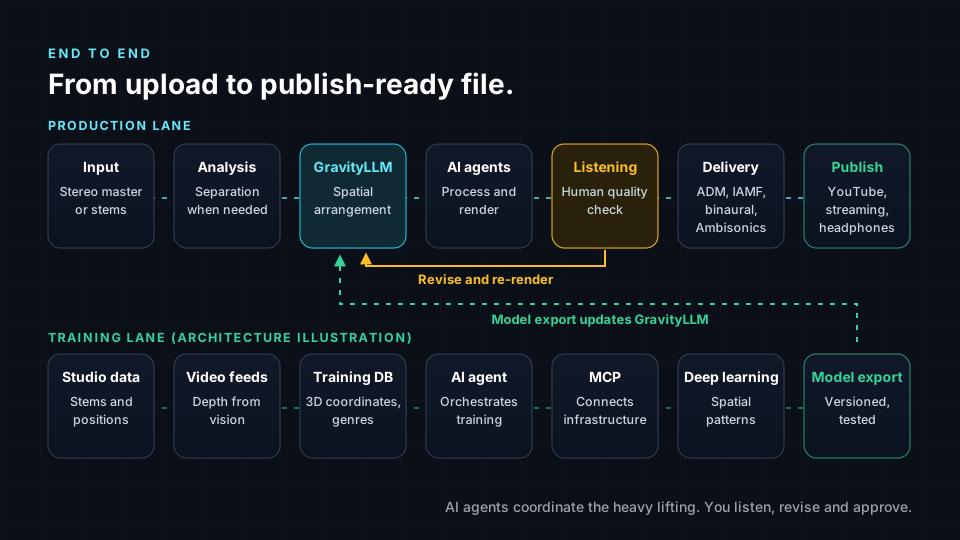
You will spend most of your time in the production lane. But understanding the training lane helps you understand why the model behaves the way it does, and why it can place an EDM synth differently from a folk guitar.
The production lane, stage by stage
1. Input. You start with either a stereo master or a set of stems. This is your first and most important creative decision, and we will look at it in detail below.
2. Analysis and source separation. The system analyzes the material. If you supplied only a stereo master, source separation estimates individual stems such as vocals, drums, bass and other instruments. These extracted stems are estimates. They can contain some bleed from other instruments or small artifacts. If you supplied original stems, this step is not needed.
3. GravityLLM spatial arrangement. GravityLLM, Spatial9's AI model, generates the spatial arrangement. For every source, it decides where it sits around the listener, how far away it is, how high it is and how it moves over time. These are the azimuth, elevation and distance coordinates you met in How We Hear in 3D.
4. AI agents coordinate processing and rendering. AI agents take the arrangement and coordinate the processing and rendering steps needed to turn sources plus positions into immersive audio. Think of them as the assistant engineers who keep every task moving in the right order.
5. Quality listening. This is where you come in. You listen on headphones and, ideally, on speakers. Does the space serve the song? Is the vocal clear? Is anything distracting? If not, you decide what to revise, and the loop runs again.
6. Delivery. Depending on the workflow and plan, Spatial9 delivers ADM, Eclipsa Audio (IAMF), binaural and Ambisonics. You learned what each one is for in Channels, Objects, Scenes and Binaural.
7. Publish. You approve the files and send them to their destination, whether that is YouTube, a distributor, a headphone release or a VR experience. Our guide to where to publish spatial audio covers the options.
Stereo master or stems?
The choice of input shapes everything downstream. Neither option is always right. Each has a clear set of trade-offs.
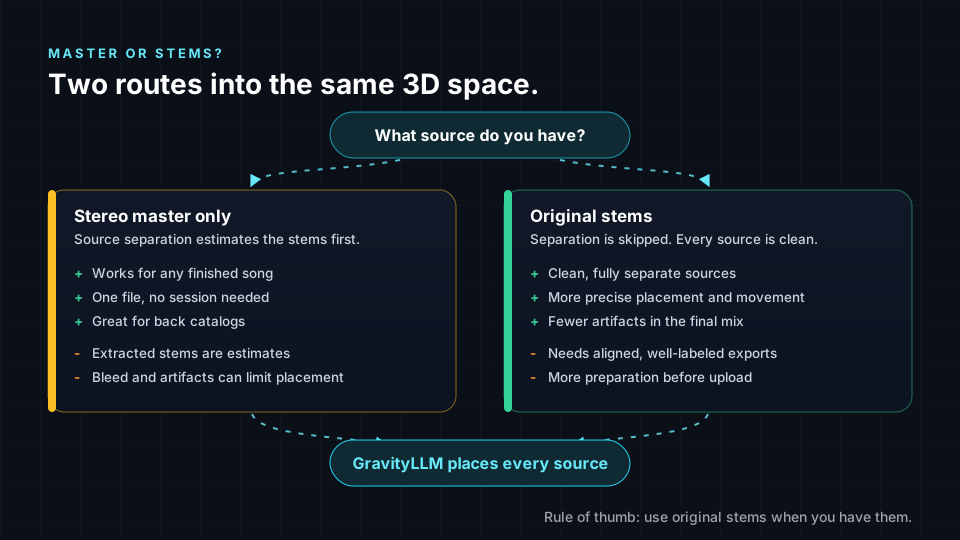
Start from a stereo master when stems are not available, which is common for older releases and large back catalogs. It is the fastest route, needs only one file, and works for any finished song. The trade-off is that separated stems are estimates, so bleed and artifacts can limit how far apart sources can be placed.
Start from stems when you have them. Original stems are clean, separate sources, so GravityLLM can place and move them precisely, and the result has fewer artifacts. The trade-off is preparation: stems need to be aligned to the same start point, consistently named and exported at the right format.
| Question | Stereo master | Original stems |
|---|---|---|
| What do I need? | One finished stereo file. | A full, aligned set of stem files. |
| Is separation needed? | Yes, stems are estimated. | No. |
| How precise is placement? | Good, limited by separation quality. | Highest, every source is clean. |
| Best for | Back catalogs and quick projects. | New releases and flagship tracks. |
For a deeper guide, read how to create spatial audio from stereo: master or stems, and before your next export, review best practices on exporting audio stems.
The training lane: how GravityLLM learns
The Architecture demo carries the badge Illustration. It explains how the system is built rather than running it live. Its "Interactive System Architecture" walks through the training lane in seven steps.
- Studio Data Collection. Studios upload stems, spatial positioning data and genre metadata from real sessions.
- Open Video Feeds. Computer vision extracts depth and spatial relationships from video.
- Training Database. A vector database stores 3D coordinates, instrument types, genre classifications and movement patterns.
- AI Training Agent. An agent orchestrates the training pipeline.
- MCP Protocol. The protocol connects the agent to the training infrastructure.
- Deep Learning. The model learns spatial patterns and genre conventions.
- Model Export. The model is versioned, tested and deployed to inference engines.
The key idea is that spatial decisions are learned from real examples of how people place sound. That is why genre matters so much. The demo lists 3000+ instruments, 50+ genres, 500+ music styles and 150+ video moods in its summary stats. When GravityLLM places a source, it draws on patterns associated with that instrument and genre. You will explore this in depth in the next lesson.
Scaling up: APIs and webhooks
One song at a time works for an artist. A label or a publisher with a large catalog needs something else. That is why Spatial9 supports batch submission through APIs and webhooks.
An API lets software submit jobs directly, with no manual uploads. A webhook is a message the system sends back automatically when a job finishes, so the catalog system knows the deliverables are ready. The Architecture demo includes an API Documentation section describing a "RESTful API".
Scale does not remove the human role. With a catalog, you still write briefs, perhaps per genre or per album. You still sample and listen to results, and you still approve delivery. The difference is that your judgment now steers hundreds of tracks instead of one.
Lab steps
The Architecture demo is an Illustration, so you do not need headphones for steps 1 to 6. Put them on for step 7, where you return to the Live music demo.
- Open /demo/architecture and find the heading "End-to-End Architecture".
- In "Interactive System Architecture", step through each stage in order: "Studio Data Collection", "Open Video Feeds", "Training Database", "AI Training Agent", "MCP Protocol", "Deep Learning" and "Model Export". For each, write one sentence in your own words about what it contributes.
- Find "Step 04 Output & Delivery", with "Spatial Audio Generation" and "Video Transformation Engine". Match these to stages 4, 6 and 7 of the production lane in this lesson.
- Read the summary stats. Note what the demo lists for instruments, genres, music styles and video moods.
- Scroll to the API Documentation section and its "RESTful API". Write down what a webhook would need to tell a label's catalog system when a job finishes.
- Optional: open /demo/inference, also an Illustration. Choose an option from "Choose a spatial arrangement prompt..." and study the "Generated Spatial Arrangement", including Stage Width and Movement Patterns. This is what stage 3 produces.
- Put on headphones and open /demo/music. Choose "Your Stems + AI" under "Choose a mode" to see how stems enter the pipeline and how GravityLLM positions them by genre. Then try "3D Spatial Audio" to hear a finished arrangement of 23 stems. Music Transformation is Live.
Key terms
| Term | Meaning |
|---|---|
| Production lane | The stages that turn your input into immersive deliverables. |
| Training lane | The stages that teach GravityLLM how to make spatial decisions. |
| Source separation | Estimating individual stems from a mixed stereo recording. |
| Spatial arrangement | The position, distance, elevation and movement of every source. |
| Inference | Using a trained model to generate a result, such as a spatial arrangement. |
| API | An interface that lets software submit jobs and fetch results automatically. |
| Webhook | An automatic message sent when a job finishes or changes status. |
Check your understanding
- List the seven stages of the production lane in order.
- Give one advantage and one disadvantage of starting from a stereo master.
- Which stage of the production lane is led by a human, and why?
- What happens in the Model Export step of the training lane?
- What is the difference between an API and a webhook?
Answers
- Input, analysis and source separation, GravityLLM spatial arrangement, AI agents processing and rendering, quality listening, delivery, publish.
- It works for any finished song with one file, but separated stems are estimates that can contain bleed and artifacts.
- Quality listening, because judging whether the space serves the song requires human taste and intent, and the human decides revisions and approves delivery.
- The model is versioned, tested and deployed to inference engines.
- An API is how software sends requests and submits jobs, while a webhook is a message sent back automatically when something happens, such as a job finishing.
Assignment
Draw your own pipeline map for a real or fictional release. Choose one song and decide whether you would start from the stereo master or stems, and justify the choice in 100 words. Then draw the seven production stages, and next to each one write what you would check or decide at that stage. Finish with a short delivery list: which formats you would export and where each one will be published. Deliver it as a one-page diagram plus a half-page written rationale.
Frequently asked questions
How does AI turn a stereo song into spatial audio?
In the Spatial9 pipeline, source separation first estimates stems from the stereo mix, GravityLLM generates a spatial arrangement for each source, AI agents coordinate processing and rendering, and a human listens, revises and approves the final deliverables.
Is it better to upload stems or a stereo master for spatial audio?
Original stems usually give cleaner and more precise results because no separation is needed, while a stereo master is the practical choice when stems are not available, such as for older releases and large catalogs.
What file formats does Spatial9 export?
Depending on the workflow and plan, Spatial9 delivers ADM, Eclipsa Audio (IAMF), binaural and Ambisonics.
Can record labels process a whole catalog with Spatial9?
Yes, Spatial9 supports batch submission through APIs and webhooks, so catalog systems can submit tracks and receive a notification when deliverables are ready, while people still set briefs and approve results.
Next step
You can now trace a track from upload to publish. In the next lesson, How GravityLLM Learns, you will go deeper into the training lane and see how an AI model learns to place sound in space. Return to the Spatial9 Academy course home to see every lesson.