10 Non-Negotiable Best Practices for Immersive and Spatial Music Mixing
Spatial9 Team · · 16 min read
Key takeaways
- Great immersive mixes start with clean, aligned stems and a finished stereo mix, and a calibrated room or a trusted binaural reference.
- Anchor lead vocal, kick, snare and bass at the front centre, use the bed for wide static parts and objects only where precision or movement is needed, and keep the height layer lighter than the main layer.
- LFE is a band-limited effect channel up to 120 Hz played 10 dB louder. It should add weight, never hold the only copy of the bass.
- Aim near -18 LUFS integrated with true peaks no higher than -1 dBTP for Dolby Atmos music, check binaural, stereo and earbuds, and deliver 48 kHz, 24-bit ADM BWF plus IAMF for Eclipsa Audio.
Immersive music has moved from a niche to an everyday format. Apple Music, Amazon Music and TIDAL stream Dolby Atmos, YouTube supports Eclipsa Audio, and almost every pair of modern headphones can play spatial audio. That means more of your listeners hear your music in 3D, and more of them notice when a spatial mix is confusing, thin or tiring.
The good news is that great immersive mixes follow a small set of rules. They are not about taste. They come from how human hearing works, how playback systems render 3D audio, and what streaming platforms expect. Break them and a mix can sound impressive in your studio but fall apart on a listener's earbuds. Respect them and you are free to be as creative as you like.
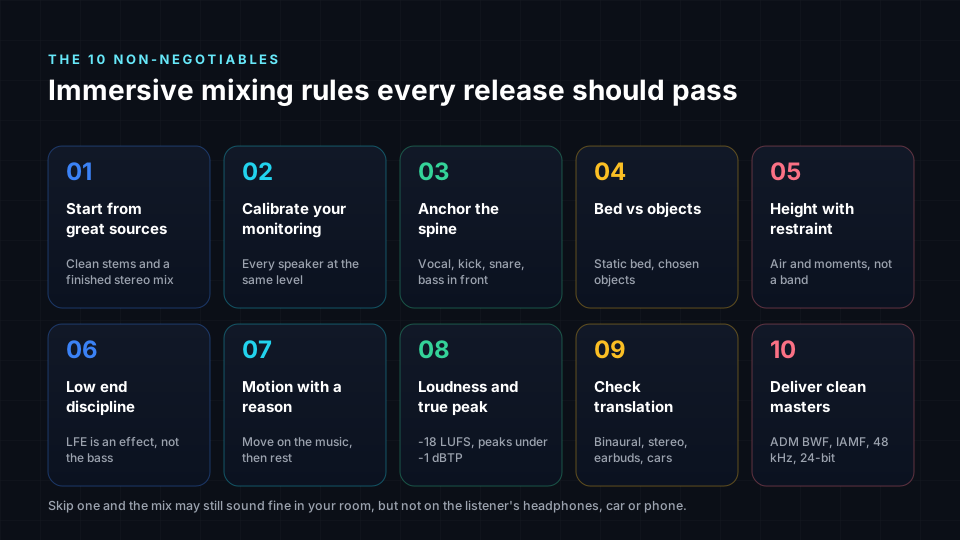
This guide covers the ten rules we consider non-negotiable for every release, with diagrams, examples and a checklist. If you want the creative side first, read our companion guide on creative thinking in immersive music mixing. It explains how to come up with bold ideas without causing listener fatigue. This article is about making sure those ideas survive on every speaker.
Why best practices matter more in immersive mixing
In stereo, a mix is played back in roughly the same way everywhere: two channels, left and right. An immersive mix is different. The same master is rendered live to whatever the listener has. That might be a 7.1.4 speaker room, a soundbar, a car, headphones with a binaural render, or a stereo fold-down on a phone speaker. You are not shipping one sound. You are shipping instructions for many sounds.
That is why small mistakes carry further. A bass that lives only in the low-frequency effects channel may vanish on headphones. A vocal placed slightly wide may sound fine in a speaker room but drift on earbuds. A busy height layer may collapse into mush on a soundbar. Best practices are how you protect your music from all of these situations at once.
Rule 1: Start from great sources
An immersive mix can only be as good as the material it starts from. Every problem in your stems, such as clipping, noise, phase issues or a missing part, will be heard in every speaker, often more clearly than in stereo because each part is now more exposed.
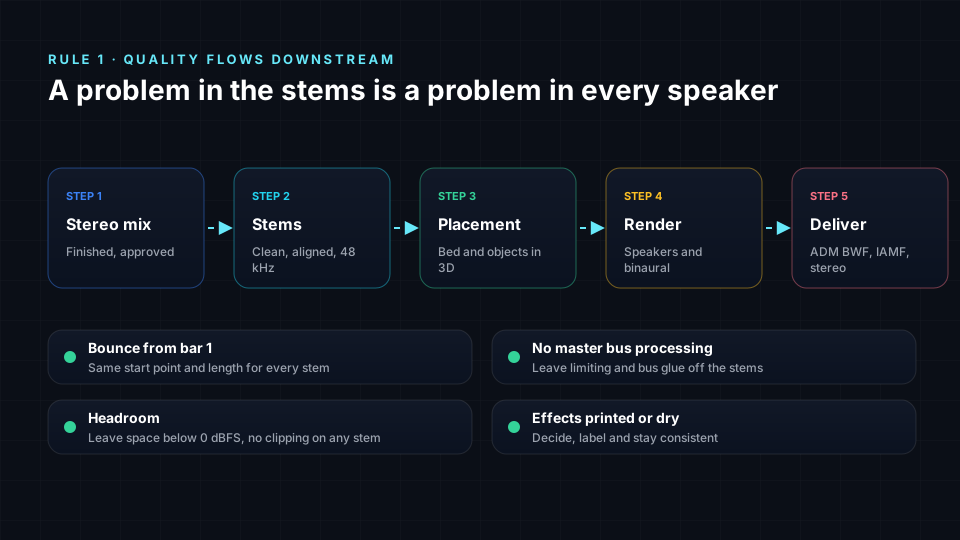
- Start from a finished, approved stereo mix. It is your creative reference. The immersive version should feel like the same song, not a different one.
- Bounce every stem from the same start point and to the same length. Misaligned stems cause flamming, phasing and timing problems that are hard to fix later.
- Leave master bus processing off the stems. Limiting and bus compression should happen on the immersive mix, not baked into each part.
- Leave headroom and avoid clipping. Peaks with some space below 0 dBFS give you room to balance and process in 3D.
- Decide whether effects are printed or dry, and label them clearly. Reverbs and delays printed into stereo stems can fight with the new space you create.
If you only have a stereo file, Spatial9 can separate it into stems with AI before placing them in 3D. Our comparison of upmixing stereo versus mixing from stems explains the trade-offs, and our guide to best practices on exporting audio stems covers the details of preparing stems from your project.
Rule 2: Calibrate your monitoring, or use a trusted reference
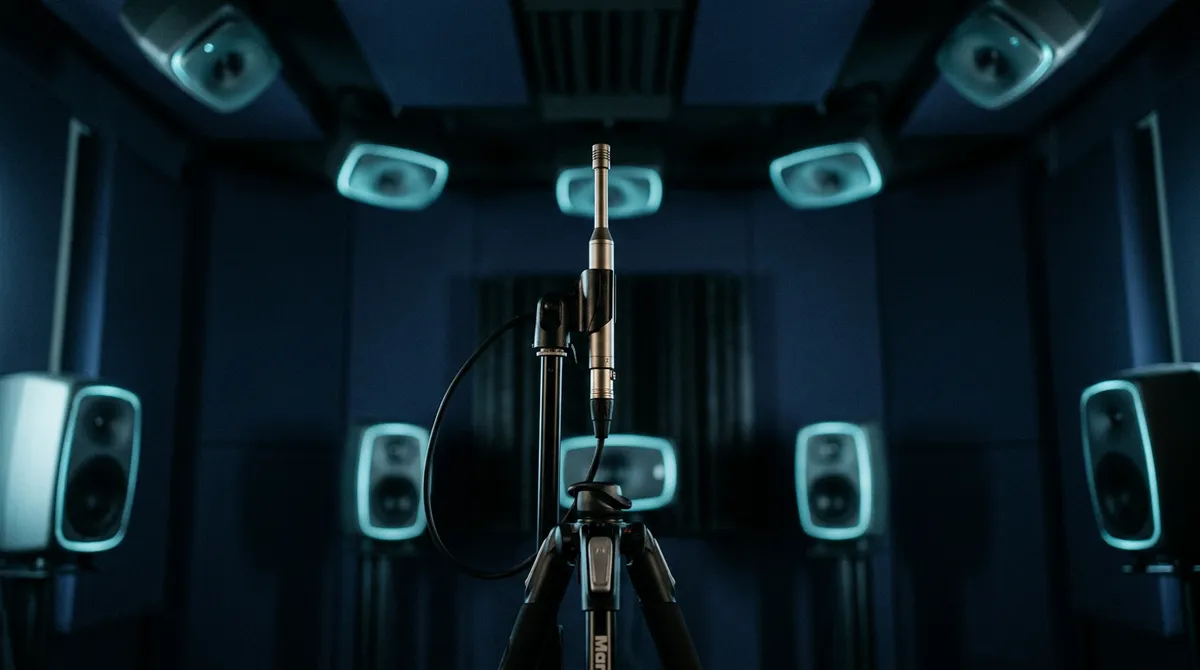
You cannot make good spatial decisions on a system that lies to you. If one speaker is louder or closer than the others, everything you place will lean towards it, and your mix will sound unbalanced everywhere else.
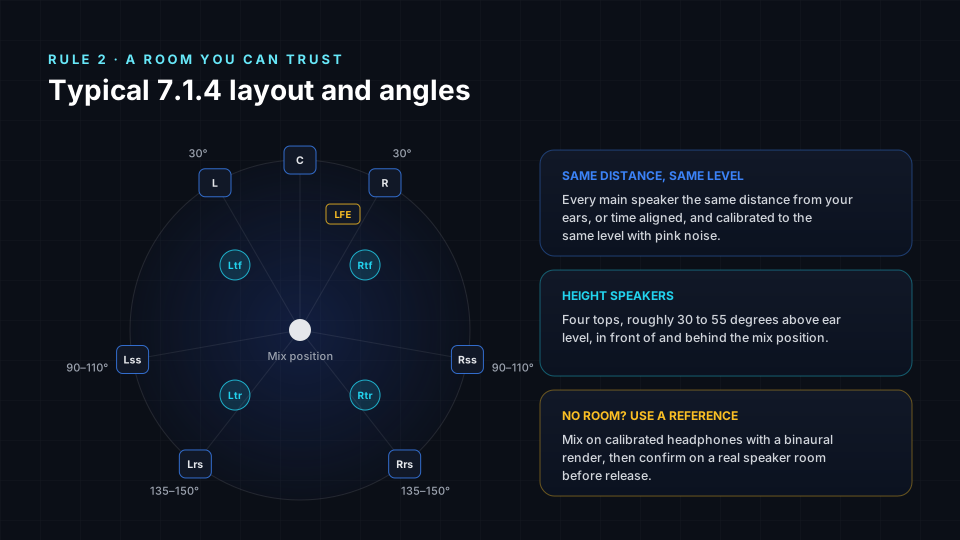
- Same distance or time aligned. Every main speaker should be the same distance from your listening position, or delayed to match. Because of the precedence effect described by Helmut Haas in 1951, a sound arriving just a few milliseconds earlier from one speaker pulls the image towards it.
- Same level. Calibrate every speaker to the same level at the listening position, using pink noise and a sound level meter or measurement microphone.
- Typical angles. Front left and right at about 30 degrees, side surrounds at about 90 to 110 degrees, rear surrounds at about 135 to 150 degrees, and height speakers roughly 30 to 55 degrees above ear level.
- No speaker room? Use headphones carefully. Mix with a binaural render on good headphones and Spatial9's virtual 7.1.4 speaker room, then confirm on a real speaker system before release if you can.
Our side-by-side guide to headphone vs speaker spatial audio explains what each monitoring approach does well and where it can mislead you.
Rule 3: Anchor the spine of the song
Lead vocal, kick, snare and bass carry the song. Keep them at the front centre, or very close to it, in every section. This is the single most important rule for translation, because the front centre is the part of the image that survives every kind of playback, from a full speaker room to a phone speaker.
There is also a hearing reason. Research by A. W. Mills in 1958 showed that our ability to tell two directions apart is sharpest straight ahead, at around one degree, and much weaker to the sides and behind. The front is where listeners expect the most important parts and where they can hear them most precisely.
Anchoring the spine does not make your mix boring. It gives you a stable centre that makes everything around it more exciting. Our creative thinking guide shows how to build creative zones around this anchor without losing the song.
Rule 4: Use bed and objects on purpose
Object-based formats such as Dolby Atmos and Eclipsa Audio give you two ways to place sound. The bed is a set of fixed speaker channels, such as 7.1.2. Objects are individual sources with position information that the playback system renders to whatever speakers or headphones the listener has.
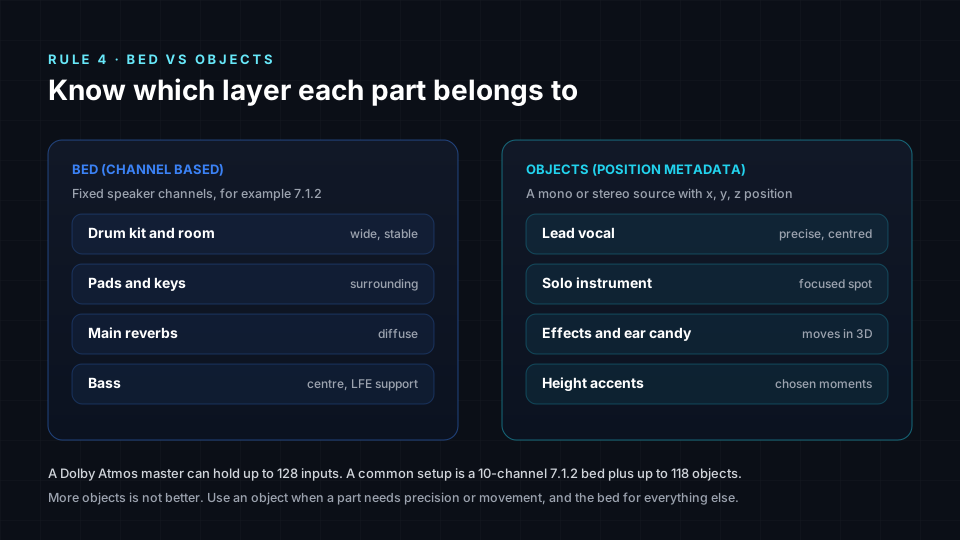
A Dolby Atmos master can hold up to 128 inputs, commonly a 10-channel 7.1.2 bed plus up to 118 objects. That does not mean you should use them all. Too many objects make a mix harder to manage, can increase processing on playback devices, and often sound less cohesive than a well-built bed.
| Part | Usually best as | Why |
|---|---|---|
| Drum kit and room mics | Bed | Wide, stable and glued together |
| Pads, keys and ambience | Bed | Surrounding texture that does not need precision |
| Main reverbs | Bed | Diffuse space, best spread across channels |
| Lead vocal | Object or centre bed channel | Must stay precise and centred on every render |
| Solo instrument or hook | Object | Needs a clear, focused position |
| Effects and ear candy | Object | Moves or appears in specific places |
| Height accents | Object | Lifted only for chosen moments |
To understand how the main formats handle beds and objects, read Eclipsa Audio vs Dolby Atmos.
Rule 5: Use height with restraint
Height speakers are the most exciting part of an immersive system, and the easiest to overuse. Humans locate sounds above them less precisely than sounds in front, so a crowded height layer quickly becomes a blur. On headphones and soundbars, height is also rendered less convincingly than on a speaker room.
- Use height for air, reverbs, shimmer and harmonies. These benefit from a sense of lift without needing a precise position.
- Save full instruments overhead for special moments. A guitar lifting into the ceiling on the last chorus is powerful because it is rare.
- Keep the height layer lighter than the main layer. It should feel like the ceiling of a room, not a second band above you.
Contrast is the key. Our creative thinking guide includes a "height as emotion" exercise that shows how a mostly empty ceiling makes the chorus feel huge.
Rule 6: Low end discipline, LFE is an effect
The low-frequency effects channel, usually called LFE or the ".1", is one of the most misunderstood parts of immersive mixing. It is a separate, band-limited channel that carries content up to 120 Hz and is played back 10 dB louder than the main channels. It was designed to add extra weight, not to carry the bass of your song.
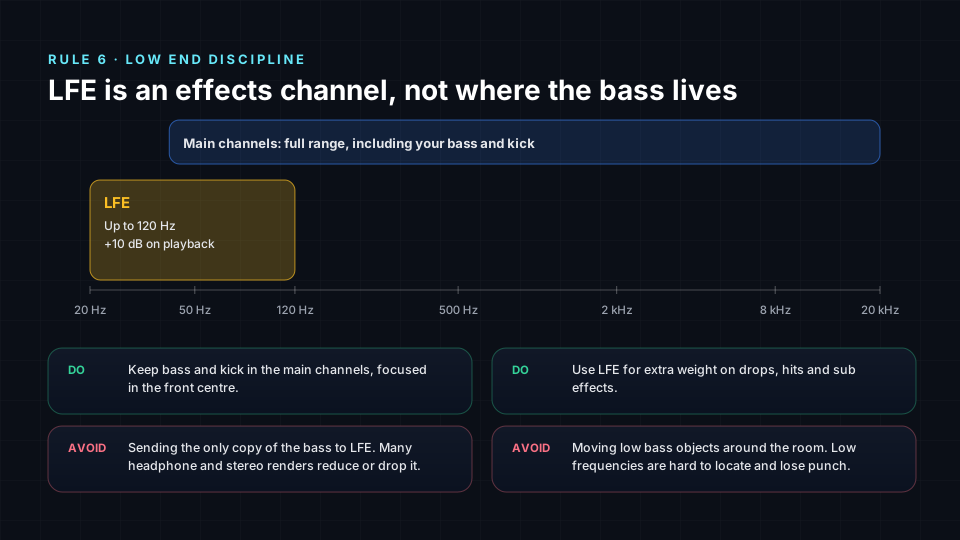
- Keep bass and kick in the main channels, focused at the front centre. The listener's playback system will send low frequencies to the subwoofer through bass management if needed.
- Use LFE for extra weight on drops, hits and sub effects. Think of it as a seasoning.
- Never put the only copy of the bass in LFE. Many headphone and stereo renders reduce or ignore it, and your bass could disappear.
- Do not move low bass around the room. Low frequencies are hard to locate, and moving them weakens the groove.
Rule 7: Move sounds only for a musical reason
Movement is one of the most powerful tools in immersive mixing, because the brain is wired to notice sounds that change position. That is exactly why it must be used carefully. Constant or random movement keeps the listener on alert and is one of the fastest routes to listener fatigue.
- Tie every movement to the music. A fill, a transition, a lyric or a build gives a move its reason.
- Let objects land and rest. A gesture that arrives and stops feels musical. Endless motion feels like a demo.
- Limit how many things move at once. Two moving objects is often plenty.
Our creative guide covers this rule in depth, including the difference between ping-pong panning and purposeful motion. Read why every movement needs a musical reason and try the "three moves maximum" exercise in your next session.
Rule 8: Hit loudness and true peak targets
Immersive music is mixed and delivered quieter than most stereo streaming masters. Dolby recommends delivering Dolby Atmos music at around -18 LUFS integrated loudness with true peaks no higher than -1 dBTP. Stereo streaming masters often sit closer to -14 LUFS or louder.
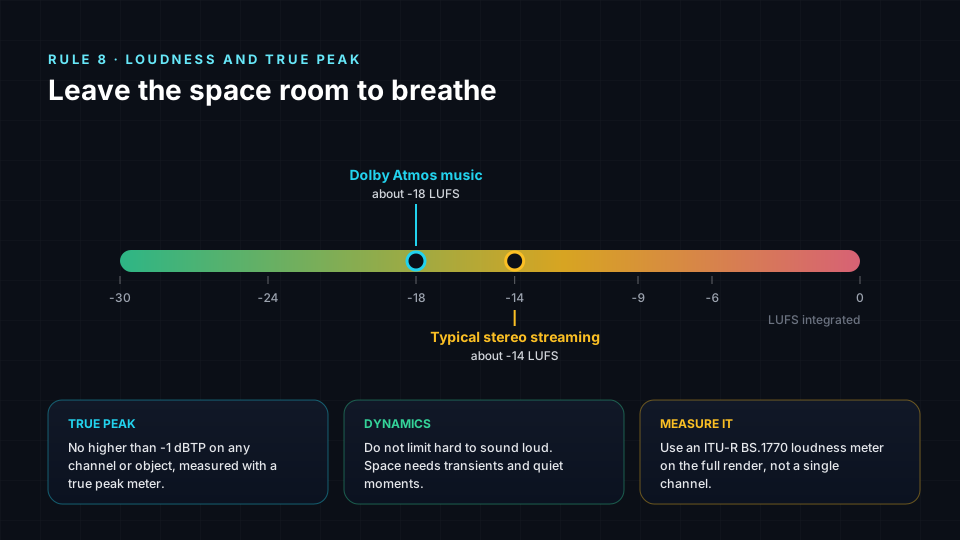
- Measure the whole render. Use a loudness meter based on ITU-R BS.1770 on the full immersive output, not on a single channel or stem.
- Watch true peak on every channel and object. Inter-sample peaks can clip on playback even when sample peaks look safe.
- Do not limit hard to sound loud. Immersive mixes depend on transients and quiet moments to feel open. Crushing dynamics makes a spatial mix sound flat and tiring.
Spatial9's mix console shows loudness and peak meters while you work. Our guide to the mix console, metering and clarity shows how to read them.
Rule 9: Check translation on every kind of playback
Most people will never hear your mix on a 7.1.4 speaker system. They will hear it on headphones, earbuds, soundbars, cars and phones. A mix is only finished when it works on all of them.
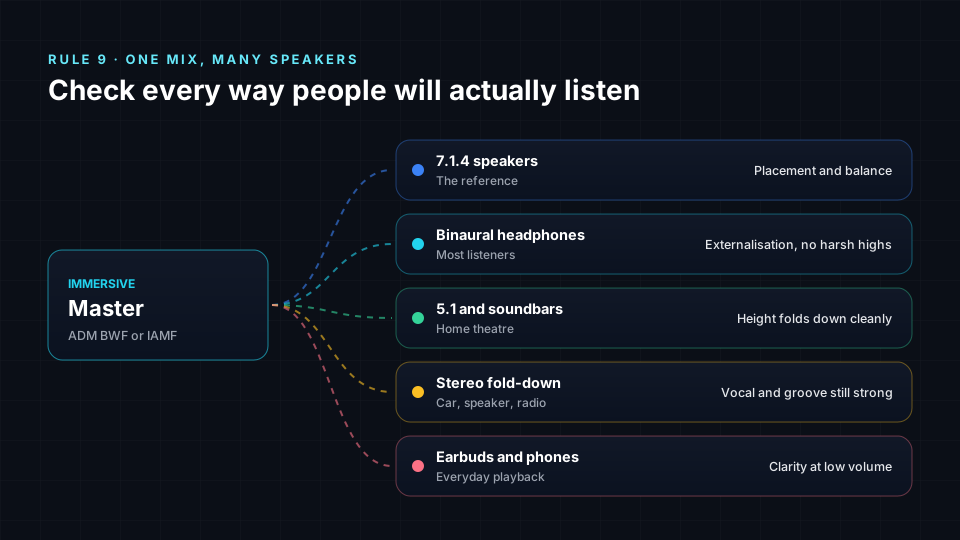
- Binaural on headphones. Check that the image sounds outside your head, the vocal stays centred and the highs are not harsh. Apple Music uses its own headphone renderer, so if Apple Music is a key platform, check there as well.
- 5.1 and soundbars. Make sure the height layer folds down cleanly and nothing important disappears.
- Stereo fold-down. The vocal and groove should still be strong. If the song feels weaker in stereo, your spatial choices may be hurting the core of the mix.
- Earbuds and phones at low volume. Listen quietly. Our sensitivity to bass and treble changes with level, as shown in the ISO 226 equal-loudness contours, so quiet listening reveals balance problems.
- Phase and mono on the bed. Check that the bed does not lose energy or thin out when summed.
To understand the difference between headphone rendering and speaker playback, read binaural vs spatial audio.
Rule 10: Deliver clean, correctly formatted masters
The final rule protects all the work you did. A great mix delivered in the wrong format, with the wrong sample rate or missing a version, can be rejected by a distributor or played back incorrectly.
- Dolby Atmos: deliver an ADM BWF file at 48 kHz and 24-bit, the standard for streaming platforms. Our plain-English guide explains what an ADM BWF file is.
- Eclipsa Audio: deliver IAMF for YouTube and supported devices. You can convert a Dolby Atmos mix to Eclipsa Audio for free.
- Binaural and stereo versions: many platforms and listeners still need a stereo master, and a binaural version is useful for previews and social media.
- Clean files: clear names, the same length and the same start point for every version.
Spatial9 exports Dolby Atmos (ADM), Eclipsa Audio (IAMF), binaural and multichannel versions from the same session. When your files are ready, our global guide to where you can publish spatial audio shows which platforms accept which formats.
The pre-release checklist
Run through these twelve checks before every release. If any one fails, fix it before you export.
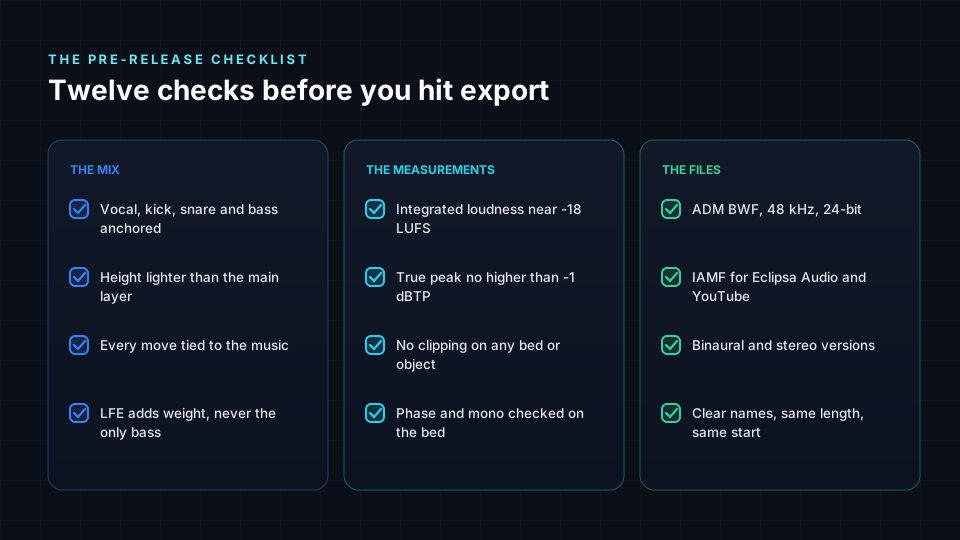
- Lead vocal, kick, snare and bass are anchored at the front centre.
- The height layer is lighter than the main layer.
- Every movement is tied to a moment in the music.
- LFE adds weight but never holds the only copy of the bass.
- Integrated loudness is near -18 LUFS for Dolby Atmos music.
- True peak is no higher than -1 dBTP.
- No bed channel or object clips.
- The bed has been checked for phase and mono compatibility.
- The Dolby Atmos master is an ADM BWF file at 48 kHz and 24-bit.
- An IAMF version is ready for Eclipsa Audio and YouTube.
- Binaural and stereo versions are exported.
- Every file has a clear name, the same length and the same start point.
How Spatial9 helps you follow every rule
Spatial9 is designed so that these best practices are the default, not extra work.
| Best practice | How Spatial9 helps |
|---|---|
| Great sources | AI stem separation turns a stereo file into clean, aligned stems |
| Trusted monitoring | Virtual 7.1.4 speaker room and binaural rendering for headphones |
| Anchored spine | AI placement gives a balanced starting point you can adjust stem by stem |
| Bed and objects | 3D sphere view shows every part and where it sits |
| Height and motion | Per-stem placement, volume, mute and solo for precise control |
| Loudness | Loudness and peak meters in the mix console |
| Translation | Instant binaural preview alongside speaker playback |
| Delivery | Dolby Atmos (ADM), Eclipsa Audio (IAMF), binaural and multichannel exports |
New to immersive mixing? Start with the hands-on lab for your first immersive mix, and browse our spatial audio guide by genre for genre-specific placement ideas.
Frequently asked questions
What are the most important best practices for immersive music mixing?
Start from clean stems, calibrate your monitoring, anchor the lead vocal, kick, snare and bass at the front centre, use bed and objects on purpose, keep the height layer restrained, treat LFE as an effect, move sounds only for musical reasons, hit loudness and true peak targets, check translation on all playback types, and deliver correctly formatted masters.
Where should the lead vocal go in a Dolby Atmos mix?
In almost every case the lead vocal should sit at the front centre, either as an object or in the centre channel of the bed. This keeps it clear and stable on speakers, headphones, soundbars and stereo fold-downs.
What loudness should a Dolby Atmos music mix be?
Dolby recommends around -18 LUFS integrated loudness with true peaks no higher than -1 dBTP for Dolby Atmos music, measured on the full render with an ITU-R BS.1770 meter.
Should I put the bass in the LFE channel?
No. Keep the bass in the main channels. LFE is a band-limited effect channel up to 120 Hz that is played back 10 dB louder, and many headphone and stereo renders reduce or drop it. Use it only to add extra weight.
What is the difference between bed and objects in Dolby Atmos?
The bed is a set of fixed speaker channels, commonly 7.1.2, used for wide and stable parts. Objects are individual sources with position information that the renderer places on whatever speakers or headphones the listener has. A Dolby Atmos master can hold up to 128 inputs in total.
Can I mix immersive music on headphones?
Yes, with care. Use a binaural render on good headphones, and check your mix on a real speaker system before release if you can. Spatial9 includes a virtual 7.1.4 speaker room and binaural rendering so you can mix on headphones with confidence.
What file format do streaming platforms need for Dolby Atmos music?
Streaming platforms expect an ADM BWF file at 48 kHz and 24-bit. For YouTube and Eclipsa Audio, deliver IAMF. Most distributors also ask for a stereo master.
How do I avoid listener fatigue in an immersive mix?
Anchor the spine of the song, limit movement, keep the height layer light, control harsh high frequencies, use shorter reverbs and keep dynamics. Our guide to creative thinking in immersive music mixing covers listener fatigue in detail.
Put the rules into practice
Best practices are not there to limit your creativity. They are what let your creative ideas reach every listener intact. Once these ten rules become habits, you can spend your energy on the fun part: shaping a song in space.
Ready to apply them? Read our companion guide to creative thinking in immersive music mixing for ten creative exercises, then open the Spatial9 Immersive Classroom and start your next mix. For the science of how we hear in three dimensions, see how we hear in 3D, and for the basics, what is spatial audio.
Sources
- Dolby Laboratories. Dolby Atmos Music mastering and delivery guidelines (-18 LUFS integrated, -1 dBTP true peak, ADM BWF 48 kHz, 24-bit).
- Dolby Laboratories. Dolby Atmos home entertainment speaker placement guidelines for 7.1.4 layouts.
- ITU-R BS.1770. Algorithms to measure audio programme loudness and true-peak audio level.
- ITU-R BS.2051. Advanced sound system for programme production.
- ITU-R BS.2076. Audio Definition Model.
- Alliance for Open Media (2023). Immersive Audio Model and Formats (IAMF) specification.
- Haas, H. (1951). Über den Einfluss eines Einfachechos auf die Hörsamkeit von Sprache. Acustica, 1, 49–58.
- Mills, A. W. (1958). On the minimum audible angle. Journal of the Acoustical Society of America, 30(4), 237–246.
- ISO 226:2023. Acoustics: Normal equal-loudness-level contours. International Organization for Standardization.