What Is an ADM BWF File? A Plain-English Guide for Immersive Audio
Spatial9 Team ·
If you have ever finished an immersive mix, you have probably been asked to deliver an "ADM BWF". It is the most common master format for object-based audio, yet very few people explain what is actually inside it. This guide breaks it down without the jargon.
What does ADM BWF stand for?
The name joins two standards together.
- ADM stands for Audio Definition Model, an international standard (ITU-R BS.2076) for describing audio: what each track is, whether it is a fixed channel or a moving object, and where it should be heard.
- BWF stands for Broadcast Wave Format, a version of the familiar WAV file used by broadcasters. It adds extra information, such as a title and timecode, to an ordinary WAV.
Put together, an ADM BWF file is a Broadcast Wave file that carries ADM metadata. Large immersive masters often use the BW64 or RF64 variant, which lets the file grow beyond the 4 GB limit of a classic WAV.
What is inside an ADM BWF file
A WAV file is made of labelled sections called chunks. An ADM BWF file adds two important ones, chna and axml, to the usual audio data.
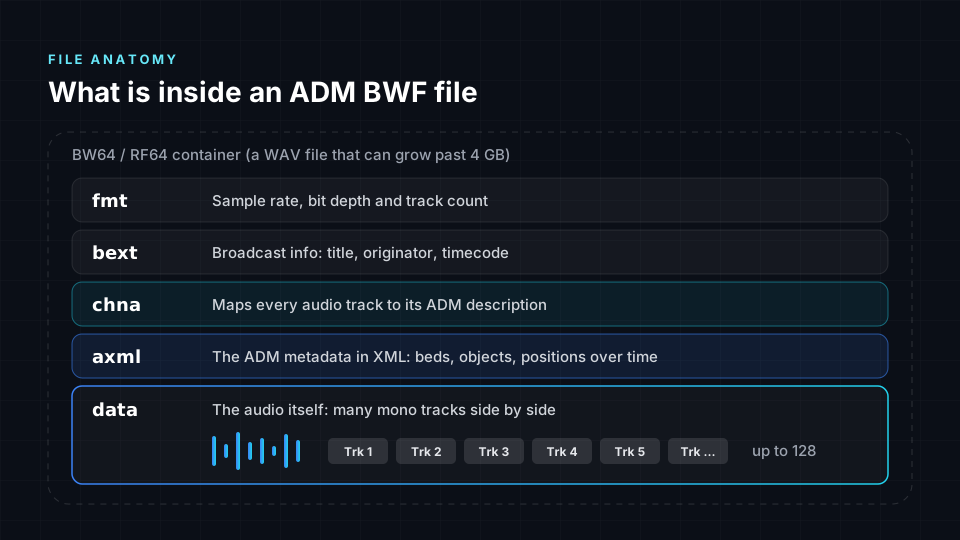
| Chunk | What it contains | Why it matters |
|---|---|---|
| fmt | Sample rate, bit depth and number of tracks | Lets software read the audio correctly |
| bext | Broadcast information such as title, originator and timecode | Keeps the file identifiable and in sync |
| chna | A map linking every audio track to its ADM description | Connects real audio to the 3D instructions |
| axml | The ADM metadata itself, written in XML | Describes beds, objects and their positions over time |
| data | The audio: many mono tracks side by side | The actual sound of your mix |
A Dolby Atmos music master delivered as ADM BWF can contain up to 128 tracks, typically 48 kHz and 24-bit. On its own, a standard audio player will just see a very wide WAV file. The magic is in the metadata.
Beds and objects: the two building blocks
Every immersive mix in an ADM file is built from two kinds of audio.
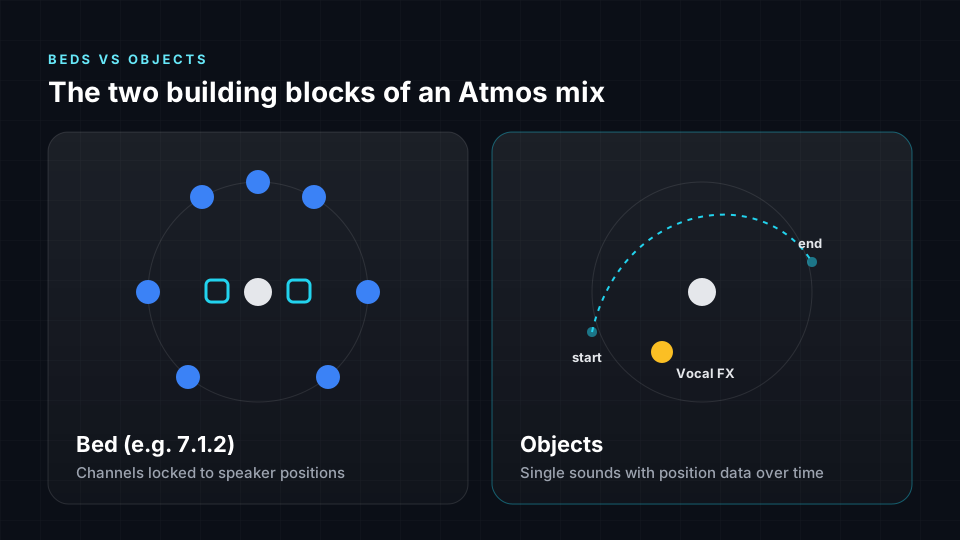
- Beds are channels assigned to fixed speaker positions, such as a 7.1.2 layout. They are ideal for wide ambiences, pads and anything that should simply fill the room.
- Objects are individual sounds with their own position data. When a converter turns objects into a sound field, it uses Ambisonics. A lead vocal, a solo instrument or a sound effect that flies overhead is usually an object.
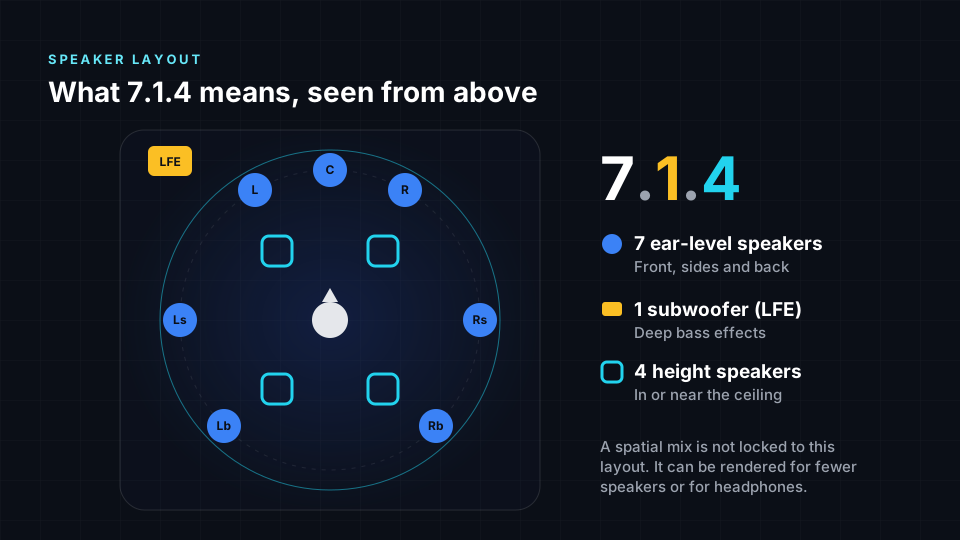
If speaker layouts like 7.1.2 or 7.1.4 are new to you, our complete guide to spatial audio explains what those numbers mean.
How ADM describes a mix
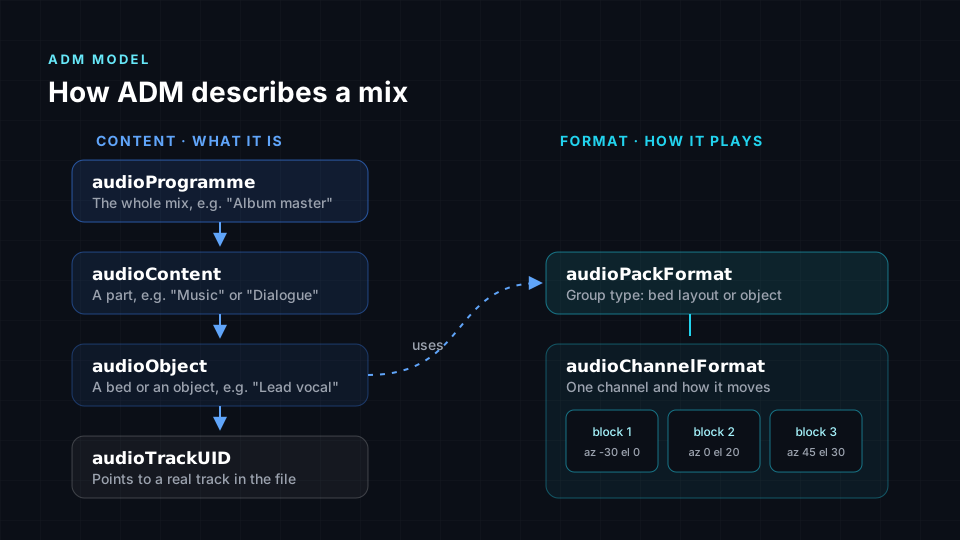
The ADM metadata is organised like a family tree. One side describes what the audio is, the other describes how it should be played.
The content side: what it is
- audioProgramme is the whole mix, for example "Album master".
- audioContent groups parts of it, such as "Music" or "Dialogue".
- audioObject is a single bed or object, for example "Lead vocal".
- audioTrackUID points from an object to an actual track in the file.
The format side: how it plays
- audioPackFormat says what type of group this is: a bed layout or an object.
- audioChannelFormat describes one channel.
- audioBlockFormat stores the position of that channel for a stretch of time. A list of blocks is how movement is recorded.
You never have to edit any of this by hand. Your DAW or Atmos renderer writes it for you when you export. Knowing the structure simply helps you understand why a converter can rebuild your mix so precisely.
How object movement is stored
When you automate a vocal to drift from left to overhead, the ADM file does not store a recording of the movement. It stores a series of time blocks, each with a direction and height.
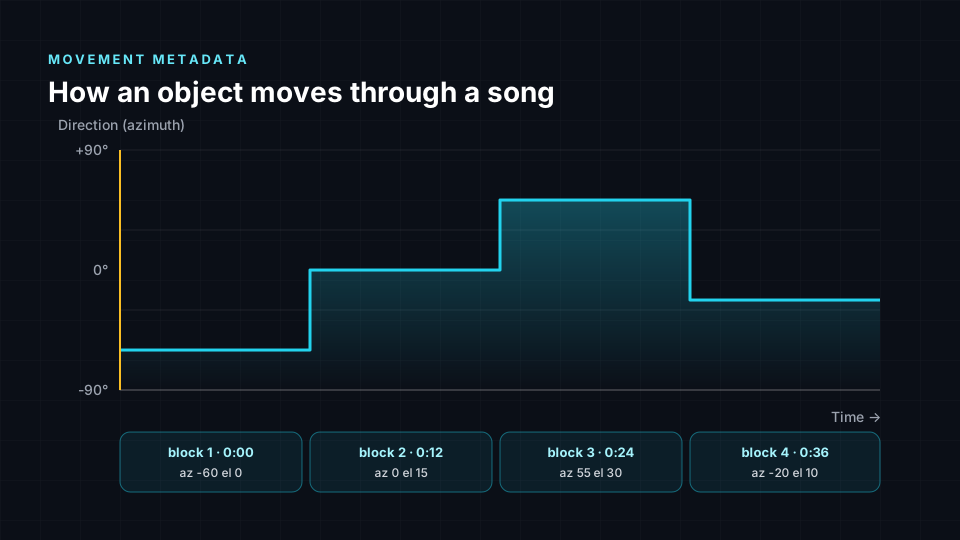
- Azimuth is the direction around you, from the left through the front to the right.
- Elevation is the height above or below ear level.
- Some objects also store distance, size and other properties.
This is exactly the information Spatial9 reads when it converts a mix. Its motion-aware translation follows the blocks over time, so a moving sound keeps moving in the new format instead of freezing in place.
Where the ADM BWF master fits in your workflow
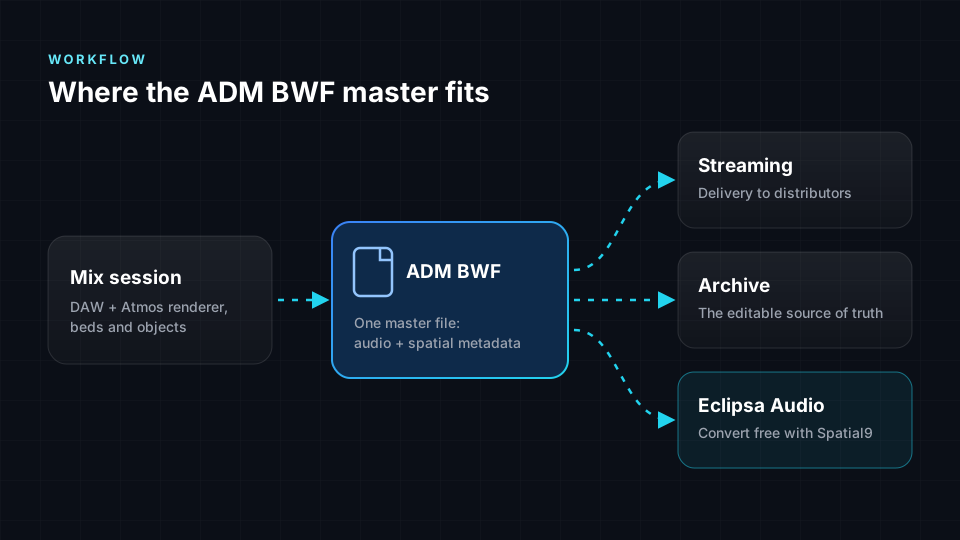
- Mix in your DAW with an immersive renderer, using beds and objects.
- Export a single ADM BWF master containing the audio and the spatial metadata.
- Deliver that master to distributors for immersive music streaming.
- Archive it as your editable source of truth.
- Convert it to new formats. Spatial9 converts ADM BWF masters to Eclipsa Audio for free, ready for YouTube, TVs and soundbars. Follow our step-by-step Atmos to Eclipsa Audio guide.
ADM BWF vs other audio files
| File | What it holds | Spatial information | Typical use |
|---|---|---|---|
| Stereo WAV | Two channels | Left and right only | Standard music masters |
| Multichannel WAV | Several channels, such as 5.1 | Fixed speaker positions only | Surround deliveries |
| ADM BWF | Up to 128 tracks plus ADM metadata | Beds and moving objects in 3D | Immersive masters, including Dolby Atmos |
| Eclipsa Audio (IAMF) | A compressed immersive bitstream | Scene-based sound field and mix metadata | Playback on YouTube, TVs and soundbars |
Common ADM BWF problems and how to avoid them
- Missing metadata. If a file has been opened and re-saved in a tool that does not understand ADM, the chna and axml chunks can be stripped. Always deliver the file exactly as your renderer exported it.
- Wrong file type. Some immersive workflows also produce other proprietary files. These are not the same as ADM BWF, so check that you are sending the right one.
- Sample rate mismatch. Immersive music masters are typically 48 kHz. Exporting at a different rate can cause rejections at delivery.
- Huge files. ADM masters can be several gigabytes. Spatial9 accepts WAV or BWF masters up to 4 GB for conversion.
- Unclear naming. Name objects clearly in your session, such as "Lead Vox" rather than "Audio 14". Those names travel with the metadata and make troubleshooting much easier.
Frequently asked questions
What is an ADM BWF file used for?
It is used to deliver and archive immersive mixes, such as Dolby Atmos music masters. It keeps all the audio tracks and their 3D positions together in one file.
Is an ADM BWF file the same as a Dolby Atmos file?
An ADM BWF file is the open, standard way to deliver a Dolby Atmos mix, but ADM itself is not owned by Dolby. It is an international standard that other immersive workflows can use too.
Can I play an ADM BWF file in a normal audio player?
A normal player may open it as a very wide WAV file, but it will not understand the 3D metadata, so it will not sound like the intended mix. You need an immersive renderer or a converter.
How big is an ADM BWF file?
It depends on the length and number of tracks. A full-length song with many objects can easily be several gigabytes, which is why large masters often use the BW64 or RF64 variant.
Can I convert an ADM BWF file to Eclipsa Audio?
Yes. Spatial9 converts ADM BWF masters to Eclipsa Audio for free in your browser, keeping object movement through motion-aware translation and showing an Intent Fidelity Score so you can check the result.
What is the difference between ADM and S-ADM?
ADM describes a complete file, while S-ADM, or Serial ADM, sends the same kind of metadata in small pieces alongside live audio. S-ADM is mostly used in live broadcast.
Give your ADM masters a second life
Every ADM BWF master in your archive already contains a full immersive mix. Convert one to Eclipsa Audio with Spatial9 and reach listeners on YouTube, TVs and soundbars, at no cost.
Dolby and Dolby Atmos are trademarks of Dolby Laboratories. Spatial9 is not affiliated with or endorsed by Dolby Laboratories.