Best Practices on Exporting Audio Stems
Spatial9 Team · · Updated · 6 min read
Key takeaways
- Export stems as 24-bit WAV at the session sample rate, with Normalize and dither off, and every file starting and ending at the same point.
- Bypass master bus compression and limiting for stems that will be remixed or mixed in 3D, because those processors react to the whole mix.
- Check stems by playing them together against the stereo mix: they should line up, add up to the same sound and never clip.
- Deliver a numbered, clearly named folder with a stereo reference mix and a notes file listing tempo, key, sample rate and how effects were printed.
Stems are the building blocks of every remix, collaboration and immersive mix. A clean stem export means the next person, or the next tool, can rebuild your song without guessing. A careless one means misaligned files, clipped drums and hours of fixing. This guide covers what to prepare, how to export stems in the most common music programs (DAWs), how to check them and how to deliver them.
What counts as a stem?
A stem is a group of related sounds exported as one audio file: all drums, all lead vocals, all keys. It is not the same as a multitrack, which keeps every single recorded track separate. For immersive audio, stems are usually the sweet spot: enough separate parts to place around the listener, few enough to stay manageable.
A good starting set for most songs:
- Lead vocal
- Backing vocals
- Drums (or kick, snare and cymbals separately if the drums matter a lot in your genre)
- Bass
- Harmony instruments such as guitars, keys and pads, ideally in separate stems
- Effects and ear candy such as risers, FX and ambience
Four stems (vocals, drums, bass and other) are enough for a convincing immersive mix. Six or more give more objects to place and a more detailed 3D result. For more on this, see our guide to turning stems into immersive audio.
Prepare the session
Before you export anything:
- Name every track by what it is ("Lead Vox", "Kick", "Rhodes"), not "Audio 14".
- Commit or freeze virtual instruments and any plugin that the receiver will not own, so the sound is printed into audio.
- Check automation is switched on and plays back as intended.
- Set one start point for everything. Start every stem at bar 1 (or at zero) and end every stem at the same point, after the last reverb tail has died away.
- Decide on the master bus. Bypass master bus compression, limiting and clipping for stems that will be remixed or mixed in 3D. Those processors react to the whole mix, so their effect cannot be rebuilt from the separate parts.
- Keep one sample rate and bit depth for the whole session.
Recommended export settings
- Format: WAV (or AIFF), uncompressed. Avoid MP3 and AAC stems, because the compression artifacts are baked into every file.
- Bit depth: 24-bit, or 32-bit float if the receiver asks for it.
- Sample rate: the session rate. 48 kHz is the norm for video and most immersive work, and 44.1 kHz is fine for music-only projects.
- Normalize: off. Normalizing changes each stem's level, so the stems no longer add up to your mix.
- Dither: off at 24-bit or 32-bit float. Dither is only for reducing to 16-bit.
- Effects: print the insert effects that are part of the sound. Either print reverb and delay sends into the stem, or export them as their own "FX returns" stem, and tell the receiver which one you did.
How to export stems in popular DAWs
Menu names change between versions, so treat these as a map and confirm the exact option in your DAW's manual.
- Ableton Live 12: File > Export Audio/Video, then set Rendered Track to "All Individual Tracks". Live creates one file per track, including return tracks, and every file has the same length. Leave Normalize off.
- Logic Pro 11: File > Export > All Tracks as Audio Files. Choose WAV, 24-bit, and include the tail so reverbs are not cut off.
- Pro Tools: select the tracks, right-click a track name and choose Bounce (Track Bounce). Use "Include sends" if the reverb returns should be printed into each stem.
- Cubase 13: File > Export > Audio Mixdown, then select several channels to export each one as a separate file.
- FL Studio: File > Export > WAV file, then enable "Split mixer tracks" so each mixer track is written as its own file.
- Studio One 7: Song > Export Stems, then choose tracks or channels.
- REAPER 7: File > Render, then set Source to "Stems (selected tracks)".
- Bitwig Studio 5: File > Export Audio, then choose the tracks to export as separate files.
- Reason 13: File > Bounce Mixer Channels.
- GarageBand: there is no one-click stem export. Solo each group of tracks and use Share > Export Song to Disk, keeping the same start and end for every export.
Check your stems before you send them
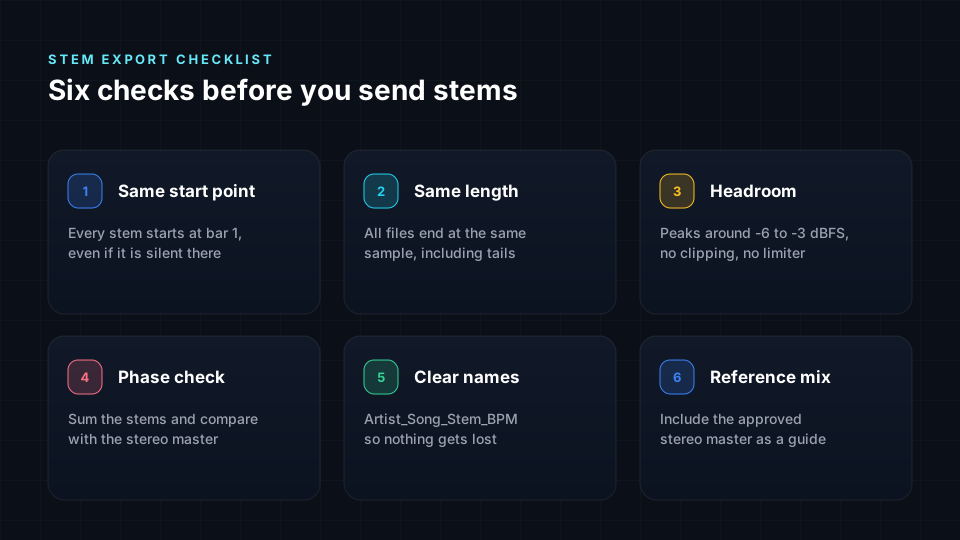
- Alignment. Import every stem into an empty session at zero. They should all start and end together.
- The sum test. Play all stems together at unity gain and compare them with your stereo mix. They should sound the same, apart from any master bus processing you bypassed.
- Headroom. No stem should clip. Peaks at around -6 dB to -3 dBFS leave room for the next stage.
- Phase and polarity. Listen for thin or hollow sound when stems play together, especially with several drum microphones.
- Tails. Check that reverbs, delays and the final note ring out completely.
- Names. Every file name should say what is in it.
Package and deliver
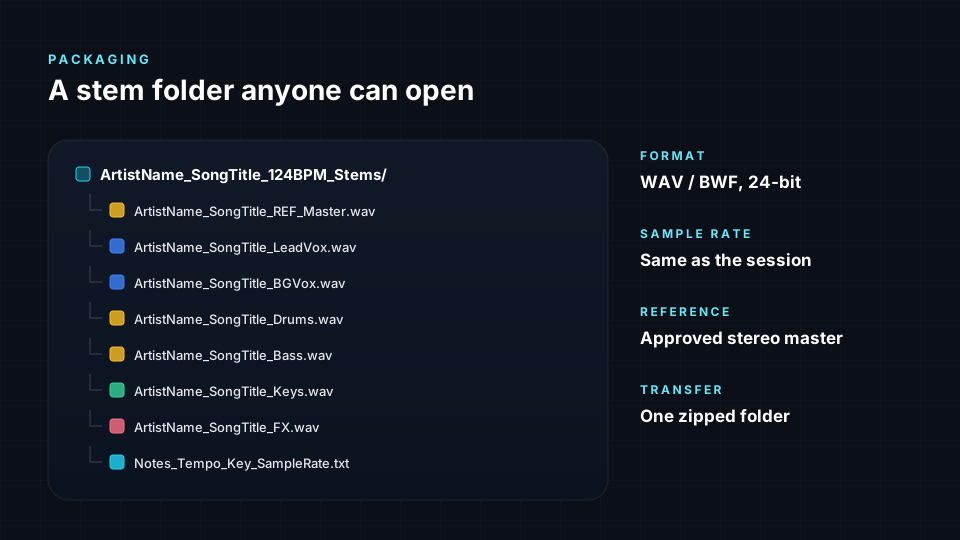
- Folder name: project, content and date, for example "ProjectName_Stems_2025-04-18_StudioName".
- File names: a number and the content, such as "01_LeadVox.wav", "02_BGVox.wav" and "03_Drums.wav", so files sort the same way everywhere.
- Reference mix: always include the stereo mix, exported with the same start point as the stems.
- A short notes file: tempo, key, sample rate, bit depth and whether effects are printed.
- Transfer: zip the folder (which compresses without loss) and send it with a service that confirms the files arrived complete.
Limitations to keep in mind
- Stems are not a perfect recreation of your mix. Master bus processing, and any sidechain compression triggered by a part that sits in another stem, behave differently once the parts are separate.
- Printed effects are permanent. A reverb printed into a stem cannot be removed later, which limits how freely that part can move in an immersive mix. If you are not sure, export the effect returns separately.
- More stems are not always better. Dozens of tiny stems slow everyone down. Group parts that always play together.
- Rights still apply. Sharing stems does not give anyone permission to release them. Agree the terms in writing first.
- Store rules on how a mix is made. Apple Music, for example, does not accept a Dolby Atmos mix made from a stereo release or from stems extracted from one. Check the rules of each store before you choose a workflow (see our guide to where you can publish spatial audio).
Next steps
Clean stems are the best way to start an immersive mix. You can upload them to Spatial9 to place every part in 3D and export Eclipsa Audio, ADM, binaural and more. If you only have a stereo master, read how to create spatial audio from stereo.
Sources
- Managing Files and Sets: exporting audio and video, Ableton Live 12 Reference Manual. Rendered Track options, including All Individual Tracks, and the Normalize setting.
- Delivering Dolby Atmos audio, Apple Music Provider Support. Rules on how an Atmos mix may be made.
- Menu paths for other DAWs come from each program's current user guide. Check your own version, because menu names change between releases.