How to Convert a Dolby Atmos Mix to Eclipsa Audio: Free Step-by-Step Guide
Spatial9 Team · · Updated
If you mix in Dolby Atmos, you already own the hardest part of an immersive release: a finished 3D mix. Eclipsa Audio, the open 3D audio format from Google and Samsung, now gives that mix a new home on YouTube and on a growing range of TVs and soundbars. This guide shows exactly how to get from one to the other, what happens to your beds and objects along the way, and how to check the result before you deliver it.
Why convert Dolby Atmos to Eclipsa Audio?
Most studios deliver Atmos masters to music distributors and stop there. Converting the same master to Eclipsa Audio adds a second immersive release with almost no extra work.
- A new audience on YouTube. YouTube accepts Eclipsa Audio uploads, so a song or live session you already mixed in Atmos can play in 3D for viewers on supported devices. Read our guide to Eclipsa Audio on YouTube for the creator side of the story.
- TVs and soundbars. Eclipsa Audio is backed by Samsung and built into a growing range of televisions and soundbars, so your mix can reach the living room.
- Royalty-free. Eclipsa Audio is built on IAMF, an open standard from the Alliance for Open Media. Nobody pays licensing fees to create, distribute or play it.
- More value from every session. For studios, an Eclipsa Audio version is a new line on the delivery menu, created from masters you have already finished and been paid for.
Dolby Atmos vs Eclipsa Audio: what is the difference?
Both formats describe sound in three dimensions, but they are built differently and live in different places. Understanding the difference explains why a simple file rename is not enough and why a proper conversion matters.
| Dolby Atmos (music master) | Eclipsa Audio | |
|---|---|---|
| Built on | Dolby's proprietary object-based system | IAMF, an open standard from the Alliance for Open Media |
| Licensing | Licensed technology | Royalty-free |
| How sound is described | Beds (fixed channels) plus objects with position data | Audio elements such as a scene-based Ambisonics sound field, with mixing metadata |
| Typical master file | ADM BWF (a large multichannel WAV) | IAMF bitstream, often inside an MP4 |
| Where it plays | Music streaming services, cinemas, Atmos-enabled devices | YouTube, supported TVs and soundbars, apps with an IAMF decoder |
| Best for | Studio mixing and music distribution | Open, wide distribution including online video |
If you want a deeper look at the source file itself, our guide What is an ADM BWF file? explains every part of it in plain language. For a deeper technical breakdown of bitstreams, codecs and rendering, read Eclipsa Audio vs Dolby Atmos.
What happens to your beds and objects
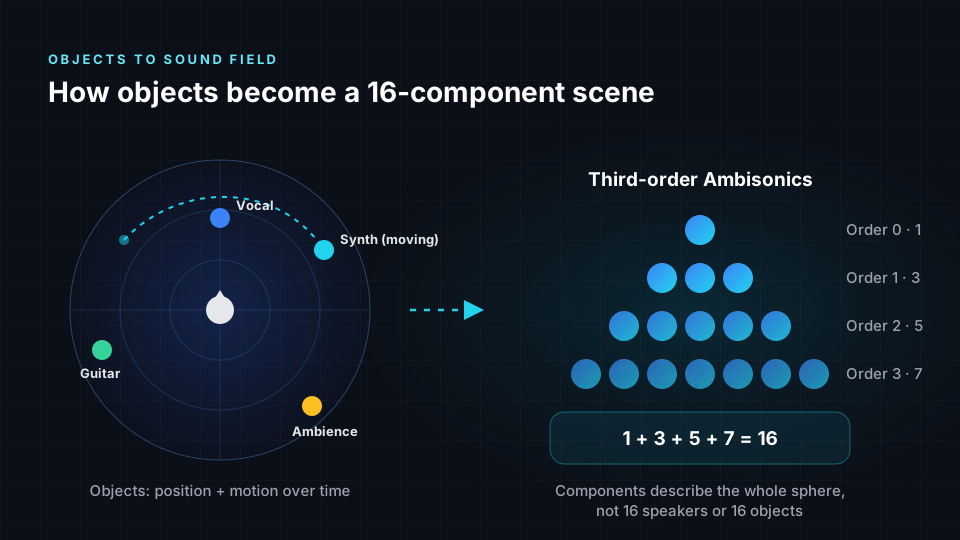
An Atmos mix is made of two building blocks. Beds are channels locked to speaker positions, such as a 7.1.2 layout. Objects are individual sounds, like a lead vocal or a sweeping synth, that carry their own position data and can move during the song.
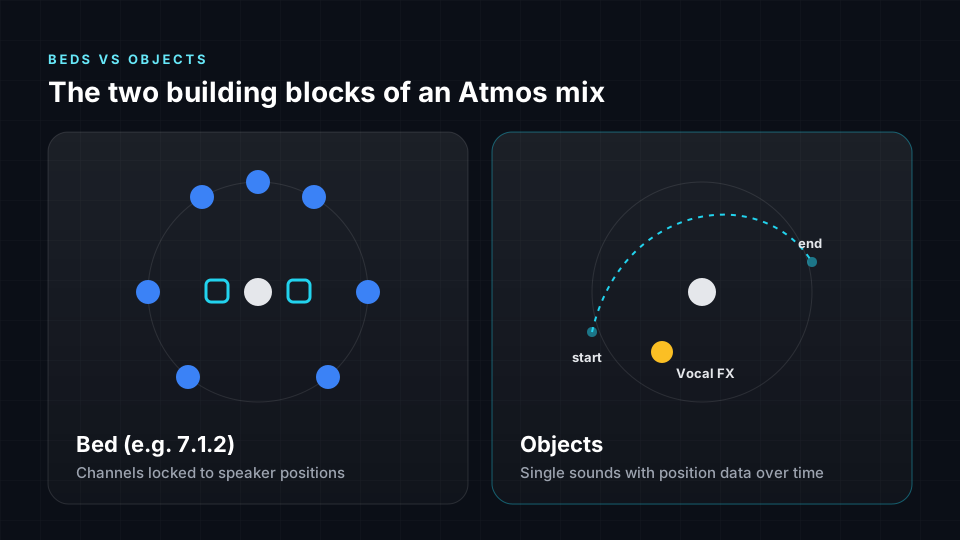
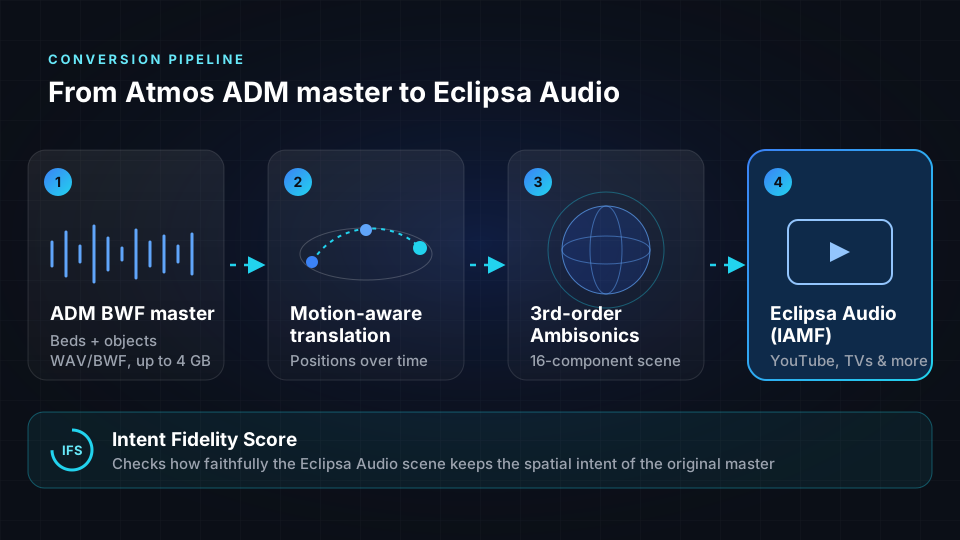
A naive conversion would simply render the mix down to a fixed speaker layout and lose the motion. Spatial9 does something different. It reads the supported object positions in your ADM master and how they change over time, then places every sound into a full 3D sound field. We call this motion-aware translation: a synth that sweeps from the rear left to the front right in your Atmos mix still sweeps the same way in the Eclipsa Audio version.
Why third-order Ambisonics?
The converted scene is stored as third-order Ambisonics, a way of describing the entire sphere of sound around the listener using 16 components. Those 16 components are not 16 speakers or 16 objects. They are layers of detail that, together, describe where sound comes from in every direction. Because the scene is not tied to a speaker layout, each device can render it for its own speakers or for headphones.
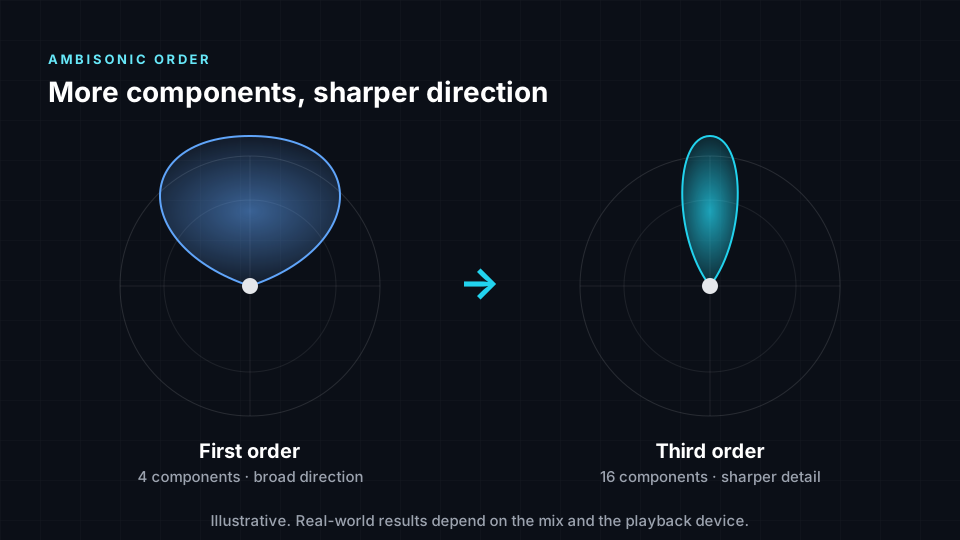
Higher orders add finer directional detail. First-order Ambisonics, which uses only four components, gives a broad sense of direction. Third order gives a noticeably sharper picture of where each sound sits. For a full introduction, read Ambisonics explained.
How to convert Dolby Atmos to Eclipsa Audio, step by step
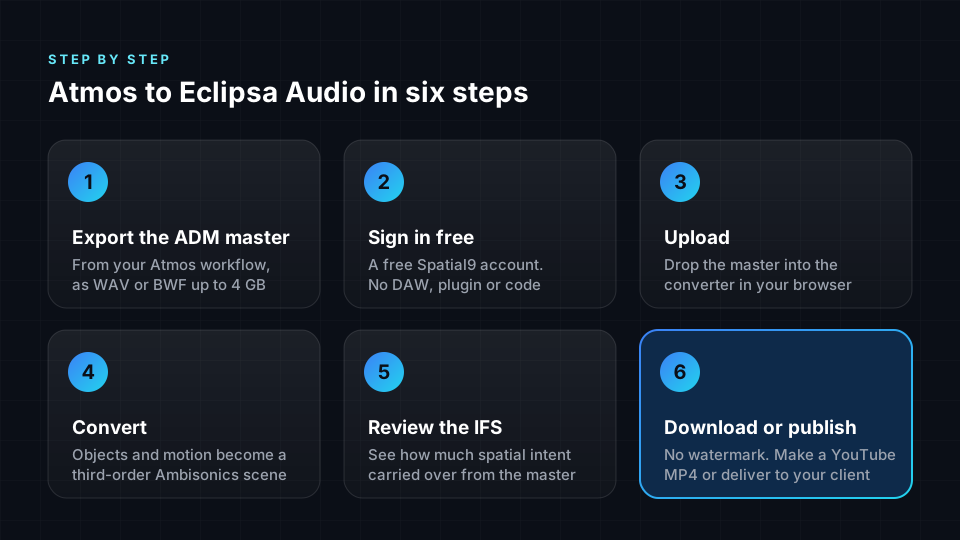
Here is the full process. Most engineers finish their first conversion in a few minutes, and the only thing you need besides your master is a web browser.
Step 1: Export your mix as an ADM BWF master
Finish your mix in your usual Atmos workflow, then export an ADM BWF master. Most Atmos-capable DAWs and renderers can export this format; it is the same master many distributors already ask for. Export it as WAV or BWF, up to 4 GB.
Other Dolby-branded delivery formats are not automatically interchangeable with an ADM master, so if you only have a different file type, go back to the session and export ADM BWF.
Step 2: Sign in with a free Spatial9 account
Create a free account. There is no DAW plugin to install, no command line and no special hardware. Anyone on your team can run a conversion from a laptop.
Step 3: Upload the master
Drop the ADM BWF file into the converter. Spatial9 reads the beds, the objects and their movement metadata from the file.
Step 4: Convert to Eclipsa Audio
Start the conversion. The motion-aware translation turns your beds and objects into a third-order Ambisonics scene and packages it as Eclipsa Audio.
Step 5: Review the Intent Fidelity Score
Before you deliver anything, check the Intent Fidelity Score (IFS). This patent-pending measure compares the converted Eclipsa Audio scene with your original ADM master and shows how faithfully the spatial intent of the mix was preserved.
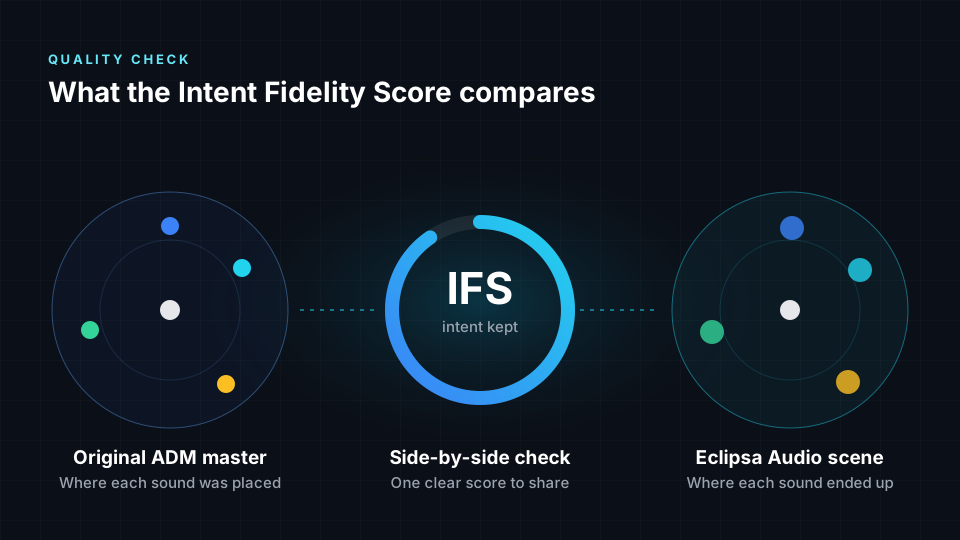
It is a clear, shareable number, which makes it easy to show a client or label that the immersive picture they approved is the one they are getting.
Step 6: Download, make a YouTube video, or deliver
Download the Eclipsa Audio file with no watermark. If the mix is headed for YouTube, Spatial9 can wrap it in a YouTube-ready MP4 using a branded frame, your cover art or your own video, and you can publish straight to YouTube from the same place.
The unique benefits of converting with Spatial9
There are a few ways to get audio into IAMF, from command-line encoders to manual re-mixing. Here is what makes the Spatial9 converter different.
| Benefit | What it means for you |
|---|---|
| Free, no watermark | Convert ADM masters to Eclipsa Audio at no cost, with clean output you can deliver |
| No remix required | Your finished master is the source. No new session and no extra hours in the room |
| Motion-aware translation | Object movement over time carries into the Eclipsa Audio scene instead of being flattened |
| Third-order Ambisonics | A 16-component scene that keeps fine directional detail and adapts to any device |
| Intent Fidelity Score | A patent-pending, shareable score showing how well your spatial intent carried over |
| Browser-based | No DAW, plugin or command line. Masters up to 4 GB |
| YouTube-ready output | Turn the mix into an MP4 with cover art or video and publish directly |
| Built by IAMF insiders | Spatial9 is a member of the Alliance for Open Media, the body behind IAMF |
Spatial9 also debuted the first music rendered in Eclipsa Audio, together with Google and Music AI, at CES 2025. The same team built the converter.
Only have a stereo mix?
Not every song has an Atmos version. For stereo-only material, Spatial9's generative engine creates finished immersive versions from the stereo file and exports them as ADM, Eclipsa Audio, binaural or Ambisonics. GravityLLM decides where each instrument belongs in 3D space, and more than a thousand BPM-synced spatial movements bring the mix to life. Our guide on how to create spatial audio from stereo walks through it.
Tips for the best conversion
- Convert the final approved master. The ADM master stays your editable source; the Eclipsa Audio file is a delivery version, not a lossless copy of it.
- Keep your object movement purposeful. Clear, intentional motion translates beautifully. Very fast, chaotic panning can be harder to follow on any format.
- Listen on more than one device. Eclipsa Audio adapts to the playback system, so a mix will not sound identical on headphones, a phone and a soundbar. Check at least two.
- Share the Intent Fidelity Score. Sending the score with the file gives clients a clear read on how well the spatial intent carried over.
- Archive both files. Keep the ADM master for future edits and the Eclipsa Audio file for distribution.
Who this is for
- Immersive studios that want to deliver an Eclipsa Audio version alongside every Atmos album master.
- Labels and catalog owners sitting on finished Atmos masters that could reach YouTube and TV audiences.
- Artists releasing immersive music videos and live sessions on YouTube.
- Educators who want to show students how ADM objects translate into a third-order Ambisonics scene.
Frequently asked questions
Can I convert Dolby Atmos to Eclipsa Audio for free?
Yes. Spatial9 converts ADM BWF masters to Eclipsa Audio for free, with no watermark on the output. You only need a free account.
What file do I need to convert a Dolby Atmos mix?
You need an ADM BWF master, delivered as a WAV or BWF file up to 4 GB. Other Dolby delivery formats are not automatically interchangeable with an ADM master, so export ADM BWF from your Atmos session first.
Will the Eclipsa Audio version sound exactly like my Atmos mix?
It is designed to keep the spatial intent of your mix, and the Intent Fidelity Score shows how closely it does. It is not a lossless copy of the ADM master, and like any immersive format it will sound slightly different on different devices.
Does object movement survive the conversion?
Yes. Spatial9 uses motion-aware translation, which reads supported object positions and how they change over time, so moving sounds keep moving in the Eclipsa Audio scene.
Can I upload the result to YouTube?
Yes. YouTube accepts Eclipsa Audio uploads. Spatial9 can create a YouTube-ready MP4 with a branded frame, your cover art or your own video, and publish it to YouTube for you.
Do I need special software or a plugin?
No. The whole conversion runs in your web browser. There is no DAW plugin, no command line and no extra hardware.
Start converting your Atmos masters
Every finished Atmos master in your archive is a potential Eclipsa Audio release. Convert one today, check the Intent Fidelity Score, and hear your mix reach a new audience on YouTube and in the living room. Start a free conversion.
Dolby and Dolby Atmos are trademarks of Dolby Laboratories. Spatial9 is not affiliated with or endorsed by Dolby Laboratories.