
How We Hear in 3D: The Science of Spatial Sound
Spatial9 Team ·
Lesson 1 of 14 in Spatial9 Academy, module 1: Foundations. Practice in the demo: Music Transformation.
Close your eyes for a moment. You can still tell where the door is when someone opens it. You know the car is behind you and to the left. You can hear that the rain is above you, on the roof, and not in front of you on the floor.
You do all of this with just two small openings on the sides of your head. No cameras, no sensors, no extra hardware. Your brain reads tiny differences between your two ears and builds a 3D world from them, every waking second.
Every immersive mix you will ever make, for music, film, games or virtual reality, works because of this machinery. When you understand how people hear in 3D, you stop guessing about spatial audio. You start designing for the brain that will actually listen to your work.
This is the first lesson of Spatial9 Academy, and it is the foundation for everything that follows.
What you will learn
- How interaural time difference (ITD) and interaural level difference (ILD) tell you left from right.
- Why the shape of your outer ear gives each direction its own tonal fingerprint, called the HRTF.
- What the cone of confusion is, and how a small turn of the head solves it.
- How you judge elevation and distance, and why the first sound to arrive wins.
- Why headphones and binaural rendering can place sound all around you.
Two ears, two clues: time and level
Imagine a guitarist standing directly to your right. The sound leaves the guitar and reaches your right ear first. To reach your left ear, it has to travel further, around your head. That extra journey takes time.
That delay is the interaural time difference, or ITD. For a human head, the largest possible delay is less than one millisecond. It sounds impossibly small. Yet your auditory system detects differences far smaller than that, and it uses them to place sounds left or right with real precision.
Your head is also an obstacle. High frequencies have short wavelengths, and they cannot bend around the head easily. So the far ear sits in an acoustic shadow and receives a quieter, duller copy of the sound. That is the interaural level difference, or ILD.
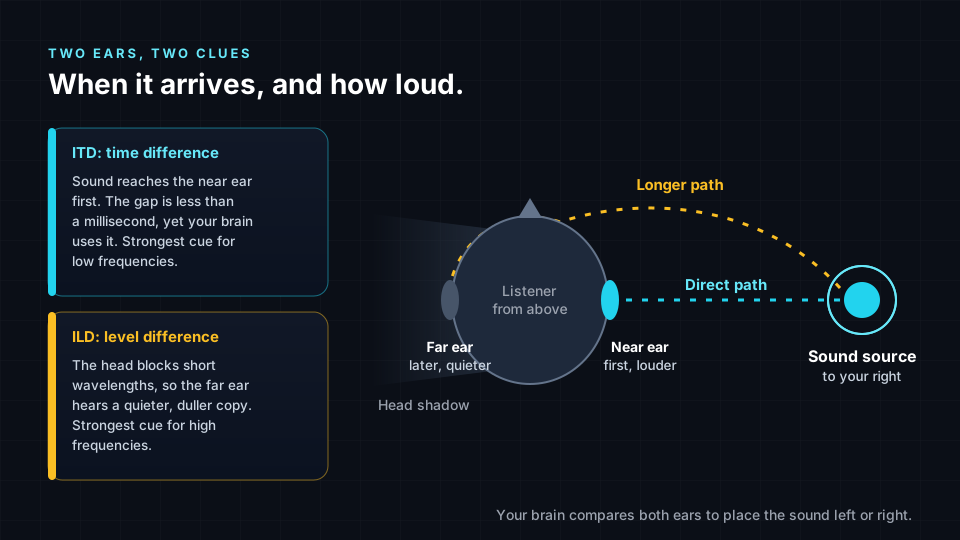
The two cues share the work. Time differences are most useful for low frequencies, where the waveform is long enough for the brain to compare its phase at each ear. Level differences are most useful for high frequencies, where the head shadow is strongest. This division of labor is known as the duplex theory, and it was first described more than a century ago by Lord Rayleigh.
For you as a mixer, this explains something practical. A classic stereo pan pot changes only level. It uses one clue out of several. That is why a panned sound can feel like it sits on a line between two speakers rather than out in the room around you.
Your outer ear is a filter: the HRTF
Time and level tell you left from right. They do not tell you much about front versus back or up versus down. For that, your body has another trick.
The folds of your outer ear, called the pinna, reflect and delay incoming sound in tiny ways. Those reflections combine with the direct sound and create peaks and notches in the frequency spectrum. The pattern changes with direction. A sound from above gets a different spectral fingerprint than a sound from behind. Your head, shoulders and torso add their own small reflections too.
All of this filtering, for one direction and one ear, can be measured and described as a head-related transfer function, or HRTF. A full HRTF set contains measurements for many directions around the head. It is, in a very real sense, the acoustic signature of a person.
You have spent your whole life learning your own HRTF. Your brain knows that a certain notch around the upper frequencies means "this sound is above me". Because every ear is shaped differently, HRTFs differ from person to person. This is one reason binaural audio sounds astonishing to some listeners and a little less convincing to others.
The cone of confusion and the power of a head turn
Here is a puzzle. A sound directly in front of you and a sound directly behind you reach both ears at the same time and at the same level. The ITD and ILD are identical. The same is true for many pairs of points around you.
In fact, for any given ITD and ILD there is a whole cone of possible directions that produce the same values. Scientists call it the cone of confusion. Spectral cues from the pinna help, but they can be ambiguous, especially for unfamiliar sounds.
So the brain uses movement. Turn your head slightly to the left. If the sound is in front, it now moves toward your right ear. If it is behind, it moves toward your left ear. One small turn, and the confusion disappears. You do this constantly without noticing.
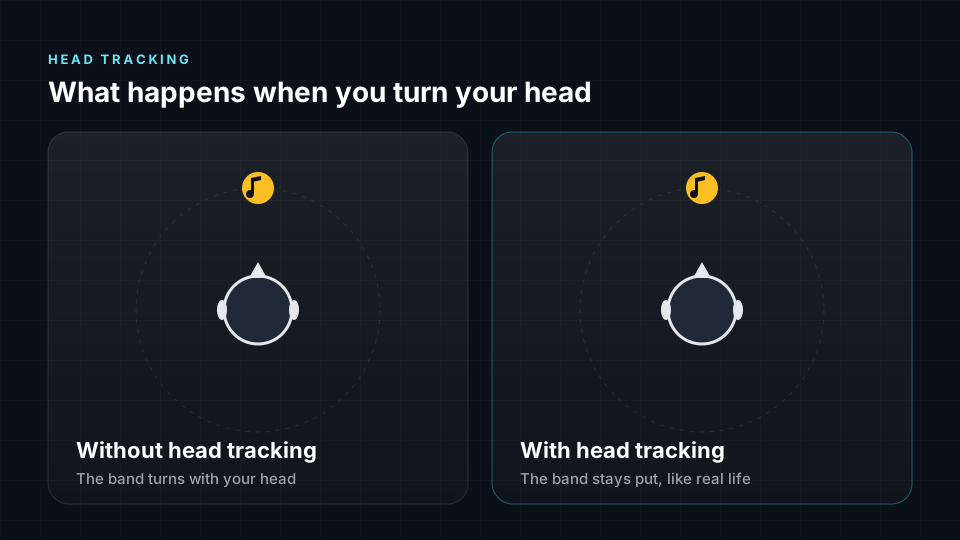
This is why head tracking matters so much in headphone listening. Without it, the whole sound scene turns with your head, which never happens in real life. With it, sounds stay anchored in space. Front and back become clearer, and the mix often feels like it lives outside your head.
Elevation and distance
Elevation is mostly a job for the pinna. Sounds above and below you get different spectral shapes, and your brain has learned to read them. Elevation perception is usually less precise than left-right perception. That is worth remembering when you place height elements in a mix: they need clear, bright content to read as "up".
Distance is not one cue but a bundle of them. Every immersive engineer should know these by heart.
- Level. In open space, a sound gets about 6 dB quieter each time the distance doubles. Familiar sounds help, because you know how loud a voice should be.
- Direct-to-reverberant ratio. Close sounds are mostly direct sound. Far sounds carry more room reflections relative to the direct sound. This is one of the strongest distance cues indoors.
- High-frequency loss. Air absorbs high frequencies over long distances, so very distant sounds become darker.
- Near-field effects. Very close to the head, level differences between the ears grow large, which is why a whisper right next to your ear feels so intimate.
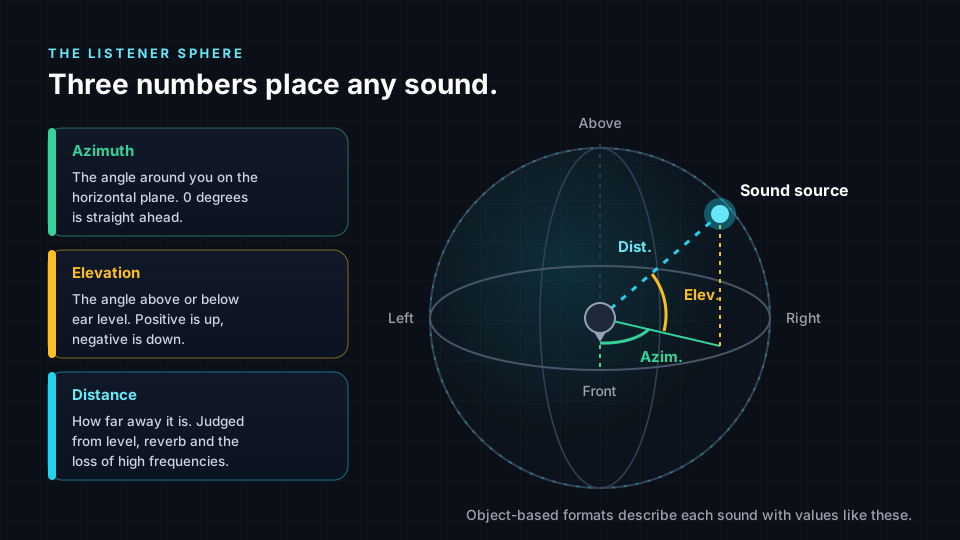
These three numbers, azimuth, elevation and distance, are the coordinates of the listener sphere. You will meet them again in every lesson. Object-based formats describe sounds with positions like these, and Spatial9's AI model, GravityLLM, generates spatial arrangements in exactly these terms: where each source sits, how far away it is, how high it is, and how it moves.
The first sound wins: the precedence effect
In a real room, you hear a direct sound followed by many reflections from walls, floor and ceiling. Each reflection comes from a different direction. So why does a voice not seem to come from everywhere at once?
Because of the precedence effect. When the same sound arrives from several directions within a short window, roughly a few tens of milliseconds, your brain places it where the first arrival came from. The later copies add loudness and a sense of space, but they do not pull the location away.
This matters in production. Short delays between speakers can shift where a sound appears to come from. Early reflections in a reverb can add size without blurring position. When delays get longer, the echoes start to separate and are heard as distinct repeats.
Why headphones can recreate 3D sound
Everything you hear arrives at just two points: your left and right eardrums. If you could deliver exactly the right signal to each eardrum, with the right timing, level and spectral filtering, your brain would have no way to tell it apart from a real sound in a real place.
That is the idea behind binaural rendering. A renderer takes a sound and a desired direction, applies the HRTF for that direction to create a left and a right signal, and plays them over headphones. Add the right distance cues and some head tracking, and sounds can appear in front of you, behind you and above you, using nothing but ordinary headphones.
Generic HRTFs are not a perfect match for every ear, so results vary from person to person. Even so, binaural is the most accessible way for most listeners to experience immersive sound today. If you want to go deeper, read our guide to binaural versus spatial audio and the overview What is spatial audio?.
Try it in the demo
Put on headphones before you start. Over speakers, binaural cues are smeared by the room and the effect largely disappears. The page itself shows the notice "Best Experienced with Headphones" for exactly this reason. Music Transformation carries the status badge Live, so everything below runs for real in your browser.
- Open /demo/music. Under "Choose a mode", select the tile "3D Spatial Audio".
- Find the main panel "3D Spatial Audio Engine". It shows "23 stems · 125 BPM · Real-time 3D positioning" and an "Electronic Dance Music" track.
- In "Master Controls", keep "Volume" at a comfortable level and press play. Listen for 30 seconds with your eyes closed. Try to point to where individual sounds sit.
- Switch the "Spatial Audio" toggle off. Now you hear the stems without 3D positioning. Notice how the sound collapses toward the inside of your head. Switch it back on and listen for the space opening up again.
- In "Stems (23)", use the speaker icons to mute everything except "Reese Bass". Listen to where it sits. Then solo "Synth Arp" the same way, then "Impact 1". Compare their positions. Which one feels highest? Which feels furthest away?
- Click a stem to select it and use its own volume slider. Lower it gradually and notice whether it feels further away or just quieter. Level alone is only one distance cue.
- Try the head tracking control below "Master Controls". Turn your head slowly and listen for whether sounds stay anchored in space.
- Find the "Hearing Accessibility" banner and press "Configure". Build a personalized hearing compensation profile, then use the Active/Inactive toggle and "Edit Profile" to compare. Hearing is personal, and good spatial audio should respect that.
Key terms
| Term | Meaning |
|---|---|
| ITD | Interaural time difference: the arrival time difference between the two ears. |
| ILD | Interaural level difference: the level difference between the ears, caused mainly by the head shadow. |
| Pinna | The visible outer ear, whose folds filter sound differently for each direction. |
| HRTF | Head-related transfer function: how head, ears and torso filter sound from a given direction. |
| Cone of confusion | The set of directions that produce identical ITD and ILD values. |
| Direct-to-reverberant ratio | The balance of direct sound to room reflections, a strong distance cue. |
| Precedence effect | The brain localizes a sound by its first arrival and suppresses the direction of early echoes. |
| Binaural rendering | Creating a two-channel headphone signal that carries 3D cues, usually by applying HRTFs. |
Check your understanding
- Which cue is most useful for low frequencies, and which for high frequencies?
- Why can the ITD and ILD alone not tell front from back?
- Name three cues the brain uses to judge distance.
- What does the precedence effect predict when the same sound arrives from two directions 5 ms apart?
- Why does head tracking make binaural audio more convincing?
Answers
- ITD is most useful for low frequencies, and ILD for high frequencies, where the head shadow is strongest.
- Many directions on the cone of confusion, including front and back pairs, produce identical time and level differences.
- Level, direct-to-reverberant ratio and high-frequency loss. Near-field level differences and familiarity also help.
- You hear one sound, located in the direction of the first arrival.
- It keeps sounds anchored in space as you move, which resolves front-back confusion and helps sounds feel outside the head.
Assignment
Make a "spatial listening diary". Record a two-minute binaural or stereo field recording somewhere busy, such as a station, cafe or park, or use the demo track if you cannot record. Then write a one-page analysis that lists at least eight sounds and describes for each one its azimuth, elevation and distance, plus the cue you think you relied on most (ITD, ILD, spectral, level, reverb or movement). Finish with three sentences on which positions were hardest to judge and why. Deliver it as a PDF with a sketch of the listener sphere and your sounds marked on it.
Frequently asked questions
How do humans hear sound in 3D with only two ears?
The brain compares the signals at both ears for time differences (ITD) and level differences (ILD), reads the direction-dependent filtering of the outer ear (the HRTF), uses distance cues such as level and reverb, and refines everything with small head movements.
What is an HRTF in simple terms?
A head-related transfer function describes how your head, outer ears and torso change a sound arriving from a particular direction before it reaches your eardrum, and binaural renderers use HRTFs to make headphone audio sound like it comes from that direction.
Why does spatial audio sometimes sound like it is inside my head?
This usually happens when the cues do not match your own ears closely enough, when there are few room or distance cues, or when there is no head tracking, so trying a different renderer, adding head tracking or listening to content with natural reverb often helps sounds move outside the head.
Do I need special headphones for binaural audio?
No, any decent pair of stereo headphones or earbuds can play binaural audio, because the 3D cues are already encoded in the two channels, although head tracking requires a device and app that support it.
Next step
You now know how the brain builds a 3D world from two ears. In the next lesson, From Mono to Immersive: A Short History of Spatial Audio, you will see how engineers spent more than a century learning to recreate that world, one barrier at a time. You can always return to the Spatial9 Academy course home to see the full path.