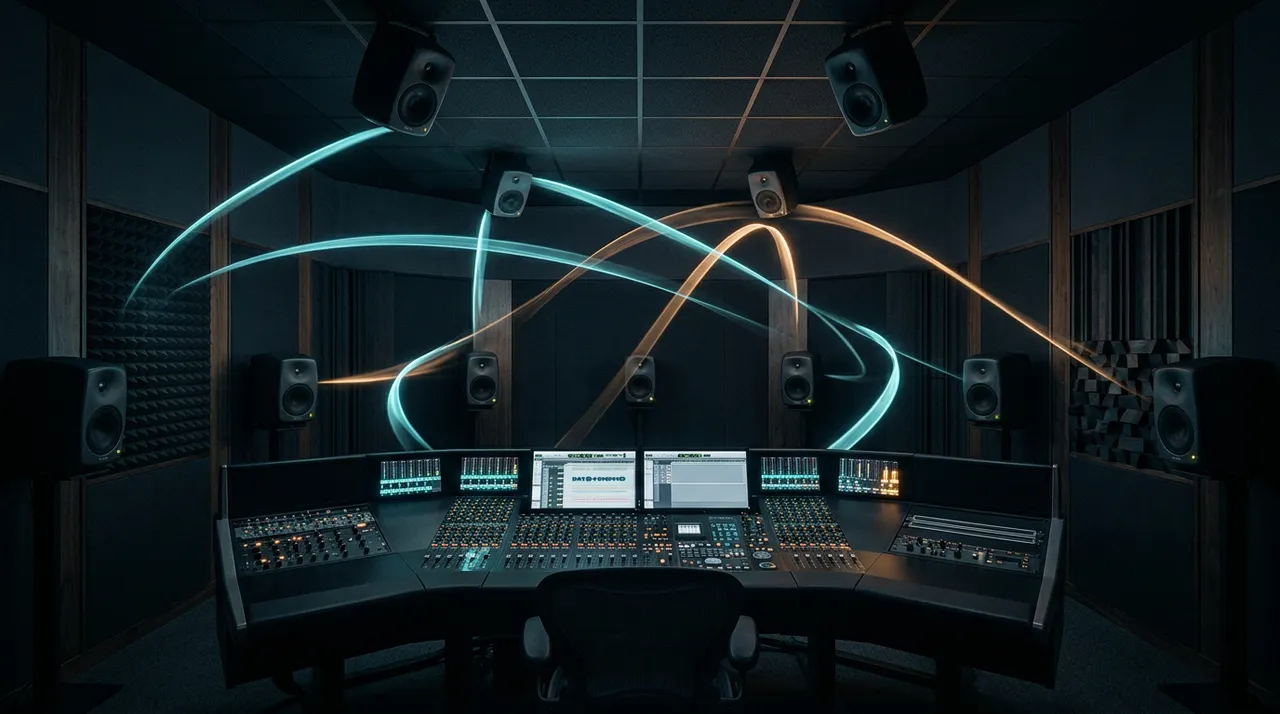
Immersive and Spatial Audio Mixing: The Complete Guide for Music, Film, Video, Podcasts and Games
Spatial9 Research Team · · 20 min read
Key takeaways
- Immersive and spatial audio mixing places sounds around and above the listener instead of only left and right. It is delivered as channels, objects, ambisonic scenes or binaural headphone audio.
- Your brain locates sound using three cues: timing between the ears, level between the ears and the shape of your outer ear. Good spatial mixes respect all three.
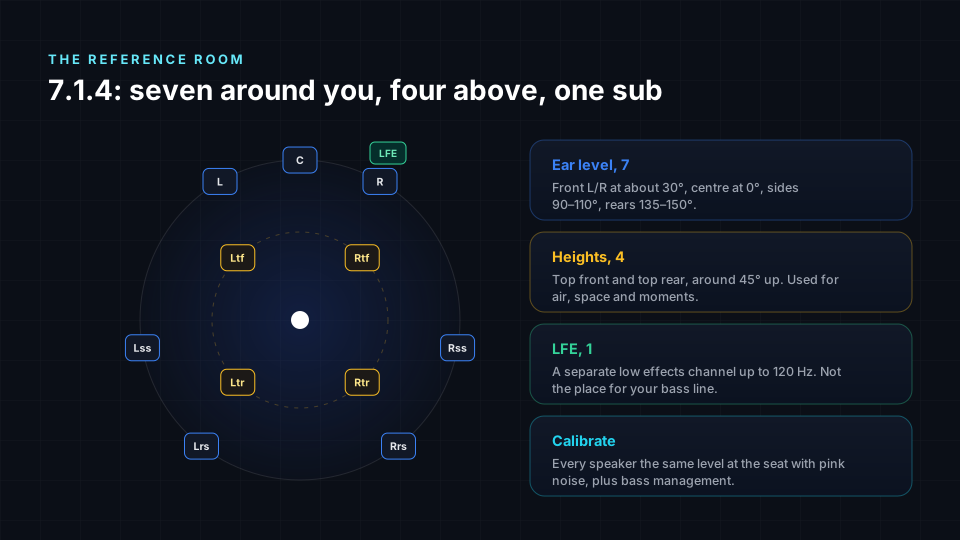
- 7.1.4 is the reference room: seven speakers around you, four above, one subwoofer. Mix there or on calibrated headphones with a trusted binaural renderer.
- In Dolby Atmos, a 7.1.2 bed of 10 channels plus up to 118 objects make up 128 inputs. Use the bed for the foundation and objects for sounds that need precise position or movement.
- Keep a strong front spine: lead vocal, kick, snare and bass anchored in front and centre. Use sides, rears and heights for space, width and moments.
- Motion should mean something. Slow, purposeful moves feel immersive; constant spinning causes fatigue and breaks on headphones.
- Immersive music for streaming is usually delivered at -18 LKFS integrated with true peaks at or below -1 dBTP. Broadcast and film follow their own standards.
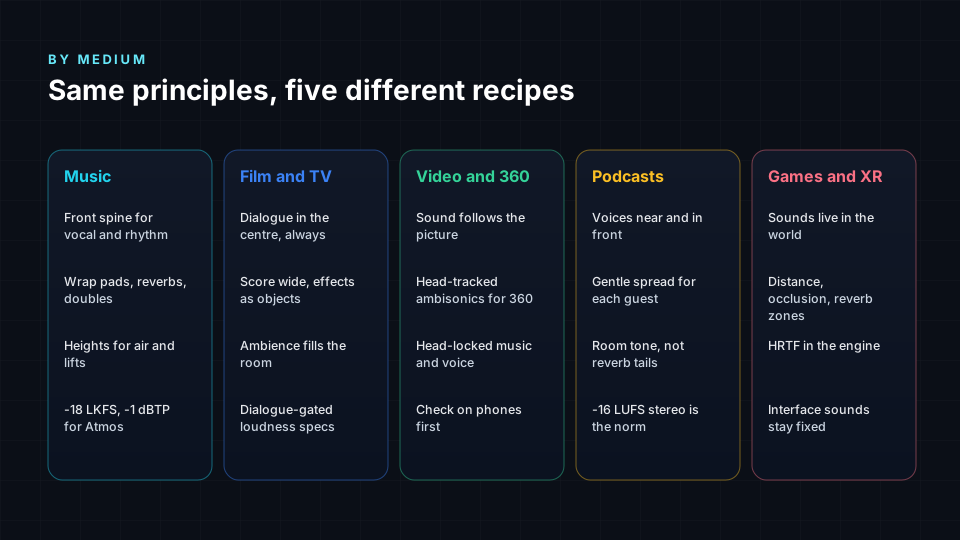
- Every medium has its own recipe: music builds a front spine, film keeps dialogue in the centre, 360 video follows the picture, podcasts keep voices close and games place sound in a living world.
- Most people will hear your mix on headphones, earbuds, soundbars or in a car. Check the binaural render, stereo fold-down and small speakers before delivery.
- Deliver an ADM BWF master, an IAMF file where needed, a binaural render, a stereo version, stems and a QC report so every platform and client gets what they need.

Stereo gave us a line. Immersive audio gives us a room.
For decades, mixing meant deciding where a sound sits between two speakers, how loud it is and how far away it feels. Immersive and spatial audio adds two whole dimensions: behind you and above you. Suddenly a choir can surround the listener, a synth can rise over their head, rain can fall from the ceiling, and a whispered line can sit right at their shoulder.
That freedom is exciting, and it is also where most first immersive mixes go wrong. Too much movement, too little focus, a lead vocal that wanders, a mix that sounds amazing in a studio and thin on earbuds.
This guide is the full picture. It covers how we actually hear in 3D, the formats you will meet, the reference room, how to think about beds and objects, where to put each sound, how to use motion, loudness targets, recipes for music, film, video, podcasts and games, how to make a mix translate everywhere and what to deliver at the end. It is written for musicians, producers, engineers, video creators and podcasters who want their work to sound like it belongs in the space.
If you want a tighter checklist just for music, read our companion article on immersive and spatial music mixing best practices. If you are new to the topic, start with what spatial audio is.
What is immersive and spatial audio mixing?
Immersive audio is sound that surrounds the listener in three dimensions, including height. Spatial audio is the wider family of techniques that make sound appear to come from specific places in space, on speakers or on headphones. In everyday use, the two terms mean nearly the same thing, and many platforms use them interchangeably: Apple calls it Spatial Audio, Dolby calls its format Dolby Atmos, Google and Samsung call theirs Eclipsa Audio, and the open standard underneath it is IAMF.
Immersive mixing is the job of deciding, for every sound in a project:
- Where it sits: front, side, rear, above, near or far.
- How big it is: a pinpoint, a wide wall or a whole room.
- Whether it moves, and if so, why, how fast and where to.
- How loud it is in the full mix and how loud the full mix is.
- How it translates to every way people will actually listen.
There are four main ways to describe and deliver sound in space. Real projects often combine them.
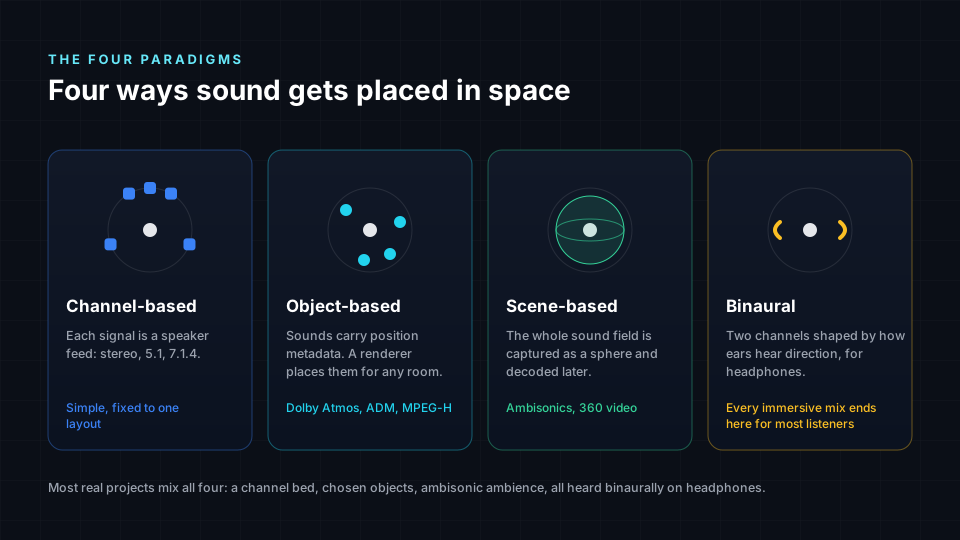
| Approach | How it works | Typical formats | Best for |
|---|---|---|---|
| Channel based | Each signal feeds a specific speaker | Stereo, 5.1, 7.1.4 | Fixed speaker layouts, beds |
| Object based | Sounds carry position metadata, a renderer places them for any room | Dolby Atmos, ADM BWF, MPEG-H, IAMF | Music, film, streaming |
| Scene based | The whole sound field is captured as a sphere and decoded later | Ambisonics (first to higher order) | 360 video, VR, field recording |
| Binaural | Two channels shaped by how ears hear direction | Headphone renders, Apple Spatial Audio | Headphones, phones, most listeners |
The key idea: in object-based audio you are not mixing for speakers, you are mixing positions. A renderer turns those positions into whatever the listener has, from a 9.1.6 cinema to a pair of earbuds. That is why one immersive master can serve so many devices, and why checking the renders matters so much.
How we hear in 3D (the 60 second version)
You cannot mix space well without knowing what your brain listens for. Three cues do most of the work.
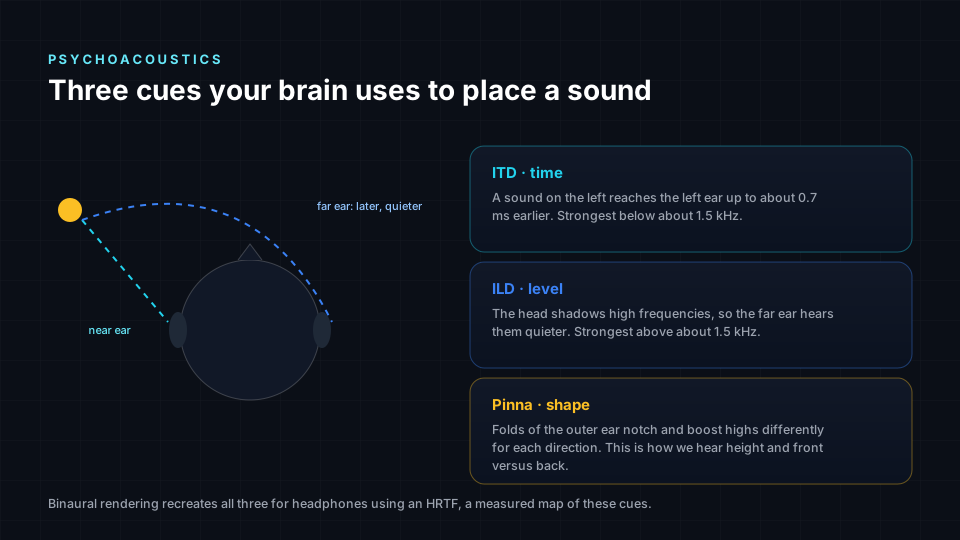
- Interaural time difference (ITD). A sound from your right reaches your right ear a fraction of a millisecond before your left, up to about 0.7 ms. Your brain uses this mostly for low and mid frequencies.
- Interaural level difference (ILD). Your head casts a shadow, so the far ear hears high frequencies more quietly. This matters most above roughly 1.5 kHz.
- Spectral cues from the outer ear (pinna). The folds of your ear filter sound differently depending on whether it comes from in front, behind or above. These cues live mostly above 4 to 5 kHz and are how you tell front from back and up from down.
What this means for mixing:
- Height needs high frequencies. A dull pad will not sound like it is above you, even in a height speaker. Brightness and air help sounds lift.
- Front and back can confuse. On headphones especially, sounds placed directly behind can flip to the front. Slightly off-axis rear positions are more reliable than dead centre rear.
- Low frequencies are hard to locate. Bass below about 100 Hz does not give a strong sense of direction, which is why the subwoofer can sit anywhere and why panning a bass line around the room achieves very little.
- Head movement resolves ambiguity. Head tracking on headphones helps the brain lock the sound field in place. That is one reason why a good binaural render with tracking can feel so real.
Binaural audio recreates all three cues in two channels using a head-related transfer function (HRTF), a filter set describing how sound reaches the ears from every direction. When you hear a binaural render, you are hearing a model of a head. Generic HRTFs work for most people, personalised ones work better, and that difference is part of why the same mix can feel stunning to one listener and vague to another. For more, see binaural vs spatial audio.
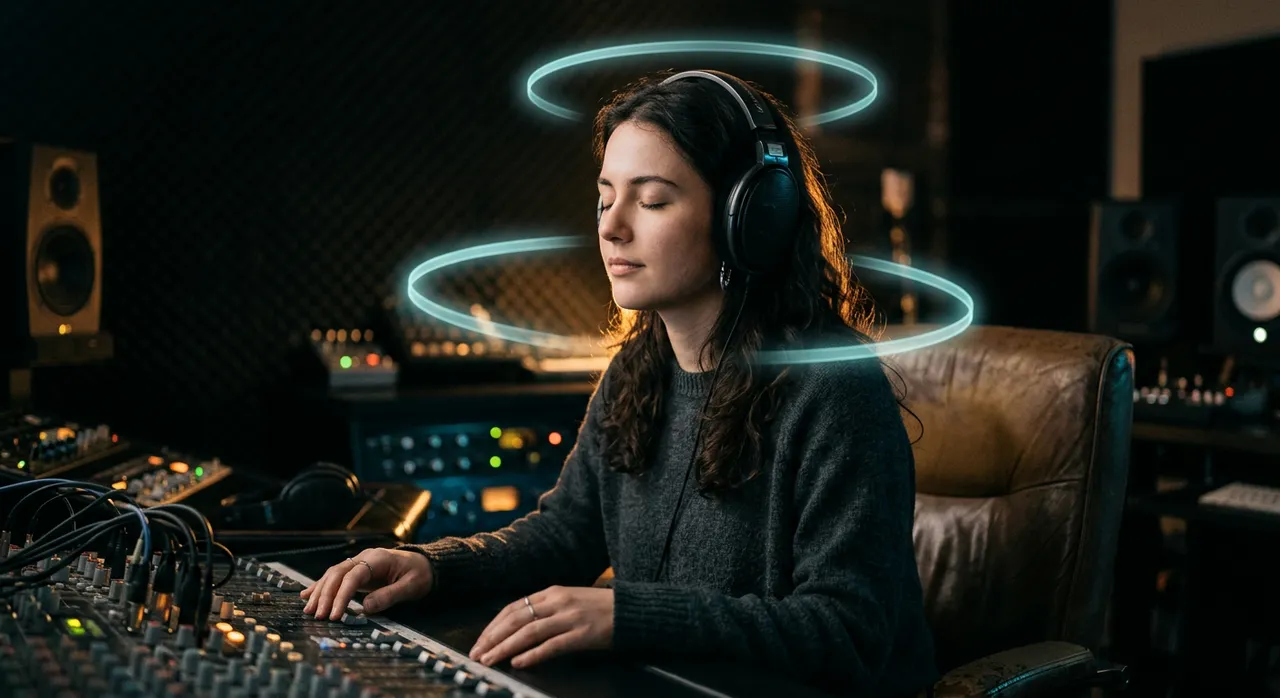
The reference room: 7.1.4
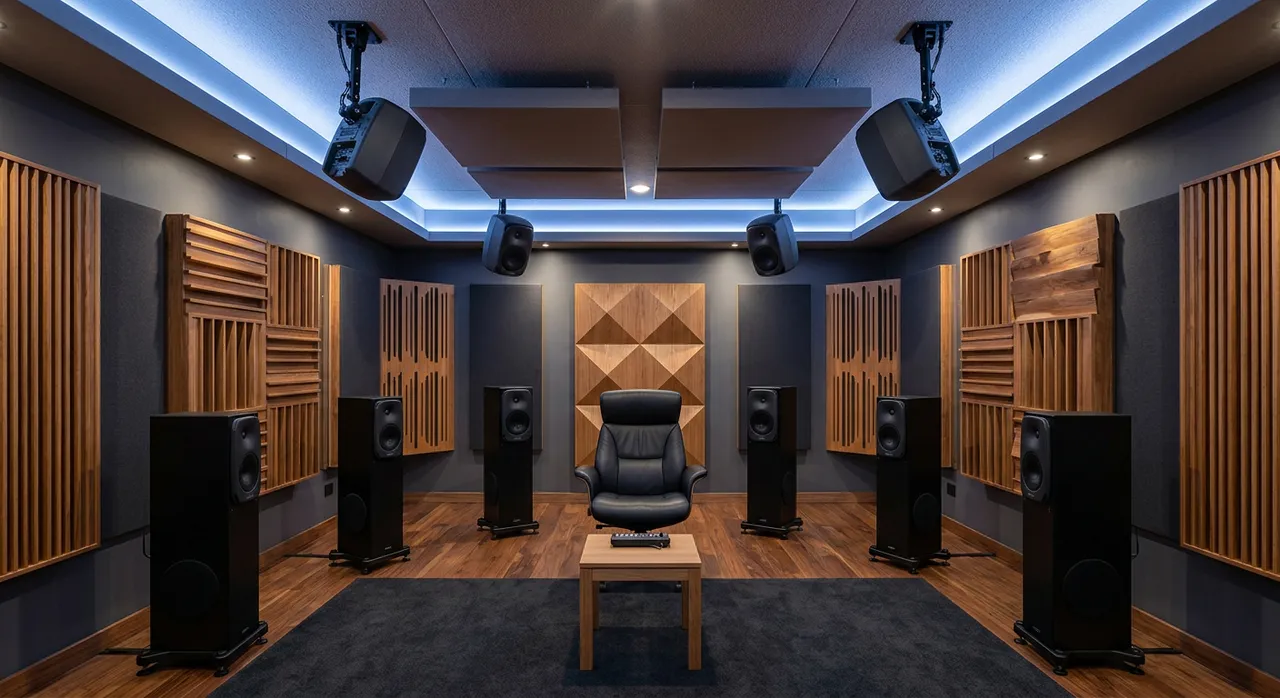
For professional immersive music, the common reference is a 7.1.4 speaker layout: seven speakers around you at ear level, four above you and one subwoofer for low effects.
| Position | Speakers | Typical angle | Mix role |
|---|---|---|---|
| Front | L, C, R | C at 0 degrees, L and R at about 30 degrees | Focus, vocals, rhythm, dialogue |
| Sides | Lss, Rss | About 90 to 110 degrees | Width, wrap, doubles |
| Rears | Lrs, Rrs | About 135 to 150 degrees | Depth, ambience, reverb returns |
| Heights | Ltf, Rtf, Ltr, Rtr | About 45 degrees up | Air, space, special moments |
| LFE | 1 | Anywhere | Extra low effects up to 120 Hz |
Three practical notes:
- Calibrate. Each speaker should play pink noise at the same level at your listening position, with bass management sending low content to the sub. Uncalibrated rooms produce mixes that collapse elsewhere.
- The LFE is not your bass channel. It is an optional extra for weight and impact. Music bass belongs in the main channels, where bass management will handle it on systems with a sub.
- No room? Use headphones carefully. Many great immersive mixes start on headphones with a reliable binaural renderer. Just check on speakers, even a borrowed room, before you release.
Beds and objects: how a Dolby Atmos mix is built
In Dolby Atmos, a session can have up to 128 inputs. A typical music setup uses a 7.1.2 bed (10 channels) plus up to 118 objects.
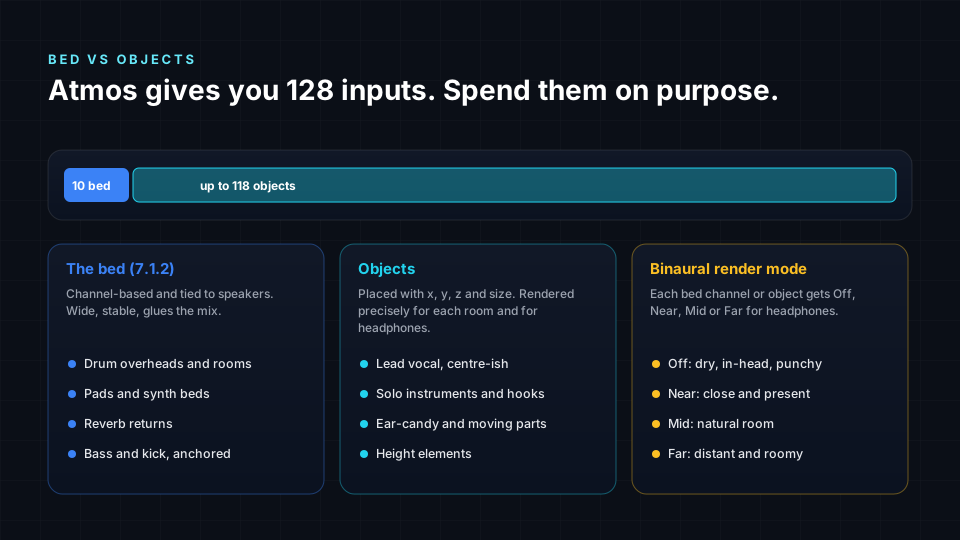
Use the bed for:
- Wide, static elements: pads, ambiences, room mics, reverb returns.
- Content that already exists as surround stems.
- Elements you are happy to have snap to speaker positions.
Use objects for:
- Anything that needs a precise position between speakers.
- Anything that moves.
- Lead elements where you want control over size and height.
- Sounds whose headphone distance you want to control separately.
Binaural render modes (Off, Near, Mid, Far) are a hidden superpower. They set how much room and distance each bed or object gets in the headphone render. A typical starting point:
- Off or Near for lead vocal, kick, snare and bass, so they stay solid and clear on headphones.
- Mid for most instruments.
- Far for ambience, reverbs and atmospheric layers.
Leaving everything on Mid is one of the most common reasons immersive mixes sound washed out on headphones. If your track already sounds spatial before you add Atmos, be careful not to add space twice; our guide to double spatial processing explains why.
Where to place each sound
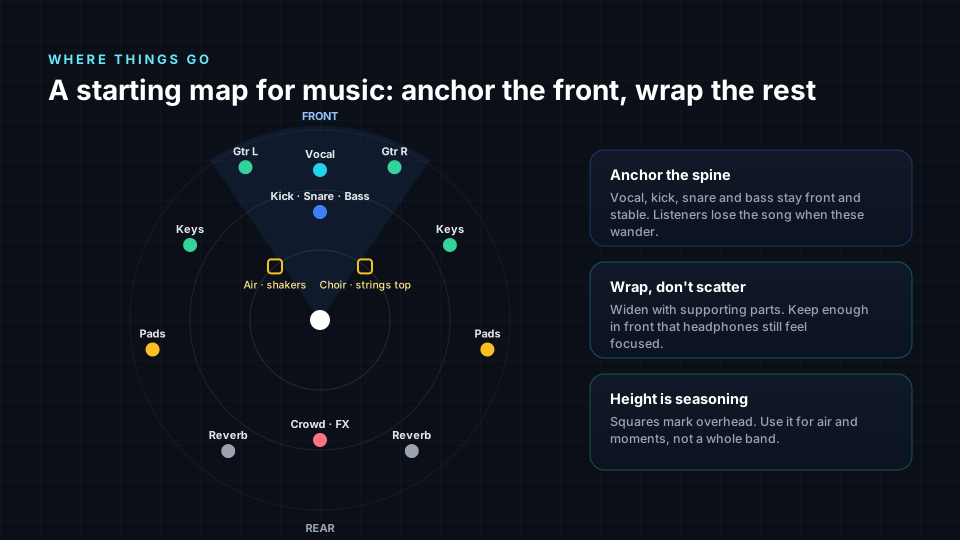
There is no single right placement, but there are strong patterns that work for most music. Think of the mix as a front spine with a wrap around it and air above it.
| Element | Starting position | Size | Height | Notes |
|---|---|---|---|---|
| Lead vocal | Front centre, slightly forward | Small | Ear level | Never let it wander without a reason |
| Kick, snare | Front centre | Small | Ear level | Anchors rhythm; keep tight |
| Bass | Front, bed | Medium | Ear level | Low frequencies do not localise; focus beats width |
| Backing vocals | Front sides to sides | Medium | Slightly up | Doubles can wrap the listener |
| Guitars, keys | Front left and right, sides | Medium | Ear level | Mirror pairs for balance |
| Pads, strings | Sides and rears | Large | Some height | Build the room the song lives in |
| Reverbs | Rears and heights | Large | Up | Separate early and late reflections |
| Percussion, shakers | Sides, heights | Small | Up | Brightness helps height read |
| FX, risers | Anywhere, often moving | Varies | Varies | Use for moments, not all the time |
Five placement principles:
- Protect the front. People still face forward. Most attention goes there. The emotional core of the song should be there.
- Mirror for balance. If something goes rear-left, consider what balances it rear-right. An unbalanced mix pulls the listener's head.
- Height is for air, not anchors. Heights work beautifully for reverbs, overheads, choirs, synth swells and cymbals. They rarely suit kicks, bass or the main vocal.
- Use size as carefully as position. A huge object can feel immersive but blurry. Small objects feel precise and present.
- Let arrangement drive space. Verse sparse and close, chorus wide and tall, bridge something different. Space can be a structural tool, just like dynamics.
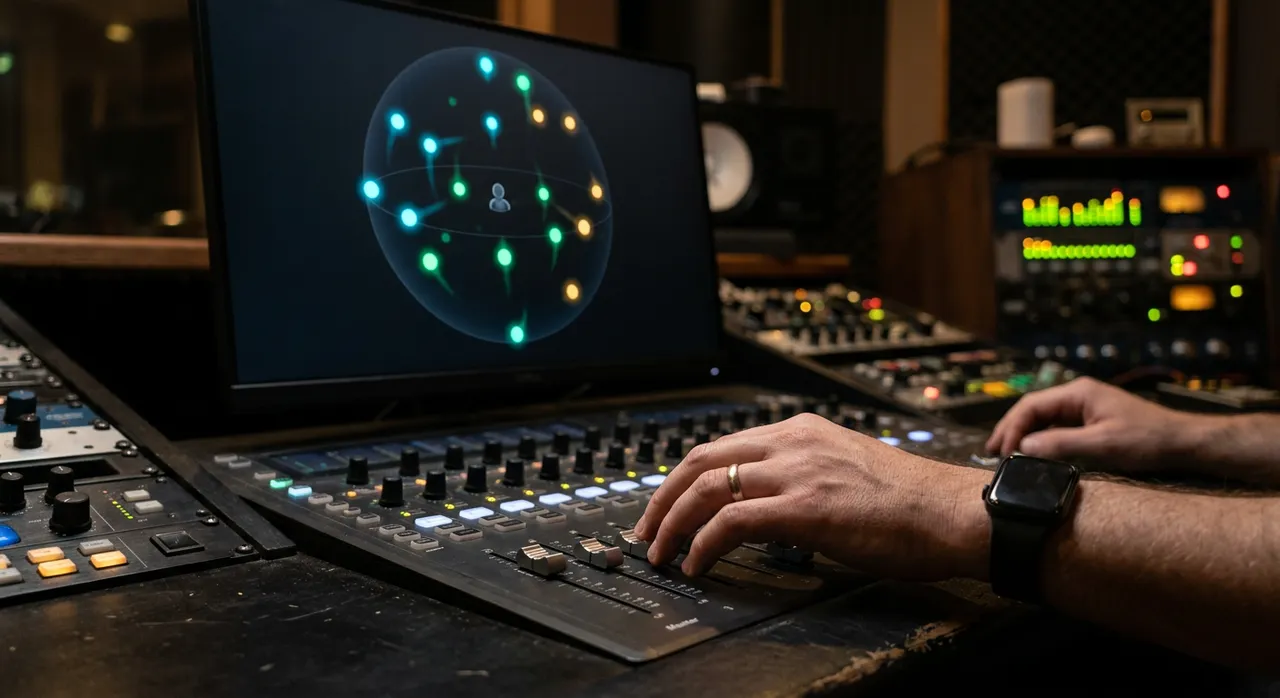
If you are starting from a finished stereo song, you will get much better results from stems than from upmixing. Here is why: upmixing stereo vs mixing from stems.
A seven step immersive mixing workflow
This is the order most professional immersive engineers follow, whatever the medium.
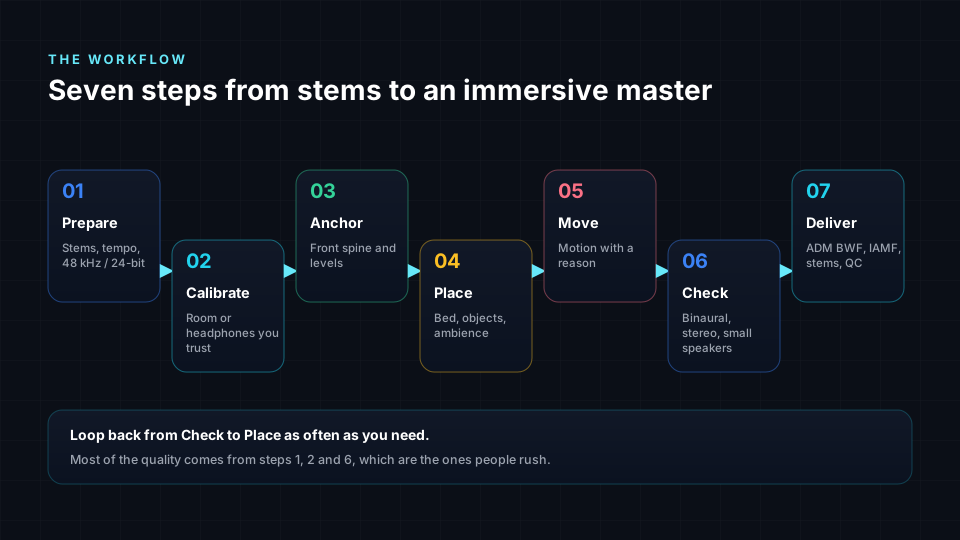
- Prepare. Gather clean stems, the stereo reference mix, lyrics or script and any picture. Organise tracks into groups: vocals, drums, bass, music, FX, ambience.
- Calibrate. Set monitoring to a known level. On speakers, calibrate each speaker. On headphones, choose your renderer and stick with it.
- Anchor. Build the front spine first: vocal or dialogue, rhythm and bass. Make it sound finished in front before anything goes around.
- Place. Open the space with pads, doubles, ambience and reverbs. Decide what lives in the bed and what becomes an object.
- Move. Add motion only where it serves the moment.
- Check. Listen to the binaural render, a stereo fold-down, small speakers and earbuds. Compare against the stereo reference for tone and energy.
- Deliver. Measure loudness, export the master and all required versions, and write down what you delivered.
A useful habit: after every major change, switch between your immersive mix and the original stereo mix at matched loudness. Immersive should feel bigger and more emotional, not just different.
Motion: making movement mean something
Movement is the most exciting tool in immersive mixing, and the most overused.
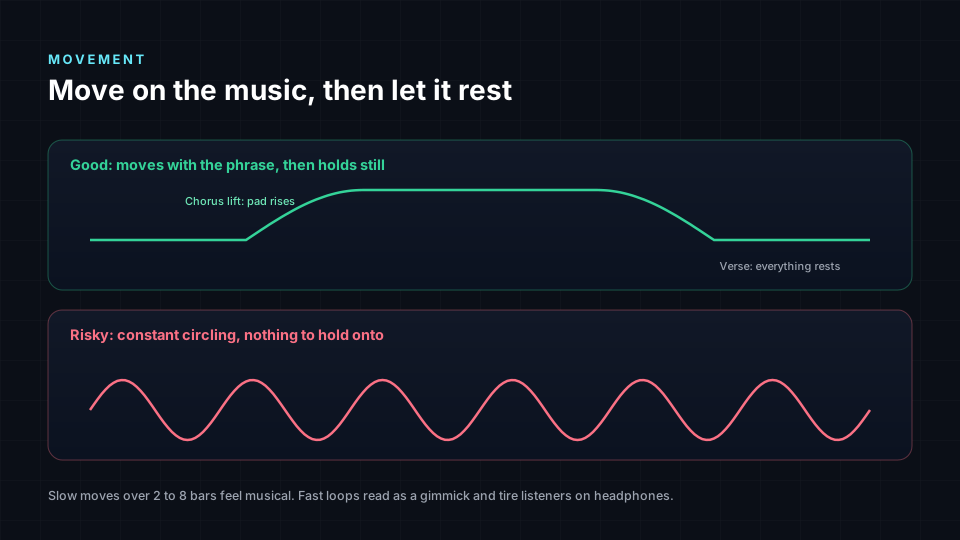
Motion that works:
- A slow arc from front to side as a section opens up.
- A riser that lifts into the heights before the drop.
- A sound that follows an on-screen object in video.
- A call-and-response that moves between front left and rear right.
- A gentle widening of a pad at the chorus.
Motion that hurts:
- Constant spinning around the head. Fun once, tiring after 20 seconds.
- Fast jumps between distant positions. On headphones these can smear or flip.
- Moving the lead vocal for no reason. Listeners lose focus.
- Moving low-frequency sounds. Nobody can tell, and it wastes attention.
Long sessions with too much motion and too many wide elements cause real listening fatigue. We go deep on this in creative thinking in immersive mixing and listener fatigue.
Loudness: one mix, many targets
Loudness is where immersive delivery differs most from stereo habits. A loud stereo master at -9 LUFS will be turned down hard by most platforms, and an immersive master pushed that hot will lose the depth and dynamics that make it immersive.
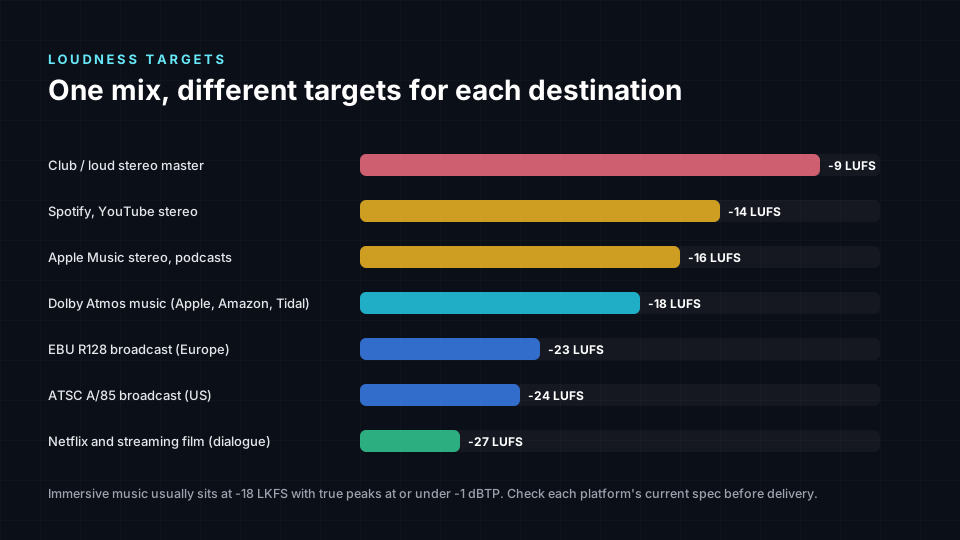
| Destination | Typical target | Peak ceiling | Standard or source |
|---|---|---|---|
| Dolby Atmos music (Apple Music, Amazon Music, Tidal) | -18 LKFS integrated | -1 dBTP | Dolby music delivery guidance |
| Spotify and YouTube stereo | Around -14 LUFS | -1 dBTP | Platform normalisation |
| Apple Music stereo (Sound Check), podcasts | Around -16 LUFS | -1 dBTP | Platform guidance |
| European broadcast | -23 LUFS | -1 dBTP | EBU R128 |
| US broadcast | -24 LKFS | -2 dBTP | ATSC A/85 |
| Netflix and streaming film | -27 LKFS dialogue gated | -2 dBTP | Netflix specs |
LUFS and LKFS mean the same thing: loudness measured as defined in ITU-R BS.1770. For immersive work, measure the full multichannel mix, not just one fold-down.
Practical loudness tips:
- Mix to target, do not crush to target. Use gentle bus compression and a transparent limiter set to a true peak ceiling. Immersive mixes thrive on headroom.
- Watch loudness range (LRA). Very wide ranges can be hard to enjoy on phones; very narrow ranges sound flat in a room.
- Check the binaural render loudness separately. It can measure differently from the speaker render.
- Always check current specs. Platforms update their requirements. Treat the table above as a starting point, not a contract.
Recipes by medium
The same principles apply everywhere, but each medium has its own priorities.
Music
- Build the front spine first and protect it.
- Wrap pads, reverbs and doubles around the listener.
- Use heights for air, lifts and special moments.
- Deliver around -18 LKFS and -1 dBTP for Atmos music.
- Keep the emotional balance of the stereo mix. Fans know the song; immersive should feel like the same song, bigger.
Choosing a format? Compare Eclipsa Audio vs Dolby Atmos and Apple Spatial Audio vs Dolby Atmos.
Listen to the before and after music examples (best on headphones).
Film and TV
- Dialogue lives in the centre channel, almost always.
- Score spreads wide; effects become objects that follow the picture.
- Ambience fills the room and sells the location.
- Follow dialogue-gated loudness specs for the network or streamer.
- Keep surprises for story moments. A sudden rear sound pulls the audience out of the screen.
Video, YouTube and 360
- Sound should follow the picture. If something is on the left of the frame, it should be heard there.
- For 360 and VR, use head-tracked ambisonics so the sound field stays fixed when the viewer turns.
- Keep music and narration head-locked (they do not turn with the head) so they stay readable.
- Most viewers watch on phones. Check on phone speakers and earbuds first.
Podcasts and spoken word
- Voices stay near and in front. Clarity beats spectacle.
- Give each guest a gentle, consistent position so listeners can follow who is speaking.
- Use room tone and subtle ambience, not long reverb tails.
- Around -16 LUFS for a stereo delivery is the common norm.
Games and XR
- Sounds live in the world: the engine places them in real time from game state.
- Distance, occlusion and reverb zones do most of the spatial work.
- The engine applies HRTFs for headphones.
- Interface sounds usually stay fixed and head-locked.
- Mixing happens in the engine, not just the DAW, so test in context. Our VR mode for immersive mixing lets you stand inside a mix.
Translation: make it work everywhere
An immersive mix that only works in your studio is not finished. Most people will hear it on headphones, earbuds, phones, soundbars and in cars.
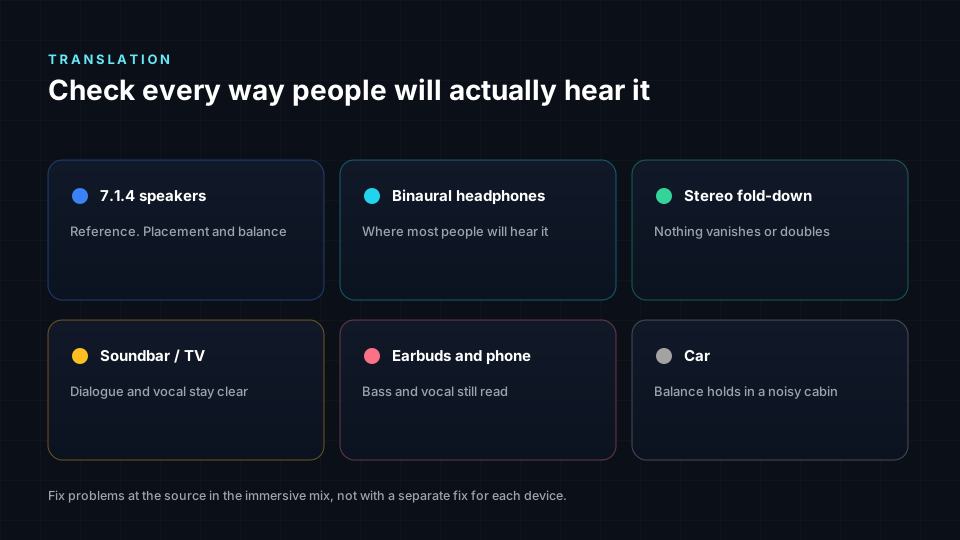
| Playback | What to check | Common fix |
|---|---|---|
| Speakers (7.1.4) | Balance, position accuracy, height | Refine object sizes and levels |
| Binaural headphones | Clarity, distance, front-back stability | Adjust binaural render modes |
| Stereo fold-down | Vocal level, phase, reverb build-up | Trim rears and heights, fix phase |
| Soundbar | Width, dialogue clarity | Keep important content in front |
| Earbuds and phones | Low end, vocal presence | Check bass translation and level |
| Car | Bass, overall balance | Avoid extreme side-only content |
A quick translation routine:
- Listen to the binaural render at a moderate level on two different pairs of headphones.
- Listen to the stereo fold-down and compare it with the original stereo mix.
- Play it on a phone speaker. If the vocal disappears, something is wrong.
- If you can, listen in a car and on a soundbar.
For the headphone versus phone question in depth, see spatial audio on headphones vs phone speakers.
Deliverables: what to hand over
Every project needs a clear set of deliverables. Missing one of them is the most common reason for a delayed release.
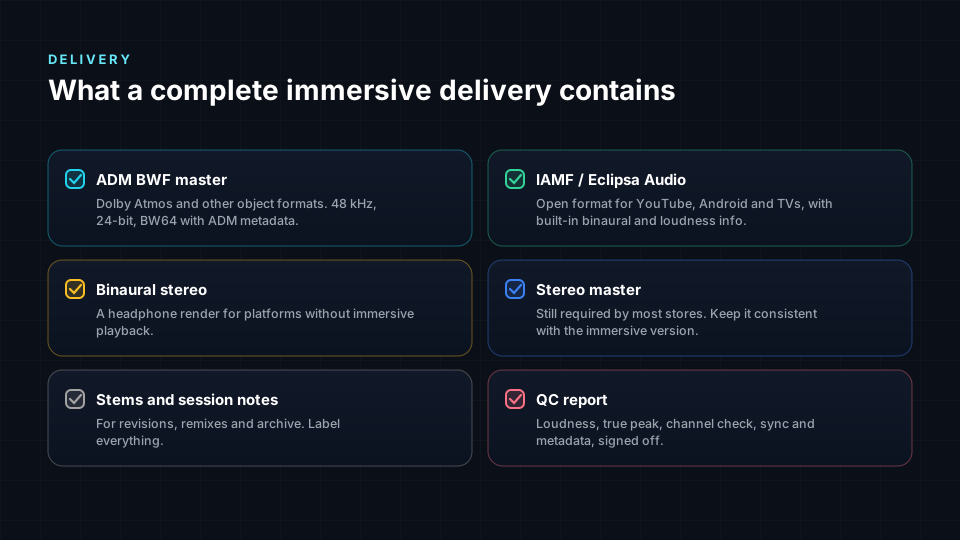
- ADM BWF master. The industry standard immersive master: a broadcast wave file carrying all beds and objects plus position metadata (ITU-R BS.2076 and BS.2088). This is what Dolby Atmos music distributors expect.
- IAMF file. The open immersive format from the Alliance for Open Media, used by YouTube and Eclipsa Audio.
- Binaural render. A two-channel headphone version for previews, social clips and clients without immersive playback.
- Stereo mix. Matched in tone and balance to the immersive version.
- Stems. Grouped exports for future remixes, edits and versions.
- QC report. Loudness, true peak, LRA, channel layout, duration, sample rate and any notes.
Handing over to a label, distributor or client? Our immersive audio client handoff checklist walks through each file. When you need feedback before final delivery, here is how to share immersive, spatial and binaural mixes for review.
The eight most common immersive mixing mistakes
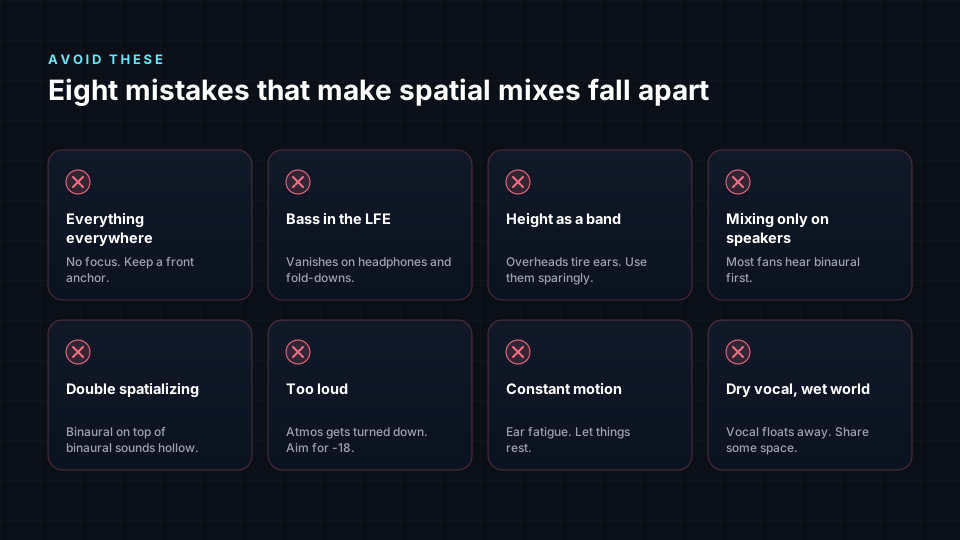
- Losing the front. The lead vocal drifts or gets buried by the wrap.
- Too much motion. Everything moves, nothing lands.
- Everything wide. Huge objects everywhere turn the mix into a blur.
- Ignoring headphones. A speaker-only mix sounds distant and washed out binaurally.
- Bass in the rears or heights. Wasted energy and muddy fold-downs.
- Mastering like stereo. Crushing to -9 LUFS removes the depth that makes immersive worth it.
- Skipping the fold-down. Phase problems and reverb build-up only show up in stereo.
- Adding space twice. Reverb-heavy stems plus a far binaural mode plus a spatial plugin equals mush.
How Spatial9 helps
Spatial9 lets you hear, shape and share immersive mixes in a browser:
- Mix stems in 3D and hear them binaurally on any headphones, then switch to a 7.1.4 speaker view.
- Master in the player with loudness targets, a live spectrum and an original versus mastered comparison.
- Share for review in Studio Rooms with timed and spatial comments, voice notes and live listening sessions.
- Export binaural, stereo and immersive versions for each destination.
Start a project or experience a song in 3D.
Frequently asked questions
What is the difference between immersive audio and spatial audio?
Immersive audio describes sound that surrounds you in three dimensions, including height. Spatial audio is the broader set of techniques that make sounds appear to come from specific places, on speakers or headphones. In practice, platforms use the two terms almost interchangeably.
Do I need a 7.1.4 speaker room to mix in Dolby Atmos?
No. Many engineers start on headphones with a trusted binaural renderer. A calibrated 7.1.4 room is still the reference for professional music, so check your mix in one before release if you can.
What loudness should an immersive music mix be?
Most immersive music for streaming is delivered at around -18 LKFS integrated loudness with true peaks at or below -1 dBTP. Always confirm the current spec of your distributor or platform.
Should the lead vocal ever move in an immersive mix?
Rarely. The lead vocal is the listener's anchor. Keep it front and centre, and only move it for a deliberate, short creative moment.
What should go in the height speakers?
Air and space: reverbs, overheads, cymbals, choirs, pads, synth swells and special effects. Avoid putting kick, bass or the main vocal in the heights.
What is the difference between a bed and an object in Dolby Atmos?
A bed is a fixed channel layout, usually 7.1.2, for wide and static content. An object is a single sound with its own position and movement metadata that the renderer places for any speaker layout or headphones.
What are binaural render modes?
In Dolby Atmos, each bed or object can be set to Off, Near, Mid or Far. These settings control how much distance and room the headphone render adds. Keep core elements Off or Near and ambience Far.
Can I make an immersive mix from a stereo file?
You can upmix a stereo file, but results are limited because instruments are already combined. Mixing from stems gives much more control and a far better immersive result.
What is ADM BWF?
ADM BWF is a broadcast wave file that carries audio channels and objects together with Audio Definition Model metadata describing positions, movement and layout. It is the standard master format for Dolby Atmos music delivery.
What is IAMF?
IAMF, the Immersive Audio Model and Formats, is an open immersive audio standard from the Alliance for Open Media. It is used by YouTube and is the basis of Eclipsa Audio.
How do I check whether my immersive mix translates?
Listen to the binaural render on more than one pair of headphones, check the stereo fold-down against your stereo mix, and play it on phone speakers, a soundbar and in a car if possible.
Why does my Atmos mix sound distant on headphones?
Usually too many elements are set to Mid or Far in the binaural render, or the stems already contain lots of reverb. Set key elements to Off or Near and reduce added space.
Is spatial audio good for podcasts?
Yes, used gently. Give each voice a consistent position close to the front and use subtle room tone. Clarity matters more than spectacle.
How is mixing for games different from mixing music?
In games, the engine places sounds in real time based on what happens in the game, using distance, occlusion and reverb zones. Much of the mixing happens inside the game engine rather than in a DAW.
What files should I deliver with an immersive mix?
An ADM BWF master, an IAMF file if required, a binaural render, a stereo mix, grouped stems and a QC report with loudness and format details.
Sources
- ITU-R BS.2051, Advanced sound system for programme production (speaker layouts including 7.1.4).
- ITU-R BS.1770, Algorithms to measure audio programme loudness and true-peak audio level.
- ITU-R BS.2076, Audio Definition Model (ADM).
- ITU-R BS.2088, Long-form file format for the international exchange of audio programme materials with metadata (BW64).
- EBU R128, Loudness normalisation and permitted maximum level of audio signals.
- ATSC A/85, Techniques for establishing and maintaining audio loudness for digital television.
- Dolby Laboratories, Dolby Atmos music creation and delivery guidance.
- Alliance for Open Media, Immersive Audio Model and Formats (IAMF) specification.
- Apple, Apple Music spatial audio and Dolby Atmos delivery requirements.
- Blauert, J., Spatial Hearing: The Psychophysics of Human Sound Localization, MIT Press.