
Immersive and Spatial Music Mixing: Object Movement and Stereo Stem Best Practices
Spatial9 Research Team · · 14 min read
Key takeaways
- Anchor the lead vocal, kick, snare and bass in front. Movement belongs to pads, effects, percussion, backing vocals and short accents.
- Never move a stereo stem as one point. Keep its left and right sides as a pair with at least 30 degrees of width, so the image never collapses to mono.
- Use four pair modes: fixed spread, mirror, independent paths and width only. Pick the one that suits the part.
- Movement should follow the song: tighter in verses, wider in choruses and drops, with changes eased over about a second.
- Match speed to the sound: slow drift for sustained parts, beat-locked moves for percussion, fast throws only for hits under a bar long.
- Keep bass and sub front and centre, and never let a source pass through the listener's head.
- Playback and every export, including ADM BWF, 7.1.4, binaural and IAMF, must use the same movement, or the release will not match what you approved.
- For IAMF and Eclipsa Audio, keep busy sounds about 30 degrees apart, keep every ambisonic channel under -1 dBTP and check the decoded level against the 7.1.4 master.

The first thing most people do in a 3D mix is make something fly around the room. It is fun for about ten seconds. Then the vocal wanders, the bass smears and the chorus feels smaller than the stereo version.
Engineers whose immersive records win awards work the other way round. They build a stable picture first and add movement only where it tells the listener something: a new section, a hit, a lyric, a feeling. When something does move, it moves with the music, at a speed the ear can follow, and it moves the same way on speakers, on headphones and in every file that leaves the studio.
This guide explains that approach. It is written for mix engineers, producers and artists working in Dolby Atmos, Apple spatial audio, IAMF / Eclipsa Audio and binaural. It covers what to anchor and what to move, how to handle stereo stems, section-aware movement, speed, height and distance, lyric and accent moves, and how to keep every export, including ambisonic ones, clear.
Why most object movement sounds amateur
Three habits make movement feel like a gimmick:
- Moving the core. When the vocal or bass moves, the listener loses the centre of the song.
- Moving stereo stems as a single point. The two sides land on top of each other, the stem turns mono and its width disappears.
- Moving without the music. Constant orbits at the same speed ignore the arrangement. The ear tunes them out, or worse, gets tired.
A fourth problem is invisible until delivery: the movement you hear while mixing is not the movement that ends up in the files. If the export uses a different path, the approved mix and the released mix are not the same song.
Anchor the core, move the colour
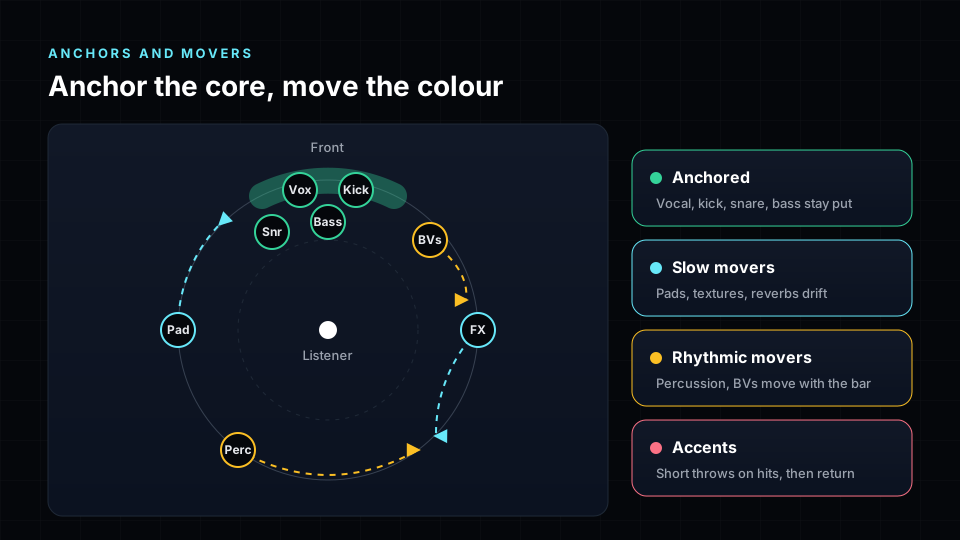
Start every immersive mix by deciding what never moves.
- Anchored: lead vocal, kick, snare and bass. Keep them in front, close to the centre. Width is fine, travel is not.
- Slow movers: pads, strings, textures and reverb returns. They drift slowly and fill the room.
- Rhythmic movers: percussion, hats, shakers and backing vocals. They move in time with the bar and can swap sides on a phrase.
- Accents: risers, hits, ear candy and the last word of a line. They throw out to a new spot for less than a bar and come back.
A useful rule of thumb: if muting the movement of a part would make the song feel clearer, the part should not be moving.
Stereo stems: move the pair, not a point
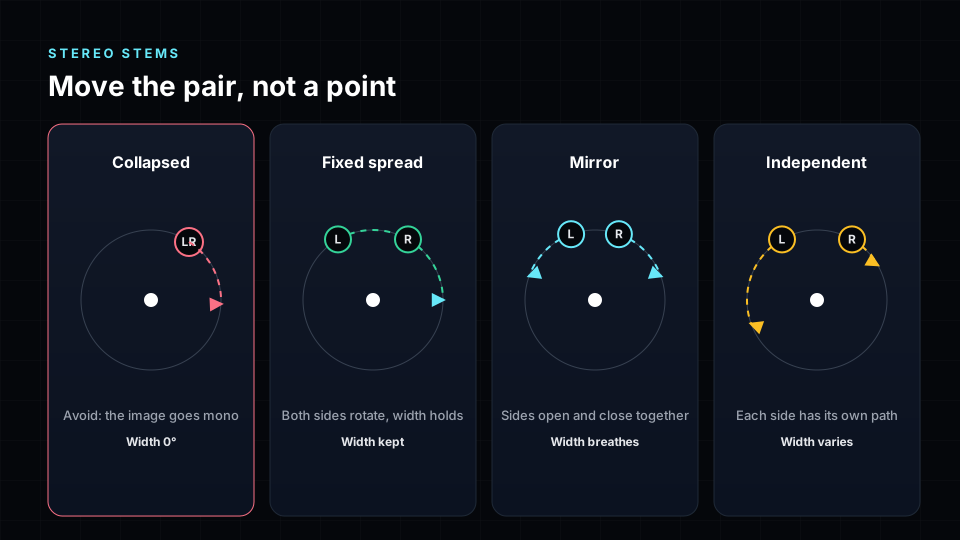
Most stems you receive are stereo: a keyboard, a choir, a drum overhead, a synth pad. A stereo stem carries its own width and depth in the difference between its two sides. Place both sides on one object and that information is gone.
Professional mixers treat the two sides as a linked pair. There are four ways to move them:
- Fixed spread. Both sides rotate together and the gap between them stays the same. Best for pads, guitars and keys that should travel without changing size.
- Mirror. The sides move in opposite directions, so the stem opens and closes around a centre. Best for builds, choruses and drops.
- Independent paths. Each side has its own path. Best for ear candy, delays and textures where the two sides are really different sounds.
- Width only. The centre stays put and only the width changes. Best for anchored stereo parts like a drum overhead or a stereo vocal double.
Stereo stem rules
- Keep at least 30 degrees between the two sides. Below that the stem starts to sound mono.
- Do not let the sides swap by accident. Left should stay to the listener's left of right, unless a swap is the effect you want.
- Keep the pair's low end in front. If a stereo stem carries real bass, its width should stay modest.
- Check the stem in a stereo fold-down. If it gets thin or hollow, the sides are too far apart or cancel each other.
Let the song set the pace
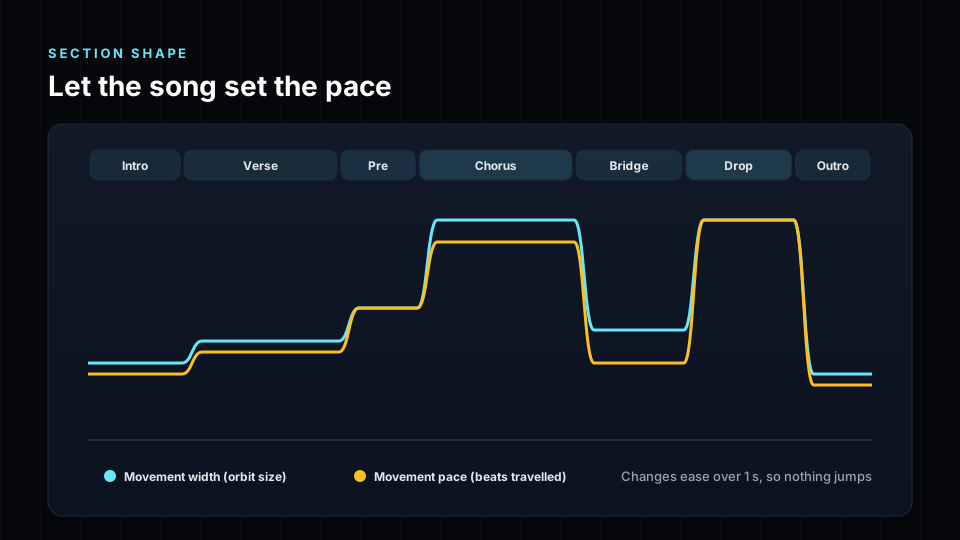
Movement should follow the arrangement, not a timer.
- Intro and verse: small, slow moves. Let the listener settle in.
- Pre-chorus: start to open. A little more width and pace.
- Chorus and drop: widest and busiest. This is where the room should feel bigger than stereo.
- Bridge and breakdown: pull back. Fewer things moving makes the next lift hit harder.
- Outro: let it drift and settle.
Change between sections over about a second, not instantly. A sudden jump in size sounds like an edit, a short glide sounds like the music breathing.
Lock movement to the tempo. A pad that completes one orbit every eight bars feels part of the song. The same pad orbiting every 7.3 seconds feels random.
How fast is too fast?
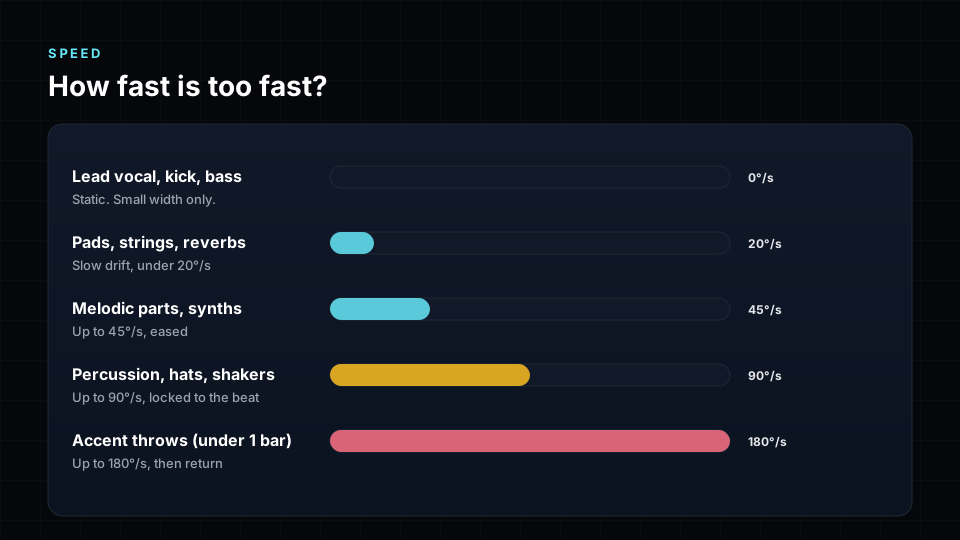
The ear follows slow movement easily and loses fast movement quickly, especially behind and above the head, where our sense of direction is weakest. Fast moves on long sounds are also tiring.
| Sound | Comfortable speed | Notes |
|---|---|---|
| Lead vocal, kick, bass | Static | Width only |
| Pads, strings, reverbs | Up to about 20° per second | Slow drift |
| Melodic parts, synths | Up to about 45° per second | Eased in and out |
| Percussion, hats, shakers | Up to about 90° per second | Locked to the beat |
| Accent throws | Up to about 180° per second | Under one bar, then return |
Always ease movement in and out. Constant-speed starts and stops sound mechanical.
Height and distance
- Height is for air and lift. Reverbs, pads, choirs and the top of a riser work well up high. Bass and kick never belong in the ceiling.
- Use height for moments. Lifting a part into the height layer for a chorus is more powerful than leaving it there all song.
- Respect the near field. Sounds that come very close to the listener get loud quickly and can feel inside the head. Keep a minimum distance, and never route a path straight through the listening position.
- Avoid the back for important parts. Rear placement is great for space and surprise, but the ear localises it less precisely and many listeners hear it on headphones, where the back is the hardest direction to render.
Lyric, word and accent moves
Some of the most memorable moments in immersive records are tiny: a single word that flies to the side, a breath that comes from above, a drum fill that sweeps behind you.
- Word moves: move a short vocal phrase or effect return when a specific word lands. Use them once or twice a song.
- Lyric meaning moves: if the lyric says "falling" or "rising", a small move in that direction makes the word land. Keep the lead vocal itself anchored and move a double, a delay or a reverb instead.
- Accent throws: a hit, riser or ear candy jumps out for less than a bar and returns. They should feel like punctuation.
The test is simple: if every chorus has the same trick, it is no longer a moment.
Write the moves to a timeline
Treat movement like any other automation:
- Give each moving part its own lane, so you can see and edit its path.
- Record moves live while the song plays, then tidy the timing to the grid.
- Keep keyframes on bars and beats where possible.
- Review a movement map of the whole song before you print, so you can see crowded areas and parts that drift too far.
What you hear is what you ship
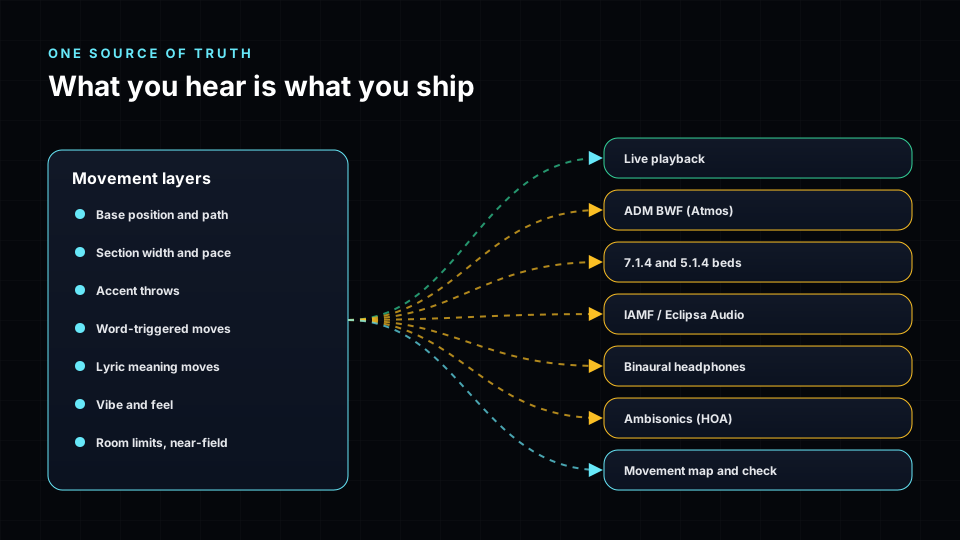
Movement in a modern immersive session comes from several layers: the base position and path, section shaping, accent throws, word-triggered moves, lyric moves, vibe and the room limits that stop parts from crowding or coming too close.
All of these must produce exactly the same position at the same moment, whether you are listening live, exporting an ADM BWF master for Dolby Atmos, rendering 7.1.4 or 5.1.4 beds, encoding IAMF / Eclipsa Audio, rendering binaural or writing ambisonics. That means:
- No random movement at export time. Anything that varies must be repeatable for the same song and the same settings.
- One timing reference. Positions follow the song's tempo and sections, not the playback clock.
- Same limits everywhere. The rules that keep parts apart and out of the listener's head apply to every file.
If the export cannot reproduce what you heard, you are approving one mix and releasing another.
Keep IAMF and Eclipsa Audio clear
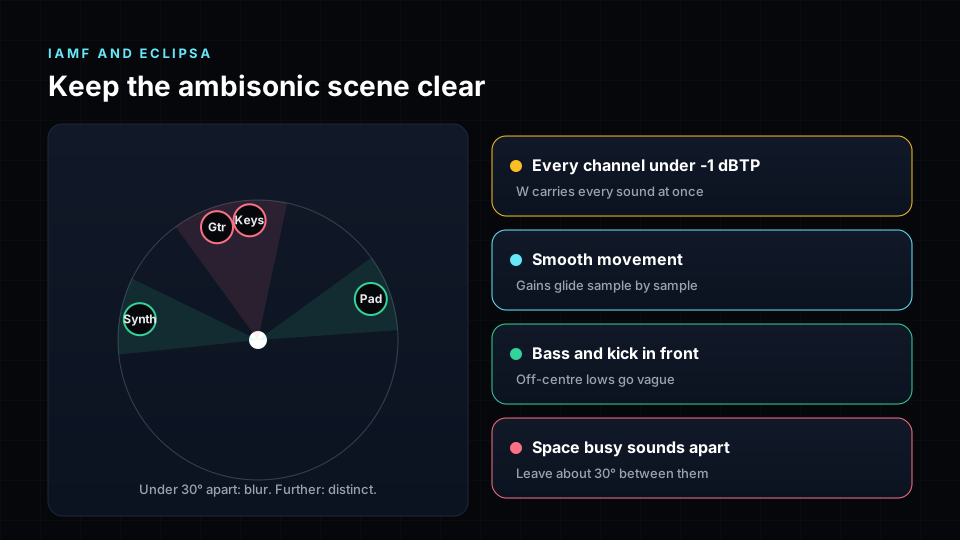
IAMF, the open format behind Eclipsa Audio on YouTube, often carries the mix as third-order ambisonics: a 16-channel description of the whole sound field rather than a set of speakers or objects. It is flexible and travels well to headphones and speakers, but it has its own rules.
- Resolution is limited. At third order, two sounds closer than about 30 degrees start to blur into one. Space busy parts, such as a guitar and keys playing in the same register, further apart than you would in a speaker mix.
- Movement must glide. If positions are only updated in steps, moving sounds can pick up a faint zipper or stepping. Positions should be smoothed between every sample.
- Peaks add up in the first channel. The first ambisonic channel carries every sound at once, so it is usually the hottest. Keep every channel under -1 dBTP.
- Keep the low end in front. Bass placed off-centre becomes vague after decoding. Kick and bass should sit front and centre.
- Check the decoded level. Decode the ambisonic file to 7.1.4 and compare its loudness with the 7.1.4 master. A gap of more than about 2 LU means the two versions will not sound the same.
- Listen to the headphone version. Most Eclipsa listeners will be on headphones. Make sure moving parts stay clear and the vocal stays put.
Movement styles by genre
| Genre | Movement amount | Typical approach |
|---|---|---|
| Pop | Moderate | Anchored vocal, choruses open wide, accent throws on hooks |
| Hip-hop and R&B | Low to moderate | Solid low end in front, ad-libs and effects move |
| Electronic and dance | High | Mirror moves on builds, widest scene on drops, beat-locked percussion |
| Rock | Low | Band in front, room and guitars spread, little travel |
| Film, orchestral, cinematic | Moderate | Sections placed like a stage, slow drifts for colour |
| Ambient and experimental | High | Slow, long paths, height used freely |
| Jazz and acoustic | Very low | A believable stage, almost nothing moves |
The object movement checklist
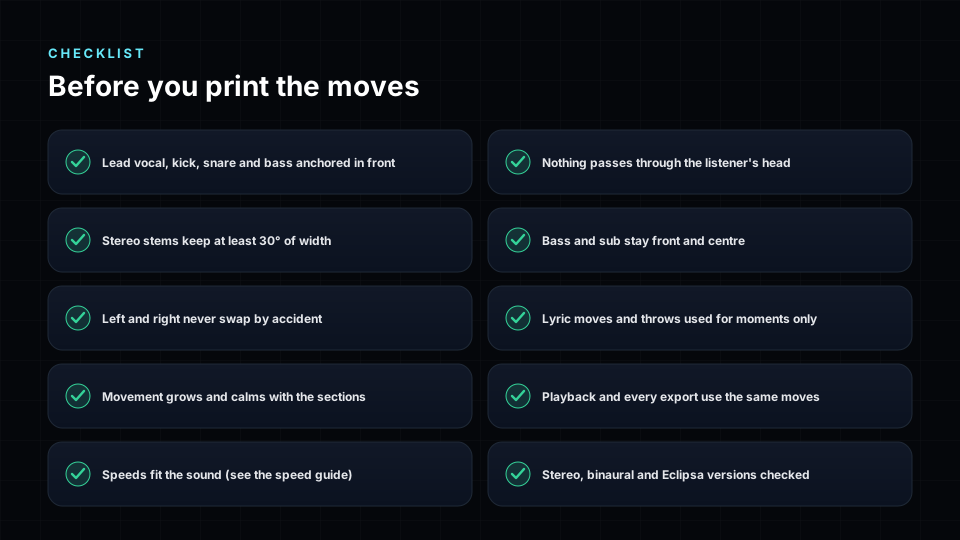
Placement
- Lead vocal, kick, snare and bass are anchored in front.
- Bass and sub stay front and centre in every section.
- Nothing passes through the listener's head.
Stereo stems
- Every stereo stem keeps at least 30 degrees of width.
- Left and right never swap by accident.
- Each stereo stem uses the right pair mode for its role.
Movement
- Movement grows and calms with the sections.
- Speeds suit each kind of sound.
- Lyric moves and throws are used for moments, not every bar.
Delivery
- Playback and every export use the same movement.
- Stereo, binaural and Eclipsa versions have been checked.
- The ambisonic file is under -1 dBTP on every channel and close in level to the 7.1.4 master.
Common mistakes
- Spinning the lead vocal. The song loses its centre. Move a double or a delay instead.
- Collapsing stereo stems. Two sides on one object equals mono.
- Moving bass. It smears the low end and disappears in fold-downs.
- Same orbit, whole song. Movement that ignores the arrangement becomes wallpaper.
- Too fast on long sounds. Tiring and hard to follow.
- Crowding one spot. Two busy parts in the same place mask each other, especially in ambisonics.
- Approving one mix, exporting another. If the files are made differently from playback, check them all.
How Spatial9 helps
Spatial9 builds these practices into its players in the browser:
- Stereo stems are moved as linked pairs with fixed spread, mirror, independent and width modes, and a minimum width that stops them collapsing.
- Movement follows song sections, tempo and accents, with word and lyric moves you can see on timeline lanes and record live.
- A movement check and map flag collapsed pairs, crowded areas, parts that move too fast and low end that drifts.
- Live playback and every export, including ADM BWF, 7.1.4, binaural and IAMF / Eclipsa Audio, use the same movement.
- The delivery check decodes the Eclipsa ambisonic render and checks channel peaks, level against the 7.1.4 master and low-end focus.
Start a project or experience a song in 3D. For the next step, read our immersive and spatial music mastering guide and our immersive mixing best practices.
Frequently asked questions
Should the lead vocal move in an Atmos or spatial mix?
Almost never. Keep the lead vocal anchored in front, usually in or near the centre. Move a double, a delay or a reverb return when you want the vocal to feel like it travels.
How do I move a stereo stem in Dolby Atmos?
Use two objects, one for each side, and move them together so the gap between them stays at least 30 degrees. Rotate them as a pair, mirror them around a centre, give each its own path or change only the width.
Why does my stereo stem sound mono after I move it?
Both sides are probably on one object or too close together. Spread them so the stem keeps its width, and check it in a stereo fold-down.
How fast should objects move in a spatial mix?
Slow for long sounds, up to about 20 degrees per second for pads, faster for percussion locked to the beat, and very fast only for short accents that return within a bar.
Should bass move in an immersive mix?
No. Keep bass and kick front and centre. Moving low end smears the mix and behaves badly in fold-downs, binaural renders and ambisonics.
Is movement different for headphones and binaural?
The same moves apply, but behind and above are harder to hear on headphones. Important parts should stay in front, and moves behind the listener should be slower and used for space rather than detail.
What is Eclipsa Audio and how does it relate to IAMF?
Eclipsa Audio is the name used for the open IAMF format on platforms such as YouTube. The mix is often carried as ambisonics, a full-sphere description of the sound that decodes to speakers or headphones.
Why does my IAMF or Eclipsa mix sound less clear than my Atmos mix?
Third-order ambisonics blurs sounds that are close together and can make off-centre bass vague. Spread busy parts at least 30 degrees apart, keep the low end in front, keep every channel under -1 dBTP and compare the decoded level with the 7.1.4 master.
Do movements in my mix survive the export?
They should, but only if the export uses the same movement source as playback. Check your ADM, 7.1.4, binaural and IAMF files against what you approved.
How much movement is too much?
If you notice the movement before the song, it is too much. Most great immersive mixes have only a few moving parts at any moment.
Sources
- ITU-R BS.2051, Advanced sound system for programme production (speaker layouts including 7.1.4).
- ITU-R BS.2076, Audio Definition Model (ADM).
- ITU-R BS.1770, Algorithms to measure audio programme loudness and true-peak audio level.
- Dolby Laboratories, Dolby Atmos music mixing and object panning guidance.
- Apple, Apple Music spatial audio and Dolby Atmos delivery requirements.
- Alliance for Open Media, Immersive Audio Model and Formats (IAMF) specification.
- Zotter, F. and Frank, M., Ambisonics: A Practical 3D Audio Theory for Recording, Studio Production, Sound Reinforcement, and Virtual Reality, Springer, 2019.
- Daniel, J., Représentation de champs acoustiques, application à la transmission et à la reproduction de scènes sonores complexes dans un contexte multimédia, 2000 (max-rE decoding).
- Pulkki, V., Virtual Sound Source Positioning Using Vector Base Amplitude Panning, Journal of the Audio Engineering Society, 1997.
- Blauert, J., Spatial Hearing: The Psychophysics of Human Sound Localization, MIT Press.