Immersive and Spatial Music Mastering: The Complete Guide
Spatial9 Research Team · · 17 min read
Key takeaways
- Immersive mastering, also called Atmos mastering or spatial audio mastering, is the final pass on a 3D mix. It works on stems and the whole speaker scene, not on one stereo file.
- Order matters: audit the session, fix phase between stems, clear frequency collisions, shape tone per stem, balance the zones, then apply linked dynamics and true peak control.
- Phase collisions between low-frequency stems thin the bass, and they get worse in fold-downs and binaural renders. Flip polarity or shift timing on the less important stem.
- Frequency collisions are fixed with small dynamic dips on the less important stem, only while the clash happens, so the leader stays clear.
- Apply EQ to sounds, not speakers, and balance front, centre, surround, height and LFE as zones that follow each object as it moves.
- Link compression and limiting across all 12 channels of a 7.1.4 render so the image never shifts on loud hits.
- Dolby Atmos music is delivered at -18 LKFS integrated or quieter, with true peaks at or below -1 dBTP on every channel and on the binaural render.
- Never let the bass live only in the LFE. Many fold-downs drop it, and headphone renders handle it differently.
- Check 7.1.4, 5.1.4, 7.1, 5.1, stereo and binaural before delivery, including phase between neighbouring speakers.
- Deliver an ADM BWF master at 48 kHz 24-bit, plus IAMF, binaural, stereo and a QC report.

Stereo mastering has a hundred years of habits behind it. Immersive mastering has a handful, and most of them were learned the hard way.
The first Atmos music releases were often treated like stereo: a quick limiter on the 7.1.4 re-render, a loudness number, done. The result was flat height channels, bass that vanished on headphones and fold-downs that sounded nothing like the immersive mix. Engineers working at the top of the field, the people whose Atmos albums now win awards, moved in a different direction. They master from stems, protect the space the mixer built and check every way the music will be heard.
This guide explains that approach step by step. It is written for mastering engineers moving into Atmos, mix engineers who master their own immersive work, producers releasing spatial music and labels deciding what to ask for. It covers how immersive mastering differs from stereo mastering, the signal flow, phase and frequency collisions between stems, zone balance, linked dynamics, loudness and true peak targets, fold-downs, headphones and delivery. Diagrams, checklists and a long FAQ are included.
What is immersive mastering?
Immersive mastering is the final quality and sound pass on music mixed for a 3D format such as Dolby Atmos, IAMF (the open format behind Eclipsa Audio) or Sony 360 Reality Audio. It has three jobs:
- Sound: make the track feel finished, consistent with the rest of the album and competitive with other immersive releases.
- Translation: make sure the music works on a 7.1.4 speaker room, a soundbar, a car, AirPods with head tracking and a plain stereo fold-down.
- Compliance: hit the loudness, true peak and file requirements that distributors and platforms check before they accept a master.
People search for it with many names. Atmos mastering usually means mastering for Dolby Atmos music on Apple Music, Amazon Music and Tidal. Spatial audio mastering is the term Apple uses for listeners and covers the same deliverable. Immersive mastering is the format-neutral term that also covers IAMF for YouTube and Android, MPEG-H and Auro-3D. The craft is the same.
Stereo mastering vs immersive mastering
The biggest change is the input. A stereo master starts from one finished file. An immersive master starts from a scene: a bed of channels plus objects that each carry their own position and movement. You cannot simply put a compressor across an object-based mix, because there is no single bus that every playback device hears.
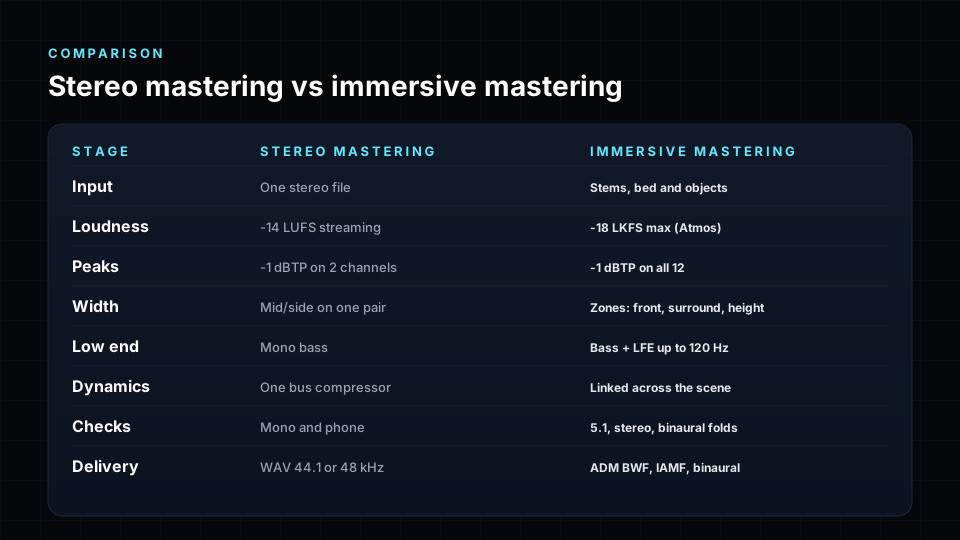
| Stage | Stereo mastering | Immersive mastering |
|---|---|---|
| Input | One stereo file | Stems, beds and objects |
| Loudness | -14 LUFS normalisation, masters often louder | -18 LKFS maximum, measured on the immersive render |
| Peaks | -1 dBTP on two channels | -1 dBTP on all 12 channels of 7.1.4 and on the binaural render |
| Width | Mid/side on one pair | Zone balance across front, centre, surround and height |
| Low end | Mono bass on the sum | LFE level, crossover and where the bass lives |
| Dynamics | Bus compressor and limiter | Linked across the scene so nothing pumps on its own |
| Checks | Mono and small speakers | Fold-downs, binaural and phase between speakers |
| Delivery | WAV at 44.1 or 48 kHz | ADM BWF at 48 kHz 24-bit, plus IAMF, binaural and stereo |
That is why the most respected immersive mastering engineers ask for stems or the full Atmos session rather than a single 7.1.4 file. With stems they can make changes that a single render cannot take back.
The immersive mastering signal flow
Order matters. Fix the stems first, then shape the room, then control the peaks. Every delivery format is rendered from the same mastered scene, so one decision carries through to ADM BWF, IAMF, binaural and stereo.
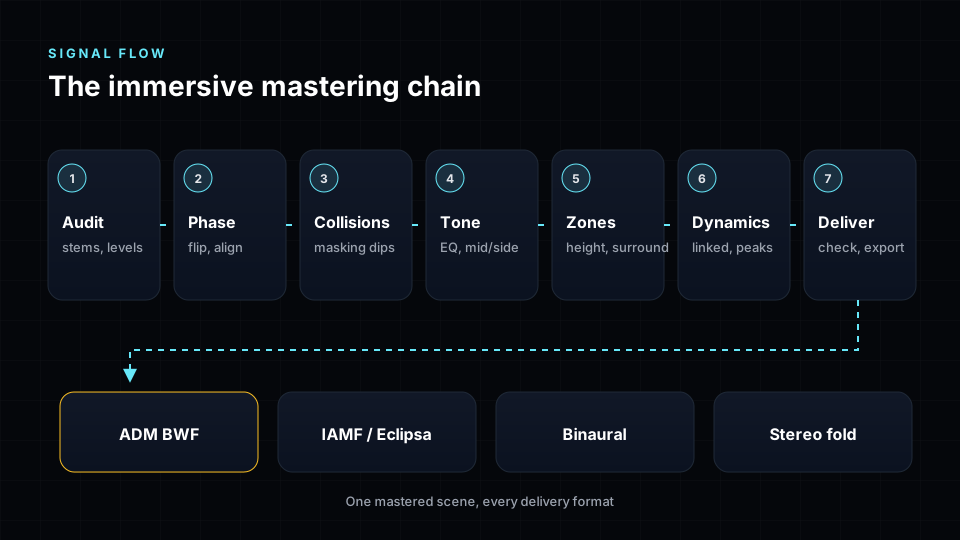
- Audit the session: sample rate, length, headroom, bed and object count, binaural render modes.
- Phase: fix polarity and timing problems between stems in the low end.
- Collisions: carve shared frequency bands so the leading stem keeps its space.
- Tone: gentle EQ per stem or stem group, never on one speaker at a time.
- Zones: balance front, centre, surround, height and LFE against each other.
- Dynamics: compression and limiting linked across all channels.
- True peak: -1 dBTP on every channel and on the headphone render.
The rest of this guide walks through each step.
Step 1: Audit the session before touching anything
Most immersive mastering problems are found, not fixed. Spend the first pass listening and checking.
Session audit checklist
- All stems share one sample rate, ideally 48 kHz, and the same start and length.
- There are at least 3 dB of headroom on every stem and on the 7.1.4 render.
- The bed and object count is known. Dolby Atmos allows 128 inputs: a 10-channel 7.1.2 bed plus up to 118 objects.
- Binaural render modes (Off, Near, Mid, Far) are set on purpose for every object.
- Nothing essential lives only in the LFE.
- The lead vocal and the kick are anchored in front, not drifting.
- There is a stereo reference mix of the same song to compare against.
Listen on the speakers first, then on headphones, then to the stereo fold-down. Write down what changes between them. Those notes are your mastering plan.
Step 2: Fix phase between stems
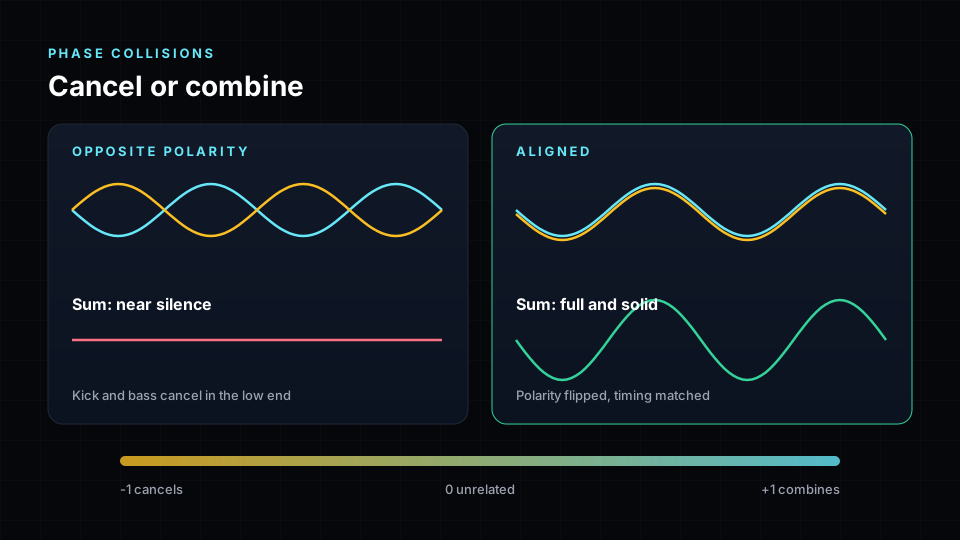
Phase problems are the most common hidden flaw in immersive mixes, and they get worse in 3D. Two stems that share low frequencies, a kick close mic and a kick sample, a bass DI and a bass amp, a synth bass and an 808, can be in opposite polarity or a millisecond apart. In stereo you might hear a slightly thin kick. In Atmos, where those stems sit in different speakers and are then folded down or rendered binaurally, the cancellation can remove several decibels of low end.
How to find phase collisions
- Solo pairs of low-frequency stems and listen for the sum getting thinner rather than fuller.
- Measure correlation in the low band only, below about 700 Hz. Values below zero mean the stems are fighting.
- Check timing: offsets of 0.3 to 5 ms are enough to cause audible comb filtering in the bass.
- Check inside stereo stems too. A stereo stem whose left and right cancel will collapse in a fold-down.
How to fix them
- Flip polarity on the less important stem when they are opposite.
- Shift it by the measured offset when they are late or early.
- Change only one stem in each pair, and never undo a fix you made earlier for another pair.
- Re-check correlation between speakers after the fix. L with Ls, L with Ltf and the other neighbouring pairs should not go strongly negative.
Step 3: Clear frequency collisions between stems
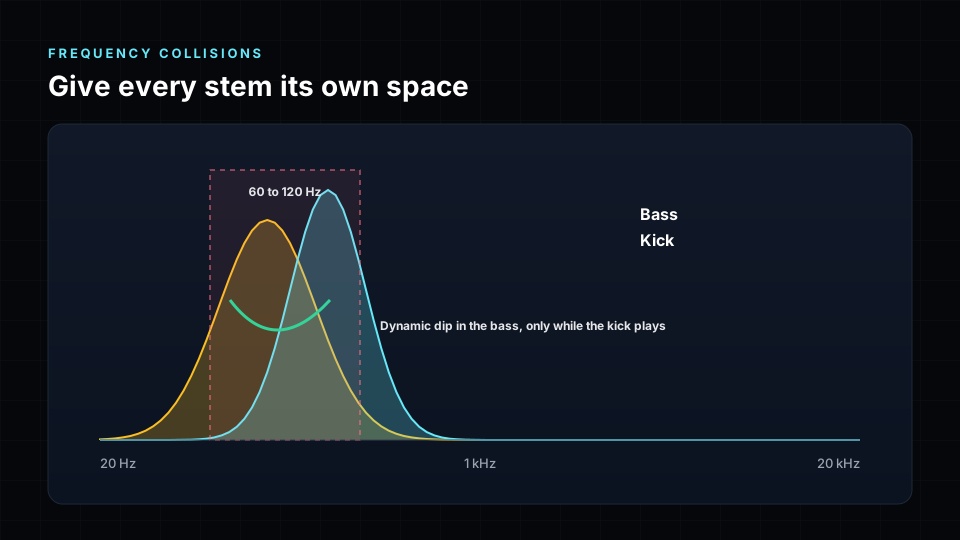
In stereo, a mastering EQ cut affects everything at once. In immersive mastering you can do what a mixer would do: give each stem its own space. A frequency collision happens when two stems carry strong energy in the same band at the same moment. The classic case is kick and bass between 60 and 120 Hz, but vocals and guitars around 2 to 4 kHz, or pads and vocals around 300 to 500 Hz, collide just as often.
A clean collision workflow
- Decide which stem leads in each band. Usually kick over bass in the sub, vocal over guitars in the presence range.
- Measure where and when the two stems overlap, frame by frame.
- Apply a dynamic dip of 1 to 4 dB to the other stem only while the clash happens.
- Release the dip the moment the leader stops, so the other stem keeps its full tone the rest of the time.
- Listen in context. If you can hear the dip as an effect, it is too deep or too slow.
Done well, collision clean-up makes an immersive master sound louder and clearer at the same loudness. Done badly, it makes stems breathe. Small, fast and targeted is the rule.
Step 4: Shape the tone without breaking the space
Tone shaping in Atmos mastering follows one principle: apply EQ to sounds, not to speakers. If you brighten only the height speakers of a 7.1.4 render, an object that glides from the front up to the ceiling changes colour halfway through its move. If you brighten the object itself, its tone stays the same wherever it goes.
Tone checklist
- Keep broad moves gentle: 0.5 to 2 dB shelves, wide bells.
- Match the tonal balance of the stereo master of the same song, so listeners switching between versions hear the same record.
- Treat the vocal stem with special care. It carries the song on every device.
- Avoid wide stereo enhancers on stems. Width in immersive comes from placement, not processing.
- Check that height content is airy but not harsh. A gentle air shelf on the height zone, around 8 kHz, is usually enough.
Step 5: Balance the zones: front, centre, surround, height and LFE
This is the step that has no stereo equivalent, and it is where immersive mastering earns its name. Instead of mid/side, you balance zones of the room against each other.
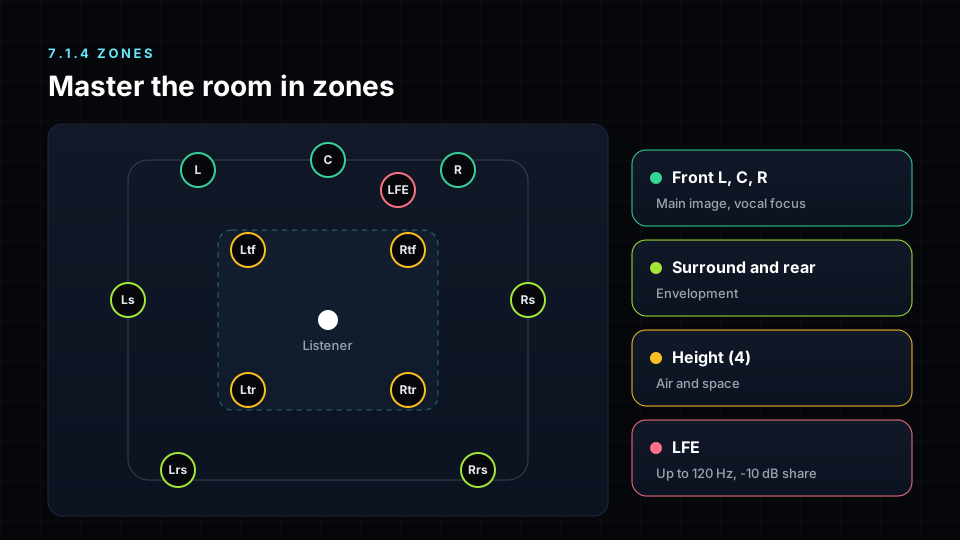
- Front (L and R): the anchor. Leave it at 0 dB and trim the other zones around it.
- Centre: vocal focus. Small moves of 1 to 2 dB only. Too much centre narrows the mix on headphones.
- Surround and rear: the wrap. Trim it down if the rear pulls attention away from the vocal, up if the mix feels like stereo with reverb.
- Height: air and lift. Most mixes need less height level than the mixer thinks, and a touch more brightness.
- LFE: weight, not foundation. Keep the crossover consistent (80, 100 or 120 Hz) and keep the real bass in the main channels.
Trim zones by object direction, not by speaker. An object halfway between the front and the ceiling should get half of the height trim, so its level glides smoothly as it moves.
The LFE rule. Many fold-downs, including common stereo downmixes, leave the LFE out entirely, and headphone renders handle it differently by platform. If the kick and bass live only in the LFE, stereo listeners lose them. Use the LFE to add weight on top of bass that already works without it.
Step 6: Linked dynamics and true peak
Compression and limiting in an immersive master must be linked across the scene. If each channel has its own limiter, a loud kick in the front pulls the front down while the rear stays up, and the image shifts towards the back on every hit. Linked processing measures all channels together and applies the same gain change everywhere, so the room breathes as one.
Dynamics checklist
- Link compressors and limiters across all 12 channels of the 7.1.4 render.
- Keep the LFE out of the detector, or use a separate linked stage for it, so sub hits do not duck the whole room.
- Use multiband only when one band is clearly out of control, and link it too.
- Aim for less gain reduction than in stereo. Immersive music is not meant to be dense.
- Use a true peak limiter with oversampling. Inter-sample peaks appear after encoding even when sample peaks look safe.
Atmos mastering loudness targets
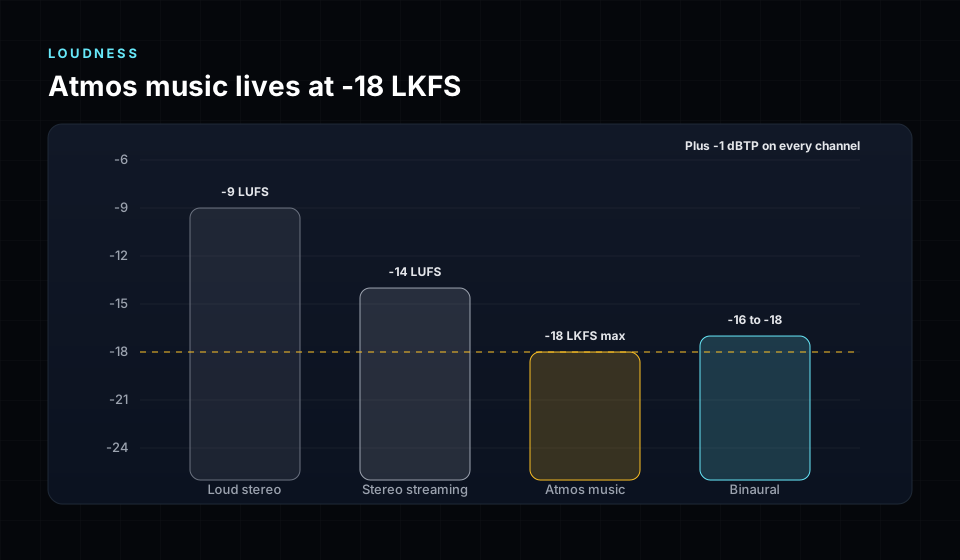
Immersive music is mastered quieter than stereo, and that is a feature. The space between instruments is part of the experience, and heavy limiting destroys it.
| Destination | Integrated loudness | True peak |
|---|---|---|
| Dolby Atmos music (Apple Music, Amazon Music, Tidal) | -18 LKFS maximum | -1 dBTP |
| IAMF / Eclipsa Audio on YouTube | Follow the same -18 LKFS practice for music | -1 dBTP |
| Binaural render for headphones | Check it stays under the same peak ceiling | -1 dBTP |
| Stereo streaming (for comparison) | Normalised to around -14 LUFS | -1 dBTP |
Measure loudness on the full immersive render following ITU-R BS.1770, not on one speaker pair. Quieter than -18 is acceptable. Louder is not, and distributors will reject it. Always confirm the current specification with your distributor before delivery.
Fold-downs and headphones: hear every version
An Atmos master is never heard in just one way. The same file plays on 7.1.4 rooms, 5.1 home theatres, soundbars, cars, phones and headphones. Each one renders or folds the scene differently.
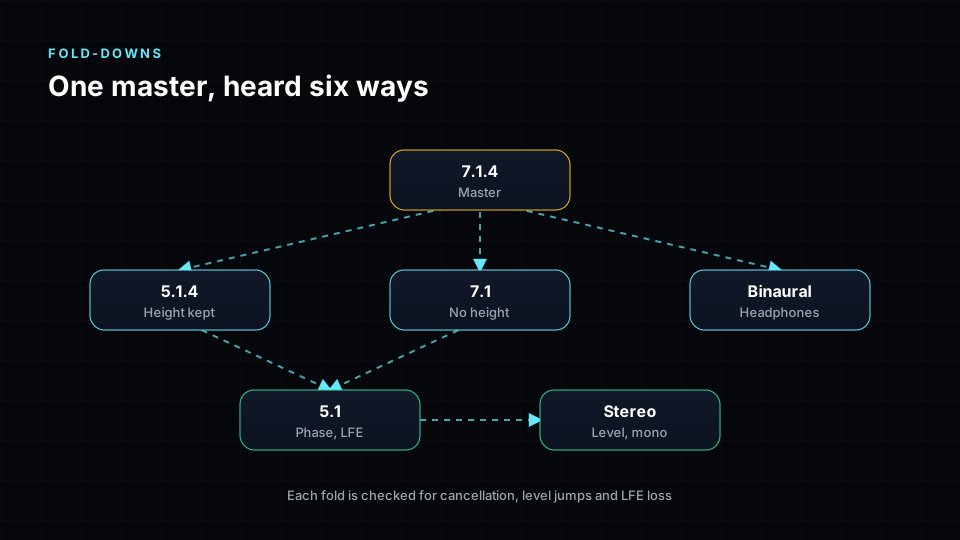
Translation checklist
- 7.1.4: the reference. Every element sits where the mixer intended.
- 5.1.4 and 7.1: heights or rears fold into fewer speakers. Check nothing gets louder or duller.
- 5.1: the most common home theatre layout. Check the vocal stays central and clear.
- Stereo: the strictest test. Look for phase cancellation between neighbouring speakers, reverb build-up and missing LFE.
- Binaural: what most listeners actually hear. Check distance and render modes, sibilance and the low end on headphones.
- Mono front: solo the centre and front pair. The song should still make sense.
Phase between speakers deserves its own check. Correlated sounds in L and Ls, or L and Ltf, add up when folded. If they are opposite in polarity they cancel. A correlation meter on each neighbouring pair catches this before your listeners do.
Delivery: ADM BWF, IAMF, binaural and stereo
The final package is more than one file.
- ADM BWF master: the industry delivery format for Dolby Atmos music. A Broadcast Wave file (BW64) that carries the bed, the objects and the Audio Definition Model metadata for position and movement. Deliver at 48 kHz, 24-bit.
- IAMF / Eclipsa Audio: the open immersive format used by YouTube and Android, rendered from the same mastered scene.
- Binaural render: a two-channel headphone version for platforms and previews that cannot play Atmos.
- Stereo master: either the original stereo master or a carefully checked fold-down.
- QC report: integrated loudness, true peak per channel, bed and object count, sample rate and any notes for the distributor.
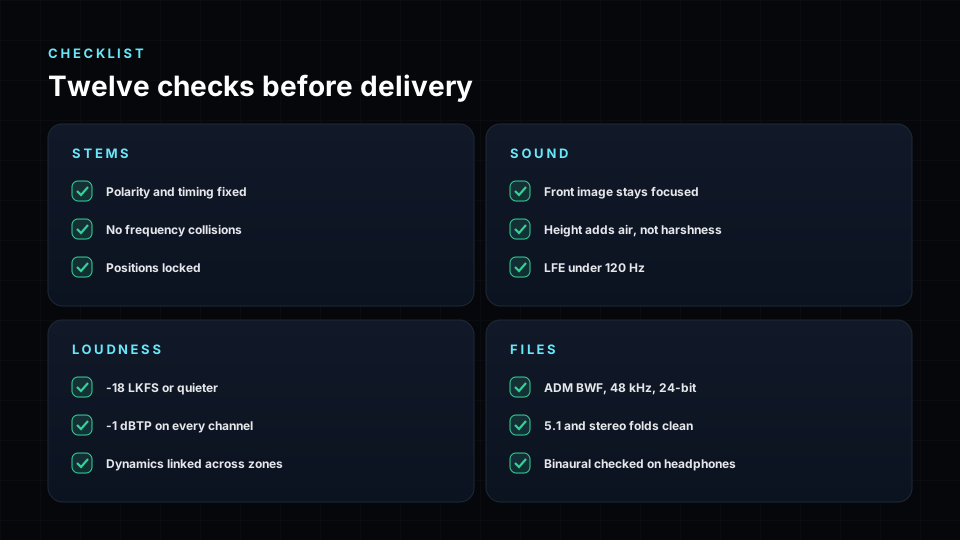
The complete immersive mastering checklist
Stems
- Same sample rate and length on every stem.
- No polarity or timing clashes between low-frequency stems.
- Shared frequency bands carved for the leading stem.
Sound
- Front spine (vocal, kick, snare, bass) solid in mono.
- Height adds air, not harshness.
- LFE supports the bass, never carries it alone.
- Tone matches the stereo master of the same song.
Loudness
- -18 LKFS maximum integrated on the immersive render.
- -1 dBTP on all 12 channels of the 7.1.4 render.
- The binaural render also stays under -1 dBTP.
Files
- Fold-downs checked all the way to stereo.
- ADM BWF at 48 kHz, 24-bit, with bed and objects intact.
- IAMF, binaural and stereo versions included.
- QC report attached.
Common Atmos mastering mistakes
- Mastering the 7.1.4 re-render like a stereo file. Unlinked limiters shift the image and flatten the height.
- Chasing stereo loudness. Pushing to -9 or -10 removes the depth that makes immersive worth it, and distributors reject anything above -18 LKFS.
- EQ per speaker. Brightening the height speakers changes the tone of every object that moves through them.
- Bass in the LFE only. It disappears in stereo and on many headphone renders.
- Ignoring phase between stems. The low end sounds fine in the room and thin on headphones.
- Skipping the fold-down. Cancellation between neighbouring speakers only shows up when they are summed.
- Checking peaks on the sum only. One height channel can clip while the overall meter looks safe.
- Delivering only one file. Platforms, previews and clients need ADM BWF, binaural and stereo.
How Spatial9 helps you master in 3D
Spatial9 brings immersive mastering into the browser, built on the practices in this guide:
- Master from stems with styles, intensity and Atmos-only loudness targets, and hear the original versus the master at matched volume.
- Phase and collision clean-up: check phase between stems, fix polarity and timing automatically, and carve frequency collisions with dips that follow the music.
- Immersive balance with live zone meters: trim front, centre, surround, height and LFE and hear the change as the song plays.
- Monitor on headphones or speakers: switch between a binaural headphone view and a 7.1.4 speaker panning view at any moment.
- Check before you deliver: a real 7.1.4 render checked for loudness, true peak on every channel, fold-downs and phase between speakers.
- Download the Atmos master as ADM BWF, or export IAMF for Eclipsa Audio, binaural and stereo, all with the same mastering applied.
Start a project or experience a song in 3D. For the mixing side, read our immersive and spatial audio mixing guide.
Frequently asked questions
What is Atmos mastering?
Atmos mastering is the final pass on a Dolby Atmos music mix. It balances the tone, the zones of the room and the dynamics, hits -18 LKFS integrated with true peaks at or below -1 dBTP, checks fold-downs and the binaural render, and delivers an ADM BWF master.
What is the difference between spatial audio mastering and immersive mastering?
They describe the same work. Spatial audio mastering is the term listeners know from Apple Music. Immersive mastering is the format-neutral term that also covers IAMF, Eclipsa Audio, MPEG-H and Auro-3D.
Can I master a Dolby Atmos mix from a single 7.1.4 file?
You can, but you lose a lot. A single 7.1.4 render no longer has objects or binaural render modes, so you cannot fix phase or collisions between stems, and the result must be delivered as a channel-based bed. Mastering from stems or the full session keeps every option open.
What loudness should an Atmos master be?
Most Dolby Atmos music is delivered at -18 LKFS integrated or quieter, measured on the immersive render, with true peaks at or below -1 dBTP on every channel. Always confirm the current specification of your distributor.
Why is Atmos music quieter than stereo?
Because the space between sounds is part of the experience. Heavy limiting closes that space. Platforms also play immersive versions at a level that does not reward loudness, so a dynamic master sounds better without sounding quieter.
How do I handle the LFE when mastering in Atmos?
Treat it as extra weight, not the foundation. Many fold-downs drop the LFE and headphone renders handle it differently, so the bass must work in the main channels first. Keep the crossover consistent and trim the LFE level by a few decibels at most.
What are phase collisions in immersive mastering?
Phase collisions happen when two stems that share low frequencies are in opposite polarity or slightly out of time. They cancel each other, which thins the low end. In 3D the problem is worse because fold-downs and binaural renders sum stems that sat in different speakers.
What are frequency collisions and how do you fix them?
A frequency collision is two stems carrying strong energy in the same band at the same time, such as kick and bass around 80 Hz. The fix is a small dynamic dip on the less important stem, only while the clash happens, so the leader stays clear and the other stem keeps its tone the rest of the time.
Do I need a 7.1.4 room to master in Dolby Atmos?
A calibrated 7.1.4 room is the professional reference. Many engineers also master on headphones with a trusted binaural renderer, and everyone should check the headphone render because that is how most people listen. If you can, check the final master in a speaker room before release.
What files should an immersive mastering engineer deliver?
An ADM BWF master at 48 kHz 24-bit, an IAMF file where needed, a binaural render, a stereo master and a QC report with loudness, true peak per channel and format details.
Is IAMF mastered differently from Dolby Atmos?
The craft is the same: stems, zones, linked dynamics and true peak control. What changes is the container and the renderer. Master the scene once and render both formats from it, then check each one on its own playback path.
Sources
- ITU-R BS.1770, Algorithms to measure audio programme loudness and true-peak audio level.
- ITU-R BS.2051, Advanced sound system for programme production (speaker layouts including 7.1.4).
- ITU-R BS.2076, Audio Definition Model (ADM).
- ITU-R BS.2088, Long-form file format for the international exchange of audio programme materials with metadata (BW64).
- ITU-R BS.775, Multichannel stereophonic sound system with and without accompanying picture (downmix coefficients).
- EBU R128, Loudness normalisation and permitted maximum level of audio signals.
- Dolby Laboratories, Dolby Atmos music creation, mastering and delivery guidance.
- Apple, Apple Music spatial audio and Dolby Atmos delivery requirements.
- Alliance for Open Media, Immersive Audio Model and Formats (IAMF) specification.
- Katz, B., Mastering Audio: The Art and the Science, Focal Press.