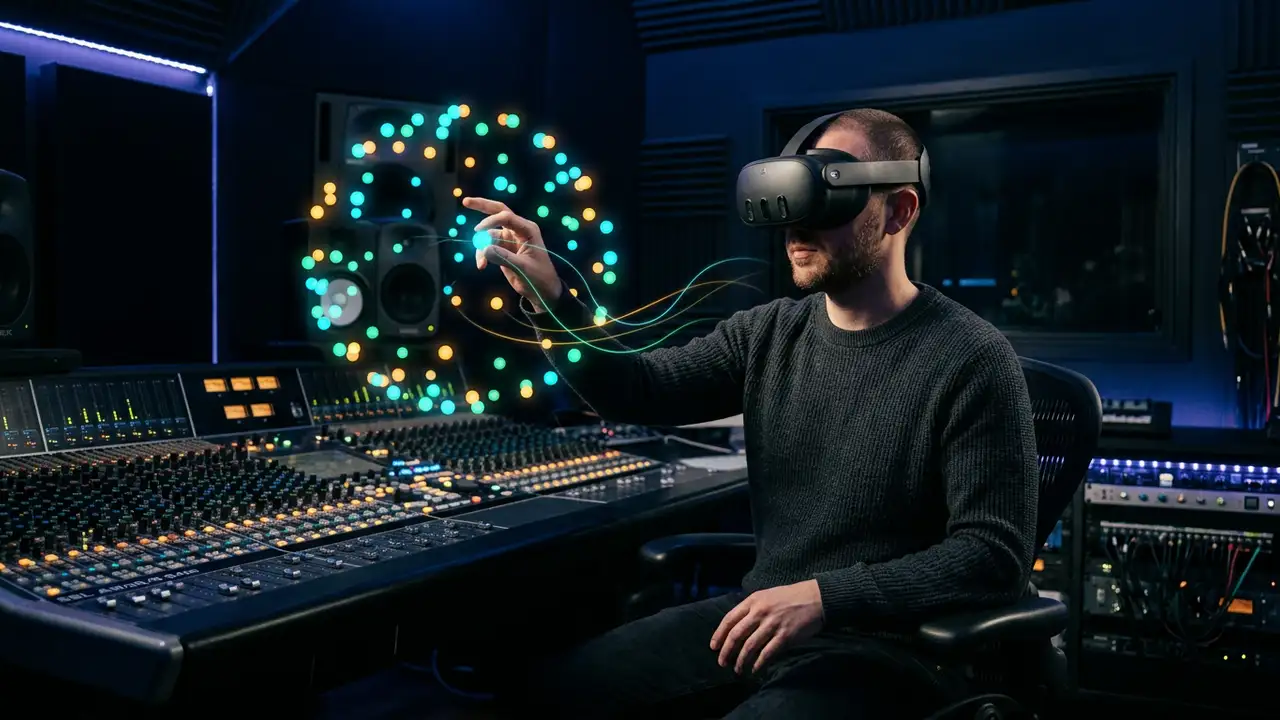
VR Mode: The Day Spatial Audio Mixing Got Hands
Spatial9 Research Team · · 9 min read
Key takeaways
- VR Mode puts every instrument of a spatial mix around you as a glowing orb you can grab, place and move with your hands or controllers.
- You can also mix by voice: say "drums behind me", "make the pads orbit" or "solo the bass".
- Hold grip while you move an instrument and your arm becomes an automation pen: the path is recorded and loops in time with the music.
- It runs in the headset web browser through the open WebXR standard, on Meta Quest, Pico, Apple Vision Pro (visionOS 2 and later) and PC headsets. Nothing to install.
- It turns a 3D idea into a 3D action, which makes spatial mixing faster to learn, easier to share with clients and more fun to perform.
There is a moment every immersive mixer knows.
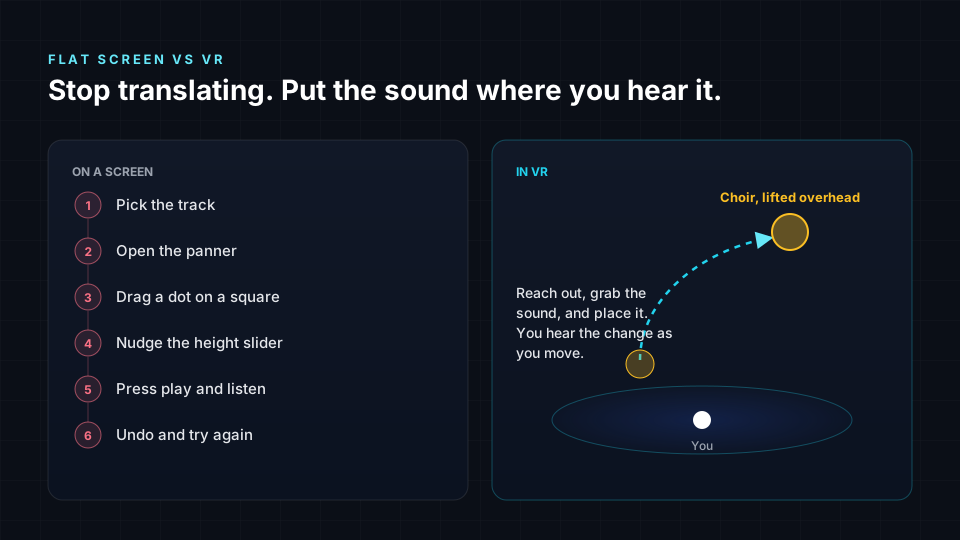
You hear it in your head before you hear it in the speakers: the choir should rise from behind, slowly, until it hangs right above the listener like weather. You can see it. You can almost touch it. And then you look down at a screen, find the right track, open a panner, drag a dot across a flat square, nudge a height slider, press play, listen, and nudge again.
The idea was three-dimensional. The tool was not.
VR Mode closes that gap. You stop translating the picture in your head into knobs. You reach out, take the choir in your hand, and lift it into the sky.
Why spatial audio has been waiting for this
Spatial and immersive formats changed what a mix is. In a stereo mix, a sound lives on a line between two speakers. In an object-based mix, such as the ones behind ADM, Eclipsa Audio (IAMF) or a 7.1.4 room, each sound is an object with a position in 3D space that can move over time. Height, depth and distance became part of the art.
Yet most of us still shape that 3D world through 2D windows. A mouse moves in two directions. A screen shows two dimensions. Every height decision is a slider, every distance decision is a number, and every movement is a curve drawn on a timeline you have to imagine in space.
That translation tax is why immersive mixing can feel slow to learn and hard to explain to an artist. It is also why so many first immersive mixes end up as "stereo with some reverb overhead". Nobody chose that. The tools nudged them there.
When you stand inside the mix, the tax disappears. Your ears and your hands finally work in the same space.
What VR Mode actually does
VR Mode lives inside Walk inside the sound, the mode of the Spatial9 players where you move through a song instead of sitting in front of it. On a laptop or phone, you walk with the keyboard, mouse or touch. In a headset, you press VR mode and the room becomes the mix.
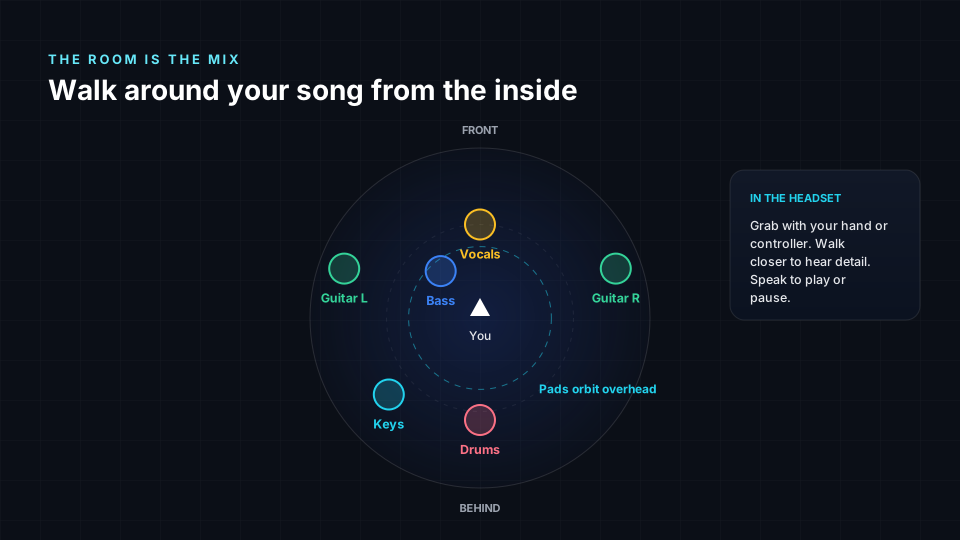
Here is what you can do in there:
- See every stem as a light. Each instrument is a colored orb, placed where it sits in the mix. When it plays, you hear it from exactly there.
- Grab and place. Point and pull the trigger, or simply pinch with your bare hand on headsets with hand tracking. Move the orb anywhere: above you, behind you, close enough to whisper. A small haptic pulse confirms the grab.
- Mix by voice. Say what you want, the way you would say it to an assistant engineer. "Move the drums behind me." "Vocals in front of me." "Bass closer." "Pads higher."
- Give a sound a personality. Say "make the pads orbit", "let the strings breathe", "the shaker bounces", or "guitar swings side to side". Built-in movements include orbit, figure eight, spiral, pendulum, bounce, breathe and drift. Say "freeze" to make it stay still.
- Solo and mute with a word: "solo the bass", "mute this".
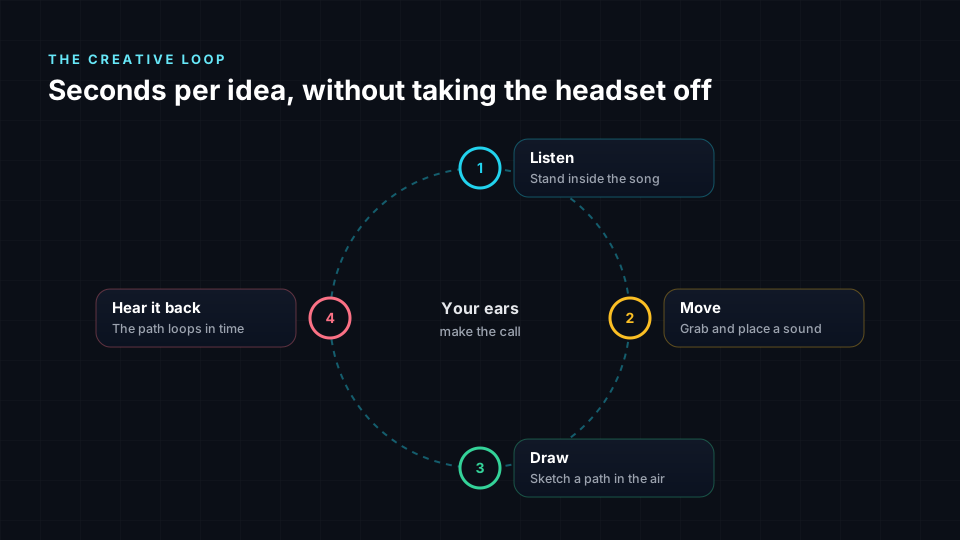
- Draw a movement with your arm. This is the part that makes people laugh out loud the first time. Say "record", or hold the grip button, then move an instrument through the air. Your gesture becomes a path, and that path loops in time with the music. You are not programming automation. You are performing it.
- Play, pause and leave with your voice too: "pause", "play", "exit VR". Say "reset" to clear the movements you drew.
Why this is a game changer
1. Your ears and your hands agree
When you place a sound with your hand at the exact spot you hear it, there is no mental conversion. Spatial decisions that took minutes of trial and error take seconds. More importantly, they feel right, because you judged them in the same space the listener will.
2. Movement becomes a performance
The most memorable immersive moments are rarely static. A guitar that circles the listener on the bridge. A synth that rises like a sunrise into the last chorus. On a timeline, that is a dozen keyframes. In VR, it is one sweep of your arm, captured with all the human timing and swing that keyframes struggle to fake.
3. Artists and clients finally understand the mix
Try explaining "the backing vocals sit at 40 degrees elevation, slightly behind" to an artist. Now imagine handing them the headset and saying "walk over to the backing vocals". VR turns a technical conversation into a shared experience. Clients stop nodding politely and start pointing: "that one, higher". That is why we see VR review as a natural step for Studio Rooms, our secure space for sharing files and collecting feedback.
4. Learning spatial audio becomes intuitive
For students, the jump from stereo to immersive is often the hardest part of the journey. In VR, the concepts teach themselves. Distance is how far away it is. Height is above you. Envelopment is literally being surrounded. It is a natural companion to the Spatial9 Academy and to the habits in our guide to immersive music mixing best practices.
5. No app, no install, no gatekeeping
VR Mode runs in the headset web browser using WebXR, the open web standard from the W3C for virtual and mixed reality. Send someone a link and they are inside your mix. That makes it as easy to share as a web page, because it is one.
Where it runs
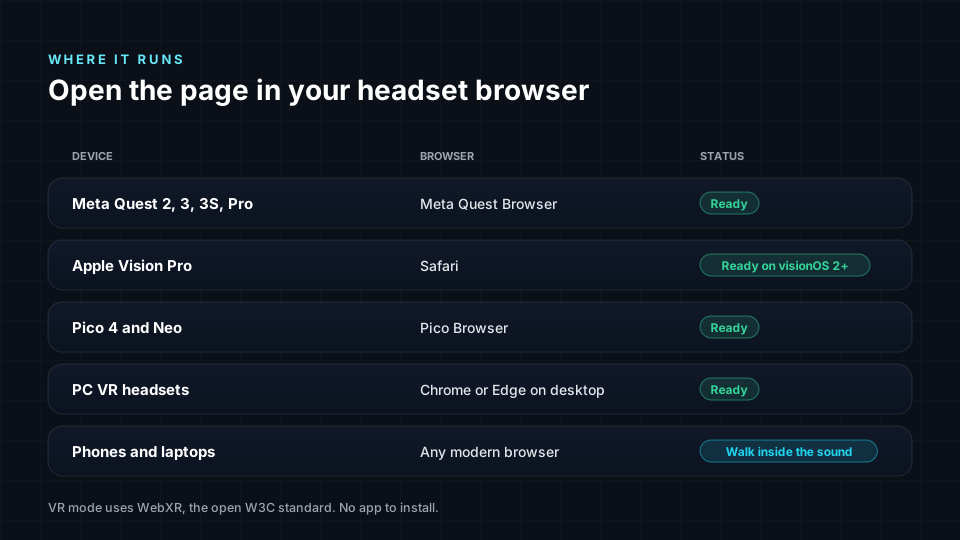
- Meta Quest 2, 3, 3S and Pro in the Meta Quest Browser, with controllers or hand tracking.
- Pico 4 and Pico 4 Ultra in the Pico browser.
- Apple Vision Pro in Safari. WebXR is on by default from visionOS 2, with natural pinch and gaze input. On visionOS 1 it can be switched on in Safari's advanced settings.
- PC headsets such as Valve Index, HTC Vive and Windows Mixed Reality, through Chrome or Edge on the desktop with the headset software running.
No headset? You can still step inside the sound from any phone or laptop, and every mix you hear in VR plays the same way there.
Your first five minutes in VR Mode
- Put on your headset and open spatial9.ai/experience in the headset browser.
- Choose a song, open Walk inside the sound and press VR mode.
- If you want to use your voice, switch on the microphone option before you enter. You can skip it and use only your hands.
- Press Enter VR. Look around: each light is an instrument.
- Grab the vocal and bring it close. Then say "drums behind me" and feel the room open up.
- Say "record", grab the pads and draw a slow circle above your head. Let go and listen to it loop.
- Say "exit VR" when you are done.
Two tips from our own sessions: stand in a clear space of about two by two meters, and mix at a comfortable volume. Being surrounded by sound makes everything feel louder than it is.
What this means for the industry
Immersive audio is growing across music streaming, film, games, podcasts and live events, but the number of people who feel confident mixing in 3D is still small. The tools have to become more human for the format to reach its potential.
We think spatial creation will look less like operating a cockpit and more like conducting an orchestra: listening, gesturing, speaking. VR Mode is our first step in that direction, and it pairs naturally with the rest of what Spatial9 is building, from music that responds to the listener to generative spatial sound shaped by how you hear.
It is also a small example of something bigger. We built VR Mode, voice control and gesture recording with an agent-assisted workflow: AI agents helped research the WebXR standard across headsets, write and test the voice grammar, and verify every release. That is exactly what our Agentic Enterprise Transformation service brings to media and entertainment companies who want to ship new experiences at this speed.
Frequently asked questions
What is VR Mode in Spatial9?
VR Mode is a way to listen to and shape a spatial mix from inside a virtual room. Every instrument appears around you as an orb you can grab, move, animate and control by voice, in real time, while the music plays.
Do I need to install an app?
No. VR Mode runs in the web browser that comes with your headset, using the open WebXR standard. Open the Spatial9 player, press VR mode and enter.
Which VR headsets work?
Meta Quest 2, 3, 3S and Pro, Pico 4 and Pico 4 Ultra, Apple Vision Pro with visionOS 2 or later, and PC headsets connected to Chrome or Edge on a desktop computer.
Can I mix with my hands instead of controllers?
Yes. On headsets with hand tracking, pinch to grab an instrument and move your hand to place it. Controllers work too, with a gentle vibration when you grab something.
What voice commands can I use?
You can place sounds ("drums behind me", "vocals in front of me", "bass closer", "pads higher"), give them movement ("orbit", "figure eight", "spiral", "bounce", "breathe", "drift", "swing", "freeze"), solo or mute them, and control playback ("play", "pause", "record", "stop recording", "reset", "exit VR").
How do I record a movement?
Say "record", or hold the grip button while you hold an instrument, then move it through the air. Let go and the path loops in time with the music. Say "reset" to clear drawn movements.
Is VR mixing a replacement for my studio and speakers?
No. Think of it as a creative and review layer. It is the fastest way to sketch spatial ideas, perform movement and share a mix with someone. Final delivery checks still belong in a calibrated room or with trusted headphones.
What if I do not have a headset?
Open Walk inside the sound on any phone or laptop and move through the mix with touch, mouse or keyboard.
Sources
- W3C, WebXR Device API: https://www.w3.org/TR/webxr/
- W3C, WebXR Hand Input Module: https://www.w3.org/TR/webxr-hand-input-1/
- MDN Web Docs, WebXR Device API: https://developer.mozilla.org/en-US/docs/Web/API/WebXR_Device_API
- Meta Horizon OS Developers, WebXR overview: https://developers.meta.com/vr/documentation/web/webxr-overview
- UploadVR, With visionOS 2, Safari on Apple Vision Pro supports WebXR by default: https://www.uploadvr.com/visionos-2-apple-vision-pro-webxr
- MDN Web Docs, Web Speech API: https://developer.mozilla.org/en-US/docs/Web/API/Web_Speech_API