How to Share Immersive, Spatial and Binaural Mixes for Client Review (and Get Feedback You Can Act On)
Spatial9 Research Team · · 12 min read
Key takeaways
- A file transfer delivers a file; a review room delivers the listening experience and brings precise feedback back.
- Studio Rooms plays ADM BWF, Eclipsa Audio (IAMF), 7.1.4 multichannel, ambisonics, binaural, stereo and video in the right player, rendered for headphones.
- Notes can be pinned to an exact millisecond, a selected section, a position in 3D space, or recorded as voice notes that are transcribed to text.
- Version comparison switches between mixes in sync, so clients hear exactly what changed.
- Share links carry a password, expiry, watermark, download control, instant revoke and per-link activity, and guests need no account.
Every engineer has had this email.
"Loved it! Just one thing: around the second chorus, the thing on the left feels a bit much? Also could the vocal be more... in front? But not louder. You know what I mean."
You do not know what they mean. You open the session, scrub to somewhere near the second chorus, guess which "thing on the left" they heard on their laptop speakers, and send version four. They reply from their phone: "Hmm, closer. Did you change the reverb?"
Now multiply that by twelve speakers, a height layer, moving objects and a client who is listening to a binaural fold-down on AirPods while you mixed on a calibrated 7.1.4 system. Immersive audio did not just add channels to the mix. It added dimensions to the misunderstanding.
Studio Rooms exists to end that email. Here is why sharing immersive mixes is harder than it looks, what good spatial feedback actually requires, and how to set up a review process that gets you to approval in fewer rounds.
Why sharing an immersive mix is harder than sharing a stereo one
With a stereo master, sharing is solved. Bounce a WAV or an MP3, drop it into any link, and everybody hears roughly the same thing.
Immersive and spatial mixes break that in four ways.
- The file itself is not playable by most people. An ADM BWF master is a multichannel Broadcast Wave file with beds, objects and position metadata. Double-click it on a normal laptop and you get silence, an error, or the first two of 128 tracks. An Eclipsa Audio (IAMF) file needs a decoder most media players do not have yet.
- Your client does not have your room. You mixed on 7.1.4 or 9.1.6 speakers. Your client, your artist and the label A&R almost certainly listen on headphones. What they hear depends entirely on the binaural rendering, and if they hear a different render than the one you checked, their notes describe a mix you never made.
- Feedback gains a direction. In stereo, "too loud" is enough. In spatial audio, the problem might be where something is: too high, too far back, too wide, moving too fast. Words are a terrible tool for describing positions in a sphere.
- There are more versions, and they differ in subtler ways. Spatial revisions are often about placement and movement rather than level. Telling version three from version four by ear, a day apart, is nearly impossible.
That is why the usual workflow, a transfer link plus an email thread, falls apart on immersive projects. A transfer delivers a file. It does not deliver the listening experience, and it gives your client no way to point at what they hear.
What a good immersive review actually needs
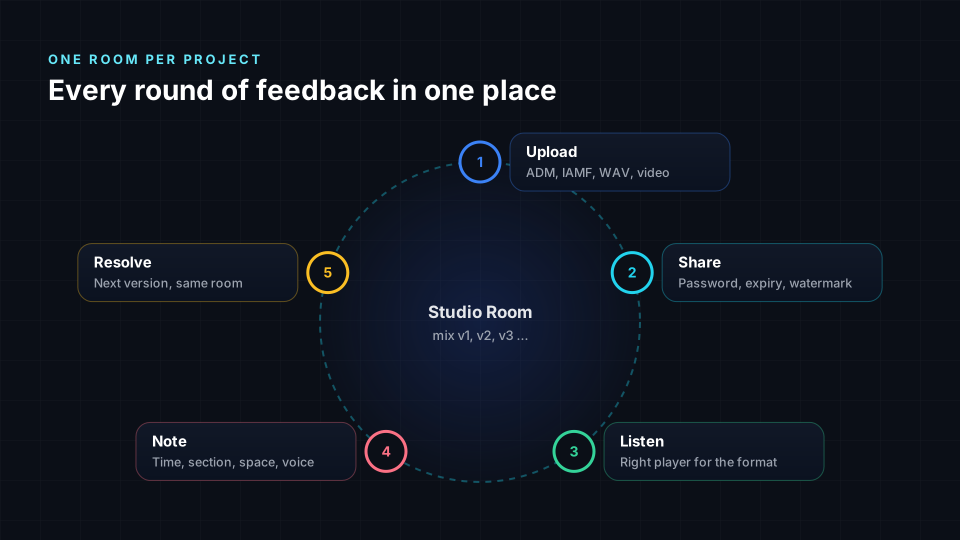
If you strip the problem down, a client review of a spatial mix needs five things.
| Need | Why it matters | What fails without it |
|---|---|---|
| The right player for the format | ADM, IAMF, multichannel and ambisonics each need different decoding and rendering | The client hears silence, a fold-down or the wrong render |
| A known binaural render | Most reviewers listen on headphones | Notes describe a mix you never heard |
| Notes anchored in time and space | Spatial problems have a when and a where | "Around the chorus, on the left-ish" |
| Versions you can switch between instantly | Spatial changes are subtle | Nobody can tell whether the fix landed |
| Access control | Unreleased music leaks | A forwarded link becomes a leak |
Studio Rooms is built around exactly these five.
Format-aware playback: the client hears what you hear
When you upload a file to a room, Studio Rooms reads it before playing it and chooses the right player automatically. These are the same players behind the free Try your current files tool, which handles more than 50 audio and video formats.
- ADM BWF and Atmos masters open with their beds and objects rendered into a virtual 7.1.4 room on headphones, so a client can judge placement and movement without a speaker system.
- Eclipsa Audio and IAMF files, as standalone
.iamfor inside an MP4, play with an instant stereo versus binaural A/B, so the client hears both deliverables and understands the difference. Read more in our IAMF web player guide. - Multichannel WAV in 5.1, 7.1, 7.1.4 or 9.1.6 shows its speaker layout and a 3D preview.
- Ambisonics (AmbiX) are rendered binaurally from the sound field.
- Binaural bounces and stereo play with a waveform, a spectrum and loudness readings.
- Video, including 360 video, plays with its soundtrack so notes land on the picture timeline.
A small format card at the top of each file tells your guest exactly what they are listening to. That single line ("ADM BWF, 7.1.4 bed plus 22 objects, rendered binaurally") prevents a surprising number of wasted review rounds.
Nothing is re-encoded for the review. The player reads the original file you uploaded.
Feedback you can point at
The heart of a review is the note. Studio Rooms gives every note an anchor, so a comment is never vague about when or where.
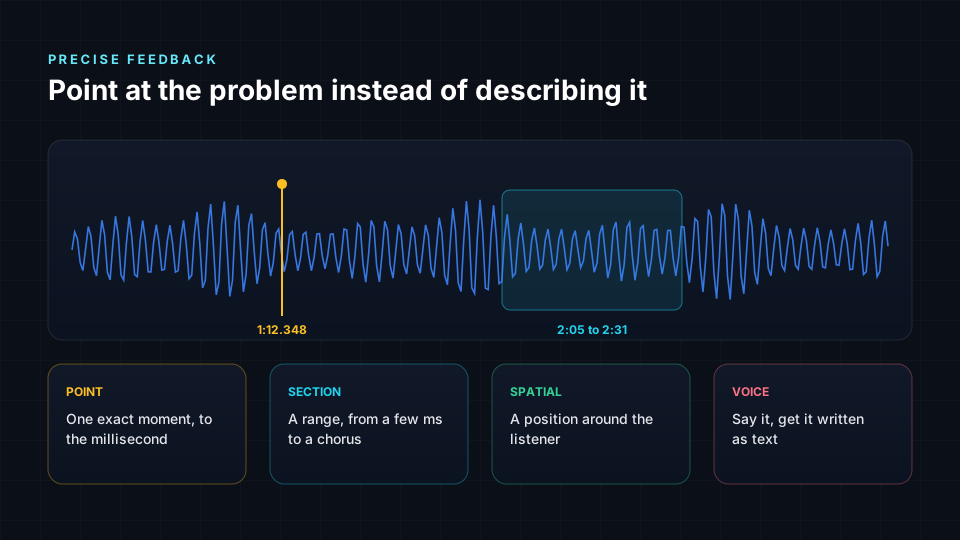
Point notes: one exact moment
Switch the waveform to Point and click. The note is pinned to that instant, shown to the millisecond. Zoom in far enough and the waveform stops being an overview and becomes the actual sample curve read from the original file, with every individual sample visible. That is the level of precision you need for a click, a bad edit, a breath that should go or a single snare hit that is too loud.
Section notes: a range, from milliseconds to minutes
Switch to Section and drag. A section can be as short as a few milliseconds, a single transient, or as long as a whole bridge. "From 2:05 to 2:31 the pads feel narrow" is a note you can act on immediately.
Spatial notes: a position in 3D
Pick a point on the sphere around the listener and attach it to the note. "The guitar should sit here" stops being a sentence and becomes a coordinate: azimuth, elevation and distance. In VR on a supported headset, spatial notes appear as markers at the positions they describe, around you, inside the mix.
Voice notes: say it, and get it in writing
Many artists and producers are far better at saying what they hear than typing it. Hum the melody that is buried. Say "this needs to feel like it is coming from behind me." Laugh at the drop.
Press the microphone in the note box and talk for up to three minutes. The player pauses while you record so your voice does not mix with the music. When you stop, Studio Rooms transcribes the voice note to text and places it in the note, where you can fix a word before sending. The recording stays attached, so the engineer hears the tone and emphasis, and also gets a searchable, skimmable written note.
Combine anchors freely. A voice note pinned to a section, with a spatial position, is about as unambiguous as feedback can be.
Resolving notes
Engineers mark a note done once it is addressed. Done notes move to their own tab, so every round starts with a clean list of what is still open, and nothing slips through an email thread.
Comparing versions: did the fix land?
Spatial changes are subtle. Moving a backing vocal 20 degrees higher is obvious when you flip between versions at the same moment, and invisible when you listen to them a day apart.
In a Studio Room each new upload can be marked as a new version of an earlier file. The room keeps the chain in order (v1, v2, v3), and version comparison plays two versions in sync and lets you switch between them instantly at the same point in the song. Your client hears exactly what changed. You get approval instead of "hmm, closer."
For the owner, a built-in quality check measures loudness, true peak, clipping, dynamics and phase against the platform you deliver to, privately in the browser, before the mix goes anywhere.
Sharing securely: unreleased music deserves better than a public link
Pre-release audio leaks. Sometimes through bad actors, far more often through a link forwarded once too many times. Each Studio Rooms share link carries its own controls.
- Password, with automatic locking after repeated wrong attempts
- Expiry date, after which the link stops working
- Stream only or download, decided per link
- Listen only or comment, decided per link
- Watermark with the recipient's name over the player, so a screen recording can be traced to its link
- Revoke at any moment, effective immediately
- Activity: when the link was opened, which files were played or downloaded, and when notes arrived
Create one link per person, label it, and you always know who heard what. Files stream through short-lived signed addresses, so a copied file address stops working within hours.
File transfer, shared drive or review room?
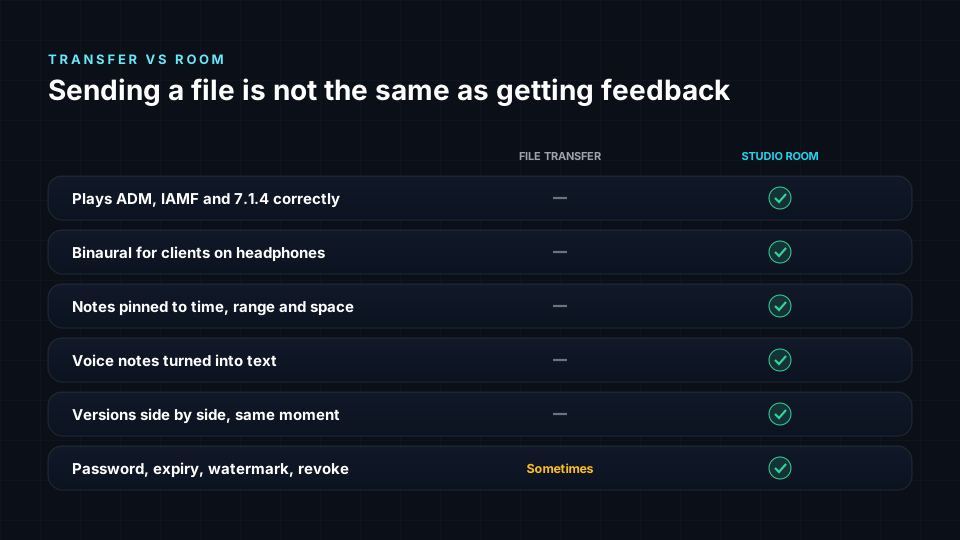
| File transfer (WeTransfer, Dropbox, Drive) | Generic audio review tools | Studio Rooms | |
|---|---|---|---|
| Plays ADM BWF and Atmos masters | No | Usually no | Yes, rendered to binaural |
| Plays Eclipsa Audio / IAMF | No | No | Yes, with stereo vs binaural A/B |
| Multichannel and ambisonics | Download only | Often downmixed or unsupported | Yes, with layout and 3D preview |
| Timestamped comments | No | Yes | Yes, to the millisecond |
| Section (range) comments | No | Sometimes | Yes |
| Spatial position on a note | No | No | Yes |
| Voice notes with automatic text | No | Rarely | Yes |
| Sample-level waveform zoom | No | Rarely | Yes |
| Version A/B at the same moment | No | Often | Yes |
| Password, expiry, watermark, revoke | Partly | Often | Yes, per link |
| Guest account needed | No | Varies | No |
Tools such as Filepass, Samply, Pibox and similar services are excellent for stereo music review, and many studios use them happily. The gap is immersive: none of them were designed to play an ADM master or an IAMF file properly, or to let a client say where in the sphere a problem is. If most of your work is stereo, any good review tool will help. If you deliver spatial, immersive or binaural mixes, the player and the spatial notes are the whole point.
A review workflow that works for immersive projects
Here is the process we recommend for client reviews of spatial and immersive mixes.
- Create one room per project. An album, a single, a film reel. Name it the way the client does.
- Upload the deliverable and a headphone reference. For Atmos projects, the ADM BWF master plus a binaural bounce. For YouTube or TV deliveries, the Eclipsa Audio file, so the client hears stereo and binaural side by side.
- Run the quality check before sharing, so loudness or true-peak problems never reach the client.
- Create one link per reviewer, with a password and an expiry date. Turn on the watermark for anything pre-release.
- Ask for anchored notes. Tell your client: click the waveform for a moment, drag for a section, use the microphone if it is easier to say. You will get better notes immediately.
- Resolve notes, upload the next version, compare. Mark each note done as you address it, upload v2 as a new version of v1, and let the client A/B them at the same moment.
- Approve and deliver. When the open list is empty, you are done, and the whole conversation is on record.
Who Studio Rooms is for
- Mixing and mastering engineers sending immersive, spatial and stereo mixes to artists and labels.
- Immersive and Atmos studios that need a professional client portal for ADM, 7.1.4 and binaural deliveries.
- Artists and producers collecting feedback from co-writers, managers and A&R.
- Labels and catalog teams approving spatial versions of existing releases at scale.
- Post-production and film teams reviewing immersive soundtracks against picture.
- Educators reviewing student mixes with precise, timestamped and spoken feedback.
Frequently asked questions
How do I share an Atmos mix with a client who does not have Atmos speakers?
Upload the ADM BWF master to a Studio Room and send a share link. The client opens it in a browser and hears the mix rendered binaurally on headphones, with beds and objects placed in a virtual 7.1.4 room. They do not need speakers, a DAW, an app or an account. You can add a binaural bounce as a second file if you want them to hear your own render as well.
What is the best way to get feedback on a spatial audio mix?
Use notes that carry a time and a place. A point note fixes the exact moment, a section note covers a range, a spatial note records the position in 3D, and a voice note captures what is easier to say than to write. Anchored notes remove almost all of the guesswork from revision requests.
Can clients leave voice notes on a mix?
Yes. In Studio Rooms a guest presses the microphone, records up to three minutes, and the recording is transcribed to text automatically and attached to the note. The engineer gets both the original audio and the written version.
Can I share an Eclipsa Audio or IAMF file for review?
Yes. IAMF files, as standalone .iamf or inside an MP4, play in the room with an instant stereo versus binaural A/B. This is the quickest way to get sign-off on a YouTube or TV deliverable.
Do my clients need an account?
No. A share link opens in any modern browser. You decide whether a link needs a password, when it expires, whether it allows downloads and whether the guest can comment.
Is my unreleased music safe?
Each link can have a password, an expiry date, stream-only playback, a visible watermark with the recipient's name, and can be revoked instantly. Every open, play, download and comment is logged per link.
Can I compare two versions of a mix?
Yes. Mark the new upload as a version of the earlier one and use version comparison to switch between them in sync, at the same moment in the song.
Is Studio Rooms free?
Studio Rooms is in early access and every feature is currently open. The free plan will include three active rooms, 5 GB of storage and links of up to seven days. See the plans page for details, and the Studio Rooms documentation for a full walkthrough.
Start your first room
The fastest way to understand Studio Rooms is to use it with a real mix and a real client. Create a room, upload your latest immersive, spatial or binaural mix, and send the link. The next note you receive will tell you exactly when, exactly where, and in the client's own voice.
[Create your first Studio Room](/studio-rooms)
Sources
- ITU-R BS.2076, Audio Definition Model: https://www.itu.int/rec/R-REC-BS.2076
- ITU-R BS.2088, Long-form file format for the international exchange of audio programme materials with metadata (BW64): https://www.itu.int/rec/R-REC-BS.2088
- Alliance for Open Media, Immersive Audio Model and Formats (IAMF) specification: https://aomediacodec.github.io/iamf/
- Apple Support, Listen to a binaural Logic Pro spatial audio mix on other devices: https://support.apple.com/en-us/105041
- ITU-R BS.1770, Algorithms to measure audio programme loudness and true-peak audio level: https://www.itu.int/rec/R-REC-BS.1770