Spatial audio ontology
The formal model Spatial9 uses to describe sources, scenes, positions, motion and renders.
The Spatial9 spatial audio ontology is a formal, machine-readable model of the things that make up an immersive mix: the recording and its stems, the instruments, the mix and what a player renders, the audio elements that place sound in space, the renderer and output format, and the listener, room and HRTF that shape what is heard. Spatial9 uses this one model at every stage of its pipeline, so a stem, a placement and a delivery file mean the same thing in the studio app, in the REST API, on the MCP server and for an A2A agent.
This page is a reference for audio engineers, data engineers and developers who want to describe their own catalog with the same vocabulary. It lists the classes and properties defined in the published Turtle file, explains the validation rules, shows how to fetch and load the file, and gives example queries. Version 0.1 is published under the MIT licence at https://spatial9.ai/ontology/spatial-audio.ttl.
Concepts
An ontology names the kinds of things in a domain, how they relate, real examples of them and the rules that must hold. The Spatial9 ontology is written with the W3C standards RDF, OWL 2 and SHACL.
| Building block | Meaning | Example in this ontology |
|---|---|---|
| Class | A kind of thing | s9:AudioObject, s9:ChannelBed, s9:Listener |
| Property | A link between things, or a value | s9:hasPosition, s9:renderedFor, s9:gainDb |
| Individual | A concrete example | s9:IAMF, s9:Binaural, or a stem in your catalog |
| Axiom | A rule that must hold | Bed, object and scene are disjoint; an object has exactly one position |
A taxonomy only records "is a kind of" relationships, such as Instrument, then Strings, then Violin. An ontology adds every other relationship, such as a stem that plays an instrument and an object that carries the stem. Spatial9 keeps instrument trees in SKOS and the relationships in OWL.
Open world and closed checks
OWL assumes an open world: a missing fact is unknown, not false. That suits a catalog that grows over time, but not quality control, where an audio object without a position must be reported as an error. For this reason the ontology pairs OWL definitions (what things mean) with SHACL shapes (what a valid record must look like). Both are shipped in the same Turtle file.
Ontology header and namespaces
The ontology IRI is https://spatial9.ai/ontology/spatial-audio and every term uses the s9: namespace https://spatial9.ai/ontology/spatial-audio#. The file reuses the Music Ontology (mo:), Dublin Core terms (dct:) and SHACL (sh:).
@prefix s9:   <https://spatial9.ai/ontology/spatial-audio#> .
@prefix owl:  <http://www.w3.org/2002/07/owl#> .
@prefix rdf:  <http://www.w3.org/1999/02/22-rdf-syntax-ns#> .
@prefix rdfs: <http://www.w3.org/2000/01/rdf-schema#> .
@prefix xsd:  <http://www.w3.org/2001/XMLSchema#> .
@prefix sh:   <http://www.w3.org/ns/shacl#> .
@prefix mo:   <http://purl.org/ontology/mo/> .
@prefix dct:  <http://purl.org/dc/terms/> .
<https://spatial9.ai/ontology/spatial-audio> a owl:Ontology ;
dct:title "Spatial9 Spatial and Immersive Audio Ontology"@en ;
dct:creator "Spatial9 Engineering Team" ;
owl:versionInfo "0.1" ;
rdfs:seeAlso <https://spatial9.ai/blog/ontology-spatial-immersive-audio-spatial9> .Classes
The classes are grouped into five families. Each family answers a different question about a mix.
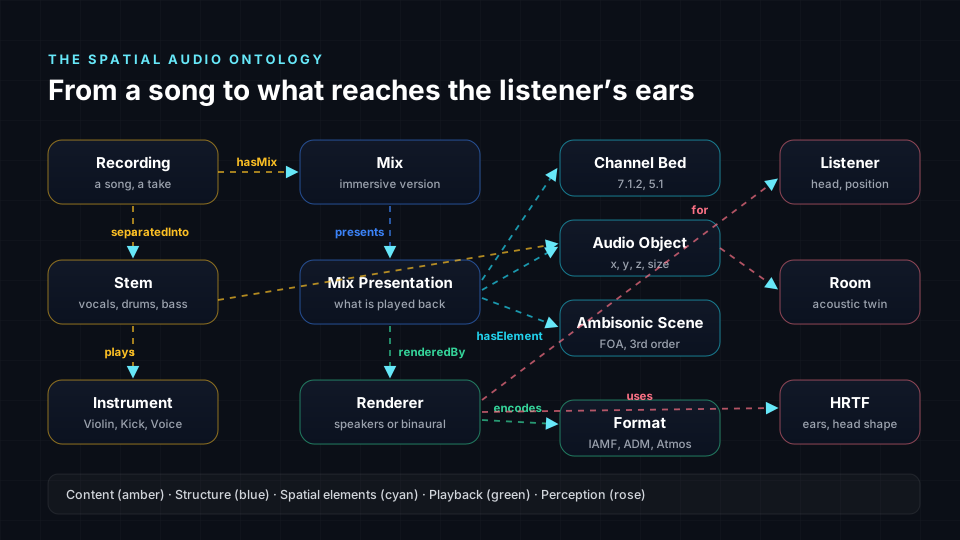
| Family | Classes | Question it answers |
|---|---|---|
| Content | Recording, Stem, Instrument | What music is this, and what is it made of? |
| Structure | Mix, MixPresentation | Which version is this, and what does a player render? |
| Spatial elements | AudioElement, ChannelBed, AudioObject, AmbisonicScene | How is the sound stored in space? |
| Playback | Renderer, Format | How is it rendered, and into which file? |
| Perception | Listener, Room, HRTF, Position | Who hears it, where, and from which direction? |
Class reference
| Class | Superclass | Definition |
|---|---|---|
s9:Recording | mo:Signal | One captured performance of a song |
s9:Stem | none | One separated or delivered part of a recording, such as vocals or drums |
s9:Instrument | mo:Instrument | What a stem plays |
s9:Mix | none | One immersive version of a recording |
s9:MixPresentation | none | What a player renders; mirrors the IAMF Mix Presentation and the ADM audioProgramme |
s9:AudioElement | none | A unit of spatial audio inside a presentation |
s9:ChannelBed | s9:AudioElement | Audio tied to fixed speaker positions |
s9:AudioObject | s9:AudioElement | A sound with its own position, width and gain |
s9:AmbisonicScene | s9:AudioElement | The whole sound field around a point |
s9:Renderer | none | Turns a presentation into speaker feeds or binaural |
s9:Format | none | An output format |
s9:Listener | none | The person hearing the result |
s9:Room | none | A real or virtual acoustic space; may be an acoustic digital twin |
s9:HRTF | none | Head-related transfer function, usually stored as an AES69 SOFA file |
s9:Position | none | A direction and distance for an audio object |
Content and structure
A Recording can be separated into Stem individuals, and each stem plays one or more Instrument individuals. Recording and Instrument extend Music Ontology classes, so a catalog described with this ontology can be joined with existing music metadata on the web.
A Mix is one immersive version of a recording. A MixPresentation is the chosen set of audio elements a player renders. Keeping the two apart lets one mix carry several presentations, for example a full mix and an instrumental version.
Spatial elements
There are three ways to store sound in space, declared as disjoint classes. One audio element is exactly one of them.
s9:AudioElement     a owl:Class ; rdfs:label "Audio Element"@en .
s9:ChannelBed       a owl:Class ; rdfs:subClassOf s9:AudioElement ; rdfs:label "Channel Bed"@en .
s9:AudioObject      a owl:Class ; rdfs:subClassOf s9:AudioElement ; rdfs:label "Audio Object"@en .
s9:AmbisonicScene   a owl:Class ; rdfs:subClassOf s9:AudioElement ; rdfs:label "Ambisonic Scene"@en .
[] a owl:AllDisjointClasses ; owl:members ( s9:ChannelBed s9:AudioObject s9:AmbisonicScene ) .| Element | ADM type | IAMF equivalent | Specific property |
|---|---|---|---|
ChannelBed | DirectSpeakers | Channel-based audio element | s9:layout |
AudioObject | Objects, with audioBlockFormat entries | none listed | s9:hasPosition, s9:width |
AmbisonicScene | HOA | Scene-based audio element | s9:hoaOrder |
Positions and motion
An audio object is placed through one s9:Position that carries azimuth, elevation and distance. s9:hasPosition is declared as an owl:FunctionalProperty, and the SHACL shape requires exactly one position per object. In ADM, an object's position can change over time through audioBlockFormat entries. Version 0.1 of the ontology does not define a separate class or property for time-varying motion; it records one position per audio object.
s9:hasPosition a owl:ObjectProperty , owl:FunctionalProperty ; rdfs:domain s9:AudioObject ; rdfs:range s9:Position .Positions follow the ADM convention: azimuth is in degrees from -180 to 180, 0 is straight ahead, and positive values are to the left.
Formats
s9:Format is a class, not a file extension. The file declares four format individuals:
| Individual | Label |
|---|---|
s9:IAMF | Eclipsa Audio (IAMF) |
s9:ADM_BWF | ADM BWF |
s9:DolbyAtmos | Dolby Atmos |
s9:Binaural | Binaural stereo |
Because formats are individuals, a single query can ask which mixes have every format a distributor needs.
Properties
Object properties
| Property | Domain | Range | Meaning |
|---|---|---|---|
s9:hasMix | Recording | Mix | A recording has an immersive version |
s9:separatedInto | Recording | Stem | Produced by stem separation |
s9:plays | Stem | Instrument | What the stem contains |
s9:presents | Mix | MixPresentation | What the player renders |
s9:hasElement | MixPresentation | AudioElement | Elements in a presentation |
s9:carries | AudioElement | Stem | Links what the music is to where it is |
s9:hasPosition | AudioObject | Position | Functional; one position per object |
s9:renderedBy | MixPresentation | Renderer | Which renderer produced the output |
s9:encodes | Renderer | Format | Which format the renderer writes |
s9:renderedFor | Renderer | Listener | Who the render targets |
s9:usesHRTF | Renderer | HRTF | The HRTF used for binaural |
s9:inRoom | Listener | Room | Where the listener is |
s9:carries is a relationship of its own because one track can feed several objects, and one object can carry several stems.
Datatype properties
| Property | Domain | Range | Notes |
|---|---|---|---|
s9:azimuth | Position | xsd:decimal | Degrees, -180 to 180, positive is left |
s9:elevation | Position | xsd:decimal | Degrees, -90 to 90 |
s9:distance | Position | xsd:decimal | Normalised 0 to 1 |
s9:width | AudioObject | xsd:decimal | Limited to 0 to 1 by SHACL |
s9:gainDb | AudioElement | xsd:decimal | Gain in decibels |
s9:layout | ChannelBed | xsd:string | For example 7.1.2 or 5.1 |
s9:hoaOrder | AmbisonicScene | xsd:integer | Ambisonic order |
Validation rules
The file contains two SHACL node shapes. Run them against your catalog to catch records that OWL alone would treat as merely incomplete.
| Shape | Target | Constraint |
|---|---|---|
s9:AudioObjectShape | s9:AudioObject | Exactly one s9:hasPosition; s9:width between 0 and 1 |
s9:PositionShape | s9:Position | s9:azimuth required, -180 to 180; s9:elevation required, -90 to 90 |
s9:AudioObjectShape a sh:NodeShape ;
    sh:targetClass s9:AudioObject ;
    sh:property [ sh:path s9:hasPosition ; sh:minCount 1 ; sh:maxCount 1 ;
                  sh:message "Every audio object needs exactly one position."@en ] ;
sh:property [ sh:path s9:width ; sh:minInclusive 0 ; sh:maxInclusive 1 ] .Describing a mix
The following Turtle describes one vocal object and a 7.1.2 bed. The ex: namespace stands for your own catalog.
@prefix s9:  <https://spatial9.ai/ontology/spatial-audio#> .
@prefix ex:  <https://catalog.example.com/> .

ex:song_0042        a s9:Recording ;
                    s9:separatedInto ex:song_0042_vocals ;
                    s9:hasMix ex:song_0042_mix_v2 .

ex:song_0042_vocals a s9:Stem ;
                    s9:plays ex:LeadVoice .

ex:song_0042_mix_v2 s9:presents ex:song_0042_main .

ex:song_0042_main   a s9:MixPresentation ;
                    s9:hasElement ex:vox_object , ex:bed_712 .

ex:vox_object       a s9:AudioObject ;
                    s9:carries ex:song_0042_vocals ;
                    s9:width 0.15 ;
                    s9:hasPosition [ s9:azimuth 0 ; s9:elevation 5 ; s9:distance 0.8 ] .

ex:bed_712          a s9:ChannelBed ; s9:layout "7.1.2" .
The same object as JSON-LD, suitable for an API response or a web page:
{
  "@context": { "s9": "https://spatial9.ai/ontology/spatial-audio#" },
  "@id": "https://catalog.example.com/vox_object",
  "@type": "s9:AudioObject",
  "s9:carries": { "@id": "https://catalog.example.com/song_0042_vocals" },
  "s9:width": 0.15,
  "s9:hasPosition": { "s9:azimuth": 0, "s9:elevation": 5, "s9:distance": 0.8 }
}
You do not need RDF to use the model. The same concepts work as database tables, JSON or column names in a data warehouse.
Fetching and loading the ontology
First, download the Turtle file.
curl -sSL https://spatial9.ai/ontology/spatial-audio.ttl -o spatial-audio.ttlNext, load the vocabulary and your catalog into one graph, then run the SHACL rules. This example uses the open source libraries rdflib and pySHACL.
from rdflib import Graph
from pyshacl import validate

g = Graph()
g.parse("https://spatial9.ai/ontology/spatial-audio.ttl")   # vocabulary and rules
g.parse("catalog.ttl")                                      # your mixes

ok, _, report = validate(g, shacl_graph=g, inference="rdfs")
print("valid" if ok else report)
Finally, query the graph with SPARQL, as shown in the next section.
Example SPARQL queries
The following query finds mixes whose lead vocal object sits behind the listener, that is, with an azimuth beyond plus or minus 90 degrees.
PREFIX s9: <https://spatial9.ai/ontology/spatial-audio#>
SELECT ?mix ?az WHERE {
  ?mix s9:presents/s9:hasElement ?obj .
  ?obj a s9:AudioObject ; s9:carries/s9:plays ?inst ; s9:hasPosition/s9:azimuth ?az .
  FILTER (CONTAINS(LCASE(STR(?inst)), "voice") && ABS(?az) > 90)
}
The next query lists mix presentations that have an Eclipsa Audio (IAMF) render but no binaural render. It uses only s9:renderedBy, s9:encodes and the format individuals defined in the file.
PREFIX s9: <https://spatial9.ai/ontology/spatial-audio#>
SELECT DISTINCT ?presentation WHERE {
  ?presentation a s9:MixPresentation ;
                s9:renderedBy/s9:encodes s9:IAMF .
  FILTER NOT EXISTS { ?presentation s9:renderedBy/s9:encodes s9:Binaural }
}
How Spatial9 uses the model
Every stage of the Spatial9 pipeline reads and writes the same model.
| Stage | What happens in ontology terms |
|---|---|
| Recognise | Gravity AI separates a stereo song and creates Stem individuals, each linked to an Instrument in a SKOS tree |
| Place | Each stem becomes an AudioObject with a position and width, or part of a ChannelBed |
| Check | Rules flag issues: the low-frequency channel is never an object, lead vocals stay in front, very wide objects are flagged, elements stay within loudness targets |
| Render | The renderer writes each requested Format from one format-neutral presentation |
| Expose | The MCP server, A2A agent and REST API use the same concepts |
A placement style such as live_concert, club, cinema or intimate_studio is a set of placement defaults over instrument classes, not a fixed list of tracks, so a new instrument type receives a sensible placement automatically. Because every output comes from the same presentation, the headphone version and the speaker version cannot drift apart.
Tool schemas follow the same vocabulary: create_spatial_audio produces a mix with formats, split_stems produces stems, and get_downloads returns format identifiers such as binaural, youtube_video and iamf. You can record a finished render as graph facts by mapping those identifiers to s9:Binaural and s9:IAMF and linking them with s9:hasMix, s9:presents, s9:renderedBy and s9:encodes.
Alignment with standards
| Standard | How the ontology uses it |
|---|---|
| ADM, ITU-R BS.2076 | Spatial elements and positions map to ADM so ADM BWF files load and export cleanly |
| IAMF, Alliance for Open Media | MixPresentation and AudioElement mirror IAMF; Eclipsa Audio is a Format individual |
| Music Ontology | Recording and Instrument extend Music Ontology classes |
| AES69 SOFA | HRTF individuals point to SOFA files |
| W3C RDF, OWL 2, SKOS, SHACL | Data model, meaning, instrument trees and validation rules |
| Schema.org | Public pages publish MusicRecording data generated from the same graph |
Modelling guidelines
- Model the mix and its presentation; treat files as renderer outputs.
- Store positions with an explicit coordinate convention.
- Use SHACL, not OWL alone, for checks that a value must be present.
Next steps
- Core concepts: see how stems, objects and formats appear in everyday Spatial9 workflows.
- ADM BWF: learn how ADM metadata relates to channel beds, objects and positions.
- Eclipsa Audio and IAMF: understand the audio elements and mix presentations the ontology mirrors.
- MCP server: call the tools whose schemas use this vocabulary.