
Generating a Spatial Scene: How AI Inference Works in Immersive Audio
Spatial9 Team ·
Lesson 7 of 14 in Spatial9 Academy, module 2: The Spatial9 approach. Practice in the demo: Inference.
In the last lesson, you watched a model learn. Thousands of small corrections slowly turned examples from real sessions into something like taste. Now comes the moment that all of that training was for.
You hand the model a song and a few words about what you want. Seconds later, it hands you back a world: a vocal anchored in front of you, guitars on either side, a pad drifting overhead, and a stage of a certain width. That moment is called inference.
Inference is where AI stops being theory and starts being a creative partner. Understanding it will make you better at briefing the model, faster at spotting problems, and more confident when you decide what to keep.
What you will learn
- What inference is and how it differs from training.
- The path from prompt and audio analysis to model, scene description, renderer and formats.
- How to read every field in a scene description, from azimuth to movement range.
- Why the same brief can produce different scenes, and when that is a feature.
- Why human review is a required step, not an optional one.
Training learns, inference uses
Training and inference are two different jobs. During training, the model sees examples and adjusts its weights, over and over. During inference, the weights stay fixed. The model simply applies what it has learned to new material it has never seen before.
A useful comparison is an experienced engineer. Years of sessions are the training. The moment they hear a new song and instantly sense that the vocal should sit close and the strings should open wide behind it, that is inference. They are not learning in that moment. They are using what they already know.
In the Spatial9 pipeline, GravityLLM, Spatial9's AI model, performs this step. It generates the spatial arrangement: the position, distance, elevation and movement of each source. AI agents then coordinate the processing and rendering that turn that arrangement into sound.
From prompt to rendered scene
Inference follows a clear path. Two inputs go in, a scene description comes out, and a renderer turns that description into the formats you deliver.
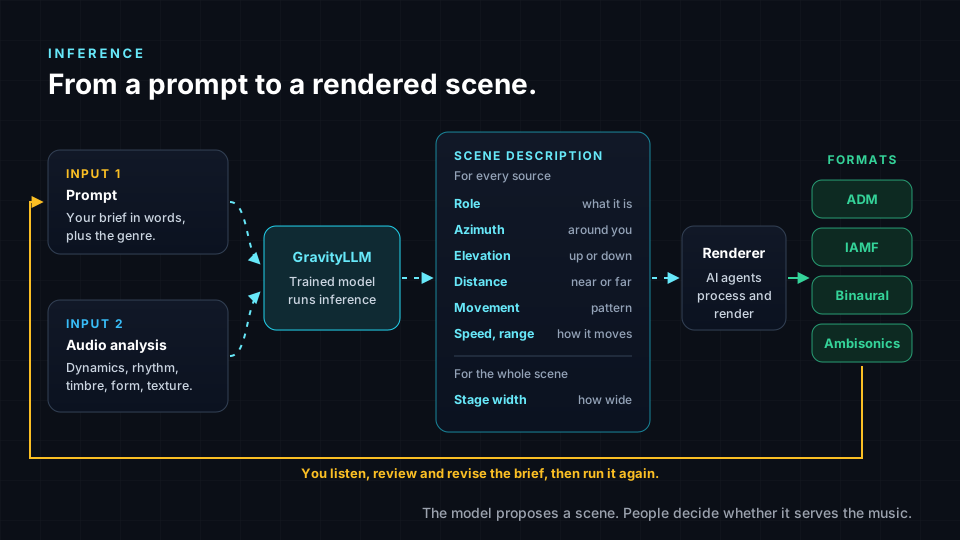
- The prompt. This is your brief, written in words, plus the genre. A prompt like "position a jazz ensemble in an intimate venue layout" tells the model the mood and the scale of the space.
- The audio analysis. The Inference demo explains that in the real production environment, the AI analyzes the full audio spectrum of the material. It lists musical elements such as dynamics, form, rhythm, timbre and texture, and contextual factors such as genre, style and mix aesthetics.
- The model. GravityLLM combines the prompt and the analysis and generates a spatial arrangement.
- The scene description. The output is a structured description of the whole scene, with a set of fields for every source and a few for the scene as a whole.
- The renderer. AI agents coordinate the processing and rendering that turn sources plus positions into immersive audio.
- The formats. Depending on the workflow and plan, the result is delivered as ADM, Eclipsa Audio (IAMF), binaural or Ambisonics. You learned what each one is for in Channels, Objects, Scenes and Binaural.
Notice the loop at the bottom of the diagram. After rendering, you listen. If something does not serve the song, you revise the brief and run it again.
Anatomy of a scene description
A scene description is a list of decisions. Each source gets its own set of fields, and the whole scene gets a few shared ones. Here is what each field means.
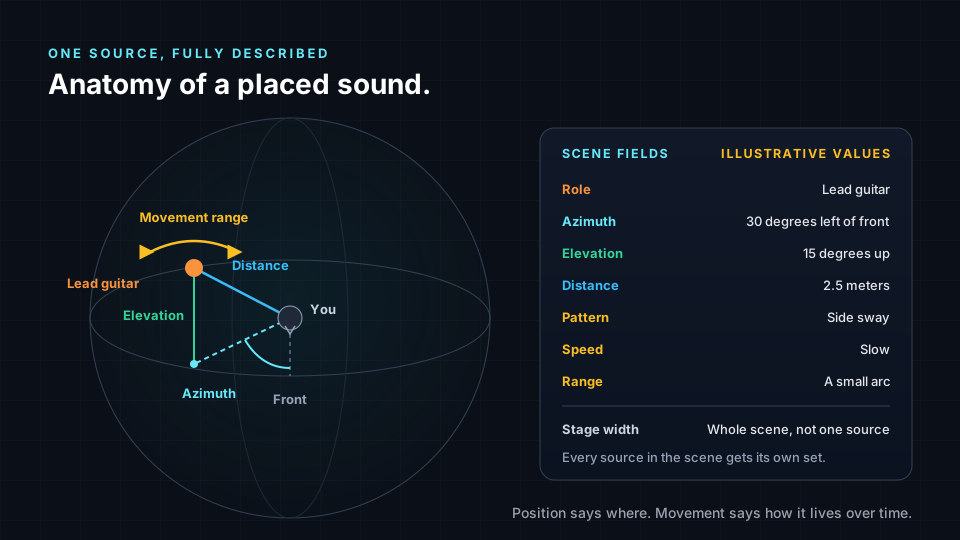
- Role. What the source is and what it does in the song, such as lead vocal, bass, rhythm guitar or ambience.
- Azimuth. The horizontal angle around the listener, measured from straight ahead.
- Elevation. The vertical angle, from below the listener to directly overhead.
- Distance. How near or far the source sits from the listener.
- Movement pattern. The kind of motion, if any, such as a gentle sway or a slow orbit.
- Speed. How fast that movement happens.
- Range. How far the source travels while it moves.
- Stage width. A scene-level field that describes how wide the whole arrangement spreads.
To make this concrete, here is an illustrative scene for a small rock band. These values are invented for teaching. They are not the output of GravityLLM or of the demo.
| Source | Azimuth | Elevation | Distance | Movement |
|---|---|---|---|---|
| Lead vocal | Front, center. | Ear level. | Close. | Steady, a slight forward lean. |
| Electric guitar | 30 degrees left. | Slightly up. | Medium. | Gentle side sway, slow, small range. |
| Bass guitar | 30 degrees right. | Ear level. | Medium. | Steady, subtle groove. |
| Drum kit | Front, behind the vocal. | Slightly up. | Farther back. | Fixed. |
| Room ambience | All around. | Above and around. | Far. | Slow drift. |
Read the table like a mix engineer. The vocal is close and stable, so it stays intelligible. The guitar and bass balance each other left and right. The drums sit behind the vocal to create depth. The ambience wraps the listener. Every choice has a reason you could explain to an artist.
Variation versus consistency
Here is something that surprises many students. Give the same brief to a generative model twice, and you may get two slightly different scenes. That is normal. Many generative systems include some variation by design, and for a creative tool, that can be a gift.
Variation is useful when you are exploring. Two versions of a chorus, one wider and one more intimate, can help you and the artist discover what the song wants. It is like asking two assistant engineers for their take and choosing the best ideas from each.
Consistency matters when you are delivering. Across an album, listeners expect the lead vocal to feel anchored in a similar place from track to track. Across a catalog, a label may want a recognizable house sound. In those cases, you want a clear, specific brief, the same brief style across tracks, and careful listening to catch anything that drifts.
| Situation | What you want | What helps |
|---|---|---|
| Exploring ideas for one song | Variation. | Run the brief more than once and compare versions. |
| Delivering a full album | Consistency. | Use a clear brief, reuse its language across tracks, and A/B tracks against each other. |
| Fixing one problem | Targeted change. | Revise only the part of the brief that relates to the problem. |
Why humans review every scene
A scene description can be perfectly valid and still wrong for the song. The model might place a backing vocal in a spot that pulls attention from the lead. A moving synth might be exciting in the verse and distracting under a quiet lyric. A wide stage might suit a big chorus and feel empty in a sparse intro.
Only a listener can judge these things, because they depend on meaning, emotion and intent. That is why your role in the Spatial9 workflow is clear. You write the brief, judge the source material, listen, revise and approve. The model proposes a scene. You decide whether it serves the music.
Good review is a skill, and you will practice it in Lab 1: Critical Listening in a 3D Spatial Audio Engine. For now, remember three questions. Is the lead clear? Does the space support the emotion? Is anything moving without a reason?
Try it in the demo
The Inference demo is an Illustration. It is a simulation that shows the shape of an inference result, not a live GravityLLM model running on your audio. It uses simplified prompt-based inputs, and its values are generated for demonstration, so they can change between runs.
- Open /demo/inference and find the heading "Live Inference" and the line "Generate spatial arrangements in real-time".
- Read the "Real Production Environment" panel, including "Musical Elements" and "Contextual Analysis". Note how these match the audio analysis step in this lesson.
- Under "Arrangement Prompt", open the dropdown "Choose a spatial arrangement prompt..." and pick "Position a jazz ensemble in an intimate venue layout". Under "Genre Selection", choose "Jazz".
- Click "Run Inference" and wait for "Generated Spatial Arrangement".
- Read every field. Note the "Prompt", the "Genre", the "Stage Width" and the "Instruments". Under "Movement Patterns", write down the "Pattern:", "Speed:" and "Range:" for each moving source.
- Find the 3D view and follow the hint "Drag to rotate view". Look at the scene from the front, the side and above. Which source is closest to the listener position, and which is highest?
- Scroll to "Generated JSON Output". Find the positions, given as x, y and z values for each instrument, and match them to what you saw in the 3D view.
- Now compare. Choose "Create an orchestral spatial mix for a concert hall performance" with the genre "Classical" and click "Run Inference" again. Compare the "Stage Width", the instruments and the movement with your jazz result. Then run the same prompt twice and note what changes.
Key terms
| Term | Meaning |
|---|---|
| Inference | Using a trained model, with fixed weights, to generate a result for new material. |
| Prompt | A short written brief that describes the spatial goal, often with a genre. |
| Scene description | The structured output that lists the spatial fields for every source and for the whole scene. |
| Azimuth | The horizontal angle of a source around the listener, measured from straight ahead. |
| Elevation | The vertical angle of a source, from below the listener to overhead. |
| Movement range | How far a source travels while it moves. |
| Stage width | How wide the whole arrangement spreads. |
| Renderer | The stage that turns sources and their positions into audio in a delivery format. |
Check your understanding
- What is the main difference between training and inference?
- Name the two inputs to inference described in this lesson.
- List the fields that describe a single source in a scene description.
- When is variation helpful, and when is consistency more important?
- Give two reasons a human must review a generated scene.
Answers
- During training the model adjusts its weights from examples, while during inference the weights are fixed and the model applies what it learned to new material.
- A prompt with genre, and an analysis of the audio material.
- Role, azimuth, elevation, distance, movement pattern, speed and range, while stage width describes the whole scene.
- Variation helps when exploring ideas for a song, while consistency matters when delivering an album or a catalog with a recognizable sound.
- A scene can be technically valid but wrong for the song, for example a moving source that distracts from a lyric, and judging meaning, emotion and intent requires a listener who can revise and approve.
Assignment
Write a scene description by hand for a song you know well. Choose four to six sources and fill in a table with role, azimuth, elevation, distance, movement pattern, speed and range for each, plus one stage width for the scene. Next to each row, write one sentence explaining the musical reason for your choice. Then write two different prompts for the same song, one aiming for intimacy and one for scale, and describe in 150 words how you would expect the scene to change between them. If you have the Spatial9 student plan, render a binaural version and compare it with your plan.
Frequently asked questions
What is AI inference in spatial audio?
Inference is the step where a trained model such as GravityLLM takes a prompt and an analysis of the audio and generates a spatial arrangement for new material, describing where each source sits, how far and how high it is, and how it moves.
Why does the same prompt sometimes give a different spatial mix?
Many generative models include some variation by design, so the same brief can produce several valid scenes, which is helpful for exploring ideas, while a clear and consistent brief plus careful listening keeps an album or catalog coherent.
Can I trust an AI-generated spatial mix without listening to it?
No, a generated scene should always be reviewed by a person, because only a listener can judge whether the placement and movement serve the meaning, emotion and intent of the music.
Next step
You can now follow a prompt all the way to a rendered scene and read every field along the way. In the next lesson, Lab 1: Critical Listening in a 3D Spatial Audio Engine, you will train your ears to review spatial mixes with confidence. Return to the Spatial9 Academy course home to see every lesson.