
How GravityLLM Learns: Training an AI to Place Sound in Space
Spatial9 Team ·
Lesson 6 of 14 in Spatial9 Academy, module 2: The Spatial9 approach. Practice in the demo: Training.
Think back to how you learned to mix. Nobody handed you a rulebook that said "put the kick here and the vocal there." You listened to records you loved. You watched experienced engineers work. You tried something, compared it with a reference, and adjusted. Over hundreds of sessions, patterns settled into your ears.
An AI model learns in a surprisingly similar way. It sees many examples, makes a guess, checks how far off it was, and corrects itself a tiny bit. Then it does it again, and again, many thousands of times.
In the previous lesson, you met the training lane of the Spatial9 pipeline. Now we slow it down and look inside. You do not need to be a data scientist to follow along. You only need the curiosity you already bring to the studio.
What you will learn
- How supervised learning turns real studio sessions into training examples.
- The four steps of the training loop and what loss measures.
- How to read train and validation loss curves and spot overfitting.
- What learning rate and training steps control.
- Why human briefs and data ethics shape what a model can become.
Sessions become examples: supervised learning
GravityLLM is Spatial9's AI model. It generates the spatial arrangement of a mix, meaning where each source sits, how far away it is, how high it is and how it moves. To learn that skill, it needs examples of good spatial decisions.
The Architecture demo, which is an Illustration, describes where those examples come from. Professional studios upload stems, spatial positioning data and genre metadata from real sessions. A vector database stores 3D coordinates, instrument types, genre classifications and movement patterns.
This is the heart of supervised learning. Each example pairs an input with a known good answer. The input is the material: the stems, the genre and a short description of the goal. The answer is what a skilled engineer actually did with that material, such as where they placed the lead vocal or how they moved a synth pad.
The model never memorizes a rule like "vocals go front center." Instead, it notices patterns that repeat across many sessions. Here are the kinds of patterns a spatial model can pick up from examples.
- Anchors. In many genres, the lead vocal sits in front of the listener and stays stable, because it carries the song.
- Genre conventions. An orchestral session may spread sections across a wide stage, while a hip-hop mix may keep the core tight and use space for separation and clarity.
- Instrument roles. Bass and kick often stay grounded and central, while ambience, pads and effects are more likely to surround or rise above the listener.
- Movement habits. Some sources move gently, some stay fixed, and the speed and range of movement tend to follow the energy of the music.
The training loop: predict, compare, adjust
Training is a loop with four steps. It runs over and over until the model's guesses get close to the engineers' choices.
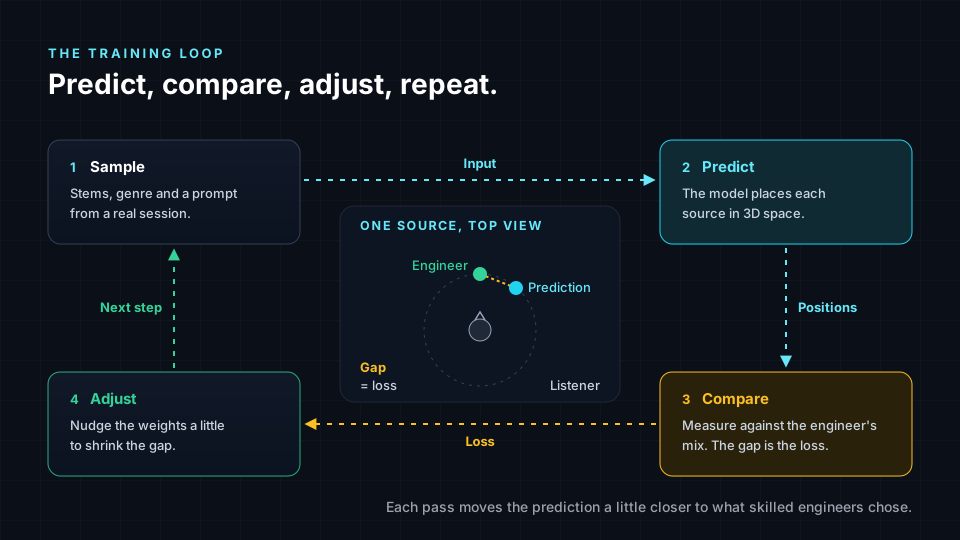
- Sample. The system picks an example from the training data, such as a rock session with stems, a genre label and a prompt that asks for vocals front center.
- Predict. The model proposes a position for every source, plus elevation, distance and movement.
- Compare. The prediction is measured against what the engineer actually did. The size of the difference is called the loss.
- Adjust. The model's internal settings, called weights, are nudged slightly in the direction that would have made the loss smaller.
One pass through this loop is called a training step. Usually a step works on a small batch of examples at once, not just one. A full pass through all the training data is called an epoch.
Loss is simply a number for "how wrong was I?" If the model placed the lead vocal far to the left and the engineer placed it front center, the loss is large. If the model placed it just a few degrees off, the loss is small. A falling loss means the model is getting closer to the decisions in its examples.
It helps to think about loss the way you think about a reference track. When you compare your mix with a reference, you are measuring a gap by ear. Training measures that gap with numbers instead.
Reading the curves: train loss, validation loss and overfitting
Here is a trap. A model can get very good at the exact sessions it trains on without getting good at music in general. To catch this, engineers hold back some sessions that the model never trains on. This is the validation set.
During training, two numbers are tracked. Train loss measures error on the sessions the model learns from. Validation loss measures error on the held-out sessions. Validation loss is the honest score, because it shows how the model handles music it has never seen.
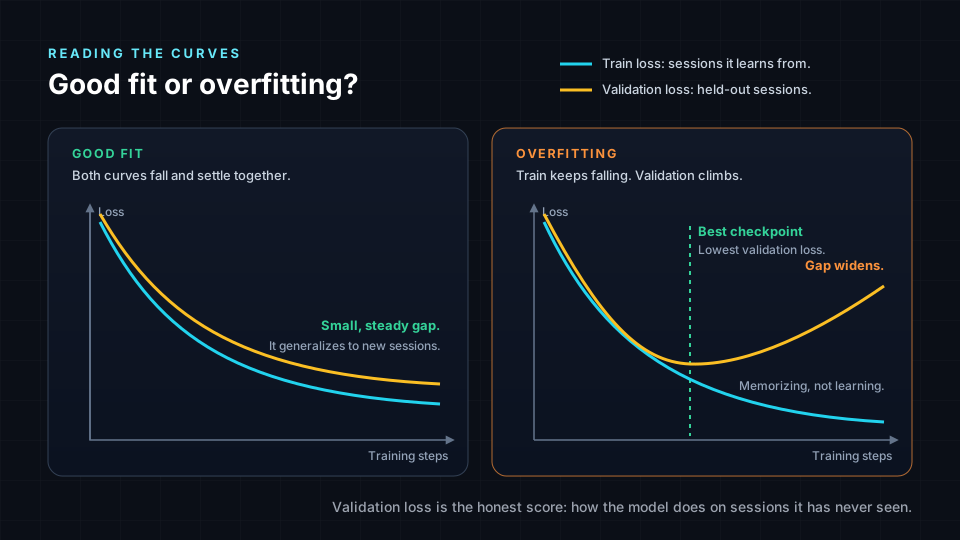
In a good fit, both curves fall and then settle, with a small, steady gap between them. The model is learning patterns that transfer to new music.
In overfitting, train loss keeps falling but validation loss reaches a low point and then starts to climb. The model has started to memorize details of its training sessions instead of learning general patterns. It is like a student who memorizes the answers to last year's exam and then struggles with new questions.
The usual fix is to keep the version of the model from the lowest point of the validation curve, called the best checkpoint. More varied training data also helps, because it is harder to memorize a large and diverse set of sessions.
Learning rate and steps: how fast and how long
Two settings shape how training unfolds.
The learning rate controls how big each adjustment is. Think of it as the size of your fader moves. If the moves are too big, you overshoot the right level and bounce around it. If they are too small, you will get there eventually, but it takes forever. A common approach is to start with larger moves and make them smaller as training goes on, so the model settles in gently.
The number of steps controls how long training runs. Too few steps and the model has not learned enough, which is called underfitting. Too many steps and it may start to overfit. The validation curve tells you when you have reached the sweet spot.
| Setting | Too low | Too high |
|---|---|---|
| Learning rate | Training is very slow. | Loss jumps around and may never settle. |
| Training steps | The model underfits and misses patterns. | The model may overfit and memorize. |
None of this replaces listening. A low loss means the model is close to its examples. It does not prove that a mix moves you. That judgment stays with people.
Why human briefs matter
In the training data, every example comes with context. The Training demo shows each dataset with a "Human Prompt:" field, a short sentence describing the spatial goal. That pairing teaches the model to connect words like "intimate," "front center" or "concert hall" with spatial decisions.
This is why the briefs you write later are so important. When you describe your intent clearly, you speak the same language the model learned from. A vague brief gives the model little to work with. A clear one, such as "keep the vocal anchored front, open the chorus wide, and keep the low end centered," points it toward the patterns you want.
Your role in the Spatial9 workflow follows from this. You write the brief, judge the source material, listen to the result, revise and approve. The model proposes. You decide.
Data ethics: consent, licensing, credit and bias
A spatial model is built from other people's creative work. That brings real responsibilities, and as future professionals, you should ask about them for any AI tool you use.
- Consent. The people whose sessions are used should know and agree that their work is used for training.
- Licensing. Training data should be properly licensed, with clear terms for how stems and session data may be used.
- Credit. The engineers, producers and artists whose decisions shaped a model deserve recognition for that contribution.
- Genre bias. A model learns from what it sees. If some genres or cultures are underrepresented in the data, the model may treat them as variations of the genres it knows best, and its suggestions for them may be weaker or less authentic.
Bias is the one you are most likely to hear. If a model keeps placing the instruments of a regional music tradition in the same way it would place a rock band, that is a sign of missing examples, not a fact about the music. Your ears and your cultural knowledge are the correction.
Try it in the demo
The Training demo is an Illustration. It is a simulation that shows the shape of a training run, not a live model training on real data. The numbers are generated to show typical behavior. You do not need headphones for this one.
- Open /demo/training and find the heading "Interactive Training Pipeline".
- Scroll to "Training Data Sources". Read each dataset and its "Human Prompt:" field. Note the genre, the instruments and how the prompt describes the spatial goal.
- Click "Start Training (1000 steps)". Watch the button change to show the current epoch and progress.
- In "Training Metrics", watch "Train Loss", "Val Loss", "Current Step" and "Learning Rate". Write down how each one changes over time. Notice that validation loss sits slightly above train loss, and that the learning rate gets smaller as training goes on.
- Scroll to the notebook panel and read its cells, "Data Loading", "Current Sample" and "Training Loop". Match each cell to a step in the training loop from this lesson.
- Wait for "Training Complete" and the message "Model ready for inference". Look back at your notes on "Train Loss" and "Val Loss" and decide whether this run looks like a good fit or like overfitting, and why.
Key terms
| Term | Meaning |
|---|---|
| Supervised learning | Learning from examples that pair an input with a known good answer. |
| Loss | A number that measures how far a prediction is from the correct answer. |
| Training step | One pass of predict, compare and adjust, usually on a small batch of examples. |
| Epoch | One full pass through all the training data. |
| Validation set | Held-out examples used to measure how well the model handles new material. |
| Overfitting | When a model memorizes its training data and gets worse on new material. |
| Learning rate | How large each adjustment to the model's weights is. |
| Checkpoint | A saved version of the model at a point in training. |
Check your understanding
- In supervised learning for spatial audio, what is the input and what is the answer?
- Name the four steps of the training loop in order.
- What is the difference between train loss and validation loss, and which one is the honest score?
- Describe what overfitting looks like on the two loss curves.
- Give one way genre bias can show up in a spatial model.
Answers
- The input is the material, such as stems, genre metadata and a prompt, and the answer is the spatial arrangement a skilled engineer actually created for that session.
- Sample, predict, compare and adjust.
- Train loss measures error on the sessions the model learns from, while validation loss measures error on held-out sessions, and validation loss is the honest score.
- Train loss keeps falling while validation loss reaches a low point and then rises, so the gap between them widens.
- If a genre is underrepresented in the training data, the model may place its instruments as if it were a better-represented genre, giving weaker or less authentic suggestions.
Assignment
Design a small, ethical training dataset on paper. Choose one genre you know well and describe five sessions you would want in the dataset. For each, write the human prompt, list the instruments, and sketch a top-view placement of every source. Then write 150 words on consent, licensing and credit: who would you ask, what would they agree to, and how would they be credited? Finish with one paragraph on which genres your dataset leaves out and how that could bias a model trained on it.
Frequently asked questions
How does an AI model learn to mix in 3D?
It learns from examples of real sessions, predicting where each source should go, comparing its prediction with what the engineer actually did, and adjusting itself to shrink the gap, repeating that loop many thousands of times.
What is overfitting in machine learning, in plain terms?
Overfitting is when a model memorizes its training examples so closely that it performs worse on new material, which shows up as train loss falling while validation loss rises.
Does training data really affect how an AI places sound?
Yes, a model can only learn the patterns present in its data, so the genres, instruments and engineering styles in the training set shape its suggestions, which is why consent, licensing, credit and genre balance matter.
Next step
You now know how GravityLLM learns from real sessions. In the next lesson, Generating a Spatial Scene, you will see what happens when a trained model is put to work and turns a prompt and your audio into a full spatial scene. Return to the Spatial9 Academy course home to see every lesson.