Upmixing stereo vs mixing from stems
When to upmix a finished stereo master, when to work from stems, and how stem separation fits in.
This page explains the three ways to turn existing music into an immersive mix: classic upmixing, AI source separation with placement, and mixing from original stems. It compares what each route can and cannot do, which platforms accept the result, and how stem separation tools fit into a Spatial9 workflow.
It is written for musicians, producers, DJs, creators, educators and labels deciding whether to start from a finished stereo master or from stems.
Three techniques that are often confused
The terms "upmix", "stereo conversion" and "stem mix" are frequently used interchangeably, but they describe three different processes.
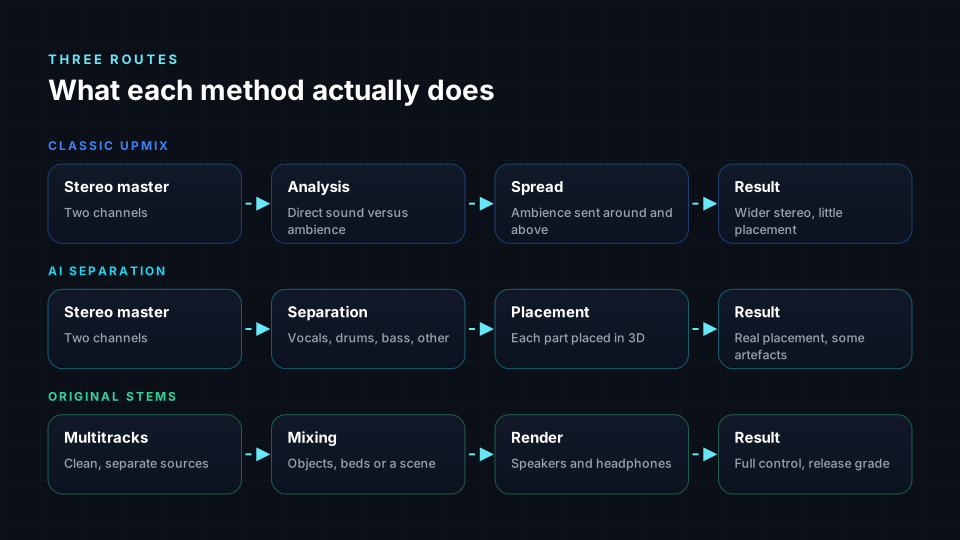
Classic upmixing
A classic upmixer, such as Dolby Surround or DTS Neural:X built into AV receivers, analyzes a stereo or 5.1 signal. It identifies which parts are correlated between the channels, usually the direct sound, and which are not, usually reverb and ambience. It keeps the direct sound at the front and spreads the ambience to the side, rear and height speakers.
The result can be pleasant, particularly on live recordings with a lot of room sound, but it is not a creative immersive mix: the upmixer never knows which sound is which, so it cannot move a guitar to the left wall or raise backing vocals overhead.
AI source separation and placement
Source separation uses neural networks trained on large collections of songs with known stems to split a finished mix into parts such as vocals, drums, bass and other. Once separated, each part can be placed and moved in 3D like an object in a conventional mix. This is how Spatial9 turns a stereo song into an immersive mix.
Mixing from original stems
The traditional route starts from the session: every vocal, drum microphone, guitar and synth on its own track, or stem groups exported from the session. Each source is placed as an object or in a bed, movement is automated, and reverb and balance are adjusted for the immersive space. Because the sources are clean, nothing leaks between them and every creative decision remains open.
Comparison at a glance
| Property | Classic upmix | AI separation and placement | Mixing from original stems |
|---|---|---|---|
| Input | Stereo master | Stereo master | Multitracks or stem groups |
| What happens | Ambience is extracted and spread | Mix is split into parts, each placed in 3D | Each source is placed and moved |
| Individual placement | No | Yes, by part | Yes, by track |
| Quality limits | Wider stereo, little true direction | Separation artifacts and shared reverb | Only the mix itself |
| Speed | Real time | Minutes | Hours to days |
| Apple Music Spatial Audio | Not accepted | Not accepted | Accepted |
| YouTube in Eclipsa Audio | Possible | Possible | Possible |
| Best for | Playback enhancement | Catalog, lost sessions, previews | New releases and flagship titles |
Both separation and stem mixing place sources individually. The real difference is the cleanliness of the sources being placed.
Limits of a stereo source
A stereo master has discarded information that separation can only estimate. Separated parts are estimates of the original recordings, not the recordings themselves. Good tools hide most of the resulting problems, but careful listening still reveals them.
| Limit | Description | Effect in 3D |
|---|---|---|
| Bleed | Parts leak into each other, such as cymbals in the vocal stem | Leaked sound moves with the part it is in |
| Shared reverb | The original reverb is baked into every part | Parts placed far apart can sound unnatural |
| Limited categories | Most models output vocals, drums, bass and other, sometimes piano or guitar | Two guitars playing together usually stay together |
| Dense, loud mixes | Distortion, layered synths and heavy limiting | These separate less cleanly than sparse acoustic mixes |
Mixing from original stems avoids all four limits.
Platform acceptance
Platform rules often decide the route more than sound quality does.
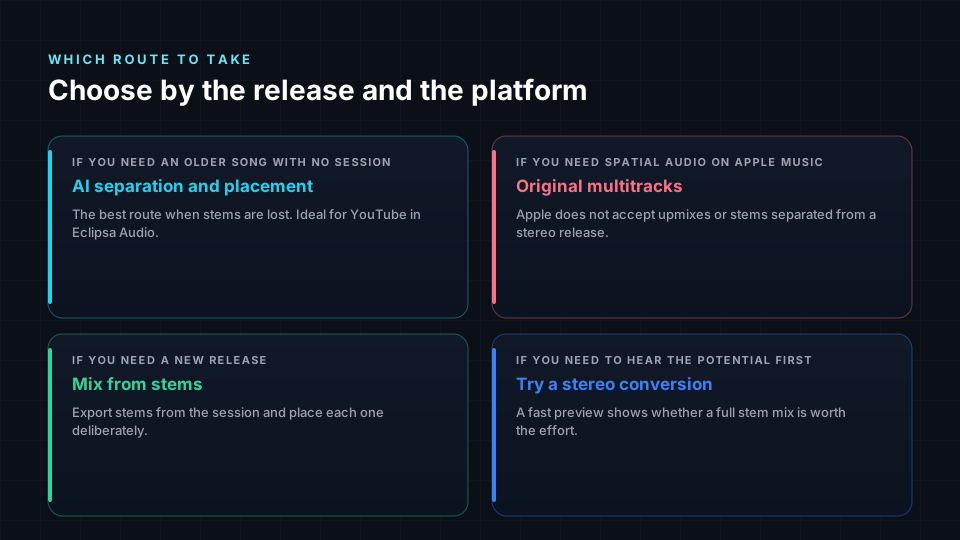
- Apple Music: Apple's delivery guidance for Dolby Atmos states that it does not accept upmixes of a stereo release, or stems separated from a stereo master, as Spatial Audio. A Dolby Atmos mix for Apple Music must come from the original multitracks.
- Other music services: rules vary and change. Your distributor may ask how a mix was made, so check before you deliver.
- YouTube: you upload Eclipsa Audio yourself with your video. An immersive version made from a stereo master can be published alongside or instead of the stereo upload, subject to YouTube's normal policies and your rights to the music.
- Your own channels: websites, apps, installations, live shows and listening sessions have no format gatekeeper.
Decision procedure
Work through the following questions in order and stop at the first one that applies.
- If the release is intended for Spatial Audio on Apple Music, use the original multitracks. No other route qualifies.
- If the release is new and you have the session, export stems from the session and mix from them, or let Spatial9 place the stems for you. Every platform accepts the result.
- If the song is older and no session survives, use AI separation and placement. This is the practical route, particularly for YouTube in Eclipsa Audio.
- If you already have stems from a stem splitter, upload those stems rather than the stereo master. This gives you more control over each part.
- If you only want to test whether a song suits immersive playback, run a fast stereo conversion first to hear its potential before committing to a full stem mix.
- If you only want to enhance playback on a receiver and do not need individual placement, a classic upmix is sufficient.
How Spatial9 handles each input
Spatial9 accepts either a stereo master or a set of stems.
| Input | What Spatial9 does | Result |
|---|---|---|
| Stereo master | Separates the song into stems, then places each part in 3D | Immersive mix of estimated sources |
| Stems from a splitter | Analyzes each stem, including its bleed, then places it | More control than a stereo upload |
| Stems from the original session | Skips separation and places your clean sources directly | Avoids the limits of a stereo source |
For each uploaded stem, Spatial9 analyzes the instrument, energy, frequency range, the amount of bleed it carries and its role in the song. GravityLLM, the placement engine, then builds a 3D scene: core elements anchored at the front, harmony instruments spread to the sides, air and ambience in the height layer, and low frequencies kept centered. Stems with more bleed are kept closer to their partners, while clean stems are allowed to travel further. In every case you can preview on headphones, adjust placement and export the formats you need.
Stem separation tools
Spatial9 does not depend on which splitter produced your stems. What matters is how clean the stems are, whether they line up in time, and how many there are. The following lists are a neutral index, not a ranking. Most commercial tools do not publish which model they run.
Online and mobile apps
| Tool | Where you use it | Typical stems |
|---|---|---|
| Moises | Web, iOS, Android, desktop | Vocals, drums, bass, guitar, piano, strings, wind, other |
| Music.ai | Web and developer platform | Configurable modules for vocals, instruments and dialogue |
| LALAL.AI | Web, desktop, mobile | Vocals, instrumental, drums, bass, guitars, piano, synth, strings, wind |
| AudioShake | Web (AudioShake Indie) and developer platform | Vocals, instruments, dialogue, music and effects |
| Fadr | Web and desktop | Vocals, drums, bass, melodies, plus MIDI |
| Gaudio Studio | Web | Vocals, drums, bass, piano, guitar, other |
Separation is also built into DAWs and editors (including Logic Pro Stem Splitter, FL Studio Stem Separation, Ableton Live 12.3 and later, Steinberg SpectraLayers, iZotope RX Music Rebalance and RipX DAW) and into DJ software (including Serato Stems, rekordbox Stems, Traktor Pro 4, VirtualDJ Stems, djay Neural Mix and Engine DJ Stems).
Open models
Separation quality is usually reported as SDR (Signal-to-Distortion Ratio) in decibels on the MUSDB18 benchmark, which contains 150 songs with vocals, drums, bass and other stems. Higher is better, and every additional 3 dB roughly halves the error energy.
| Model | Year | Made by | Family | Reported average SDR |
|---|---|---|---|---|
| Open-Unmix | 2019 | Inria and Sony | Spectrogram mask | about 5.3 dB |
| Spleeter | 2019 | Deezer | Spectrogram mask | about 5.9 dB |
| Hybrid Demucs (v3) | 2021 | Meta AI | Hybrid | about 7.7 dB |
| KUIELab-MDX-Net | 2021 | Korea University | Spectrogram mask | about 7.5 dB |
| HT Demucs (v4) | 2022 | Meta AI | Hybrid plus transformer | about 9.0 to 9.2 dB |
| BS-RoFormer | 2023 | ByteDance | Band-split | about 9.8 dB (12.0 dB with extra data) |
| SCNet | 2024 | Academic research | Band-split | about 9.0 dB |
| SAM Audio | 2025 | Meta AI | Prompted | Not reported on fixed 4-stem SDR |
Model families and typical artifacts
| Family | Examples | Strength | Artifact to listen for |
|---|---|---|---|
| Spectrogram mask | Spleeter, Open-Unmix, MDX-Net | Fast and light | Hollow or "underwater" sound from reused phase |
| Waveform | Wave-U-Net, Demucs v1 and v2 | Crisp transients | Weaker high-frequency detail, occasional noise |
| Hybrid | Hybrid Demucs, HT Demucs | Balanced all-rounder using long musical context | No specific artifact noted |
| Band-split | BS-RoFormer, Mel-RoFormer, SCNet | Cleanest vocals, least bleed | Slow without a good graphics card |
| Prompted | AudioSep, SAM Audio | Extracts any described sound | Can invent small details |
Ultimate Vocal Remover (UVR) is a free desktop app that bundles many of these open models. SAM Audio lets you describe the target with text, by clicking on an object in a video, or by marking a time span, and returns the target sound plus the residual mix. Use prompted models for specific targets alongside a classic stem split.
Stem count
The number and type of stems matters more for 3D mixing than a fraction of a decibel, because every extra stem is another object to place.
- Four stems (vocals, drums, bass, other) are enough for a convincing immersive mix.
- Six stems (adding guitar and piano) let you separate harmony instruments to opposite sides.
- Specialized stems such as lead versus backing vocal, reverb or crowd rise naturally into the height layer.
- Prompted extraction can split the busy "other" stem further, which is usually the stem that benefits most.
Workflow: from a stereo master
- Start from a lossless master, not a streaming rip or MP3.
- Upload the stereo master to Spatial9.
- Spatial9 separates the song into stems and places each part in 3D.
- Preview the result on headphones.
- Adjust placement where bleed or shared reverb is audible.
- Export the formats your destination accepts, keeping in mind that Apple Music does not accept this result as Spatial Audio.
Workflow: from separated or session stems
- Split the song with the tool of your choice. If you can choose the model, a recent band-split or hybrid model (RoFormer or HT Demucs) gives the cleanest result for 3D. Choose the highest number of stems available.
- Export every stem as WAV, 24-bit, at 44.1 or 48 kHz. Avoid MP3 stems, because compression adds its own artifacts on top of separation artifacts.
- Make every stem start at the same point and have the same length.
- Name the files clearly so instruments are recognized immediately.
- Play all stems together once and confirm that the sum sounds like the original song.
- Upload all stems together to Spatial9.
- Review the placement in the 3D view and move any object you want.
- Keep vocal, kick, snare and bass anchored, and lift reverb, pads, backing vocals and cymbals slightly above the listener.
- Listen on both headphones and speakers, then export.
For binaural delivery, use the cleanest stems possible, because headphones reveal bleed the most. For ADM BWF and 7.1.4, more stems are better, because each becomes its own object or bed channel.
Troubleshooting
| Symptom | Likely cause | Remedy |
|---|---|---|
| A ghost of one instrument comes from the wrong direction | Bleed between separated stems | Use a cleaner model or keep the affected stems closer together |
| Soloed stems sound hollow or underwater | Mask-based model reused the mix phase | Keep all stems in the mix rather than muting some |
| Drums sound soft after splitting | Older spectrogram model smeared transients | Re-split with a Demucs or RoFormer based model |
| Reverb is split unpredictably | Reverb belongs to every instrument at once | Lift the reverb that lands in "other" into the height layer |
| Widely spaced parts sound unnatural | Shared reverb baked into every part | Reduce the spacing, or mix from original stems |
| Stems drift out of time | Stems have different start points or lengths | Re-export with the same start point and length |
| Bleed audible only on headphones | Headphones reveal bleed more than speakers | Check on both, and prefer band-split models for binaural |
| Distributor rejects the mix | Platform rules on upmixes or separated stems | Deliver a mix made from the original multitracks |
Next steps
- Exporting stems: prepare session stems that line up and sum correctly.
- Spatializer for Music: review and refine placement after upload.
- Formats overview: choose the export formats for each destination.
- Publishing and delivery: check platform requirements before you release.