MCP server reference
Connect Spatial9 to ChatGPT, Claude, Gemini, Cursor and any MCP client: endpoint, authentication, tools and examples.
The Spatial9 MCP server exposes the full Spatial9 toolset to any client that speaks the Model Context Protocol (MCP). ChatGPT, Claude, Gemini, Grok, Cursor, VS Code, Claude Code, Codex, Gemini CLI, Windsurf, open models such as Qwen, Kimi and DeepSeek through LM Studio, and any other MCP client can call the same tools to create spatial audio, split stems, convert Dolby Atmos and ADM BWF to Eclipsa Audio, remix by instruction, publish to YouTube and manage jobs.
This page is the protocol reference. It lists the endpoints, the authentication options, the JSON-RPC handshake, the tools and their arguments, the shape of results and errors, and the client configuration for the most common assistants and coding tools. For account limits and retry rules, see Limits, quotas and errors.
Endpoints
Spatial9 runs two MCP servers. Both use the same protocol and the same tool names; they differ in authentication and allowance.
| Server | URL | Authentication | Allowance |
|---|---|---|---|
| Account server | https://spatial9.ai/mcp | OAuth 2.1 or Authorization: Bearer s9_... | Your plan |
| Guest server | https://spatial9.ai/mcp/free | None | 3 chorus previews, 1 video in spatial audio, 1 ADM to Eclipsa Audio conversion, 1 instrument split |
The free guest allowance is available over MCP only. The A2A agent always requires sign-in. See A2A agent reference.
Authentication
The account server accepts two forms of credentials. Both identify the same Spatial9 account and share the same plan.
| Method | How it works | Lifetime |
|---|---|---|
| OAuth 2.1 with PKCE | The client opens a Spatial9 sign-in page and requests the single scope spatial_audio | Access tokens last one hour; the connection can be revoked |
| Personal key | Send Authorization: Bearer s9_... on every request | Until you revoke it |
Create and revoke personal keys at https://spatial9.ai/connect. Keys always start with s9_. The same key works for the A2A agent.
Transport and protocol
The server implements JSON-RPC 2.0 over HTTP using the Streamable HTTP transport.
| Property | Value |
|---|---|
| Transport | Streamable HTTP, HTTP POST to the endpoint URL |
| Message format | JSON-RPC 2.0 |
| Supported protocol versions | 2025-06-18, 2025-03-26, 2024-11-05 |
| Batches | 1 to 20 messages per request |
| Reply format | Plain JSON or Server-Sent Events |
| Extensions | MCP Apps, io.modelcontextprotocol/ui, for interactive cards in assistants that support it |
Send these headers on every request.
| Header | Value |
|---|---|
Authorization | Bearer s9_... (account server only) |
Content-Type | application/json |
Accept | application/json, text/event-stream |
Mcp-Session-Id | The value returned by initialize, if the server sent one |
MCP-Protocol-Version | The negotiated version, for example 2025-06-18 |
A reply can arrive as plain JSON or as an SSE stream. If the Content-Type of the reply is text/event-stream, parse the last data: line as the JSON-RPC message.
Handshake
Every session starts with three messages. Most MCP clients perform them automatically; send them yourself only when you call the server with raw HTTP.
- Send
initializewith your protocol version, capabilities and client information. - Send the
notifications/initializednotification. It has noid, and the server answers with HTTP 202 and no body. - Call tools with
tools/call, echoingMcp-Session-IdandMCP-Protocol-Versionon each request.
Initialize request
{"jsonrpc":"2.0","id":1,"method":"initialize","params":{"protocolVersion":"2025-06-18","capabilities":{},"clientInfo":{"name":"my-client","version":"1.0.0"}}}The server may return an Mcp-Session-Id response header. Store it and send it back on every later request.
Initialized notification
{"jsonrpc":"2.0","method":"notifications/initialized"}Raw HTTP example
curl -s https://spatial9.ai/mcp \
  -H "Authorization: Bearer $SPATIAL9_KEY" \
  -H "Content-Type: application/json" \
  -H "Accept: application/json, text/event-stream" \
  -d '{"jsonrpc":"2.0","id":1,"method":"initialize","params":{"protocolVersion":"2025-06-18","capabilities":{},"clientInfo":{"name":"my-client","version":"1.0.0"}}}'
Tool catalog
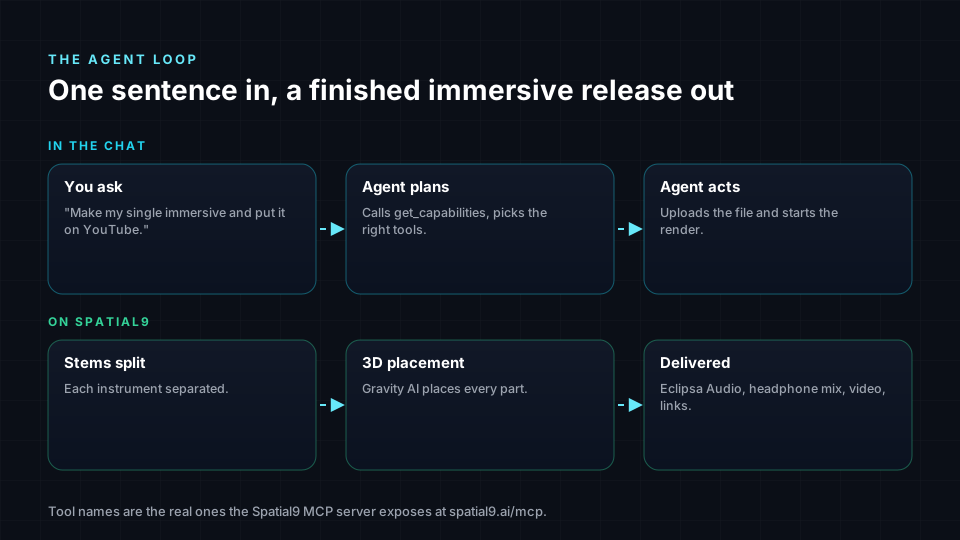
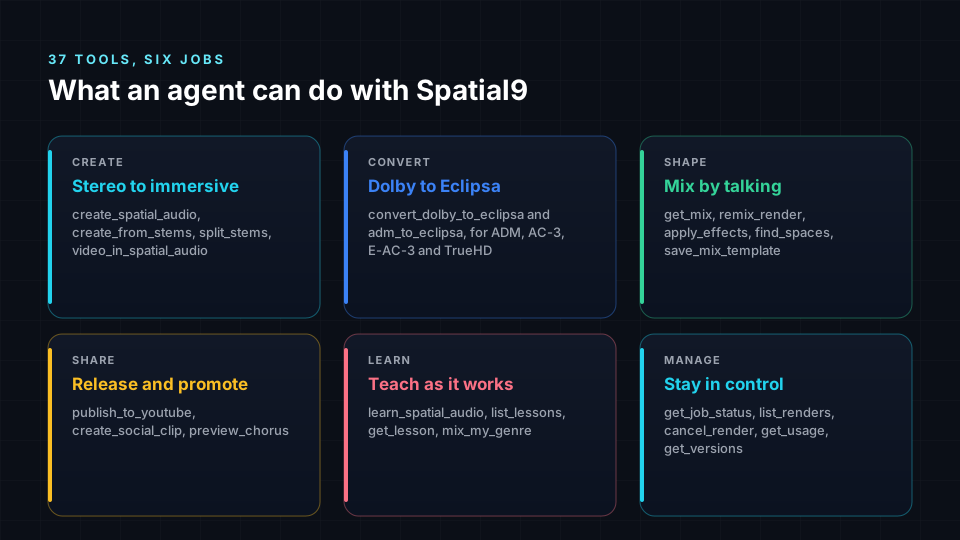
The server exposes 37 tools. Call get_capabilities first: it lists the current formats, options and limits, so your agent does not rely on assumptions. The main tools are grouped below.
| Group | Tools |
|---|---|
| Create | create_spatial_audio, create_from_stems, split_stems, video_in_spatial_audio |
| Convert | convert_dolby_to_eclipsa, adm_to_eclipsa |
| Shape | get_mix, remix_render, apply_effects, find_spaces, save_mix_template |
| Share | publish_to_youtube, create_social_clip, preview_chorus |
| Learn | learn_spatial_audio, list_lessons, get_lesson, mix_my_genre |
| Manage | get_job_status, list_renders, cancel_render, get_usage, get_versions |
| Supporting | get_capabilities, create_upload_link, get_downloads, get_clip, get_youtube_upload, get_effects, analyze_song, find_effects, combine_quiet_stems, try_a_sample, list_samples |
The authoritative list and every input schema are returned by the standard tools/list method.
Uploading a file
Use a public https link as source_url, or upload a private file first. Streaming pages, such as YouTube or Spotify links, cannot be used as input.
create_upload_link
| Argument | Type | Description |
|---|---|---|
filename | string | Name of the file you will upload |
media_type | string | music, video or image |
The result contains upload_id and direct_upload_url. PUT the file to the URL, then pass upload_id to the next tool. Files can be up to 2 GB and the link is valid for 2 hours.
curl -X PUT "$DIRECT_UPLOAD_URL" -H "Content-Type: audio/wav" --data-binary @my-single.wavCreating spatial audio
create_spatial_audio
| Argument | Type | Required | Description |
|---|---|---|---|
source_url | string | One of source_url or upload_id | Public https link to the master |
upload_id | string | One of source_url or upload_id | Id returned by create_upload_link |
media_type | string | Yes | music or video |
title | string | Yes | Title shown on downloads and the stage player |
style | string | No | live_concert, club, cinema or intimate_studio |
include_binaural | boolean | No | Also deliver a binaural headphone WAV |
include_video | boolean | No | Also deliver a YouTube-ready MP4 |
idempotency_key | string | Recommended | Stable key; a retry with the same key returns the same job |
{"jsonrpc":"2.0","id":7,"method":"tools/call","params":{"name":"create_spatial_audio","arguments":{"source_url":"https://example.com/masters/my-single.wav","media_type":"music","title":"My Single","style":"live_concert","include_binaural":true,"include_video":true,"idempotency_key":"release-2026-10-21-my-single"}}}The result carries result.structuredContent with the new job_id, its status, stage and progress. A song takes 10-20 minutes and a short video a few minutes. Spatial9 also emails the links when the job finishes.
create_from_stems
| Argument | Type | Description |
|---|---|---|
stems | array | 2 to 16 objects of the form { url or upload_id, name, instrument } |
title | string | Title of the mix |
idempotency_key | string | Stable key for retries |
The instrument value is one of vocals, drums, bass, guitar, piano, keys, synth, strings, brass or other.
split_stems
split_stems takes title and idempotency_key with a source and returns a job that runs for 4-8 minutes. Downloads are listed as stem:<stem_id> entries plus a stems_package ZIP. Stems with little content are flagged silent or near_silent; combine_quiet_stems merges them.
convert_dolby_to_eclipsa
| Argument | Type | Description |
|---|---|---|
source_url or upload_id | string | The Dolby or ADM BWF source |
title | string | Title of the result |
include_binaural | boolean | Also deliver a binaural WAV |
include_video | boolean | Also deliver an MP4 |
visual_url or visual_upload_id | string | Optional image or video used with include_video |
idempotency_key | string | Stable key for retries |
ADM BWF keeps its beds and objects. AC-3, E-AC-3 and TrueHD keep speaker channels up to 7.1 but not the Dolby Atmos height and object layer. Dolby Atmos is accepted as an input only.
preview_chorus
preview_chorus takes title with a source, plus optional start_sec and seconds. It returns a clip_id; poll get_clip until the clip is ready. A preview finishes in under 2 minutes, is free and uses no project.
Following a job
get_job_status
| Argument | Type | Description |
|---|---|---|
job_id | string | Id returned by a create, convert or remix tool |
The result returns status, stage, progress and title. Stages include queued, separating, placing, encoding and rendering_binaural. The terminal statuses are completed, failed and cancelled. Poll every 30-60 seconds.
{"jsonrpc":"2.0","id":8,"method":"tools/call","params":{"name":"get_job_status","arguments":{"job_id":"YOUR_JOB_ID"}}}get_downloads
Call get_downloads with the job_id once the status is completed. It returns downloads: [{id, label, url, filename}].
| Download id | Content |
|---|---|
iamf | IAMF, 16-channel third-order Ambisonics |
iamf_mp4 | Eclipsa Audio in MP4 |
youtube_video | YouTube-ready MP4 |
binaural | Binaural headphone WAV |
Music jobs also include a stage player link, and video jobs also include an Ambisonics WAV. Present files by label and use the url exactly as returned.
Other management tools
list_renders lists your jobs, cancel_render stops a running job, get_usage reports what is left on your plan and get_versions lists the versions of a mix.
Remixing and effects
remix_render
| Argument | Type | Description |
|---|---|---|
job_id | string | The job to remix |
changes | array | One entry per instrument |
preview | boolean | true runs a free dry run and starts no render |
style | string | Optional new style |
idempotency_key | string | Required for the real render |
Each entry in changes names an instrument and any of the following fields.
| Field | Description |
|---|---|
direction, height | Position in plain terms |
azimuth_deg, elevation_deg, distance | Position in exact terms |
gain_db, gain_change_db, mute | Level |
motion.shape | circle, spiral_up, rise, sink, sweep, fly_over, come_close, move_away, wander or none |
motion.when | Musical moment, for example chorus or drop |
motion.speed, motion.clockwise | Speed and direction of the motion |
{"job_id":"YOUR_JOB_ID","preview":true,"changes":[{"instrument":"guitar","motion":{"shape":"circle","when":"chorus","speed":"medium","clockwise":true}},{"instrument":"vocals","gain_change_db":2}]}Read the current placement with get_mix before you change it. A real remix takes 3-6 minutes.
Effects, spaces and templates
find_effects takes a query and searches more than 1,400 presets. apply_effects takes action: add with a preset_id, or up to 6 effects with their params; target or stem_id chooses the stem or the master bus. find_spaces searches 6,700 rooms, halls and stadiums. save_mix_template saves a mix so you can reuse it later with template_id.
Publishing
publish_to_youtube takes job_id, privacy (default unlisted), title, description and tags. If YouTube is not yet connected, the tool returns a connect link; call it again after the user confirms. Poll get_youtube_upload for the video link. create_social_clip takes a job_id and produces a 9:16 MP4; poll get_clip for the result.
Results and errors
Every reply follows JSON-RPC 2.0. There are three outcomes to handle.
| Outcome | Where to look | What to do |
|---|---|---|
| Success | result.structuredContent | Read fields such as job_id, status, stage and progress |
| Tool failure | result.isError: true, reason in result.content[0].text | Pass the message on in plain words and stop |
| Protocol error | Top-level error.message | Fix the request, for example a bad parameter |
| HTTP 401 | Response status | The key is wrong or revoked; create a new one at /connect |
A tool failure looks like this.
{"jsonrpc":"2.0","id":7,"result":{"isError":true,"content":[{"type":"text","text":"Plain-language reason from Spatial9"}]}}At plan limits the server does not upsell; it returns a plain explanation and tells the agent to say so to the user.
Client setup
Claude Code
claude mcp add --transport http spatial9 https://spatial9.ai/mcp --header "Authorization: Bearer $SPATIAL9_KEY"
claude mcp add --transport http spatial9-free https://spatial9.ai/mcp/free
Gemini CLI
gemini mcp add --transport http spatial9 https://spatial9.ai/mcpmcp.json
Cursor, VS Code, Windsurf and other clients that read an mcp.json file accept this entry. Some clients use "type":"streamableHttp" instead of "type":"http".
{"mcpServers":{"spatial9":{"type":"http","url":"https://spatial9.ai/mcp","headers":{"Authorization":"Bearer ${SPATIAL9_KEY}"}}}}ChatGPT and Claude
In ChatGPT, a paid plan with Developer mode is required; add Spatial9 as an app and sign in with OAuth. In Claude, open Settings, then Connectors, and add a custom connector with the account server URL. You can try the flow on the MCP demo.
Cost and guardrails
Each render uses one project from your plan and is refunded automatically on failure. Chorus previews and remix previews are free. The server applies these guardrails:
- Idempotency keys prevent duplicate renders on retry.
- A single OAuth scope,
spatial_audio, limits what a connection can do. - Publishing requires a confirmed title, description and privacy.
- Free previews let users listen before spending a project.
cancel_renderstops work that is no longer needed.- At plan limits, the agent is told to say so plainly.
Next steps
- A2A agent reference to delegate long renders to the Spatial9 agent with streaming and webhooks.
- Limits, quotas and errors for concurrency, daily limits and retry rules.
- Agent Skills to teach coding agents the right tool sequence.
- Agent frameworks to load these tools in LangGraph, CrewAI or the OpenAI Agents SDK.