Inside the Immersive Classroom: A Guided Tour of Echoes and the Story Behind It
Spatial9 Team · · 12 min read
Lesson 8 of 24 in Spatial9 Academy, module 3: Inside the Immersive Classroom. Practice in the demo: Music Transformation.
Key takeaways
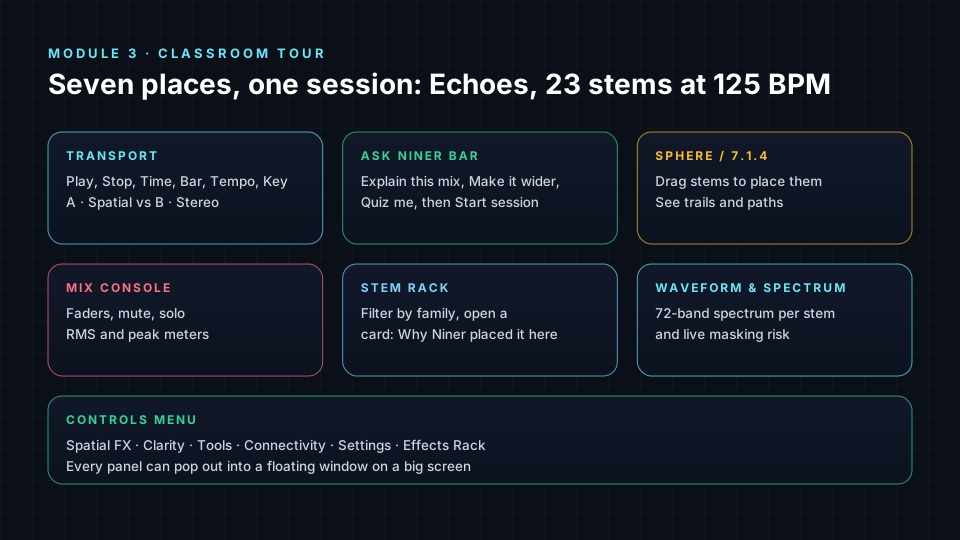
- The Immersive Classroom has a transport with A/B, the Ask Niner bar, the Sphere and 7.1.4 view, a mix console, a stem rack, a spectrum and a Controls menu.
- A · Spatial plays the immersive mix and B · Stereo plays the original stereo mix, so you can judge every spatial choice against a reference.
- Echoes keeps bass, lead, snares and impacts on a stable front stage, puts pads on the sides and an atmosphere overhead, and lets only the arp, risers and transitions move.
- On large screens the console, Sphere, stems and spectrum panels can pop out into floating windows that remember their layout.
- Echoes was created by Luiz Zanardo, Spatial9 CEO and co-founder, an Armada Music and Black Hole Recordings artist supported by Armin van Buuren, Paul van Dyk, Ferry Corsten and Nora En Pure, whose tech career spans HP, Intel, Cloudera and Databricks.
The first two modules of Spatial9 Academy gave you the theory: how the brain hears in 3D, how formats describe space and how GravityLLM proposes a spatial scene. This module is different. It is a feature-by-feature course on the tool you will practise in for the rest of the Academy, the Immersive Classroom.
Think of this lesson as the first day in a new studio. Before you touch a fader, you walk the room, learn the names of things and listen to a mix that the studio is proud of. That is exactly what we will do here.
What you will learn
- The layout of the Immersive Classroom and the job of each panel.
- How to use the transport, the A/B switch and the position bar.
- What the Ask Niner bar does and when to use it.
- Where the Controls menu lives and what each of its five groups changes.
- The story behind Echoes and Luiz Zanardo, the artist and engineer who created it.
- The mix intent behind Echoes and the role of each of its 23 stems.
- How to read the "Why Niner placed it here" note on every stem card.
The shape of the room
When you open the classroom you will see three tabs at the top: Classroom, Studio and Certificate. The heading reads "Immersive Classroom", and the session line tells you what you are working on: "Today's session is Echoes, 23 stems at 125 BPM." Two small labels set expectations: Headphones recommended and Niner tutor mode.
A free account gives you the full Echoes session, every control, Niner in tutor mode, effect previews, sharing and the certificate. The Student Pro plan, which costs $9 per month with a verified school email, adds your own uploads (a stereo track or stems), nine projects per month and real file exports. Everything in this module works on the free plan unless we say otherwise.
The transport
The transport is the strip you will use most. It has Return to start, Play/Pause and Stop, and five readouts:
| Readout | What it tells you |
|---|---|
| Time | Minutes, seconds and hundredths |
| Bar | Bar and beat, counted in 4/4 |
| Tempo | The session BPM, 125 for Echoes |
| Key | The musical key of the session |
| Render | The current render mode and the 23 stems |
The position bar under it lets you click or drag to any moment. With the bar focused, the left and right arrow keys jump five seconds, which is perfect for looping a short passage while you listen.
The A/B switch
Next to the transport sits the most important learning tool in the room: A · Spatial versus B · Stereo. A plays the immersive mix. B plays the original stereo mix of the same song. While the stereo version loads you will see "Preparing original mix".
There is also a master volume from 0 to 100 with a mute button, and an Export button. Free users see a lock and a "Pro" label on Export; you will learn all the delivery formats in Export, Share and Deliver.
The Ask Niner bar
Just under the top of the page sits a bar that stays in view as you scroll and shrinks slightly once it sticks. It reads "Ask Niner, your mixing tutor" and suggests you ask why something sounds the way it does, or say something like "move the lead above me". Three chips give you a fast start: Explain this mix, Make it wider and Quiz me. Press Start session to open the conversation. Once Niner is listening, the button changes to Go to chat. Niner gets a whole lesson of its own in Learning With Niner.
The main panels
Four panels make up the workspace:
- Sphere / 7.1.4 view: where you see and place every sound in 3D.
- Mix console: faders, mute, solo and meters for stems and speaker channels.
- Stems: the stem rack, a tile for each of the 23 stems.
- Waveform & spectrum: the song overview and a live frequency analyser.
On a screen at least 1,024 pixels wide with a mouse or trackpad, each of these panels can Pop out into a floating window. Drag it by the title bar, resize it from the bottom-right corner, minimise it by double-clicking the title, and press the dock icon to send it home. The page shows "is floating" with a Dock back here button where the panel used to be, and your layout is remembered on that browser. A common setup is to float the console beside the Sphere so you can move a sound and watch its level at the same time.
The Controls menu
The Controls button opens a side panel titled "Controls — Shape how the mix moves". It holds five groups:
- Spatial FX: FX Energy, Accent Throws, Ghost Orbits and Flux Mode.
- Clarity: Frequency Masking and Auto Ducking.
- Tools: Harmonics and A/B/C Compare.
- Connectivity: LiveLink to a DAW over MIDI, and Collab sessions (in beta) with a room code.
- Settings: Head Tracking, Spatial Mix or Original playback, Hearing Compensation, a Parametric EQ, Master, Performance and a headphone profile.
The same panel opens the Effects Rack, with a badge that counts the effects you have loaded. Each of these tools appears again later in this module, at the moment you need it.
The story behind Echoes
Every studio has one song it plays for visitors. At Spatial9, that song is Echoes, and it was created by Luiz Zanardo, CEO and co-founder of Spatial9.
Two lives, one signal
For more than two decades, Luiz has lived a double life. By night he is an international electronic music artist signed to Armada Music and Black Hole Recordings, two of the most respected labels in electronic dance music. His records have been supported by legends of the scene, including Armin van Buuren, Paul van Dyk, Ferry Corsten and Nora En Pure.
By day he worked somewhere very few musicians ever go. Luiz built his career across HP, Intel, Cloudera and Databricks, the companies that shaped the modern data and AI revolution. He led global engineering teams that designed intelligence-grade data and AI systems for the military, the intelligence community and some of the world's largest enterprises. It was quiet work, done far from the stage, and most of it can never be described in public.
The question that would not go away
Working on both sides gave Luiz an uncomfortable view. In the data centre, machines were learning to understand language, images and human decisions at enormous scale. In the studio, music was still flat: two speakers, left and right, the same way it had been for decades. Immersive sound existed, but it lived in expensive rooms with specialist engineers, out of reach for almost every artist he knew.
The question he kept asking was simple: what if the intelligence he had spent his career building could *listen* the way a mix engineer listens, and place every sound in space with intent?
Spatial9 is born
In 2024, Luiz answered that question together with co-founders Alan Silva (CTO) and Carlos Freitas (Chief Music Officer). They founded Spatial9 to invent what they call Generative Spatial Audio: technology that turns music into adaptive, living, three-dimensional sound. The company's motto is one Luiz carries everywhere: *Acta non verba*, "deeds, not words".
The deeds followed quickly. At CES 2025, Spatial9 debuted music rendered in Eclipsa Audio, the open immersive format, alongside Google. In April 2025 it joined the Alliance for Open Media. Later that year it presented at the AES Show 2025 alongside Google, Meta and Samsung, and in January 2026 its three founders led an A3E workshop at the NAMM Show, "The Dawn of Generative Spatial Audio".
Why the first song is called Echoes
An echo is a sound that comes back to you changed by the space it has travelled through. That is the whole idea of this course, and in a sense it is Luiz's story too: years of club records and years of machine intelligence, returning as one signal.
Echoes is built to be heard, not explained. The full meaning of its name is left for you to discover. Listen closely and you will notice that nothing in it is random: the bass holds the ground, the pads open the walls, the atmosphere becomes a ceiling, and only a few sounds are allowed to move. Every free student starts with this song because it carries the founder's signature: an artist's ear, built with an engineer's precision.
Echoes: a reference mix with a clear intent
A reference mix is only useful if you know what it is trying to do. Echoes has a written mix intent: "a stable front stage (bass, lead, snares and impacts), wide side pads and an overhead canopy, with movement reserved for the arp, risers and transitions so every motion means something."
Read that sentence twice. It describes three zones and one rule. The front holds what the song depends on. The sides and ceiling hold atmosphere. And only a few sounds are allowed to move, so when they do, you notice.
Where the 23 stems live
| Zone | Stems and their behaviour |
|---|---|
| Front stage, still | Reese Bass centred just below ear level; Synth Lead front centre, slightly raised, with a tiny drift; Stabs fixed front right; Snare Build front centre; Truppel Snare slightly left; Impact 1 and Impact 2 wide front left and right; Impact 3 centre on the downbeat |
| Front height | Synth Fill as a height layer; Pluck 3 as sparkle above and in front |
| Wide sides | Pluck 1 and Pluck 2 mirroring wide left and wide right; Pad drifting slowly on the left side; Synth Pad as its right-side partner at a different speed |
| Overhead | Atmosphere as a slowly circling canopy; Noise Impact directly overhead |
| Moving with purpose | Synth Arp sweeps across the front, never behind; Riser spirals upward; Sweep Down falls from the ceiling to ear level; Sweep Transition travels front to back |
| Behind you | Honk with a gentle sway at rear left; Horn FX at rear right; DPV FX starts behind and above, then swings around |
Notice what is *not* here. The bass never moves, because low frequencies are hard to localise and a wandering bass feels unstable. The snares and impacts stay at or above ear level, because drums below you feel buried. The arp moves, but only across the front, so it never pulls your attention behind you during a verse.
Why Niner placed it here
Open any tile in the stem rack and you will find a note titled Why Niner placed it here. Read these notes like liner notes. Each one connects a placement to a listening reason, such as clarity, envelopment or attention. When you disagree with one, that is a good sign: you are starting to form your own taste. Later you can ask Niner directly and it will explain the concept behind the choice.
Under the mix you will also see a rating prompt: "How does this mix sound to you?" with Love it and Could be better. Your answer helps us tune the reference mix for future students.
A ten-minute first listen
- Put on headphones and set a comfortable, fixed level.
- Press Play and listen to the whole song once without touching anything.
- Play it again in B · Stereo for one minute, then switch back to A · Spatial. Write one sentence about what changed.
- Open the stem rack, filter by FX and read the "Why Niner placed it here" note for the Riser.
- Watch the Riser on the Sphere while it plays. Does what you see match what you hear?
- Press Explain this mix in the Ask Niner bar and compare Niner's answer with your own notes.
Check yourself
- Which three readouts would you use to find the second beat of bar 33?
- What does the B side of the A/B switch play?
- Name the five groups in the Controls menu.
- Which Echoes stems are allowed to move, and why so few?
- Where does the Reese Bass sit, and why does it stay still?
Answers
- Time, Bar and Tempo, though Bar alone gets you there.
- The original stereo mix of the same song.
- Spatial FX, Clarity, Tools, Connectivity and Settings.
- Mainly the arp, the risers and the transitions, so that each motion carries meaning instead of becoming noise.
- Centred just below ear level, because low frequencies are hard to localise and a moving bass makes the whole mix feel unstable.
Assignment
Draw a top-down sketch of Echoes with three rings: front stage, sides and overhead. Place all 23 stems on it from memory, then check your sketch against the Sphere. Circle the three placements you found most surprising and write one sentence on each explaining why you think Niner chose it.
Frequently asked questions
Do I need to pay to use the Immersive Classroom?
No, a free account gives you the full Echoes session, every control, Niner in tutor mode, previews, sharing and the certificate, while the $9 per month Student Pro plan adds your own uploads and real file exports.
What is Echoes?
Echoes is the Spatial9 reference session, a 23-stem electronic track at 125 BPM mixed with a stable front stage, wide side pads, an overhead canopy and movement reserved for the arp, risers and transitions.
Can I move the classroom panels around?
Yes, on a screen at least 1,024 pixels wide you can pop the mix console, the Sphere and 7.1.4 view, the stem rack and the waveform and spectrum out into floating windows that remember their layout.
Who created Echoes?
Echoes was created by Luiz Zanardo, CEO and co-founder of Spatial9 and an electronic music artist signed to Armada Music and Black Hole Recordings, as the reference session every free Spatial9 Academy student starts with.
Who is Luiz Zanardo?
Luiz Zanardo is the CEO and co-founder of Spatial9, an electronic music artist supported by Armin van Buuren, Paul van Dyk, Ferry Corsten and Nora En Pure, and a technology leader whose career spans HP, Intel, Cloudera and Databricks.
Who founded Spatial9?
Spatial9 was founded in 2024 by Luiz Zanardo (CEO), Alan Silva (CTO) and Carlos Freitas (Chief Music Officer) to build Generative Spatial Audio, technology that turns music into adaptive three-dimensional sound.
Why should I keep switching between A and B?
Comparing the spatial mix with the original stereo mix is the fastest way to tell whether a spatial choice actually improves the song or just makes it different.
Sources
- The 2026 NAMM Show, speaker profile: Luiz Zanardo, CEO and co-founder of Spatial9. https://namm26.mapyourshow.com/8_0/sessions/speaker-details.cfm?speakerid=293
- The 2026 NAMM Show, A3E workshop: "Music Learning to Evolve: The Dawn of Generative Spatial Audio". https://namm26.mapyourshow.com/8_0/sessions/session-details.cfm?scheduleid=252
- PR Newswire (2025). Google, Spatial9 and Music AI debut Eclipsa Audio immersive format at CES 2025. https://www.prnewswire.com/news-releases/google-spatial9-and-music-ai-debut-eclipsa-audio-immersive-format-at-ces-2025-302344338.html
- Alliance for Open Media (2025). Spatial9 joins the Alliance for Open Media. http://aomedia.org/press%20releases/Spatial9-Joins-the-Alliance-for-Open-Media
- Spatial9 (2025). Spatial9 showcases Generative Spatial Audio at AES Show 2025.
Next step
Now that you know the room, it is time to place sound in it. Continue with Classroom Lab 1: Place Sound on the Sphere and in a 7.1.4 Studio, or return to the Spatial9 Academy course home.
The full lesson is free with a Spatial9 account.