Binaural rendering, headphones and speakers
HRTFs, head tracking, headphone and speaker playback, and how to check a mix on both.
This page explains how spatial audio reaches your ears on headphones and on speakers. It covers the hearing cues that locate sound, binaural recording and rendering, head-related transfer functions (HRTFs), head tracking, speaker layouts, the headphone rendering modes in Dolby Atmos and IAMF, and a practical routine for checking a mix on both playback systems.
It is written for mix engineers, producers and developers who need to understand why the same Dolby Atmos or Eclipsa Audio master sounds different on earbuds, a soundbar and a studio monitor array, and how to make one master that holds up on all of them.
Binaural, spatial and 8D audio
These three terms are often confused. Spatial audio is a mix that describes where every sound is in 3D space, stored as channels, objects or an Ambisonics sound field. Binaural audio is a two-channel result with hearing cues built in, made for headphones. 8D audio is an informal name for a stereo effect.
| 8D audio | Binaural audio | Spatial audio | |
|---|---|---|---|
| What it is | Stereo panned around the head | Two channels with hearing cues | A 3D mix played many ways |
| Is it a format | No, an informal name | No, a recording or rendering method | Yes, through Eclipsa Audio, Dolby Atmos, Ambisonics |
| Channels | 2 | Always 2 | Channels, objects or a sound field |
| Sounds placed individually | No, the whole mix moves | Yes, when rendered from a spatial mix | Yes |
| Best played on | Headphones | Headphones | Headphones, speakers, soundbars, TVs, cars |
| On normal speakers | Moving stereo | Odd or narrow | Rendered for the speakers |
| Head tracking | Not possible | Not possible from a fixed file | Possible |
| Typical uses | Novelty remixes | ASMR, podcasts, field recordings | Music, film, YouTube in Eclipsa Audio, games |
8D audio sweeps the full stereo mix from side to side, usually with a large reverb and sometimes a binaural panner. Because the vocal, drums and bass travel together, it cannot keep a vocal anchored in front, it tends to sound like plain stereo on speakers and it cannot adapt to different devices.
How you hear direction
Your brain locates sound from a small set of cues. Lord Rayleigh described the first two in his duplex theory in 1907.
| Cue | What it carries | Speakers | Headphones |
|---|---|---|---|
| Time difference | Left or right; at most about two thirds of a millisecond | Natural | Rendered by the HRTF |
| Level difference | Left or right, strongest at high frequencies | Natural | Rendered by the HRTF |
| Ear shape | Above, below, front or behind; personal to each listener | Natural, your own ears | Generic unless personalised |
| Head movement | Resolves front and back confusion | Natural | Needs head tracking |
| Room reflections | Distance and space | Real room | Simulated or absent |
| Vision | Pulls sound towards what you see | Natural | Natural |
Spatial playback works by delivering these cues. Speakers and headphones deliver them in different ways.
Making binaural audio
There are two ways to produce a binaural signal.
- Recorded binaural uses a dummy-head microphone, a model of a human head with microphones inside realistic ears. It captures a space exactly as a listener in that seat would hear it. Experiments with two-ear listening go back to the 1880s.
- Rendered binaural takes a spatial mix, such as Dolby Atmos, Eclipsa Audio or Ambisonics, and applies an HRTF to every sound. This is how phones, headphones and streaming apps play spatial audio today.
A spatial master can always become binaural. A binaural file cannot easily become a spatial master, because the positions are baked into two channels and cannot be cleanly separated again.
Head-related transfer functions
An HRTF describes how your head, shoulders and outer ears change a sound depending on the direction it arrives from. A sound from above is coloured differently from the same sound from behind. Applying the HRTF for a direction gives the signal at each ear the time, level and ear-shape cues of a sound from that direction.
Every ear is shaped differently, so every HRTF is slightly different. Most renderers use a generic, typical head. Research by Elizabeth Wenzel and colleagues in 1993 showed that listeners using another person's HRTFs make more front-back confusions and misjudge elevation more often than with their own. Height cues come mostly from outer-ear filtering at high frequencies, so height is the least reliable cue on headphones with a generic HRTF.
| Personalisation | Method |
|---|---|
| Apple | Personalised profile from a scan of your ears |
| Sony | Personalisation from a photo of your ears |
| Generic renderers | Average head model |
Headphone playback
Headphones put a driver against each ear and nothing else, so unprocessed sound appears inside your head. A binaural renderer filters each sound with an HRTF to place it outside.
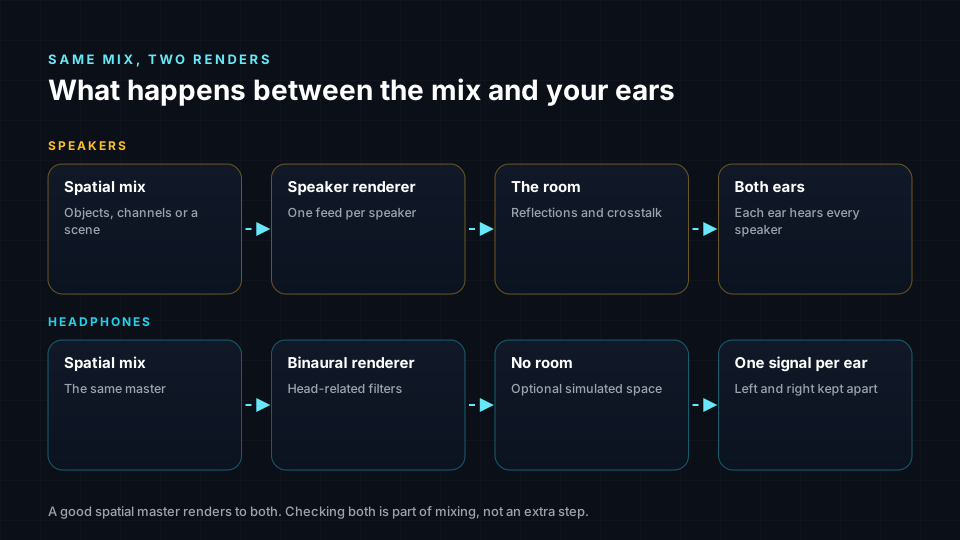
The limits come from the gap between a generic model and your own head.
- Externalisation: without room cues, sounds can collapse back inside the head. Renderers add simulated room reflections.
- Front and back: elements placed directly behind or low behind the listener are the most likely to be misheard.
- Individual fit: the same render can sound real to one listener and vague to another.
Head tracking
Without head tracking, the whole scene turns with your head. Turn left and the singer who was in front of you stays in front of your nose. With a spatial mix, the player knows where each sound belongs, so headphones with motion sensors can re-render the binaural version in real time and keep the band fixed in the room.
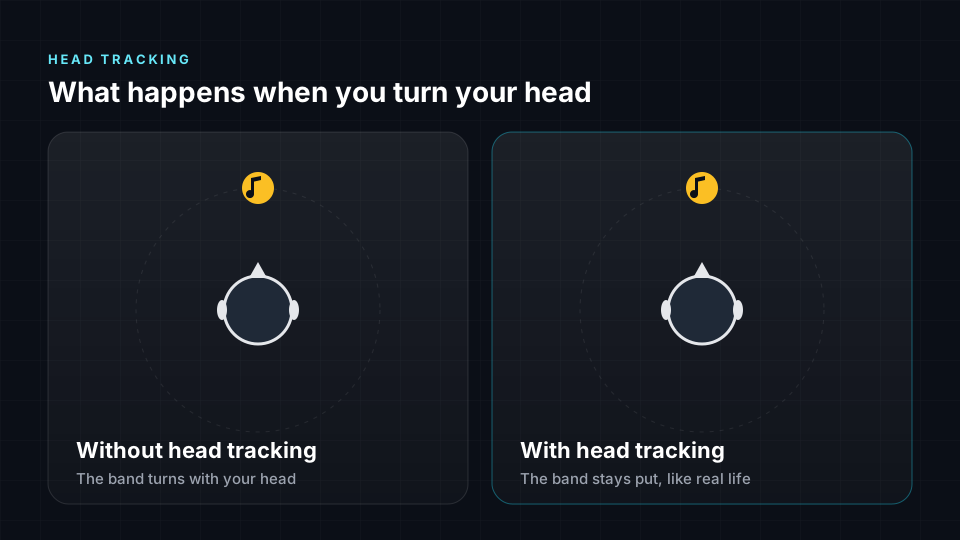
Head tracking is only possible when spatial information is kept rather than baked into two channels. A fixed binaural file cannot be head tracked. One consequence for mixing: with head tracking on, a centred lead vocal moves towards one ear when the listener turns their head.
In the libiamf reference decoder, head tracking takes the listener's head rotation as a quaternion and affects binaural output only. Speaker output is unchanged.
Headphone rendering modes
Formats let the mix engineer influence how headphone rendering behaves.
Dolby Atmos binaural render modes
Each Atmos bed or object carries a binaural render mode that sets how much simulated room is added.
| Mode | Effect |
|---|---|
| Off | No binaural room processing |
| Near | Close to the head |
| Mid | Moderate distance |
| Far | Most distant |
Apple's renderer does not follow these settings in the same way as Dolby's own renderer. It places rear sounds louder and closer and plays louder overall, so check the Apple render separately.
IAMF headphone rendering mode
In Eclipsa Audio, each audio element in a mix presentation carries a headphones_rendering_mode field. Rendering itself is defined by the Open Audio Renderer specification.
| Value | Meaning |
|---|---|
| 0 | Stereo for channel-based elements; world-locked binaural for scene and object elements |
| 1 | World-locked binaural |
| 2 | Head-locked binaural |
| 3 | Reserved |
World-locked means sources stay fixed in the room as the head turns. Head-locked means the scene moves with the head. See Eclipsa Audio and IAMF reference.
Speaker playback
With speakers, the renderer sends each sound to the speakers nearest its intended position. Because the sound genuinely arrives from that direction, your own head and ears supply every cue, including the personal ear-shape cues, and turning your head works naturally. The room adds reflections that make sound feel spacious.
The limits come from physics and rooms.
- Speaker count: a sound between two speakers is a phantom image, less precise than a real source.
- The sweet spot: off-centre seats hear nearer speakers louder and earlier, which shifts the image.
- The room: strong reflections and resonances blur placement and colour the sound.
- Crosstalk: each ear hears every speaker, so speakers cannot deliver a sound to one ear only. This is why binaural files sound odd or narrow on speakers.
Speaker layouts
Layout names count ear-level speakers, then subwoofers, then height speakers.
| Layout | Speakers | Arrangement |
|---|---|---|
| Stereo | 2 | Left and right |
| 5.1 | 6 | Five ear level, one subwoofer; standardised in ITU-R BS.775 |
| 7.1.4 | 12 | Seven ear level, one subwoofer, four overhead; usual immersive studio reference |
| 9.1.6 | 16 | Nine ear level, one subwoofer, six overhead |
Advanced layouts with height are standardised in ITU-R BS.2051. Soundbars imitate these layouts with angled drivers that bounce sound off walls and ceilings, which works well in some rooms and less well in others.
Headphones and speakers compared
| Headphones | Speakers | |
|---|---|---|
| How direction is created | Binaural filters imitate the head and ears | Sound arrives from each speaker position |
| What each ear hears | Only its own channel | Every speaker, shaped by the room |
| The room | Simulated or absent | Real reflections |
| Head movement | Scene turns unless head tracking is on | Scene stays put |
| Height and rear | Convincing for many, varies by person | Stable with height and rear speakers |
| Personal fit | Depends on the head model | Depends on the room and seat |
| Cost and space | Low, portable | Higher, needs a room |
| Most common use | Streaming music on phones | Home cinema, studios, shared listening |
Headphones excel at intimacy, precision and consistency, and they are how most listeners hear spatial music. Speakers excel at envelopment, stable height and rear images and shared listening, and they are the reference for film and professional immersive mixing.
Checking a mix on both
A good spatial master is made to work on headphones and speakers. Use this routine before release.
- Mix on speakers where you can. A calibrated 7.1.4 room gives a reference that does not depend on your ears matching an HRTF.
- Check every binaural render. Most listeners use headphones, so the binaural version is not secondary.
- Check the Apple render separately if you deliver Dolby Atmos to Apple Music.
- Listen with head tracking on and off and confirm the lead vocal and bass stay solid.
- Avoid placing important elements directly behind or low behind the listener.
- Keep the centre stable rather than spreading the lead vocal and bass widely.
- Check height fold-down on a smaller layout and on stereo.
- If you only have headphones, use a binaural monitor with head tracking, compare against professional reference mixes and arrange a speaker check before release.
Binaural and stereo deliverables in Spatial9
Spatial9 works with spatial masters first and produces binaural when you need it. Every render includes a binaural WAV alongside the spatial deliverables, and stereo or stems can be exported as ADM, Eclipsa Audio, binaural or Ambisonics.
| Deliverable | Channels | Use |
|---|---|---|
| Binaural | 2 | Headphones, platforms that accept only stereo files |
| Stereo Mixdown | 2 | Safety net for speakers and plain playback |
| 5.1.4 Speaker File | 10 | Speaker check, WAV |
| Eclipsa Audio | Varies | Device renders for headphones, TVs or soundbars |
In the Immersive Classroom, export Binaural for headphones and Stereo Mixdown as the safety format, then listen to both. See Publishing and delivery.
Common misconceptions
- Spatial audio does not need ceiling speakers. Headphones reproduce height through binaural rendering.
- Binaural is not a different format. The same Atmos or Eclipsa Audio master produces both binaural and speaker playback.
- Headphone spatial audio does not sound the same to everyone. It depends on how closely the head model matches the listener.
- More speakers do not always sound better. A well-calibrated 7.1.4 room usually beats a poorly set up larger system.
- Soundbars are not the same as a full system. Bouncing sound off walls depends heavily on the room.
- You do not need special headphones. Any headphones play binaural audio; head tracking and personalised profiles improve the effect.
Next steps
- Mixing best practices applies these playback limits to placement decisions.
- Psychoacoustics goes deeper into how the brain locates sound.
- Ambisonics explains how a sound field is decoded and rotated for head tracking.
- Publishing and delivery lists the binaural and stereo safety formats each platform expects.