Eclipsa Audio and IAMF reference
The open IAMF container: audio elements, mix presentations, codecs, profiles and how Eclipsa Audio uses it.
This page is a technical reference for IAMF, the Immersive Audio Model and Formats specification from the Alliance for Open Media (AOMedia), and for Eclipsa Audio, the consumer name under which Google and Samsung launched IAMF in January 2025. It covers the bitstream structure, audio element types, mix presentations, profiles, codecs, MP4 carriage, the open-source reference tools and the export options Spatial9 offers.
It is written for audio engineers, developers building players or pipelines, and anyone who needs to know exactly what an Eclipsa Audio file contains. If you only need to publish a file, see Publishing and delivery.
IAMF at a glance
| Feature | Value |
|---|---|
| Full name | Immersive Audio Model and Formats |
| Publisher | Alliance for Open Media (AOMedia) |
| Consumer name | Eclipsa Audio |
| Specification versions | v1.0.0 (2023), v1.1.0 (2024), v2.0.0 (approved 24 August 2026) |
| Packet unit | OBU (Open Bitstream Unit) with a 5-bit type |
| Codecs | Opus, AAC-LC, FLAC, LPCM |
| Audio element types | Channel-based, scene-based (Ambisonics), object-based from v2.0.0 |
| Largest channel layouts | 9.1.6, 7.1.5.4 and 22.2 (10.2.9.3 in v2.0.0) |
| Ambisonics | Up to 14th order, 225 channels |
| Rendering | Open Audio Renderer (OAR) specification, speakers or binaural |
| Container | Standalone .iamf file, or MP4 with an iamf sample entry |
| Reference software | iamf-tools (encoder, decoder, web demo) and libiamf (decoder) |
| Licence | BSD 3-Clause Clear License plus AOM Patent License 1.0, royalty-free |
Openness and licensing
IAMF follows the model of AV1, AOMedia's video codec: a public specification, royalty-free use and open-source reference code.
- Specification and reference software. The specification is public, and the libiamf decoder and conformance streams are published on the AOMediaCodec GitHub organisation.
- Creation tools. Google released an open-source Eclipsa Audio plugin for DAWs and video editors in June 2025; the open-source EAR Production Suite also works.
- Patents. The code is BSD licensed and AOM members grant a royalty-free patent licence, so you pay nothing to create, distribute or play IAMF.
Spatial9 joined AOMedia on April 16, 2025 and contributes to its open audio work, including IAMF.
Bitstream architecture
An IAMF file is called an IA Sequence. It begins with descriptor OBUs that tell the decoder everything it needs before the first sample, followed by a run of temporal units. Each temporal unit holds the Parameter Blocks and Audio Frames for one slice of time.
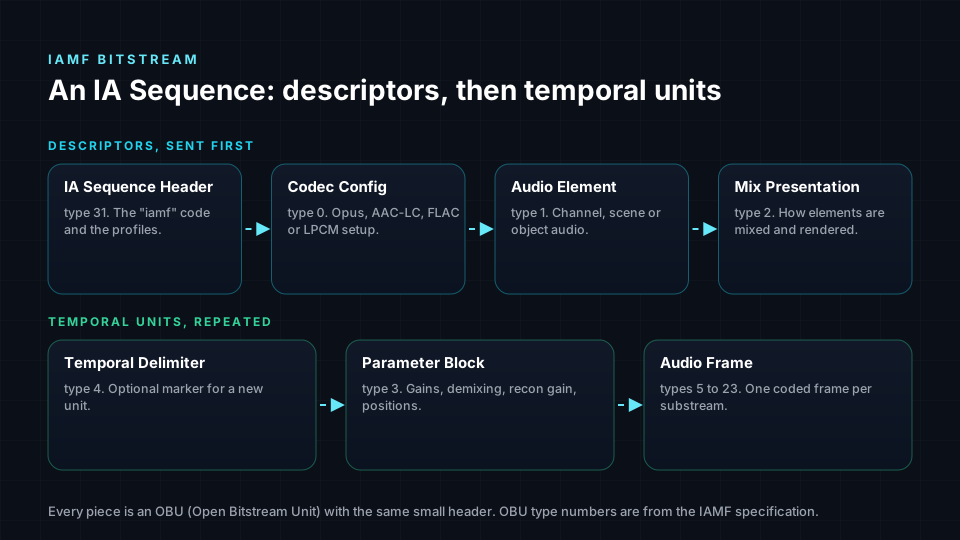
OBU types
| Type value | OBU | Role |
|---|---|---|
| 31 | IA Sequence Header | Starts the stream and declares the profiles |
| 0 | Codec Config | Codec and its settings |
| 1 | Audio Element | One channel-based, scene-based or object-based element |
| 2 | Mix Presentation | How elements are combined, rendered and normalised |
| 3 | Parameter Block | Time-varying values such as gains, demixing and positions |
| 4 | Temporal Delimiter | Boundary between moments in time |
| 5 | Audio Frame | Coded audio with an explicit substream ID |
| 6 to 23 | Audio Frame Id0 to Id17 | Coded audio whose substream ID is implied by the type |
| 24 | Metadata | ITU-T T.35 data and IAMF tags (v2.0.0) |
Sequence Header, Codec Config, Audio Element and Mix Presentation are the descriptor OBUs.
IA Sequence Header
The sequence header holds a 32-bit ia_code, always the four characters iamf, plus primary_profile and additional_profile. The primary profile is what a decoder must support to play the stream. The additional profile names a richer profile that a more capable decoder can use, so one stream can serve a basic decoder and a full home theatre decoder.
Profiles
Profiles cap stream complexity so device makers know what they must support.
| Profile | Value | Introduced | Max channels | Max audio elements | Typical use |
|---|---|---|---|---|---|
| Simple | 0 | v1.0.0 | 16 | 1 | One third-order Ambisonics scene or one channel layout |
| Base | 1 | v1.0.0 | 18 | 2 | A scene plus a stereo element such as narration |
| Base-Enhanced | 2 | v1.1.0 | 28 | 28 | Third-order Ambisonics plus a 7.1.4 bed |
| Base-Advanced | 3 | v2.0.0 | 18 | 18 | Object-only first mix, two codecs with one LPCM |
| Advanced-1 | 4 | v2.0.0 | 18 | 18 | Any mix of channel, scene and object elements |
| Advanced-2 | 5 | v2.0.0 | 28 | 28 | The same at the larger channel budget |
A third-order Ambisonics scene has 16 channels and fits the Simple profile exactly. Google's example YouTube video combines third-order Ambisonics for ambience with a stereo narration element, 18 channels in total, which requires the Base profile.
Codecs
The Codec Config OBU declares a four-character codec_id, the number of samples per frame and an audio_roll_distance.
| Codec | codec_id | Type | Recon gain | Typical use |
|---|---|---|---|---|
| Opus | Opus | Lossy, open, royalty-free | Yes | Streaming, where bandwidth matters most |
| AAC-LC | mp4a | Lossy, widely supported | Yes | Devices and pipelines built around AAC |
| FLAC | fLaC | Lossless | Not needed | High-quality delivery and archiving |
| LPCM | ipcm | Uncompressed | Not needed | Production, testing, highest-fidelity paths |
In v1.x a sequence uses one codec. In v2.0.0 a sequence may contain two Codec Config OBUs, provided one of them is LPCM.
Audio elements
An audio element is one piece of content rendered as a unit, such as a 7.1.4 bed, an Ambisonics scene, a commentary track or a moving object. Each element references a codec config, lists its substreams and declares its parameters. Parameter definitions with a type above 9 carry their own size, so older decoders can skip types they do not understand; this is how v2.0.0 added object positions without breaking v1 decoders.
| Element type | Value | Configuration | Available from |
|---|---|---|---|
| Channel-based | 0 | Scalable channel layout config | v1.0.0 |
| Scene-based | 1 | Ambisonics config | v1.0.0 |
| Object-based | 2 | Objects config | v2.0.0 |
Channel-based elements and scalable layouts
A channel-based element is a stack of up to six channel layers, each adding speakers to the one below. A device with two speakers decodes only the stereo layer; a 7.1.4 system decodes every layer and rebuilds the full layout.
loudspeaker_layout | Layout | Channel order |
|---|---|---|
| 0 | Mono | C |
| 1 | Stereo | L/R |
| 2 | 5.1 | L/C/R/Ls/Rs/LFE |
| 3 | 5.1.2 | L/C/R/Ls/Rs/Ltf/Rtf/LFE |
| 4 | 5.1.4 | L/C/R/Ls/Rs/Ltf/Rtf/Ltr/Rtr/LFE |
| 5 | 7.1 | L/C/R/Lss/Rss/Lrs/Rrs/LFE |
| 6 | 7.1.2 | L/C/R/Lss/Rss/Lrs/Rrs/Ltf/Rtf/LFE |
| 7 | 7.1.4 | L/C/R/Lss/Rss/Lrs/Rrs/Ltf/Rtf/Ltb/Rtb/LFE |
| 8 | 3.1.2 | L/C/R/Ltf/Rtf/LFE |
| 9 | Binaural | L/R |
| 15 | Expanded | Selects from a second table of 20 layouts |
The expanded table includes 9.1.6, 22.2 and, in v2.0.0, 7.1.5.4 with bottom speakers. coupled_substream_count tells the codec how many substreams are stereo pairs, which Opus and AAC-LC code more efficiently than two mono channels.
Demixing and reconstruction gain
When a scalable element plays on its full layout, the decoder rebuilds surround and height channels from the downmixed lower layers. Because lossy codecs smear energy between channels, the encoder also sends reconstruction gain, a per-channel correction. Reconstruction gain is used only with Opus and AAC-LC; with FLAC or LPCM, demixing is exact.
Scene-based elements
Scene-based elements carry Ambisonics. An order-N scene has (N + 1)² channels, and IAMF accepts orders 0 to 14. See Ambisonics for orders, channel ordering and normalisation.
| Mode | How channels are coded | Notes |
|---|---|---|
| Mono | Each Ambisonics channel as its own substream | channel_mapping can mark channels silent so they cost nothing; required for LPCM |
| Projection | A matrixed version of the scene | Sends a demixing_matrix to restore Ambisonics; can save bits |
Both modes follow RFC 8486, the Opus Ambisonics specification.
Object-based elements
Object-based elements were added in v2.0.0. num_objects is 1 for a mono substream or 2 for a stereo substream carrying two objects. Positions travel in parameter blocks using six new parameter definitions: polar, Cartesian 8-bit, Cartesian 16-bit and a dual version of each.
Parameter blocks and animation
Anything that changes over time is sent as a Parameter Block OBU. An audio element or mix presentation declares a parameter definition with an ID, and blocks with that ID update it. Each block is divided into subblocks, each carrying an animated value.
| Animation type | Data carried |
|---|---|
| Step | Start value |
| Linear | Start and end values |
| Bezier | Start, end and control values plus control point time |
| Inter-linear | End value, continuing from the previous subblock |
| Inter-Bezier | End and control values, continuing from the previous subblock |
The same template is used for mix gains and object positions.
Mix presentations
A mix presentation is the finished experience a listener selects. It lists which audio elements play, the gain applied to each, an overall output gain, the rendering configuration and loudness information. A stream can carry several, for example a full mix and a dialogue-forward mix. In v2.0.0 a presentation can contain a second sub-mix, intended for system sounds.
Headphone rendering modes
headphones_rendering_mode | Behaviour |
|---|---|
| 0 | Channel-based audio to stereo; scenes and objects to world-locked binaural |
| 1 | World-locked binaural for everything |
| 2 | Head-locked binaural |
| 3 | Reserved |
Rendering to speakers and binaural is defined by the companion Open Audio Renderer (OAR) specification, so compliant players produce the same result. See Binaural rendering, headphones and speakers.
Loudness
Each sub-mix lists the layouts it was measured on, with loudness information for each. Integrated loudness and peak values are stored in Q7.8 fixed point. Optional fields add true peak, anchored loudness for dialogue and, in v2.0.0, momentary loudness. Players use these values to match levels without measuring the audio.
Output layouts
Output layouts use ITU-R BS.2051 naming, where 4+7+0 means four upper speakers, seven middle and none below.
| libiamf sound system | BS.2051 | Common name |
|---|---|---|
| A | 0+2+0 | Stereo |
| B | 0+5+0 | 5.1 |
| C | 2+5+0 | 5.1.2 |
| D | 4+5+0 | 5.1.4 |
| I | 0+7+0 | 7.1 |
| J | 4+7+0 | 7.1.4 |
| EXT_712 | 2+7+0 | 7.1.2 |
| EXT_312 | 2+3+0 | 3.1.2 |
| EXT_916 | 6+9+0 | 9.1.6 |
| H | 9+10+3 | 22.2 |
MP4 carriage and codecs string
IAMF is stored as a raw .iamf file or inside an MP4 (ISO BMFF) file. In MP4, the track uses an iamf sample entry holding an iacb configuration box with all descriptor OBUs. Each MP4 sample holds one temporal unit. The channelcount and samplerate fields of the sample entry are set to 0 and must be ignored, because one track can hold elements with different channel counts.
Web players check support with a codecs string of this form:
iamf.<primary_profile>.<additional_profile>.<codec>
iamf.000.000.Opus
iamf.001.001.Opus
The codec part is Opus, mp4a.40.2, fLaC or ipcm. On YouTube, Stats for nerds shows a string starting with iamf when the immersive version plays.
Reference software
| Project | Language | Contents |
|---|---|---|
| libiamf | C | Reference decoder for IAMF v2.0.0, conformance test vectors, head tracking for binaural output |
| iamf-tools | C++ | Encoder and decoder API, command-line encoder, probe tool, browser web demo |
Decoding with libiamf
The decoding flow follows the bitstream.
- Open a handle with
IAMF_decoder_open. - Select a profile with
IAMF_decoder_set_profile. - Select an output with
IAMF_decoder_output_layout_set_sound_systemorIAMF_decoder_output_layout_set_binaural. - Optionally choose a presentation with
IAMF_decoder_set_mix_presentation_idand a target withIAMF_decoder_set_normalization_loudness. - Pass the descriptor OBUs to
IAMF_decoder_configure. - Pass each temporal unit to
IAMF_decoder_decode, which returns the number of decoded samples.
A normalisation loudness of 0.0 turns normalisation off; the header gives -16 LUFS as a YouTube example. Head tracking takes a quaternion and affects binaural output only.
Encoding with iamf-tools
The command-line encoder reads WAV files, or an ADM BWF master with --adm_filename, plus a protocol buffer text configuration whose field names match the specification syntax.
bazel-bin/iamf/cli/encoder_main --user_metadata_filename=iamf/cli/testdata/test_000002.textproto --output_iamf_directory=.Spatial9 export options
Spatial9 produces Eclipsa Audio files from stereo songs, stems or a Dolby Atmos ADM master, with profiles, loudness data and binaural settings handled for you. When converting from objects, Spatial9 uses motion-aware translation into a third-order Ambisonics scene of 16 components. See ADM to Eclipsa Audio.
For exports produced by Spatial9's own encoder (the stems and music Eclipsa pipelines and direct encode calls), you choose one of three codecs. All three produce a .iamf file.
| Codec option | Lossless | Streaming-safe | Profile | Accepted by YouTube |
|---|---|---|---|---|
| Opus (default) | No | Yes | Simple | Yes, required for YouTube and Eclipsa streaming |
| FLAC | Yes | No | Base | No |
| LPCM, uncompressed 24-bit | Yes | No | Base | No |
Next steps
- Ambisonics explains the scene-based model most Eclipsa Audio music uses.
- ADM to Eclipsa Audio walks through converting a Dolby Atmos master.
- Publishing and delivery shows how to upload and verify an Eclipsa Audio video on YouTube.
- Open-source pipeline covers building your own workflow on the reference tools.