Ambisonics
Scene-based audio: orders, channel ordering, normalization, decoding and when to use it.
This page is a reference for Ambisonics, the scene-based approach to spatial audio that describes sound per direction rather than per speaker. It covers first-order B-format, higher orders and their channel counts, channel ordering and normalisation conventions, encoding, decoding and rotation, how Ambisonics is carried in Eclipsa Audio, and when to use it instead of channels or objects.
It is written for engineers, sound designers, VR and 360 video producers and developers who work with Ambisonics files or with the third-order scenes Spatial9 produces for Eclipsa Audio.
Definition
Most audio formats store one signal per speaker: left, right, rear left and so on. Ambisonics stores a picture of the entire sound field around a single listening point, from every direction, including above and below. Because it is not tied to a speaker layout, one Ambisonics file can be decoded for headphones, for any speaker arrangement, or for VR and 360 video, and it can be rotated as the listener turns.
Ambisonics was developed in the 1970s, principally through the work of Michael Gerzon and Peter Craven. It became mainstream with virtual reality, 360 video and headphone spatial audio, and it is one of the two audio element types in IAMF, the specification behind Eclipsa Audio.
Spatial models compared
| Channel-based | Object-based | Ambisonics | |
|---|---|---|---|
| Describes | Signals for specific speakers | Individual sounds with positions | The full sphere around a listener |
| Tied to a speaker layout | Yes | No | No |
| Rotation | Not practical | Per object | Whole scene in one matrix operation |
| Cost grows with | Speaker count | Number of objects | Order only |
| Suited to | Fixed home theatre setups | Studio mixing, Dolby Atmos | VR, 360 video, headphones, open delivery |
| Examples | 5.1, 7.1 | ADM, Dolby Atmos objects | B-format, Eclipsa Audio scenes |
A scene-based description has a fixed channel cost. A 300-track session and a 5-track session both become 16 channels at third order.
First-order Ambisonics and B-format
First-order Ambisonics uses four signals, together called B-format.
| Signal | Captures |
|---|---|
| W | Sound from every direction equally: the overall sound of the space |
| X | The difference between front and back |
| Y | The difference between left and right |
| Z | The difference between up and down |
Combining these four signals in different proportions lets a decoder estimate how loud the sound field is in any direction, which is why four signals are enough to describe a full sphere, at least broadly.
A-format and B-format
An Ambisonics microphone has four capsules arranged in a tetrahedron. Their raw signals are called A-format. Software converts A-format into the W, X, Y and Z signals of B-format, which is the form you edit, store and play back.
Orders and channel counts
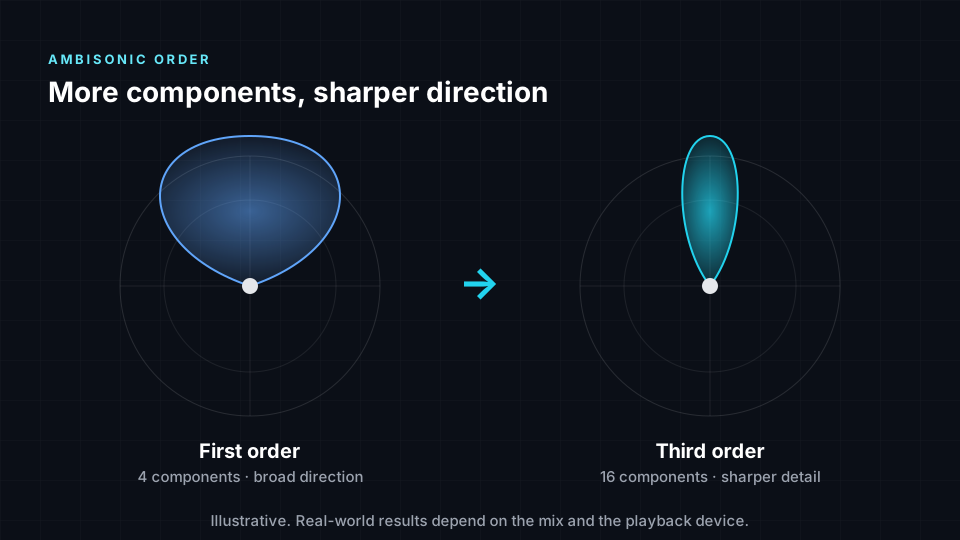
Higher orders add signals that sharpen directional detail. The channel count for order N is (N + 1)². Each order adds 2N + 1 components, so third order uses 1 + 3 + 5 + 7 = 16 components.
| Order | Abbreviation | Channels | Directional detail | Common uses |
|---|---|---|---|---|
| 0 | 1 | None, omnidirectional only | W signal alone | |
| 1 | FOA | 4 | Clear sense of space, soft directions | 360 video, field recordings, VR |
| 2 | HOA | 9 | Noticeably sharper placement | Games, VR experiences |
| 3 | HOA | 16 | Precise placement | Music and film delivery, Eclipsa Audio from Spatial9 |
| 4 | HOA | 25 | Very detailed | Large speaker arrays, installations |
| 5 | HOA | 36 | Extremely detailed | Research |
| 14 | HOA | 225 | Maximum order IAMF accepts | Specification limit |
FOA means first-order Ambisonics; HOA means higher-order Ambisonics, second order and above.
Channel ordering and normalisation
Ambisonics files follow conventions for the order in which signals are stored and how they are scaled. Two conventions are in common use.
| Convention | Channel ordering | Normalisation | Status |
|---|---|---|---|
| AmbiX | ACN | SN3D | Modern standard expected by most tools, 360 video platforms and plugins |
| FuMa | FuMa ordering | FuMa scaling | Older convention found in many classic recordings and libraries |
Both conventions describe the same sound field, but the signals are arranged and scaled differently. Reading a file with the wrong convention places sounds in the wrong position. IAMF scene-based elements and Spatial9 conversions use ACN ordering with SN3D normalisation, the same conventions as AmbiX.
Encode, decode and rotate
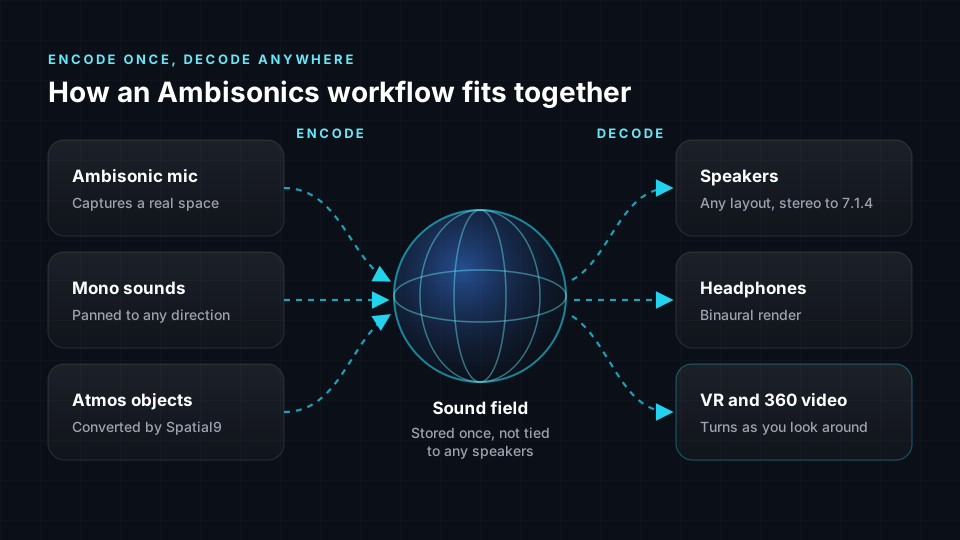
Ambisonics separates making the sound field from playing it.
Encoding
Encoding places sounds into the sphere.
- An Ambisonics microphone encodes a real space directly.
- A mono recording can be panned to any direction in software.
- An existing immersive mix can be converted. Spatial9 encodes Dolby Atmos beds and objects into a third-order scene, following each object's movement over time.
Decoding
Decoding turns the sphere into signals for real speakers or into a binaural signal for headphones. Speaker decoding is a matrix operation that produces feeds for 2.0, 5.1, 7.1.4 or other layouts. The decoder adapts to the speakers it has, so the same file works from stereo to large 3D layouts. Binaural decoding converts the whole sphere into two ear signals with a fixed set of filters. See Binaural rendering, headphones and speakers.
Rotation
The whole sphere can be rotated with a single matrix operation. This is why 360 video can turn the sound with the viewer's gaze and why head-tracked headphones work well with Ambisonics. In the libiamf decoder, head tracking counter-rotates an intermediate Ambisonics bed so sources stay fixed in the room as the listener turns.
Ambisonics in Eclipsa Audio
IAMF supports scene-based audio elements that carry an Ambisonics sound field, which each device renders for its own speakers or headphones.
| IAMF property | Value |
|---|---|
| Element type | Scene-based (value 1) |
| Orders accepted | 0 to 14, up to 225 channels |
| Storage modes | Mono (each channel coded separately) or projection (matrixed before coding) |
| LPCM | Requires mono mode |
| Basis | RFC 8486, the Opus Ambisonics specification |
| Profile fit | A 16-channel third-order scene fits the 16-channel Simple profile exactly |
| Base profile example | Third-order scene plus a stereo narration element, 18 channels |
In mono mode the channel_mapping field can mark channels as silent so they cost nothing. In projection mode a demixing matrix is sent so the decoder can restore the Ambisonics signals. Because Ambisonics channels in a scene are highly correlated, efficient codecs such as Opus keep a full third-order scene within practical streaming bitrates. See Eclipsa Audio and IAMF reference.
Third order in Spatial9 conversions
When Spatial9 converts a Dolby Atmos ADM BWF master to Eclipsa Audio, it uses motion-aware translation to build a third-order scene of 16 components. The conversion must:
- Read every bed and object, including the time blocks that record movement.
- Map room-centred Atmos positions to listener-centred directions so front stays front, overhead stays overhead and side stays side.
- Translate object size into a matching spread in the sound field.
- Follow movement over time, so a sweeping sound keeps sweeping.
- Carry low-frequency content deliberately, because Ambisonics has no dedicated LFE channel.
- Encode to third order to keep enough directional detail for music.
The Intent Fidelity Score then compares placement in the original master with the converted scene. See ADM to Eclipsa Audio.
Ambisonics export options in Spatial9
The Spatial9 Immersive Classroom exports Ambisonics at orders 1 to 4, alongside binaural, stereo, surround layouts and Eclipsa Audio video.
| Order | Channels | Character |
|---|---|---|
| 1 | 4 | Broad, light, widely supported |
| 2 | 9 | Noticeably sharper positions |
| 3 | 16 | Detailed, suitable for premium VR |
| 4 | 25 | Most detailed option in the classroom |
Choose the highest order your destination platform accepts. Real file exports in the classroom are part of the Student Pro plan. See Education and Academy.
When to use Ambisonics
| Use Ambisonics when | Prefer channels or objects when |
|---|---|
| The listener can turn their head or view, as in VR and 360 video | You deliver to a fixed speaker layout only |
| You need one file to play on headphones, phones, TVs and soundbars | You need per-sound control at playback, such as dialogue level |
| You are capturing a real space with an Ambisonics microphone | You need the sharpest possible point sources |
| You deliver Eclipsa Audio to YouTube and supported TVs | You deliver to Apple Music, Amazon Music or TIDAL, which take Dolby Atmos |
| The session has very many sources and you need a fixed bitrate | The arrangement is sparse and relies on very precise placement |
Limitations
- Low orders are blurry. First order gives broad, soft positions; sharp placement needs third order or higher, which means larger files.
- Speaker decodes have a sweet spot. A decode sounds best at the centre of a regular layout; away from the centre, or with uneven speaker spacing, images drift.
- A third-order scene is precise enough for music but is not a perfect point. A very small object can sound slightly broader than in an object renderer.
- Platforms differ. YouTube 360 and VR videos use first-order Ambisonics, so a higher-order mix must be reduced for that route.
- There is no per-instrument control after encoding. Once sounds are in the sphere you cannot extract one instrument to rebalance it. Keep the original stems or objects.
- Converting an Ambisonics scene back into objects would require separating the sources again.
Troubleshooting
| Symptom | Likely cause | Check |
|---|---|---|
| Left and right or front and back appear swapped | Convention mismatch between AmbiX and FuMa | Confirm ordering and normalisation of the file and the decoder |
| Scene sounds unusually wide or diffuse | Wrong convention, or a low order | Confirm the convention; consider a higher order |
| Positions drift on speakers | Listener outside the sweet spot or irregular layout | Listen at the centre of a regular layout |
| Height weak on headphones | Generic HRTF mismatch | Compare on several listeners; height is the least reliable headphone cue |
| No bass on some systems | Low-frequency content not carried after conversion from a mix with LFE | Check the low-frequency handling of the conversion |
Next steps
- Eclipsa Audio and IAMF reference describes how scene-based elements are stored in the bitstream.
- Binaural rendering, headphones and speakers explains how a sound field is rendered for each playback system.
- ADM to Eclipsa Audio shows how an Atmos master becomes a third-order scene.
- Immersive audio formats compared places Ambisonics alongside channel and object formats.