ADM BWF files
The Audio Definition Model and Broadcast Wave files: structure, metadata and how to validate a master.
This page describes ADM BWF files: Broadcast Wave files that carry Audio Definition Model metadata. ADM BWF is the most common master format for object-based immersive audio, including Dolby Atmos music masters, and it is the input Spatial9 uses to convert an Atmos mix to Eclipsa Audio.
It is written for mix engineers, mastering and delivery engineers, archivists and developers who need to know what is inside an ADM master, how beds, objects and movement are stored, and how to check a file before you deliver or convert it.
Definition
The name joins two standards.
| Term | Full name | Standard | What it defines |
|---|---|---|---|
| ADM | Audio Definition Model | ITU-R BS.2076 | A metadata model describing each track: fixed channel or object, and where it should be heard |
| BWF | Broadcast Wave Format | Broadcast WAV | A WAV file with extra broadcast information such as title and timecode |
| BW64 | Long-form BWF | ITU-R BS.2088 | A long-form variant that can exceed the 4 GB WAV limit |
| RF64 | 64-bit RIFF | Variant of WAV | Another large-file variant used for big masters |
| S-ADM | Serial ADM | ITU-R BS.2125 | ADM metadata sent in small pieces alongside live audio |
An ADM BWF file is therefore a Broadcast Wave file that carries ADM metadata. Large immersive masters often use the BW64 or RF64 variant so that the file can grow beyond 4 GB.
File structure
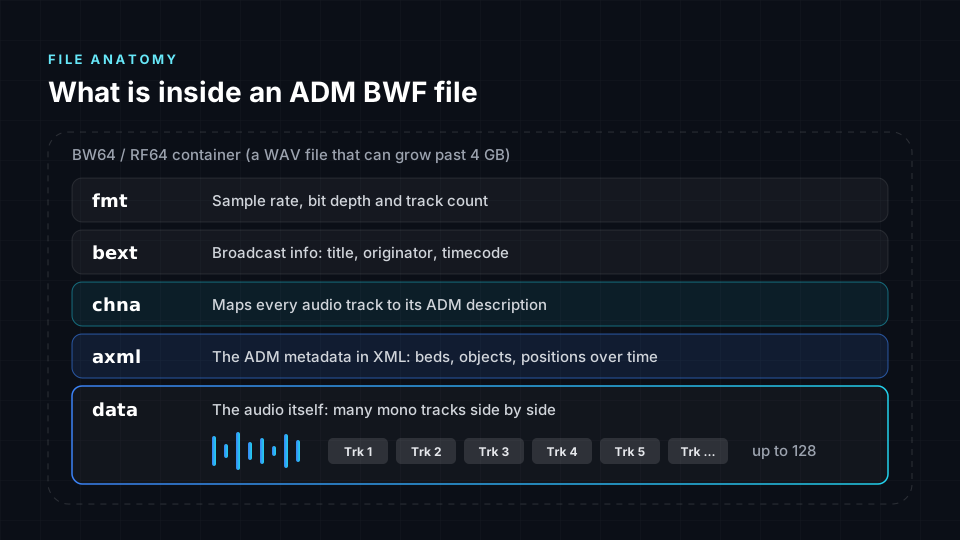
A WAV file is made of labelled sections called chunks. An ADM BWF file adds two chunks, chna and axml, to the usual ones.
| Chunk | Contents | Purpose |
|---|---|---|
fmt | Sample rate, bit depth and number of tracks | Lets software read the audio correctly |
bext | Broadcast information such as title, originator and timecode | Keeps the file identifiable and in sync |
chna | A map from every audio track to its ADM description | Connects the audio to the spatial metadata |
axml | The ADM metadata, written in XML | Describes beds, objects and their positions over time |
data | The audio, as many mono tracks side by side | The sound of the mix |
A standard audio player opens an ADM BWF file as a very wide WAV and ignores the metadata, so it does not reproduce the intended mix. You need an immersive renderer or a converter that reads chna and axml.
Typical Dolby Atmos master properties
| Property | Typical value |
|---|---|
| Tracks | Up to 128 |
| Sample rate | 48 kHz |
| Bit depth | 24-bit |
| Bed | Up to 7.1.2, which uses 10 tracks |
| Objects | Up to 118 alongside a 7.1.2 bed |
| Size | Often several gigabytes for a full-length song |
Beds and objects
Every immersive mix in an ADM file is built from two kinds of audio.
| Beds | Objects | |
|---|---|---|
| Position | Fixed to speaker positions, such as 7.1.2 | Carried as metadata and can change over time |
| Typical content | Wide ambiences, pads, room tone, reverb returns | Lead vocals, solo instruments, effects that fly overhead |
| ADM pack type | Bed layout | Object |
| Conversion to Ambisonics | Encoded at the positions of the bed channels | Encoded at the position stored in each time block |
Beds fill a zone of the room. Objects sit anywhere, including between or beyond the speakers.
The ADM model
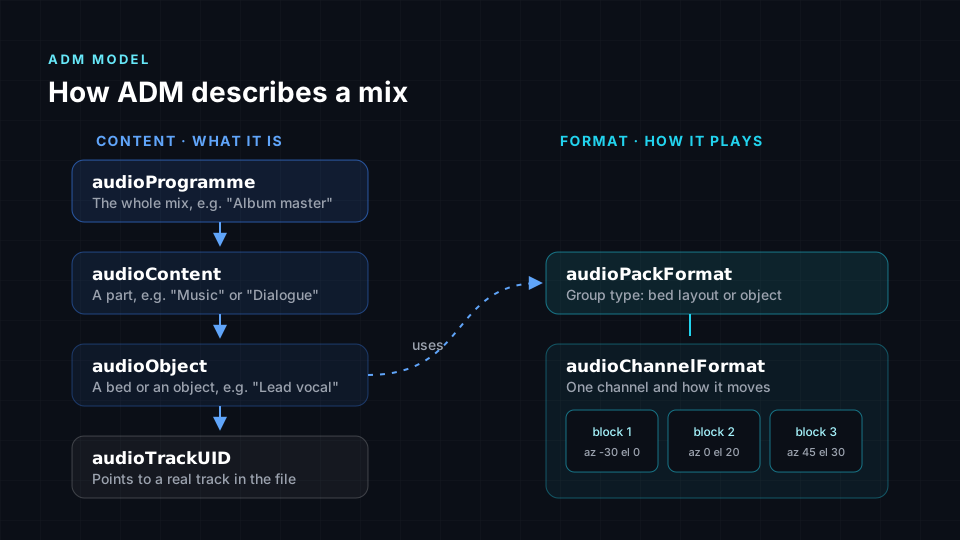
ADM metadata is organised in two linked hierarchies. The content side describes what the audio is; the format side describes how it plays.
Content elements
| Element | Describes | Example |
|---|---|---|
audioProgramme | The whole mix | Album master |
audioContent | A group within the mix | Music, Dialogue |
audioObject | A single bed or object | Lead vocal |
audioTrackUID | The link from an object to an actual track in the file | Track 14 |
Format elements
| Element | Describes |
|---|---|
audioPackFormat | The type of group: a bed layout or an object |
audioChannelFormat | One channel |
audioBlockFormat | The position of one channel for a stretch of time |
Your DAW or Atmos renderer writes this metadata when you export. You do not edit it by hand, but knowing the structure explains how a converter can rebuild a mix precisely.
How movement is stored
An ADM file does not store a recording of a pan. It stores a series of time blocks (audioBlockFormat entries), each holding a position for a stretch of time. Played in order, the blocks become movement.
| Property | Meaning |
|---|---|
| Azimuth | Direction around the listener, from left through front to right |
| Elevation | Height above or below ear level |
| Distance | Optional distance from the listener |
| Size | Optional spread, so a sound feels less like a point |
Dolby Atmos music describes object positions in a room-centred coordinate system: a point inside a cube that represents the room. A converter to Eclipsa Audio must map those room positions to listener-centred directions on a sphere. See Immersive audio formats compared for the difference between the two coordinate systems.
Where the master fits in a workflow
- Mix in your DAW with an immersive renderer, using beds and objects.
- Export a single ADM BWF master that contains the audio and the spatial metadata.
- Deliver that master to distributors for immersive music streaming.
- Archive it as your editable source of truth.
- Convert it to other formats, such as Eclipsa Audio for YouTube, TVs and soundbars.
Distributors for Apple Music, Amazon Music and TIDAL ask for the Atmos ADM BWF master. The same file is the input to the Spatial9 converter at /adm-to-eclipsa.
ADM BWF compared with other file types
| File | Holds | Spatial information | Typical use |
|---|---|---|---|
| Stereo WAV | Two channels | Left and right only | Standard music masters |
| Multichannel WAV | Several channels, such as 5.1 | Fixed speaker positions only | Surround deliveries |
| ADM BWF | Up to 128 tracks plus ADM metadata | Beds and moving objects in 3D | Immersive masters, including Dolby Atmos |
| Ambisonics WAV | 4, 9 or 16 channels and more | A full sound field around one point | VR, 360 video, scene-based workflows |
| Eclipsa Audio (IAMF) | A compressed immersive bitstream, often in MP4 | Ambisonics scene or channel layers with mix metadata | Playback on YouTube, TVs and soundbars |
Validating a master before delivery or conversion
Use this checklist on every ADM BWF master before you send it to a distributor or upload it for conversion.
- Confirm the file is the untouched export from your renderer, not a copy re-saved in another tool.
- Confirm the file contains
chnaandaxmlchunks. If either is missing, the spatial metadata has been stripped. - Confirm the sample rate is 48 kHz and the bit depth is 24-bit, unless your distributor specifies otherwise.
- Confirm the track count matches your session, up to 128 tracks.
- For files larger than 4 GB, confirm the container is BW64 or RF64.
- Open the file in an immersive renderer and check that beds and objects play from the expected positions, including moving objects.
- Check that objects have clear names, such as "Lead Vox" rather than "Audio 14". Names travel with the metadata and make troubleshooting easier.
- Keep a copy of the untouched export alongside any converted versions.
Listing chunks with a script
You can confirm that the metadata chunks are present with a short script that walks the chunk list. This example reads only the chunk headers, so it runs quickly on multi-gigabyte files.
import struct
import sys

def list_chunks(path):
    with open(path, "rb") as f:
        riff_id, _, wave_id = struct.unpack("<4sI4s", f.read(12))
        print("container:", riff_id.decode(), wave_id.decode())
        while True:
            header = f.read(8)
            if len(header) < 8:
                break
            chunk_id, size = struct.unpack("<4sI", header)
            print(chunk_id.decode(errors="replace"), size)
            f.seek(size + (size & 1), 1)

list_chunks(sys.argv[1])
A valid ADM BWF master lists fmt, chna, axml and data, usually with bext.
Common problems
| Problem | Cause | Resolution |
|---|---|---|
| Missing metadata | The file was opened and re-saved in a tool that does not understand ADM, stripping chna and axml | Deliver the file exactly as your renderer exported it |
| Wrong file type | A different Dolby-branded delivery file was sent instead of ADM BWF | Export ADM BWF from the session |
| Delivery rejection | Sample rate other than 48 kHz | Re-export at 48 kHz |
| File too large for a classic WAV | Many tracks over a long duration | Use BW64 or RF64 |
| Hard to troubleshoot | Generic object names | Name objects clearly in the session before export |
Converting an ADM BWF master
Spatial9 converts ADM BWF masters, supplied as WAV or BWF files, to Eclipsa Audio for free in your browser, with no watermark. It reads every bed and object, follows the time blocks so moving sounds keep moving, and rebuilds the mix as a third-order Ambisonics scene of 16 components. This process is called motion-aware translation. A patent-pending Intent Fidelity Score then compares placement in the original master with the converted scene.
Keep these limits of the translation in mind.
- The result is a translation, not a copy. A very small, precise object can sound slightly broader in a third-order scene than in the Dolby Atmos Renderer.
- Dolby-specific settings, such as the binaural render modes chosen in the Dolby Atmos Renderer, have no direct equivalent in Eclipsa Audio.
- Ambisonics has no dedicated LFE channel, so low-frequency content must be carried deliberately during conversion.
- Keep the ADM master. Apple Music, Amazon Music and TIDAL take Dolby Atmos; Eclipsa Audio is for YouTube and compatible devices.
- Only convert masters you own or have permission to release.
You can also encode ADM BWF directly with the open-source iamf-tools encoder using its --adm_filename option. See Eclipsa Audio and IAMF reference.
Next steps
- ADM to Eclipsa Audio walks through each step of the browser converter.
- Ambisonics explains the third-order scene that converted masters use.
- Exporting stems covers preparing source material when you do not have an ADM master.
- Publishing and delivery lists which platforms accept which deliverables.