Eclipsa Audio on YouTube: Convert Atmos for Free (Even With ChatGPT) and Listen on Your Computer
Spatial9 Team · · 14 min read
Key takeaways
- You no longer need to buy conversion software to put an immersive mix on YouTube: Spatial9, ChatGPT with the Spatial9 connector and open-source tools all convert ADM to Eclipsa Audio for free.
- Upload a video MP4 that contains the Eclipsa Audio track, upload it as private first, and check Stats for nerds for Opus (773), which means the immersive stream is playing.
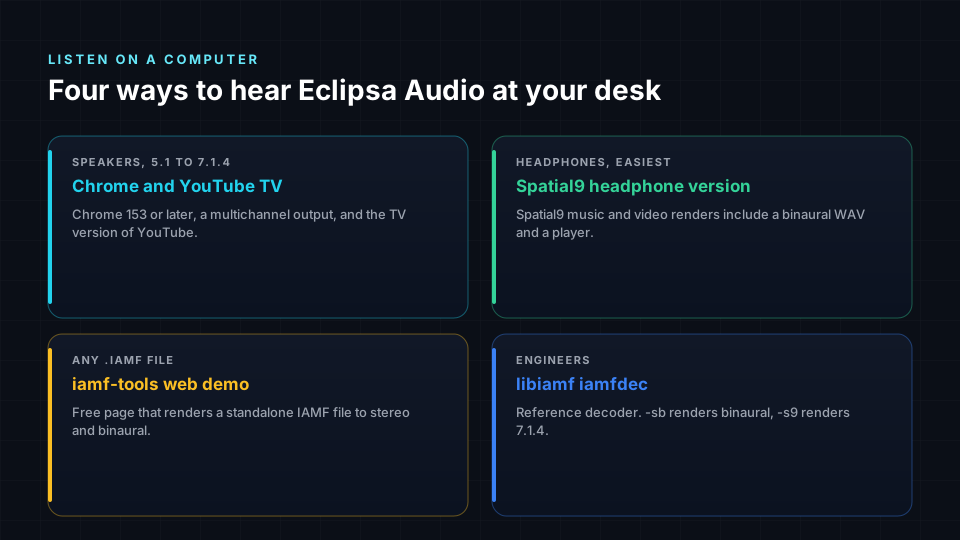
- To listen on a computer, use Chrome 153 or later, set your audio device to its full speaker layout, and open the video through the YouTube TV interface.
- On headphones, use the binaural version Spatial9 delivers, the free iamf-tools web demo, or the open-source libiamf decoder.

YouTube accepts Eclipsa Audio, the open immersive format from Google, Samsung and the Alliance for Open Media. Most guides on the subject stop at "upload and hope", or end by selling a conversion tool. This one covers the whole path: three free ways to convert, how to package the file, how to check that YouTube kept the immersive track, and how to listen on a Mac or Windows computer with speakers or headphones.
At a glance
| Step | What you need | Cost |
|---|---|---|
| Convert an ADM BWF master | Spatial9 converter, ChatGPT with the Spatial9 connector, or iamf-tools | Free |
| Convert Dolby Digital, Digital Plus or TrueHD | Spatial9 converter or the Spatial9 connector | Included with a Spatial9 account |
| Package with video | Spatial9 (automatic) or MP4Box | Free |
| Upload | YouTube Studio, private first | Free |
| Check | Stats for nerds shows Opus (773) | Free |
| Listen on speakers | Chrome 153 or later, multichannel audio device, YouTube TV interface | Free |
| Listen on headphones | Spatial9 binaural file, iamf-tools web demo or libiamf | Free |
You do not need to pay for conversion anymore
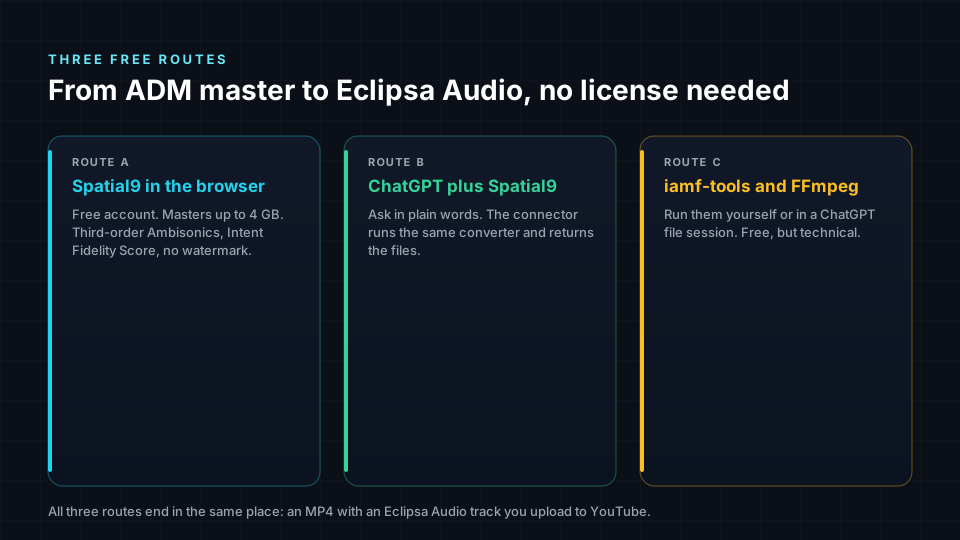
For a while, getting an Atmos mix onto YouTube in an immersive format meant buying a dedicated converter or a renderer licence. That made sense when the only encoders were closed. It no longer does, for three reasons.
- The format is open. Eclipsa Audio is the consumer name for IAMF, a royalty-free standard published by the Alliance for Open Media. The reference encoder, iamf-tools, is open source and has an ADM input built in.
- Spatial9 offers the conversion free. The ADM to Eclipsa converter takes ADM WAV or BWF masters up to 4 GB, needs only a free account and adds no watermark.
- AI assistants can now do the work. ChatGPT can drive the Spatial9 converter through the Spatial9 connector, and it can also try the open-source route inside its own file workspace.
Paid tools can still make sense if you need a specific workflow inside your DAW. For the job of "turn my Atmos master into something YouTube plays in 3D", the free routes are enough.
Before you start: check your master
Every route below starts from an ADM BWF file: the single WAV that Dolby Atmos Renderer, Pro Tools, Logic Pro, Nuendo and DaVinci Resolve export, with the beds, objects and their positions stored inside. If you are not sure what you have, our guide to what an ADM BWF file is explains how to tell.
- ADM BWF WAV: all three routes work.
- Dolby Digital (AC-3), Dolby Digital Plus (E-AC-3) or TrueHD: use Spatial9. It decodes the speaker channels, up to 7.1, and places each at its real speaker position. The open-source ADM route does not read these files.
- Stereo WAV: you need spatialization, not conversion. Start with how to create spatial audio from stereo.
Have a cover image or a video ready too. YouTube needs a video track.
Route A: the Spatial9 converter in your browser
This is the shortest path, and the only one with no file size problem for most masters.
- Open the free ADM to Eclipsa converter and create a free account.
- Upload your ADM BWF master, up to 4 GB.
- Add a cover image or video if you want a YouTube-ready MP4.
- Download the Eclipsa Audio file and the MP4, or publish straight to your channel.
The result is 16-channel third-order Ambisonics in IAMF, with an Intent Fidelity Score that tells you how closely the converted scene matches the original object positions. Our step-by-step Atmos to Eclipsa conversion guide covers each screen.
Route B: ask ChatGPT to do it
There are two ways to do this in ChatGPT, and knowing the difference saves time.
Option 1: ChatGPT with the Spatial9 connector (recommended). Add Spatial9 to ChatGPT once (setup is on the connect page). Then you can say:
ChatGPT gives you an upload link for files up to 2 GB, runs convert_dolby_to_eclipsa on Spatial9, waits for the job and returns the downloads. Because the conversion runs on Spatial9, it works on any ChatGPT plan that supports apps, and it also accepts Dolby Digital, Digital Plus and TrueHD files. If you just want to try it, the guest address https://spatial9.ai/mcp/free includes one ADM to Eclipsa conversion with no account. For everything else an assistant can do with Spatial9, from remixing in 3D to publishing, see agentic AI and spatial audio.
Option 2: ChatGPT's own file tools. ChatGPT can run code on files you upload, so it can try the open-source route itself. Two honest limits apply: audio uploads need a paid ChatGPT plan, and the upload limit is 512 MB. Many ADM masters are larger than that. If yours fits, use a prompt that asks the assistant to check before it promises anything:
Inspect this ADM BWF master. Tell me the duration, sample rate,
number of channels and whether it contains ADM metadata.

If the tools available to you can convert it, convert it to
Eclipsa Audio (IAMF) with the open-source iamf-tools ADM workflow,
then put it in a video MP4 with my cover image as the picture.

Keep the full duration and check that audio and video stay in sync.
Tell me how the objects were represented (for example, folded into
third-order Ambisonics) and any metadata that could not be kept.

Give me the .iamf file and the final MP4, and list every check you
actually ran. If you cannot run the encoder here, say so plainly
and do not substitute a stereo or 5.1 file.
The last line matters. If the encoder is not installed in ChatGPT's workspace, a good answer is "I can't do this here", not a different file with a convincing name. When that happens, use Option 1 or Route A.

Route C: open source on your own computer
If you are comfortable in a terminal, you can do everything yourself with free software. This is also what an assistant runs under the hood in Route B, Option 2.
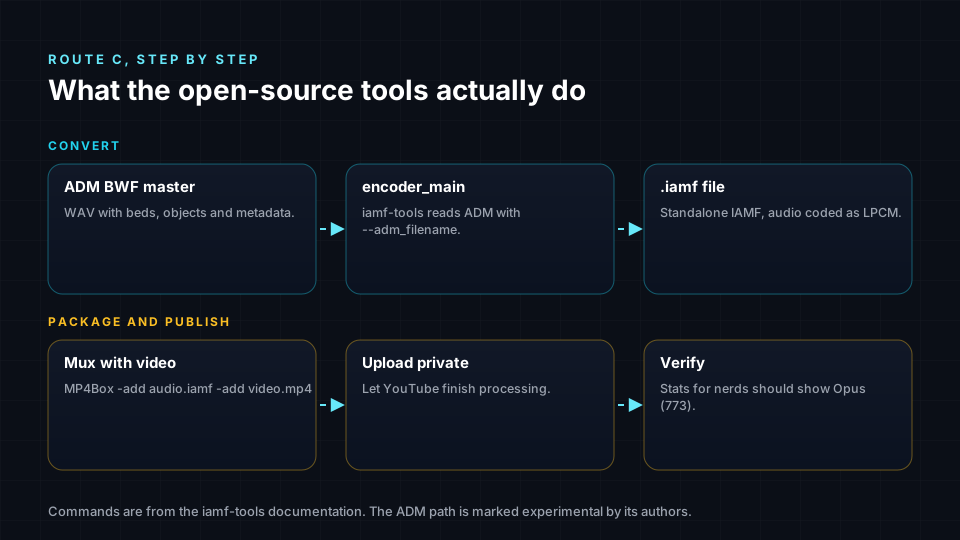
Build the encoder and convert:
git clone https://github.com/AOMediaCodec/iamf-tools.git
cd iamf-tools
bazel build -c opt //iamf/cli:encoder_main

./bazel-bin/iamf/cli/encoder_main \
  --adm_filename=/path/to/my_mix_adm.wav \
  --output_iamf_directory=/path/to/out
Turn a cover image into a video the same length as your mix, then combine the two:
ffmpeg -loop 1 -i cover.jpg -t 245 -r 30 \
  -c:v libx264 -pix_fmt yuv420p cover_video.mp4

MP4Box -add /path/to/out/my_mix.iamf -add cover_video.mp4 -new upload.mp4
Replace 245 with your mix length in seconds, and use the name of the .iamf file the encoder wrote.
Three things to know about this route:
- The ADM workflow in iamf-tools is marked experimental by its authors.
- The encoder writes uncompressed audio (LPCM), so files are large. YouTube accepts that and creates its own compressed versions.
- Objects cannot be stored as objects in IAMF. The encoder can fold them into third-order Ambisonics, so the movement stays but they are no longer editable objects. Our IAMF technical deep dive explains why, with code from the repository.
What changes when Atmos becomes Eclipsa Audio
Conversion is a translation, not a copy. An Atmos mix is beds plus objects with positions. Eclipsa Audio describes the same scene as channel layouts or Ambisonics. The positions and the sense of height survive. What does not survive is the ability to grab one object and move it later.
So listen before you publish. Pay attention to:
- Elements that move: fly-overs, pans, anything that should travel overhead.
- The center: dialogue and lead vocals should stay anchored in front.
- Low end: bass and kick should feel as solid as in your original.
- Height: ceiling elements should still feel above you, not just wider.
Spatial9's Intent Fidelity Score gives you a number for this; your ears give you the final answer.
Upload to YouTube the right way
YouTube's recommended upload settings list Eclipsa Audio alongside AAC-LC and Opus, with a channel layout of "Stereo + Eclipsa Audio" at 48 kHz. In practice:
- Upload a video MP4, not an audio-only MP4.
- Keep the sample rate at 48 kHz.
- Avoid edit lists and keep the file header at the front, which MP4Box and Spatial9 do by default.
- Upload as private or unlisted first.
- Wait. YouTube processes the immersive track after the standard versions, so it can appear a while after the video goes live.
Check that YouTube kept the immersive track
Right-click the video player and choose Stats for nerds. Look at the audio codec line.
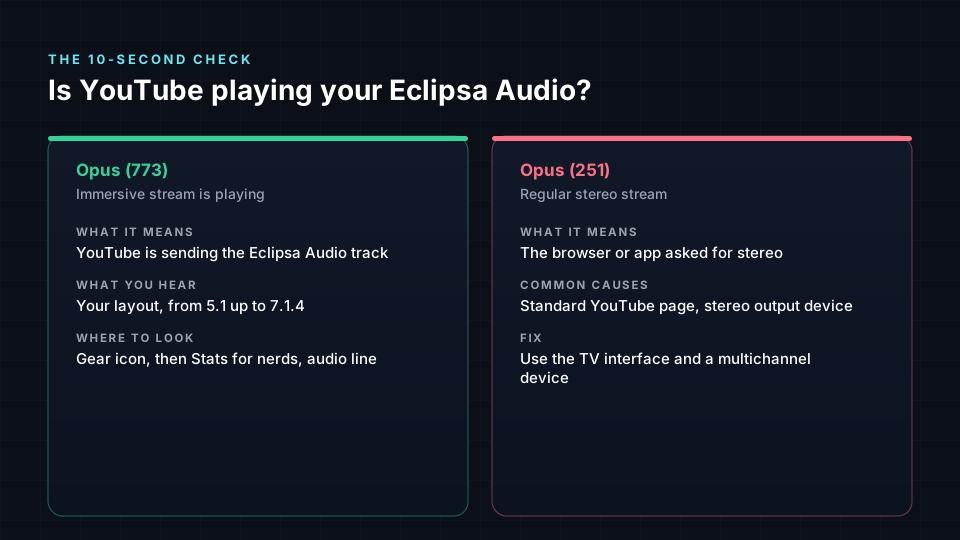
| Stats for nerds shows | What it means | What to do |
|---|---|---|
opus (773) | The Eclipsa Audio stream is playing | Nothing; it worked |
opus (251) | The stereo version is playing | Check your browser and setup below, or wait for processing |
| No 773 after a day, on a correct setup | The immersive track may not have been accepted | Re-check the file: video MP4, 48 kHz, IAMF track present |
If you have ffprobe from FFmpeg 7.1 or later, you can also confirm before uploading that your MP4 contains an IAMF stream group.
How to listen to Eclipsa Audio on your computer
This is the part most people get stuck on. YouTube only sends the immersive stream to players that ask for it, and a desktop browser normally asks for stereo.
On speakers, through YouTube
- Update Chrome to version 153 or later. Chrome 153 added Eclipsa Audio (IAMF) decoding for web players on every platform Chrome supports. Check your version under Settings, then About Chrome.
- Set your audio device to its full layout.
- macOS: open Audio MIDI Setup, select your audio interface, click Configure Speakers and choose your layout, for example 7.1.4. Assign each output to the right speaker and test it.
- Windows: open Control Panel, then Sound, select your multichannel device, click Configure and choose the largest layout offered. The built-in Windows layouts go up to 7.1, so height speakers depend on your audio interface and its driver.
- Open the video through the TV interface. YouTube's TV app, at
youtube.com/tv, is the player that requests immersive audio. Desktop browsers are normally redirected away from it, which is why many listeners use a browser extension or a user-agent setting that presents Chrome as a TV. Use a reputable extension and remove it when you are done. - Find a video and confirm. Open your private upload, or a channel of Eclipsa Audio demo music such as @EclipsaAudioMusic, play it and check Stats for nerds for
opus (773).
On headphones
Most people will hear your mix on headphones, so it is worth checking that version too.
- The Spatial9 headphone version. Every Spatial9 render includes a binaural WAV made for headphones. It is the quickest way to hear what listeners will hear.
- The iamf-tools web demo. The IAMF web demo from the Alliance for Open Media opens a standalone
.iamffile in your browser and renders it to stereo or binaural WAV. Nothing to install. - The libiamf decoder. For engineers, the open-source decoder can render any IAMF file or MP4 to binaural or to a speaker layout:
# Build with the command-line tool enabled
cmake -DIAMF_TEST_TOOL=ON .. && make

# Binaural for headphones
./iamfdec -i1 -o3 headphones.wav -sb upload.mp4

# 7.1.4 speaker feed
./iamfdec -i1 -o3 speakers_714.wav -s9 upload.mp4
Our explainer on binaural versus spatial audio covers why the headphone version sounds different from speakers.
Troubleshooting
| Problem | Likely cause | Fix |
|---|---|---|
| Stats for nerds always shows 251 | Desktop YouTube player asked for stereo | Use Chrome 153 or later and the TV interface |
| 773 shows but it sounds like stereo | Audio device set to stereo | Set the speaker layout in Audio MIDI Setup or Windows Sound |
| Height speakers are silent | Windows layout limited to 7.1 | Check your interface driver; use the binaural version to judge height |
| Upload has no immersive track | Audio-only MP4, wrong sample rate or missing IAMF track | Re-mux as a video MP4 at 48 kHz |
| ChatGPT refuses the file | Over 512 MB or no paid plan | Use the Spatial9 connector or the browser converter |
| ChatGPT returns a 5.1 or stereo file | Encoder not available in its workspace | Ask it to stop and say so; use Route A or Option 1 |
| Movement feels smeared | Objects folded into Ambisonics | Compare with the original; adjust the mix or check the Intent Fidelity Score |
Common misconceptions
- "You need a paid converter for Eclipsa Audio." Not anymore. The encoder is open source and Spatial9's ADM converter is free.
- "ChatGPT can convert any Atmos file by itself." Only if the encoder runs in its workspace and the file is under 512 MB. With the Spatial9 connector, ChatGPT can handle much larger files because the work happens on Spatial9.
- "If it plays in 3D on my phone, YouTube kept the immersive track." Phones and laptops often play the stereo version. Stats for nerds is the only reliable check.
- "Eclipsa Audio on YouTube is just Atmos with a new name." It is a different, open format. Our Eclipsa versus Dolby Atmos comparison explains where they differ.
For the creator side of publishing, including titles, thumbnails and where else to release, see our guide to Eclipsa Audio for YouTube creators.
Frequently asked questions
Can I convert Dolby Atmos to Eclipsa Audio for free?
Yes. Spatial9's ADM to Eclipsa converter is free with an account, accepts ADM BWF masters up to 4 GB and adds no watermark. The open-source iamf-tools encoder from the Alliance for Open Media is also free.
Can ChatGPT convert ADM to Eclipsa Audio?
Yes, in two ways. With the Spatial9 connector, ChatGPT runs the conversion on Spatial9 and returns the files. Without it, ChatGPT can try the open-source encoder in its own workspace, which needs a paid plan for audio uploads and works only for files up to 512 MB.
Why should I not pay for an Atmos to Eclipsa converter?
Because the format is open, the reference encoder is free, and Spatial9 offers a free converter that also scores how well the conversion kept your mix. Paid tools can be useful for specific DAW workflows, but they are not required to publish on YouTube.
Does YouTube support Eclipsa Audio uploads?
Yes. YouTube's recommended upload settings list Eclipsa Audio with a channel layout of "Stereo + Eclipsa Audio" at 48 kHz. Upload a video MP4 that contains the IAMF track.
How do I know YouTube is playing Eclipsa Audio?
Right-click the player and open Stats for nerds. opus (773) means the Eclipsa Audio stream is playing; opus (251) means you are hearing stereo.
How can I listen to Eclipsa Audio on my computer?
Use Chrome 153 or later, set your audio device to its full speaker layout and open the video through YouTube's TV interface. On headphones, use the Spatial9 binaural version, the iamf-tools web demo or the libiamf decoder.
Does Eclipsa Audio work with Dolby Digital Plus or TrueHD files?
Spatial9 accepts AC-3, E-AC-3 and TrueHD files, decodes the speaker channels up to 7.1 and converts them to Eclipsa Audio. The open-source ADM route only reads ADM BWF files.
Will my Atmos objects stay as objects in Eclipsa Audio?
No. Eclipsa Audio stores channel layouts and Ambisonics, so objects are rendered into the scene, for example as third-order Ambisonics. Their position and movement remain; the ability to edit them separately does not.
References
- Uploading files and audio to ChatGPT, OpenAI Help Center.
- iamf-tools encoder documentation, including ADM input, Alliance for Open Media.
- Encoding and muxing IAMF with external tools, Alliance for Open Media.
- YouTube recommended upload encoding settings, YouTube Help.
- IAMF decoding with Media Source Extensions, Chrome Platform Status, shipped in Chrome 153.
- IAMF web demo, Alliance for Open Media.
- libiamf decoder and iamfdec tool, Alliance for Open Media.
- Report on YouTube audio format 773, yt-dlp issue tracker.
- Spatial9 free ADM to Eclipsa conversion, Spatial9.
Convert your master free
Your Atmos mix already exists. Getting it onto YouTube in 3D should not cost extra. Convert your ADM master free with Spatial9, or connect ChatGPT to Spatial9 and ask it to do the whole job for you.
Dolby, Dolby Atmos, Dolby Digital Plus, TrueHD, YouTube, Chrome, ChatGPT, Eclipsa Audio and all other names are trademarks of their respective owners. Spatial9 is not affiliated with or endorsed by Dolby Laboratories, Google, OpenAI or Samsung.