
From Stems to Immersive Audio: Turn Splits from Moises, LALAL.AI, AudioShake and Every Stem Splitter into Eclipsa Audio, ADM and Binaural
Spatial9 Team · · 19 min read
Key takeaways
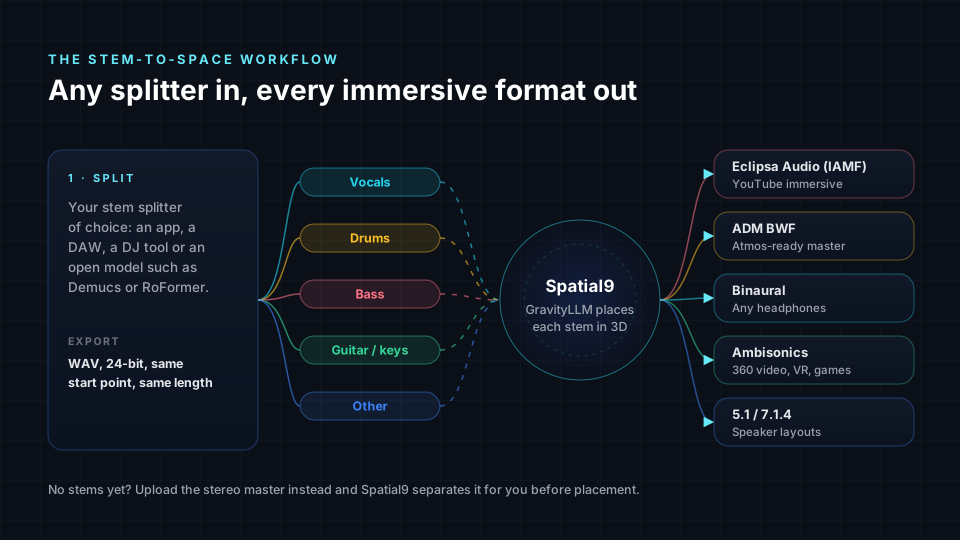
- Any stem splitter works: export your stems as same-length 24-bit WAV files from Moises, Music.ai, LALAL.AI, AudioShake, UVR, Demucs, your DAW or your DJ software, and Spatial9 places each one in 3D.
- One upload gives you every immersive format: Eclipsa Audio (IAMF) for YouTube, ADM BWF for Atmos-style workflows, binaural for headphones, Ambisonics for 360 video, plus 5.1 and 7.1.4.
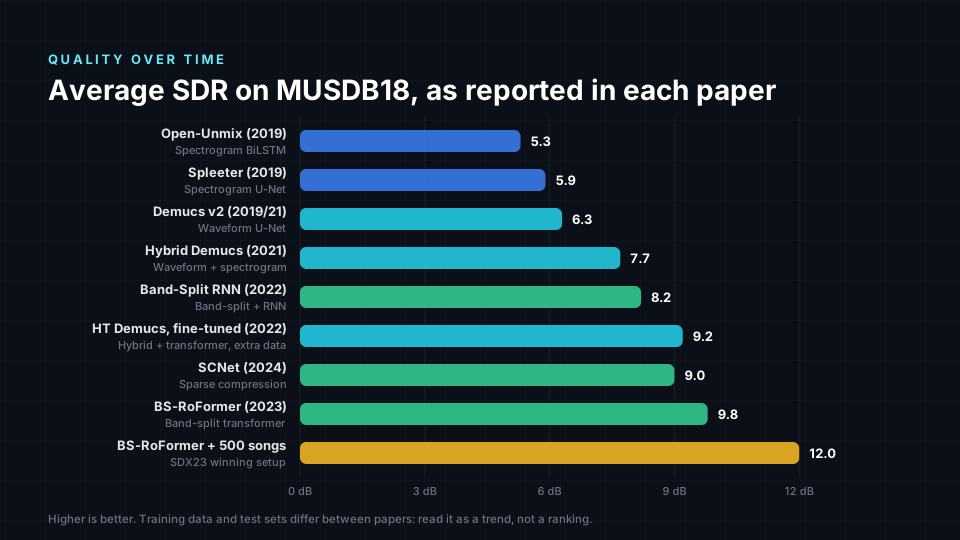
- Open separation models improved from about 5 dB SDR (Open-Unmix, Spleeter, 2019) to about 9 to 12 dB (HT Demucs, BS-RoFormer, 2023), and Meta's SAM Audio (2025) can now pull out any sound you describe.
- Separated stems carry small traces of each other (bleed), so keep core elements anchored front and centre and move the cleanest stems furthest; that one rule makes split stems sound great in 3D.
Short answer: if you already split songs into stems with Moises, Music.ai, LALAL.AI, AudioShake, Ultimate Vocal Remover, Demucs or any other stem splitter, you are one step away from immersive audio. Export the stems as WAV files of the same length, upload them to Spatial9, and our AI places every stem in a 3D room around the listener. From that one mix you can download Eclipsa Audio (IAMF) for YouTube, an ADM BWF master, a binaural headphone version, Ambisonics for 360 video, and 5.1 or 7.1.4 speaker mixes.
That is the whole workflow. The rest of this guide explains why it works, which stem splitters exist today, how the machine learning models behind them evolved over thirty years, and how to get the best possible 3D result from separated stems.
Why stems are the perfect starting point for immersive audio
A stereo song is two channels with everything glued together. An immersive mix is the opposite: each instrument is an independent audio object with its own position in 3D space, including above the listener. To place a guitar to your left and a pad above your head, the guitar and the pad have to exist as separate sounds first.
That is exactly what a stem splitter gives you. Each stem (vocals, drums, bass, guitar, keys, "other") becomes one object. Spatial9 then decides where each object belongs, how wide it should be, whether it should move, and how high it should sit, using the same placement rules a professional immersive mixer would apply.
If you have never mixed in 3D, our introduction to spatial audio covers the basics, and how to create spatial audio from stereo explains the full stereo-to-3D process.
The complete index of stem splitters in 2026
People search for "stem splitter" in many different ways, so here is a neutral index of the tools in use today, grouped by where you meet them. This is not a ranking: every tool on this list can produce stems that work with Spatial9. Most commercial tools do not publish which model they run, so we only discuss the underlying technology for the open-source models in the next sections.
Online apps and mobile apps
| Tool | Where you use it | Typical stems |
|---|---|---|
| Moises | Web, iOS, Android, desktop | Vocals, drums, bass, guitar, piano, strings, wind, other |
| Music.ai | Web and developer platform | Configurable modules for vocals, instruments and dialogue |
| LALAL.AI | Web, desktop, mobile | Vocals, instrumental, drums, bass, guitars, piano, synth, strings, wind |
| AudioShake | Web (AudioShake Indie) and developer platform | Vocals, instruments, dialogue, music and effects |
| Fadr | Web and desktop | Vocals, drums, bass, melodies, plus MIDI |
| Gaudio Studio | Web | Vocals, drums, bass, piano, guitar, other |
| Splitter.ai | Web | Vocals, accompaniment, drums, bass |
| vocalremover.org | Web | Vocals and instrumental |
| PhonicMind | Web | Vocals, drums, bass, other |
| Mobile karaoke and practice apps | iOS and Android | Usually vocals and instrumental |
Inside DAWs and audio editors
| Tool | Where you use it |
|---|---|
| Logic Pro Stem Splitter | Apple Logic Pro for Mac and iPad |
| FL Studio Stem Separation | Image-Line FL Studio |
| Ableton Live stem separation | Ableton Live 12.3 and later |
| Steinberg SpectraLayers | Standalone editor and Cubase integration |
| iZotope RX Music Rebalance | iZotope RX repair suite |
| RipX DAW (Hit'n'Mix) | Standalone stem-based editor |
| Acon Digital Remix | Plug-in |
| Audionamix | Professional separation and dialogue tools |
| Studio One and other DAWs | Built-in or plug-in based separation |
Inside DJ software
| Tool | Where you use it |
|---|---|
| Serato Stems | Serato DJ Pro |
| rekordbox Stems | Pioneer DJ / AlphaTheta rekordbox |
| Traktor Pro stems | Native Instruments Traktor Pro 4 |
| VirtualDJ Stems | VirtualDJ |
| djay Neural Mix | Algoriddim djay |
| Engine DJ Stems | Denon DJ and Numark hardware |
Free and open source
| Tool | What it is |
|---|---|
| Ultimate Vocal Remover (UVR) | Free desktop app that bundles many open models (Demucs, MDX-Net, RoFormer and more) |
| Demucs | Meta's open model family, runs from the command line or inside many apps |
| Spleeter | Deezer's open model, the first widely used one |
| Open-Unmix | Inria and Sony open reference model |
| python-audio-separator and MSST | Community toolkits that run RoFormer, SCNet and MDX models |
| StemRoller | Free desktop front end for Demucs |
| SAM Audio | Meta's prompt-based separation model released in December 2025 |
A short history of music source separation
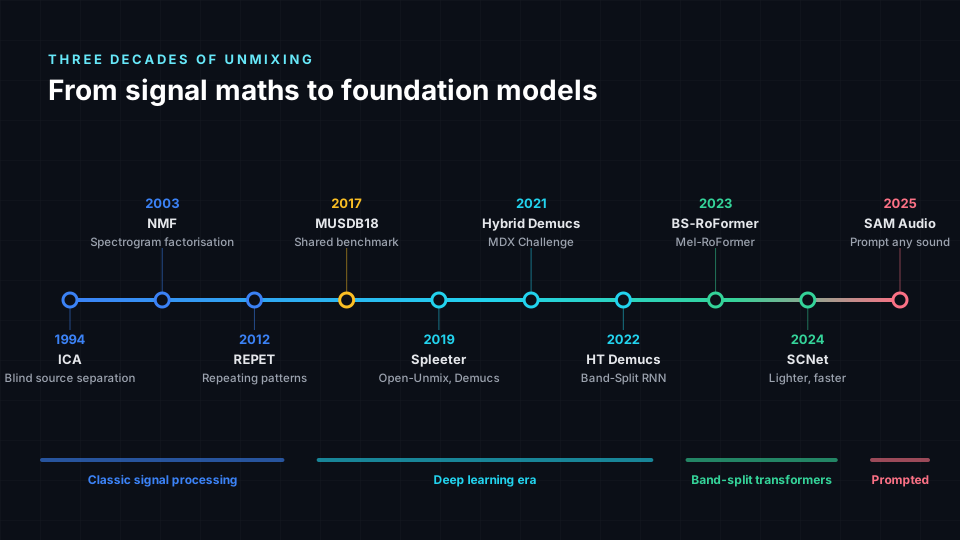
Separating a mix back into its instruments is one of the oldest problems in audio research. Engineers call it source separation, and the musical version is often nicknamed the "cocktail party problem for music". It took three decades to go from lab demos to one-click apps.
1990s to 2016: the signal processing era
The first methods used pure mathematics rather than learning. Independent Component Analysis (ICA) in the mid-1990s assumed every source is statistically independent, which works for microphones in a room but not well for a finished stereo song. Non-negative Matrix Factorisation (NMF), popular from the early 2000s, broke a spectrogram (a picture of frequencies over time) into repeating building blocks that could be grouped into instruments. REPET (2012) exploited the fact that accompaniment repeats while vocals change. These methods were clever, but results were metallic and highly song-dependent.
2017: the benchmark that changed everything
Progress needs a fair test. In 2017 researchers released MUSDB18: 150 full-length songs (100 for training, 50 for testing) with professionally separated vocals, drums, bass and "other". A lossless version, MUSDB18-HQ, followed in 2019. Almost every model since then reports its quality on this dataset, and it is the reason the four-stem layout (vocals, drums, bass, other) became the industry default.
2018 and 2019: deep learning goes open source
Wave-U-Net (2018) showed that a neural network could separate audio working directly on the raw waveform. Then 2019 brought three open releases that put separation into everyone's hands:
- Spleeter by Deezer (November 2019) was the breakthrough moment. It was free, MIT-licensed, offered 2, 4 and 5 stem models, and could separate faster than real time on an ordinary laptop. Within weeks it was inside apps, plug-ins and DJ tools.
- Open-Unmix by Inria and Sony became the open reference implementation for researchers, with clean code and clear documentation.
- Demucs by Facebook AI Research, now Meta AI, took the waveform approach seriously and proved it could compete with spectrogram methods, especially on drums and bass.
2021: the Music Demixing Challenge
Sony and AIcrowd ran the Music Demixing (MDX) Challenge 2021, which pushed quality forward fast. Two important open models came out of it: Hybrid Demucs (Demucs v3) from Meta, which combined waveform and spectrogram processing, and KUIELab-MDX-Net from Korea University, which inspired a large family of community-trained "MDX" models distributed through Ultimate Vocal Remover.
2022 and 2023: transformers and band-splitting
HT Demucs (Hybrid Transformer Demucs, Demucs v4, 2022) added a transformer in the middle of Meta's hybrid design, letting the model look across many seconds of music at once. It reached about 9.0 dB SDR, and about 9.2 dB with sparse attention and fine-tuning. It is still the default model in many apps today.
At the same time, researchers rethought how to feed music to a model. Band-Split RNN (2022) cut the spectrum into bands that follow how instruments actually occupy frequencies. ByteDance combined that idea with a transformer using rotary position embeddings to create BS-RoFormer (2023), which won the Sound Demixing Challenge 2023 music track. It reported 9.8 dB on MUSDB18-HQ using the standard training set, and 12.0 dB with 500 extra training songs. Its sibling Mel-RoFormer (2023) uses bands spaced like human hearing (the mel scale) and is especially strong on vocals.
2024: lighter and faster
SCNet (Sparse Compression Network, 2024) reached about 9.0 dB with a fraction of the computation, showing that quality no longer needs huge models. The open community (UVR, MSST and others) fine-tuned RoFormer and SCNet checkpoints for specific targets such as lead versus backing vocals, de-reverb and individual instruments.
2025: prompted separation with Meta SAM Audio
In December 2025 Meta released SAM Audio, extending its "Segment Anything" family to sound. Instead of a fixed list of stems, you tell it what to extract: with a text description ("the electric guitar"), by clicking on the object in a video, or by marking a time span where the sound occurs. It returns the target sound and the remaining mix (the residual). Under the hood it is a generative diffusion transformer trained with flow matching, and Meta published the model so anyone can download and run it. Earlier language-queried research such as AudioSep (2023) pointed in the same direction, but SAM Audio made it practical for general audio.
How good are the models? Understanding SDR
Separation quality is usually measured with SDR (Signal-to-Distortion Ratio), in decibels. It compares a separated stem to the real studio stem: the higher the number, the closer they are. Every +3 dB is roughly a halving of the error energy, so the jump from about 5 dB in 2019 to about 10 dB in 2023 means the leftover error shrank to roughly a third.
| Open model | Year | Made by | Approach | Reported average SDR | License |
|---|---|---|---|---|---|
| Open-Unmix | 2019 | Inria and Sony | Spectrogram mask, recurrent network | about 5.3 dB | MIT |
| Spleeter | 2019 | Deezer | Spectrogram mask, U-Net | about 5.9 dB | MIT |
| Demucs v2 | 2019 to 2020 | Meta AI | Waveform U-Net | about 6.3 dB | MIT |
| Hybrid Demucs (v3) | 2021 | Meta AI | Waveform plus spectrogram | about 7.7 dB | MIT |
| KUIELab-MDX-Net | 2021 | Korea University | Two-stream spectrogram network | about 7.5 dB | MIT |
| Band-Split RNN | 2022 | Tencent AI Lab | Band-split plus recurrent | about 8.2 dB | Paper and community code |
| HT Demucs (v4) | 2022 | Meta AI | Hybrid plus transformer | about 9.0 to 9.2 dB | MIT |
| BS-RoFormer | 2023 | ByteDance | Band-split transformer | about 9.8 dB (12.0 dB with extra data) | Paper; open community implementations |
| Mel-RoFormer | 2023 | ByteDance | Mel-band transformer | strongest on vocals in its paper | Paper; open community implementations |
| SCNet | 2024 | Academic research | Sparse compression network | about 9.0 dB | MIT |
| SAM Audio | 2025 | Meta AI | Prompted diffusion transformer | not reported on fixed 4-stem SDR | Meta's model license |
The five families of separation models
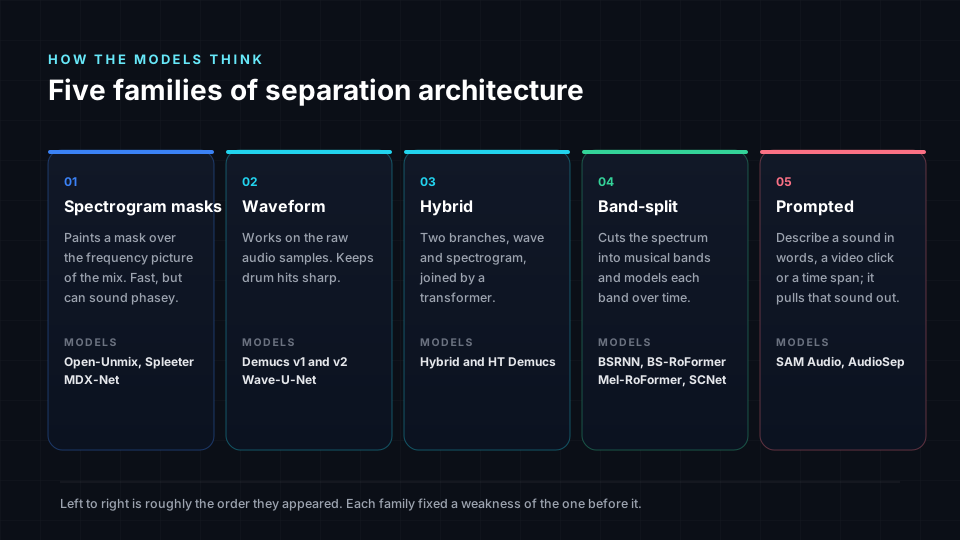
Every model above belongs to one of five architectural families. Knowing the family tells you what a model is good at and what kind of artifacts to listen for.
1. Spectrogram mask models (Spleeter, Open-Unmix, MDX-Net)
These models look at the song as a spectrogram and predict a "mask" for each stem: which parts of the picture belong to the vocal, which to the drums. They are fast and light. Their weakness is phase: they usually reuse the phase of the original mix, so stems can sound slightly hollow or "underwater", especially on cymbals and reverb tails.
2. Waveform models (Wave-U-Net, Demucs v1 and v2)
These skip the spectrogram and work on raw samples. They keep transients (the sharp start of a drum hit or a plucked note) crisp, which is why early Demucs was loved for drums and bass. Their weakness is high-frequency detail and occasional noisy artifacts.
3. Hybrid models (Hybrid Demucs, HT Demucs)
Meta's answer was to run both views side by side, waveform and spectrogram, and let them share information. HT Demucs adds a transformer between the two branches so the model can use long musical context: if the chorus repeats, it uses the first chorus to separate the second one better. The result is a balanced all-rounder, which is why it remains the default in so many apps.
4. Band-split models (Band-Split RNN, BS-RoFormer, Mel-RoFormer, SCNet)
Instruments live in different frequency ranges, so these models cut the spectrum into bands first, then model each band over time and the bands against each other. With a transformer on top (the "RoFormer" part) they currently give the cleanest vocals and the least bleed. Their trade-off is compute: the largest RoFormer checkpoints are slow without a good graphics card.
5. Prompted models (AudioSep, SAM Audio)
Instead of a fixed list of four or six stems, you ask for a sound. This is a big shift for immersive audio: you could pull out "the tambourine", "the crowd noise" or "the string section" as separate objects. Because these models are generative, they can sometimes invent small details rather than only subtracting, so they are best used for specific targets alongside a classic stem split.
What each model can actually pull out
The number and type of stems matters more for 3D mixing than a fraction of a decibel. Every extra stem is another object you can place in space.
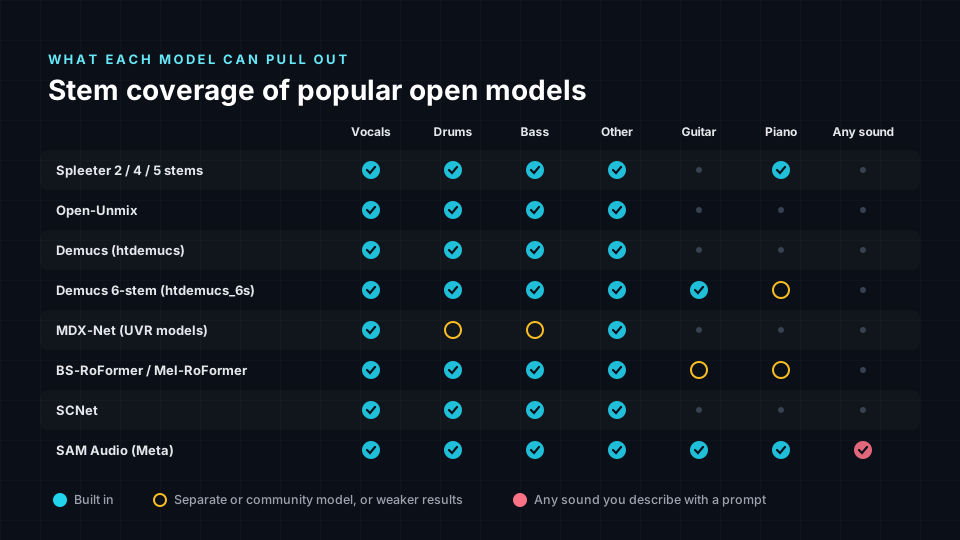
- Four stems (vocals, drums, bass, other) already gives a convincing immersive mix: vocal anchored, drums around the front, bass centred, "other" spread wide and high.
- Six stems (adding guitar and piano, as in Demucs 6-stem) lets you separate harmony instruments to opposite sides.
- Specialised stems (lead versus backing vocal, reverb, crowd) are where immersive mixes come alive. Backing vocals and reverb returns rise into the height layer naturally.
- Prompted extraction can split the busy "other" stem further, which is usually the stem that benefits most from more detail.
The nuances: what separation does to your sound
Separated stems are estimates, not studio originals. Understanding the typical side effects helps you get a great 3D result.
Bleed
A little of each instrument always remains in the other stems: a ghost of the hi-hat in the vocal, a hint of vocal in the guitars. In stereo you never notice, because all stems play from the same two speakers. In 3D the stems are pulled apart, and the ghost can suddenly appear from the "wrong" direction.
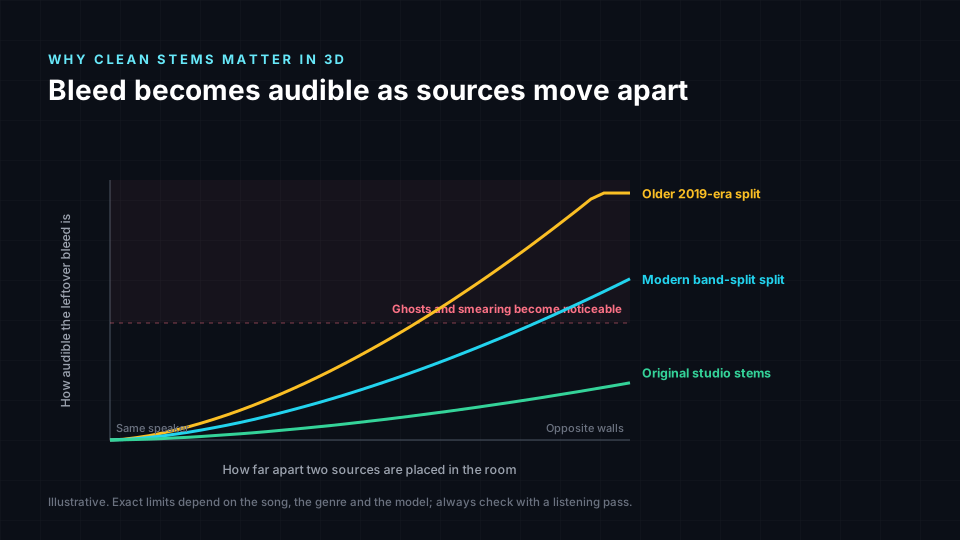
This is the most important nuance of all, and it is why Spatial9 analyses the stems before placing them: stems with more bleed are kept closer to their partners, while clean stems are allowed to travel further.
Phase and "underwater" sound
Mask-based models reuse the phase of the original mix, which can make individual stems sound a little hollow when soloed. When the stems play together again the effect mostly cancels out, which is why we recommend keeping all stems in the mix rather than muting some.
Transients
Drum hits and plucked strings are short and dense. Older spectrogram models smear them; waveform and hybrid models keep them sharp. If your drums sound soft after splitting, try a Demucs or RoFormer based model.
Reverb tails
Reverb belongs to every instrument at once, so models split it unpredictably: some of it lands in "other", some stays with the vocal. In an immersive mix this is actually useful: the reverb that ends up in "other" can be lifted into the height speakers to create a sense of room.
The "other" stem
"Other" is a catch-all for everything that is not vocals, drums or bass: guitars, keys, synths, strings, effects. It is usually the widest and most complex stem, so Spatial9 treats it as a broad, enveloping object rather than a single point.
Step by step: from any stem splitter to immersive audio with Spatial9
Step 1: Split your song
Use whichever tool you prefer. If you can choose the model, a recent band-split or hybrid model (RoFormer or HT Demucs) gives the cleanest result for 3D. Choose the highest number of stems available.
Step 2: Export correctly
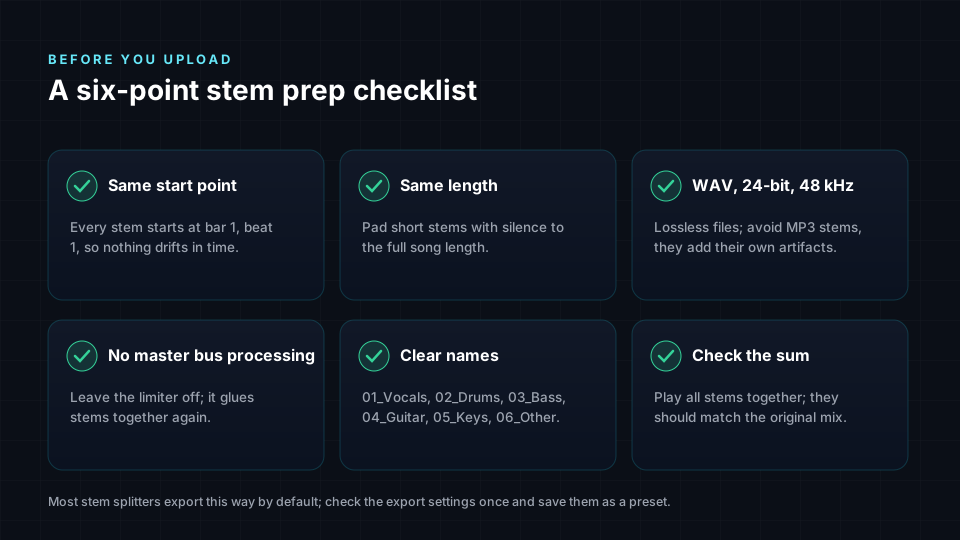
- Export WAV (24-bit, 44.1 or 48 kHz). Avoid MP3 stems, because compression adds its own artifacts on top of separation artifacts.
- Make every stem start at the same point and have the same length.
- Name the files clearly so instruments are recognised immediately.
- Play all stems together once: the sum should sound like the original song.
Our guide to exporting audio stems goes deeper on each point.
Step 3: Upload to Spatial9
Open Spatial9 and drop in your stems. Each stem is analysed: instrument, energy, frequency range, how much bleed it carries, and its role in the song. No stems? Upload the stereo master and Spatial9 separates it first. You can read more on the stems-to-spatial solution page.
Step 4: Let the AI place every stem
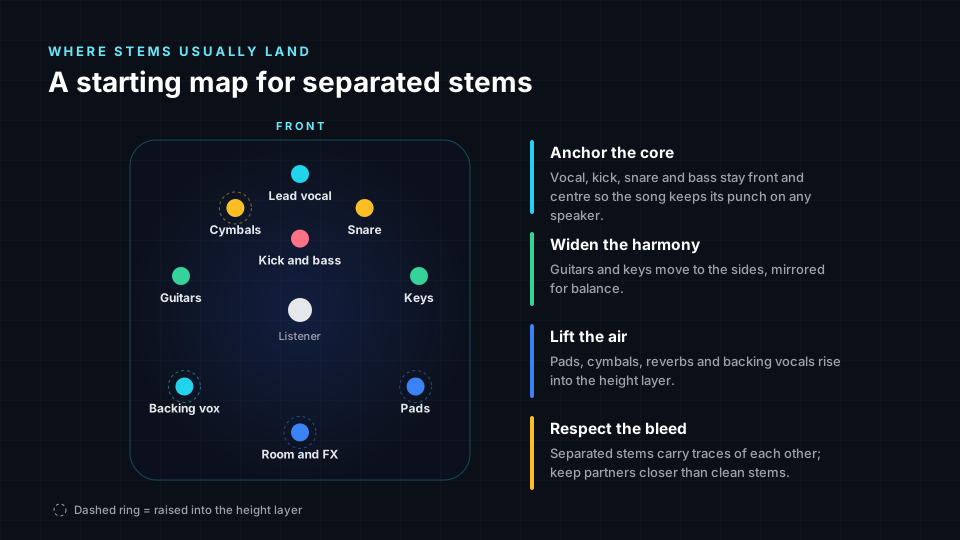
GravityLLM, our placement engine, builds a 3D scene the way an experienced immersive mixer would: core elements anchored at the front, harmony instruments spread to the sides, air and ambience in the height layer, low frequencies kept centred. You can see and hear every object in the 3D view and move anything you want.
Step 5: Export every format you need
| Format | Best for | Where it plays |
|---|---|---|
| Eclipsa Audio (IAMF) | YouTube immersive audio | YouTube on supported TVs, browsers and devices, with binaural fallback on headphones |
| ADM BWF | Atmos-style mastering, distribution and archiving | Professional immersive workflows, renderers and DAWs |
| Binaural | Headphones and earbuds | Any player, any streaming service, any pair of headphones |
| Ambisonics | 360 video, VR, AR and games | YouTube 360, VR headsets, game engines |
| 5.1 | Film, TV and home cinema | AV receivers, soundbars, broadcast |
| 7.1.4 | Immersive speaker rooms | Home theatres and studios with height speakers |
- New to YouTube immersive audio? Read Eclipsa Audio for YouTube creators.
- Need an ADM master? See what an ADM BWF file is.
- Not sure which headphone format to pick? Compare binaural and spatial audio.
- Working on 360 video? Start with Ambisonics explained.
- Ready to release? Here is where to publish spatial audio.
Which stems work best for each format?
- YouTube with Eclipsa Audio: four or more stems give a clear front stage plus an enveloping sound field. Eclipsa Audio is an open format, which we explain in why open source matters for immersive audio.
- Binaural: headphones reveal bleed the most, so the cleanest stems matter here. Modern band-split models are worth the extra processing time.
- ADM BWF and 7.1.4: the more stems the better, because each one becomes its own object or bed channel in the master.
- Ambisonics: works well even with four stems, because Ambisonics represents a smooth sound field rather than discrete speakers.
Tips for the best result from split stems
- Split once, from the best source. Start from a lossless master, not a streaming rip or MP3.
- Prefer more stems over a cleaner but smaller set, as long as each stem still sounds musical.
- Keep vocal, kick, snare and bass anchored. They carry the song's punch and should feel solid on every system.
- Lift the ambience. Reverb, pads, backing vocals and cymbals sound most immersive slightly above the listener.
- Listen on headphones and speakers. Bleed that is invisible on speakers can become audible on headphones.
- Respect the rights. Separating a song does not change who owns it; only publish immersive versions of music you own or are licensed to use.
Why this matters now
For years immersive audio required original multitrack sessions, an expensive studio and a specialist engineer. Two things changed. Open separation models crossed the quality line where stems are clean enough to move around a 3D room. And open immersive formats such as Eclipsa Audio arrived on YouTube, the largest music platform in the world. Spatial9 connects the two: any stem from any splitter becomes an immersive mix for every format, in minutes. Our partnership with AudioShake, announced at CES 2025, was an early step on this path.
Frequently asked questions
Can I use stems from Moises, LALAL.AI, AudioShake or Music.ai with Spatial9?
Yes. Spatial9 accepts stems from any stem splitter, including Moises, Music.ai, LALAL.AI, AudioShake, Ultimate Vocal Remover, Demucs, Logic Pro, FL Studio, Ableton Live, Serato, rekordbox and others. Export them as WAV files with the same start point and length, then upload them together.
What is the best open-source model for stem separation?
On the standard MUSDB18 benchmark, band-split transformer models such as BS-RoFormer and Mel-RoFormer report the highest scores, followed closely by Meta's HT Demucs and SCNet. HT Demucs remains the most widely used all-rounder, while RoFormer models usually give the cleanest vocals.
What is Meta's SAM Audio?
SAM Audio is a prompt-based sound separation model released by Meta in December 2025. Instead of a fixed set of stems, you describe the sound you want with text, by clicking on an object in a video, or by marking a time span, and it extracts that sound plus the remaining mix.
How many stems do I need for immersive audio?
Four stems (vocals, drums, bass and other) are enough for a convincing immersive mix. Six or more stems, such as separate guitar, piano, backing vocals or reverb, give more objects to place and a more detailed 3D result.
Can I turn stems into Eclipsa Audio for YouTube?
Yes. Upload your stems to Spatial9 and export Eclipsa Audio (IAMF), the open immersive format supported by YouTube. Viewers with compatible devices hear the immersive mix, and headphone listeners get a binaural rendering.
Can I get an ADM BWF file from separated stems?
Yes. Spatial9 places every stem as an object and exports an ADM BWF master that can be opened in professional immersive workflows, alongside binaural, Ambisonics, 5.1 and 7.1.4 versions.
Do I need stems at all, or can I upload a stereo song?
You can upload a stereo song. Spatial9 separates it into stems automatically before placing them in 3D. If you already have stems from a splitter or from the original session, uploading them gives you more control.
Does stem bleed ruin an immersive mix?
No, but it changes how far apart stems should be placed. Spatial9 detects bleed and keeps the affected stems closer to their partners, so ghost sounds do not appear from unexpected directions.
What does SDR mean in stem separation?
SDR, or Signal-to-Distortion Ratio, measures in decibels how closely a separated stem matches the real studio stem. Higher is better; every 3 dB roughly halves the remaining error. Open models went from about 5 dB in 2019 to about 10 dB in 2023.
Sources
- Rafii et al., MUSDB18: a corpus for music separation (2017)
- Stoller, Ewert and Dixon, Wave-U-Net (ISMIR 2018)
- Hennequin et al., Spleeter: a fast and efficient music source separation tool (JOSS 2020)
- Stöter et al., Open-Unmix: a reference implementation for music source separation (JOSS 2019)
- Défossez et al., Music Source Separation in the Waveform Domain (Demucs, 2019)
- Défossez, Hybrid Spectrogram and Waveform Source Separation (2021)
- Kim et al., KUIELab-MDX-Net (2021)
- Rouard, Massa and Défossez, Hybrid Transformers for Music Source Separation (HT Demucs, 2022)
- Luo and Yu, Music Source Separation with Band-Split RNN (2022)
- Lu et al., Music Source Separation with Band-Split RoPE Transformer (BS-RoFormer, 2023)
- Wang et al., Mel-Band RoFormer for Music Source Separation (2023)
- Fabbro et al., The Sound Demixing Challenge 2023, Music Demixing Track (2023)
- Tong et al., SCNet: Sparse Compression Network for Music Source Separation (2024)
- Liu et al., Separate Anything You Describe (AudioSep, 2023)
- Meta AI, SAM Audio (2025)
- Demucs repository
- Ultimate Vocal Remover repository