Spatial Audio & Immersive Music for Glitch: Microsound, Clicks and Cuts & Glitch Pop
Spatial9 Team · · 9 min read
Part of the series Spatial audio and immersive music by genre.
Key takeaways
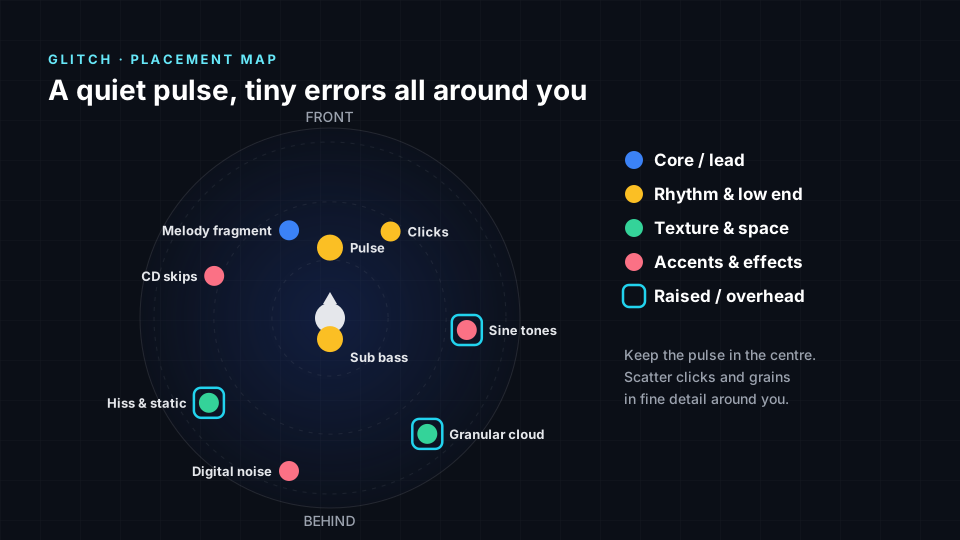
- In a spatial glitch mix the pulse and any sub bass stay in the centre, while clicks, skipping loops, melody fragments, sine tones, static, granular clouds and digital noise are placed precisely around the listener.
- The ear detects the smallest changes in direction straight ahead, so the most detailed glitch click patterns belong in front of the listener.
- Bright sine tones, hiss and grains read naturally as raised because of spectral elevation cues, which makes height an easy tool for glitch textures.
- The glitch immersion profile scores width 5, height 4, movement 4, low-end focus 2 and space 3 out of 5.
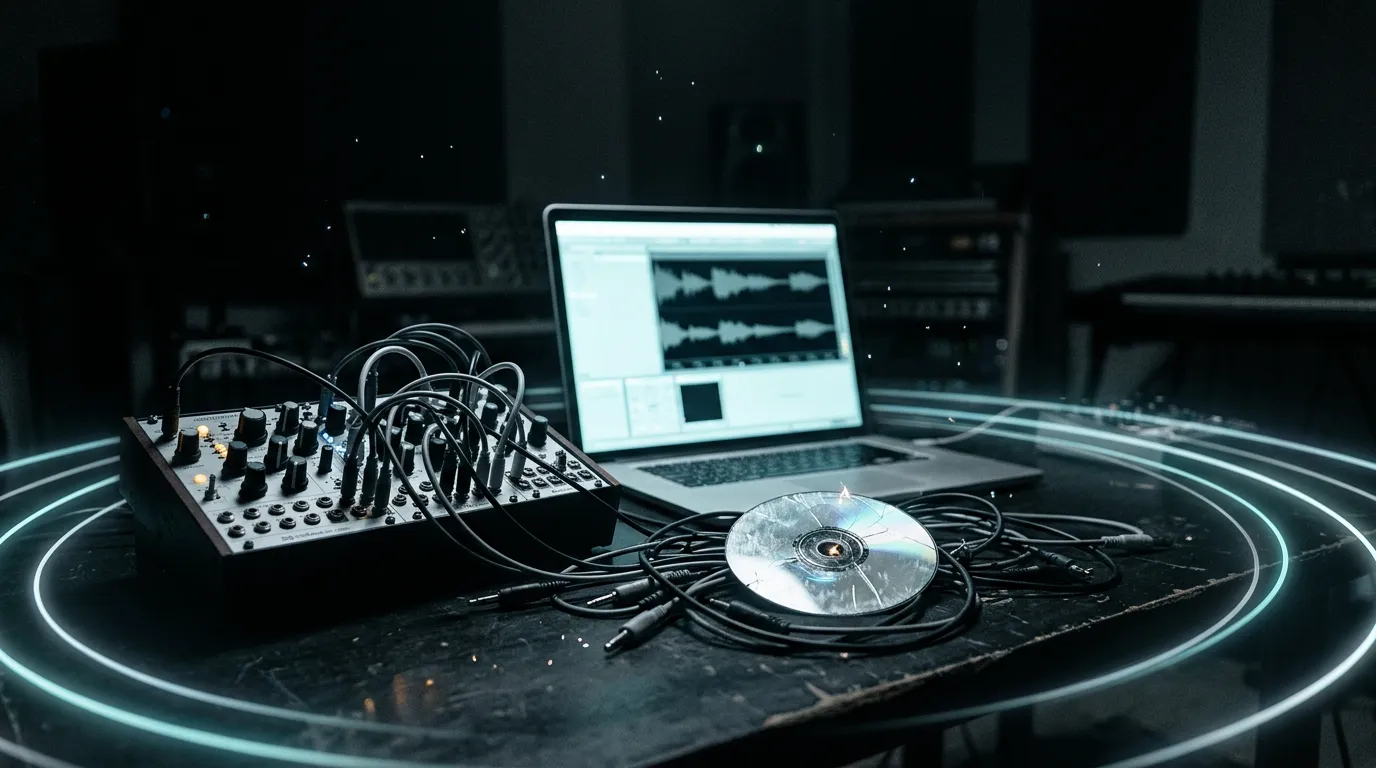
Glitch grew out of experimental electronic music in the 1990s, with important scenes in Germany, Austria, Japan and elsewhere. Its producers turned the sounds of failing technology into music: skipping CDs, digital clipping, clicks, hum, dropouts and the hiss of empty signal paths. Oval built tracks from deliberately damaged CDs, and Kim Cascone's essay The Aesthetics of Failure gave the movement a name for its ideas around the turn of the millennium. The sound is small and exact rather than loud. A soft pulse, crackles placed with surgical timing, short melodic fragments, pure sine tones and clouds of tiny grains. Because the parts are so small, their position is a big part of what makes them interesting. A click on the far left feels different from the same click just above your head. This guide covers how spatial audio for glitch works, where to place each element and how to make an immersive glitch mix. For the basics, see what spatial audio is.
Why glitch works in spatial audio
Glitch is a music of detail. A single track may hold hundreds of tiny events, each only a few milliseconds long. In stereo those events can only sit somewhere on a line between two speakers, and many end up stacked on top of each other. In an immersive mix every click and skip can have its own point in space, including above and behind the listener, so the texture becomes a three-dimensional pattern instead of a flat crackle.
The rule: a calm centre, precise detail around it. The pulse and low end stay still, while clicks, skips and grains are placed with the same care as their timing.
Immersive music for glitch: what listeners hear
- Clicks with an address. Each tiny hit arrives from a clear, specific point.
- Errors that travel. Skipping loops and stutters jump from side to side.
- Tones that float. Pure sine tones and grains hang above the listener.
- A fragile melody in front. Short melodic pieces stay close and readable.
Where to place each element in a glitch mix
| Element | Position | Height | Why it works |
|---|---|---|---|
| Pulse | Front centre | Ear level | Calm, steady reference |
| Sub bass | Centre | Ear level | Soft weight under the detail |
| Melody fragment | Front left | Ear level | Close and easy to follow |
| Clicks | Front right, moving | Ear level | Precise rhythmic detail |
| CD skips | Left, moving | Ear level | Stutters that jump across |
| Sine tones | Right, moving | Raised | Pure tones float upward |
| Hiss & static | Behind left | Raised | A fine halo of texture |
| Granular cloud | Behind right, moving | Raised | Grains drifting overhead |
| Digital noise | Behind left | Ear level | Errors from the shadows |
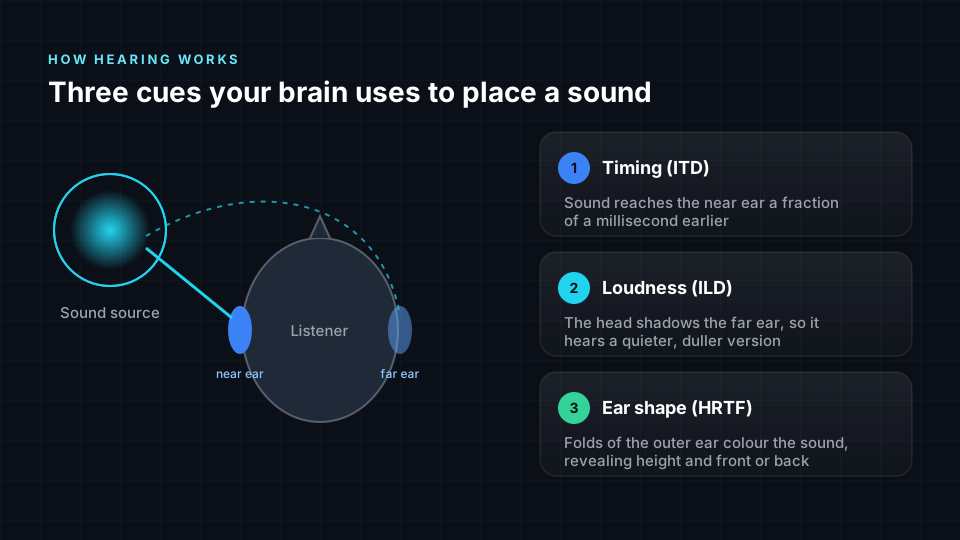
The psychoacoustics behind glitch placement
Every position in the table above follows how the ear and brain locate sound. Here is the reason behind the main choices for glitch.
- Pulse and sub stay centred. The ear finds almost no direction in frequencies below roughly 80 to 100 Hz, so any glitch sub gains nothing from being spread. Keeping it centred and mono gives the scattered detail a stable reference point.
- The finest clicks near the front. The smallest change in direction the ear can detect, the minimum audible angle, is smallest straight ahead, as Mills showed. Tiny shifts in the position of clicks in front of the listener are heard most clearly, so that is where the most precise rhythmic detail belongs.
- Sine tones and static above. The outer ear shapes high frequencies differently depending on where a sound comes from, and the brain reads these spectral cues as elevation, as Hebrank and Wright showed. Bright tones, hiss and short grains are rich in those frequencies, so raising them feels natural and convincing.
- Clicks and skips in different places. The brain groups sounds into streams by pitch, timing and direction. This is auditory stream segregation, described by Bregman. Glitch clicks and skipping loops are often similar in tone, so giving them separate directions lets the ear follow two patterns instead of one crackle.
The immersion profile for glitch
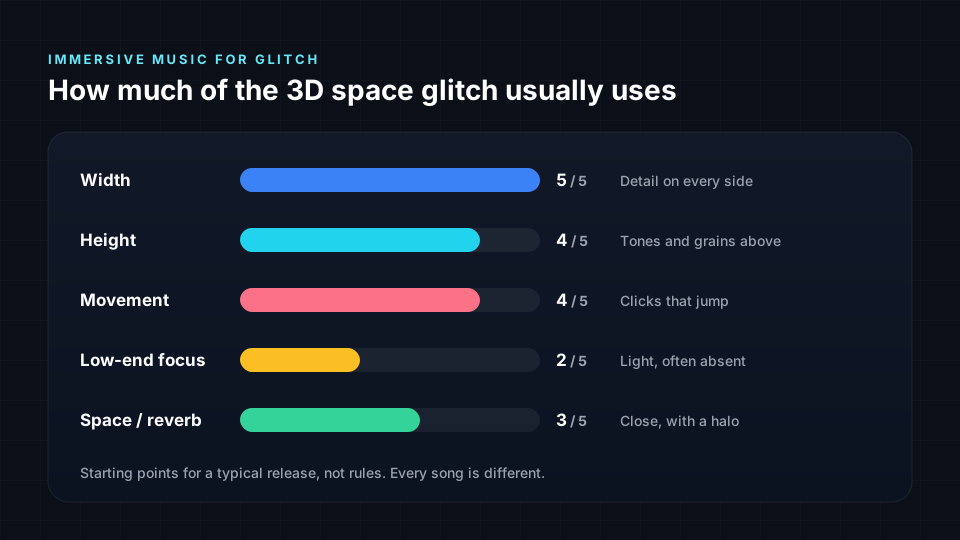
Width is at maximum because glitch is built from many small events that need their own positions. Height and movement are high because bright tones and grains read naturally from above, and skips and stutters invite motion. Low-end focus is low: many glitch tracks have little or no sub, and the music lives in the mids and highs. Space sits in the middle, since dry clicks need to stay close while hiss and grains add a soft halo.
Tips for an immersive glitch mix
- Treat position like timing. Place each click as precisely as you programmed it.
- Keep clicks dry. Reverb blurs tiny transients, so add space to tones and grains instead.
- Use height for brightness. Raise sine tones, hiss and grains, and keep low parts at ear level.
- Leave silence. Empty directions make each small event stand out.
- Move small things fast and big things slowly. Let clicks jump, while clouds drift.
Glitch styles: microsound, clicks and cuts, and glitch pop
The core placement still applies to all three styles: a calm centre with detail placed precisely around it. What changes is how much pulse there is, how quiet the material is and whether a voice leads the track.
Microsound
Microsound works with sound particles so short they are barely heard on their own, often built with granular synthesis and set against long stretches of near silence. There is often no beat at all, so drop the pulse and let a soft sine tone or quiet hum take the centre. Spread grains in a wide sphere around and above the listener, with very gentle, slow movement. Keep levels low and consistent. In headphones, the closeness of tiny sounds is what creates the intimate, almost physical effect.
Clicks and Cuts
Clicks and cuts is the rhythmic, dance-floor side of glitch, closely linked to minimal techno and microhouse. A steady kick returns, and clicks, crackles and cut-up samples take the place of hi-hats and percussion. Keep the kick and sub firmly centred and put the main click patterns at front left and front right, where the groove stays tight. Let cut-up chord or vocal samples move around the sides, and keep the room short and dry so the swing stays crisp.
Glitch Pop
Glitch pop builds songs around a lead vocal, then stutters, slices and bit-crushes parts of the arrangement. The vocal becomes the anchor, so place the main voice at front centre, dry and stable. Chopped vocal fragments and stuttered copies can jump around the sides and above, which makes the edits feel playful without hiding the lyrics. Beats sit closer to the front than in experimental glitch, and the low end is fuller, closer to modern electronic pop.
Closely related styles include lowercase, an extremely quiet strand of microsound that works with amplified small sounds. It follows the same rules as microsound, with even more silence.
How to make immersive glitch from stereo
Spatial9 can create spatial audio from a stereo track in a few steps:
- Upload your stereo master or your stems.
- Spatial9's AI separates and places each part, keeping the pulse and low end centred and scattering clicks, tones and textures around you.
- Preview it in binaural on headphones.
- Export Eclipsa Audio, ADM, binaural or Ambisonics.
- Publish a video. Create a YouTube-ready video with your immersive audio and publish it directly.
For related guides, read spatial audio for IDM and spatial audio for experimental music. Every guide is listed in spatial audio and immersive music by genre.
Frequently asked questions
Does this guide cover microsound, clicks and cuts and glitch pop?
Yes. Microsound drops the beat and spreads tiny grains in a quiet sphere around the listener. Clicks and cuts keeps a centred kick with tight click patterns at the front. Glitch pop anchors a dry lead vocal at front centre and lets stuttered fragments jump around it.
Can I make a glitch mix in Dolby Atmos or Eclipsa Audio?
Yes. The placements in this guide work for both. Spatial9 exports ADM, the standard file used by Dolby Atmos studios, as well as Eclipsa Audio for YouTube, so one immersive glitch mix covers both. If you plan to release the Atmos version on Apple Music, build it from your original stems or multitracks, because Apple does not accept Atmos made from a finished stereo master. See where to publish spatial audio. You may also hear this called a 3D glitch mix or glitch in spatial audio.
Is spatial audio good for glitch?
Yes. Glitch is built from tiny, precise sounds, and spatial audio gives each of them its own point in space, so the detail becomes clearer rather than crowded.
How is glitch different from IDM in spatial audio?
IDM usually has a fuller beat, a stronger melody and more low end, so its mix is built around a clear groove. Glitch is smaller and quieter, with more focus on single clicks, skips and textures, so precise placement and silence matter more than movement of large parts.
Where should clicks go in immersive glitch?
Mostly in front of the listener and to the sides, close and dry. The ear is most precise straight ahead, so the main click patterns belong there, while occasional stray clicks can appear behind or above as surprises.
Can I convert a finished glitch track to spatial audio?
Yes. Spatial9 uses AI to generate an immersive mix from a stereo master and exports it as Eclipsa Audio, ADM, binaural or Ambisonics.
Does immersive glitch work on normal headphones?
Yes. The mix is rendered binaurally, so the tiny clicks and floating tones work on any regular headphones.
Dolby and Dolby Atmos are trademarks of Dolby Laboratories. Spatial9 is not affiliated with or endorsed by Dolby Laboratories.
Sources
- Blauert, J. (1997). Spatial Hearing: The Psychophysics of Human Sound Localization, revised edition. MIT Press. Low-frequency, elevation, distance and motion cues.
- Mills, A. W. (1958). On the minimum audible angle. Journal of the Acoustical Society of America, 30(4), 237-246.
- Hebrank, J. and Wright, D. (1974). Spectral cues used in the localization of sound sources on the median plane. Journal of the Acoustical Society of America, 56(6), 1829-1834.
- Barron, M. and Marshall, A. H. (1981). Spatial impression due to early lateral reflections in concert halls. Journal of Sound and Vibration, 77(2), 211-232.
- Bregman, A. S. (1990). Auditory Scene Analysis: The Perceptual Organization of Sound. MIT Press.
Put every error in its place
Upload a track to Spatial9 and hear your clicks, skips and tones placed precisely around you in minutes. Then export it or publish it straight to YouTube.