
Spatial9 Agent Skills: Pipelines, Code and n8n, Zapier and Make Workflows for Spatial Audio
Spatial9 Team · · 24 min read
Key takeaways
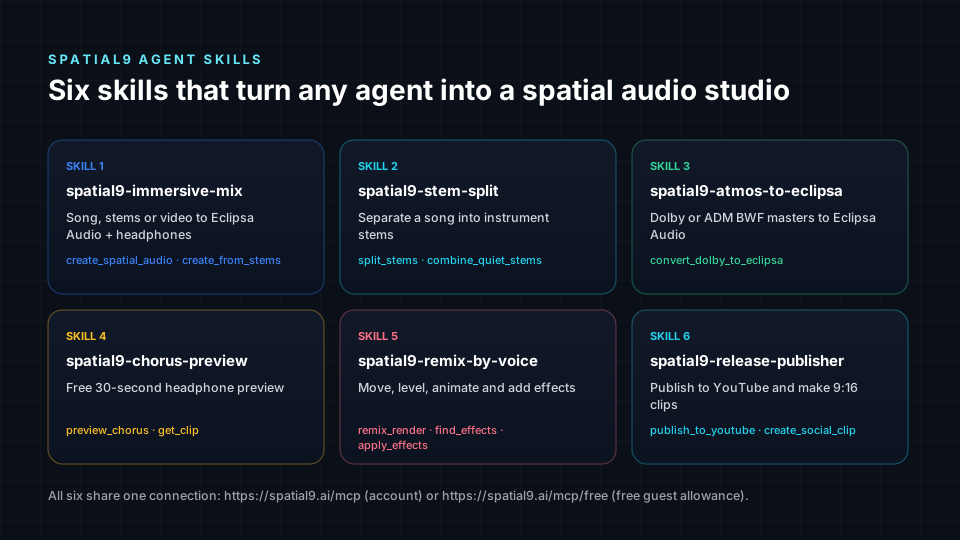
- Spatial9 publishes six free Agent Skills (SKILL.md) for immersive mixes, stem splits, Atmos to Eclipsa conversion, free chorus previews, remixing by voice and YouTube publishing.
- Every skill and pipeline uses one connection, the Spatial9 MCP server at spatial9.ai/mcp, with OAuth or a personal s9_ key, or spatial9.ai/mcp/free with no sign-in.
- Any workflow tool that can send an HTTPS POST can run a render: n8n, Zapier, Make, Power Automate, Pipedream, UiPath, GitHub Actions and Airflow all follow the same five-step lifecycle.
- Safe pipelines preview for free first, send an idempotency_key with every render, keep keys in secret stores, respect 3 active and 20 daily renders, and let a person approve public publishing.
Our first two agent guides explained what agents can build with the Spatial9 MCP server and how to connect agent frameworks and the A2A protocol. This guide is the hands-on toolkit. You get six downloadable skills, a clear description of everything each one can do, fully commented code, pipeline recipes for the workflow tools artists, labels and enterprises already use, and six real use cases.
Download all six skills and every workflow example: spatial9-agent-skills.zip, or browse every file online in the Spatial9 Agent Skills repository, with each skill, example and template readable in your browser.
At a glance
| Question | Answer |
|---|---|
| What are Spatial9 Agent Skills? | Six free SKILL.md packs that teach agents to use Spatial9 correctly |
| Which agents can use them? | Claude, Claude Code, OpenAI Codex, GitHub Copilot, Cursor, Gemini CLI and other agents that read Agent Skills |
| What do they connect to? | The Spatial9 MCP server at https://spatial9.ai/mcp, or https://spatial9.ai/mcp/free with no sign-in |
| Sign-in | OAuth inside the assistant, or a personal key starting with s9_ from spatial9.ai/connect |
| Workflow tools | n8n, Zapier, Make, Power Automate, Pipedream, Workato, UiPath, GitHub Actions, Airflow and anything that can send HTTPS |
| Outputs | Eclipsa Audio (IAMF), Eclipsa Audio in MP4, a YouTube-ready MP4, a binaural headphone WAV, stems and 9:16 social clips |
| Limits | 3 renders at once, 20 per 24 hours, 5 YouTube publishes per 24 hours |
| Cost | Each render uses one project from your plan and is refunded if it fails. Chorus previews and remix previews are free |
What is an Agent Skill?
An Agent Skill is a folder with a file called SKILL.md. The file starts with a short header (the "frontmatter") that gives the skill a name and a description, followed by plain-language instructions. Anthropic released the format as an open standard in December 2025, and it is documented at agentskills.io. Claude Code, OpenAI Codex, GitHub Copilot, VS Code, Cursor and Gemini CLI are among the many tools that read it.
The clever part is how agents load skills. They do not read every instruction all the time. They keep only each skill's name and description in mind, read the full instructions when a request matches, and only then call tools. This is called progressive disclosure, and it means you can install dozens of skills without slowing an agent down or confusing it.
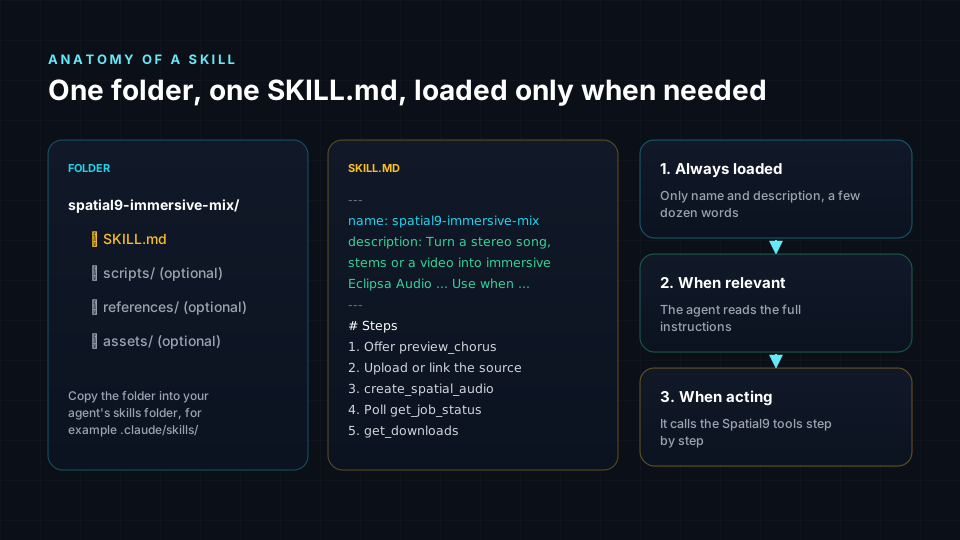
Why does Spatial9 need skills when it already has an MCP server? The server gives an agent the tools. A skill gives it the know-how: which tool to use first, when to offer a free preview, how long to wait, what to tell the user about cost, and which mistakes to avoid. An agent with both behaves like an experienced immersive engineer instead of a clever guesser.
The six Spatial9 skills, and everything they can do
Each skill below lists what it does, phrases that trigger it, the tools it uses and what comes back.
1. spatial9-immersive-mix
Turns a stereo song, a set of 2 to 16 stems, or a video into immersive Eclipsa Audio (IAMF) with a binaural headphone version.
- Say: "Make this song immersive," "Turn my stems into Eclipsa Audio," "Give this video spatial sound for YouTube."
- Tools:
create_upload_link,create_spatial_audio,create_from_stems,get_job_status,get_downloads. - Choices:
stylecan belive_concert,club,cinemaorintimate_studio. Stems are tagged as vocals, drums, bass, guitar, piano, keys, synth, strings, brass or other. - Returns: Eclipsa Audio, Eclipsa Audio in MP4, a YouTube-ready MP4, a binaural WAV and a 3D stage player link. Videos also get a third-order Ambisonics WAV.
- Time: usually 10 to 20 minutes for a song.
2. spatial9-stem-split
Separates a mixed song into instrument stems as WAV files, with a single ZIP when it is ready.
- Say: "Split this into stems," "Give me the acapella," "I need an instrumental."
- Tools:
split_stems,get_job_status,get_downloads,combine_quiet_stems. - Returns: one file per instrument, plus a
stems_packageZIP. Nearly silent stems are flagged so the agent can offer to combine them. - Time: usually 4 to 8 minutes.
3. spatial9-atmos-to-eclipsa
Converts Dolby Digital (AC-3), Dolby Digital Plus (E-AC-3), TrueHD or an ADM BWF master into Eclipsa Audio for YouTube and supported TVs.
- Say: "Convert my Atmos master to Eclipsa Audio," "Make this .ec3 work on YouTube."
- Tools:
create_upload_link,convert_dolby_to_eclipsa,get_job_status,get_downloads. - Know this: ADM BWF masters keep their beds and objects. AC-3, E-AC-3 and TrueHD keep their speaker channels up to 7.1, but not the Atmos height and object layer. Read what an ADM BWF file is and our guide to converting Dolby Atmos to Eclipsa Audio.
4. spatial9-chorus-preview
Makes a free 30-second binaural headphone preview of a song's chorus. It uses no project, so it is the perfect first step for any agent.
- Say: "What would my song sound like in spatial audio?"
- Tools:
preview_chorus,get_clip. Passstart_secandsecondsto pick a different moment. - Time: usually under two minutes.
5. spatial9-remix-by-voice
Changes a finished mix from plain language: move instruments in 3D, change levels, add movement, effects and acoustic spaces.
- Say: "Put the guitar behind me," "Make the synth circle around me in the chorus," "Add a small jazz club."
- Tools:
get_mix,get_effects,analyze_song,remix_render,find_effects,find_spaces,apply_effects,save_mix_template. - Movement shapes: circle, spiral_up, rise, sink, sweep, fly_over, come_close, move_away, wander, or none, timed with
when(for examplechorus). - Safety: always runs
remix_renderwithpreview: truefirst, which is free, and asks before the real render. The skill also carries our immersive mixing best practices so the agent keeps the vocal anchored and avoids constant motion.
6. spatial9-release-publisher
Publishes a finished render to the user's YouTube channel and makes a vertical 9:16 clip for Shorts, Reels and TikTok.
- Say: "Put it on my channel as unlisted," "Make a vertical clip of the chorus."
- Tools:
publish_to_youtube,get_youtube_upload,create_social_clip,get_clip. - Safety: defaults to unlisted and never publishes publicly without an explicit yes.
| Skill | Free? | Typical time | Main output |
|---|---|---|---|
| spatial9-immersive-mix | Uses one project | 10 to 20 min | Eclipsa Audio, MP4, binaural WAV |
| spatial9-stem-split | Uses one project | 4 to 8 min | Stem WAVs and a ZIP |
| spatial9-atmos-to-eclipsa | Uses one project | Depends on length | Eclipsa Audio and MP4 |
| spatial9-chorus-preview | Free | Under 2 min | 30-second binaural WAV |
| spatial9-remix-by-voice | Preview free, render uses a project | 10 to 20 min | New version of the mix |
| spatial9-release-publisher | Free | Minutes | YouTube link and 9:16 MP4 |
Install the skills and connect the server
Two steps: give the agent the skills, then give it the connection.
Step 1, the skills. Download spatial9-agent-skills.zip and unzip it. In Claude Code, put the folders in .claude/skills/ inside a project, or in ~/.claude/skills/ to use them everywhere. Other agents have their own skills folder, so check your agent's documentation. In the Claude apps you can upload a zipped skill folder in the settings.
Step 2, the connection. In ChatGPT, Claude or Gemini, add a custom connector with the address https://spatial9.ai/mcp and sign in when asked. In a coding agent, add the server with your personal key:
# Create a personal key at https://spatial9.ai/connect, then keep it in an environment variable.
export SPATIAL9_KEY="s9_your_key_here"

# Claude Code: register Spatial9 as a remote MCP server over HTTP.
claude mcp add --transport http spatial9 https://spatial9.ai/mcp \
  --header "Authorization: Bearer $SPATIAL9_KEY"

# No account yet? Use the free guest server instead (no key needed).
claude mcp add --transport http spatial9-free https://spatial9.ai/mcp/free
Many other agents and editors use a JSON settings file. The shape is usually the same:
{
  "mcpServers": {
    "spatial9": {
      "type": "http",
      "url": "https://spatial9.ai/mcp",
      "headers": { "Authorization": "Bearer ${SPATIAL9_KEY}" }
    }
  }
}
Then just ask: "Preview the chorus of https://example.com/song.wav in spatial audio." The agent picks the spatial9-chorus-preview skill and follows its steps.
Pick your door: four ways into the same engine
Agents are only one way in. Choose the route that matches who is making the decisions.
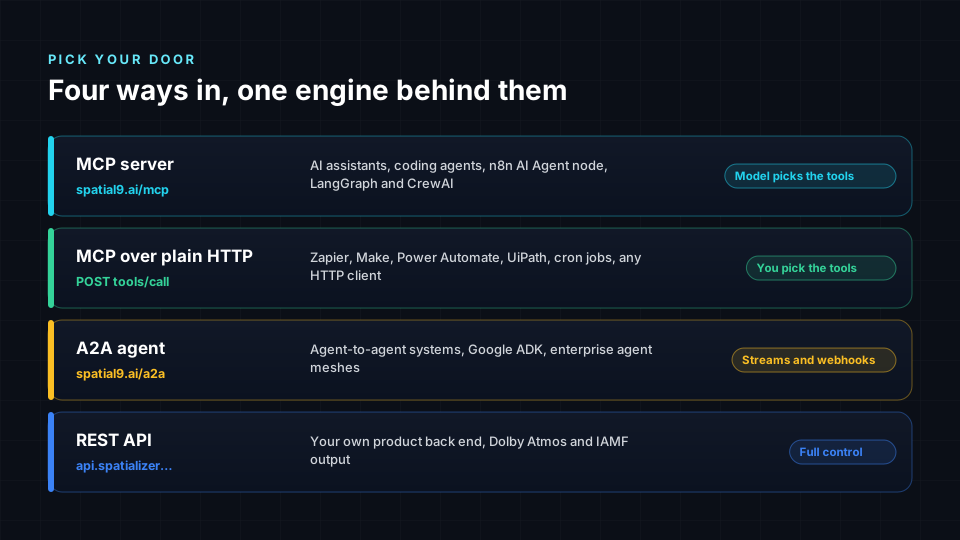
- MCP server, with skills: the model decides which tools to call. Best for assistants, coding agents and AI nodes inside workflow tools.
- MCP over plain HTTP: your workflow decides. Every tool is one
tools/callrequest, which any HTTP step can send. - A2A agent at `https://spatial9.ai/a2a`: for agent-to-agent systems. It can stream progress and call your webhook when a job changes, which is ideal for Zapier and Make.
- REST API: for your own product's back end. See the REST section of our first agent guide.
The render lifecycle every pipeline follows
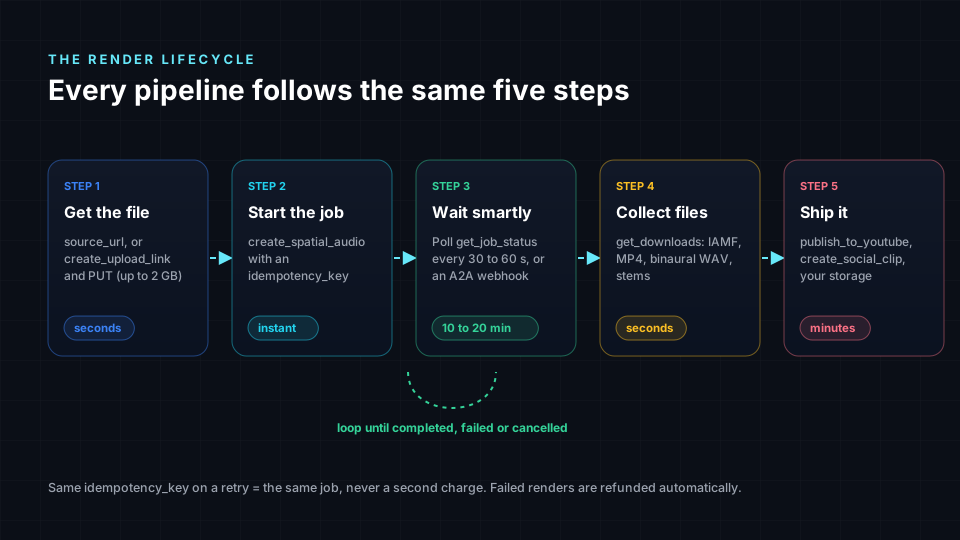
Whatever tool you use, a Spatial9 pipeline always runs the same five steps. Learn them once and every recipe below will feel familiar.
The core pipeline in Python, fully commented
This script renders every WAV in a folder, three at a time, and saves the headphone version and YouTube video. It is the reference that the GitHub Actions and Airflow recipes reuse. Save it as spatial9_pipeline.py.
"""Spatial9 pipeline: render every WAV in a folder to immersive Eclipsa Audio.

Usage:  SPATIAL9_KEY=s9_... python spatial9_pipeline.py masters/ out/
"""
import os, re, sys, time, pathlib
from concurrent.futures import ThreadPoolExecutor
import requests

MCP_URL = "https://spatial9.ai/mcp"      # account server; https://spatial9.ai/mcp/free is the guest server
KEY = os.environ["SPATIAL9_KEY"]          # personal key from spatial9.ai/connect, never hard-code it
HEADERS = {
    "Authorization": f"Bearer {KEY}",
    "Content-Type": "application/json",
    "Accept": "application/json, text/event-stream",   # MCP clients announce both
}
DONE = {"completed", "failed", "cancelled"}
KEEP = {"binaural", "youtube_video", "iamf"}         # download ids we want to save


def call_tool(name: str, arguments: dict) -> dict:
    """Send one MCP tools/call and return its structuredContent."""
    body = {"jsonrpc": "2.0", "id": 1, "method": "tools/call",
            "params": {"name": name, "arguments": arguments}}
    r = requests.post(MCP_URL, json=body, headers=HEADERS, timeout=120)
    r.raise_for_status()                          # 401 means the key is wrong or revoked
    reply = r.json()
    if "error" in reply:                          # protocol problem, such as a bad parameter
        raise RuntimeError(reply["error"]["message"])
    result = reply["result"]
    if result.get("isError"):                     # the tool refused and says why in plain words
        raise RuntimeError(result["content"][0]["text"])
    return result.get("structuredContent", {})


def upload(path: pathlib.Path) -> str:
    """Local file -> upload_id. Links last 2 hours and accept files up to 2 GB."""
    link = call_tool("create_upload_link", {"filename": path.name, "media_type": "music"})
    with path.open("rb") as f:
        requests.put(link["direct_upload_url"], data=f,
                     headers={"Content-Type": "audio/wav"}, timeout=3600).raise_for_status()
    return link["upload_id"]


def wait_for(job_id: str, every: int = 45) -> dict:
    """Poll every 30 to 60 seconds until the job finishes. Songs take 10 to 20 minutes."""
    while True:
        job = call_tool("get_job_status", {"job_id": job_id})
        print(f"  {job.get('title')}: {job.get('stage')} {job.get('progress', 0)}%")
        if job["status"] in DONE:
            return job
        time.sleep(every)


def render(path: pathlib.Path, out_dir: pathlib.Path, style: str = "live_concert") -> None:
    slug = re.sub(r"[^a-z0-9]+", "-", path.stem.lower()).strip("-")
    job = call_tool("create_spatial_audio", {
        "upload_id": upload(path),
        "media_type": "music",
        "title": path.stem.replace("-", " ").title(),
        "style": style,                        # live_concert, club, cinema or intimate_studio
        "include_binaural": True,              # always ship a headphone version
        "idempotency_key": f"pipeline-{slug}", # a retry returns the same job, never a second charge
    })
    job = wait_for(job["job_id"])
    if job["status"] != "completed":
        print(f"  {path.name}: {job['status']} (failed renders are refunded)")
        return
    files = call_tool("get_downloads", {"job_id": job["job_id"]})["downloads"]
    for f in files:
        if f["id"] in KEEP:                    # only real links returned by Spatial9
            target = out_dir / f["filename"]
            target.write_bytes(requests.get(f["url"], timeout=600).content)
            print(f"  saved {target}")


if __name__ == "__main__":
    src, out = pathlib.Path(sys.argv[1]), pathlib.Path(sys.argv[2])
    out.mkdir(parents=True, exist_ok=True)
    # Three workers match the limit of three renders at once.
    with ThreadPoolExecutor(max_workers=3) as pool:
        list(pool.map(lambda p: render(p, out), sorted(src.glob("*.wav"))))
Webhooks instead of polling, in Node.js
Polling is simple, but workflow tools prefer to be called back. The A2A route accepts a webhook address and posts the whole task to it every time the state changes. This Node.js 18+ snippet runs in Pipedream, a serverless function or any back end.
// Start a Spatial9 render and ask Spatial9 to call us back when it changes.
const res = await fetch("https://spatial9.ai/a2a", {
  method: "POST",
  headers: {
    "Authorization": `Bearer ${process.env.SPATIAL9_KEY}`,   // s9_ key from a secret store
    "Content-Type": "application/json",
  },
  body: JSON.stringify({
    jsonrpc: "2.0",
    id: "start-1",
    method: "message/send",
    params: {
      message: {
        kind: "message",
        role: "user",
        messageId: "night-drive-001",          // doubles as the idempotency key
        parts: [{
          kind: "data",
          data: {
            skill: "spatial_audio",            // or split_stems, convert_dolby, preview_chorus
            source_url: "https://example.com/masters/night-drive.wav",
            title: "Night Drive",
            style: "cinema",
          },
        }],
      },
      configuration: {
        pushNotificationConfig: {
          url: "https://hooks.example.com/spatial9-updates",  // https, public host, port 443
          token: process.env.WEBHOOK_TOKEN,                    // echoed in X-A2A-Notification-Token
        },
      },
    },
  }),
});

const body = await res.json();
if (body.error) throw new Error(body.error.message);   // never assume the call worked
console.log("Task", body.result.id, "is", body.result.status.state);
When your webhook receives a task, check the X-A2A-Notification-Token header first, then look at status.state. When it is completed, the download links are in artifacts, each as a file part with a uri. Deliveries are checked once a minute, and a task can have up to five webhooks.
Workflow tools: n8n, Zapier, Make and the enterprise stack
Most people who want automation already have a workflow tool. Here is where the main ones fit, based on what each one offers in 2026.
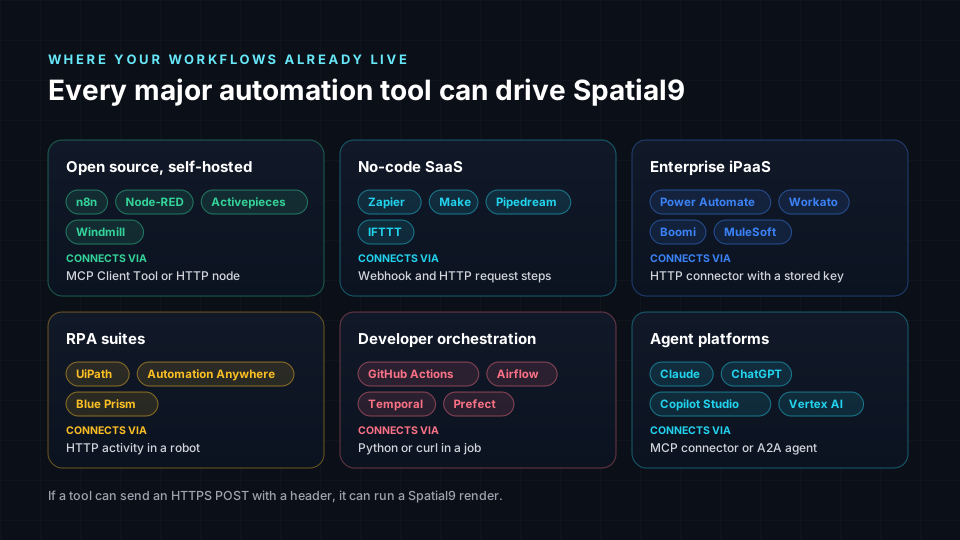
| Tool | Best for | How it connects to Spatial9 |
|---|---|---|
| n8n | Self-hosted and technical teams | MCP Client Tool node for AI agents, HTTP Request node for fixed flows |
| Zapier | Fast no-code automations | Webhooks by Zapier: a custom request to start, a catch hook for the A2A webhook |
| Make | Visual scenarios with branching | HTTP "Make a request" module plus a custom webhook |
| Power Automate | Microsoft 365 companies | HTTP action with a "Do until" loop |
| Pipedream | Developers who like code steps | Node.js or Python step, HTTP trigger for webhooks |
| Workato, Boomi, MuleSoft | Enterprise integration teams | HTTP connector with the key in a stored connection |
| UiPath, Automation Anywhere | RPA robots | HTTP request activity inside a process |
| GitHub Actions, Airflow, Temporal | Engineering and data teams | The Python pipeline above, run on a schedule or event |
n8n, option A: a fixed workflow with HTTP Request nodes
n8n is open source, can be self-hosted, and is popular with both indie developers and enterprises. This flow lets anyone on your team paste a song link into a form and receive immersive files in Slack.
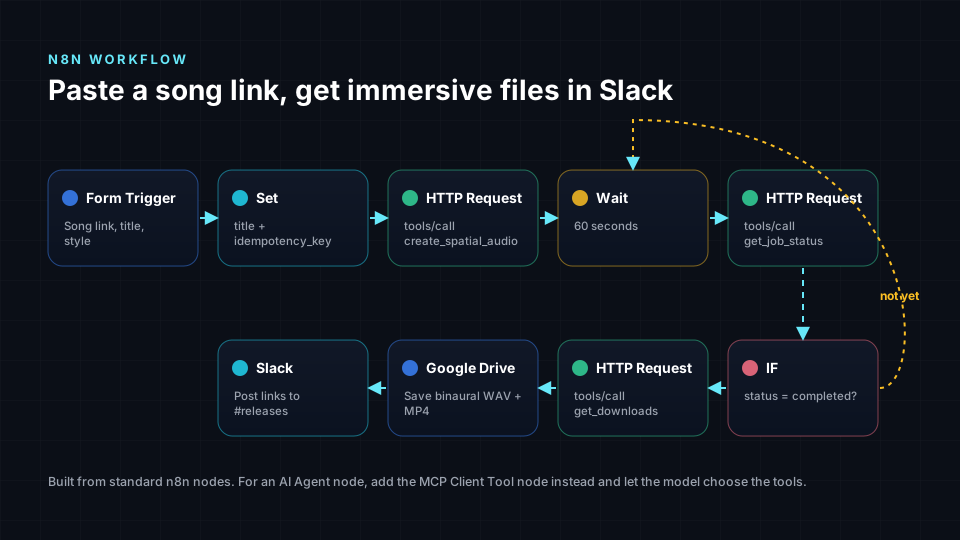
- Credential: create a "Header Auth" credential named Spatial9 with the name
Authorizationand the valueBearer s9_your_key. Never type the key into a node. - Form Trigger: fields for Song link, Title and Style.
- HTTP Request, "Start render": method POST, URL
https://spatial9.ai/mcp, authentication from the Spatial9 credential, anAcceptheader ofapplication/json, text/event-stream, and the JSON body below. - Wait: 60 seconds.
- HTTP Request, "Check status": the same settings, calling
get_job_status. - Switch:
completedcontinues,failedorcancelledgoes to an alert, anything else loops back to Wait. - HTTP Request, "Get downloads": calls
get_downloads, then Google Drive and Slack nodes use the links.
The body for "Start render", written as an n8n expression:
{{ JSON.stringify({
  jsonrpc: "2.0",
  id: 1,
  method: "tools/call",
  params: {
    name: "create_spatial_audio",
    arguments: {
      source_url: $json["Song link"],          // a direct https link to the audio file
      media_type: "music",
      title: $json["Title"],
      style: $json["Style"] || "live_concert",
      include_binaural: true,
      // Same title = same key = same job, so a re-run never double-charges.
      idempotency_key: "n8n-" + $json["Title"].toLowerCase().replace(/[^a-z0-9]+/g, "-")
    }
  }
}) }}
The "Check status" body only changes the tool and its argument. The job id comes from the first request:
{{ JSON.stringify({
  jsonrpc: "2.0", id: 2, method: "tools/call",
  params: {
    name: "get_job_status",
    arguments: { job_id: $('Start render').item.json.result.structuredContent.job_id }
  }
}) }}
In the Switch node, route on {{ $json.result.structuredContent.status }}. In a Code node after "Get downloads", this picks out the links people care about:
// n8n Code node: turn the Spatial9 download list into a Slack-friendly message.
const result = $input.first().json.result;
if (result.isError) throw new Error(result.content[0].text);   // surface Spatial9's own message

const files = result.structuredContent.downloads ?? [];
const wanted = files.filter(f => ["binaural", "youtube_video", "iamf"].includes(f.id));
const lines = wanted.map(f => `• ${f.label}: ${f.url}`);

return [{ json: { text: `Your immersive mix is ready:\n${lines.join("\n")}` } }];
n8n, option B: an AI Agent node with the MCP Client Tool
When the request is open-ended ("make the chorus feel bigger and post an unlisted version"), let a model choose the tools. Add an AI Agent node, attach a chat model, and attach the MCP Client Tool node with:
- Endpoint:
https://spatial9.ai/mcp - Server transport: HTTP Streamable
- Authentication: Bearer, using your Spatial9 key
- Tools to include: "Selected", and pick only what this agent needs, for example
preview_chorus,get_clip,create_spatial_audio,get_job_statusandget_downloads
Paste the steps and rules from the matching SKILL.md into the agent's system message. The model then follows the same safe playbook as a desktop agent. Leave publishing tools out of unattended agents.
Zapier: start with a request, finish with a catch hook
Zapier steps should not sit and wait for 20 minutes, so the best pattern uses the A2A webhook and two Zaps.
- Zap 2 first, "Render finished": trigger "Webhooks by Zapier: Catch Hook". Copy its URL.
- Zap 1, "Start render": a trigger such as a new Google Sheets row with a song link, then "Webhooks by Zapier: Custom Request" with method POST, URL
https://spatial9.ai/a2a, headersAuthorization: Bearer s9_...andContent-Type: application/json, and the same body as the Node.js example, with Zap 2's URL aspushNotificationConfig.url. - Back in Zap 2: add a Filter that only continues when
status.stateexactly matchescompleted, then a "Code by Zapier" step to pick the links, then Gmail, Slack or Google Drive.
# Code by Zapier (Python). Input data: task = the raw JSON body from the catch hook.
import json

task = json.loads(input_data["task"])
links = []
for artifact in task.get("artifacts", []):
    for part in artifact.get("parts", []):
        if part.get("kind") == "file":           # each download arrives as a file part
            f = part["file"]
            links.append(f.get("name", "file") + ": " + f["uri"])

output = {"title": task.get("id"), "links": "\n".join(links)}
Make: the same pattern with visual modules
In Make, Scenario 1 uses a trigger (for example "Watch Rows" in Google Sheets) followed by the HTTP module "Make a request": method POST, URL https://spatial9.ai/a2a, an Authorization header, body type "Raw" with content type JSON, and the A2A body with the webhook URL from Scenario 2. Scenario 2 starts with a "Custom webhook", filters on status.state = completed, uses an Iterator over artifacts, downloads each file.uri with "Get a file", and uploads it to Dropbox, Box or Google Drive.
Power Automate: a "Do until" loop for Microsoft 365 teams
Power Automate's HTTP action is a premium connector. A typical flow starts when a SharePoint list item with a song link is created:
- HTTP "Start render": POST to
https://spatial9.ai/mcpwith thetools/callbody forcreate_spatial_audio. Store the key in Azure Key Vault or a secure environment variable. - Do until the status equals
completed, with a count limit of 40 and a timeout ofPT1H. Inside it, a Delay of 1 minute and an HTTP "Check status" call toget_job_status. - HTTP "Get downloads", then update the list item and post the links to Teams.
The expression that reads the status inside the loop:
body('HTTP_Check_status')?['result']?['structuredContent']?['status']GitHub Actions: render whenever a master is pushed
For teams that keep masters in a repository (with Git LFS), this workflow renders new files automatically and attaches the results to the run.
# .github/workflows/spatial9.yml
name: Spatial9 immersive renders
on:
  push:
    paths: ["masters/**.wav"]       # run when a new or changed master lands
  workflow_dispatch:                # or run it by hand from the Actions tab

jobs:
  render:
    runs-on: ubuntu-latest
    timeout-minutes: 120            # three renders at a time, 10 to 20 minutes each
    steps:
      - uses: actions/checkout@v4
        with: { lfs: true }
      - uses: actions/setup-python@v5
        with: { python-version: "3.12" }
      - run: pip install requests
      - name: Render masters with Spatial9
        env:
          SPATIAL9_KEY: ${{ secrets.SPATIAL9_KEY }}   # stored as a repository secret
        run: python spatial9_pipeline.py masters/ out/
      - uses: actions/upload-artifact@v4
        with: { name: immersive-renders, path: out/ }
Because every render has an idempotency key built from the file name, re-running the workflow never pays twice for a song that already rendered.
Apache Airflow: a nightly catalog job for data teams
Airflow suits labels and distributors that keep their catalog in a warehouse. A pool with three slots enforces the three-renders-at-once limit for every DAG that uses it. Create it once with airflow pools set spatial9 3 "Spatial9 render limit".
from datetime import datetime
from airflow.decorators import dag, task


@dag(schedule="@daily", start_date=datetime(2026, 1, 1), catchup=False)
def spatial9_catalog():

    @task
    def pending_tracks() -> list[dict]:
        # Read up to 20 tracks a day (the daily limit) still marked "pending".
        # Replace with your warehouse query: Snowflake, BigQuery, Postgres...
        return [{"isrc": "USABC2600001", "title": "Night Drive",
                 "url": "https://cdn.example.com/masters/USABC2600001.wav"}]

    @task(pool="spatial9", retries=2)
    def render(track: dict) -> dict:
        from spatial9_pipeline import call_tool, wait_for   # reuse the commented helpers
        job = call_tool("create_spatial_audio", {
            "source_url": track["url"], "media_type": "music", "title": track["title"],
            "include_binaural": True,
            "idempotency_key": f"catalog-{track['isrc']}",   # ISRC = one render per recording
        })
        done = wait_for(job["job_id"])
        if done["status"] != "completed":
            raise RuntimeError(f"{track['title']}: {done['status']}")
        files = call_tool("get_downloads", {"job_id": done["job_id"]})["downloads"]
        return {"isrc": track["isrc"], "files": {f["id"]: f["url"] for f in files}}

    @task
    def record(results: list[dict]) -> None:
        # Write the links back and set each track to "ready for review".
        for r in results:
            print(r["isrc"], r["files"].get("binaural"))

    record(render.expand(track=pending_tracks()))


spatial9_catalog()
Workato, Boomi, MuleSoft, UiPath and other enterprise tools
Enterprise platforms follow the same contract. Store the s9_ key in the platform's connection or credential vault, send the tools/call body with an HTTP connector or activity, and either loop on get_job_status or receive the A2A webhook on an HTTP listener. RPA robots in UiPath or Automation Anywhere can do the same with an HTTP request activity, which is handy when the rest of the process clicks through a distributor portal.
Six use cases you can build this week
1. The release-day assistant, for independent artists
The artist drops a WAV into Claude or ChatGPT with the skills installed. The agent offers a free chorus preview, renders the full song after a yes, publishes an unlisted video and makes a 9:16 clip for socials. Skills used: chorus-preview, immersive-mix, release-publisher.
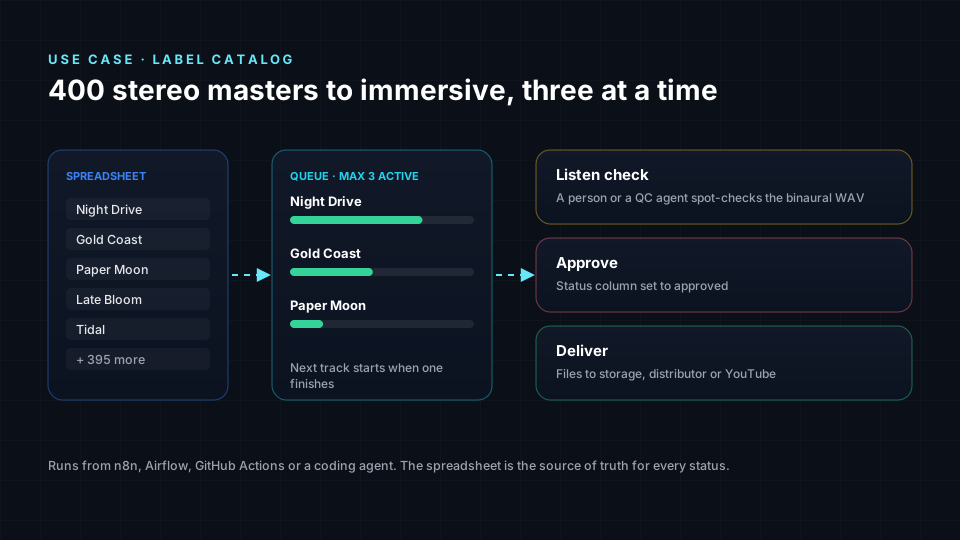
2. The catalog pipeline, for labels
A label wants 400 stereo masters ready for immersive playback. An Airflow or n8n job reads the catalog spreadsheet, keeps three renders running, and marks each track for a listening check before delivery.

3. The channel automation, for YouTube creators
A Zapier or Make flow watches a folder for finished edits, sends the video through create_spatial_audio with media_type: video, and queues an unlisted upload so the creator can check the spatial sound before publishing.
4. The Atmos bridge, for post houses
A post house already delivers Dolby Atmos. A Power Automate or n8n flow sends every approved ADM BWF master through the atmos-to-eclipsa skill and files the Eclipsa Audio version next to it, so clients get YouTube-ready immersive audio with no extra mixing session.
5. The classroom tutor, for music schools
Students connect the free guest server and ask an agent to explain what changes when a guitar moves behind them. The agent uses the learning tools (list_lessons, get_lesson, list_samples) and the remix preview to demonstrate, at no cost. Pair it with our guide to creative thinking in immersive mixing.
6. The stem service, for sync libraries and remixers
A library offers stems on request. A form triggers the stem-split skill, the ZIP lands in shared storage, and the requester gets a link. If they want an immersive version, the same stems go straight into create_from_stems. Read our stem export best practices for the details.
Guardrails for pipelines you can leave running
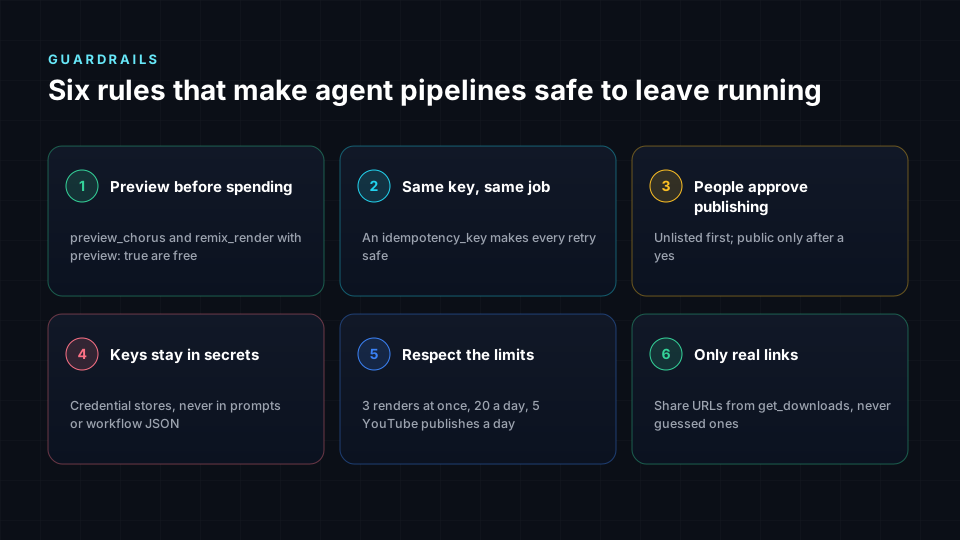
Automation is only useful if you can trust it overnight. These rules are built into the skills and should be built into every workflow.
- Preview before spending.
preview_chorusandremix_renderwithpreview: trueare free. Use them before any paid render. - Same key, same job. Always send an
idempotency_key(or a stable A2AmessageId). Retries return the original job instead of starting and charging for a new one. - People approve publishing. Default to unlisted. Only publish publicly after a clear yes from a person.
- Keys stay in secrets. Use credential stores, never prompts, workflow JSON or code. Revoke a key at spatial9.ai/connect if it leaks.
- Respect the limits. 3 renders at once, 20 per 24 hours and 5 YouTube publishes per 24 hours. Queue extra work instead of retrying in a loop.
- Only real links. Share only URLs returned by
get_downloadsor the task artifacts.
Write your own Spatial9 skill
The six skills are a starting point. Teams often write their own that encode house rules, such as a label's preferred style or naming. Here is a template:
---
name: acme-label-immersive-release
description: Prepare an ACME Records release in immersive audio with Spatial9. Use when someone at ACME asks to make a single or album immersive, or to prepare a YouTube spatial audio upload.
---

# ACME immersive release

Requires the Spatial9 MCP server at https://spatial9.ai/mcp.

## Steps
1. Always start with preview_chorus and share the headphone WAV.
2. After approval, run create_spatial_audio with style "cinema" for ballads
   and "live_concert" for everything else, include_binaural: true,
   and idempotency_key "acme-<ISRC>".
3. Poll get_job_status every 60 seconds and report progress in plain words.
4. Name files "<ARTIST> - <TITLE> (Immersive)" when sharing get_downloads links.

## Rules
- Never publish to YouTube. The ACME release team publishes manually.
- Keep the lead vocal at the front centre.
Keep the description specific: it is the only part the agent reads before deciding to use the skill. Say what it does and when to use it, in the words people really type.
Frequently asked questions
What are Spatial9 Agent Skills?
They are six free instruction packs in the open SKILL.md format that teach AI agents how to use Spatial9: immersive mixes, stem splits, Dolby and ADM to Eclipsa Audio conversion, free chorus previews, remixing by voice and YouTube publishing. They work with the Spatial9 MCP server at spatial9.ai/mcp.
Which AI agents support Spatial9 skills?
Any agent that reads the Agent Skills standard, including Claude, Claude Code, OpenAI Codex, GitHub Copilot, VS Code, Cursor and Gemini CLI. Agents without skills support can still use the Spatial9 MCP server directly.
Can I use Spatial9 with n8n?
Yes. Use the MCP Client Tool node with an AI Agent node when a model should choose the steps, or HTTP Request nodes for a fixed workflow that starts a render, waits, checks the status and collects the downloads.
Can I use Spatial9 with Zapier or Make?
Yes. Start a render with a custom HTTP request to spatial9.ai/a2a and include a webhook address. Spatial9 calls that webhook, such as a Zapier catch hook or a Make custom webhook, whenever the task changes, so the flow continues when the render is complete.
How long does a Spatial9 render take in a pipeline?
A song usually takes 10 to 20 minutes, a stem split 4 to 8 minutes, and a free chorus preview under two minutes. Poll every 30 to 60 seconds or use a webhook.
How do I avoid paying twice when a workflow retries?
Send the same idempotency_key with every retry of the same song, or reuse the same A2A messageId. Spatial9 returns the original job instead of starting a new one, and failed renders are refunded automatically.
Is there a free way to try Spatial9 with an agent?
Yes. The guest server at spatial9.ai/mcp/free needs no sign-in and includes three chorus previews, one video render, one ADM to Eclipsa Audio conversion and one stem split.
What limits apply to Spatial9 pipelines?
Three renders at once, 20 renders per 24 hours and 5 YouTube publishes per 24 hours per account. Each render uses one project from your plan.
Give your agents a studio
Spatial audio used to need a specialist room and a specialist engineer for every song. With Spatial9 skills and pipelines, that expertise becomes something any agent or workflow can call, while people stay in charge of taste and approval.
Download the Spatial9 Agent Skills, create a key at spatial9.ai/connect, and try your first render, or explore the engine by hand in the Spatial9 Immersive Classroom. To see where the technology is heading next, read what comes next for AI assistants, MCP and acoustic digital twins, and before release, run your mix through our 10 immersive mixing best practices.
Sources
- Agent Skills open standard and specification, agentskills.io.
- Anthropic (December 2025). Agent Skills released as an open standard.
- Model Context Protocol specification, version 2025-06-18, modelcontextprotocol.io.
- Agent2Agent (A2A) protocol specification, Linux Foundation, a2a-protocol.org.
- n8n documentation: MCP Client Tool node, AI Agent node and HTTP Request node.
- Zapier documentation: Webhooks by Zapier and Code by Zapier.
- Make documentation: HTTP app and Webhooks.
- Microsoft Learn: Power Automate HTTP action and "Do until" loops.
- GitHub Docs: Workflow syntax for GitHub Actions and encrypted secrets.
- Apache Airflow documentation: TaskFlow API, dynamic task mapping and pools.
- Alliance for Open Media. Immersive Audio Model and Formats (IAMF) specification.