Agentic AI Meets Spatial Audio: What AI Agents Can Build With the Spatial9 MCP and API
Spatial9 Team · · 16 min read
Key takeaways
- The Spatial9 MCP server at spatial9.ai/mcp gives any MCP-capable assistant 37 tools that cover the whole immersive audio chain, from stem separation to a YouTube upload.
- Agents can mix by talking: move an instrument into the height speakers, make the guitar circle the listener in the chorus, or apply a full live-concert style in one call.
- Guardrails are built in: idempotency keys stop double charges, OAuth uses a single scope, publishing needs confirmation and renders can be cancelled.
- A free no-sign-in address, spatial9.ai/mcp/free, lets anyone try chorus previews, a video conversion and an ADM to Eclipsa conversion before creating an account.
For two years most "AI music" news has been about generating songs. The more useful shift is quieter. Assistants now use tools. They read files, call services, wait for jobs to finish and come back with results. The Model Context Protocol (MCP) is the open standard that makes this work across assistants, and it is now governed by the Agentic AI Foundation under the Linux Foundation, next to the Agent2Agent (A2A) protocol for agents that talk to other agents.
That changes what an audio company should build. A plugin waits for an engineer to open a DAW. An agent-ready service works wherever the artist already is: in a chat, in a coding tool, in a scheduled job at 3 a.m. Spatial9 was built for that second world. This article shows how, with the real tool names, real configuration and six scenarios you can run this week.
At a glance
| Question | Answer |
|---|---|
| What is it? | A remote MCP server and a REST API for immersive audio |
| MCP address | https://spatial9.ai/mcp, or https://spatial9.ai/mcp/free with no sign-in |
| Works with | ChatGPT, Claude, Gemini, Grok, Claude Code, Codex, Cursor, VS Code and agent builders for open models |
| Tools | 37, grouped into create, convert, shape, share, learn and manage |
| Outputs | Eclipsa Audio (IAMF), Eclipsa Audio in MP4, a YouTube-ready video, a binaural headphone WAV and a 3D stage player project |
| Inputs | Stereo songs, stems, videos, ADM BWF masters, Dolby Digital, Dolby Digital Plus and TrueHD |
| Sign-in | OAuth inside the assistant, or a personal key for apps without sign-in |
| Typical render | 10 to 20 minutes for a song, a few minutes for a short video |
Why agents need a real audio engine
A language model is very good at understanding "make the chorus feel huge" and very bad at rendering 16 channels of third-order Ambisonics. Agents become useful when they can hand the heavy work to a specialist service and keep the conversation going while it runs.
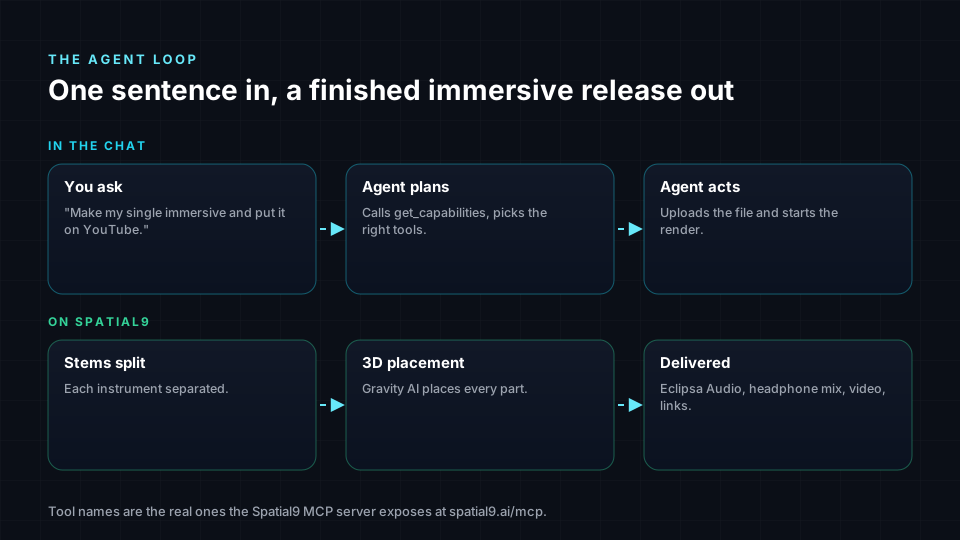
That is the split Spatial9 is designed around. The assistant handles intent: what the artist wants, which song, which channel, which privacy setting. Spatial9 handles the audio: instrument separation, 3D placement with Gravity AI, encoding to Eclipsa Audio, a binaural version for headphones and a video that YouTube accepts.
The difference matters for quality as well as convenience. An agent that writes its own audio code from scratch will produce something, but nobody has tuned it, tested it on real masters or measured how well it keeps the mix. A specialist engine has. The agent's job is to drive it well.
What MCP actually is, in one minute
MCP is a small, open protocol. A client (the assistant) connects to a server (Spatial9), asks which tools exist, and calls them with structured arguments. Messages are JSON-RPC 2.0 over HTTP. The Spatial9 server supports the protocol versions 2025-06-18, 2025-03-26 and 2024-11-05, so both new and older clients can connect.
A tool call from an agent looks like this. The agent is asking Spatial9 to turn a song into an immersive mix with a live concert feel:
{
  "jsonrpc": "2.0",
  "id": 7,
  "method": "tools/call",
  "params": {
    "name": "create_spatial_audio",
    "arguments": {
      "source_url": "https://example.com/masters/my-single.wav",
      "media_type": "music",
      "title": "My Single",
      "style": "live_concert",
      "include_binaural": true,
      "include_video": true,
      "idempotency_key": "release-2026-10-21-my-single"
    }
  }
}
You never type this yourself. The assistant writes it from your sentence. It is shown here because it explains why agents can be trusted with real work: every argument is named, typed and checked by the server.
The server also supports the MCP Apps extension (io.modelcontextprotocol/ui). In assistants that support it, a finished render shows up as an interactive card inside the chat, not just a list of links.
The toolbox: 37 tools, six jobs
Spatial9 does not expose one giant "do everything" tool. It exposes small, clear tools that an agent can combine. That is what makes complex requests reliable.
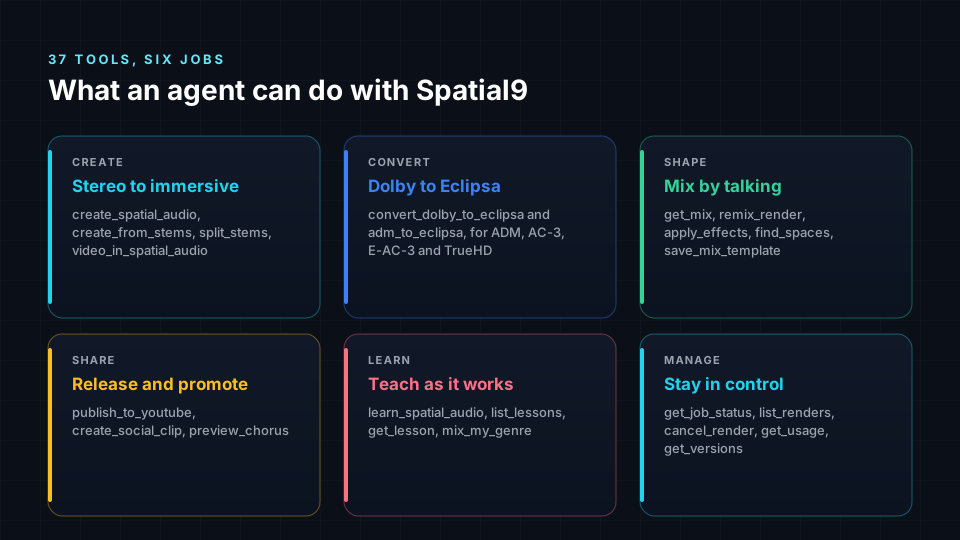
| Group | Example tools | What the agent can do |
|---|---|---|
| Create | create_spatial_audio, create_from_stems, split_stems, video_in_spatial_audio | Turn a stereo song, a set of stems or a video soundtrack into immersive audio |
| Convert | convert_dolby_to_eclipsa, adm_to_eclipsa | Bring Dolby Atmos ADM masters, AC-3, E-AC-3 and TrueHD files into Eclipsa Audio |
| Shape | get_mix, remix_render, apply_effects, find_spaces, save_mix_template | Move, level, animate and add rooms and effects, then reuse the mix on other songs |
| Share | publish_to_youtube, create_social_clip, preview_chorus | Upload to your channel, make a 9:16 clip for Shorts, Reels and TikTok, preview for free |
| Learn | learn_spatial_audio, list_lessons, get_lesson, mix_my_genre | Teach spatial audio and give genre placement guides while working |
| Manage | get_job_status, list_renders, cancel_render, get_usage, get_versions | Track jobs, list past work, stop a render and check what is left on the plan |
There is also get_capabilities, which the agent calls first. It lists exactly what the server can produce, so the agent never offers a format or feature that does not exist. That one tool removes a whole class of AI overpromising.

Mixing by talking
This is where agents stop being a novelty. After a render finishes, the artist can keep talking about the mix in normal words, and the agent turns that into precise changes.
| You say | What the agent calls |
|---|---|
| "Put the guitar upper left" | remix_render with direction left and height upper |
| "Vocals a bit louder" | remix_render with gain_change_db: 3 on the vocals |
| "Make the synth circle around me in the chorus" | remix_render with a circle motion, when: chorus |
| "Lift the vocals into the ceiling at the drop" | remix_render with a rise motion, when: drop |
| "Make it sound like a small jazz club" | find_spaces, then apply_effects with the best space |
| "Mix it like a live concert" | remix_render with style: live_concert |
A movement request becomes a change like this. Note preview: true, which is a free dry run: the agent shows you the plan before anything is rendered or charged.
{
  "name": "remix_render",
  "arguments": {
    "job_id": "YOUR_JOB_ID",
    "preview": true,
    "changes": [
      {
        "instrument": "guitar",
        "motion": { "shape": "circle", "when": "chorus", "speed": "medium", "clockwise": true }
      },
      { "instrument": "vocals", "gain_change_db": 2 }
    ]
  }
}
The motion shapes available are circle, spiral_up, rise, sink, sweep, fly_over, come_close, move_away and wander. Song sections are found from the audio itself, so "the second chorus" really means the second chorus. Each movement returns the instrument to its home position when that section ends, which keeps the mix stable.
The four one-line styles are live_concert, club, cinema and intimate_studio. A style sets every position, level, movement and effect in one step. Artists who find a mix they love can save it with save_mix_template and apply it to the next song with template_id, which is how a consistent "sound" across an album becomes one sentence.
Six agents you can run this week
These are not concept videos. Each scenario uses tools that exist today.
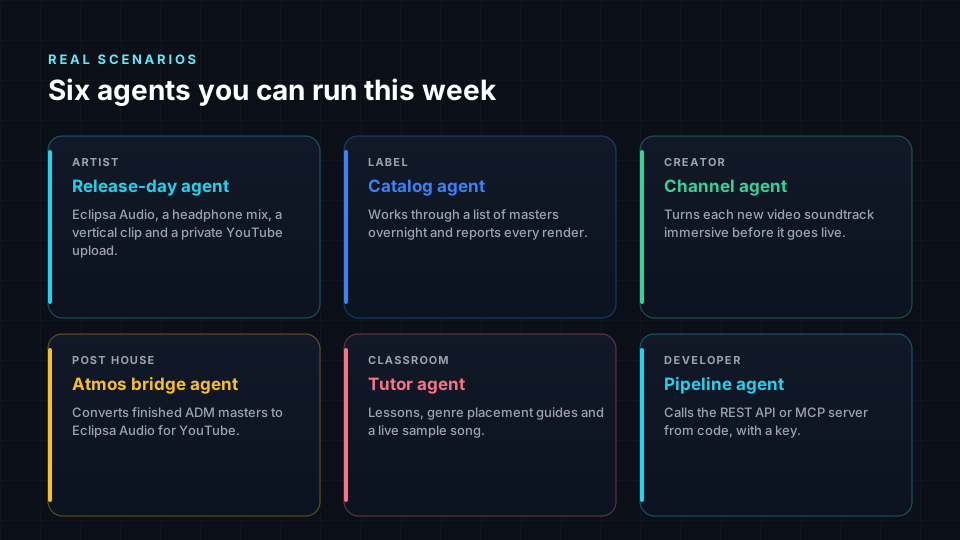
1. The release-day agent, for artists
The artist drops a WAV into the chat and says: "Make this immersive, give me the headphone version and a vertical clip, and put it on my channel as unlisted so I can check it." The agent offers preview_chorus first, a free 30-second binaural preview, so the artist hears the idea before spending a project. Then it runs create_spatial_audio, polls get_job_status, shares the before and after link, calls create_social_clip and, after confirming the title and privacy, publish_to_youtube.
2. The catalog agent, for labels
A label has 400 stereo masters and wants them ready for immersive playback. A coding agent such as Claude Code or Codex reads a spreadsheet of tracks, uploads each file through create_upload_link, starts renders with a unique idempotency_key per track and writes the status back to the sheet. If the job is interrupted and restarted, the keys guarantee nothing is rendered or charged twice. Developers who prefer plain code can do the same with the REST API. Catalog-scale conversion is already happening: our partnership with Pozalabs brought more than 1,000 AI-generated tracks into Eclipsa Audio.
3. The channel agent, for YouTube creators
Every new video goes through video_in_spatial_audio before upload. The soundtrack is rebuilt as Eclipsa Audio and the agent returns a YouTube-ready MP4, an Ambisonics WAV and a headphone version. For creators, this is the simplest way to stand out on a platform where almost everyone still uploads stereo.
4. The Atmos bridge agent, for post houses
Studios already have finished Dolby Atmos mixes. convert_dolby_to_eclipsa reads an ADM BWF master's beds and objects with their positions and delivers an Eclipsa Audio file through the same Spatializer used on the Spatial9 website. It also accepts Dolby Digital, Dolby Digital Plus and TrueHD files, decoding the speaker channels up to 7.1 and placing each one at its real speaker position. We cover the manual and free routes in our free guide to Eclipsa Audio on YouTube.
5. The tutor agent, for classrooms
Students ask "why does the bass stay in the middle?" and the agent answers with learn_spatial_audio, opens a lesson with get_lesson, pulls a genre placement guide with mix_my_genre and lets them hear it on a sample song with try_a_sample. Teaching and doing happen in the same chat. Our academy article on MCP and acoustic digital twins goes deeper into the classroom side.
6. The pipeline agent, for developers
A product team wants immersive audio as a feature, not a destination. Their back end calls the REST API. Their support assistant calls the MCP server. Both run on the same engine, so what the support agent previews is what the product delivers.
Connect your assistant in under two minutes
One address works across assistants. Most of them open a Spatial9 sign-in window and you approve the connection. Apps without sign-in use a personal key that starts with s9_.
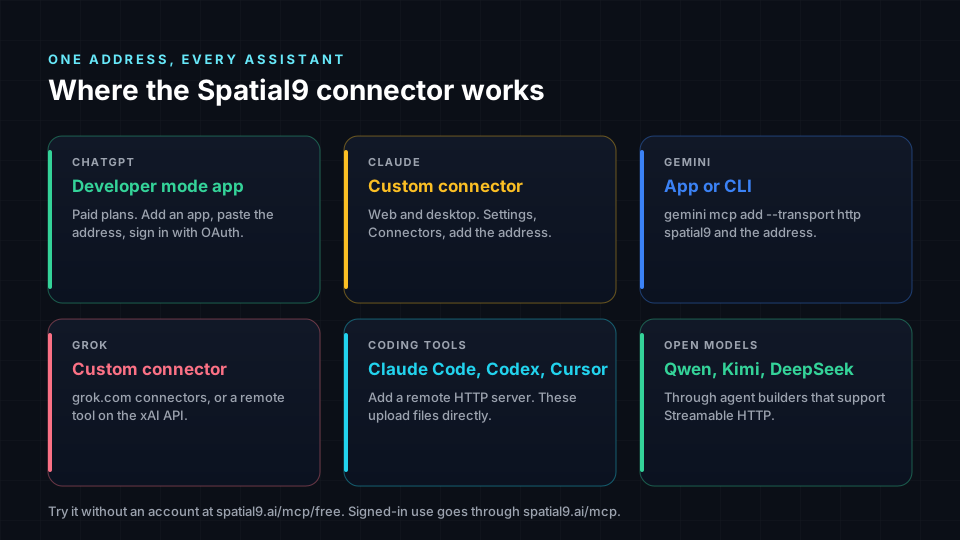
For coding tools, it is one line. Claude Code:
claude mcp add --transport http spatial9 https://spatial9.ai/mcpGemini CLI:
gemini mcp add --transport http spatial9 https://spatial9.ai/mcpFor apps that read a configuration file and use a personal key, such as many agent builders for Qwen, Kimi, DeepSeek and other open models:
{
  "mcpServers": {
    "spatial9": {
      "type": "streamableHttp",
      "url": "https://spatial9.ai/mcp",
      "headers": { "Authorization": "Bearer YOUR_SPATIAL9_KEY" }
    }
  }
}
In ChatGPT, custom MCP apps need a paid plan and Developer mode. You add Spatial9 as an app, choose OAuth and approve the sign-in. In Claude, it is Settings, then Connectors, then add a custom connector. The connect page walks through each assistant with screenshots-level detail and lets you create and revoke personal keys.
Want to try before creating an account? Use https://spatial9.ai/mcp/free. It needs no sign-in and includes three chorus previews, one video in spatial audio, one ADM to Eclipsa conversion and one full stem separation.

Guardrails: why you can trust an agent with your release
Letting software act on your behalf only works when it cannot do something expensive or embarrassing by accident. Spatial9 builds the safety into the server, so it does not depend on how careful each assistant is.
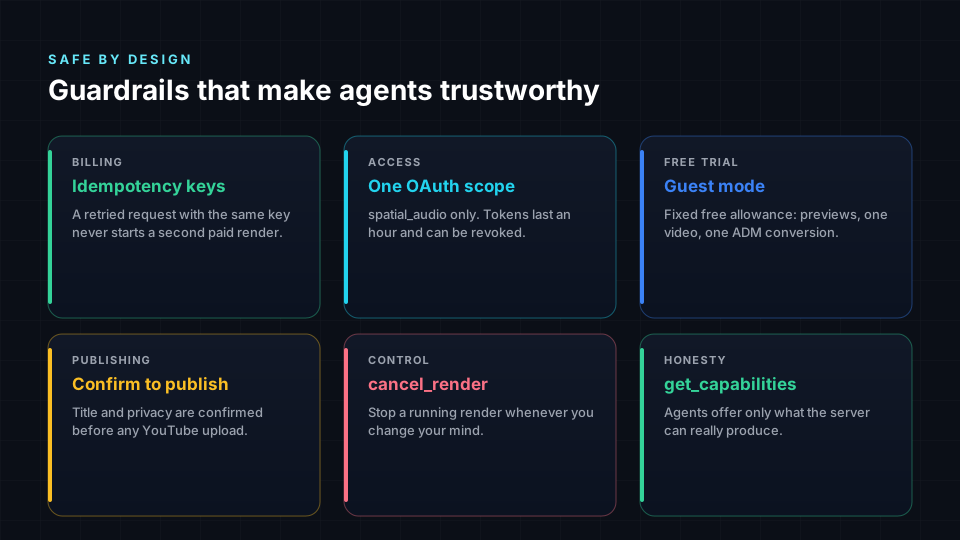
- No double charges. Every render accepts an
idempotency_key. If a flaky connection makes the agent retry, the same key returns the same job instead of starting a second one. - Least privilege. OAuth uses a single scope,
spatial_audio. Access tokens last one hour and connections can be revoked from your account at any time. - A human confirms publishing. The agent must confirm title, description and privacy with you before
publish_to_youtube. Uploading as private or unlisted first is always an option. - Free dry runs.
remix_renderwithpreview: trueshows the plan for a bigger change before anything is rendered. - Stoppable.
cancel_renderstops a running job when you change your mind. - No sales pressure. When a plan limit is reached, the server tells the agent to say so plainly and not to push upgrades.
MCP server or REST API?
Both run on the same engine. The choice depends on who is driving.
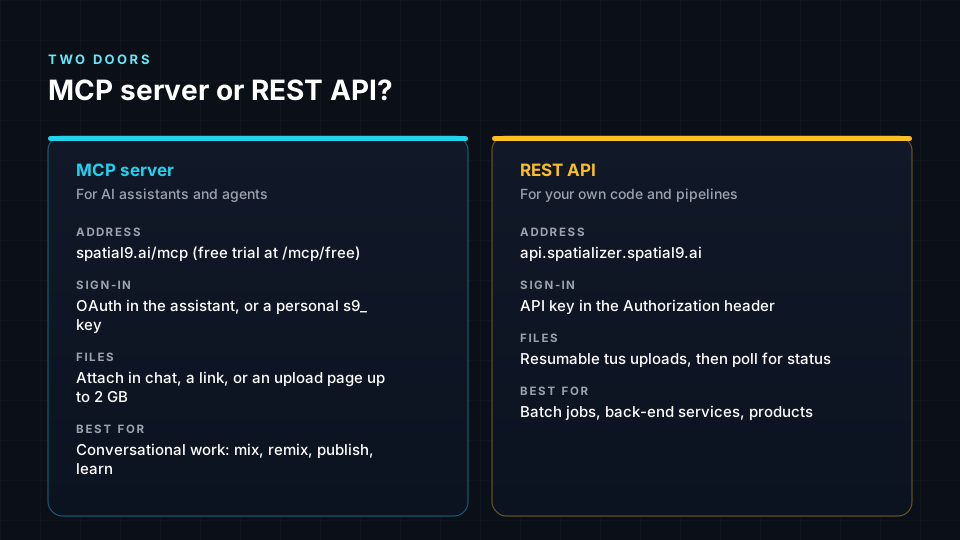
The REST API lives at https://api.spatializer.spatial9.ai/api/v0.0.1. You create a music with POST /musics, choose output formats with the formats query parameter (atmos, iamf or both), upload audio with the resumable tus protocol, then poll status and download:
curl -H "Authorization: YOUR_API_KEY" \
  https://api.spatializer.spatial9.ai/api/v0.0.1/musics/MUSIC_ID/status
Because one request can produce both Dolby Atmos and Eclipsa Audio, a distributor or platform can serve both ecosystems from a single upload. The full reference is on the API documentation page.
Why this is a different kind of audio company
Plenty of audio tools have added a chatbot to their website. That is a help desk with a new face. Spatial9 took the opposite approach and made the studio itself callable: separation, 3D placement, motion, rooms, encoding, conversion, headphone rendering, video and publishing, all as tools an agent can combine.
Three choices make that possible.
- Open formats at the core. Spatial9 delivers Eclipsa Audio, the consumer name for IAMF from the Alliance for Open Media. It is royalty-free, documented in public and decoded by open-source software. Agents work best with formats they can inspect and verify. Our IAMF technical deep dive shows exactly what is inside the file.
- Every assistant, not one. The same server works in ChatGPT, Claude, Gemini, Grok, coding tools and open-model agent builders. Artists do not have to switch assistants to use it.
- The whole chain, end to end. An agent can go from a stereo WAV to a published YouTube video with immersive sound, a headphone mix and a social clip without leaving the conversation. We have not found another immersive audio service that offers that chain to agents today.
Common misconceptions
- "An agent will make my mix sound generic." The agent does not mix by guesswork. It drives a placement engine and gives you precise control afterwards, down to exact angles in degrees and levels in dB.
- "I need to be a developer to use MCP." Not in chat assistants. You paste one address, approve a sign-in and talk normally. The code in this article is for people who want to see how it works.
- "Agents will spend my credits without asking." Renders use idempotency keys, previews are free, and publishing requires confirmation. The server enforces all three.
- "Immersive audio only matters for Dolby studios." Eclipsa Audio plays on YouTube, and Spatial9 starts from the stereo file every artist already has. If you are new to the idea, start with how to create spatial audio from stereo.
Frequently asked questions
What is agentic AI in music production?
Agentic AI means an assistant that can take actions with tools, not only write text. In music production it means the assistant can upload a song, start a render, check its progress, adjust the mix and publish the result, while you describe what you want in normal words.
What is the Spatial9 MCP server?
It is a remote Model Context Protocol server at https://spatial9.ai/mcp that gives AI assistants 37 tools for immersive audio. Assistants can create Eclipsa Audio from songs, stems and videos, convert Dolby files, remix in 3D, make social clips and publish to YouTube.
Which AI assistants work with Spatial9?
ChatGPT (paid plans with Developer mode), Claude, Gemini (app and CLI), Grok, coding tools such as Claude Code, Codex, Cursor, VS Code and Windsurf, and agent builders that support remote MCP servers for models such as Qwen, Kimi and DeepSeek.
Can I try the Spatial9 connector for free?
Yes. The address https://spatial9.ai/mcp/free needs no account. It includes three chorus previews, one video in spatial audio, one ADM to Eclipsa conversion and one full stem separation.
How long does an agent render take?
A full song usually takes 10 to 20 minutes and a short video a few minutes. A remix of a finished song reuses the separated stems and usually takes 3 to 6 minutes. You can close the chat; Spatial9 emails the links when the job finishes.
Can an agent publish to my YouTube channel?
Yes, with your permission. You connect your channel once, the agent confirms the title, description and privacy with you, then calls publish_to_youtube. Uploading as private or unlisted first is the safest way to check the result.
Is my audio safe when an agent uses Spatial9?
Connections use OAuth with a single spatial_audio scope and short-lived tokens, or a personal key you can revoke. Your renders stay in your Spatial9 account. Streaming pages such as YouTube or Spotify links cannot be used as input, so the agent only works with files you provide.
What is the difference between the MCP server and the REST API?
The MCP server is for AI assistants and agents that work through conversation. The REST API is for your own code: you send files with resumable uploads, choose Dolby Atmos or Eclipsa Audio output, poll status and download. Both use the same Spatial9 engine.
References
- Model Context Protocol specification, version 2025-06-18, modelcontextprotocol.io.
- MCP Apps extension, modelcontextprotocol.io.
- Official MCP Registry, Model Context Protocol project.
- Agent2Agent (A2A) protocol, A2A project.
- Introducing Eclipsa Audio: immersive audio for everyone, Google Open Source Blog, January 2025.
- YouTube recommended upload encoding settings, YouTube Help.
- Connect your assistant to Spatial9, Spatial9 setup guide, tool names and limits as of October 2026.
- Spatial9 API documentation, Spatial9.
Give your agent a studio
The fastest way to understand agentic audio is to hear it. Paste https://spatial9.ai/mcp/free into your assistant, ask it to preview the chorus of a song you love, and listen on headphones. When you are ready for full renders, remixes and YouTube publishing, connect your assistant to Spatial9.
ChatGPT, Claude, Gemini, Grok, YouTube, Dolby Atmos, Eclipsa Audio and all other names are trademarks of their respective owners. Spatial9 is not affiliated with or endorsed by OpenAI, Anthropic, Google, xAI or Dolby Laboratories.