What Comes Next: AI Assistants, MCP and Acoustic Digital Twins
Spatial9 Team ·
Lesson 13 of 14 in Spatial9 Academy, module 4: The open future. Practice in the demo: MCP Integration, Acoustic Digital Twin.
Imagine finishing a recording session and simply asking your assistant to prepare a binaural draft of the three songs you just tracked, following your creative brief. A few minutes later you are listening, making notes and deciding what to change.
Now imagine you could take that same song and hear it as if it were performed in a cathedral, a jazz club or a historic concert hall that you have never visited.
Neither of these ideas is science fiction, but neither is finished either. They are research directions we are building toward. In this lesson, you will learn how they work in principle, what they could mean for your daily workflow, and which skills will make you ready when they arrive.
What you will learn
- What the Model Context Protocol is and how it connects AI assistants to tools and data.
- How MCP could change immersive audio workflows, from single drafts to large catalogs.
- What an acoustic digital twin is, and the pipeline from a real room to a virtual one.
- How to read our Coming soon demos honestly, as previews rather than products.
- Which skills to build now: acoustics, room measurement, impulse responses and scripting.
A note on honesty: previews, not products
The demo hub groups its pages into "01 / Experience it", "02 / How we do it" and "03 / What comes next". The last group is called The road ahead and is described as "Research directions we are building toward with partners and studios." Both demos in this lesson live there, and both carry a Coming soon badge.
That label matters. As a future professional, you will hear many bold claims about AI. A healthy habit is to separate what you can use today from what is being explored. In this lesson, everything about MCP integration and acoustic digital twins is a preview of where we are heading, not a feature you can rely on in a project yet.
What is the Model Context Protocol
The Model Context Protocol, or MCP, is an open protocol introduced by Anthropic in November 2024. It lets AI assistants connect to tools and data sources in a consistent way.
Before a shared protocol, every connection between an assistant and a tool had to be built separately. MCP offers a common language. A tool describes what it can do. An assistant that speaks MCP can then discover those abilities and use them when you ask for something.
Think of it like a patch bay in a studio. Instead of rewiring every device for every session, you plug each one into a standard panel. Any source can reach any destination through the same interface.
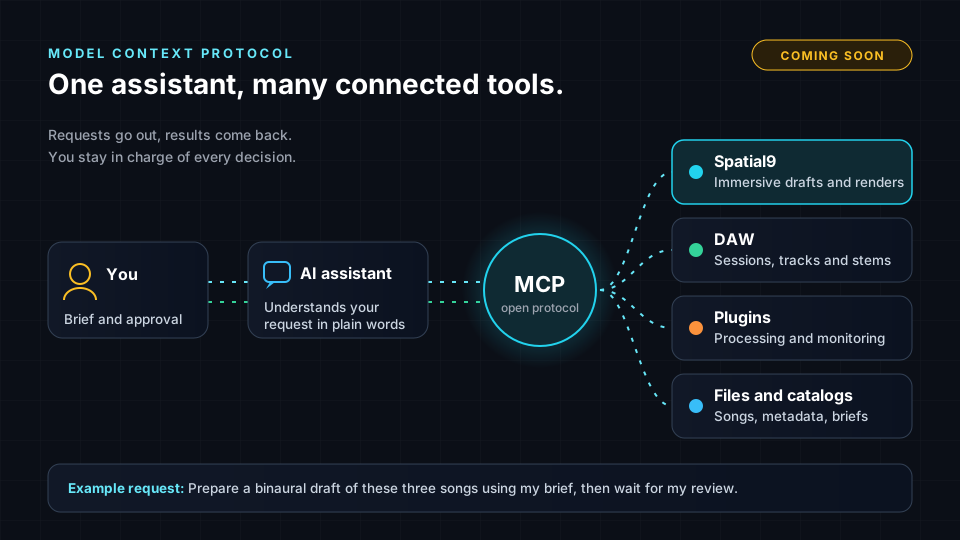
In an immersive audio context, the connected tools might include the following.
- Spatial9, for generating immersive drafts and renders from your music.
- A DAW, for sessions, tracks and stems.
- Plugins, for processing and monitoring.
- Files and catalogs, such as songs, metadata and creative briefs.
What MCP could mean for your workflow
Our /demo/mcp page previews how Spatial9 could connect to AI assistants, DAWs and plugins through MCP. Its tagline is "Spatial audio inside your AI tools". Here is what that could look like in practice, framed as possibilities rather than promises.
Preparing a first draft
You could describe your intent in plain language, for example asking for a warm, intimate binaural draft with the vocal anchored in front. The assistant could pass that brief to Spatial9, which already uses GravityLLM to generate the spatial arrangement and AI agents to coordinate processing and rendering. You would then listen and judge the result, exactly as you practiced in Lab: Critical Listening.
Working with a catalog
Spatial9 already supports batch processing through APIs and webhooks. An assistant connected through MCP could make that power easier to reach, for example by helping you organize a set of songs, apply a consistent brief and track which drafts are ready for review.
Staying in your DAW
The preview describes "Seamless DAW Integration" and a "Universal Plugin Architecture". The idea is that immersive tools could meet you inside the software you already use, rather than forcing you to move files between apps.
What does not change
However powerful the connections become, the human role stays the same. You write the creative brief. You judge the source. You listen critically. You decide revisions. You approve delivery. An assistant can carry messages and run tasks, but it cannot hear your mix the way you do. Revisit How GravityLLM Learns and Spatial Inference for a reminder of what the model does and where your judgment comes in.
What is an acoustic digital twin
Every room has a sound. A stone church rings for seconds. A small studio is tight and controlled. A concert hall wraps the audience in a warm, even reverberation. That character comes from the size, shape and materials of the space.
An acoustic digital twin is a virtual model of a real space that aims to recreate how it sounds. Our /demo/adt page calls it "Acoustic Digital Twin", with the tagline "Virtual rooms that sound real". It is a research preview of virtual acoustic environments for music, film, games and VR.
The concept follows a clear pipeline.
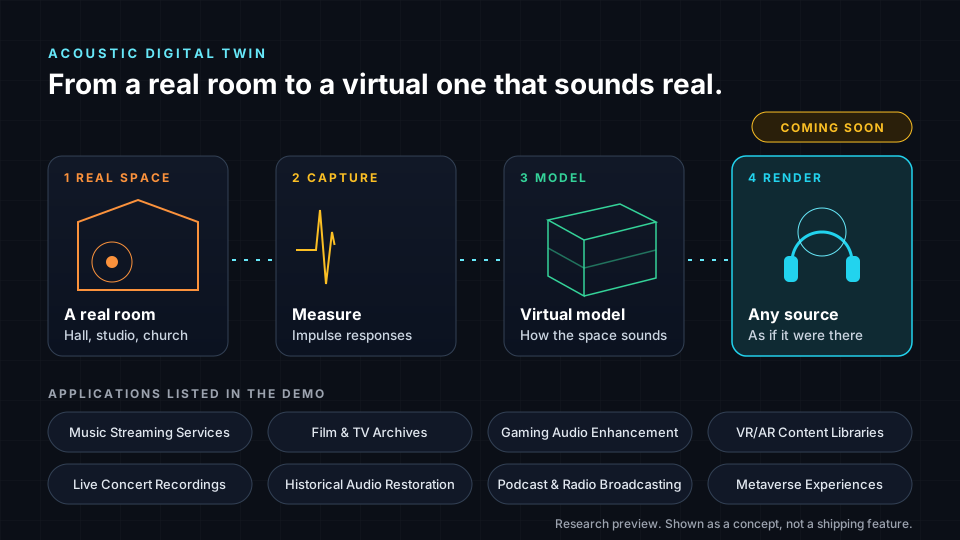
- Real space. Start with a room worth capturing, such as a hall, a studio or a church.
- Capture. Measure how the room responds to sound. A common method is to record impulse responses: you play a short burst or a sweep and record how the room answers from different positions.
- Model. Use those measurements to build a virtual model of how sound behaves in the space.
- Render. Place any source in the model and hear it as if it were performed in that room, ideally from any listening position.
The demo lists three technologies behind this vision: Source Separation and Analysis, Intelligent Spatial Positioning and Real-Time Rendering. You already know the first two from earlier lessons. Source separation splits a mix into parts. Intelligent positioning decides where each part should live. Real-time rendering would let you move through the space and hear it respond.
Where it could be used
The demo lists a wide range of possible applications: Music Streaming Services, Film and TV Archives, Video Streaming Platforms, Podcast and Radio Broadcasting, Historical Audio Restoration, Live Concert Recordings, Gaming Audio Enhancement, VR/AR Content Libraries, Voice Communication Platforms, Audiobook Narration, E-Learning Platforms and Metaverse Experiences.
Pick any two and think about the creative questions they raise. How should a restored historical recording sound if you could place it in the hall where it was first performed? How should a game environment change when a player walks from a cave into an open field?
How to prepare as a student
These directions reward people who understand both sound and systems. You do not need to wait for the tools to be finished. You can build the foundations now.
- Learn room acoustics. Study reverberation time, early reflections, absorption and diffusion. Listen for them in every room you enter.
- Practice room measurement. Many university studios have measurement microphones and software. Ask to help measure a room, and learn how to read the results.
- Record impulse responses. Capture a few spaces on your campus, such as a stairwell, a hall and a small room. Load them into a convolution reverb and compare how the same dry recording changes.
- Learn basic scripting. A little Python goes a long way. Renaming files, batch converting audio and calling APIs are all useful skills for automated workflows.
- Understand APIs and protocols. Read the public MCP documentation and learn how tools describe their abilities. This helps you see where automation fits and where it does not.
- Keep your ears sharp. Every new tool still needs a skilled listener. The critical listening habits from earlier in this course are your most durable skill.
Try it in the demo
Both demos for this lesson are marked Coming soon. They are previews, so explore them as a guided tour of ideas rather than working tools.
- Open /demo and scroll to the "03 / What comes next" group. Read the description of The road ahead.
- Open /demo/mcp. Note the Coming soon badge and the tagline "Spatial audio inside your AI tools".
- Read the "How MCP Works" section. Sketch the flow in your own words, using the diagram in this lesson as a starting point.
- Read "Seamless DAW Integration", "Universal Plugin Architecture" and "Native Integration". Write down which DAW tasks you would most like an assistant to help with, and which you would never hand over.
- Scroll to the Security section. List two questions you would ask before connecting an assistant to your own sessions and files.
- Open /demo/adt. Note the "Acoustic Digital Twin" name, the tagline "Virtual rooms that sound real" and the Coming soon badge.
- Read the use cases list and choose the two that excite you most. Then read the three technologies and connect each to a lesson you have already completed.
Key terms
| Term | Meaning |
|---|---|
| Model Context Protocol (MCP) | An open protocol introduced by Anthropic in November 2024 that lets AI assistants connect to tools and data sources. |
| AI assistant | Software you talk to in plain language that can carry out tasks, including through connected tools. |
| Acoustic digital twin | A virtual model of a real space that aims to recreate how it sounds. |
| Impulse response | A recording of how a space responds to a short burst or sweep of sound, capturing its acoustic character. |
| Convolution reverb | A reverb that applies a recorded impulse response to a sound, placing it in that space. |
| Real-time rendering | Producing audio instantly as conditions change, such as when a listener moves. |
| Research preview | An early look at a direction being explored, not a finished product. |
Check your understanding
- In one sentence, what does MCP do?
- Name two ways MCP could help an immersive audio workflow.
- What are the four stages of the acoustic digital twin pipeline?
- What is an impulse response, and how is it often captured?
- Why does it matter that these demos are labeled Coming soon?
Answers
- MCP is an open protocol that lets AI assistants connect to tools and data sources in a consistent way.
- It could help prepare a first immersive draft from a plain language brief, and help manage batch work across a catalog, while you stay in charge of listening and approval.
- Real space, capture, model and render.
- An impulse response records how a space responds to sound. It is often captured by playing a short burst or a sweep in the room and recording the result.
- It tells you these are research directions, not tools to rely on in a project yet, which helps you judge claims honestly and plan your learning.
Assignment
Create a small acoustic portfolio piece and a workflow design. Your deliverable has two parts. First, record or source impulse responses from two contrasting spaces you have permission to use, apply each to the same dry recording with a convolution reverb, and export a short comparison with a half-page note describing what you hear. Second, write a one-page workflow design showing how an AI assistant connected through MCP could help with a real project of yours. Mark clearly which steps you would automate, which steps must stay human, and why. Label the whole design as a future concept.
Frequently asked questions
Can I use the MCP integration or the acoustic digital twin today?
Not yet, because both are shown as Coming soon research previews in our demo, so treat them as directions to learn about rather than tools for current projects.
Who created the Model Context Protocol?
MCP is an open protocol introduced by Anthropic in November 2024 to let AI assistants connect to tools and data sources.
Do I need special equipment to learn about impulse responses?
You can start with a portable recorder, a clap or balloon pop and a free convolution reverb, then move to measurement microphones and sweep-based software when your university studio gives you access.
Will AI assistants make mixing skills less important?
No, because assistants can move files and run tasks, but deciding whether a mix serves the music still depends on trained ears and clear creative judgment.
Next step
You have seen where immersive audio could go next. In the final lesson, we bring everything together and look at the roles, skills and projects that will shape your career. Continue to Your Place in the Future of Immersive Audio, or return to the Spatial9 Academy course home.