IAMF Web Player: Play Eclipsa Audio Files in Your Browser (Free Demo)
Spatial9 Team · · 10 min read
Key takeaways
- The Spatial9 IAMF web player decodes Eclipsa Audio in your browser: drop a .iamf or MP4 file, or play official 7.1.4 and third-order ambisonics samples, with nothing uploaded.
- Eclipsa Audio is the consumer brand; IAMF (Immersive Audio Model and Formats) is the open Alliance for Open Media format underneath, carried by Opus, AAC-LC, FLAC or LPCM.
- Press A for a stereo fold-down and B for binaural headphone rendering to hear how one IAMF stream adapts to every device.
- Unlike the iamf-tools web demo, the player decodes AAC-LC streams, plays instantly without rendering a WAV first and adds a free loudness and true-peak quality check.
Eclipsa Audio is on YouTube, on Samsung TVs and soundbars, and in more and more delivery specs. But until now, if you wanted to simply hear an IAMF file on a computer, your choices were a command-line decoder or the reference iamf-tools web demo, which renders a WAV file first and then lets you play it back. We wanted something faster and friendlier: an Eclipsa Audio player that starts in seconds, shows you what is inside the file, and makes the difference between stereo and binaural obvious.
This page is that player, plus everything you need to understand what you are hearing.
Try the IAMF web player
Pick a sample to start, or drop your own Eclipsa Audio file. The 7.1.4 speaker callout is the quickest test: a voice names each of the 12 speakers, so you can check that front, side, rear and height positions land where they should. The animated sound sphere shows off third-order ambisonics, with sounds travelling around and over your head.
Spatial9 IAMF Web Player (Eclipsa Audio player)
A free IAMF and Eclipsa Audio web player that decodes in your browser and never uploads your file. Drop a standalone .iamf bitstream or an MP4 with an IAMF track, or play a bundled sample: a 7.1.4 speaker callout in Opus or FLAC, and an animated third-order ambisonics scene from the Alliance for Open Media iamf-tools project.
- Codecs: Opus, AAC-LC, FLAC and LPCM (the iamf-tools web demo does not decode AAC)
- Audio elements: channel-based layouts up to 9.1.6 and scene-based ambisonics
- Instant A/B between a stereo fold-down and binaural headphone rendering, with live channel meters
- Profile, codec, audio element and mix presentation details
- Optional quality check: BS.1770 loudness, true peak, clipping and silence, with a downloadable report
Use headphones to hear the binaural version. It is a preview, not a reference renderer.
When the player opens, it starts in stereo. Press B (or click Binaural) and listen for the sound moving out of your head and into the space around you. Press A to go back. The dots on the stage light up with the level of each virtual speaker, so you can see the scene as well as hear it.
How the Eclipsa Audio web player works
Everything happens inside your browser tab. The player reads the file, finds the IAMF descriptors, decodes the audio with the WebCodecs API that modern browsers ship, renders the scene and sends it to your headphones or speakers.
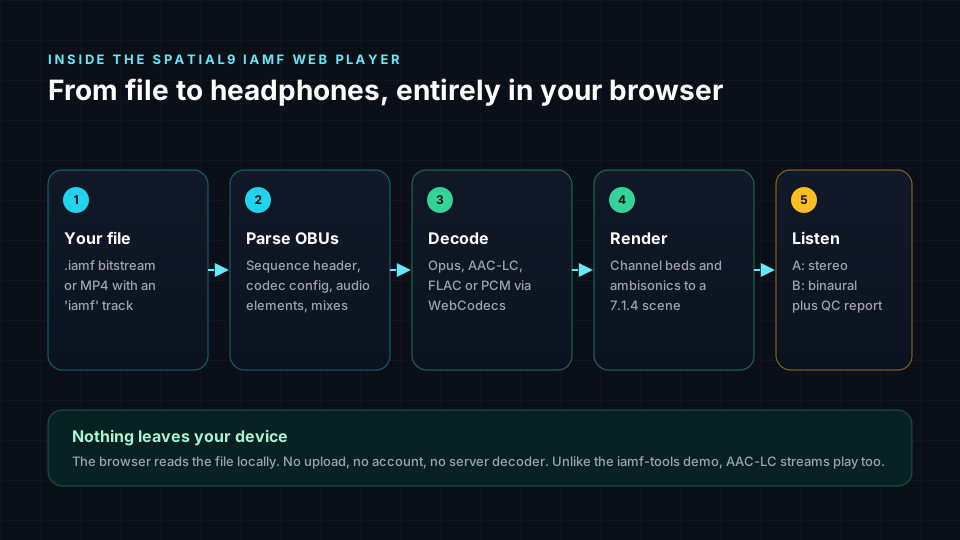
- Read the file. A standalone .iamf file is a raw IA Sequence. An MP4 carries the same data in an 'iamf' sample entry. The player handles both.
- Parse the OBUs. IAMF is a sequence of small packets called OBUs (Open Bitstream Units). The descriptor OBUs come first: the IA Sequence Header (which profile the file uses), Codec Config, Audio Elements and Mix Presentations.
- Decode. Each substream is decoded with the codec the Codec Config names: Opus, AAC-LC, FLAC or uncompressed LPCM.
- Render. Channel-based elements (stereo up to 9.1.6) and scene-based elements (ambisonics) are placed into a 7.1.4 virtual room.
- Listen. The room is folded down to stereo for A, or rendered binaurally for headphones for B. An optional quality check measures loudness, true peak, clipping and silence.
Eclipsa Audio vs IAMF: what each name means
The two names get used as if they were the same thing, and that confuses people. They describe the same technology at different layers.
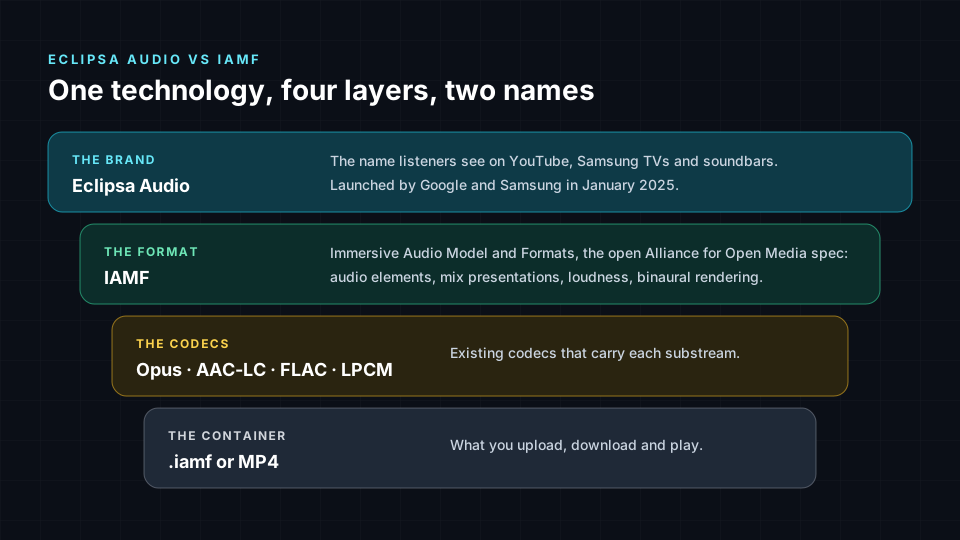
- Eclipsa Audio is the consumer brand, introduced by Google and Samsung in January 2025. It is the label you see on YouTube, TVs and soundbars, much like a logo on a box.
- IAMF stands for Immersive Audio Model and Formats. It is the open, royalty-free specification published by the Alliance for Open Media (AOM), the same group behind the AV1 video codec. It defines audio elements, mix presentations, loudness information and how to render to speakers or headphones.
- The codecs are existing, well-known audio codecs. IAMF does not invent a new one. It wraps Opus, AAC-LC, FLAC or LPCM.
- The container is what you actually upload or download: a .iamf file or an MP4.
So an "Eclipsa Audio file" and an "IAMF file" are the same file. If you want the bit-level detail, our technical deep dive into IAMF walks through every OBU with code.
The role of IAMF: one file for every device
Most immersive formats are made for a fixed speaker layout and then squeezed onto everything else. IAMF takes a different approach. One file carries the sound scene plus one or more mix presentations, which are instructions for how to mix and render it. Each device then plays the version that suits it.
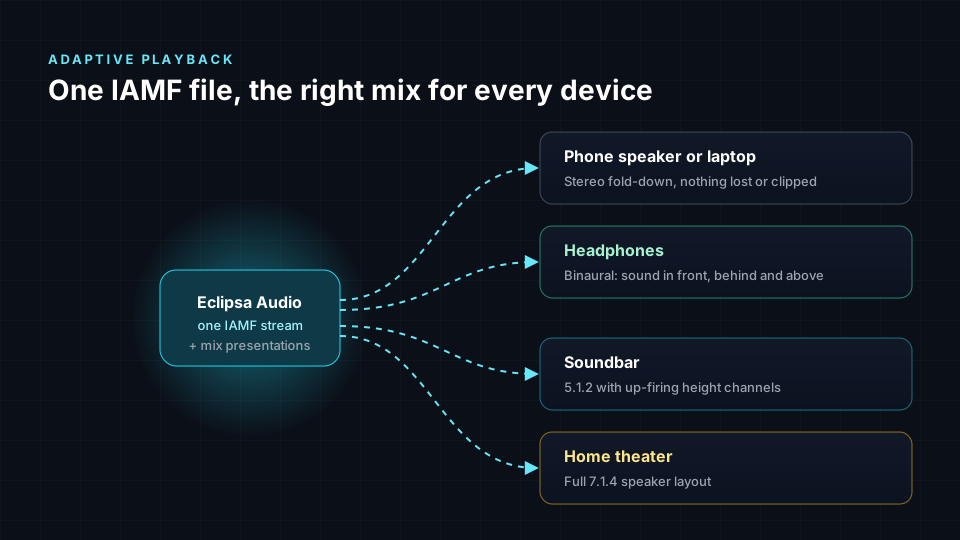
That is why the A/B switch in the player matters. A is roughly what a phone speaker, laptop or non-immersive player gives you. B is what an immersive-aware player gives you on headphones. A good Eclipsa Audio mix has to work in both, and hearing them back to back is the fastest way to check.
What is inside an IAMF file
IAMF builds a scene from audio elements. Each one is either channel-based or scene-based (and, from version 2.0.0, object-based):
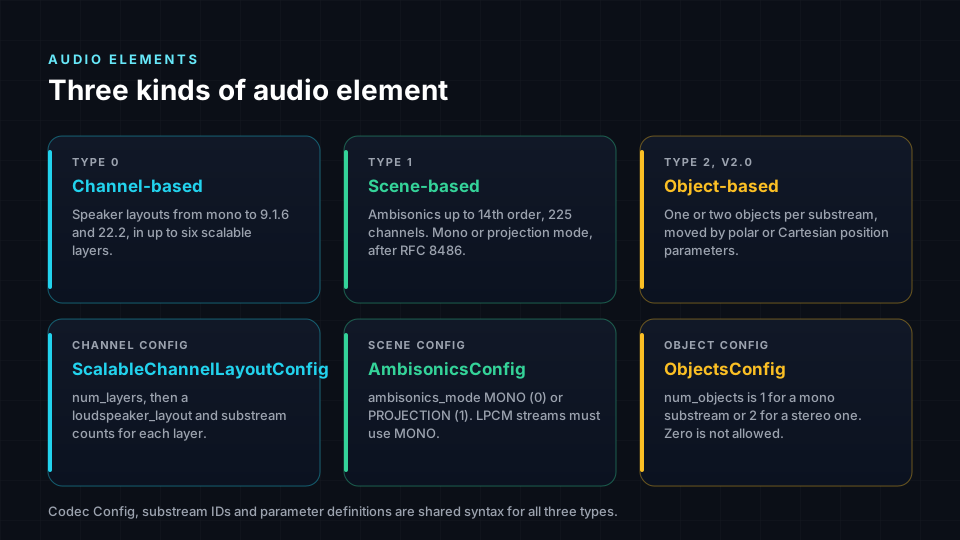
- Channel-based elements are classic speaker layouts, from mono and stereo up to 5.1.4, 7.1.4 and 9.1.6. IAMF can stack them in scalable layers, so one stream can serve stereo and 7.1.4 at the same time.
- Scene-based elements are ambisonics: a full sphere of sound described by 4 channels (first order), 9 (second), 16 (third) or more. The animated sample in the player is third-order, 16 channels. Our guide to ambisonics explains how that works.
- Mix presentations say how elements are combined, at what loudness, and how to render them, including whether headphones should hear stereo or binaural.
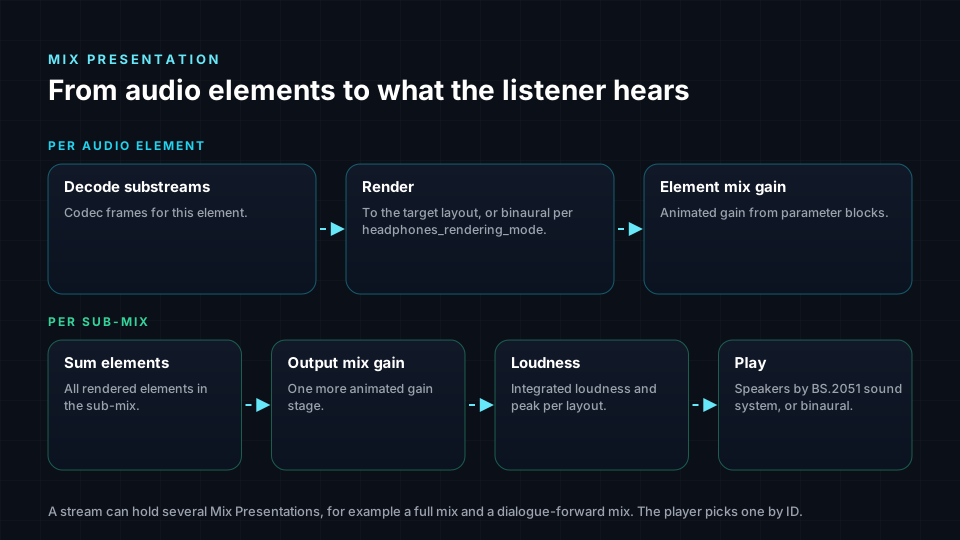
The player shows you this information too. Open a file and the side panel lists the IAMF profile, codec, sample rate and every audio element it found.
Stereo vs binaural: what to listen for
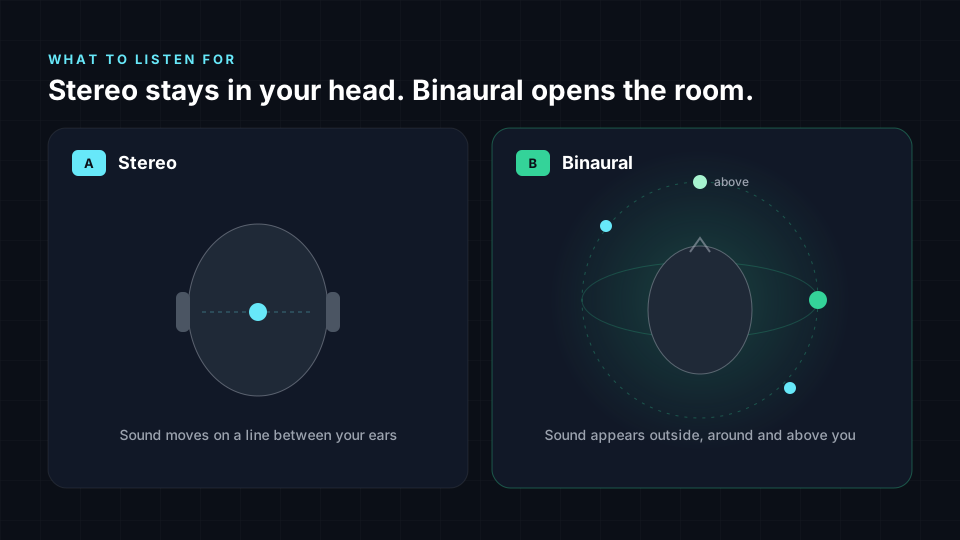
With headphones on, switch between A and B a few times and listen for:
- Externalisation. Stereo often sounds like it is inside your head. Binaural should feel like it comes from a space around you.
- Direction. In the 7.1.4 callout, rear and height speakers should sound behind and above, not just "a bit to the side".
- Movement. In the animated sphere, sounds should pass behind you and overhead.
- Fold-down health. In stereo, nothing should vanish, get louder or clip. If it does, the mix has a translation problem.
Binaural perception varies from person to person, so if the effect is subtle for you, try closing your eyes and focusing on the rear and height positions. Our article on 8D vs binaural vs spatial audio explains why.
Spatial9 IAMF player vs the iamf-tools web demo
The Alliance for Open Media publishes an excellent IAMF binaural web demo, built from the iamf-tools reference decoder compiled to WebAssembly. It is the reference, and it is the right tool for spec testing. Our player is built for a different job: quickly hearing and checking real files.
| Feature | Spatial9 IAMF web player | iamf-tools web demo |
|---|---|---|
| Runs in the browser, no upload | Yes | Yes |
| Standalone .iamf and MP4 | Yes | Yes |
| Opus, FLAC, LPCM | Yes | Yes |
| AAC-LC inside IAMF | Yes | No |
| Starts playing | In seconds, decodes as it plays | After the whole file is rendered to WAV |
| Stereo vs binaural switch | Instant A/B, keyboard A and B | Stereo and binaural buttons after rendering |
| Live channel visualisation | Yes, 7.1.4 stage with level meters | Waveform |
| File details | Profile, codec, audio elements | In the browser console |
| Quality check | BS.1770 loudness, true peak, clipping, silence, report download | No |
| Loudspeaker layout export and mix presentation selection | No | Yes, plus WAV download |
| Binaural renderer | Spatial9 virtual 7.1.4 room | Google OBR |
If you need a specific loudspeaker layout as a WAV file, or a particular mix presentation, use the reference demo. If you want to hear an Eclipsa Audio file right now and know whether it is healthy, use the player on this page.
What the IAMF player supports
- Files: standalone .iamf bitstreams and MP4 files with an IAMF track. Other audio and video files also open, so you can compare against a stereo or surround master.
- Codecs: Opus, AAC-LC, FLAC and LPCM.
- Elements: channel-based layouts up to 9.1.6 and scene-based ambisonics. If a file uses a second codec configuration, those elements are skipped in the preview and the player tells you.
- Browsers: recent Chrome, Edge and Firefox on desktop. Compressed IAMF needs the browser's WebCodecs audio decoder. LPCM files play everywhere.
- Size: very large files are limited by your browser's memory. A few hundred megabytes is usually fine.
It is a preview player, not a reference renderer or a platform certification tool. For a final check of a YouTube upload, follow our Eclipsa Audio on YouTube guide.
How to make your own Eclipsa Audio files
If you do not have an IAMF file yet, there are three common routes:
- From a Dolby Atmos master. Our free ADM to Eclipsa converter turns an Atmos ADM BWF into an Eclipsa Audio file and a YouTube-ready MP4. The step-by-step conversion guide covers the details.
- From stereo songs or stems. Spatial9 creates an immersive mix and exports it as Eclipsa Audio with loudness and binaural settings handled for you.
- With the reference tools. iamf-tools encodes WAV or ADM into IAMF using textproto configuration files. Our deep dive shows how.
Then drop the result into the player above to hear it, or into the file checker to see exactly what it declares.
FAQ
What is an IAMF web player?
An IAMF web player is a web page that decodes and plays Immersive Audio Model and Formats files, the format behind Eclipsa Audio, directly in a browser. The Spatial9 IAMF web player above does this for free, without uploading your file, and lets you compare stereo and binaural playback.
Is there a free Eclipsa Audio demo I can listen to?
Yes. The player on this page includes three official samples from the Alliance for Open Media: a 7.1.4 speaker callout in Opus, the same callout in lossless FLAC, and an animated third-order ambisonics scene. Use headphones and switch to binaural to hear the full effect.
Can I play my own IAMF or Eclipsa Audio file in the browser?
Yes. Drag a .iamf file or an MP4 with an IAMF audio track onto the player, or click Choose a file. It is decoded on your device and never uploaded.
What is the difference between Eclipsa Audio and IAMF?
They are the same technology at different layers. IAMF is the open specification from the Alliance for Open Media. Eclipsa Audio is the consumer brand Google and Samsung use for it on YouTube, TVs and soundbars.
Why does the IAMF player sound better on headphones?
The binaural mode uses head-related filtering to place sounds outside your head, in front, behind and above. That only works when each ear gets its own signal, which headphones provide and speakers do not.
Which browsers support the Eclipsa Audio player?
Recent desktop versions of Chrome, Edge and Firefox work best, because compressed IAMF needs the browser's WebCodecs audio decoder. Uncompressed LPCM IAMF files play in any modern browser.
Does the IAMF player support AAC?
Yes. Unlike the iamf-tools web demo, the Spatial9 IAMF web player decodes IAMF files whose audio is AAC-LC, as well as Opus, FLAC and LPCM.
Is my file uploaded when I use the IAMF demo?
No. The whole decoder runs inside your browser tab. The file is read from your device and nothing is sent to a server.
Sources
- IAMF specification, Alliance for Open Media. Immersive Audio Model and Formats.
- iamf-tools, AOMediaCodec. Reference encoder, decoder and the source of the sample files, BSD 3-Clause Clear License.
- IAMF binaural web demo, AOMediaCodec. Reference browser decoder with the OBR binaural renderer.
- Introducing Eclipsa Audio: immersive audio for everyone, Google Open Source Blog, January 2025.
- WebCodecs API, MDN Web Docs.
Hear your own mix in Eclipsa Audio
Have a stereo song, stems or a Dolby Atmos master? Spatial9 turns it into Eclipsa Audio for YouTube, binaural for headphones and an archive master, then you can check it right here. Try your current files or convert an Atmos mix for free.
Sample audio copyright the Alliance for Open Media, redistributed under the BSD 3-Clause Clear License. Eclipsa Audio and all other names are trademarks of their respective owners. Spatial9 is not affiliated with or endorsed by the Alliance for Open Media or Google.