Sound for Picture: How AI Makes Video Audio Immersive
Spatial9 Team ·
Lesson 11 of 14 in Spatial9 Academy, module 3: Hands-on labs. Practice in the demo: Video Transformation.
Close your eyes during a great film scene and you can still feel the room. Rain falls above you. A car passes from left to right. The music seems to come from everywhere at once, yet every word of dialogue stays clear.
That feeling is not an accident. It is the result of hundreds of small decisions about where each sound should live. Sound for picture has always been a craft of placement and restraint, and immersive formats give you a much bigger canvas to work with.
In this lesson, we move from music to moving images. You already know how to judge a spatial mix with your ears. Now you will learn how to make sound follow the picture, and how AI can help you get there faster without taking the creative decisions away from you.
What you will learn
- The seven core principles of immersive sound for picture.
- How to map the screen into three-dimensional space around the viewer.
- The ten creative techniques shown in the Spatial9 video demo, and what each one means in practice.
- Where AI helps in a video workflow, and where your judgment must stay in charge.
- How to evaluate an immersive video mix with a structured listening checklist.
From the screen to the space around you
In a stereo mix for video, everything lives on a line between two speakers. In an immersive mix, the screen becomes the front wall of a sphere. The viewer sits inside it. Your job is to decide what stays locked to the picture and what is free to surround the audience.
A useful way to think about this is a map. The screen is in front. Dialogue sits at its center. The score wraps around the room. Effects move with the action. The sides and the rear hold the parts of the world the camera does not show. Height sits above, ready for weather, wind, birds and room tone.
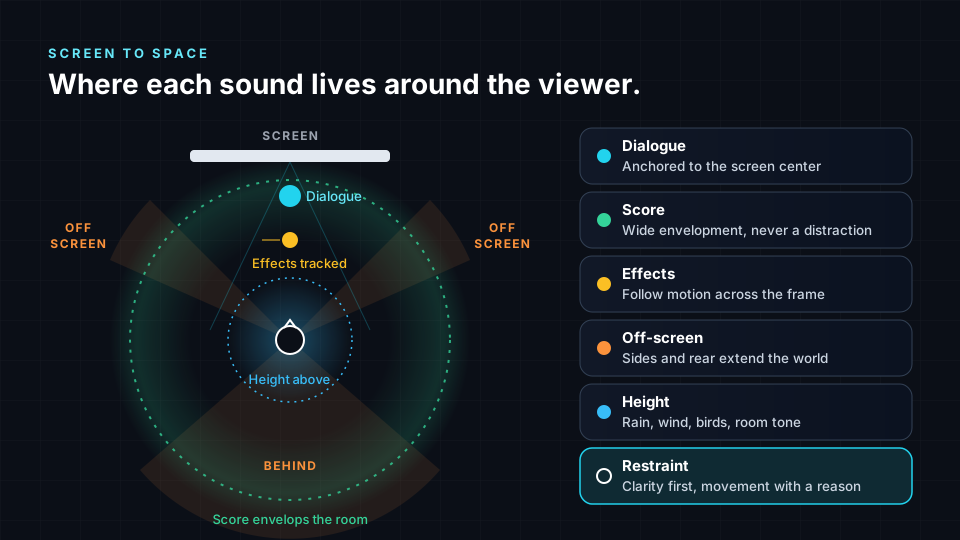
Here are the seven principles behind that map.
- Dialogue is anchored to the screen. Speech carries the story. Keep it at or near the center of the screen so the audience never has to search for it. Moving dialogue around the room is one of the fastest ways to confuse a viewer.
- Score is envelopment. Music can open up and surround the audience. It sets mood and scale. It should support the picture, not compete with the dialogue for attention.
- Effects follow motion. When a car crosses the frame, its sound should travel with it. When a door slams on the left of the image, the sound should come from the left. This link between eye and ear is what makes a scene feel real.
- Off-screen sound extends the world. A dog barking behind the viewer, a crowd to the side, traffic in the distance. Sounds the camera cannot see tell the audience that the world continues beyond the frame.
- Perspective follows the camera. When the shot changes, the listening position can change too. A close-up and a wide shot of the same scene may call for different placement and distance. Handle cuts with care, because sudden jumps in the sound field can feel jarring.
- Height carries atmosphere. Overhead space is ideal for rain, wind, birdsong, ceiling reflections and the subtle tone of a room. Used gently, height adds depth without pulling focus.
- Restraint keeps it clear. Not every sound needs to move. Not every scene needs full envelopment. Clarity comes first, and movement should always have a reason.
How AI helps sound follow the picture
Placing every sound by hand in a long video is slow work. You watch a shot, find the source, draw a pan movement, check it against the next shot, and repeat. That is where AI can help.
In the Spatial9 video workflow, AI detects what is on screen and places score, dialogue and effects around the viewer so that sound follows the picture. The demo shows live object detection and tracking. As an object moves in the frame, the system can follow it and suggest where its sound should sit.
This does not replace the sound designer or the mixer. It gives you a strong first draft to react to. You still decide whether a sound should move, how far it should travel, and whether the scene calls for intimacy or scale. The AI proposes. You judge.
That human role matches what you learned earlier in the course. You write the creative brief. You judge the source material. You listen critically. You decide on revisions. You approve the delivery. If you need a refresher on that loop, revisit The Spatial9 Approach and Lab: Critical Listening.
When the mix is done, the video demo lists the same open deliverables you have seen elsewhere in the course: ADM, Eclipsa Audio (IAMF), binaural and Ambisonics. Binaural lets anyone hear the result on headphones. Eclipsa Audio is accepted by YouTube, which makes it a practical target for creators. Our guide Eclipsa Audio for YouTube creators explains that path in detail.
The ten creative techniques
The video demo describes its artistic approach through a set of creative techniques. Each one is a principle you can apply yourself, with or without AI. Learn them as a vocabulary. When you review a mix, you can name what is working and what is not.
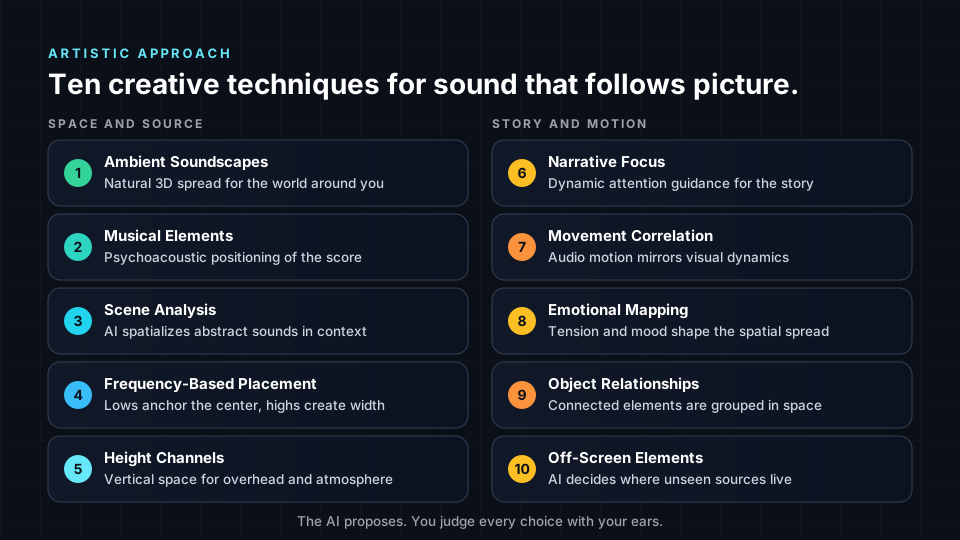
Space and source
- Ambient Soundscapes. Natural 3D audio spread. Backgrounds such as forests, cities and rooms are spread around the viewer so the environment feels continuous.
- Musical Elements. Psychoacoustic positioning. Score and musical layers are placed using how we perceive direction and distance, so music feels wide without masking speech.
- Scene Analysis. AI spatializes abstract sounds. Not every sound has a visible source. Drones, risers and textures still need a home, and scene analysis helps choose one that suits the moment.
- Frequency-Based Placement. Low frequencies anchor the center and high frequencies create width. This keeps the foundation stable while the top end opens up the space.
- Height Channels. Vertical space for overhead elements and atmosphere. Weather, flyovers and room tone gain a sense of air.
Story and motion
- Narrative Focus. Dynamic attention guidance. Sound can gently lead the eye to what matters in the scene, for example by bringing an important sound forward as a character turns toward it.
- Movement Correlation. Audio motion mirrors visual dynamics. Fast cuts and fast motion can carry more movement in the sound field, while calm shots stay still.
- Emotional Mapping. Tension and mood influence spatial spread. A tense moment might narrow and press in. A moment of release might open wide.
- Object Relationships. Connected elements are grouped spatially. A band on stage, a group of people talking, a car and its engine all belong together.
- Off-Screen Elements. AI determines the position of unseen sources. A voice calling from outside the frame needs a believable direction, and that direction should stay consistent across cuts.
Perspective, cuts and the art of restraint
Camera cuts are where immersive mixes most often go wrong. Picture a dialogue scene shot from two angles. If you move the voices around the room every time the camera flips, the audience feels the sound jumping. Most mixers keep dialogue steady at the screen and let the backgrounds and effects carry the change of perspective.
Here are a few practical habits to build.
- Decide what is locked and what is free. Before you mix a scene, list which elements stay with the screen and which can surround the viewer.
- Smooth the transitions. When the perspective changes, shift ambience and reverb gradually rather than snapping them.
- Give movement a motive. Ask what on screen justifies a moving sound. If you cannot answer, keep it still.
- Protect intelligibility. Check dialogue clarity on headphones and on a simple speaker setup. If the words get harder to follow, pull the surround elements back.
- Use height sparingly. A little overhead atmosphere goes a long way. Too much can make a scene feel detached from the picture.
These habits apply whether you mix by hand or start from an AI draft. In fact, they matter more with AI, because a system that can move every object will happily do so. Your taste decides when to hold back. For more on making everyday video sound bigger, read How to make YouTube videos sound cinematic.
A listening checklist for immersive video
Use this checklist every time you review an immersive video mix. Watch the scene once for story, then again for each line.
| Check | What to listen for |
|---|---|
| Dialogue anchor | Is every line clear and attached to the screen? |
| Score balance | Does the music surround you without masking speech? |
| Motion match | Do moving sounds follow what you see, in direction and timing? |
| Off-screen logic | Do unseen sources stay in a consistent place across cuts? |
| Height use | Does overhead sound add air without pulling focus? |
| Restraint | Is there any movement without a reason? |
| Translation | Does it still work on binaural headphones? |
Try it in the demo
The video demo is marked Early access and is invite-only. Here is how to explore what is visible and what to listen for.
- Open /demo/video. You can also reach it from the demo hub at /demo.
- Read the tagline, "Sound that follows the picture", and the summary. Note the status badge so you know this is an early access workflow.
- In the "Live demo" section, wait for the "Loading AI Detection Engine..." step to finish, then press the play button.
- Put on headphones. Use the "Spatial" toggle to switch between the plain and the spatial version while watching. The "Live spatialization" view shows the live object detection and tracking at work.
- As you toggle, apply the listening checklist above. Does dialogue stay anchored? Do effects move with the objects being tracked?
- Scroll to "How It Works" and read how the stages connect.
- Open "Artistic Approach". Under "Creative Techniques", match each technique to a moment you heard. Under "Artistic Direction", note how the creative intent is described.
- Check the stats labels: Processing (live object detection and tracking) and Output (ADM, Eclipsa Audio (IAMF), binaural, Ambisonics). These are the deliverables "Included in early access".
Key terms
| Term | Meaning |
|---|---|
| Sound for picture | Audio created to support moving images, including dialogue, music and effects. |
| Dialogue anchor | Keeping speech locked to the screen, usually the center, so it is always easy to follow. |
| Envelopment | The feeling of being surrounded by sound, often created by the score and ambience. |
| Off-screen sound | Sound from sources the camera does not show, used to extend the world. |
| Object detection and tracking | AI that finds objects in the frame and follows their position over time. |
| Movement correlation | Matching the motion of a sound to the motion seen on screen. |
| Height channels | Overhead positions used for atmosphere and elements above the viewer. |
Check your understanding
- Why is dialogue usually anchored to the center of the screen?
- What is the difference between an effect that follows motion and an off-screen element?
- What does frequency-based placement suggest about low and high frequencies?
- Why are camera cuts a risk in immersive mixing?
- In an AI-assisted video workflow, which decisions remain yours?
Answers
- Dialogue carries the story. Keeping it at the screen center means the audience never has to search for it, and it stays clear when the rest of the mix opens up.
- An effect that follows motion has a visible source and travels with it. An off-screen element has no visible source and is placed to extend the world beyond the frame.
- Low frequencies anchor the center for stability, while high frequencies can be spread to create width.
- If sounds jump position at every cut, the sound field feels unstable. Keeping dialogue steady and shifting ambience smoothly avoids this.
- You write the brief, judge the source, listen critically, decide revisions and approve delivery. The AI drafts placement, but you decide what stays.
Assignment
Pick a 60 to 90 second video clip that you have the rights to use, ideally with dialogue, some movement and at least one off-screen sound. Create a spatial plan for it. Your deliverable is a one-page document with three parts. First, a screen-to-space map for the clip, drawn by hand or digitally, showing where dialogue, score, effects, off-screen sounds and height elements will sit. Second, a shot-by-shot table naming which of the ten creative techniques you would apply and why. Third, a short note on two places where you chose restraint over movement. If you have access to an immersive mixing tool, add a binaural render of your plan. Keep the document in your portfolio, because it shows how you think, not just what you can operate.
Frequently asked questions
Do I need a full speaker setup to learn immersive sound for picture?
No. You can start on good headphones with binaural monitoring, which is how most viewers on phones and laptops will hear your work anyway, and then check on speakers whenever you get access to a studio.
Will AI replace sound designers and re-recording mixers?
AI can speed up repetitive work such as tracking objects and drafting placement, but the creative choices about story, emotion, clarity and restraint still need a trained listener, which is why we design our workflows around human review and approval.
Can I access the Spatial9 video demo right now?
The video workflow is in invite-only early access, so you can view the demo page and its live example, while full use of the workflow is limited to invited users for now.
Which format should I deliver for YouTube?
YouTube has accepted Eclipsa Audio (IAMF) since January 2025, so it is a strong target for immersive uploads, and a binaural version is a useful companion for listeners on headphones.
Next step
You now know how to make sound follow the picture. Next, we step back and look at why the formats you deliver in matter so much for your career. Continue to Open Formats and the Open Source Mindset, or return to the Spatial9 Academy course home to see the full path.