Lab 1: Critical Listening in a 3D Spatial Audio Engine
Spatial9 Team ·
Lab 8 of 14 in Spatial9 Academy, module 3: Hands-on labs. Practice in the demo: Music Transformation.
Every great immersive engineer has the same secret weapon. It is not a plugin, a speaker array or a faster computer. It is a trained pair of ears and a disciplined way of using them.
Critical listening is a skill, and like any skill it grows with practice. The difference between a beginner and a professional is rarely that the professional hears more. It is that the professional knows what to listen for, listens in a repeatable order, and writes down what they hear.
In the previous lessons you learned how the brain hears in 3D, how formats describe space, and how spatial inference lets GravityLLM propose where sounds should live. Now it is your turn. This is the first of three hands-on labs in Spatial9 Academy, and it gives you the listening method you will use in every lab that follows.
What you will learn
- How to prepare your body, your room and your headphones for a reliable listening session.
- A five-pass protocol that moves from the whole mix to single layers, A/B comparisons, formats and head tracking.
- Eight words that professionals use to describe space: position, width, height, distance, movement, envelopment, clarity and masking.
- How to fill in a listening worksheet and draw a top-down listening map.
- Why personal hearing differences matter, and how the Hearing Accessibility profile helps.
Why a protocol beats a vibe
The first time you hear a good immersive mix, it is easy to say "wow" and stop there. That reaction matters. It tells you something works. But "wow" is not a note you can act on, and it is not something a client, a director or a teammate can respond to.
A protocol turns a feeling into evidence. You listen to the same material, at the same level, in the same order, and you answer one question per pass. Then you can compare two mixes fairly, notice what changed after a revision, and explain your choices to someone else.
Protocols also protect you from your own brain. Your auditory system adapts quickly. After a few minutes, a sound that seemed wide can start to feel normal. A sound you expected to be above you may seem higher simply because you expect it. Structured passes, short breaks and written notes keep those biases in check.
The five-pass listening protocol
Before any pass, you prepare. Then you make five passes through the same track, each with a single focus.
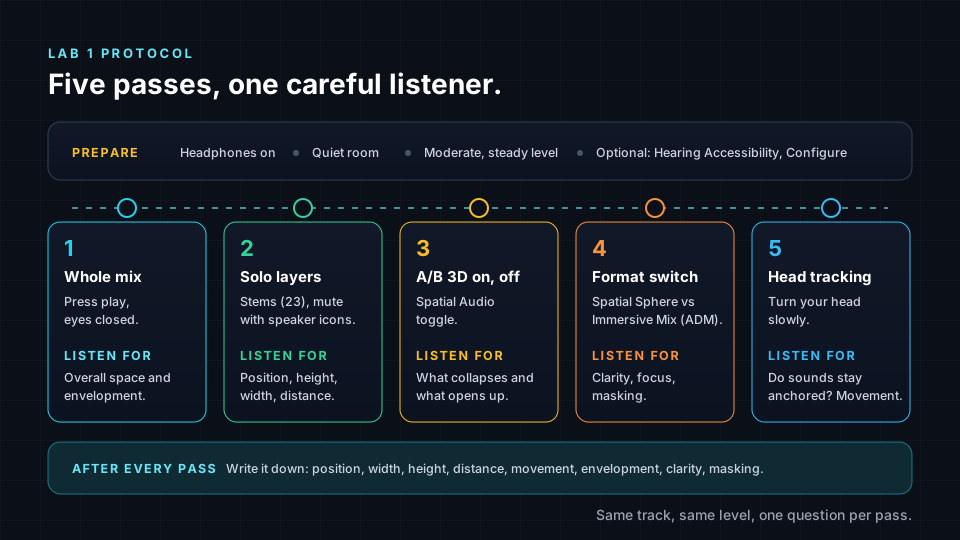
Prepare: headphones, quiet room, moderate level
Use headphones. Binaural rendering delivers its 3D cues straight to each ear, and loudspeakers in a normal room smear those cues. The demo itself shows the notice "Best Experienced with Headphones" for exactly this reason. Closed-back or open-back headphones both work. Earbuds work too, but write down which device you used, because it changes what you hear.
Find a quiet room. Background noise masks the quiet details that carry distance and height, such as reverb tails and soft high frequencies.
Set a moderate, comfortable level and leave it there for the whole session. Loudness changes perception. A louder version of a mix almost always sounds "better" for a moment, which makes fair comparisons impossible. A steady level also protects your hearing and reduces fatigue. Take a short break every 20 to 30 minutes and rest your ears in silence.
Pass 1: the whole mix
Press play, close your eyes and simply listen. Do not solo anything yet. Ask broad questions. Does the mix feel like it surrounds you? Is there a clear front? Does anything feel above you? Where does your attention go first?
This pass gives you your first impression, which is also the impression most listeners will have. Write three sentences before you move on.
Pass 2: solo layers
Now isolate. Mute everything except one stem or a small group, and listen to where it sits. Describe its position, height, distance and width. Then bring in a second stem and listen to how the two relate. Do they share space? Does one cover the other?
This pass is where you learn the most, because a dense mix hides details that a solo reveals instantly.
Pass 3: A/B Spatial Audio on and off
Switch 3D positioning off and on while the music plays. Listen for what collapses and what opens up. Many listeners notice that with 3D positioning off, the sound moves toward the inside of the head. With it on, sounds move outward and around you.
A/B comparison is one of the most powerful tools in audio. Your memory for small sonic details is short, so quick switching reveals differences that long, separate listens would miss.
Pass 4: format switch
The engine can present the same stems in two spatial formats. Compare them on the same section of the track. Listen for clarity, focus and masking. Does one format make individual sources sharper? Does one feel more enveloping? There is no single right answer. You are training yourself to hear how a format choice changes the experience.
If you want to refresh the theory, revisit Channels, Objects, Scenes and Binaural and Ambisonics Explained.
Pass 5: head tracking
Enable head tracking and turn your head slowly to the left and right. Do sounds stay anchored in space, or do they turn with you? Does front and back become easier to tell apart? As you learned in How We Hear in 3D, small head movements are one of the brain's best tools for resolving front-back confusion.
A vocabulary for space
Good notes need good words. These eight terms give you a precise, shared language. Use them in your worksheet, in feedback sessions and in your portfolio.
- Position. The direction a sound comes from, around you on the horizontal plane. A clock face works well: 12 is straight ahead, 3 is right, 6 is behind, 9 is left.
- Width. How much space a single source occupies. A narrow source sounds like a point. A wide source sounds like a curtain.
- Height. How far above or below ear level a sound seems to be.
- Distance. How near or far a sound seems. Remember that level is only one cue. Reverb and darker tone also push sounds away.
- Movement. Whether a sound travels, how fast, and along what path.
- Envelopment. The feeling of being inside the music rather than in front of it.
- Clarity. How easily you can follow each part and hear its detail.
- Masking. When one sound hides or blurs another, usually because they share frequencies and direction.
In stereo, two parts that share frequencies often fight for the same spot. In an immersive mix you can separate them by direction, height and distance. Learning to hear masking is the first step to fixing it.
The listening worksheet
Copy this worksheet into a notebook or spreadsheet. Add one column for each stem you analyze, then fill in every row during Pass 2. Use the other passes to add notes on what changed.
| Dimension | Question to ask | How to record it |
|---|---|---|
| Position | Where around me is it? | Clock face, 12 is front. |
| Width | Is it a point or a curtain? | Narrow, medium or wide. |
| Height | Is it below, at or above ear level? | Low, ear level, high or overhead. |
| Distance | How close does it feel? | Close, mid or far. |
| Movement | Does it travel, and how? | Static, slow or fast, plus the path. |
| Envelopment | Does it wrap around me? | Scale from 1 to 5. |
| Clarity | Can I follow its detail? | Scale from 1 to 5. |
| Masking | What hides it, or what does it hide? | Name the other stem. |
The top-down listening map
Numbers and words are useful. A picture is faster. Draw a circle on paper and imagine you are looking down at your own head from the ceiling. Front is at the top, rear at the bottom, left and right at the sides. Add rings for close, mid and far, and a small zone in the center for sounds you hear above you.
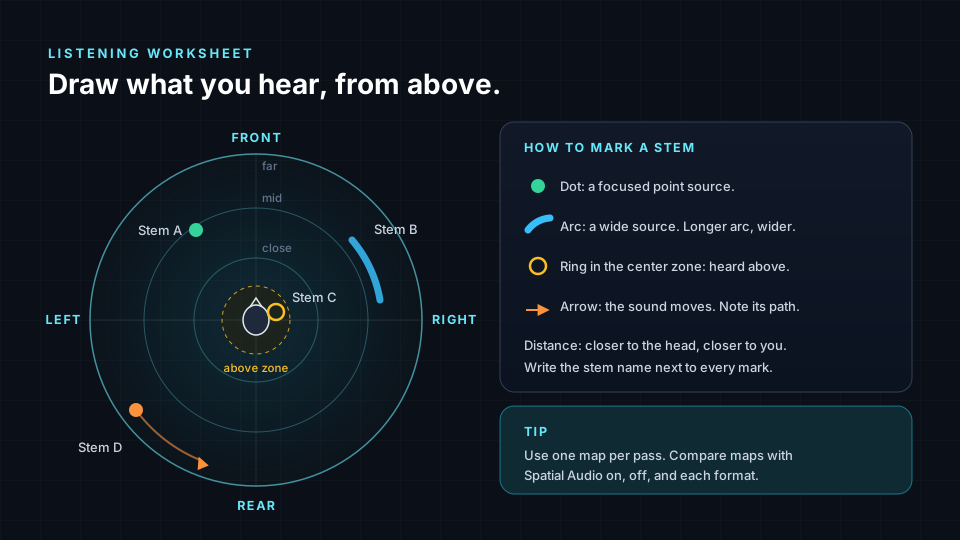
Mark each stem as you hear it. A dot is a focused point source. An arc shows a wide source. A ring in the center zone means you hear it above. An arrow shows movement and its direction. Write the stem name next to every mark.
Make one map per pass. When you lay your Spatial Audio on map next to your Spatial Audio off map, the difference becomes visible. It is a powerful way to show a teacher or a client what you hear.
Hearing is personal
No two listeners hear exactly alike. Ear shapes differ, so HRTFs differ. Hearing sensitivity differs too, and it changes over a lifetime. Two students can hear the same mix and honestly disagree about whether a sound is above them.
That is not a failure. It is a reason to compare notes and to describe your setup. The demo includes a "Hearing Accessibility" banner with a "Configure" button that builds a personalized hearing compensation profile. Once you have one, you can switch it between Active and Inactive and refine it with "Edit Profile". Try a pass with it on and off, and note what changes for you.
Lab steps
Put on your headphones before you begin. The Music demo has the status Live, so everything below runs in your browser right now.
- Open /demo/music. Under "Choose a mode", select the tile "3D Spatial Audio". Notice the "Best Experienced with Headphones" notice.
- Optional but recommended: find the "Hearing Accessibility" banner and click "Configure" to build your personalized compensation profile. You can return later with "Edit Profile" and switch it between Active and Inactive.
- Look at the panel "3D Spatial Audio Engine". It shows "23 stems · 125 BPM · Real-time 3D positioning" and the overlay "Electronic Dance Music". Under "Spatial Format", select "Spatial Sphere" to start.
- In "Master Controls", set "Volume" to a comfortable, moderate level. The default is 80%. Do not change it again during the session.
- Press play. You will see "Loading..." while the stems load. Then the 23 stems loop and move around you.
- Pass 1: listen to the whole mix for two minutes with your eyes closed. Write three sentences about your first impression and draw your first listening map.
- Pass 2: in the "Stems (23)" list, use the speaker icons to mute every stem except "Reese Bass". Fill in its worksheet column. Repeat for "Pad", "Atmosphere", "Synth Lead", "Synth Arp", "Pluck 1", "Impact 1" and "Riser". Click a stem to select it and use its volume slider to hear how level alone changes the sense of distance.
- Still in Pass 2, unmute pairs that might compete, such as "Synth Lead" with "Synth Arp", or "Pad" with "Synth Pad". Listen for masking. Note whether their positions keep them clear.
- Pass 3: unmute all stems. Switch the "Spatial Audio" toggle off for 20 seconds, then on for 20 seconds. Repeat three times. Write down what collapses and what opens up.
- Pass 4: change "Spatial Format" to "Immersive Mix (ADM)", which is channel and object-based. Listen to the same section again. Then switch back to "Spatial Sphere", which uses Higher-Order Ambisonics (HOA). Compare clarity, focus, envelopment and masking.
- Pass 5: use the head tracking control below the 3D view. Turn your head slowly left and right. Listen for whether sounds stay anchored and whether front and back become clearer.
- Press "Stop". Rest your ears for a few minutes, then read your notes and finish your maps.
Key terms
| Term | Meaning |
|---|---|
| Critical listening | Focused, structured listening with a specific question and written notes. |
| Listening protocol | A repeatable order of listening passes, used to compare mixes fairly. |
| A/B comparison | Switching quickly between two versions to reveal differences. |
| Solo | Listening to one stem or a small group while the rest are muted. |
| Masking | When one sound hides or blurs another, often because they share frequencies and direction. |
| Envelopment | The sense of being surrounded by and inside the sound. |
| Higher-Order Ambisonics (HOA) | A scene-based format that describes the full sphere of sound, used by "Spatial Sphere". |
| Hearing compensation profile | A personal setting that adjusts playback to your own hearing. |
Check your understanding
- Why should you keep the playback level the same for the whole session?
- What is the difference between width and envelopment?
- Why is quick A/B switching more reliable than two long, separate listens?
- Name two ways an immersive mix can reduce masking between two parts.
- Why might two students describe the height of the same stem differently?
Answers
- Louder playback tends to sound better for a moment, which biases comparisons, and a steady moderate level also reduces fatigue and protects your hearing.
- Width describes how much space a single source occupies, while envelopment describes how much the whole mix surrounds you.
- Memory for small sonic details is short, so fast switching lets you compare while both versions are fresh.
- By separating the parts in direction or height, and by placing them at different distances.
- Ear shapes and HRTFs differ, hearing sensitivity differs, and headphones differ, so perceived height varies between listeners.
Assignment
Produce a "critical listening report" on the demo track. Include your notes from all five passes, a completed worksheet for at least eight stems, and three listening maps: Spatial Audio on, Spatial Audio off, and your preferred spatial format. Finish with one paragraph on masking, naming one pair of stems that competed and how their placement helped or did not help, and one paragraph on how head tracking changed your perception. State your headphone model and whether you used a hearing compensation profile. Deliver it as a PDF for your portfolio.
Frequently asked questions
Do I need studio headphones for this lab?
No, any comfortable pair of headphones or earbuds will work, but use the same device for the whole session and write down which one it is, because different headphones present the same mix differently.
Why does the mix sound different every time I listen?
Your ears adapt, your attention shifts and fatigue builds up, which is exactly why a fixed protocol, a steady level, short breaks and written notes make your judgments more reliable.
Which spatial format is better, Spatial Sphere or Immersive Mix (ADM)?
Neither is better in every case, because each represents space in a different way, so the goal of this lab is to hear the difference yourself and describe it with precise vocabulary.
What if I cannot hear anything above me?
Height is the hardest direction to perceive over headphones and varies a lot between listeners, so try head tracking, solo bright stems such as "Synth Arp" or "Riser", and record honestly what you hear rather than what you expect.
Next step
You now have a method and a vocabulary. In the next lab, Lab 2: Shape an Immersive Mix With Your Hands and Voice, you will stop only listening and start performing, moving sound with gestures and voice. You can always return to the Spatial9 Academy course home to see the full path.