Free Online Immersive Audio Player: Play ADM, Eclipsa Audio (IAMF), Dolby Atmos Files, WAV, MP4, Opus and 50+ Formats
Spatial9 Research Team · · Updated · 8 min read
Key takeaways
- Spatial9 Try Your Files is a free web player and inspector for more than 50 audio and video formats, and it runs entirely in your browser: nothing is uploaded.
- ADM BWF, BW64 and RF64 masters open in a 7.1.4 virtual room with every bed and object moving live, the same master format Dolby Atmos music is delivered in.
- Eclipsa Audio (IAMF) files, including Opus, FLAC and LPCM profiles, and ambisonics open in a stereo versus binaural A/B so you can hear what headphone listeners will get.
- Encoded deliverables such as E-AC-3, AC-3, TrueHD, MLP and DTS play their channel bed; the objects inside those codecs need licensed decoders, so check the ADM master instead.
- Everyday files such as WAV, PCM, MP3, AAC, M4A, Ogg, Opus, FLAC, AIFF, CAF, MP4, MOV, MKV, WebM, WMA, DSD and MIDI are inspected, quality checked and routed to the right next step.
- Every check includes container, codec, channel layout, spatial metadata, integrated loudness (ITU-R BS.1770), true peak, clipping, DC offset and silent channels.
Most people who search for "Dolby Atmos player online", "ADM player", "IAMF player" or "play 7.1.4 in browser" have the same problem. They have a file on their drive, a client or a deadline, and no idea what is really inside it. Desktop tools are expensive, renderers need a studio, and most web players simply fold everything down to stereo without telling you.
We built the Spatial9 web player to fix that in one drop. This guide explains which formats it accepts, what you will hear for each one, and how to read the results.
Spatial9 File Inspector and 7.1.4 Player
A free interactive tool that runs in your browser and never uploads your file. It reads WAV, BWF/ADM (RF64, BW64), W64, AIFF, CAF, FLAC, MP3, AAC, Ogg, Opus, MP4, MOV, MKV, WebM, IAMF, AC-3, E-AC-3, DTS, WMA, DSD and more, and reports:
- Container, duration, sample rate and channel count
- The declared speaker layout (WAVE_FORMAT_EXTENSIBLE channel mask)
- ADM metadata (chna and axml chunks), audio objects and programme names
- IAMF profile, codec, audio elements and mix presentations
- 360 degree video and ambisonic audio metadata
ADM, Dolby and surround files open in a 7.1.4 player that shows beds and objects moving live, on headphones or 12 discrete outputs. Eclipsa Audio (IAMF) and ambisonic files open in a stereo versus binaural A/B player. Stereo, mono and video files get a plain explanation and the right next step. Full page: Try your current files. An optional quality check measures BS.1770 loudness, true peak, clipping, silence and DC offset, with a downloadable report.
It is a preview, not a reference monitor, and it cannot guarantee platform playback.
Which audio formats does the web player support?
The player accepts more than 50 file types, grouped into five families. Each family opens the listening experience that makes sense for it.
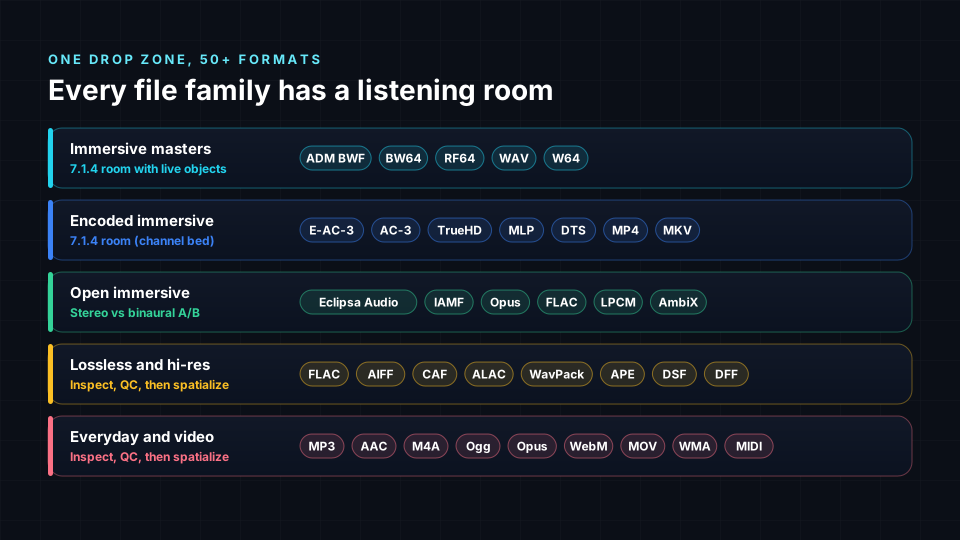
| Family | Formats and extensions | What opens |
|---|---|---|
| Immersive masters | ADM BWF (.wav, .bwf), BW64 (.bw64), RF64 (.rf64), Wave64 (.w64) | 7.1.4 room with live beds and objects |
| Encoded immersive and surround | E-AC-3 / Dolby Digital Plus (.ec3, .eac3), AC-3 (.ac3), TrueHD (.thd), MLP (.mlp), DTS (.dts), plus MP4, MOV and MKV that carry them | 7.1.4 room playing the channel bed |
| Open immersive | Eclipsa Audio / IAMF (.iamf, .mp4) with Opus, FLAC or LPCM, ambisonics (AmbiX, FuMa) in WAV, CAF or Ogg | Stereo vs binaural A/B |
| Lossless and hi-res | WAV / PCM, FLAC, AIFF / AIFC, CAF, ALAC (.m4a), WavPack (.wv), Monkey's Audio (.ape), TTA, DSD (.dsf, .dff), AU / SND | Inspect, quality check, spatialize |
| Everyday and video | MP3, MP2, AAC / ADTS, M4A, M4B, Ogg Vorbis (.ogg, .oga), Opus, Speex (.spx), WebM / WebA, Matroska (.mka, .mkv), WMA / ASF, Musepack (.mpc), AMR, 3GP, 3G2, MP4, MOV, MIDI (.mid, .midi) | Inspect, quality check, spatialize |
If your file is not in the list, drop it anyway. The inspector reads the file structure rather than trusting the extension, so a renamed WAV or an MP4 with an unusual brand is still identified correctly.
How do I play a Dolby Atmos or ADM file online?
Dolby Atmos music is delivered as an ADM BWF master: a broadcast WAV (often BW64 or RF64 for large files) that carries the audio plus an XML description of every bed and object, stored in the axml and chna chunks. That XML is the Audio Definition Model, an open ITU standard (ITU-R BS.2076).
Drop an ADM BWF into Try Your Files and the player:
- Reads the ADM metadata and lists every bed, object, channel and programme.
- Opens a 7.1.4 virtual room in which each object moves along its real automation.
- Renders the room to your headphones so you can hear the placement without a speaker system.
This is the fastest way to answer the question every engineer gets from a client: "is this really immersive, or just stereo in a big file?" For the full picture of what sits inside, read Inside an ADM WAV file and What is an ADM BWF file?.
Can I play E-AC-3, AC-3, TrueHD or DTS files in the browser?
Yes, with one honest limit. Streaming and disc deliverables such as E-AC-3 (Dolby Digital Plus, including the JOC variant used for streaming Atmos), AC-3, TrueHD, MLP and DTS store immersive objects inside a licensed codec. Only licensed decoders can unpack those objects.
The Spatial9 player still identifies the codec, the channel layout and the bitrate, and plays the channel bed in the 7.1.4 room. If you need to hear the objects move, check the ADM BWF master the deliverable was made from. If you only have the encoded file and want an open version, our free ADM to Eclipsa Audio converter is the next step.
How do I play Eclipsa Audio (IAMF) files online?
Eclipsa Audio is built on IAMF (Immersive Audio Model and Formats), the open format from the Alliance for Open Media that YouTube plays. An IAMF file carries audio elements, which can be channel beds or ambisonic scenes, plus mix presentations that tell any device how to render them. The audio inside is coded with Opus, FLAC or LPCM.
Because IAMF adapts to the playback device, the useful test is not a speaker room. It is a comparison. The player opens an A/B between the stereo fold-down and the binaural headphone render, so you hear exactly what a phone speaker listener and a headphone listener will get. Raw .iamf bitstreams and IAMF inside MP4 are both supported. For a deeper look, see the Spatial9 Player for Eclipsa Audio and the IAMF technical deep dive.
What happens when I drop a WAV, MP3, MP4 or Opus file?
Most files on a drive are stereo or mono: WAV and PCM exports, MP3 and AAC masters for streaming, Opus voice notes, MP4 and MOV videos, FLAC and AIFF archives. They have no positions inside, so there is nothing to place in a room yet.
The player is honest about that. It tells you plainly what the file is, runs a full quality check and offers the one tool that turns it into an immersive release: the Spatializer for Music for songs, or the Spatializer for Video for clips. Ambisonic files and 360° videos are recognised separately, because their channels describe a full sound sphere rather than speakers. Learn more in Ambisonics explained.
What does the inspector check inside each file?
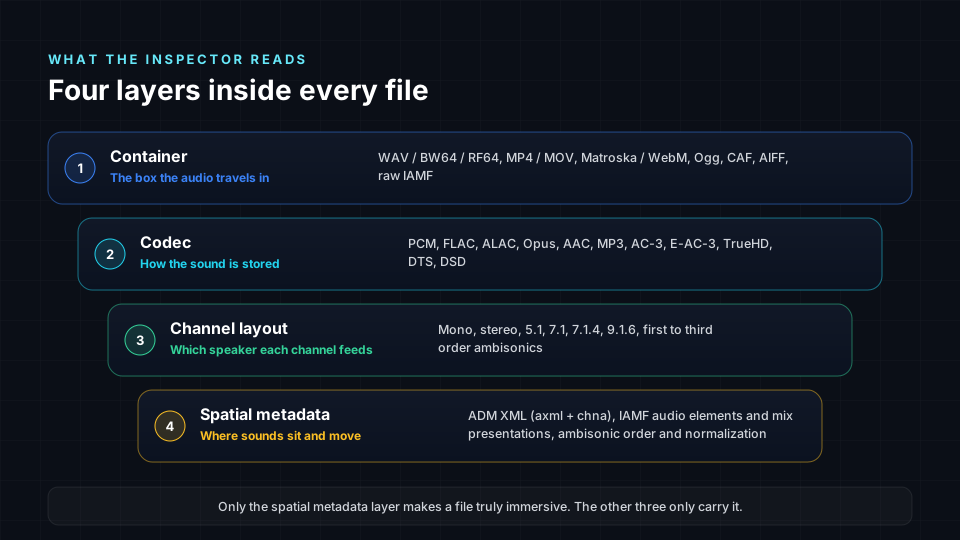
Every file gets the same four-layer reading, in plain words:
- Container: the box the audio travels in, such as WAV, BW64, RF64, MP4, MOV, Matroska, WebM, Ogg, CAF or a raw IAMF stream.
- Codec: how the sound is stored, from uncompressed PCM to FLAC, ALAC, Opus, AAC, MP3, AC-3, E-AC-3, TrueHD, DTS and DSD.
- Channel layout: mono, stereo, 5.1, 7.1, 7.1.4 or 9.1.6, or first to third order ambisonics.
- Spatial metadata: ADM XML, IAMF audio elements and mix presentations, or ambisonic order and normalization.
Then the quality check runs: integrated loudness following ITU-R BS.1770, true peak, clipping, DC offset and silent channels, with a report you can download and send to a client.
Is my file uploaded to a server?
No. Reading, decoding, rendering and checking all happen inside your browser tab.
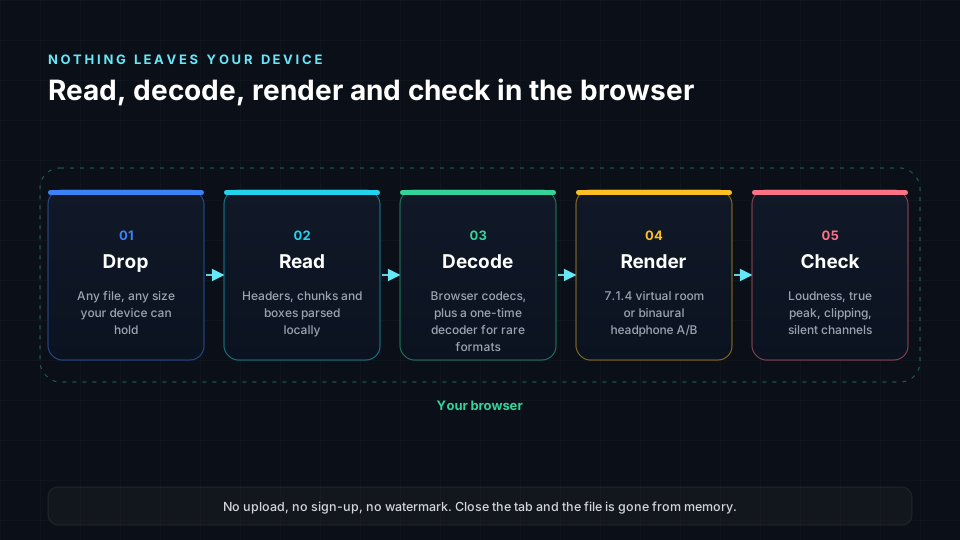
The only thing your browser may download is a one-time decoder for rare formats. Unreleased masters, client mixes and embargoed music stay on your device, which is why studios use it for quick checks before delivery.
Who uses an online immersive audio player?
- Mix and mastering engineers checking an ADM BWF or 7.1.4 bounce before it goes to a label or distributor.
- Labels and distributors confirming that a delivery is really immersive before it reaches Apple Music, Amazon Music, Tidal or YouTube.
- Video creators checking whether a downloaded MP4 or MOV carries surround, ambisonic or Eclipsa Audio sound.
- Producers and artists who want to hear a stereo song in 3D and need to know where to start.
- Developers testing IAMF, Opus and ADM output from their own pipelines.
Frequently asked questions
Is there a free Dolby Atmos player online?
The Spatial9 web player at Try Your Files is free and plays ADM BWF masters, the format Dolby Atmos music is delivered in, in a 7.1.4 virtual room on headphones. Encoded files such as E-AC-3 and TrueHD play their channel bed, because their objects need a licensed decoder.
Can I play a 7.1.4 or 5.1 WAV file in my browser?
Yes. Multichannel WAV, BW64, RF64, FLAC and CAF files open in a 7.1.4 room, and each channel is placed at its speaker position and rendered to headphones.
Does the player support IAMF and Eclipsa Audio?
Yes. Raw .iamf files and IAMF inside MP4 are supported with Opus, FLAC and LPCM audio, and open in a stereo versus binaural A/B comparison.
What is the difference between PCM, WAV and BWF?
PCM is the uncompressed audio itself. WAV is the container that usually holds it. BWF (Broadcast Wave) is a WAV with extra broadcast chunks, and ADM BWF adds the Audio Definition Model that describes immersive beds and objects.
Can it play Opus, MP3 and AAC files?
Yes. Opus, MP3, AAC, M4A, Ogg Vorbis, WMA and other compressed formats are inspected, quality checked and played. They are usually stereo, so the player points you to the Spatializer to make them immersive.
Do I need to sign up?
No. There is no account, no upload and no watermark. Drop a file and the result appears in seconds.
Try it with your own file
Your next immersive release may already be on your drive. Drop a file into Spatial9 Try Your Files and you will know in seconds what is inside, hear it the way it was meant to be heard, and see the fastest path to an immersive release.
Sources
- ITU-R BS.2076, Audio Definition Model: https://www.itu.int/rec/R-REC-BS.2076
- ITU-R BS.2088, Long-form file format for the international exchange of audio programme materials with metadata (BW64): https://www.itu.int/rec/R-REC-BS.2088
- ITU-R BS.1770, Algorithms to measure audio programme loudness and true-peak audio level: https://www.itu.int/rec/R-REC-BS.1770
- Alliance for Open Media, Immersive Audio Model and Formats (IAMF): https://aomedia.org/specifications/iamf/
- IETF RFC 6716, Definition of the Opus Audio Codec: https://www.rfc-editor.org/rfc/rfc6716