Export, Share and Deliver an Immersive Mix
Spatial9 Team · · 6 min read
Lesson 17 of 24 in Spatial9 Academy, module 3: Inside the Immersive Classroom. Practice in the demo: Music Transformation.
Key takeaways
- Binaural is the primary format for headphone listeners, and a Stereo Mixdown is the safety net for everyone else.
- Ambisonics orders 1 to 4 use 4, 9, 16 and 25 channels, following the rule (order + 1) squared.
- Surround layouts run from 3.1 to 9.1.6, and YouTube Eclipsa Audio renders an IAMF MP4 from MP4, MOV or WebM video.
- Share with class is free and carries positions and movements but not levels or effects; exports include effects by default.
A mix is not finished until someone else can hear it the way you intended. In immersive audio that is harder than in stereo, because the same scene can end up on headphones, in a living room with five speakers, in a cinema, in a VR headset or on YouTube. Each destination needs a different file.
In The language of formats you learned the theory of channels, objects and scenes. Now you will put it into practice with the Export your mix window.
What you will learn
- Who can export, and what free students can share instead.
- The four core formats and when to use each one.
- How Ambisonics orders differ in channels and detail.
- Which surround layout matches which room.
- How to render an Eclipsa Audio video for YouTube.
- What a Share with class link contains, and what it leaves out.
- How to plan a delivery checklist.
Who can export
Real file exports are part of the Student Pro plan, $9 per month with a verified school email, which also includes your own uploads and nine projects per month. Free students see a lock and a "Pro" label on the Export button. Everyone, free or Pro, can share a scene with Share with class, covered below.
Effects are included in exports by default, both the whole-mix chain and every stem chain. What you hear in the classroom is what you deliver.
The Export your mix window
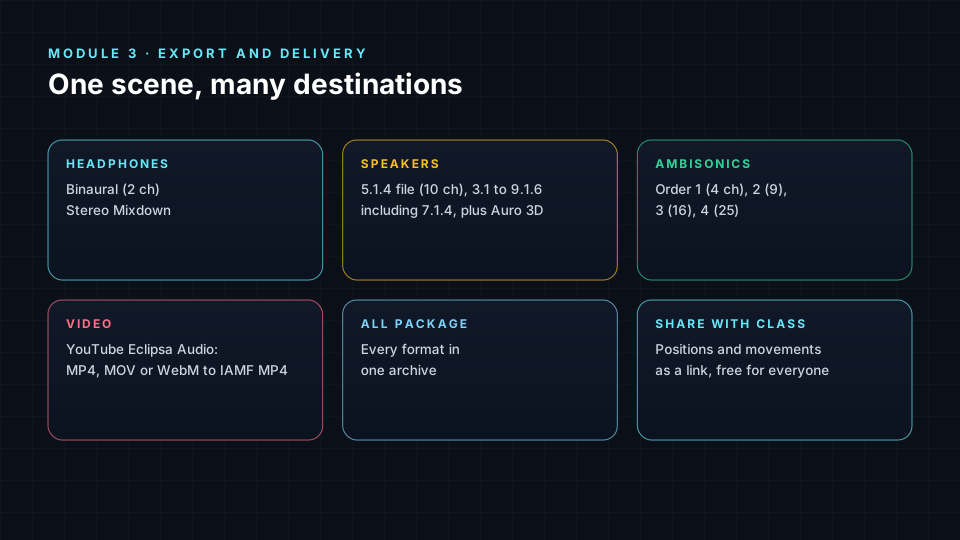
Core formats
| Format | Channels | Use it for |
|---|---|---|
| Binaural | 2 | Headphones: streaming, social posts, portfolios |
| Stereo Mixdown | 2 | Speakers or headphones where 3D is not supported |
| 5.1.4 Speaker File | 10 (WAV) | Rooms with five ear-level speakers, a sub and four ceiling speakers |
| Auro 3D | Layered | Auro-3D playback systems with a height layer |
Binaural is the format most of your audience will hear. It encodes the 3D scene into two channels using head-related cues, so it only works properly on headphones. The Stereo Mixdown is your safety net for everyone else. Always check both.
Ambisonics
Ambisonics describes the whole sound field around a point rather than individual speakers. It is the standard for VR and 360° video, because the field can be rotated as the viewer turns their head. Higher orders give sharper detail:
| Order | Channels | Character |
|---|---|---|
| 1 | 4 | Broad, light, widely supported |
| 2 | 9 | Noticeably sharper positions |
| 3 | 16 | Detailed, good for premium VR |
| 4 | 25 | Most detailed option in the classroom |
The channel count follows the rule (order + 1)². Choose the highest order your destination platform accepts.
Surround layouts
The Surround layouts group covers 3.1, Quad, 5.1, 7.1, 9.1, 5.1.2, 7.1.2, 7.1.4 and 9.1.6. Read the numbers as ear-level speakers, then LFE, then height speakers. 7.1.4 matches the 7.1.4 Studio you mixed in. 9.1.6 is for larger rooms with more height coverage. 5.1 and 7.1 are common in home theatres and many cinemas without height speakers.
When you export to a smaller layout, check that height content still makes sense. A sparkle you placed on the ceiling may sit on the front speakers in 5.1, which can crowd the lead.
YouTube Eclipsa Audio video
YouTube Eclipsa Audio video lets you attach your mix to a video. Press Choose video and select an MP4, MOV or WebM file, then Render video. The result is an IAMF MP4, a video file with an Immersive Audio Model and Formats soundtrack that YouTube can play as spatial audio. The YouTube & Eclipsa Audio Preview panel helps you check the result. This is ideal for portfolio pieces, because a link plays anywhere.
All package
All package creates every format at once and gives you Download archive. Use it for a client delivery or a final project submission, so the receiver can choose what they need.
Share with class
Share with class is free for everyone. It saves your stem positions and movements, not levels or effects, and creates a link like /education/mix/ followed by a code. Press Copy link and send it. When a classmate opens it, your scene is applied on top of Echoes in their own classroom.
Because it carries only the spatial scene, a share link is perfect for critique: everyone hears your placement and motion choices with the same source material, at their own level. If your idea depends on an effect, describe the effect in your message so classmates can add it.
The Arrangement timeline also has a Share button that shares the spatial sphere as a video, which is useful for showing movement visually.
Building a delivery checklist
- Who is listening, and on what? Headphones, speakers, VR or video.
- Primary format: the one most of your audience will hear.
- Safety format: usually a Stereo Mixdown.
- Check height: listen to how ceiling content folds in smaller layouts.
- Check peaks: confirm the Master clip light stayed off.
- Name files clearly: song, format and version.
- Listen to the delivered file, not the session.
Your certificate
After completing all lessons and labs in the Academy, you can claim your certificate from the Certificate tab of the classroom. It shows how many lessons you completed and can be verified online, which makes it a strong addition to a portfolio or CV.
Check yourself
- Which export format should you choose for most headphone listeners?
- How many channels does third-order Ambisonics use?
- What do the three numbers in 7.1.4 mean?
- What does a Share with class link include and leave out?
- Which video formats can you render into an Eclipsa Audio video?
Answers
- Binaural.
- Sixteen.
- Seven ear-level speakers, one LFE and four height speakers.
- It includes positions and movements, and leaves out levels and effects.
- MP4, MOV and WebM.
Assignment
Write a delivery plan for Echoes for three destinations: a streaming release on headphones, a 7.1.4 listening room and a 360° video. For each, choose a format, explain why, and list two checks you would make. If you have Student Pro, export the files; if not, share your scene with class and attach your plan.
Frequently asked questions
Which formats can I export from the Spatial9 classroom?
Student Pro users can export Binaural, Stereo Mixdown, a 5.1.4 speaker file, Auro 3D, Ambisonics orders 1 to 4, surround layouts from 3.1 to 9.1.6 including 7.1.4, and YouTube Eclipsa Audio video.
What is Eclipsa Audio?
Eclipsa Audio is the YouTube name for immersive audio in the open IAMF format, and the classroom can render your mix into an IAMF MP4 video from an MP4, MOV or WebM file.
Can free students share their mix?
Yes, Share with class is free and creates a link with your positions and movements that classmates can open on top of Echoes.
Are effects included in my export?
Yes, by default exports include both the whole-mix effect chain and each stem's chain, while share links carry only positions and movements.
Next step
You now know every tool in the classroom. Put them together in the hands-on labs, starting with Lab 1: Critical Listening in a 3D Spatial Audio Engine, or return to the Spatial9 Academy course home.
The full lesson is free with a Spatial9 account.