REST API reference
Authentication, resumable uploads, render jobs, status polling and downloads over HTTP.
The Spatializer REST API turns a set of stems into delivery masters over plain HTTP. One request can produce both a Dolby Atmos master and an Eclipsa Audio (IAMF) master, and a 5.1 MP4 demo rendition is available for local playback. Files are uploaded with the tus resumable upload protocol, processing is followed by polling a status endpoint, and masters are downloaded when they are ready.
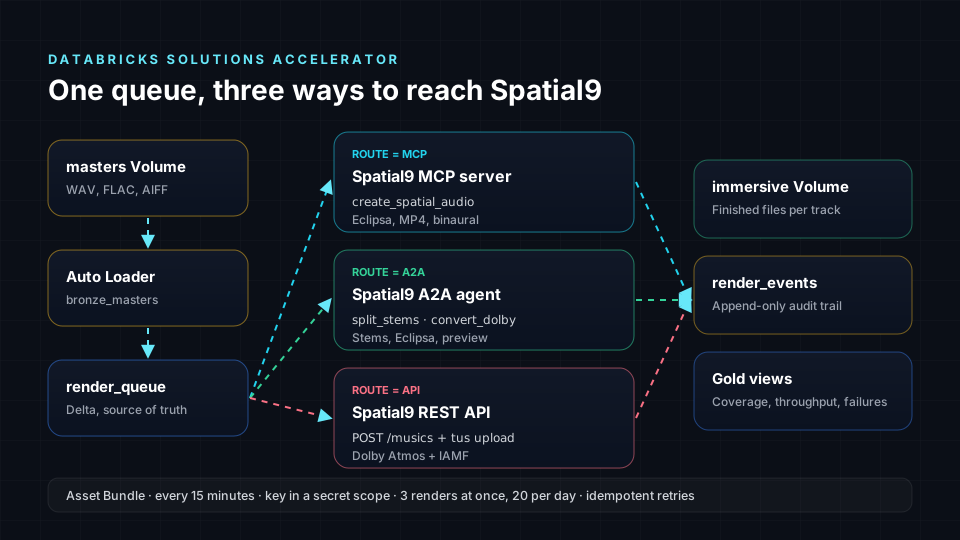
This page is for developers who embed immersive audio in their own product or pipeline. It documents the base URL, authentication, the catalog endpoints, music creation, resumable uploads, status polling, downloads and HTTP error codes. The REST API is separate from the MCP server and the A2A agent: it uses its own key and its own endpoints.
Base URL and versioning
| Item | Value |
|---|---|
| Base URL | https://api.spatializer.spatial9.ai/api/v0.0.1 |
| Version | v0.0.1, part of the path |
| Format | JSON for requests and responses, binary for uploads and downloads |
All paths on this page are relative to the base URL.
Authentication
Send your API key in the Authorization header exactly as issued, with no Bearer prefix.
| Header | Value |
|---|---|
Authorization | YOUR_API_KEY |
The REST API key is not the s9_ key used by MCP and A2A. Integrations such as the Databricks accelerator store it as spatializer_api_key. Request access with Get API Access on the API page.
curl -H "Authorization: YOUR_API_KEY" https://api.spatializer.spatial9.ai/api/v0.0.1/profileWorkflow
- Read the catalog with
GET /instrumentsand, optionally,GET /presets. - Create a music with
POST /musics, choosing the output formats. - Upload every stem, the optional stereo reference and any ADM file with tus.
- Poll
GET /musics/{id}/statusuntil processing completes. - Download each master with
GET /musics/{id}/download.
Endpoint summary
| Method | Path | Behaviour | Responses |
|---|---|---|---|
| GET | /instruments | Instruments as a JSON array, each with its UUID | 200 |
| GET | /presets | Presets as a JSON array | 200 |
| GET | /presets/{preset_id}/instruments | Instruments of a preset, only those with bus=false | 200; 404 Preset not found |
| GET | /profile | Profile of the authenticated account | 200 |
| GET | /musics | Musics created by the user | 200 |
| POST | /musics?formats=atmos,iamf | Create a music and return the created music object | 200 |
| POST | /musics/{id}/{kind} | Start a tus upload of a stem, stereo or ADM file | 201; 400; 413; 415 |
| HEAD | /musics/{music_id}/{kind}/{id} | Current offset of an upload | 200; 403; 404 |
| PATCH | /musics/{music_id}/{kind}/{id} | Send a chunk | 204; 200; 409 |
| GET | /musics/{id}/status | Processing status | 200 |
| GET | /musics/{id}/download?format= | Master file or demo MP4 | 200 |
Catalog endpoints
GET /instruments
Returns every instrument as a JSON array. Each entry carries the UUID you use as a key in POST /musics. Read this list at run time rather than hard-coding UUIDs.
curl -H "Authorization: YOUR_API_KEY" https://api.spatializer.spatial9.ai/api/v0.0.1/instrumentsGET /presets
Returns the presets as a JSON array.
GET /presets/{preset_id}/instruments
| Parameter | In | Description |
|---|---|---|
preset_id | path | Id of a preset from GET /presets |
Returns the instruments of the preset, limited to entries with bus=false. An unknown preset returns 404 with the message Preset not found.
GET /profile and GET /musics
GET /profile returns the profile of the account that owns the key. GET /musics returns the musics that account has created. Use GET /profile as a cheap check that a key is valid.
Creating a music
POST /musics
| Parameter | In | Type | Description |
|---|---|---|---|
formats | query | string | atmos, iamf or both, comma-separated |
name | body | string | Name of the music |
stereo | body | string | Optional file name of a stereo reference |
instruments | body | object | Keys are instrument UUIDs from /instruments; values are arrays of stem file names |
{"name":"Sample Music","stereo":"Sample Music.wav","instruments":{"1e9d541b-7286-4023-be7b-5f943644842c":["BASS.wav"],"0409683b-3bbd-419c-8db4-579f7cc6b22c":["DRUMS.wav"],"57a7464e-fe2e-41b5-aa78-215ea8fc8785":["LEAD VOCALS.wav"]}}curl -X POST "https://api.spatializer.spatial9.ai/api/v0.0.1/musics?formats=atmos,iamf" \
-H "Authorization: YOUR_API_KEY" \
-H "Content-Type: application/json" \
-d @music.jsonThe response is the created music object. Store its id; every later call uses it. The UUIDs above are examples only.
The stereo reference keeps the spatial version in sync with the original mix. If you name a stereo file, you must upload it. Every file name listed in instruments must also be uploaded, and only those names are accepted.
Resumable uploads
Stems, the stereo reference and ADM files are uploaded with the tus protocol. The {kind} path segment is stems, stereo or adm.
Upload headers
| Header | Used on | Value |
|---|---|---|
Tus-Resumable | All tus requests | Protocol version, for example 1.0.0 |
Upload-Length | POST | Total file size in bytes |
Upload-Metadata | POST | filename <base64 file name> |
Upload-Offset | PATCH | Byte offset of this chunk |
Content-Type | PATCH | application/offset+octet-stream |
Start an upload
POST /musics/{id}/{kind} creates the upload and returns 201 with a Location header. The Location may be relative; if it is, prefix it with the base URL.
curl -i -X POST "https://api.spatializer.spatial9.ai/api/v0.0.1/musics/MUSIC_ID/stems" \
  -H "Authorization: YOUR_API_KEY" \
  -H "Tus-Resumable: 1.0.0" \
  -H "Upload-Length: 52428800" \
-H "Upload-Metadata: filename QkFTUy53YXY="| Status | Meaning |
|---|---|
| 201 | Upload created; read the Location header |
| 400 | The filename is missing from Upload-Metadata or is not part of this music |
| 413 | The chunk exceeds the server Tus-Max-Size |
| 415 | Content-Type must be application/offset+octet-stream |
Send chunks
PATCH /musics/{music_id}/{kind}/{id} sends the next chunk at the current offset.
curl -X PATCH "$UPLOAD_URL" \
  -H "Authorization: YOUR_API_KEY" \
  -H "Tus-Resumable: 1.0.0" \
  -H "Upload-Offset: 0" \
  -H "Content-Type: application/offset+octet-stream" \
--data-binary @chunk-000.bin| Status | Meaning |
|---|---|
| 204 | Chunk accepted and more remain; the offset is updated |
| 200 | Final chunk accepted; the body is the music object |
| 409 | Upload-Offset does not match the server offset |
The Databricks accelerator sends 32 MB chunks. Choose a chunk size that stays under the server Tus-Max-Size.
Resume an upload
HEAD /musics/{music_id}/{kind}/{id} returns the current offset in the Upload-Offset header. After a network failure or a 409, read the offset and continue from it.
| Status | Meaning |
|---|---|
| 200 | Upload-Offset holds the bytes received so far |
| 403 | No access to this upload |
| 404 | The upload does not exist |
Python upload helper
import base64, os, requests

BASE = "https://api.spatializer.spatial9.ai/api/v0.0.1"
HEADERS = {"Authorization": os.environ["SPATIALIZER_API_KEY"], "Tus-Resumable": "1.0.0"}
CHUNK = 32 * 1024 * 1024

def upload(music_id: str, kind: str, path: str) -> None:
    name = os.path.basename(path)
    size = os.path.getsize(path)
    meta = "filename " + base64.b64encode(name.encode()).decode()
    r = requests.post(f"{BASE}/musics/{music_id}/{kind}",
                      headers={**HEADERS, "Upload-Length": str(size), "Upload-Metadata": meta})
    r.raise_for_status()
    location = r.headers["Location"]
    url = location if location.startswith("http") else BASE + location
    offset = 0
    with open(path, "rb") as f:
        while offset < size:
            f.seek(offset)
            chunk = f.read(CHUNK)
            r = requests.patch(url, data=chunk, headers={**HEADERS, "Upload-Offset": str(offset),
                               "Content-Type": "application/offset+octet-stream"})
            if r.status_code == 409:
                offset = int(requests.head(url, headers=HEADERS).headers["Upload-Offset"])
                continue
            r.raise_for_status()
            offset += len(chunk)
This helper is a sketch. Add retries with backoff for network errors and log progress without logging the key.
Status polling
GET /musics/{id}/status
Returns the processing status of a music.
curl -H "Authorization: YOUR_API_KEY" https://api.spatializer.spatial9.ai/api/v0.0.1/musics/MUSIC_ID/statusPoll every 30-60 seconds. Pipelines that run on a schedule, every 10-15 minutes, can instead check status once per run. The Databricks accelerator treats a master as ready when the download endpoint answers 200.
Downloads
GET /musics/{id}/download
| Parameter | In | Values | Default |
|---|---|---|---|
format | query | atmos, iamf or demo | atmos |
| Format | Content |
|---|---|
atmos | Dolby Atmos master |
iamf | Eclipsa Audio master in IAMF |
demo | 5.1 MP4 rendition of the Atmos master for local playback |
curl -L -o master-iamf.bin -H "Authorization: YOUR_API_KEY" "https://api.spatializer.spatial9.ai/api/v0.0.1/musics/MUSIC_ID/download?format=iamf"Download only the formats you requested in POST /musics. Store masters in governed storage and record the music id alongside them so you can trace every file back to its request.
Error handling
| Status | Typical cause | Action |
|---|---|---|
| 400 | Upload filename missing or not part of the music | Check Upload-Metadata and the instruments list |
| 401 or 403 | Missing, wrong or unauthorized key | Check the Authorization header; do not add Bearer |
| 404 | Unknown preset, music or upload | Check the id |
| 409 | Upload offset mismatch | Send HEAD, then resume from the returned offset |
| 413 | Chunk too large | Use smaller chunks |
| 415 | Wrong Content-Type on PATCH | Use application/offset+octet-stream |
Retry network errors and 5xx responses with exponential backoff. Do not retry 4xx responses unchanged; fix the request first. For shared rules on retries, idempotency and logging, see Limits, quotas and errors.
When to use the REST API
| You have | Use |
|---|---|
| Stems and need Dolby Atmos and IAMF masters | REST API |
| A stereo master and want the full Spatial9 render with binaural and YouTube MP4 | MCP server |
| An agent that hands over long tasks | A2A agent |
| A product embedding audio for its own users | REST API |
Next steps
- Limits, quotas and errors for retry, idempotency and logging rules.
- Databricks accelerator for a production example that uses this API.
- Dolby Atmos ADM BWF to understand the ADM files you can upload.
- Eclipsa Audio and IAMF to learn what the IAMF master contains.