A2A agent reference
The Spatial9 Agent2Agent endpoint: agent card, skills, tasks, idempotency, streaming and push notifications.
The Spatial9 A2A agent lets another AI agent hand a complete spatial audio task to Spatial9 and follow it until the files are ready. It implements the Agent2Agent (A2A) protocol, version 0.3.0, over JSON-RPC 2.0. You send one message describing the work, Spatial9 creates a task, and you receive status updates by streaming, by webhook or by polling until the task reaches a final state.
This page is the protocol reference for the agent. It covers the endpoint and Agent Card, authentication, the five skills, the message and task formats, every supported method, artifacts, push notifications and error handling. The A2A agent uses the same account, key and plan as the MCP server. Remixing and YouTube publishing are available over MCP only.
Endpoint and Agent Card
| Item | Value |
|---|---|
| Endpoint | https://spatial9.ai/a2a |
| Agent Card | https://spatial9.ai/.well-known/agent-card.json |
| Protocol | A2A 0.3.0 |
| Transport | JSON-RPC 2.0 over HTTP POST |
The Agent Card describes the agent, its skills, its input and output modes and its security schemes. Read it once at start-up so your client discovers the current skills instead of hard-coding them.
curl -s https://spatial9.ai/.well-known/agent-card.jsonAuthentication
The A2A agent always requires sign-in. There is no guest allowance over A2A; the free guest server is MCP only.
| Method | Header or flow |
|---|---|
| Personal key | Authorization: Bearer s9_... |
| Personal key, alternative header | X-API-Key: s9_... |
| OAuth 2.1 with PKCE | Scope spatial_audio |
Create keys at https://spatial9.ai/connect. A key that works with the MCP server works here, and both protocols draw on the same plan.
Skills
| Skill id | What it does | Typical time |
|---|---|---|
spatial_audio | A song becomes IAMF, MP4 and a binaural WAV; a video becomes an MP4 with Eclipsa Audio plus Ambisonics and headphone versions. Runs create_spatial_audio | 10-20 minutes per song |
split_stems | Separates a song into stems delivered as WAV files | 4-8 minutes |
convert_dolby | Converts AC-3, E-AC-3, TrueHD or ADM BWF to Eclipsa Audio | Depends on length |
preview_chorus | A free 30-second binaural WAV that uses no project | Under 2 minutes |
upload_link | Returns a private upload address and upload_id with a direct PUT URL, up to 2 GB, valid 2 hours | Instant |
Choosing a skill
Name the skill in a data part, for example {"skill":"split_stems"}. If you send no skill, the agent infers one from the text of the message.
| Text contains | Skill selected |
|---|---|
| "stems" | split_stems |
| "Dolby" or "ADM" | convert_dolby |
| "preview" or "chorus" | preview_chorus |
| Anything else | spatial_audio |
Messages
A message has this shape.
| Field | Type | Description |
|---|---|---|
kind | string | Always message |
role | string | user |
messageId | string | Your idempotency key; reusing it returns the same task |
parts | array | One or more text, file or data parts |
The parts you can send are listed below.
| Part | Shape | Use |
|---|---|---|
| Text | {"kind":"text","text":"..."} | A plain request; a link inside the text also works |
| File | A file part with a uri | Points to the source file |
| Data | {"kind":"data","data":{"skill","source_url" or "upload_id","title","style"}} | Structured arguments |
For a private file, call the upload_link skill first, PUT the file to the returned URL and then pass the upload_id in the data part.
Methods
| Method | Params | Purpose |
|---|---|---|
message/send | {message, configuration?} | Create a task and return it immediately |
message/stream | {message} | Create a task and stream its updates as SSE |
tasks/get | {id, historyLength} | Read the current task |
tasks/resubscribe | {id} | Reopen the update stream for a task |
tasks/cancel | {id} | Cancel a task |
tasks/pushNotificationConfig/set | {taskId, pushNotificationConfig:{url, token}} | Register a webhook |
tasks/pushNotificationConfig/get | Task and config id | Read a webhook registration |
tasks/pushNotificationConfig/list | Task id | List webhooks for a task |
tasks/pushNotificationConfig/delete | Task and config id | Remove a webhook |
message/send
curl -s https://spatial9.ai/a2a \
  -H "Authorization: Bearer $SPATIAL9_KEY" \
  -H "Content-Type: application/json" \
  -d '{"jsonrpc":"2.0","id":"req-1","method":"message/send","params":{"message":{"kind":"message","role":"user","messageId":"night-drive-001","parts":[{"kind":"text","text":"Make Night Drive immersive, cinema style."},{"kind":"data","data":{"skill":"spatial_audio","source_url":"https://example.com/night-drive.wav","title":"Night Drive","style":"cinema"}}]}}}'
The reply is a task. Read result.id for the task id and result.status.state for its state. Store the task id; every later call uses it.
tasks/get
{"jsonrpc":"2.0","id":"req-2","method":"tasks/get","params":{"id":"TASK_ID","historyLength":0}}Setting historyLength to 0 returns the task without its message history, which keeps polling replies small.
tasks/cancel
{"jsonrpc":"2.0","id":"req-3","method":"tasks/cancel","params":{"id":"TASK_ID"}}A chorus preview cannot be canceled; tasks/cancel answers with TaskNotCancelableError. A canceled render is refunded only if paid processing had not started.
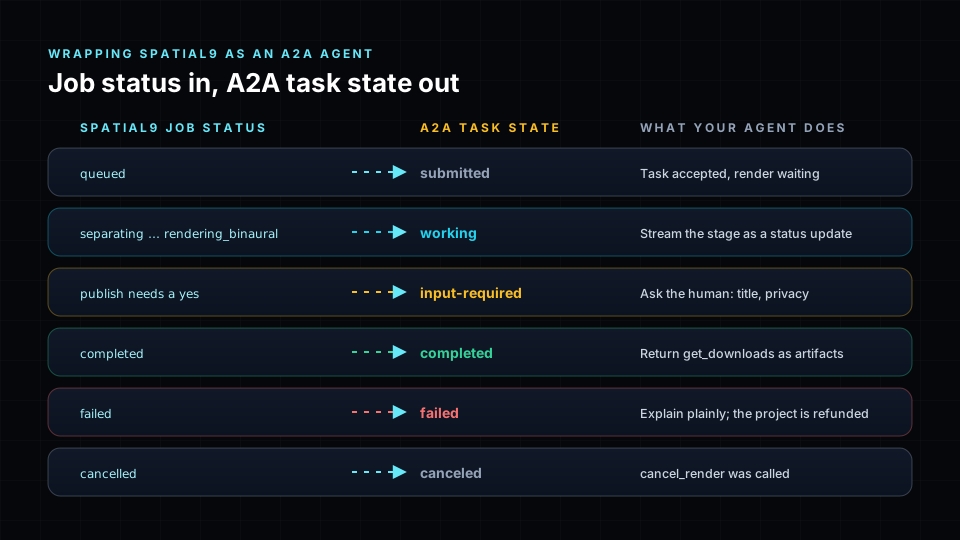
Task states
| State | Meaning |
|---|---|
submitted | Accepted; the reply carries the task id and context id |
working | Rendering; each stage and progress value arrives as an update |
input-required | No file or filename was sent; reply on the same taskId |
completed | Files are ready as artifacts |
canceled | Stopped by tasks/cancel |
failed | A plain explanation is in status.message.parts[0].text; the render is refunded |
Treat completed, canceled, failed and rejected as final. The Spatial9 job status cancelled maps to the A2A state canceled.
Answering input-required
When the state is input-required, send another message/send whose message includes the same taskId and the missing file or filename. The task resumes in the working state.
Artifacts
A completed task carries one file artifact per delivered file. Each artifact has a name and a part of the form {"kind":"file","file":{"uri","name"}} with the MIME type and filename. A summary data artifact holds the job_id and, for music, the before and after comparison link and the stage player link.
{"kind":"file","file":{"uri":"SIGNED_URL_FROM_SPATIAL9","name":"night-drive-binaural.wav"}}Receiving updates
Choose one of three ways to follow a task. Pipelines usually combine a webhook with a slow fallback poll.
| Method | Best for | How |
|---|---|---|
| Streaming | Interactive agents | message/stream, then tasks/resubscribe |
| Webhook | Pipelines and back ends | pushNotificationConfig with url and token |
| Polling | Simple scripts | tasks/get every 30-60 seconds |
Streaming
Call message/stream with Accept: text/event-stream. You receive the task first, then status-update and artifact-update events.
curl -N https://spatial9.ai/a2a \
  -H "Authorization: Bearer $SPATIAL9_KEY" \
  -H "Content-Type: application/json" \
  -H "Accept: text/event-stream" \
  -d '{"jsonrpc":"2.0","id":"req-4","method":"message/stream","params":{"message":{"kind":"message","role":"user","messageId":"my-song-001","parts":[{"kind":"data","data":{"skill":"spatial_audio","source_url":"https://example.com/my-song.wav"}}]}}}'
Streams through spatial9.ai close after about 20 seconds. Call tasks/resubscribe with the task id in a loop until you receive an event marked final.
Push notifications
Add configuration.pushNotificationConfig with {url, token} to message/send, or register it later with tasks/pushNotificationConfig/set.
{"jsonrpc":"2.0","id":"req-5","method":"tasks/pushNotificationConfig/set","params":{"taskId":"TASK_ID","pushNotificationConfig":{"url":"https://hooks.example.com/a2a/webhook","token":"YOUR_SHARED_TOKEN"}}}Spatial9 posts the full task to the URL on every state change, with your token in the X-A2A-Notification-Token header. An optional authentication object, with a scheme and credentials, adds an Authorization header to each delivery.
| Rule | Value |
|---|---|
| URL | https on a public host, port 443; private addresses are refused |
| Webhooks per task | Up to 5 |
| Delivery check | Once a minute, so a delivery can lag by up to a minute |
| Stop conditions | 5 failed deliveries in a row, or 2 days after registration |
| Credentials | get and list never return the credentials you sent |
Verifying a webhook
Compare the token in constant time, answer quickly with 202, and re-read the task with tasks/get instead of trusting the posted body.
@app.post("/a2a/webhook", status_code=202)
async def a2a_webhook(request: Request, background: BackgroundTasks) -> dict:
    sent = request.headers.get("X-A2A-Notification-Token", "")
    if not hmac.compare_digest(sent, TOKEN):
        raise HTTPException(status_code=401, detail="Unauthorized")
    body = await request.json()
    task_id = body.get("id") if isinstance(body, dict) else None
    if not isinstance(task_id, str) or not task_id:
        raise HTTPException(status_code=400, detail="Missing task id")
    background.add_task(apply_task, task_id)
    return {"accepted": True}
Webhooks can fail during a deploy or a network outage. As a fallback, periodically call tasks/get for tasks that have been quiet for several minutes and feed the result through the same handler.
Idempotency
messageId is the idempotency key. Sending the same messageId again returns the same task instead of starting a second render. Derive it from stable data, for example oss-spatial_audio-<track_id>-v<version>, and never generate a new value on retry.
Errors
| Situation | What you receive | What to do |
|---|---|---|
| Wrong or revoked key | HTTP 401 | Create a new key at /connect |
| Malformed request | A JSON-RPC error object with a message | Fix the request |
| Render failed | State failed, reason in status.message.parts[0].text | Relay the reason; the render is refunded |
| Missing input | State input-required | Reply on the same taskId |
| Cancel a preview | TaskNotCancelableError | Let the preview finish |
| Plan limit reached | A plain-language explanation | Stop starting new tasks and retry later |
Limits
A2A shares the account limits with MCP: 3 renders at a time and 20 per day. Agents can also create up to 120 A2A tasks per hour. Polling in a tight loop wastes requests and can reach the hourly limit. See Limits, quotas and errors.
Building your own A2A specialist
You can also publish your own agent that calls Spatial9. With Google ADK, to_a2a(root_agent, port=8001) wraps an agent as an A2A server. Its Agent Card includes name, description, url, version, protocolVersion set to 0.3.0, capabilities, defaultInputModes, defaultOutputModes, skills with id, name, description, tags and examples, plus securitySchemes and security. Treat messages from peer agents as untrusted input. See Agent frameworks.
Next steps
- MCP server reference for remixing, publishing and the full tool catalog.
- Limits, quotas and errors to plan concurrency and retries.
- Workflow automation to call the agent from n8n, Zapier or Power Automate.
- Open-source pipeline for a complete webhook-driven example.