
Build a Real-Time Spatial Audio Pipeline with Open Source Tools and Spatial9
Spatial9 Engineering Team · · 12 min read
Key takeaways
- You can build a production-grade spatial audio pipeline from open source tools only: MinIO for storage, Apache Kafka for events, PostgreSQL for state, FFmpeg for checks, Dagster for batch work, FastAPI and Valkey for real time, and Prometheus with Grafana for monitoring.
- Spatial9 joins over open protocols, MCP and A2A over HTTPS, so there is no proprietary SDK to install and every piece can be swapped.
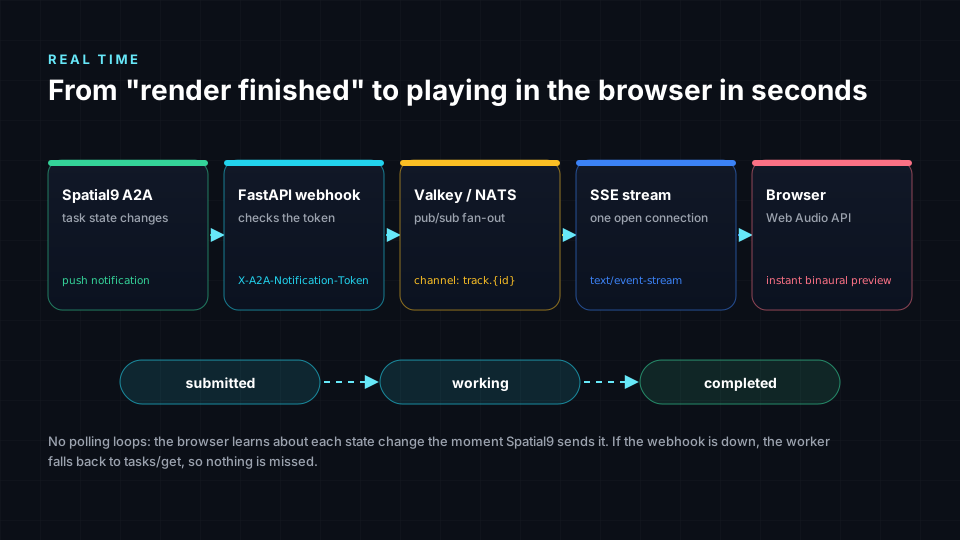
- Real time comes from A2A push notifications: Spatial9 calls your webhook on every state change, the webhook publishes to Valkey, and Server-Sent Events update the browser instantly.
- Reliability comes from three rules: register each file once, check free render slots (3 at once, 20 per day) before starting, and use the A2A messageId as an idempotency key so retries never double charge.
- The full example, with docker compose, a worker, a webhook, a live preview page and Dagster assets, is free under the MIT licence in the Spatial9 Agent Skills repository.

Many teams want immersive audio without locking their infrastructure to one cloud or one vendor's SDK. Independent labels run on a single server. Broadcasters and universities often have rules that favour open source. Developers simply like to see and own every moving part.
This guide shows a complete, working design built entirely from open source tools, connected to Spatial9 through open protocols. It covers a batch pipeline for whole catalogs and a real-time loop that shows a listener the result the moment it is ready. Every file is in the open-source example folder, with commented code, a docker compose file and a live preview page.
At a glance
| Layer | Tool | Licence | Job in the pipeline |
|---|---|---|---|
| Storage | MinIO | AGPL-3.0 | Holds masters and immersive outputs, sends an event per upload |
| Events | Apache Kafka | Apache-2.0 | Durable log of every upload, so nothing is lost when a worker restarts |
| State | PostgreSQL | PostgreSQL | One row per track, plus an append-only audit trail |
| Audio checks | FFmpeg | LGPL / GPL | Confirms real audio, length and integrated loudness |
| Batch | Dagster | Apache-2.0 | Nightly backfill of old masters and a daily report |
| Real time | FastAPI, Valkey, Server-Sent Events | MIT, BSD-3, W3C standard | Webhooks in, live updates out |
| Monitoring | Prometheus, Grafana, OpenTelemetry | Apache-2.0, AGPL-3.0, Apache-2.0 | Counters, dashboards and traces |
| Immersive rendering | Spatial9 over MCP and A2A | Open protocols | Eclipsa Audio (IAMF), binaural WAV and YouTube MP4 |
Licences change. MinIO, Grafana and Redis have all changed terms in recent years, which is why this design uses Valkey, the BSD-licensed fork of Redis. Check every project before going to production.
Why open source and open protocols
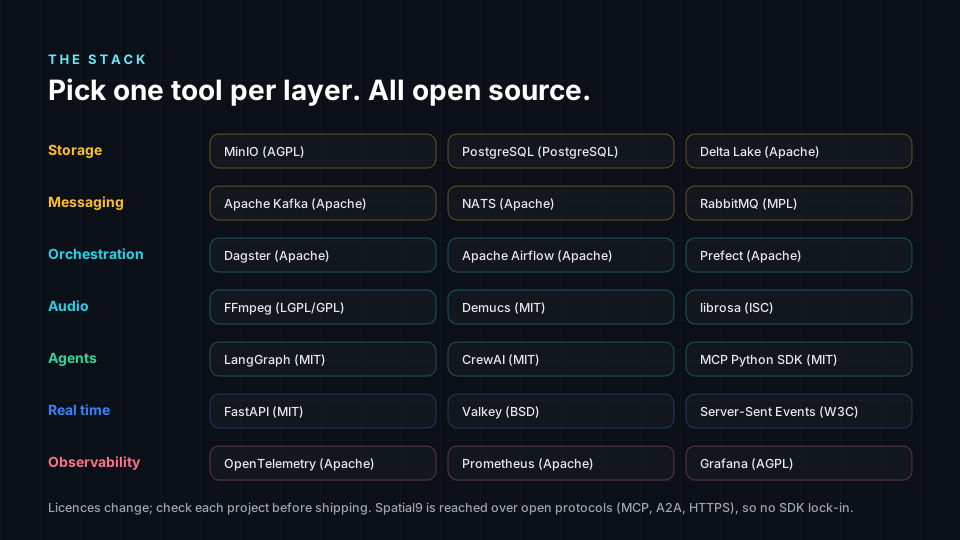
- No lock-in. Each layer can be swapped: Kafka for NATS, Dagster for Airflow or Prefect, MinIO for any S3-compatible store.
- Runs anywhere. One laptop, one server, Kubernetes or any cloud.
- Auditable. Security teams can read every line that touches a master.
- Standard connections. Spatial9 speaks the Model Context Protocol (MCP) and Agent2Agent (A2A), both open specifications, over plain HTTPS. You need no SDK; the example clients use only the
requestslibrary.
The architecture
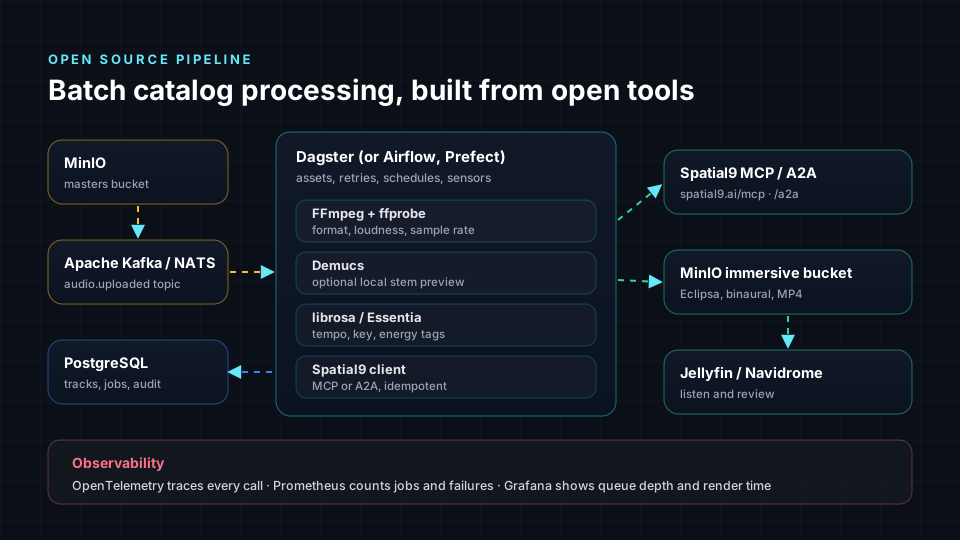
- A producer, a person or another system, drops
my-song.wavinto the MinIOmastersbucket. - MinIO publishes an
s3:ObjectCreated:Putevent to the Kafka topicaudio.uploaded. - The worker registers the track once in PostgreSQL, checks it with FFmpeg and waits for a free render slot.
- It asks the Spatial9 MCP server for an upload link, uploads the file, and hands the render to the Spatial9 A2A agent with a webhook address.
- Spatial9 calls the webhook each time the task changes state. When it completes, the webhook copies the Eclipsa Audio, binaural and MP4 files into the
immersivebucket. - PostgreSQL and Prometheus record everything, and Grafana shows it.
Pick one tool per layer from the stack below. The example uses the first one in each row.
Step 1: storage that announces new files
MinIO can publish bucket events straight to Kafka. Three environment variables in docker compose turn it on, and one command attaches the rule to the bucket:
minio:
  image: minio/minio:latest
  command: server /data --console-address ":9001"
  environment:
    MINIO_NOTIFY_KAFKA_ENABLE_PRIMARY: "on"           # turn on the Kafka target named PRIMARY
    MINIO_NOTIFY_KAFKA_BROKERS_PRIMARY: kafka:9092
    MINIO_NOTIFY_KAFKA_TOPIC_PRIMARY: audio.uploaded   # one message per new object
mc mb local/masters
mc event add local/masters arn:minio:sqs::PRIMARY:kafka --event putWhy Kafka in between instead of calling the worker directly? Because a log survives restarts. If the worker is down for an hour, every upload is still waiting when it comes back.
Step 2: register every file exactly once
The worker reads each event and inserts a row. The primary key on track and version, plus ON CONFLICT DO NOTHING, means a duplicate event can never create a second job. The Kafka offset is committed only after the row exists.
def register(message: bytes) -> None:
    """Turn one MinIO bucket event into a pending track. Duplicates are ignored."""
    for record in json.loads(message).get("Records", []):
        key = urllib.parse.unquote_plus(record["s3"]["object"]["key"])   # MinIO URL-encodes keys
        if pathlib.Path(key).suffix.lower() not in AUDIO:
            continue
        track_id = TRACK_ID.sub("-", pathlib.Path(key).stem.lower()).strip("-")[:80]
        inserted = db.execute(
            "INSERT INTO tracks (track_id, object_key) VALUES (%s, %s) ON CONFLICT DO NOTHING RETURNING 1",
            (track_id, key),
        ).fetchone()
        if inserted:
            event(track_id, 1, "registered", key)

# Main loop: commit the Kafka offset only after the row is safely in PostgreSQL.
msg = consumer.poll(5.0)
if msg is not None and not msg.error():
    register(msg.value())
    consumer.commit(msg)
Step 3: check the audio with FFmpeg
Catch problems before they cost a render. ffprobe confirms the file is audio and long enough, and FFmpeg's loudnorm filter in analysis mode measures integrated loudness without changing the file:
def check_audio(path: str) -> tuple[bool, float | None, str]:
    probe = subprocess.run(
        ["ffprobe", "-v", "error", "-select_streams", "a:0", "-show_entries", "format=duration", "-of", "json", path],
        capture_output=True, text=True, timeout=120,
    )
    if probe.returncode != 0:
        return False, None, "Not a readable audio file."
    duration = float(json.loads(probe.stdout).get("format", {}).get("duration", 0))
    if duration < 30:
        return False, None, f"Too short ({duration:.0f} s)."
    meter = subprocess.run(                               # prints a JSON block with input_i on stderr
        ["ffmpeg", "-hide_banner", "-nostats", "-i", path, "-af", "loudnorm=print_format=json", "-f", "null", "-"],
        capture_output=True, text=True, timeout=600,
    )
    match = re.search(r"\{[^{}]*\"input_i\"[^{}]*\}", meter.stderr)
    return True, float(json.loads(match.group(0))["input_i"]) if match else None, ""
Want richer tags for later search, such as tempo, key or energy? Add librosa or Essentia here. For a local stem preview before sending anything, Demucs runs on a CPU. Spatial9 still does the final separation and placement, so these steps are optional.
Step 4: respect the limits, then hand the task to Spatial9
Each Spatial9 key allows 3 renders at once and 20 per day, and failed renders are refunded. The worker counts both from PostgreSQL before starting anything:
def free_slots() -> int:
    running = db.execute("SELECT count(*) FROM tracks WHERE status IN ('submitted', 'working')").fetchone()[0]
    today = db.execute(
        "SELECT count(*) FROM track_events WHERE event = 'started' AND at > now() - interval '24 hours'"
    ).fetchone()[0]
    return max(0, min(3 - running, 20 - today))
When a slot is free, it uploads with MCP and delegates the render with A2A:
link = mcp.call("create_upload_link", {"filename": name, "media_type": "music"})   # valid 2 hours, up to 2 GB
with open(local, "rb") as f:
    requests.put(link["direct_upload_url"], data=f, timeout=3600).raise_for_status()

task = a2a.send(
    message_id=f"oss-spatial_audio-{track_id}-v{version}",   # same id on retry returns the same task
    skill="spatial_audio",
    data={"upload_id": link["upload_id"], "title": title, "style": "live_concert", "include_binaural": True},
)
a2a.set_webhook(task["id"], os.environ["PUBLIC_WEBHOOK_URL"], os.environ["A2A_WEBHOOK_TOKEN"])
Why both protocols? MCP is ideal for single tool calls such as an upload link. A2A is built for handing over a long task and being told when it changes, which is exactly what real time needs. Both use the same Spatial9 key. Learn more on the Spatial9 agents page and the MCP demo.
Real time: from "finished" to playing in seconds
The webhook: trust, then verify
Spatial9 sends the shared token in the X-A2A-Notification-Token header. The webhook compares it in constant time, answers right away, and then re-reads the task from Spatial9 with tasks/get rather than trusting the posted body:
@app.post("/a2a/webhook", status_code=202)
async def a2a_webhook(request: Request, background: BackgroundTasks) -> dict:
    sent = request.headers.get("X-A2A-Notification-Token", "")
    if not hmac.compare_digest(sent, TOKEN):                  # constant-time comparison
        raise HTTPException(status_code=401, detail="Unauthorized")
    body = await request.json()
    task_id = body.get("id") if isinstance(body, dict) else None
    if not isinstance(task_id, str) or not task_id:
        raise HTTPException(status_code=400, detail="Missing task id")
    background.add_task(apply_task, task_id)                  # answer fast, do the work afterwards
    return {"accepted": True}
apply_task updates PostgreSQL, streams finished files into MinIO and publishes a small message on the Valkey channel track:<id>.
Server-Sent Events: one open connection per viewer
Server-Sent Events are a plain HTTP response that never ends. The browser reconnects automatically, and proxies handle it like any other request, so it is simpler than WebSockets when updates only flow one way:
@app.get("/events/{track_id}")
async def events(track_id: str, request: Request) -> StreamingResponse:
    if not TRACK_ID.match(track_id):                          # only ids we create, nothing else
        raise HTTPException(status_code=404, detail="Unknown track")

    async def stream():
        sub = aredis.Redis.from_url(os.environ["VALKEY_URL"]).pubsub()
        await sub.subscribe(f"track:{track_id}")
        try:
            while not await request.is_disconnected():
                msg = await sub.get_message(ignore_subscribe_messages=True, timeout=15)
                yield f"data: {msg['data'].decode()}\n\n" if msg else ": keep-alive\n\n"
        finally:
            await sub.aclose()

    return StreamingResponse(stream(), media_type="text/event-stream")
The browser: listen and play
The preview page needs no framework. EventSource receives each update, and when the binaural file arrives, it plays immediately with the browser's built-in audio. Binaural audio is already rendered for headphones, so any pair of earbuds hears the 3D mix:
const source = new EventSource(`/events/${encodeURIComponent(trackId)}`);
source.onmessage = (msg) => {
  const update = JSON.parse(msg.data);
  status.textContent = `Status: ${update.state}`;             // textContent, never innerHTML
  const binaural = (update.files || []).find((f) => /binaural/i.test(f.name));
  if (binaural) {
    const audio = new Audio(binaural.url);
    audio.controls = true;
    list.append(audio);
  }
  if (update.final) source.close();
};
Never miss an update
Webhooks can fail: a deploy, a network blip, an expired certificate. Every two minutes the worker asks A2A directly about any task that has been quiet for five minutes, and feeds the answer through the same webhook code. One code path, no lost tracks.
More real-time examples
The same pattern powers other live experiences:
- Instant chorus preview at upload. Send the
preview_chorusskill first. Chorus previews are free and do not use a render slot, so an artist hears a 30-second immersive taste while the full render runs. - Live dashboard for a label. Point Grafana at PostgreSQL and the Prometheus counters
spatial9_tasks_started_totalandspatial9_tasks_runningto see queue depth and throughput as they change. - Chat notification. Add a second Valkey subscriber that posts to a self-hosted Mattermost or Matrix room when a track completes or fails, with the plain-language reason Spatial9 provides.
- Agent in the loop. An open source agent framework such as LangGraph or CrewAI can call the Spatial9 MCP tools directly, while the pipeline handles the bulk work. See Agentic AI and Spatial9 integrations.
- Self-hosted listening room. Serve the
immersivebucket through Jellyfin or Navidrome so reviewers can browse and listen to every version.

Batch: backfilling a whole catalog with Dagster
New uploads are handled live, but most labels also have thousands of masters already in storage. A Dagster asset lists the bucket and registers anything new. The worker then starts them as slots free up, so 1,000 tracks simply flow through at up to 20 a day, safely:
@asset(description="Registers masters that were in MinIO before the pipeline existed. Safe to re-run.")
def catalog_backfill(context: AssetExecutionContext) -> MaterializeResult:
    added = 0
    with _db() as conn:
        for obj in store.list_objects("masters", recursive=True):
            if pathlib.Path(obj.object_name).suffix.lower() not in AUDIO:
                continue
            track_id = TRACK_ID.sub("-", pathlib.Path(obj.object_name).stem.lower()).strip("-")[:80]
            if conn.execute("INSERT INTO tracks (track_id, object_key) VALUES (%s, %s) "
                            "ON CONFLICT DO NOTHING RETURNING 1", (track_id, obj.object_name)).fetchone():
                added += 1
    return MaterializeResult(metadata={"queued": added})

nightly = define_asset_job("nightly_catalog", selection=[catalog_backfill, daily_report])
schedules = [ScheduleDefinition(job=nightly, cron_schedule="0 2 * * *")]
Prefer Apache Airflow? The Airflow example uses a pool of 3 for the same effect.
Observability
- Prometheus scrapes the worker on port 9100 and the webhook at
/metrics: tasks started, tracks rejected, tasks running and pushes accepted. - Grafana shows those counters next to SQL panels from PostgreSQL, such as "tracks completed today" and "top failure reasons".
- OpenTelemetry can wrap the
requestsand FastAPI calls with automatic instrumentation, so one trace follows a track from Kafka to Spatial9 to MinIO.
Run it yourself
- Create a Spatial9 key at spatial9.ai/connect.
- Download the open-source example from the Agent Skills repository and copy
env.exampleto.env. - Make the webhook reachable over https and set
PUBLIC_WEBHOOK_URL. - Run
docker compose up -d, then create the bucket and event rule withmc. - Copy a WAV into the
mastersbucket and open the preview page.
Common mistakes
- Polling in a tight loop. It wastes requests and can hit the 120 tasks per hour agent limit. Use webhooks with a slow fallback poll.
- Trusting the webhook body. Check the token in constant time and re-read the task with
tasks/get. - Starting renders without counting. Always check free slots first; a failed start is not a queue.
- Generating a new idempotency key on retry. The key must be stable per track version, or a retry starts a second render.
- Building download links by hand. Use only the links Spatial9 returns; they are temporary and signed.
- Putting keys in code or images. Keep them in
.envor a secret manager such as OpenBao or Vault. - Rendering everything at once. Mixing quality still matters. Review the first renders against our 10 best practices for immersive mixing.
Frequently asked questions
Can I build a spatial audio pipeline with only open source tools?
Yes. MinIO, Apache Kafka, PostgreSQL, FFmpeg, Dagster, FastAPI, Valkey, Prometheus and Grafana cover storage, events, state, audio checks, scheduling, real time and monitoring. Spatial9 is reached over open protocols, MCP and A2A over HTTPS, so no proprietary SDK is needed.
How do I get real-time updates from Spatial9?
Register a webhook for each A2A task with tasks/pushNotificationConfig/set. Spatial9 posts to it on every state change with your token in the X-A2A-Notification-Token header. Verify the token, re-read the task with tasks/get, and stream the update to browsers with Server-Sent Events.
Should I use MCP or A2A in an open source pipeline?
Use both. MCP is best for single tool calls, such as create_upload_link. A2A is best for handing over a long render and being notified when it changes. Both use the same Spatial9 key and limits.
What limits do I need to handle?
Each key allows 3 renders at once and 20 per day, and agents can create up to 120 A2A tasks per hour. Failed renders are refunded and chorus previews are free. Count slots before starting and use a stable messageId so retries never start a second render.
Is Kafka required?
No. Kafka gives a durable log so uploads are never lost during restarts, but NATS JetStream or RabbitMQ work too. A small project can even poll the bucket from Dagster on a schedule.
Can I run local stem separation instead?
You can preview stems locally with the open source Demucs model. For final immersive renders, Spatial9 separates and places the stems itself, so local separation is optional.
Where is the code?
Every file is in the open-source folder of the Spatial9 Agent Skills repository at spatial9.ai/agents/skills/examples/open-source, under the MIT licence.
Sources
- Model Context Protocol specification, modelcontextprotocol.io.
- Agent2Agent (A2A) protocol specification, version 0.3.0, a2a-protocol.org.
- MinIO documentation: bucket notifications with Kafka.
- Apache Kafka documentation, KRaft mode.
- FFmpeg documentation: ffprobe and the loudnorm filter (EBU R128).
- Dagster documentation: assets, jobs and schedules.
- FastAPI documentation: background tasks and streaming responses.
- WHATWG HTML Living Standard: Server-sent events.
- Valkey project, Linux Foundation.
- Prometheus, Grafana and OpenTelemetry documentation.
- Alliance for Open Media, IAMF specification.