Agent Skills
The free SKILL.md library that teaches coding agents to use Spatial9, how to install it and what each skill does.
Agent Skills are a free library of SKILL.md files that teach coding agents and assistants how to use Spatial9 correctly. Each skill is a short, plain-text procedure: which MCP tools to call, in what order, with which arguments, and which rules to follow. With the skills installed, you can ask an agent in plain words to make a song immersive, split stems or convert Dolby Atmos to Eclipsa Audio, and it follows the same tested sequence every time.
This page describes the format, how to install the library, every skill in it, the example integrations that ship alongside it and how to write a skill of your own. The library is MIT licensed. Browse it at /agents/skills or download everything as a zip from /agents/skills?download=zip.
Supported agents
The skills work in any agent that reads SKILL.md files, including Claude, Claude Code, OpenAI Codex, GitHub Copilot, VS Code, Cursor and Gemini CLI. Every skill relies on the Spatial9 MCP server, so the agent also needs an MCP connection. See MCP server reference.
The SKILL.md format
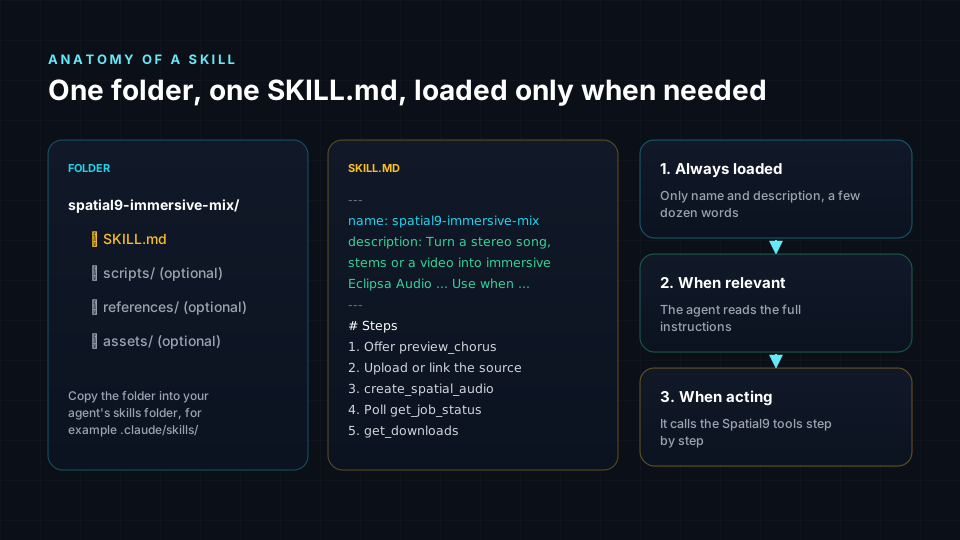
Anthropic released the SKILL.md format as an open standard in December 2025, documented at https://agentskills.io. A skill is a folder containing a SKILL.md file. The file starts with YAML frontmatter followed by Markdown instructions.
| Part | Purpose |
|---|---|
name | Unique identifier, for example spatial9-immersive-mix |
description | What the skill does and when to use it |
| Body | When to use, numbered steps and rules |
Agents use progressive disclosure. They read only the name and description of every installed skill, and load the full steps only when a request matches. This keeps the context small even with many skills installed.
---
name: spatial9-immersive-mix
description: Turn a stereo song, a set of stems or a video into immersive Eclipsa Audio (IAMF) with a binaural headphone version, using the Spatial9 MCP server. Use when the user asks to make a track immersive, 3D, spatial, 360 or "Atmos-like", or to prepare music for YouTube spatial audio.
---Install
- Connect the Spatial9 MCP server, using
examples/setup/claude-code.shfor Claude Code orexamples/setup/mcp.jsonfor clients that read an MCP configuration file. - Copy the skill folders into your agent's skills folder:
.claude/skills/for a project or~/.claude/skills/for your user. Other agents use their own skills folder, and the Claude apps accept an uploaded zipped skill. - Ask in plain words, for example "make this song immersive" or "split this track into stems".
claude mcp add --transport http spatial9 https://spatial9.ai/mcp --header "Authorization: Bearer $SPATIAL9_KEY"
mkdir -p .claude/skills
cp -r spatial9-* .claude/skills/
Create the key at https://spatial9.ai/connect. To try the skills without an account, connect the guest server at https://spatial9.ai/mcp/free instead.
Skill catalog
The repository contains seven skills.
| Skill | Free | Time | Output |
|---|---|---|---|
spatial9-immersive-mix | Uses a project | 10-20 min | Eclipsa Audio, MP4, binaural WAV |
spatial9-stem-split | Uses a project | 4-8 min | Stem WAVs and ZIP |
spatial9-atmos-to-eclipsa | Uses a project | Depends on length | Eclipsa Audio and MP4 |
spatial9-chorus-preview | Free | Under 2 min | 30-second binaural WAV |
spatial9-remix-by-voice | Preview free, render uses a project | 10-20 min | New mix version |
spatial9-release-publisher | Free | Minutes | YouTube link and 9:16 MP4 |
spatial9-enterprise-catalog | Uses a project per track | 10-20 min per track | Copies of the binaural, IAMF and YouTube files in governed storage |
spatial9-immersive-mix
Turns a stereo song, a set of stems or a video into Eclipsa Audio with a binaural headphone version.
- Offer the free
preview_chorusfirst if the user has not heard Spatial9 before. - Get the source: a public https link as
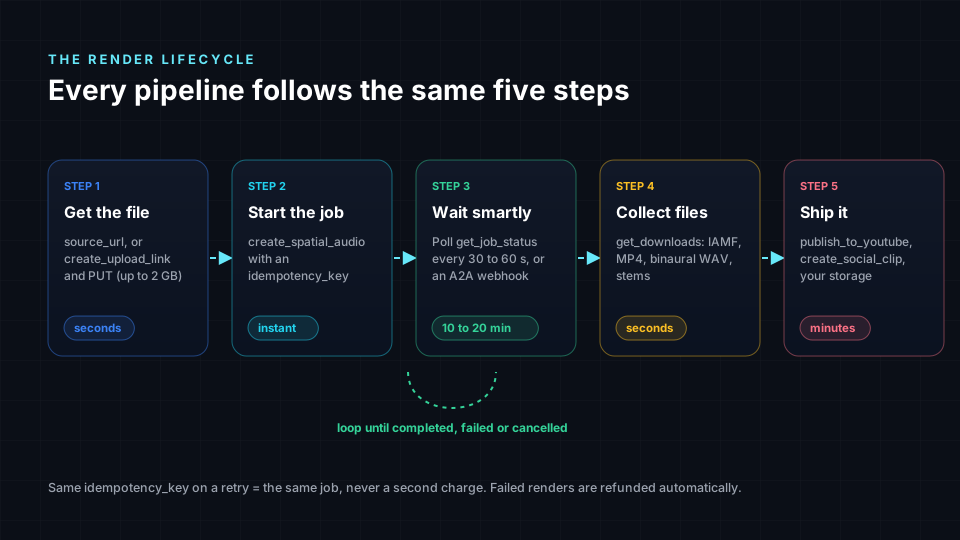
source_url, orcreate_upload_link, a PUT todirect_upload_url, thenupload_id. - Start
create_spatial_audiowithmedia_type,title, optionalstyleandinclude_binaural: true, orcreate_from_stemswith 2 to 16 stems. - Always send an
idempotency_keyso a retry never starts a second render. - Poll
get_job_statusevery 30-60 seconds and reportstageandprogress. - Call
get_downloadsand present files by label, leading with the binaural WAV and the YouTube MP4.
Rules: one project per render, refunded on failure; 3 renders at once and 20 per 24 hours; never invent links; on isError, relay the message and stop.
spatial9-stem-split
Calls split_stems with title and idempotency_key; the job runs for 4-8 minutes. Downloads are listed as stem:<stem_id> entries plus a stems_package ZIP. Quiet stems can be merged with combine_quiet_stems. Suggested follow-ups are create_from_stems and preview_chorus. The skill only processes music the user owns.
spatial9-atmos-to-eclipsa
Calls convert_dolby_to_eclipsa, optionally with include_video and visual_url or visual_upload_id. ADM BWF keeps its beds and objects. AC-3, E-AC-3 and TrueHD keep speaker channels up to 7.1 only, without the Dolby Atmos height and object layer.
spatial9-chorus-preview
Works on both the account server and the guest server, where each guest has 3 free previews. Calls preview_chorus with title and optional start_sec and seconds, then polls get_clip with the returned clip_id.
spatial9-remix-by-voice
Reads the current mix with get_mix, get_effects and analyze_song, then sends remix_render changes with preview: true first. It can also use find_effects, apply_effects, find_spaces and save_mix_template, and reuse a saved mix with template_id. Rules: keep the lead vocal, kick, snare and bass near the front centre, and tie every movement to a musical moment.
spatial9-release-publisher
- Confirm the render is complete with
get_job_status. - Publish with
publish_to_youtube, which defaults to unlisted. - Poll
get_youtube_uploadfor the video link. - Create a 9:16 clip with
create_social_clipand pollget_clip.
Rules: never publish as public without explicit confirmation; at most 5 publishes per 24 hours; YouTube processes spatial audio after the upload finishes.
spatial9-enterprise-catalog
Runs a scheduled catalog pipeline on a data platform.
- The service key is stored in the platform's secret store.
- A queue table
catalog.renders_queueholdstrack_id,title,source_urlandstatus='pending'. - Each render uses the idempotency key
<platform>-<track_id>-<version>. - The
binaural,iamfandyoutube_videodownloads are copied to governed storage. job_id,status,stage, file paths and timestamps are written back to the queue.- A failed track is retried at most twice.
See Enterprise platforms for platform-specific versions.
Example integrations
The examples folder contains working integrations that follow the same rules as the skills.
| Folder | Contents |
|---|---|
setup | claude-code.sh and mcp.json connection files |
python | spatial9_pipeline.py, three workers matching the limit of three renders at once, polling every 45 seconds |
node | An A2A webhook receiver |
n8n | HTTP Request nodes, or an AI Agent with the MCP Client Tool |
zapier | A catch hook and a custom request to /a2a |
power-automate | A Do until loop that polls job status |
github-actions | spatial9.yml, which renders masters when a new WAV lands in masters/, with the key stored as a repository secret |
airflow | A DAG that uses a pool of 3 |
enterprise | Databricks, Snowflake, Vertex AI and Bedrock, plus shared spatial9_mcp.py and spatial9_a2a.py clients |
open-source | MinIO, Kafka, PostgreSQL, FFmpeg, FastAPI and Dagster |
n8n
Option A uses HTTP Request nodes with a Header Auth credential and a Switch on $json.result.structuredContent.status. Option B uses an AI Agent node with the MCP Client Tool: set the endpoint, choose the HTTP Streamable transport, use Bearer authentication and pick Selected tools.
Power Automate
A Do until loop with a count of 40 and a timeout of PT1H polls status. The condition reads the status with this expression.
body('HTTP_Check_status')?['result']?['structuredContent']?['status']Airflow
A pool limits Airflow to three concurrent renders, matching the account limit.
airflow pools set spatial9 3 "Spatial9 render limit"See Workflow automation for the full flows.
Writing your own skill
Start from templates/SKILL.template.md. The template shows a label-specific skill named acme-label-immersive-release.
---
name: acme-label-immersive-release
description: Prepare an ACME Records release in immersive audio with Spatial9. Use when someone at ACME asks to make a single or album immersive, or to prepare a YouTube spatial audio upload.
---

Requires the Spatial9 MCP server at https://spatial9.ai/mcp.

## Steps
1. Always start with preview_chorus and share the headphone WAV.
2. After approval, run create_spatial_audio with style "cinema" for ballads
   and "live_concert" for everything else, include_binaural: true,
   and idempotency_key "acme-<ISRC>".
3. Poll get_job_status every 60 seconds and report progress in plain words.
4. Name files "<ARTIST> - <TITLE> (Immersive)" when sharing get_downloads links.

## Rules
- Never publish to YouTube. The ACME release team publishes manually.
- Keep the lead vocal at the front centre.
Follow these guidelines when you write a skill:
- Name only tools that exist; read them from
tools/listorget_capabilities. - Write a description that states both what the skill does and when to use it.
- Always include an idempotency key rule for any step that starts a render.
- State the polling interval and what to report while waiting.
- Add rules for anything that spends a project or makes content public.
- Tell the agent to relay
isErrormessages and stop rather than retry blindly.
Shared rules
Every Spatial9 skill follows the same rules, which also apply to agents that call the tools without a skill:
- Each render uses one project from the plan and is refunded on failure.
- Chorus previews and remix previews are free.
- 3 renders run at once and 20 per 24 hours.
- Download links come only from
get_downloads; never invent them. - Anything public or anything that spends a project needs the user's approval.
Next steps
- MCP server reference for every tool the skills call.
- Agent frameworks to use the same tools from LangGraph, CrewAI or Google ADK.
- Workflow automation to run the example flows in n8n, Zapier and Power Automate.
- Limits, quotas and errors for the limits the skills enforce.