Spatial9 Gravity Feed: Musical Intelligence for DAWs and Plugins
Spatial9 Engineering Team · · 9 min read
Key takeaways
- Gravity Feed is a musical-intelligence feed: a DAW or plugin sends session metadata and gets back a placement and movement plan.
- Requests never contain audio; they must declare audio_uploaded false, and confidence is always null.
- A model picks musical ideas; deterministic code applies locks and style limits and computes every coordinate and curve point.
- One query is one plan request covering up to 32 tracks and 128 beats; the free plan allows 1 query per second with bursts of 5 per account.
- REST, the MCP tool gravity_feed_plan and the A2A skill gravity_feed_plan are live and share one limit; the REAPER script is a prototype.
- IEM StereoEncoder and ICST AmbiEncoder have Gravity Profiles; their conversion is not yet verified in a real session.
Mixing in 3D asks a question stereo never did: not only how loud and how bright each part should be, but where it should be and how it should move. Most spatial plugins give you the controls. None of them tell you what to do with them, or when. Gravity Feed fills that gap: it reads the shape of your song and proposes where things should go and how they should travel, in a form your DAW can show, preview and write.
This article explains what Gravity Feed is, what a DAW or plugin sends and gets back, what "1 QPS" means in practice, every way to connect, and exactly which parts are live today and which are still prototypes or plans.
What is Spatial9 Gravity Feed?
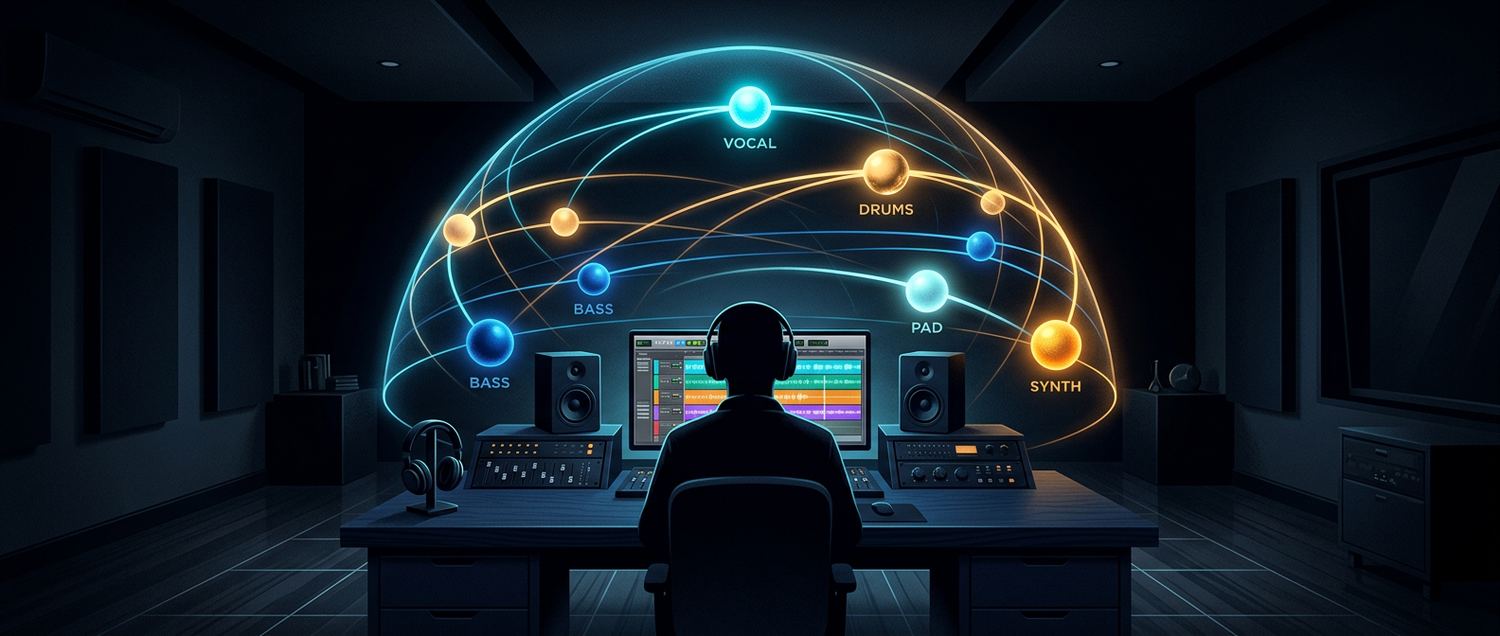
Gravity Feed is a planning service with an API. It is not a plugin and not a renderer. You call it when you want ideas for a section, and it answers with a plan your tools can act on. The name comes from the way a good immersive mix behaves: the lead vocal holds the centre like a planet, and the other parts orbit, rise and settle around it.
| Name | What it is | Status |
|---|---|---|
| Gravity Feed | The planning service and its API | Live |
| Gravity Connect | The ways in: REST, MCP and A2A, sharing one limit | Live |
| Gravity Profiles | Machine-readable descriptions of a plugin's position controls | Two profiles, not yet verified in a session |
| Gravity Link | A desktop bridge that relays plans to OSC plugins | Planned |
| Gravity Capture | A plugin that reads track context and writes plan automation in any host | Planned |
It covers six workflows: Place (static positions), Move (motion over time), Shape (effect ideas that support the movement), Explain (a reason for every change), Compare (restrained, expressive and cinematic alternatives) and Commit (automation actions, guarded so a stale plan is never written).
What does a DAW send?
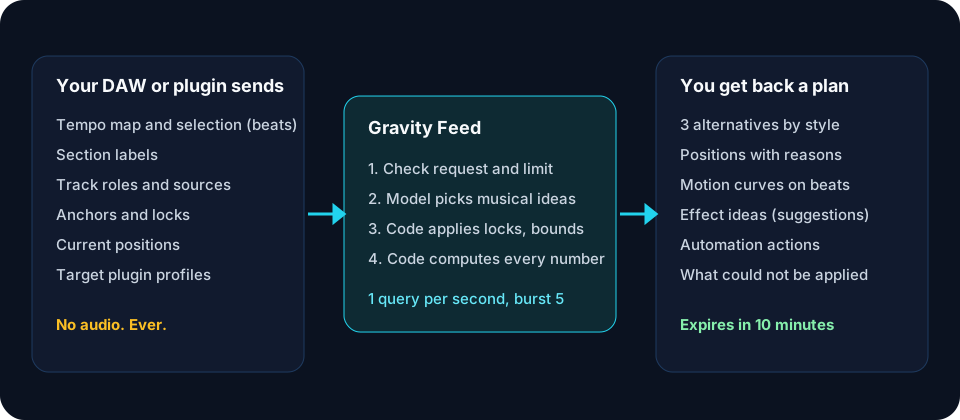
Only metadata. A request describes the session in musical terms:
| Field | Example |
|---|---|
| Tempo map | 120 BPM from beat 0 |
| Selection | Beats 64 to 96, the chorus |
| Sections | Verse, Chorus, Bridge with their beats |
| Tracks | Up to 32, each with a role such as lead_vocal or pad and where that label came from |
| Anchors and locks | Keep the vocal still; do not move the drums |
| Current positions | Azimuth, elevation and distance per track |
| Targets | Which plugin instance can receive each track's automation |
| Direction | Optional text, such as "open the chorus upward" |
| Privacy | audio_uploaded: false, required on every request |
Time is measured in quarter-note beats, so a plan stays in time if you change tempo. Positions use one neutral frame: azimuth 0 is straight ahead, positive is to the left, elevation positive is up, distance runs from 0 to 1.
What comes back?
Every plan is a proposal. Nothing changes in your session until your adapter writes it. A plan contains:
- Three alternatives, one per style, each with a one-line summary.
- A scene: every track's current and proposed position, whether it changed and why.
- Motions: shapes such as
rise,sweep,circle,spiral_uporfly_over, with start and end beats, intensity and curve points. - Effect ideas: reverb, delay, filter, width, dynamics or synth suggestions, always marked
executable: false. - Actions: the exact automation points for plugins that have a Gravity Profile, in the plugin's own units, with its OSC address.
- Unsupported actions: anything that could not be applied, and why, such as "this plugin has no distance control".
- Preconditions and expiry: the session revision the plan was made for, and a time ten minutes ahead after which it must not be written.
Two fields are deliberately empty. confidence is always null, because a made-up score would only look precise. audio_checks always says not_evaluated, because Gravity Feed never hears your audio.
How are the numbers made?
The model chooses musical ideas: lift the pad over the chorus, sweep the arpeggio from left to right, bring the guitar a little closer. Deterministic code does everything after that. It drops ideas that break a lock, clamps intensity and height to the style (one moving track and 35 degrees for restrained, up to six tracks and 85 degrees for cinematic), calculates each curve with fixed formulas and converts it to the target plugin's units. The same choice always produces the same numbers, and every change carries the reason the model gave.
What does 1 QPS mean?
QPS means queries per second. One query is one plan request, and a single request can cover up to 32 tracks and up to 128 beats.
Take an eight-bar chorus in 4/4 at 120 BPM. Eight bars are 32 beats, or 16 seconds of music. Asking Gravity Feed for a plan for all 12 tracks in that chorus is one query, not 12. If you do not like the result and ask again three times in quick succession, the burst of 5 absorbs it. What 1 QPS rules out is asking on every beat: at 120 BPM that would be two queries per second, and it is not how planning is meant to be used. Plan a section, preview it, then write it.
| Plan | Sustained | Burst | Monthly volume |
|---|---|---|---|
| Free | 1 query per second per account | 5 | Unlimited for now |
| Higher volume | By agreement | By agreement | Contact sales |
The limit is shared by every key and every protocol on the account. When you go over it, the API answers 429 with a Retry-After header saying how many seconds to wait. Checking a request with /validate, reading capabilities or profiles, and viewing your usage never count.
How do I connect?
| Route | Who it is for | Status |
|---|---|---|
REST API at spatial9.ai/api/gravity-feed/v1 | DAW scripts, plugins, servers | Live |
MCP tool gravity_feed_plan | ChatGPT, Claude and other MCP clients | Live |
A2A skill gravity_feed_plan | Other AI agents | Live |
| REAPER script for IEM StereoEncoder | REAPER users | Prototype, not yet tested in REAPER |
| Gravity Link desktop bridge | OSC plugins on your computer | Planned |
| Gravity Capture plugin | Any VST3, AU or AAX host | Planned |
Requests are idempotent: resend the same body with the same request_id after a network drop and you get the stored plan back without using your limit.
Which DAWs can use it?
Any DAW can reach the API, because a plan request is an HTTPS call. The difference is how much of the session a script can read and whether it can write automation back.
| DAW | Route | Status |
|---|---|---|
| REAPER | ReaScript reads tempo, regions and FX and writes envelopes in one undo step | Prototype |
| Ableton Live | Max for Live device or Remote Script | Documented route |
| Bitwig Studio | Controller API with remote-control pages | Documented route |
| FL Studio | Python MIDI scripting, live parameter changes | Documented route |
| Cubase and Nuendo | MIDI Remote API while recording automation | Documented route |
| Pro Tools | Scripting SDK for session data, plugin-side writing | Documented route |
| Logic Pro | MIDI control of an Audio Unit spatial plugin (IEM has no AU build), or Gravity Capture when it ships | Documented route |
| Studio One, Reason, Cakewalk Sonar, GarageBand | Plugin-side routes | Documented route |
"Documented route" means the DAW's maker documents a way to do it; Spatial9 has not built or certified that adapter yet. The DAW guides explain each one.
Which plugins can receive a plan?
A plugin can be written to directly only when a Gravity Profile describes its controls. Two exist:
- IEM StereoEncoder: azimuth and elevation through its documented OSC addresses
/StereoEncoder/azimuthand/StereoEncoder/elevation. No distance control. - ICST AmbiEncoder: Cartesian XYZ per source index through
/icst/ambi/sourceindex/xyz.
Both say conversion_verified: false until a fixture test in a real session confirms that +90 degrees really means hard left. SPAT Revolution, L-ISA, SpatGRIS and SPARTA have documented control routes but no profile yet. Effect plugins such as Surge XT, FabFilter, Diva and Soundtoys receive ideas, not parameter changes. dearVR has been discontinued and is listed as legacy. The plugin guides cover each one.
What do the status labels mean?
| Label | Meaning |
|---|---|
| Live | Running in production and covered by automated tests |
| Prototype | Code exists but has not been tested in the host |
| Documented route | The vendor documents a route; no certified Spatial9 adapter |
| Planned | Designed, not built |
| Legacy | Discontinued product, no new work |
A label only moves up after the test that justifies it has passed.
How do I start?
- Open the Gravity Feed page and try the playground. Signed out, it shows a labeled sample built by the real compiler; signed in, it makes live plans.
- Create a key in the Gravity Feed console.
- Follow the quickstart to send your first request, or install the REAPER prototype.
FAQ
Does Gravity Feed upload or listen to my audio?
No. Requests are metadata only and are rejected unless they declare audio_uploaded: false. Spatial9 stores a hash of the request, counts, timings and the returned plan.
Is Gravity Feed free?
Yes, up to 1 query per second per account with bursts of up to 5 and no monthly cap for now. Contact sales for more.
Does the AI decide the automation values?
No. The model picks musical ideas; deterministic code checks locks, style limits and plugin ranges and computes every value.
Can I use Gravity Feed from ChatGPT or Claude?
Yes. It is the gravity_feed_plan tool on the Spatial9 MCP server and a skill on the A2A agent. Both share your account's limit with the REST API. For the wider picture, see how Spatial9 connects to agent platforms.
What happens if my session changes after I ask for a plan?
The plan records the session revision it was built for and expires after ten minutes. A correct adapter refuses to write a stale plan and asks for a new one.
Does Gravity Feed render or encode my mix?
No. Gravity Feed plans positions for the plugins you choose; your DAW and plugins make the sound. To deliver an immersive master, use Spatial9's spatial audio tools or your own renderer.
Sources
- Gravity Feed documentation
- Gravity Feed API reference
- IEM Plug-in Suite OSC documentation
- ICST, OSC syntax for the ICST AmbiEncoder plugin
- REAPER ReaScript documentation
- Model Context Protocol
- Agent2Agent protocol
- Spatial9 Agent Integrations, Spatial9 Engineering: /blog/agentic-ai-platforms-a2a-spatial9-integrations
Product and company names in this article are trademarks of their respective owners and are used only to describe integrations. Vendor routes change; check each maker's documentation for current scripting and OSC support.