Studio Rooms: share and review mixes
Share immersive, spatial, binaural and stereo mixes in private rooms, compare versions and collect timed, section, spatial and voice notes.
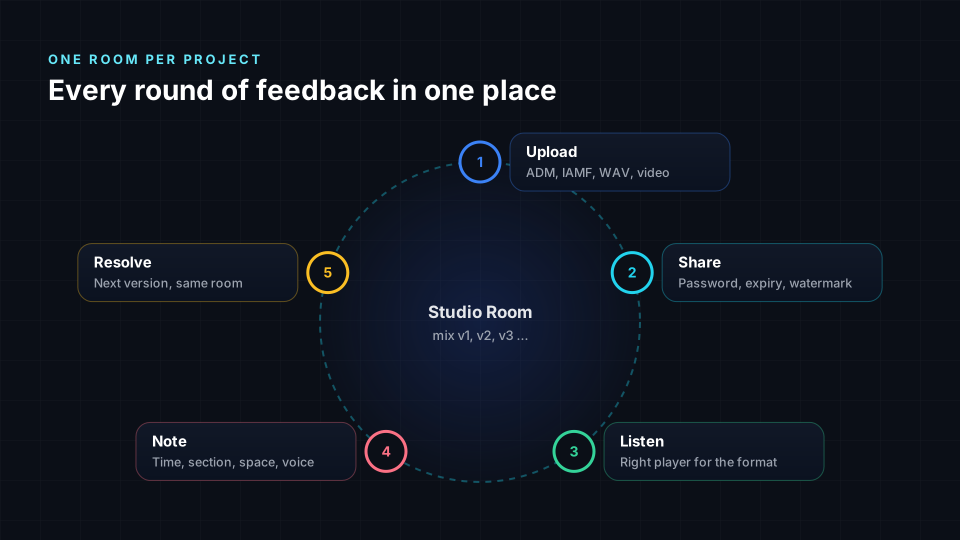
Studio Rooms is a private space to share immersive, spatial, binaural and stereo mixes with clients, artists, labels and collaborators, and to collect precise feedback on them. You upload files into a room at /studio-rooms, send a share link, and every note your guest leaves is pinned to an exact moment, a section, a position in 3D space, or a recorded voice message that is turned into text.
This page explains how rooms, files, versions and share links work, which formats the players understand, how each kind of note is created, and the limits of each plan.
| Property | Value |
|---|---|
| Who it is for | Mixing and mastering engineers, immersive studios, artists, labels, post-production teams |
| What you share | Audio and video files, grouped into rooms, with version history |
| Who can review | Anyone with a share link. Guests do not need an account |
| Kinds of notes | Point in time, section, spatial position, voice note with automatic text |
| Largest file | 2 GB per file |
| Cost | Free during early access. See plans |
Rooms, files and versions
A room is one project: an album, a single, a film reel or a client job. Each room holds files and the conversation around them.
- Upload by dragging files into the room. Uploads go to private storage that only you and your share links can reach.
- Versions. When you upload a new mix of the same song, mark it as a new version of the earlier file. The room keeps the chain in order, so you and your client always know which mix is the latest and what changed.
- Compare. Version comparison plays two versions in sync and lets you switch between them instantly at the same moment, which is the fastest way to hear whether a note was addressed.
- Quality check. The owner can run a quality report on a file: loudness, true peak, clipping, dynamics and phase, measured against the platform you deliver to. It runs privately in the browser.
Players that understand the format
Studio Rooms reads each file before it plays it, and opens the right player instead of a plain audio bar. These are the same players used in Try your current files.
| File | What the room shows |
|---|---|
| ADM BWF (Atmos master) | Beds and objects, played in a virtual 7.1.4 room on headphones |
| Eclipsa Audio / IAMF (.iamf or MP4) | Stereo and binaural A/B, channel layout, ambisonic order |
| Multichannel WAV (5.1, 7.1, 7.1.4, 9.1.6) | Speaker layout and a 3D room preview |
| Ambisonics (AmbiX) | Binaural rendering of the sound field |
| Stereo WAV, FLAC, MP3, AAC | Waveform, spectrum and loudness |
| Video (MP4, MOV, WebM), including 360 video | Picture with the soundtrack, and notes on the timeline |
A format card at the top of each file tells your guest what they are hearing, so nobody reviews a binaural fold-down thinking it is the speaker master.
The waveform and the spectrum
Every audio file opens with a waveform and a spectrum view that you can zoom from the whole song down to individual samples.
- Zoom with the buttons or the mouse wheel. At the highest zoom the waveform switches to a sample-accurate curve read from the original file, so transients and clicks are drawn exactly as they are, not as a blurred overview.
- Point or section. Use the Point and Section switch above the waveform. Point marks one exact moment, shown to the millisecond. Section marks a range: drag across the waveform to select it, from a few milliseconds up to the whole song.
- Spectrum. The spectrum view shows where the energy sits in frequency over time, which helps a guest point at a harsh vocal sibilance or a low-end build-up instead of describing it.
Leaving notes
Notes are how guests and owners talk inside a room. Each note can carry one or more of these anchors.
| Note | How to make it | Best for |
|---|---|---|
| Timed note | Pause the player, or click the waveform in Point mode | "The snare is too loud here" |
| Section note | Drag a range in Section mode | "The whole second chorus feels narrow" |
| Spatial note | Pick a position on the sphere around the listener | "The guitar should sit further back and left" |
| Voice note | Press the microphone and speak | Feedback that is faster to say than to type |
Voice notes
Many clients find it easier to say what they hear than to write it. Press the microphone in the note box, allow microphone access once, and talk. The player pauses while you record so your voice does not mix with the music.
- A voice note can be up to 3 minutes long.
- When you finish, Studio Rooms turns the recording into text and places it in the note, so you can correct a word before sending.
- The original recording is attached to the note. Anyone in the room can play it back, so tone and emphasis are not lost.
- If the text could not be created, the recording is still attached and you can type a short summary.
- Deleting a note also deletes its recording.
Resolving notes
The owner marks a note done once it has been addressed. Done notes stay in the room history under their own tab, so the next round of review starts with a clean list of open notes.
Sharing securely
Share links are how guests enter a room. Each link has its own settings, and you can create as many links as you need, one per person if you like.
- Password. Add a password so a forwarded link is not enough to open the room. Repeated wrong attempts lock the link.
- Expiry. Set a date after which the link stops working. Free rooms allow links of up to 7 days.
- Downloads. Choose whether guests can download the files or only stream them.
- Notes. Choose whether guests can leave notes or only listen.
- Watermark. Show the recipient's name over the player, so a screen recording can be traced back to its link.
- Revoke. Turn a link off at any moment. It stops working straight away.
- Activity. See when each link was opened, which files were played and downloaded, and when notes were added.
Files stream through short-lived signed addresses that expire after a few hours, so a copied file address cannot be reused later.
Reviewing in VR
On a supported headset, a guest can open the room in VR and hear the immersive mix around them. Spatial notes appear as markers at the positions they describe, so feedback such as "move the choir higher" is shown exactly where it belongs.
Plans and limits
Studio Rooms is in early access and every feature is open while billing is switched off. The planned limits are:
| Plan | Active rooms | Storage | Share link lifetime |
|---|---|---|---|
| Free | 3 | 5 GB | Up to 7 days |
| Creator | Unlimited | 250 GB | No limit |
| Studio | Unlimited | 1 TB | No limit |
| Pro Facility | Unlimited | 3 TB | No limit |
| Enterprise | Unlimited | Custom | No limit |
See the full comparison on the plans page.
Frequently asked questions
Does my client need an account? No. Guests open the share link in a browser, enter the password if you set one, and can listen and leave notes straight away.
Can a client hear an Atmos mix without Atmos speakers? Yes. ADM masters and multichannel files are rendered to binaural for headphones in the browser, so a client can judge placement and movement anywhere.
Will a guest hear the real file or a compressed preview? The players read the original file you uploaded. Nothing is re-encoded for the review.
Can I leave feedback on a single drum hit? Yes. Zoom in until you see the individual samples, switch to Point mode and click the exact spot. The time is stored to the millisecond.
What languages work for voice notes? Voice notes are turned into text in the language you speak. Most widely spoken languages are recognized automatically.
How is this different from sending a WeTransfer or a Dropbox link? A file transfer delivers a file. A room delivers the file, plays it correctly for its format, keeps each version, and gathers feedback attached to exact moments and positions, so nothing gets lost in an email thread.