Eclipsa Audio Plugin Patch: Editable AI Motion Plans, MCP and Undo
Spatial9 Engineering Team · · 8 min read
Key takeaways
- The patch adds editable 3D motion plans to Google's Eclipsa Audio (IAMF) plugins: position, gain, mute and stereo width over seconds or beats.
- A local companion and MCP server expose eight inspectable tools, so an assistant can read the scene and propose a plan, but you validate and apply it.
- Every proposal is tied to a scene revision: stale proposals are rejected, manual edits and DAW automation take control, and undo will not overwrite later edits.
- Playback runs locally from precomputed keyframes; no inference runs on the audio thread and no audio samples are sent anywhere.
- You can apply it to upstream commit db21055 and test the companion with Python 3.11+, with no Spatial9 account and no native build.
- It is a source preview: Windows and macOS compilation, DAW playback and production Data Feed compatibility are still being verified.
"Keep the vocal in front. When the chorus opens, let the synth rise to the right and gradually get wider."
That is how people talk about a mix. A plugin can't act on it directly. It needs explicit decisions: which source moves, where it starts, where it ends, how wide it gets, and on which beat. An AI model can help write those decisions, but someone still has to see them, check them against the current session and choose whether to apply them.
This patch makes those decisions visible. It adds editable 3D motion plans, a local Model Context Protocol (MCP) server and a Spatial9 Data Feed adapter to the Eclipsa Audio plugins, Google's open-source authoring tools for IAMF, the Immersive Audio Model and Formats standard from the Alliance for Open Media (AOMedia).
Download the Spatial9 Eclipsa patch
One Git patch for Google's open-source Eclipsa Audio plugins (source preview, Apache-2.0): 53 files, 32 new and 21 changed. Apply it to upstream revision db210550eb273cb4ea08ae2e923ca46fc1b9c9d5.
- Editable motion plans in the Audio Element
- Local companion with validate, apply and undo
- MCP server with eight inspectable tools
- Data Feed adapter, contract and example
- Tests, build workflows and validation notes
Download spatial9-integration.patch (148 KB). SHA-256: b7ca3628b39fe54b8e7ff023bfeb90971833e265d557770913074b02e4441f49
What can you try immediately?
You need Python 3.11 or newer. You do not need a Spatial9 account, and you do not need to compile the plugins to test the companion, the plan engine or the MCP server.
| Feature | What it does |
|---|---|
| Editable motion plans | JSON keyframes for position, gain, mute and stereo width, timed in seconds or beats |
| Local MCP tools | Eight tool definitions an MCP client can inspect: six local Eclipsa tools and two optional Spatial9 cloud tools |
| Revision checks and undo | Proposals are tied to a scene revision; stale ones are rejected and undo restores a snapshot |
| Local playback code | Plans play back from precomputed keyframes, with no inference on the audio thread |
| Data Feed adapter | Optional HTTPS request for a structured proposal; no audio samples are sent |
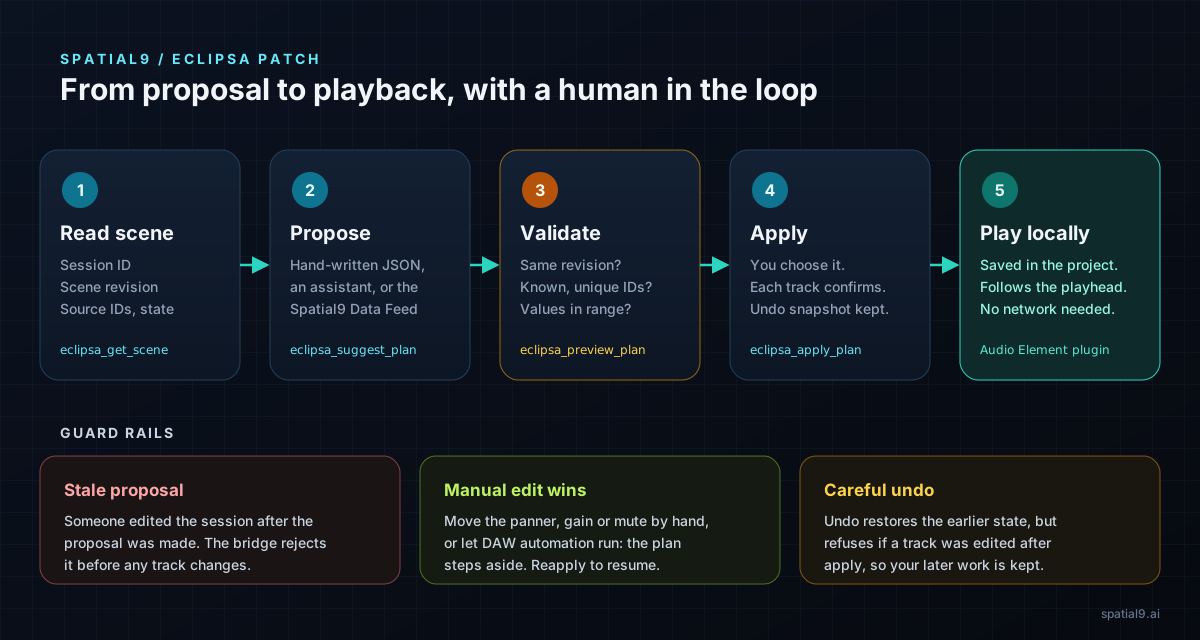
How the review loop protects your session
- Read the scene. The companion reads sessions, tracks and source IDs from the plugins.
- Propose a plan. You, an assistant or the Data Feed writes a proposal tied to that scene revision.
- Validate. The companion checks the schema, the source IDs and the revision, and makes no audio changes.
- Apply. An accepted plan is applied as one step, and a snapshot is saved for undo.
- Play locally. The plugin follows the keyframes during playback.
Three guard rails sit around that loop. If the session changed after the proposal was written, the proposal is rejected as stale. If you move a panner by hand, or existing DAW automation runs, your edit takes control and the plan steps aside. And undo is careful: it restores the snapshot without overwriting edits you made later.
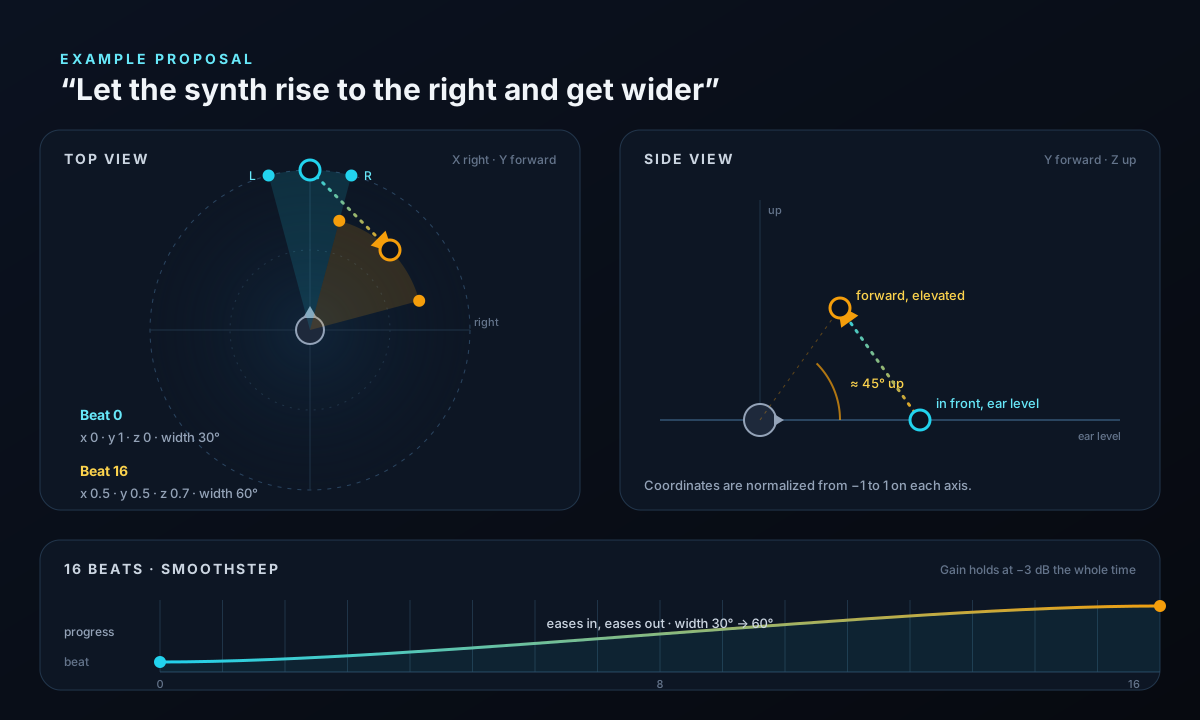
Try a 16-beat move with two keyframes
The patch ships an example at docs/spatial9/example-proposal.json. It moves one stereo source over 16 beats while gain stays at −3 dB:
| Beat | Position | Height | Stereo width |
|---|---|---|---|
| 0 | Directly in front | Ear level | 30° |
| 16 | Right and forward | Elevated | 60° |
{
  "schema_version": 1,
  "session_id": "REPLACE_WITH_LIVE_SESSION_ID",
  "scene_revision": "0000000000000000000000000000000000000000000000000000000000000000",
  "sources": [
    {
      "source_id": "REPLACE_WITH_LIVE_SOURCE_ID",
      "plan": {
        "schema_version": 1,
        "coordinate_system": "eclipsa_normalized_xyz",
        "timebase": "beats",
        "interpolation": "smoothstep",
        "keyframes": [
          { "time": 0,  "x": 0,   "y": 1,   "z": 0,   "gain_db": -3, "stereo_width_deg": 30, "muted": false },
          { "time": 16, "x": 0.5, "y": 0.5, "z": 0.7, "gain_db": -3, "stereo_width_deg": 60, "muted": false }
        ]
      }
    }
  ],
  "effect_suggestions": [
    "Consider a subtle room reverb; no effect will be applied by this proposal."
  ]
}
The motion eases in and out. Coordinates follow the Eclipsa convention: +X is right, +Y is forward and +Z is up. Beat times are absolute, so if your chorus starts at beat 64, set the keyframes to 64 and 80.
Some easy edits to try:
- Lower
zto keep the synth closer to ear level. - Set
stereo_width_degon the second keyframe to 45 for a subtler opening. - Switch
interpolationtolinearto hear a constant-speed move. - Add a third keyframe to bring the synth back for the next verse.
The room reverb is only a suggestion in text. The proposal never adds an effect to your session.
How to apply the patch to the official Eclipsa Audio source
Put the downloaded patch next to the folder you will clone into, then apply it to the exact upstream revision it was made from:
git lfs install
git clone https://github.com/google/eclipsa-audio-plugin.git
cd eclipsa-audio-plugin
git switch -c spatial9-preview db210550eb273cb4ea08ae2e923ca46fc1b9c9d5
git apply --check ../spatial9-integration.patch
git apply --index ../spatial9-integration.patch
git diff --cached --stat
All 53 files were checked against that revision. If git apply --check reports an error, make sure you are on the pinned commit and that Git LFS files were downloaded.
Then set up and test the companion:
python -m venv .venv
source .venv/bin/activate          # Windows PowerShell: .\.venv\Scripts\Activate.ps1
python -m pip install ./bridge
python -m unittest discover -s bridge/tests -v
python bridge/tests/mcp_smoke.py
python -m spatial9_bridge ui
The last command opens a browser view that only listens on your own computer. Before you load the plugins, an empty session list is expected.
To connect an MCP client that supports local servers, start the companion UI first, then point the client at the Python inside your virtual environment (use an absolute path) with these arguments:
{ "command": "/absolute/path/to/.venv/bin/python", "args": ["-m", "spatial9_bridge", "mcp"] }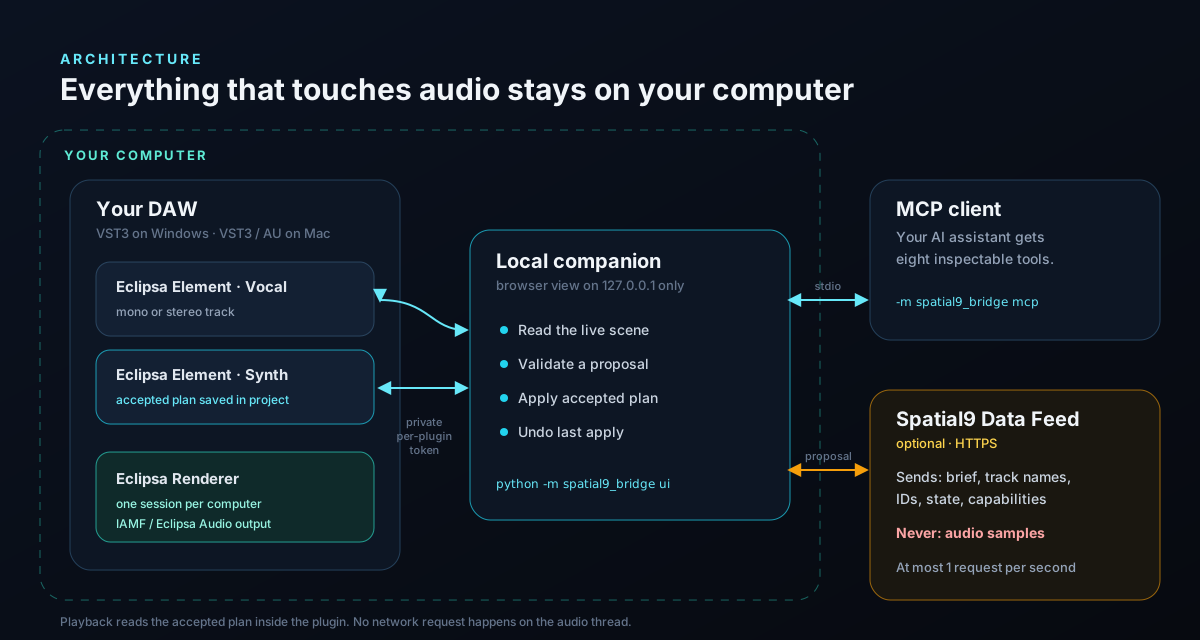
How to audition the plan in a DAW
To hear the plan, build the plugins. Start with python scripts/spatial9/bootstrap.py and follow docs/spatial9/BUILD_AND_PUBLISH.md. The included GitHub Actions workflow targets Windows x64 VST3 and Apple Silicon on macOS 15+ (VST3 and AU).
- Load one Spatial9 Eclipsa Renderer and a Spatial9 Eclipsa Element on a mono or stereo track. Enable panning, choose a spatial layout, and set elevation mode to None.
- Read the scene with
eclipsa_get_sessionsandeclipsa_get_scene, and copy the session and source IDs into the proposal. - Click Validate proposal, then Apply accepted plan, and press play.
- Click Undo last apply. Reapply, then move the panner by hand to confirm the manual edit takes control.
Use one active Spatial9 Renderer session per computer.
When do you need the Spatial9 Data Feed?
Only when you want proposals written for you. Writing JSON by hand, or asking an assistant through MCP, works without it.
The adapter reads SPATIAL9_FEED_URL and, optionally, SPATIAL9_FEED_API_KEY from the environment that starts the companion. Nothing is hardcoded. It sends track names, source IDs, current state, capabilities and your brief, and expects a structured proposal tied to the scene revision back. It never sends audio samples, and it is limited to 1 request per second across all sessions. The request and response are documented in docs/spatial9/DATA_FEED_CONTRACT.md; compatibility with the production Data Feed is still pending.
For the bigger picture of how assistants, plugins and planners fit together, read our developer guide to AI-era audio plugins with MCP and A2A and how Gravity Feed brings musical intelligence to DAWs and plugins.
Need help shipping it?
If you build on Eclipsa Audio or ship IAMF content, our IAMF and Eclipsa Audio support team can help with builds, validation and releases. If you want your own plugin ready for assistants and agents, see plugin modernization for the AI age. To hear IAMF files in your browser, try the free Eclipsa Audio Player.
Frequently asked questions
What is the Spatial9 Eclipsa Audio patch?
It is a Git patch for Google's open-source Eclipsa Audio plugins that adds editable 3D motion plans, a local companion with an MCP server, revision checks with undo, and an optional Spatial9 Data Feed adapter. It changes 53 files, 32 of them new, against upstream commit db210550eb273cb4ea08ae2e923ca46fc1b9c9d5.
Do I need a Spatial9 account to use it?
No. The plan engine, companion, local MCP tools and example proposal all work without an account. An account or key is only needed for the optional Data Feed or the Spatial9 cloud tools.
Does the AI change my mix automatically?
No. Every proposal must be validated against the current scene revision and applied by you. Manual edits and existing DAW automation take control over a plan, and undo restores the previous state without overwriting later edits.
Is any audio sent to the cloud?
No. The Data Feed adapter sends only track names, source IDs, state, capabilities and your brief. Plans play back locally from keyframes, with no inference on the audio thread.
Which MCP tools does the patch add?
Six local tools (eclipsa_get_sessions, eclipsa_get_scene, eclipsa_suggest_plan, eclipsa_preview_plan, eclipsa_apply_plan and eclipsa_restore_snapshot) and two optional cloud tools (spatial9_cloud_tools and spatial9_cloud_call, limited to an allowlist).
Which DAWs and formats are supported?
The build workflow targets VST3 on Windows x64 and VST3 and Audio Units on Apple Silicon with macOS 15 or newer. AAX is not enabled. DAW playback is still being verified in this source preview.
Is this an official Google or AOMedia release?
No. It is an independent Spatial9 development patch. Spatial9 changes are Apache-2.0, and the original licenses and notices stay in place.
Start small
Start with one stereo track and the two-keyframe example. Validate, apply, play, undo, and then make one edit of your own. Then listen for the question that matters: when the synth rises and widens over 16 beats, does the vocal still have the space you intended?