
AI-Era Audio Plugins: A Developer Guide to MCP and A2A for VST3, AU, CLAP and DAW Scripts
Spatial9 Engineering Team · · 17 min read
Key takeaways
- Keep DSP untouched: AI features live on the message and network threads, never on the audio thread.
- Use REST inside plugins, MCP so assistants can drive your plugin or DAW, and A2A to delegate long jobs to other agents.
- A local companion process should own keys, rate limits and protocols; plugin instances stay small and offline-safe.
- Treat AI output as a plan: snapshot, ask, choose, preview, verify the session revision, then commit as one undo step.
- Spatial9 exposes the same Gravity Data Feed planner through REST, MCP and A2A, metadata only, with a shared free rate limit.
Why plugins need to modernize now
For twenty years the plugin contract was simple: the host sends audio and parameter changes, the plugin returns audio. Everything "smart" happened in a human's head. In 2025 and 2026 that changed. Assistants such as Spatial9, Claude, ChatGPT and Gemini can now call tools through the Model Context Protocol (MCP), and autonomous agents can hand work to each other through the Agent2Agent (A2A) protocol. Producers increasingly ask an assistant "open the chorus up" or "split these stems and give me a spatial version", and they expect their DAW and plugins to take part.
A plugin that cannot be described, called or driven by an agent becomes a black box in that workflow. A plugin that exposes a clean, safe, documented surface becomes a tool every assistant can use. The good news: you do not need to rewrite your DSP, add a model to your binary or send anyone's audio to the cloud.
| Old assumption | AI-era reality |
|---|---|
| Only a human moves parameters | Humans, host automation and agent plans all propose changes |
| The plugin UI is the only interface | Tools, schemas and agent cards are interfaces too |
| Presets are static files | Plans are generated per song, per section, per intent |
| Network code is for licensing only | Network code carries plans, jobs and status, never on the audio thread |
| "Smart" means a model inside the binary | Smart means a well-described target that outside intelligence can drive |
The three threads every AI-ready plugin respects
The single most important rule is old and still true: the audio thread never waits. No allocation, no locks that can be contended, no file or network I/O, no JSON parsing. AI features live on two other threads and reach the audio thread only through lock-free hand-offs.
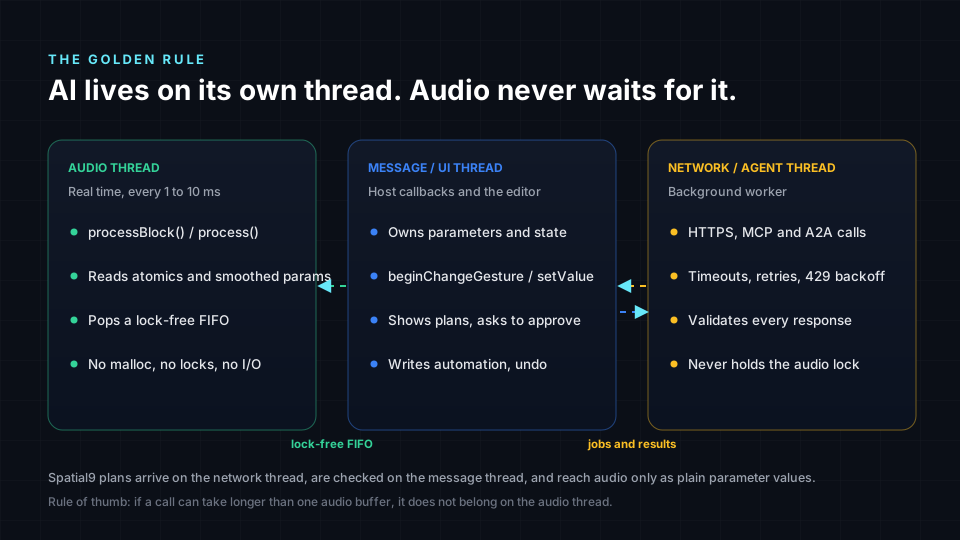
- Audio thread: reads atomics or pops a lock-free queue, smooths values, renders audio. Nothing else.
- Message (UI) thread: owns parameter gestures, undo, preview state and the user's final decision.
- Network thread (or a separate process): builds requests, waits for responses, handles retries and rate limits, parses JSON, then posts results back to the message thread.
MCP, A2A and REST: which one does a plugin need?
They solve different problems and work well together.
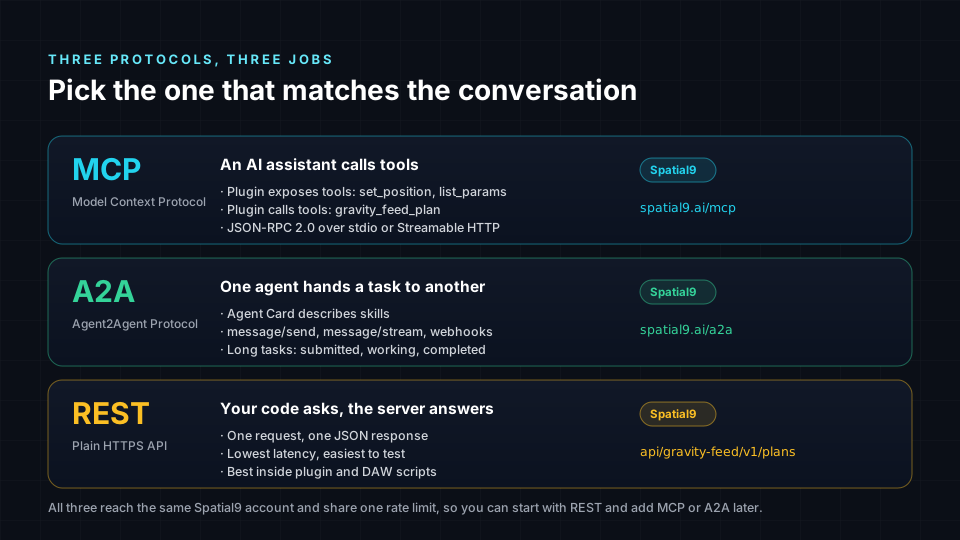
| Protocol | Who calls whom | Best for | Shape |
|---|---|---|---|
| MCP | An assistant (client) calls your tools (server) | "Set the reverb to a small room", "plan the chorus" | JSON-RPC 2.0: tools/list, tools/call |
| A2A | One agent delegates a task to another agent | Stem splits, renders, multi-step jobs with progress | JSON-RPC 2.0: message/send, message/stream, tasks, webhooks |
| REST | Your code calls a service directly | Deterministic calls from inside a plugin or script | HTTPS + JSON |
A practical rule: inside the plugin, call REST. Use MCP when you want assistants to drive your plugin or DAW. Use A2A when your product is itself an agent that hands long jobs to another agent.
Four roles a plugin can play
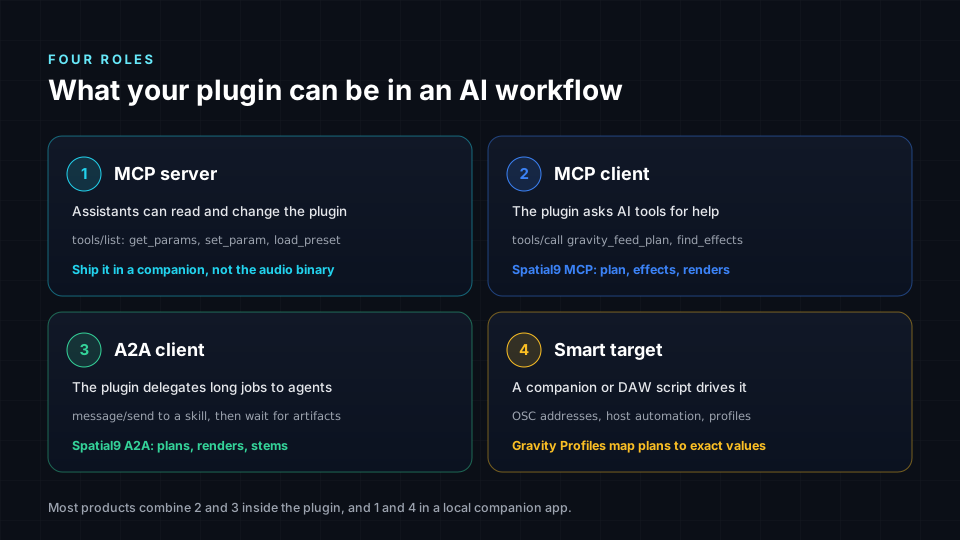
- Smart target. The plugin publishes a parameter profile (names, ranges, units, safe defaults) so outside planners know exactly what it can do. This needs no network code at all.
- MCP client. The plugin or its companion calls tools on a service, for example a placement planner.
- MCP server. A companion process exposes "describe session", "preview plan", "commit plan" tools so an assistant can drive the DAW.
- A2A client. The product hands long jobs (stem splitting, spatial renders) to a remote agent and follows progress.
Why a local companion beats networking inside the plugin
Plugins are loaded many times per session, sandboxed differently by each host and sometimes scanned on machines with no network. Putting MCP servers or OAuth flows inside every plugin instance is fragile. The robust pattern is a small local companion process that owns the network, keys and protocols, and talks to plugin instances over local IPC, OSC or a loopback socket.
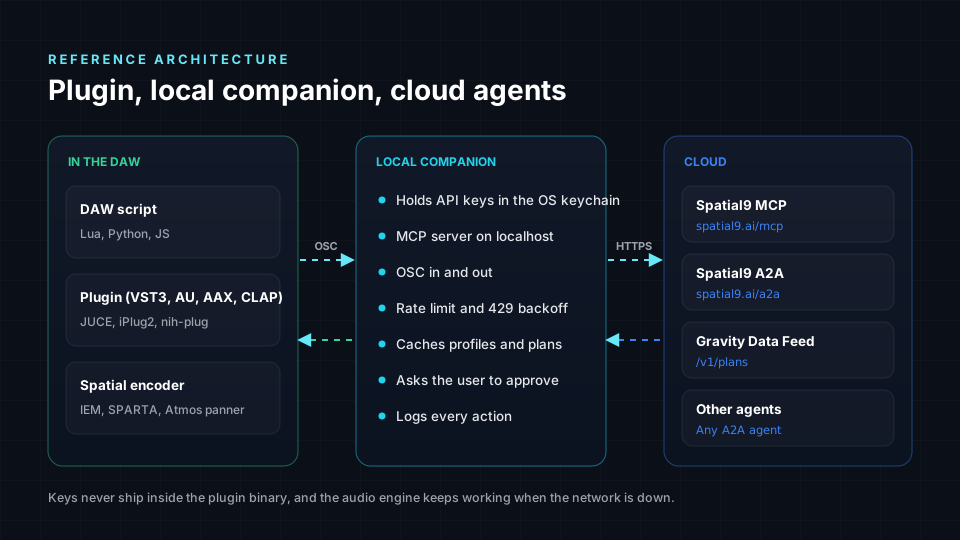
Benefits: one place for the API key (in the OS keychain), one shared rate limiter, the plugin keeps working offline, and assistants on the same machine can reach the companion's MCP server.
The plan lifecycle: suggest, preview, commit
AI output should never jump straight into a session. Treat every suggestion as a plan that must survive a lifecycle.
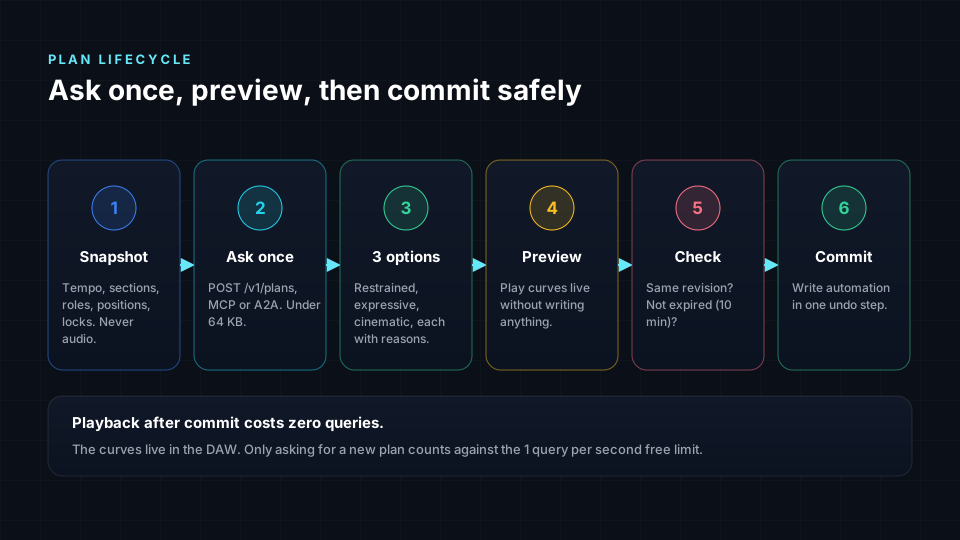
- Snapshot session metadata: tempo map, sections, track roles, targets. No audio.
- Ask with a plain-language intent ("open the chorus upward, keep the vocal centred").
- Receive alternatives, for example restrained, expressive and cinematic.
- Preview without writing automation.
- Check the plan has not expired and the session revision still matches.
- Commit as normal parameter gestures inside one undo step.
JUCE / C++: the bridge between plans and parameters
JUCE is still the most common way to ship VST3, AU and AAX from one codebase. The pattern below keeps all networking on a background thread, hands results to the message thread, and applies values as proper host gestures so automation and undo work.
Network thread that calls a planner
// PlanClient.h  (JUCE 7/8)
#pragma once
#include <juce_core/juce_core.h>
#include <juce_events/juce_events.h>

class PlanClient : private juce::Thread
{
public:
    using Callback = std::function<void (const juce::var& plan)>;

    PlanClient (juce::String apiKeyFromKeychain, Callback onPlanReady)
        : juce::Thread ("Gravity Data Feed client"),
          apiKey (std::move (apiKeyFromKeychain)),
          onPlan (std::move (onPlanReady))
    {
        startThread();
    }

    ~PlanClient() override { stopThread (4000); }

    // Message thread: queue the latest request (older pending requests are replaced).
    void request (const juce::String& requestJson)
    {
        const juce::ScopedLock sl (lock);
        pending = requestJson;
        notify();
    }

private:
    void run() override
    {
        while (! threadShouldExit())
        {
            juce::String body;
            { const juce::ScopedLock sl (lock); body.swapWith (pending); }

            if (body.isEmpty()) { wait (-1); continue; }

            int status = 0;
            juce::StringPairArray headers;
            auto options = juce::URL::InputStreamOptions (juce::URL::ParameterHandling::inPostData)
                               .withExtraHeaders ("Content-Type: application/json\r\nX-API-Key: " + apiKey)
                               .withConnectionTimeoutMs (8000)
                               .withStatusCode (&status)
                               .withResponseHeaders (&headers);

            const auto url = juce::URL ("https://spatial9.ai/api/gravity-feed/v1/plans").withPOSTData (body);
            std::unique_ptr<juce::InputStream> stream (url.createInputStream (options));

            if (stream == nullptr)
                continue;                                    // offline: manual control keeps working

            if (status == 429)                               // shared 1 request/second limit
            {
                { const juce::ScopedLock sl (lock); if (pending.isEmpty()) pending = body; }
                wait (1000 * juce::jmax (1, headers["Retry-After"].getIntValue()));
                continue;
            }

            const auto plan = juce::JSON::parse (stream->readEntireStreamAsString());
            if (status == 200 && plan.hasProperty ("alternatives"))
                juce::MessageManager::callAsync ([cb = onPlan, plan] { cb (plan); });
        }
    }

    juce::String apiKey;
    Callback onPlan;
    juce::CriticalSection lock;
    juce::String pending;
};
Applying a chosen plan as real host gestures
// Message thread only. One begin/end pair per parameter so the host records clean automation.
static void applyPoint (juce::RangedAudioParameter& p, float plainValue)
{
    p.beginChangeGesture();
    p.setValueNotifyingHost (p.convertTo0to1 (plainValue));
    p.endChangeGesture();
}
For time-based curves, prefer writing host automation through the host's own API (or let the companion do it through a DAW script) instead of streaming values from a timer. Plugins cannot portably write future automation points.
Lock-free hand-off for live preview
// PluginProcessor.h (excerpt)
std::atomic<float> previewAzimuth { 0.0f };          // written on the message thread
juce::SmoothedValue<float> azimuth;                  // read on the audio thread

void prepareToPlay (double sampleRate, int) override
{
    azimuth.reset (sampleRate, 0.05);                // 50 ms glide avoids zipper noise
}

void processBlock (juce::AudioBuffer<float>& buffer, juce::MidiBuffer&) override
{
    azimuth.setTargetValue (previewAzimuth.load (std::memory_order_relaxed));
    for (int i = 0; i < buffer.getNumSamples(); ++i)
    {
        const float az = azimuth.getNextValue();
        juce::ignoreUnused (az);                     // feed your panner / encoder here
    }
}
Plain C with CLAP: a real-time-safe plan queue
CLAP is an open plugin standard with first-class parameter events, which makes it a natural fit for plan-driven automation. The network side pushes events into a single-producer, single-consumer ring buffer; process() pops them and also reports them back to the host.
/* plan_queue.h - lock-free SPSC queue, C11 */
#include <stdatomic.h>
#include <stdbool.h>
#include <stdint.h>

#define PLAN_Q_SIZE 256u                     /* must be a power of two */

typedef struct { uint32_t param_id; double value; uint32_t sample_offset; } plan_event;

typedef struct {
    plan_event items[PLAN_Q_SIZE];
    _Atomic uint32_t head;                   /* written by the producer (main thread) */
    _Atomic uint32_t tail;                   /* written by the consumer (audio thread) */
} plan_queue;

static bool plan_push(plan_queue *q, plan_event e) {
    uint32_t h = atomic_load_explicit(&q->head, memory_order_relaxed);
    uint32_t t = atomic_load_explicit(&q->tail, memory_order_acquire);
    if (h - t == PLAN_Q_SIZE) return false;  /* full: drop, never block */
    q->items[h & (PLAN_Q_SIZE - 1)] = e;
    atomic_store_explicit(&q->head, h + 1, memory_order_release);
    return true;
}

static bool plan_pop(plan_queue *q, plan_event *out) {
    uint32_t t = atomic_load_explicit(&q->tail, memory_order_relaxed);
    uint32_t h = atomic_load_explicit(&q->head, memory_order_acquire);
    if (t == h) return false;
    *out = q->items[t & (PLAN_Q_SIZE - 1)];
    atomic_store_explicit(&q->tail, t + 1, memory_order_release);
    return true;
}
/* inside your clap_plugin_t.process */
static clap_process_status my_process(const clap_plugin_t *plugin, const clap_process_t *process) {
my_plugin *p = (my_plugin *)plugin->plugin_data;
plan_event e;
while (plan_pop(&p->plan_q, &e)) {
p->param_values[e.param_id] = e.value; /* use it in this block */
clap_event_param_value_t ev = {
.header = { .size = sizeof ev, .time = e.sample_offset,
.space_id = CLAP_CORE_EVENT_SPACE_ID,
.type = CLAP_EVENT_PARAM_VALUE, .flags = 0 },
.param_id = e.param_id, .cookie = NULL,
.note_id = -1, .port_index = -1, .channel = -1, .key = -1,
.value = e.value,
};
process->out_events->try_push(process->out_events, &ev.header); /* host stays in sync */
}
/* ... DSP ... */
return CLAP_PROCESS_CONTINUE;
}Wrap committed changes in CLAP_EVENT_PARAM_GESTURE_BEGIN / CLAP_EVENT_PARAM_GESTURE_END so hosts record them as one user action.
Lua for REAPER: the fastest way to prototype
REAPER's ReaScript gives you tempo maps, FX parameters and envelopes with no compile step, which makes it ideal for proving a plan-driven workflow before you touch C++. Spatial9 ships a prototype REAPER script that does exactly this for the IEM StereoEncoder. The condensed version:
-- Read session metadata (no audio), ask for a plan, write one undoable automation pass.
local json = dofile(reaper.GetResourcePath() .. "/Scripts/json.lua")   -- e.g. rxi/json.lua
local key  = reaper.GetExtState("Spatial9", "gf_key")                 -- never hard-code keys

local startTime, endTime = reaper.GetSet_LoopTimeRange(false, false, 0, 0, false)
local request = {
  schema_version = "1.0",
  session = {
    id = "reaper-project", revision = reaper.GetProjectStateChangeCount(0),
    tempo_map = { { beat = 0, bpm = reaper.Master_GetTempo() } },
    selection = { start_beat = reaper.TimeMap2_timeToQN(0, startTime),
                  length_beats = reaper.TimeMap2_timeToQN(0, endTime) - reaper.TimeMap2_timeToQN(0, startTime) },
  },
  intent  = "Open the chorus upward without moving the vocal",
  tracks  = { { id = "pad", role = { value = "pad", source = "user" }, target_id = "enc-1" } },
  targets = { { id = "enc-1", profile_id = "iem_stereoencoder_candidate_v1", automation_commit = true } },
  privacy = { mode = "metadata_only", audio_uploaded = false },
}

local tmp = os.tmpname()
local f = io.open(tmp, "w"); f:write(json.encode(request)); f:close()
local out = reaper.ExecProcess(string.format(
  'curl -s -X POST https://spatial9.ai/api/gravity-feed/v1/plans -H "Content-Type: application/json" -H "X-API-Key: %s" --data-binary @"%s"',
  key, tmp), 15000)
os.remove(tmp)

local plan = json.decode(out:match("\n(.*)$") or "{}")                -- first line is the exit code
local alt = plan.alternatives and plan.alternatives[1]
if not alt then return reaper.MB("No plan returned.", "Gravity Data Feed", 0) end

reaper.Undo_BeginBlock()
for _, action in ipairs(alt.actions or {}) do
  local env = FindStereoEncoderEnvelope(action.track_id, action.parameter)   -- your FX lookup
  if env then
    for _, p in ipairs(action.points or {}) do
      local norm = (p.value + 180) / 360                                  -- IEM azimuth range -180..180
      reaper.InsertEnvelopePoint(env, reaper.TimeMap2_QNToTime(0, p.beat), norm, 0, 0, false, true)
    end
    reaper.Envelope_SortPoints(env)
  end
end
reaper.Undo_EndBlock("Gravity Data Feed: apply plan", -1)
Two details matter: the request carries session.revision, and a real adapter must refuse to apply a plan if the project changed or the plan is older than ten minutes. The downloadable script does both.
Python: an MCP server for your DAW companion
The official MCP Python SDK turns a few functions into tools any MCP-capable assistant can call. This companion exposes "describe" and "preview" tools and forwards planning to Spatial9.
# companion.py  -  pip install "mcp[cli]" httpx
import os, time, httpx
from mcp.server.fastmcp import FastMCP

mcp = FastMCP("daw-companion")
API = "https://spatial9.ai/api/gravity-feed/v1/plans"
KEY = os.environ["S9GF_KEY"]            # load from the OS keychain in production

@mcp.tool()
def describe_session() -> dict:
    """Return tempo, sections and track roles of the open session (metadata only)."""
    return current_session_snapshot()   # your DAW bridge

@mcp.tool()
async def plan_spatial_motion(intent: str) -> dict:
    """Ask Spatial9 Gravity Data Feed for three placement alternatives. Nothing is written."""
    body = build_request(current_session_snapshot(), intent)
    async with httpx.AsyncClient(timeout=15) as http:
        for _ in range(3):
            r = await http.post(API, json=body, headers={"X-API-Key": KEY})
            if r.status_code != 429:
                r.raise_for_status()
                return r.json()
            time.sleep(int(r.headers.get("Retry-After", "1")))
    return {"error": "rate_limited"}

@mcp.tool()
def commit_plan(plan_id: str, alternative: int) -> str:
    """Apply one alternative as a single undo step, only if the session has not changed."""
    return daw_bridge_commit(plan_id, alternative)

if __name__ == "__main__":
    mcp.run()                            # stdio transport for desktop assistants
Keep commit_plan behind an explicit confirmation in the assistant. Describing and previewing are safe; writing is a user decision.
TypeScript / Node: the same companion for web-first teams
// server.ts  -  npm i @modelcontextprotocol/sdk zod
import { McpServer } from "@modelcontextprotocol/sdk/server/mcp.js";
import { StdioServerTransport } from "@modelcontextprotocol/sdk/server/stdio.js";
import { z } from "zod";

const server = new McpServer({ name: "daw-companion", version: "1.0.0" });

server.registerTool(
  "plan_spatial_motion",
  {
    title: "Plan spatial motion",
    description: "Ask Spatial9 Gravity Data Feed for placement alternatives. Metadata only; nothing is written.",
    inputSchema: { intent: z.string().max(500) },
  },
  async ({ intent }) => {
    const res = await fetch("https://spatial9.ai/api/gravity-feed/v1/plans", {
      method: "POST",
      headers: { "Content-Type": "application/json", "X-API-Key": process.env.S9GF_KEY ?? "" },
      body: JSON.stringify(buildRequest(await snapshotSession(), intent)),
    });
    if (res.status === 429) {
      return { content: [{ type: "text", text: `Rate limited, retry in ${res.headers.get("Retry-After") ?? 1}s` }], isError: true };
    }
    return { content: [{ type: "text", text: JSON.stringify(await res.json()) }] };
  },
);

await server.connect(new StdioServerTransport());
Rust with nih-plug: same rules, different language
// rtrb = "0.3", ureq = { version = "2", features = ["json"] }
use rtrb::RingBuffer;

pub struct PlanEvent { pub param: u32, pub value: f32 }

// In initialize(): create the queue and start a worker that never touches audio.
let (mut tx, rx) = RingBuffer::<PlanEvent>::new(256);
self.plan_rx = Some(rx);
std::thread::spawn(move || {
    let resp = ureq::post("https://spatial9.ai/api/gravity-feed/v1/plans")
        .set("X-API-Key", &key)
        .send_json(request_json);
    if let Ok(r) = resp {
        if let Ok(plan) = r.into_json::<serde_json::Value>() {
            for ev in preview_events(&plan) { let _ = tx.push(ev); }   // drop if full, never block
        }
    }
});

// In process(): pop without waiting.
if let Some(rx) = self.plan_rx.as_mut() {
    while let Ok(ev) = rx.pop() { self.preview[ev.param as usize] = ev.value; }
}
FL Studio, Ableton and other hosts: drive them from the companion
Not every host lets scripts open network connections. FL Studio's MIDI scripting API, for example, is Python but sandboxed. The clean solution: the companion receives the plan and sends MIDI or OSC to a small host script that only maps messages to mixer or plugin controls.
# FL Studio device script (device_GravityDataFeed.py): map CC 20-27 to mixer pan on tracks 1-8
import mixer

def OnControlChange(event):
    if 20 <= event.data1 <= 27:
        track = event.data1 - 19
        mixer.setTrackPan(track, (event.data2 / 127.0) * 2.0 - 1.0)
        event.handled = True
# companion side: send OSC straight to an IEM StereoEncoder (OSC enabled in the plugin)
from pythonosc.udp_client import SimpleUDPClient
enc = SimpleUDPClient("127.0.0.1", 9000)
enc.send_message("/StereoEncoder/azimuth", 45.0)
enc.send_message("/StereoEncoder/elevation", 20.0)The same idea works for Ableton Live (Max for Live devices or remote scripts), Bitwig (controller scripts) and Logic (MIDI and control surfaces): intelligence lives in the companion, the host script stays tiny.
How plugins can use Spatial9 once integrated
Spatial9 exposes one planner, the Gravity Data Feed, through three doors, plus a wider set of spatial audio tools through MCP and A2A.
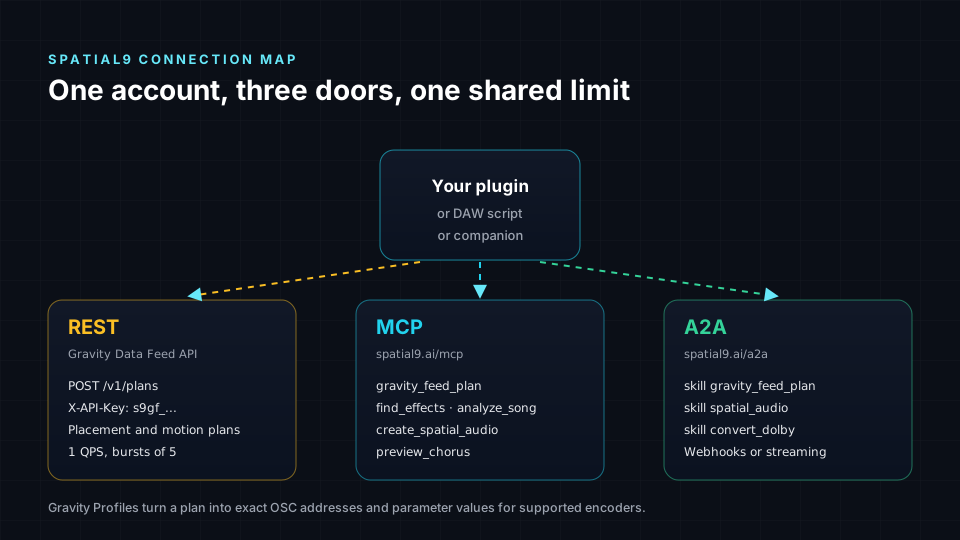
| Door | Endpoint | Auth | Use it from |
|---|---|---|---|
| REST | POST https://spatial9.ai/api/gravity-feed/v1/plans | X-API-Key: s9gf_... | Plugins, ReaScript, companions |
| MCP | https://spatial9.ai/mcp (or /mcp/free for the guest allowance) | Authorization: Bearer s9_... | Claude, ChatGPT, Cursor and other MCP clients |
| A2A | https://spatial9.ai/a2a, card at /.well-known/agent-card.json | Authorization: Bearer s9_... | Other agents and orchestrators |
Create keys at spatial9.ai/connect. The free tier allows 1 request per second with bursts of 5, shared across all three doors; over the limit you get HTTP 429 with Retry-After.
Connect an assistant over MCP
{
  "mcpServers": {
    "spatial9": {
      "url": "https://spatial9.ai/mcp",
      "headers": { "Authorization": "Bearer s9_your_key" }
    }
  }
}
The assistant can then call gravity_feed_plan, find_effects, split_stems, create_spatial_audio, preview_chorus, convert_dolby_to_eclipsa, get_job_status and more. A raw tools/call looks like this:
{
  "jsonrpc": "2.0", "id": 7, "method": "tools/call",
  "params": {
    "name": "gravity_feed_plan",
    "arguments": {
      "session": { "id": "song-42", "revision": 7, "tempo_map": [{ "beat": 0, "bpm": 120 }] },
      "tracks":  [{ "id": "pad", "role": { "value": "pad", "source": "host" }, "target_id": "enc-1" }],
      "targets": [{ "id": "enc-1", "profile_id": "iem_stereoencoder_candidate_v1" }],
      "intent":  "Open the chorus upward without moving the vocal"
    }
  }
}
Delegate from another agent over A2A
curl -s https://spatial9.ai/a2a \
  -H "Authorization: Bearer s9_your_key" \
  -H "Content-Type: application/json" \
  -d '{
    "jsonrpc": "2.0", "id": "1", "method": "message/send",
    "params": {
      "message": {
        "kind": "message", "role": "user", "messageId": "msg-001",
        "parts": [{ "kind": "data", "data": {
          "skill": "gravity_feed_plan",
          "session": { "id": "song-42", "revision": 7, "tempo_map": [{ "beat": 0, "bpm": 120 }] },
          "tracks":  [{ "id": "pad", "role": { "value": "pad", "source": "host" }, "target_id": "enc-1" }],
          "targets": [{ "id": "enc-1", "profile_id": "iem_stereoencoder_candidate_v1" }],
          "intent":  "Open the chorus upward"
        }}]
      }
    }
  }'
The task moves through submitted, working and completed (or input-required, failed, canceled), and the plan arrives as an artifact named plan. For long jobs such as split_stems or spatial_audio, use message/stream or add a pushNotificationConfig so Spatial9 calls your webhook with an X-A2A-Notification-Token header. The A2A integration guide and the agents page cover every skill.
What a plan contains
Every plan returns three alternatives (restrained, expressive, cinematic). Each has motions with reasons, effect ideas, actions mapped to a target profile and a list of things it could not do. Plans expire after ten minutes and include preconditions.session_revision; adapters must refuse stale plans. Read the full contract in the Gravity Data Feed docs and the background in Gravity Data Feed: musical intelligence for DAWs and plugins.
Guardrails that make AI features trustworthy
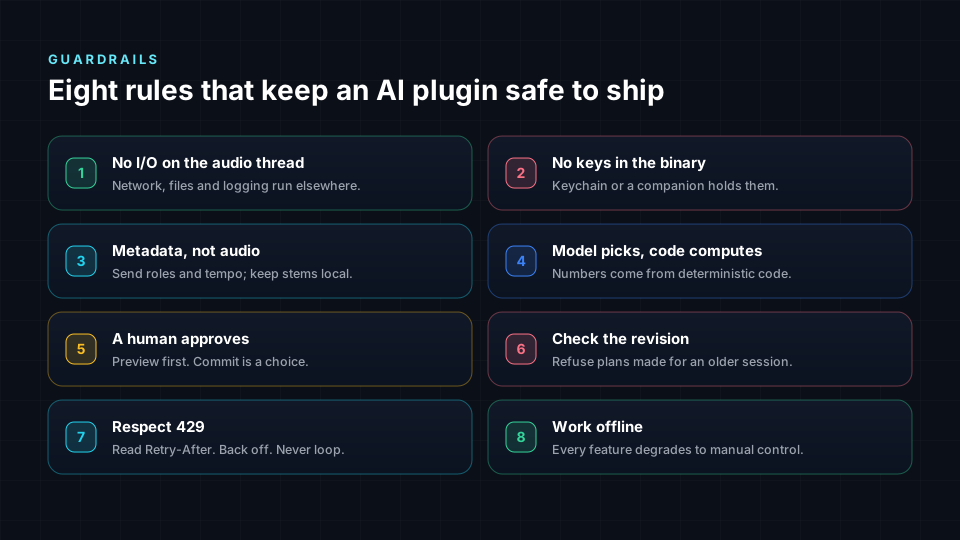
- The audio thread never waits for a network, lock or allocation.
- Metadata only by default. Send tempo, sections and roles; upload audio only with explicit consent.
- Preview before commit. Nothing is written until the user chooses.
- One undo step per applied plan.
- Plans expire, and stale plans are refused.
- Check the session revision before writing.
- Keys live in the OS keychain, never in presets, project files or logs.
- Offline is a normal state. Manual control always works.
A maturity model for your roadmap
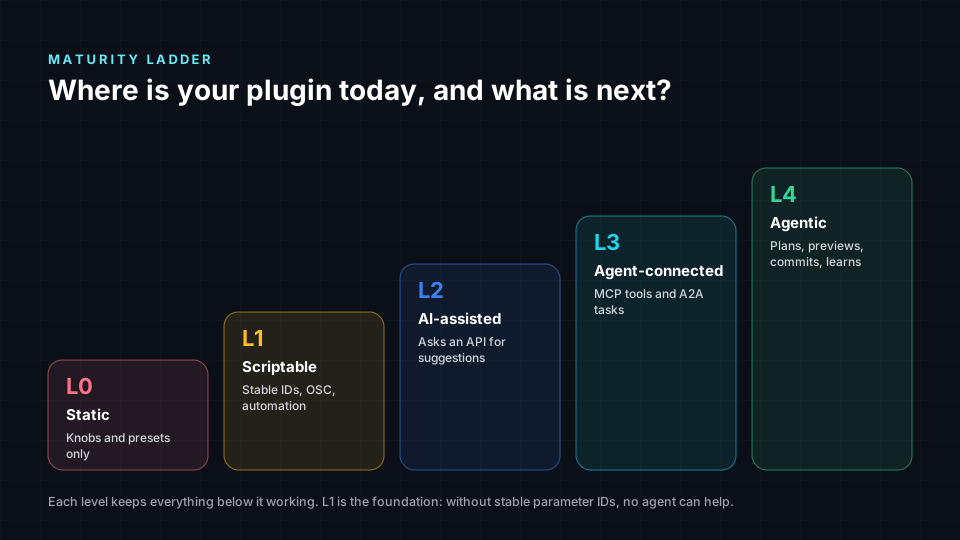
| Level | What you ship | Effort |
|---|---|---|
| L0 Classic | DSP and UI only | Done today |
| L1 Described target | Published parameter profile with ranges and units | Days |
| L2 Plan consumer | Preview and commit plans from a REST planner | Weeks |
| L3 Agent-drivable | Companion with MCP tools for describe, preview, commit | Weeks |
| L4 Agent collaborator | A2A delegation of long jobs with progress and webhooks | Ongoing |
Honest status of the Spatial9 pieces
- Live now: Gravity Data Feed REST API, the Spatial9 MCP server and the A2A endpoint, all sharing one free rate limit.
- Prototype: the REAPER Lua script for the IEM StereoEncoder.
- Candidate profiles:
iem_stereoencoder_candidate_v1andicst_ambiencoder_candidate_v1; actions reportconversion_verified: falseuntil each mapping is confirmed against the real plugin. - Planned: Gravity Link (a local companion) and Gravity Capture (a VST3/AU/AAX plugin).
FAQ
Should I put an AI model inside my VST3 or AU plugin?
Usually not. Models add size, CPU load and update pain. A well-described plugin that accepts validated plans from an outside planner gets most of the benefit with far less risk.
What is the difference between MCP and A2A for audio plugins?
MCP lets an assistant call specific tools, such as "plan the chorus" or "set this parameter". A2A lets one agent hand a whole task, such as a stem split or a spatial render, to another agent and follow its progress.
Can a plugin make network calls safely?
Yes, on a background thread or in a companion process, never on the audio thread. Results go to the message thread and reach audio only through atomics or lock-free queues.
Does Spatial9 need my audio to plan spatial motion?
No. The Gravity Data Feed works on metadata only (tempo, sections, track roles and targets), and every request declares audio_uploaded: false.
Which plugin formats can use the Gravity Data Feed?
Any of them. VST3, AU, AAX and CLAP plugins, DAW scripts in Lua or Python, and companions in any language can call the REST API; assistants use MCP and agents use A2A.
How do I handle rate limits?
Read the Retry-After header on HTTP 429, wait that many seconds and retry once. Keep one shared limiter in your companion so many plugin instances do not compete.
Sources
- Model Context Protocol specification: https://modelcontextprotocol.io/specification
- Agent2Agent (A2A) protocol specification: https://a2a-protocol.org
- JUCE framework documentation: https://docs.juce.com
- Steinberg VST 3 developer portal: https://steinbergmedia.github.io/vst3_dev_portal
- CLAP plugin standard: https://github.com/free-audio/clap
- nih-plug Rust framework: https://github.com/robbert-vdh/nih-plug
- REAPER ReaScript API: https://www.reaper.fm/sdk/reascript/reascripthelp.html
- IEM Plug-in Suite: https://plugins.iem.at