
The Media and Entertainment Data Model: One Blueprint for Databricks, Snowflake, BigQuery, AWS and ClickHouse
Spatial9 Research Team · · 9 min read
Key takeaways
- A media and entertainment data model needs eight subject areas: content, music, parties, rights, distribution, audience, revenue and production.
- Industry identifiers such as EIDR, ISAN, ISRC, ISWC, ISNI, IPI, UPC and Ad-ID form the spine that makes joins across systems trustworthy.
- The most valuable join in M&E is usage multiplied by rights multiplied by party share: it drives royalties, compliance and catalog value.
- A medallion architecture (bronze, silver, gold) plus a semantic and agent layer works the same way on Databricks, Snowflake, BigQuery and AWS.
- ClickHouse is the hot path for real-time audience and quality of experience; the lakehouse is the governed history for finance and AI.
- The free Spatial9 Databricks Asset Bundle deploys the catalog, schemas, sample data, gold marts and quality checks with three commands.
- Agentic AI depends on this model: agents can only check rights, answer questions and act safely when entities, identifiers and rules are explicit.
Every media company already has a data model. It is just spread across a rights system, a media asset manager, a royalty engine, a player SDK, three spreadsheets and the memory of two people in finance. Nothing joins cleanly, so every question ("can we stream this in Brazil next month?", "who gets paid for this play?", "which catalog titles are worth remastering in immersive audio?") turns into a project.
This blueprint is the model we use with studios, streamers, broadcasters, labels and publishers in our Agentic Enterprise Transformation work. It is the same foundation that lets AI agents act safely, which is why it sits right next to our guide on ontologies and knowledge graphs for media.
What is a media and entertainment data model?
It is a shared, explicit description of the things a media business cares about, how they relate and which rules apply. A good one answers three questions without a meeting: what do we own, where can we use it, and who gets paid.
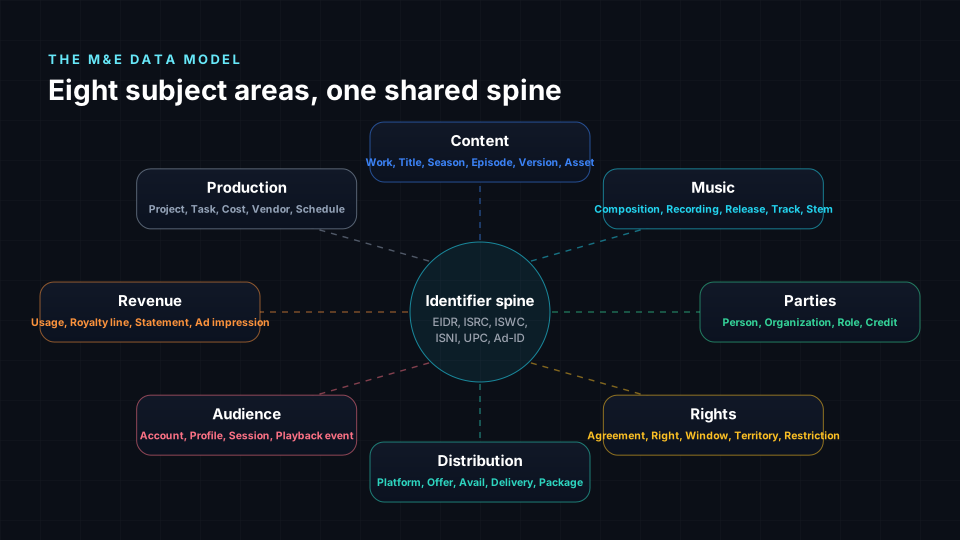
| Subject area | Core entities | Typical source systems |
|---|---|---|
| Content | Work, Title, Season, Episode, Version, Asset | MAM, IMF packages, MovieLabs MEC, EIDR |
| Music | Composition, Recording, Release, Track, Stem | DDEX ERN, label catalog, publisher systems |
| Parties | Person, Organization, Role, Credit | Talent systems, ISNI, IPI, CRM |
| Rights | Agreement, Right, Window, Territory, Restriction | Contract and rights management, EMA avails |
| Distribution | Platform, Offer, Avail, Delivery, Package | Distribution portals, DSP feeds |
| Audience | Account, Profile, Session, Playback event | Player SDKs, CDN logs, CRM |
| Revenue | Usage, Royalty line, Statement, Ad impression | DDEX DSR, ad servers, ERP |
| Production | Project, Task, Cost, Vendor, Schedule | Production management, ERP |
Why identifiers are the spine
Names are not keys. Two films share a title, an artist changes spelling, a song exists as five recordings. The industry solved this long ago with registries. Use them as natural keys and your joins become trustworthy across every partner.
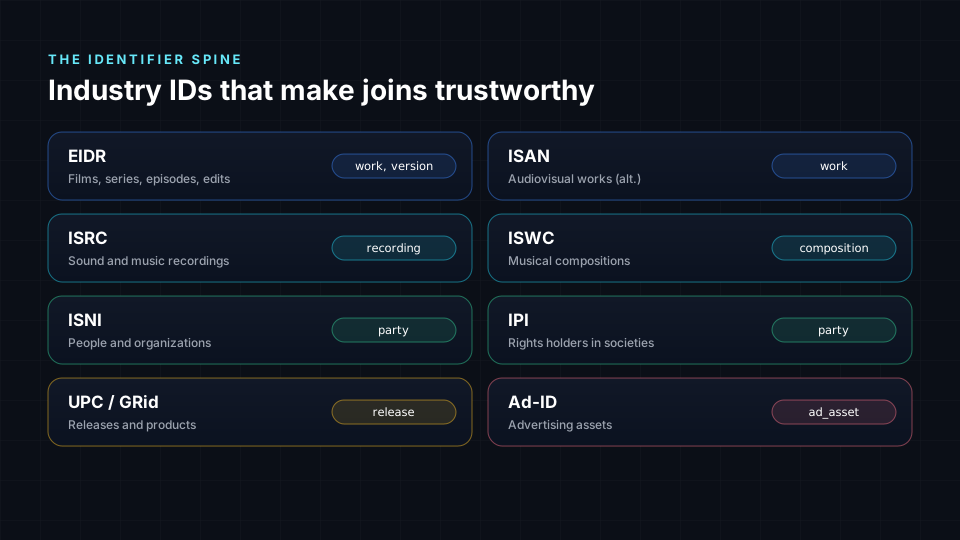
- EIDR for films, series, episodes and edits, with parent and child links between them.
- ISRC for recordings and ISWC for compositions, so a stream can be traced to both the master and the song.
- ISNI and IPI for people and rights holders, so credits and royalty shares point at the same party.
- UPC or GRid for releases and Ad-ID for advertising assets.
Keep an internal surrogate key for every entity, but store the registry ID next to it and match on it first.
The core entities and how they connect
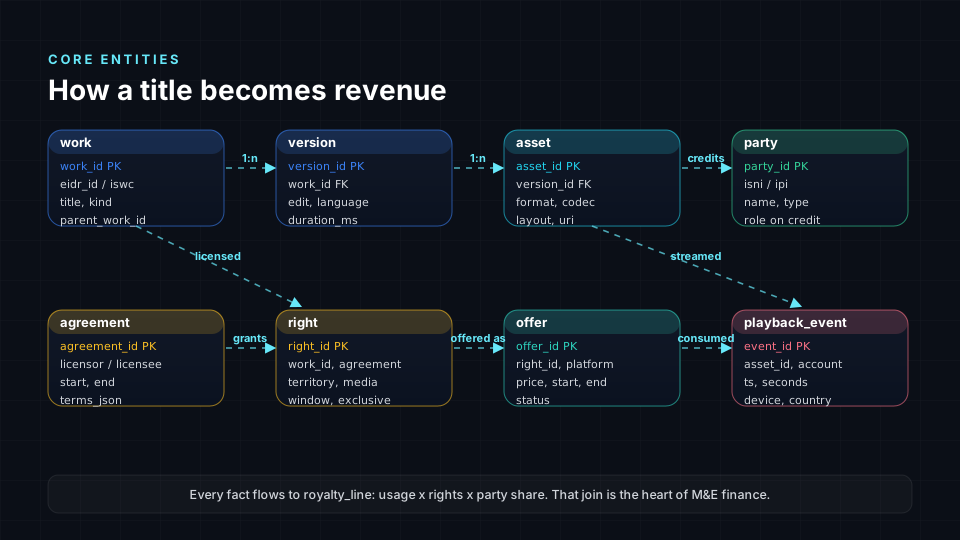
The chain that matters most is simple to say and hard to build: a work has versions, each version has assets, an agreement grants rights on a work for a territory, media and window, a right becomes an offer on a platform, and a playback event consumes an asset. Join usage to rights to party shares and you get a royalty line. That one join powers finance, compliance and catalog valuation.
Two modelling rules save years of pain:
- Separate the work from the version from the file. A director's cut, a dubbed version and a Dolby Atmos or Eclipsa Audio immersive mix are versions; the IMF package and the MP4 proxy are assets. Rights usually attach to the work, quality and delivery to the asset.
- Model windows as data, not as code. Territory, media type, start, end and exclusivity are columns, so "available today" is a query, not a ticket.
The medallion architecture for media
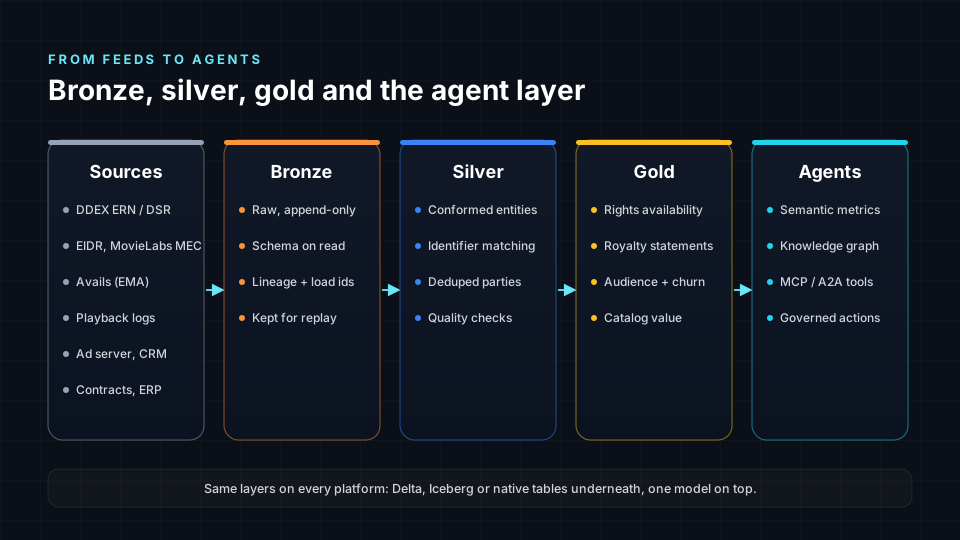
- Bronze keeps every feed exactly as received, with a load ID, so you can replay history when a contract is corrected.
- Silver conforms entities, matches identifiers, deduplicates parties and runs quality rules.
- Gold holds the marts people and agents actually ask: rights availability, consumption, royalty statements, churn, catalog value.
- The agent layer adds governed metrics, a knowledge graph and tools such as MCP servers, so an AI agent can check a right before it schedules a release.
How the model maps to each platform
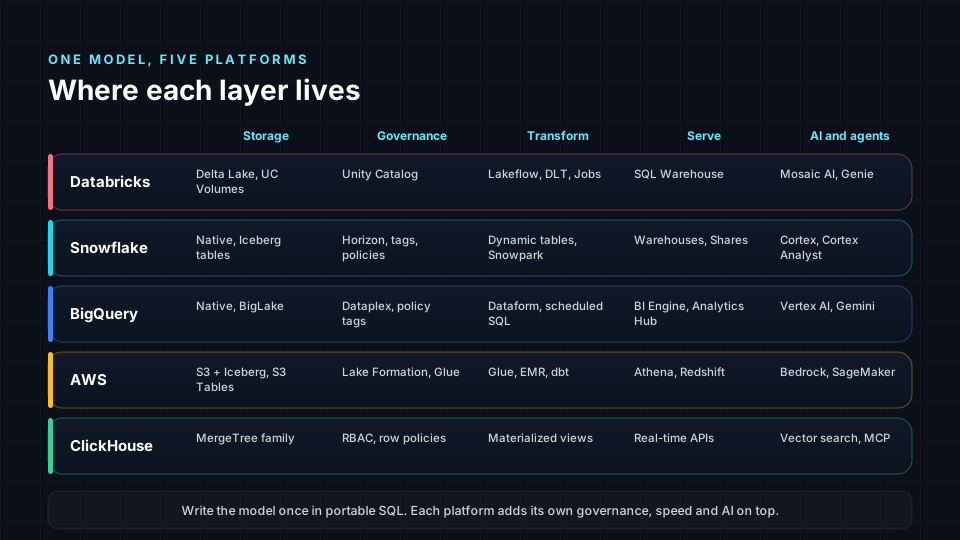
The core DDL below is intentionally portable. Each platform then adds what it does best.
Databricks: Unity Catalog, Delta Lake and Lakeflow
Databricks is a natural home for the full medallion model: Delta Lake tables with liquid clustering, Unity Catalog for lineage, tags, row filters and column masks, Lakeflow Declarative Pipelines or Jobs for transformations, and Mosaic AI and Genie on top of gold.
CREATE TABLE media_dm.silver.right_grant (
  right_id     STRING NOT NULL,
  work_id      STRING COMMENT 'EIDR',
  licensee     STRING,
  territory    STRING COMMENT 'ISO 3166-1 alpha-2',
  media        STRING COMMENT 'SVOD, AVOD, TVOD, FAST, linear',
  window_start DATE,
  window_end   DATE,
  exclusive    BOOLEAN,
  CONSTRAINT right_pk PRIMARY KEY (right_id)
) CLUSTER BY (work_id, territory);
Snowflake: dynamic tables, Horizon and Cortex
On Snowflake, keep silver and gold fresh with dynamic tables, govern with Horizon tags and row access policies, share marts with partners through Secure Data Sharing, and let Cortex Analyst answer questions over a semantic model.
CREATE OR REPLACE DYNAMIC TABLE gold.rights_availability
  TARGET_LAG = '1 hour' WAREHOUSE = transform_wh AS
SELECT w.work_id, w.title, r.territory, r.media, r.window_start, r.window_end,
       CURRENT_DATE() BETWEEN r.window_start AND r.window_end AS available_today
FROM silver.work w JOIN silver.right_grant r ON r.work_id = w.work_id;
Google BigQuery: partitioning, BigLake and Vertex AI
On BigQuery, partition events by day and cluster by territory, manage open tables through BigLake, govern with Dataplex and policy tags, transform with Dataform, and ground Vertex AI and Gemini agents on gold.
CREATE TABLE media_dm.playback_event (
  event_id STRING NOT NULL, asset_id STRING, account_id STRING,
  event_type STRING, ts TIMESTAMP, seconds FLOAT64, device STRING, country STRING
)
PARTITION BY DATE(ts)
CLUSTER BY country, asset_id;
AWS: S3 Tables, Glue, Lake Formation, Athena and Redshift
On AWS, store tables as Apache Iceberg in Amazon S3 Tables or S3, catalog them in AWS Glue, control access with Lake Formation, query ad hoc with Amazon Athena and serve finance from Amazon Redshift. Amazon Bedrock agents can call the gold layer through governed tools.
CREATE TABLE media_dm.right_grant (
  right_id string, work_id string, licensee string, territory string,
  media string, window_start date, window_end date, exclusive boolean
)
PARTITIONED BY (territory)
LOCATION 's3://your-bucket/media_dm/right_grant/'
TBLPROPERTIES ('table_type' = 'ICEBERG');
ClickHouse: the real-time audience path
ClickHouse answers "what is happening right now" in milliseconds: live concurrency, quality of experience, ad delivery and trending titles. Use the MergeTree family, and roll events up with materialized views.
CREATE TABLE playback_event (
  event_id String, asset_id LowCardinality(String), account_id String,
  event_type LowCardinality(String), ts DateTime64(3), seconds Float32,
  device LowCardinality(String), country LowCardinality(FixedString(2))
) ENGINE = MergeTree
PARTITION BY toYYYYMMDD(ts)
ORDER BY (asset_id, country, ts);

CREATE MATERIALIZED VIEW minute_viewers
ENGINE = AggregatingMergeTree ORDER BY (asset_id, country, minute) AS
SELECT asset_id, country, toStartOfMinute(ts) AS minute,
       uniqState(account_id) AS viewers
FROM playback_event GROUP BY asset_id, country, minute;
Hot and cold paths together
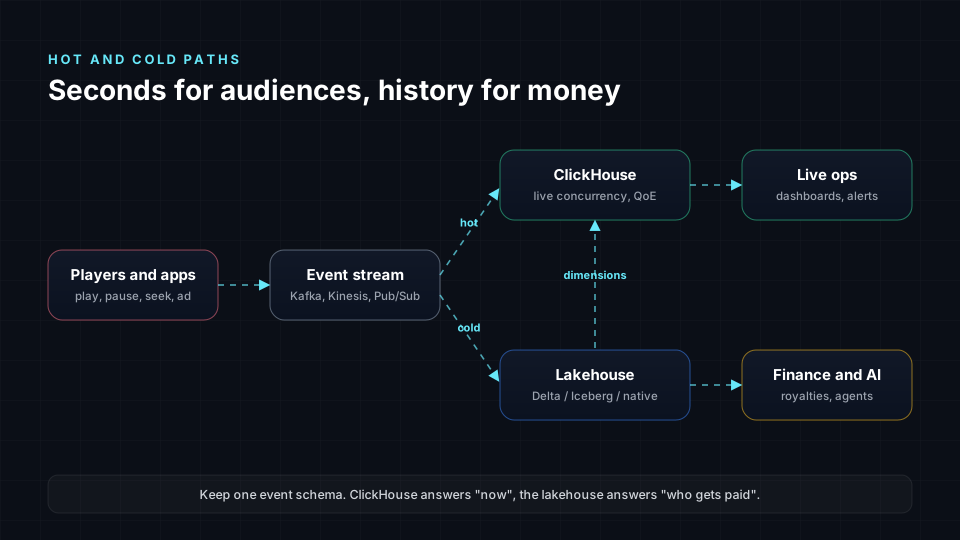
Keep one event schema. Stream it into ClickHouse for live operations and into the lakehouse for the governed record that drives royalties, forecasting and AI. Push dimensions such as titles, territories and rights back into ClickHouse so live dashboards speak the same language as finance.
The free Databricks Asset Bundle
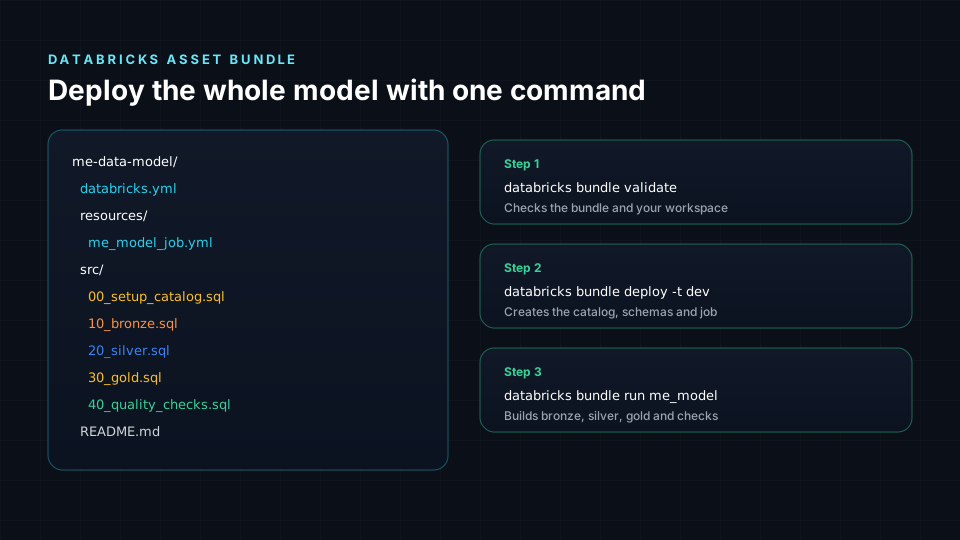
To make this practical, we packaged the model as a Databricks Asset Bundle, a small Solution Accelerator you can deploy to your own workspace. It creates the catalog and schemas, loads sample titles, rights and plays, builds the gold marts (rights_availability, daily_consumption and out_of_window_usage) and fails the job if quality rules break.
- Download: spatial9-me-data-model-bundle.zip
- Read first: README, databricks.yml
databricks bundle validate --var="warehouse_id=<id>"
databricks bundle deploy -t dev --var="warehouse_id=<id>"
databricks bundle run me_model -t dev --var="warehouse_id=<id>"
The SQL is plain enough to port to Snowflake, BigQuery, Athena or Redshift in an afternoon; only the platform features shown above change.
Why agentic AI needs this model
An AI agent that schedules a release, answers a licensing question or builds a royalty statement is only as safe as the data it reads. Without explicit windows it may stream outside a territory. Without identifiers it may credit the wrong artist. With the model in place, the agent checks rights_availability before it acts, cites the agreement it relied on and leaves an auditable trail.
That is the path we follow with clients: diagnose with the free Agentic AI Maturity Assessment, design the data and knowledge foundations, prove value on one workflow, then scale. Read how we connect agents to these platforms in Spatial9 enterprise agents on Databricks, Snowflake, Vertex AI and Bedrock.
Agentic AI & A2A Maturity Assessment for Media & Entertainment
A free 50-question assessment across 10 weighted dimensions, built only for media and entertainment companies. Get your score, maturity level, A2A readiness index, roadmap and a premium PDF report.
Frequently asked questions
What tables does a media data model need first?
Start with work, version, asset, party, agreement, right_grant and playback_event. Those seven answer what you own, where you can use it and what people watched or heard.
Should I use Databricks or Snowflake for media data?
Both work well. Databricks suits teams that want open Delta or Iceberg storage, heavy data engineering and ML in one place; Snowflake suits teams that want managed SQL, dynamic tables and easy data sharing with partners. The model itself is the same.
Where does ClickHouse fit next to a lakehouse?
ClickHouse serves real-time analytics such as live concurrency and quality of experience. The lakehouse keeps the governed history used for royalties, compliance and AI.
How do I model music rights and royalties?
Link compositions by ISWC and recordings by ISRC, store party shares per composition and recording, then join usage from DDEX DSR reports to those shares to produce royalty lines.
Is the Databricks Asset Bundle free to use?
Yes. It is provided as-is under the MIT License, with sample data you can replace with your own feeds.
Sources
- Databricks, What are Databricks Asset Bundles?: https://docs.databricks.com/en/dev-tools/bundles/index.html
- Databricks, Unity Catalog: https://docs.databricks.com/en/data-governance/unity-catalog/index.html
- Snowflake, Dynamic tables: https://docs.snowflake.com/en/user-guide/dynamic-tables-about
- Google Cloud, Introduction to partitioned tables in BigQuery: https://cloud.google.com/bigquery/docs/partitioned-tables
- AWS, Amazon S3 Tables: https://docs.aws.amazon.com/AmazonS3/latest/userguide/s3-tables.html
- ClickHouse, MergeTree table engine: https://clickhouse.com/docs/engines/table-engines/mergetree-family/mergetree
- EIDR, Entertainment Identifier Registry: https://www.eidr.org/
- DDEX, Digital Data Exchange standards: https://ddex.net/
- MovieLabs, Ontology for Media Creation: https://mc.movielabs.com/